1
Altus Dynamics – Altus Purchase Requests Portal – User Guide – V3.8
Viewing an Open Purchase Request
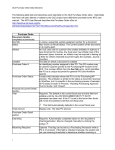
The default view for this page is to display all requests with a status of Open.
1.
If a different status is selected, from the Status View drop-down menu, choose Open Requests.
The list is reduced to those requests with a status of Open.
2. Locate the request you want.
3. Click the View/Edit hyperlink in the last column (right-hand side of the row).
The Purchase Request window for the file you selected opens.
NOTE:
To make changes to an ‘Open’ request, see Viewing and Managing In-Progress Purchase Requests.
Altus Dynamics
Page 7