1
Overview of IKON Office Solutions Print Center Online
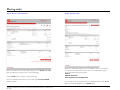
Your documents
Documents you create when using IKON Office Solutions Print Center online are listed here. Each document is stored at the site for 30 days and then deleted. If you order one
of the stored document before the 30-day limit, day count will change to start at the order date.
DOCUMENT
Clicking on a document title will open a detailed view of that document.
PAGES
Amount of pages in a document are shown in this column.
DATE
Shows the date a document was last modified. Every time an existing document is
modified, the displayed date will change accordingly.
DETAILS
Click on this link to open a detailed view of the corresponding document.
ADD TO ORDER (link)
Use this link to start an order with the corresponding document added.
ADD TO ORDER (button)
To add several documents to an order at once, check the box before the title of
each document you’re adding, then click the ADD TO ORDER button to
proceed.
SAVE (button)
To save several documents at once, check the box before the title of each
document you’re saving, then click the SAVE button to proceed.
DELETE (button)
To delete several documents at once, check the box before the title of each
document you’re deleting, then click the DELETE button to proceed.
CREATE DOCUMENT
Use this link to begin creating a new document.
IKON WebPrint QuickStart Guide l Proprietary l Copyright © 2004-2009 IKON Office Solutions, Inc. All rights reserved.
Rev. 02/09
20