1
Create document
Print from your desktop: Review your file
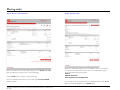
A proof of the PDF file created by the print driver is displayed in the
Acrobat window. Check file’s content for errors, look for any problems
caused by the PDF conversion.
Review the proof carefully: this is how the file will look when printed. If
needed, you can print the PDF file on your printer, by pressing the printer
icon in the Acrobat toolbar.
If changes need to be made, press the MODIFY button to open the
original file (not the PDF version) in its native application. You will be
logged out and the current PDF file will be discarded. To submit the
updated file, simply re-print it using the via Online Copy Center printer.
If you’re satisfied with the PDF file, press the ACCEPT button: a small
pop up will appear, verifying the upload; click OK to continue.
By clicking ACCEPT you confirm that you have reviewed and approved
the PDF and acknowledge that you have permission to copy content of this
document.
IKON WebPrint QuickStart Guide l Proprietary l Copyright © 2004-2009 IKON Office Solutions, Inc. All rights reserved.
Rev. 02/09
7