1
Overview of IKON Office Solutions Print Center Online
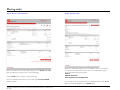
Upload a file
Use this page to upload files directly to IKON Office Solutions Print Center. WebPrint accepts more than 250 file formats. To check if your file format is supported. You can
upload up to 10 files as part of a single document on this page; additional files can also be added while setting your Document Production Options. Use this option if you don't
have the Copy Mail Center print driver installed on your system.
Name of document
Enter the name of your document.
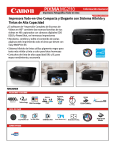
Files
Browse and select up to 10 files. After you have selected the third file, an
additional blank field and browse button will appear until you reach the maximum
of 10 files.
You must check this box before continuing. If left unchecked, you will
receive this pop up message to remind you to check it off.
IKON WebPrint QuickStart Guide l Proprietary l Copyright © 2004-2009 IKON Office Solutions, Inc. All rights reserved.
Rev. 02/09
18