1
while holding the switch bracket in place
to prevent shifting.
5.
Pull out the remaining four pins on
each dial. All retracted pins should clear
the switch bracket actuator arm.
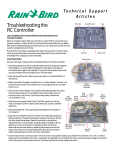
To adjust RC Controller station timing
micro switches:
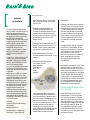
For course adjustment - loosen the righthand mounting screw, rotate the station
dial to rest position, and turn the adjusting screw clockwise until the back of the
metal switch actuating arm is 1/32-inch
from the switch body.
For fine adjustment:
1/32"
1. Adjust each station knob to the
minimum timing mark. (The pointer
will not always fall on the center at
this mark.)
2. Turn the
this for all stations. Now, turn the
adjustment screw clockwise in one
quarter-turn increments until the dial
fails to stop at a station. When that
happens, turn the adjusting screw
back a quarter-turn counterclockwise.
Make sure that the dial stops at every
station and that the gap between the
actuating arm and the switch is at
least 1/64-inch.
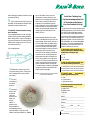
• Check the wafer switches. The wafer
switch is the distribution point for the
valve voltage. As the center hub turns
with the station dial, the wafer switch
is connected to the station dial shaft.
As it turns, a tab on the wafer switch
touches the station contact point and
powers the valve. Problems occur
when dirt accumulates on the tabs or
contacts. You can carefully clean the
wafer switch hub with the eraser of a
pencil, being careful not to bend the
contacts. To clean the back side of the
switch, remove the mounting screws
and lift the wafer switch off its shaft.
The wafer switch can also be damaged
by lightning. Burn marks would indicate this type of damage.
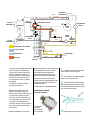
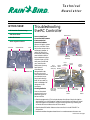
Notice on the front wafer switch that the tab is
in contact with Station #1.
[
Put On Your Thinking Cap...
RC Controllers to the Test and
Earn Your Free Rain Bird Cap!
Try your hand at correctly answering the
following questions. If you are one of the
first 100 to submit the right answers,
you will receive a FREE Rain Bird hat.
Choose one of the following answers for
each. Circle your answers on the form
below and submit it to Rain Bird by fax
520-434-6289 or by e-mail [email protected]. The correct answers will be
published in the next issue. Allow 4-6
weeks for delivery of your hat.
1.The 24-hour clock on the RC controllers allows you to select how many
different start times per day?
a. 1-24
b. 1-23
c. any number
2.With 12-station RC controllers, you
can set the watering times from ______.
a. 3-60 minutes in one-minute increments
b. 6-60 minutes in two-minute increments.
c. 6-60 minutes in one-minute increments.
3. The RC-C uses a ____ to protect the
system against short circuits.
a. fuse
b. circuit breaker
controller to
the AUTO
position.
c. quick release plug
3. Move the
a. station dial
station dial
clockwise
from rest
position and
allow it to
stop at
Station 1.
After the dial
stops at Station 1,
immediately rotate it
just past Station 1. It should now
advance and stop at Station 2. Repeat
]
Put Your Knowledge of Rain Bird
4. The RC controllers can be started
manually using the ______.
b. MODE switch
c. day dial
Name: ___________________________________
Company:________________________________
Address:__________________________________
City:____________State: _______ Zip: ________
Phone: ___________________________________
FAX: _____________________________________
E-mail address: ___________________________