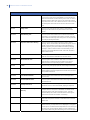
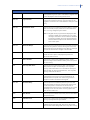
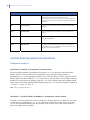
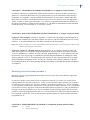
1
NetworX Version 3 Alarm System
Installation Manual
1070138
Copyright
Copyright © 2010 UTC Fire & Security. All rights reserved.
This document may not be copied or otherwise reproduced, in whole or in part, except as
specifically permitted under US and international copyright law, without the prior written
consent from UTC Fire & Security.
Document number/revision: 1070138 September 2010
Disclaimer
Trademarks and patents
THE INFORMATION IN THIS DOCUMENT IS SUBJECT TO CHANGE WITHOUT NOTICE.
UTC FIRE & SECURITY ASSUMES NO RESPONSIBILITY FOR INACCURACIES OR
OMISSIONS AND SPECIFICALLY DISCLAIMS ANY LIABILITIES, LOSSES, OR RISKS,
PERSONAL OR OTHERWISE, INCURRED AS A CONSEQUENCE, DIRECTLY OR
INDIRECTLY, OF THE USE OR APPLICATION OF ANY OF THE CONTENTS OF THIS
DOCUMENT. FOR THE LATEST DOCUMENTATION, CONTACT YOUR LOCAL
SUPPLIER OR VISIT US ONLINE AT WWW.UTCFIREANDSECURITY.COM.
GE and the GE monogram are trademarks of the General Electric Company and are under
license to UTC Fire & Security, 9 Farm Springs Road, Farmington, CT 06034-4065.
NetworX product and logo are registered trademarks of UTC Fire & Security.
Other trade names used in this document may be trademarks or registered trademarks of the
manufacturers or vendors of the respective products.
Manufacturer
UTC Fire & Security Americas Corporation, Inc. 1275 Red Fox Rd., Arden Hills, MN 551126943, USA
Authorized EU manufacturing representative:
UTC Fire & Security B.V.
Kelvinstraat 7, 6003 DH Weert, Netherlands
Certification
EN 50131-1 System requirements
EN 50131-3 Control and indicating equipment
EN 50131-6 Power Supplies
EN 50131-5-3 Requirements for interconnections equipment using radio frequency
techniques
EN 50136-1-1 Alarm systems - Alarm Transmission systems
EN 50136-2-1 General requirements for alarm transmission equipment
PSTN transmission path: ATS Class 2 (D2, M2, T2, S0, I0) with notification options A, B, C
GPRS transmission path: ATS Class 5 (D3, M3, T4, S2, I3) with notification options A, B, C,
D
Security Grade 2, Environmental class II
Tested and certified by Telefication B.V.
European Union
directives
1999/5/EC (R&TTE directive): Hereby, UTC Fire & Security declares that this device is in
compliance with the essential requirements and other relevant provisions of Directive
1999/5/EC.
2002/96/EC (WEEE directive): Products marked with this symbol cannot be disposed of as
unsorted municipal waste in the European Union. For proper recycling, return this product to
your local supplier upon the purchase of equivalent new equipment, or dispose of it at
designated collection points. For more information see: www.recyclethis.info.
2006/66/EC (battery directive): This product contains a battery that cannot be disposed of as
unsorted municipal waste in the European Union. See the product documentation for specific
battery information. The battery is marked with this symbol, which may include lettering to
indicate cadmium (Cd), lead (Pb), or mercury (Hg). For proper recycling, return the battery to
your supplier or to a designated collection point. For more information see:
www.recyclethis.info.
NetworX Version 3 Installation Manual
3
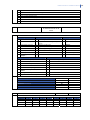
Table of Contents
Preface ................................................................................................................................................................ 9
Safety terms and symbols.............................................................................................................................................. 9
References............................................................................................................................................................................. 9
Section A Installing and programming a basic system ...........................................................................10
Chapter A1 Introducing the NetworX V3 system......................................................................................11
NetworX V3 diagram ......................................................................................................................................................11
NetworX V3 technical specifications.......................................................................................................................13
Auxiliary current and battery capacity ....................................................................................................14
NetworX V3 system .........................................................................................................................................................15
Parts of the system..........................................................................................................................................................16
Keypads ................................................................................................................................................................................19
Wireless keypad..................................................................................................................................................19
LCD icons ...............................................................................................................................................................22
Chapter A2 Installation guidelines ..............................................................................................................25
Mains power connection ..............................................................................................................................................25
Mounting ..............................................................................................................................................................................25
Wiring guidelines ..............................................................................................................................................................26
Defaulting the panel .......................................................................................................................................................26
Chapter A3 Installing a basic system..........................................................................................................27
Installing the NetworX V3 .............................................................................................................................................27
Polycarbonate housings .................................................................................................................................27
Installing the keypad.......................................................................................................................................................29
Mounting the wireless keypad.....................................................................................................................29
Mounting the wired keypad ..........................................................................................................................30
Wireless keypad learning-in procedure ..................................................................................................32
Installing the wireless sirens .......................................................................................................................................33
Installing the wireless sensors ...................................................................................................................................38
Mounting the sensors ......................................................................................................................................38
Sensor learning-in procedure ......................................................................................................................38
Chapter A4 Programming guidelines..........................................................................................................39
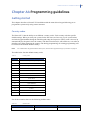
Getting started...................................................................................................................................................................39
Country codes......................................................................................................................................................39
Powering up the system .................................................................................................................................40
Entering programming mode.......................................................................................................................40
Changing the user interface language....................................................................................................40
Navigating the menus....................................................................................................................................................41
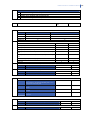
4
NetworX Version 3 Installation Manual
Quick User Menu................................................................................................................................................41
Selecting a menu option...............................................................................................................................................41
Changing a menu option..............................................................................................................................................41
Changing selection list entries.....................................................................................................................41
Changing binary entries .................................................................................................................................42
Changing numeric entries .............................................................................................................................42
Changing phone numbers and phone prefixes...................................................................................42
Exiting the menu system ..............................................................................................................................................43
Editing text ..........................................................................................................................................................................43
Overview ................................................................................................................................................................43
Example..................................................................................................................................................................44
Word library..........................................................................................................................................................45
Guidelines for location-based programming .....................................................................................................45
Selecting the module to program..............................................................................................................45
Programming a location ................................................................................................................................46
Exiting the program mode ............................................................................................................................46
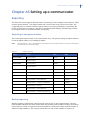
Chapter A5 Setting up a communicator .................................................................................................... 47
Reporting .............................................................................................................................................................................47
Reporting to one phone number................................................................................................................47
Backup reporting ...............................................................................................................................................47
Dual reporting .....................................................................................................................................................48
Split reporting......................................................................................................................................................49
Section B Programming the system............................................................................................................ 50
Chapter B1 Selecting the programming mode ......................................................................................... 51
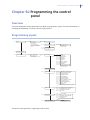
Chapter B2 Programming the control panel............................................................................................. 53
Overview ..............................................................................................................................................................................53
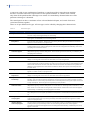
Programming inputs.......................................................................................................................................................53
Defining a zone...................................................................................................................................................55
Copying zone settings .....................................................................................................................................56
Editing a zone type............................................................................................................................................56
Setting swinger count......................................................................................................................................57
Programming outputs ...................................................................................................................................................58
Configuring an output .....................................................................................................................................58
Configuring the internal siren ......................................................................................................................59
Programming the keypad sounder ...........................................................................................................60
Assigning codes................................................................................................................................................................60
Setting up the installer code.........................................................................................................................60
Setting communication options................................................................................................................................62
Defining communication with a central station .................................................................................63
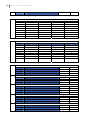
NetworX Version 3 Installation Manual
5
Defining communication with a mobile phone....................................................................................64
Defining communication with upload/download software...........................................................64
Configuring the system autotest ................................................................................................................65
Enabling reporting .............................................................................................................................................65
Configuring partitions ....................................................................................................................................................66
Setting timers.......................................................................................................................................................66
Configuring a partition ....................................................................................................................................67
Configuring the system .................................................................................................................................................68
Setting timers.......................................................................................................................................................68
Configuring system features ........................................................................................................................69
Setting arm schedules ...................................................................................................................................................69
Setting up schedules ........................................................................................................................................70
Glossary ................................................................................................................................................................................70
Control panel programming locations...................................................................................................................94
Telephone number 1 ........................................................................................................................................94
Reporting events to phone number 1 ......................................................................................................95
Telephone number 2 ........................................................................................................................................96
Reporting events to phone number 2 ......................................................................................................97
Telephone number 3 ........................................................................................................................................98
Reporting events to phone number 3 ......................................................................................................99
Special formats ................................................................................................................................................100
Download parameters..................................................................................................................................101
Feature and report selections (for partition 1)...................................................................................102
Entry/Exit timers ..............................................................................................................................................103
Zone configurations and partition selection......................................................................................104
General options................................................................................................................................................108
Programming the outputs ..........................................................................................................................112
Setup for auto-test, auto-arm and opening/closing times .........................................................113
Communicator codes for slow speed formats only........................................................................115
Programming partition parameters.......................................................................................................122
Programming zone configuration groups...........................................................................................125
NetworX V3 location-programming worksheets ...........................................................................................139
Chapter B3 Programming the NX-1048 keypad......................................................................................152
Overview............................................................................................................................................................................152
Configuring the NX-1048 keypad features .......................................................................................................154
General options................................................................................................................................................154
Programming the function keys ..............................................................................................................154
Setting up the tamper switch....................................................................................................................157
Battery replacement......................................................................................................................................157
Master mode .....................................................................................................................................................160
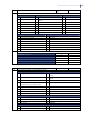
6
NetworX Version 3 Installation Manual
Assigning X-10 devices ................................................................................................................................ 161
Copying keypad settings............................................................................................................................. 161
Configuring keypad text .............................................................................................................................. 161
Setting installer messages ......................................................................................................................... 162
Setting the keypad partition and keypad number.......................................................................... 162
Setting the exit buzzer options................................................................................................................. 162
Glossary............................................................................................................................................................................. 164
Technical specifications............................................................................................................................................. 169
Chapter B4 Programming the other keypads ......................................................................................... 171
Glossary............................................................................................................................................................................. 171
Chapter B5 Setting up the RF receivers ................................................................................................... 172
Programming the RF system................................................................................................................................... 172
Defaulting the wireless modules............................................................................................................. 173
Programming the wireless detectors.................................................................................................... 173
Learning-in additional wireless keypads............................................................................................. 174
Deleting wireless keypads .......................................................................................................................... 175
Learning-in IO modules ............................................................................................................................... 176
Learning-in wireless sirens......................................................................................................................... 176
Configuring receiver features ................................................................................................................... 177
Configuring IO modules............................................................................................................................... 177
Setting supervision windows..................................................................................................................... 180
Testing wireless sensors.............................................................................................................................. 181
Disabling wireless sensors ......................................................................................................................... 182
Glossary............................................................................................................................................................................. 182
Programming locations for the RF receivers ................................................................................................... 187
Chapter B6 Setting up the GSM/GPRS module (NX-7002) ..................................................................... 191
Overview ........................................................................................................................................................................... 191
Enrolling the GSM/GPRS module............................................................................................................................ 191
Enrolling the SIM card on the GSM network....................................................................................... 192
Enrolling the SIM card on the GPRS network..................................................................................... 192
Inserting a SIM card....................................................................................................................................... 193
Testing the RSSI value .................................................................................................................................. 194
Testing the GSM or GPRS connection.................................................................................................... 194
Programming the GSM/GPRS module (NX-7002)........................................................................................... 196
Programmable options................................................................................................................................ 197
Reporting .......................................................................................................................................................................... 197
Overview ............................................................................................................................................................. 197
Report methods............................................................................................................................................... 199
Report controllers........................................................................................................................................... 199
NetworX Version 3 Installation Manual
7
Primary and secondary reporting ...........................................................................................................199
GSM/GPRS module as backup (SMS / GPRS) ......................................................................................200
GSM/GPRS module as backup (audio reporting) ..............................................................................200
Setting up polling ............................................................................................................................................202
Upload/download...........................................................................................................................................202
Reporting summary .......................................................................................................................................203
Using the GSM/GPRS module ..................................................................................................................................207
Obtaining the GSM/GPRS module status.............................................................................................207
Troubleshooting...............................................................................................................................................208
Autotest ...............................................................................................................................................................208
Reporting protocols and formats ..........................................................................................................................209
Reporting fixed codes in SIA and Contact ID .....................................................................................209
Special Reports.................................................................................................................................................210
SMS SIA reporting message format .......................................................................................................210
SMS Contact ID reporting............................................................................................................................212
HomeText control ...........................................................................................................................................213
Receiving SMS messages from a security system...........................................................................215
HomeText reporting.......................................................................................................................................216
Glossary .............................................................................................................................................................................216
GSM/GPRS module location-based programming worksheets ..............................................................225
Chapter B7 Enrolling modules....................................................................................................................235
Enrolling the system modules .................................................................................................................................235
Defaulting the modules..............................................................................................................................................235
Glossary .............................................................................................................................................................................236
Chapter B8 Reading the event log.............................................................................................................237
Overview............................................................................................................................................................................237
Event log events.............................................................................................................................................................238
Glossary .............................................................................................................................................................................242
Chapter B9 NX-586E .....................................................................................................................................243
Overview............................................................................................................................................................................243
Connecting the NX-586E direct connect module...........................................................................................243
Connecting the NX-586E to a PC .............................................................................................................243
Connecting the NX-586E to a PC and a panel...................................................................................244
Connecting the NX-586E to a panel.......................................................................................................245
Programming the NX-586E direct connect module......................................................................................245
Enabling memory transfer using the keypad ....................................................................................246
Panel to PC memory transfer using DL900 software.....................................................................246
Writing data from the DL900 software to the NX-586E................................................................247
Reading data from the NX-586E to the DL900 software .............................................................247
Location programming for the NX-586E..............................................................................................247
8
NetworX Version 3 Installation Manual
Glossary............................................................................................................................................................................. 248
Technical Specifications ............................................................................................................................................ 249
Chapter B10 Programming with the DL900 software ........................................................................... 250
Other methods of programming ........................................................................................................................... 250
Connecting the panel to the computer .............................................................................................................. 250
Connecting using a serial port ................................................................................................................. 250
Connecting using a modem ...................................................................................................................... 251
Programming with upload/download software............................................................................................. 251
Programming tasks ....................................................................................................................................... 252
Chapter B11 Updating firmware ............................................................................................................... 255
Overview ........................................................................................................................................................................... 255
Update procedure ........................................................................................................................................................ 255
Section C References ................................................................................................................................... 257
Appendix 1: Reporting codes in Contact ID or SIA......................................................................................... 258
Appendix 2: Overview of module numbers....................................................................................................... 261
NX-1701E door swipe modules................................................................................................................ 262
Keypads............................................................................................................................................................... 262
Appendix 3: Communicator formats.................................................................................................................... 263
Appendix 4: Service messages ............................................................................................................................... 264
Appendix 5: Tasks summary.................................................................................................................................... 267
Appendix 6: Word library........................................................................................................................................... 268
Appendix 7: EN 50131 compliance....................................................................................................................... 269
Setting the EN mode ..................................................................................................................................... 269
Users..................................................................................................................................................................... 272
Keypad................................................................................................................................................................. 273
Menu..................................................................................................................................................................... 274
Holdup alarm.................................................................................................................................................... 275
Fire alarm ........................................................................................................................................................... 275
Keyfobs................................................................................................................................................................ 275
Scheduled arming/disarming ................................................................................................................... 275
RF Receivers ...................................................................................................................................................... 275
Event logs ........................................................................................................................................................... 276
Prevention of setting and fault acknowledging ............................................................................... 279
Index................................................................................................................................................................ 283
NetworX Version 3 Installation Manual
9
Preface
This is the NetworX Version 3 Installation Manual. This document includes an overview of the
product and detailed instructions explaining:
•
how to install and configure the components of your NetworX V3 system; and
•
how to program the system.
To use this document effectively, you should have the following minimum qualifications:
•
a basic knowledge of alarm systems and components; and
•
a basic knowledge of electrical wiring and low-voltage electrical connections.
Read these instructions and all ancillary documentation entirely before installing or operating this
product.
Note:
A qualified installer, complying with all applicable codes, should perform whatever hardware installation is
required.
Read “Appendix 7: EN 50131 compliance” on page 269 if you are installing a system that needs to
be EN 50131 compliant.
Safety terms and symbols
These terms may appear in this manual:
CAUTION: Cautions identify conditions or practices that may result in damage to the equipment or other property.
WARNING: Warnings identify conditions or practices that could result in equipment damage or serious personal injury.
References
For more information, refer to the following:
NetworX V3 Menu Structure
This menu structure provides a map of the NetworX V3 menu options, including those for all the
additional modules.
NX Expander Installation Guide
This manual contains detailed information about additional modules and their installation.
10
NetworX Version 3 Installation Manual
Section A Installing and
programming a basic
system
NetworX Version 3 Installation Manual
11
Chapter A1 Introducing the NetworX V3
system
NetworX V3 diagram
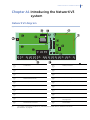
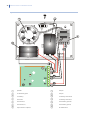
Figure 1. NetworX V3 board diagram
1
Transformer
B
VVMIQ Connector
2
NetworX Bus (internal)
C
SIM Card Holder
3
NetworX Bus (internal)
D
Telephone connections (see Figure 2)
4
NetworX Bus (internal)
E
Outputs (see Figure 2)
5
Box Tamper
F
Inputs (see Figure 2) [1]
6
Box Tamper
G
RF microprocessor
7
Audio Tap Outputs
H
Flash/DL900 jumper
8
Antenna
I
Mini USB connection
9
Antenna
J
GSM Modem (for status LEDs description,
see page 194)
A
GSM Antenna Connector
K
PSTN Modem
[1]
The number of onboard zones differs for particular panel models. Refer to “NetworX V3 technical
specifications” on page 13.
NetworX Version 3 Installation Manual
[1]
8
6
7
4
5
Figure 2. NetworX V3 inputs and outputs
3
12
DATA
Connect to Data terminal of keypad
and expanders
COM
Power (−)
POS (+)
Connect to Positive (+) terminal of
keypad and expanders
AUX PWR+
Power (+)
COM
Connect to negative (−) terminal of
keypad and expanders
AUX PWR+
Power (+)
BELL+
Internal bell positive
1
Zone 1 [1]
BELL−
Internal bell negative
COM
Common (−) for zone 1 and zone 2 [1]
AUX PWR+
Power (+)
2
Zone 2 [1]
Relay 1 NC
Relay 1 (normally closed)
3 to 8, COM
Zones 3 to 8 and common terminals [1]
Relay 1 NO
Relay 1 (normally open)
Earth
Ground
Relay 1 C
Relay 1 (common)
T1
House Telephone Tip
Relay 2 NC
Relay 2 (normally closed)
T
Telephone Tip
Relay 2 NO
Relay 2 (normally open)
R
Telephone Ring
Relay 2 C
Relay 2 (common)
R1
House Telephone Ring
The number of onboard zones differs for particular panel models. Refer to “NetworX V3 technical
specifications” on page 13.
NetworX Version 3 Installation Manual
NetworX V3 technical specifications
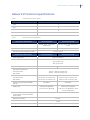
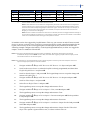
Table 1.
Available NetworX V3 panel models
Panel models
Onboard zones capacity
NX-5
0
NX-7
6
NX-9, NX-11
8
NX-10
2
Table 2.
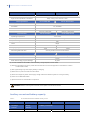
NetworX V3 technical specifications
Mains power specifications
NX-xx(-GSM)-EUR
NX-xx(-GSM)-LB-EUR
Mains input voltage
230 VAC +10%, −15%, 50Hz
±10%, 25 VA
230 VAC +10%, −15%, 50Hz ±10%,
40 VA
Current consumption at 230 VAC
120 mA typical, 300mA max.
200 mA typical, 500mA max.
Main board supply voltage (AC: CON8)
Power supply specifications
16.5 VAC typical
NX-xx(-GSM)-EUR
NX-xx(-GSM)-LB-EUR
Power supply type
Type A, EN 50131-6
Power supply voltage [5]
Min. 9.5 V ± 2%
Typ. 13.8 V ± 2%
Max. 14.4 ± 2%
Power supply current
0.9 A max. at 13.8 V ± 2%
1.8 A max. at 13.8 V ± 2%
Main board consumption:
Non-GSM variant
GSM variant
145 mA ± 10% at 13.8 V ± 2%
180 mA ± 10% at 13.8 V ± 2%
Maximum system current available [1]
Non-GSM variant
GSM variant
Auxiliary power output (AUX PWR+,
POS) [2]
Battery type
740 mA max. at 13.8 V ± 2%
700 mA max. at 13.8 V ± 2%
1640 mA max. at 13.8 V ± 2%
1600 mA max. at 13.8 V ± 2%
See Table 2
See Table 3
Lead acid rechargeable,
7.2 Ah 12 V nom. (BS127N)
Lead acid rechargeable,
7.2 Ah 12 V nom. (BS127N) or 12 Ah
12 V nom. (BS130N)
Maximum voltage at power supply,
auxiliary power output and battery
power output
14.4 V
Battery low condition
11.6 V
Deep discharge protection [7]
9.7 V
Maximum ripple voltage Vpp [3]
300 mV typical, 600 mV max.
13
14
NetworX Version 3 Installation Manual
Standard onboard outputs
NX-xx(-GSM)-EUR
Built-in Siren Driver (BELL+, BELL-)
Electronic output, rating: 1 A at 13.8 V ± 10%
High current outputs (RLY1 and RLY2)
Control panel fuses
NX-xx(-GSM)-LB-EUR
Relay, rating: 1 A at 13.8 V ± 10%
NX-xx(-GSM)-EUR
NX-xx(-GSM)-LB-EUR
Battery
5 A, resettable
AUX PWR+
1 A, resettable
POS
1 A, resettable
Mains, mains fuse [4]
Environmental
315 mA, T 250V 20x5
630 mA, T 250V 20x5
NX-xx(-GSM)-EUR
NX-xx(-GSM)-LB-EUR
Operating temperature
−10 to +55°C
Humidity
Max 95% non condensing
IP protection grade
IP30
Colour
Beige
Dimensions
220 x 253 x 112 mm
394 x 256 x 118 mm
1.8 kg
2.8 kg
Shipping weight
EN 50131 grade and class
General features
Securuty Grade 2, Environmental Class II
NX-xx(-GSM)-EUR
Code combinations [6]
NX-xx(-GSM)-LB-EUR
From 10,000 (4 digits) to 1 million (6 digits)
End-of-line resistor
3.3 kΩ
Data retention (log, program settings)
20 years
[1] Current available for AUX PWR+, POS and battery charge outputs (non-EN-mode).
[2] Maximum permanent current to power devices external to the control equipment in the absence of alarm
conditions (EN-mode).
[3] Max ripple voltage only when empty battery is charging.
[4] Mains fuse is a part of the mains terminal block.
[5] Minimum voltage only when mains supply voltage is disconnected and system is running on battery.
[6] There are no disallowed codes.
[7] Optional function for the EN 50131 compliance.
WARNING: Before removing the mains fuse, mains power must be disconnected.
Auxiliary current and battery capacity
Table 3.
NX-xx(-GSM)-EUR maximal available auxiliary current
Battery
7.2 Ah
Discharge
Charge
Time (h)
Time (h)
12
72
Auxiliary current (mA)
350
EN 1&2
NetworX Version 3 Installation Manual
Table 4.
NX-xx(-GSM)-LB-EUR maximal available auxiliary current
Battery
7.2 Ah
Discharge
Charge
Time (h)
Time (h)
12
72
12 Ah
Auxiliary current (mA)
350
700
EN 1&2
NetworX V3 system
NetworX V3
Number of wireless zones
48
Number of onboard hardwired
zones
See Table 1.
Maximum number of hardwired
zones
42
Maximum number of zones
48 zones
(if 2 hardwired zones are used, than there are 46 wireless zones left to use)
Number of partitions
4
Maximum number of wireless
outputs
8 (including sirens)
Outputs on board
2 NC/NO relays, 1 internal siren
Maximum number of input
expanders
5
Maximum number of output
expanders
8
Maximum number of RF output
modules
4 (including sirens)
Report formats
Contact ID, Ademco 4/2 Express, Siren Tone, Vocal, Radionics extended fast with
parity, Ademco/Silent Knight Slow, Silent Knight 4+2 fast, Sescoa/Franklin Fast, SIA,
XSIA and custom formats
Maximum number of wireless
keypads
4
Support for Proximity Reader
Yes
RF Dual Transceiver
Internal, built-in
GPRS module
Internal, built-in (in NX-xx-GSM-EUR and NX-xx-GSM-LB-EUR panels only)
15
16
NetworX Version 3 Installation Manual
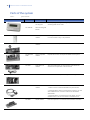
Parts of the system
Table 5.
System modules
Part number
Description
Purpose
NX-1048-R-W
Wireless Menu
LCD Keypad
NX-1048-W
Menu LCD Keypad
(wired)
NX-1701E
Door swipe
module
Proximity card reader/door control module. You can program it
to control access in any or all partitions.
NX-320-I
Auxiliary power
module
Provides additional power for modules attached to a panel.
NX-507E/NX508E
Output expander
module
Expands the number of outputs available on the system.
NX-534E
Audio (listen-in)
module
Two-way audio (listen-in) communicator that allows the
situation on the premises to be monitored.
NX-535
Voice module
Allows events to be reported using voice messages.
NX-586E
Direct connect
module
Used as:
Used for programming and using the system. Wireless and
wired keypads can be used.
1. A direct connect interface between the panel and PC.
2. A storage device, when connected only to the PC. You can
also read/write from 1 of the 4 locations via the DL900
downloader.
3. A storage device, connected only to the panel. You can
read/write from 1 of the 4 locations on the NetworX V3.
NX-590E
TCP/IP Module
Dual microprocessor-controlled Internet/Intranet interface.
NetworX Version 3 Installation Manual
Part number
NX-7002
Table 6.
Description
GPRS module
17
Purpose
Allows events to be reported via a GSM network or a GPRS
network. The GPRS module is a part of the main panel board,
so it does not require a separate installation procedure. It is
available on the NX-xx-GSM-EUR and NX-xx-GSM-LB-EUR
panels only (not on the NX-xx-EUR and NX-xx-LB-EUR panels.)
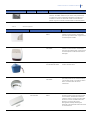
Wireless equipment
Part Number
Part Description
Purpose
TX-7001-05-1
INDOOR SIREN, 868 MHz
GEN2
This full wireless indoor siren offers you
wireless communication and wireless
operation by batteries with a typical tone
sound output of 108 dB.
TX-7201-05-1
OUTDOOR SIREN, 868
MHz GEN2
This full wireless outdoor siren offers you
wireless communication and wireless
operation by batteries with a typical tone
sound output of 125 dB and an internal
flashlight.
BS7201
Spare battery pack for
the TX-7201-05-1 siren.
The 14 Ah lithium battery pack for the
outdoor wireless siren.
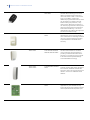
TX-6211-03-1
SMOKE DETECTOR, 868
MHz GEN2
The smoke sensor is a wireless, battery
operated photo-electric smoke sensor. It
incorporates a built-in sounder for alarm
alerts, a visual status LED and a
transmitter.
TX-1211-03-1
TX-1211-03-3
LONGLIFE DWS, 868 MHz
GEN2
This wireless universal transmitter
protects anything that opens and closes
such as doors, windows and cabinets.
Moreover, there is an extra terminal that
allows to connect an additional wired
detector. The Long-Life version
distinguishes itself by allowing two
batteries to be used and reduce the need
for maintenance.
18
NetworX Version 3 Installation Manual
TX-4131-03-2
4 BUTTON KEYFOB, 868
MHz GEN2
The 4-button keyfob is a portable
wireless device allowing you to arm or
disarm the system without having to
memorise access codes or race to beat
entry or exit delays. It offers two
additional programmable buttons, which
can be used to turn lights on and off
before entering the premises, or any
other function defined in the system. It
can also be programmed to send a panic
alarm by pressing the Lock and Unlock
buttons simultaneously, or to send a
medical alarm by pressing the Light and
Star buttons simultaneously.
TX-2211-03-1
Mirror PIR, 868 MHz
GEN2
This motion detector uses mirror
technology to cover up to 16 metres. It
has a rich feature set including standard
'4D' or bi-curtain processing providing
improved detection and false alarm
immunity.
TX-2411-03-1
DUAL MOTION SENSOR
PIR/MW, 868 MHz GEN2
This dual motion detector combines
mirror technology and microwave to
provide you with excellent false alarm
immunity on a range of up to 12 metres.
It also features GE's patented Range
Controlled Radar technology.
TX-1011-03-1
TX-1011-03-3
SLIMLINE DWS, 868 MHz
GEN2
This wireless universal transmitter
protects anything that opens and closes
such as doors, windows and cabinets.
Moreover, there is an extra terminal that
allows to connect an additional wired
detector.
TX-8001-05-1
IO-MODULE, 868 MHz
GEN2
The IO-module allows you to link a wired
application to your wireless security
system using two open collector outputs
and a supervised external power input.
NetworX Version 3 Installation Manual
Keypads
Wireless keypad
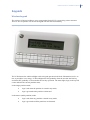
The wireless LCD keypad allows you to program the NetworX V3 system using a menu structure.
There is also an option to use the wired keypad with the same functionality.
Figure 3. Keypad.
The LCD features the white backlight to allow keypad operation in the dark. Illumination level is as
low as possible to save energy. LCD backlight turns ON gradually when the user hits the first key,
and turns OFF gradually 30 seconds after the last key operation. The status light (logo) in the top left
corner indicates the current partition status.
In the single-partition mode:
•
logo is red when the partition is armed in any mode,
•
logo is green when the partition is disarmed.
In the master (multi-partition) mode:
•
logo is red when any partition is armed in any mode,
•
logo is green when all the partitions are disarmed.
19
20
NetworX Version 3 Installation Manual
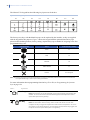
The NetworX V3 keypad has the following key layout out-of-the-box:
Figure 4. Default keypad layout.
F1
F2
F3
F4
F5
F6
F7
F8
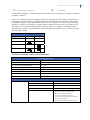
The four top-row keys with the blank keycaps can be replaced by the installer, as they are supplied
with the keypad for this purpose. Figure 3 shows the keypad with the optional function keycaps
placed in their default positions (factory setting). Optional keycaps available for assigning to the four
programmable keys are:
Keycap symbol
Name
Default factory setting
PANIC
F1
FIRE
F2
MEDICAL
F8
NIGHT MODE
F7
CANCEL
Not assigned
Note: The function keycaps can be placed randomly over the four available positions. Actual function activation is
accomplished through a menu option during installation.
For more information about programming function keys F1 to F8, see Programming the function
keys on page 154.
Table 7.
Key functions
Arm Away
Arm Stay
Press to arm the system.
Note: Exact behavior of this key depends on the system settings configured by the
installer. For more information, see the Master Keypad, and the Quick Arm menu
option descriptions in the glossary.
Press to arm the system in Stay mode.
Note: For this mode to work correctly, interior zones must be set. You can also
configure this key to toggle the Stay/Instant mode of the armed partition. For more
information on this button behavior, see the Master Keypad, Instant Stay Toggle, and
the Quick Arm menu option description in the glossary.
NetworX Version 3 Installation Manual
When in the menu:
Press to scroll to the start of the LCD message.
Disarm
When in master mode:
Press to disarm the system.
Note: The Disarm key works in the master mode only, after the user code and the
partition number have been entered.
When in the menu:
Press to scroll to the end of the LCD message.
Bypass
Press to select a zone to bypass.
Night Mode
Press to arm the system in Night mode.
Chime
Press to toggle the Chime mode on and off. A chime is often used as an indication on
a shop door. There is a beep on chime activation and no beep on deactivation. For
more information, see the Chime menu option description.
No
Press No to:
The Enter Zone No. prompt displays. Type the zone number and press OK. Repeat this
action for subsequent zones you want to bypass. To remove a zone from the
bypassed zone set, enter its number again. To partially arm the system with the
selected zones bypassed, enter the user code. Disarming the system clears the
bypassed zone set.
Note: For this mode to work correctly, entry guard zones must be set. Also, see notes
below.
•Cancel a change to the menu selection or
•Navigate to a higher level in the menu structure or
NO
•Cancel a sequence when entering numeric data.
Note: Press NO key to clear any incorrectly entered user code or other information.
OK
OK
Press OK to:
•Activate the menu or
•Accept selection changes or
*
•Move forward in the menu structure or
•Complete a sequence when entering numeric data.
Hash
When editing text and phone numbers:
•Press # F4 to move to the first character or digit.
•Press # F5 to move to the last character or digit.
#
•Press #¾ to delete a part of the string starting from the current cursor position to
the last character or digit.
•This button also allows to enter other special characters (see Changing phone
numbers and phone prefixes on page 42).
Navigation
keys
Press the navigation keys to scroll through menu lists and options.
When in master mode or not in a menu:
•Press ½ to display bypassed zones.
•Press ¾ to display problem zones.
When editing text and telephone numbers:
•Press ½ to overwrite or insert text.
•Press ¾ to delete text.
Notes: F1, F2, F7, and F8 function keys can be programmed by the installer. F7 function key is programmed to Night
Mode by default. Function keys behave differently, depending on the settings configured by the installer, for
example, see descriptions for the Quick Arm, Instant Stay Toggle and Master Keypad menu options.
21
22
NetworX Version 3 Installation Manual
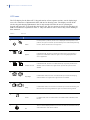
LCD icons
The LCD display for the NetworX V3 keypad consists of two separate sections, one for displaying 2
rows of 16 characters of alphanumeric data, and one for showing icons. The display section on the
wireless keypad showing alphanumeric data is only turned ON while the user is operating the
keypad, and turns OFF 30 seconds after the last key hit. The icon section is always ON and shows all
kinds of conditions as explained in Table 8. They can either be OFF or ON or they can be flashing to
draw attention.
Table 8.
Symbol
LCD icons
Name
Description
Power
If mains power is present, the left icon is displayed. If mains power is not
present, the right icon shows up. Panel battery low is indicated by flashing
the icon, either the left one or the right one.
1
2
Bypass
In MASTER mode, the left icon shows up if ANY zone in any partition is
bypassed. In PARTITION mode, the right icon is being displayed if ANY
zone is bypassed.
Full/Part armed
In MASTER mode, the FULL icon (left) shows up only if ALL partitions are
ARMED, while the PART icon (right) shows up if NOT ALL partitions are
ARMED.
Stay/Night
In PARTITION mode, the STAY icon (left) shows up if armed and staying,
and the NIGHT icon (right) if the night function is enabled.
Away
In PARTITION mode, one of these icons shows up if armed and leaving, the
left one if ANY zone is bypassed, the right one if NO zone is bypassed.
Chime
In CHIME mode, this icon will be ON. If the CHIME mode is disabled, it will
be OFF.
3
4
5
6
7
Fire
This icon will be displayed when a fire zone has been activated (fire alarm),
and it will flash in case of fire trouble.
NetworX Version 3 Installation Manual
8
This icon is only available on the wireless keypad and flashing when the
keypad battery is low.
Battery low
9
This icon flashes in case of an alarm condition.
Alarm
10
11
This icon is only available on the wireless keypad and indicates RF-link
field strength. The one most to the left indicates absence of RF, the one
most to the right indicates full signal strength. It will flash as long as the
keypad is not registered yet.
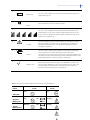
This icon indicates a system trouble condition, for example, fire trouble,
day zone trouble or AC power loss. You can display the trouble list by
pressing the # (hash) button on the keypad (see Appendix 4: Service
messages on page 264.)
!
Trouble
Service
This icon is ON in case the system needs to be serviced. It can indicate
many conditions, for example, ground fault, phone fault, fail to
communicate, box tamper, loss of system time, and similar problems. You
can display the service message list by pressing the # (hash) button on the
keypad (see Appendix 4: Service messages on page 264.)
Ready to arm
If the system is OK to arm, the V-sign icon is displayed. If it is NOT OK to
arm, the V-sign disappears. In case a force armable zone is open, it will
show a flashing V-sign (see Table 15 Default zone types, and Force
Armable menu option description in the glossary.)
12
13
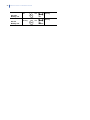
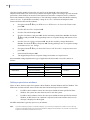
Note: In case of power supply problems, the following icons are displayed:
Normal
mode
Power
ON
Screensaver
mode
ON
NO faults
AC fault
Battery OK
AC OK
Battery fault
ON
ON
Blinking
Blinking
ON
Blinking
23
24
NetworX Version 3 Installation Manual
AC fault
Battery low
AC OK
Battery low
ON
ON
Blinking
Blinking
ON
Blinking
NetworX Version 3 Installation Manual
Chapter A2 Installation guidelines
Mains power connection
Use the mains connector terminal for connecting the mains supply. You can use a fixed cable or a
flexible mains lead to an earthed mains outlet. If fixed wiring is used, insert a dedicated circuit
breaker in the power distribution network. In all cases, the mains connection must comply with local
regulations.
WARNING: Disconnect the mains power before opening the cabinet.
To do this:
•Disconnect the AC mains plug from the AC mains wall socket.
or
•Disconnect the mains with the dedicated circuit breaker.
CAUTION: This unit can is provided with a lead battery inside. Batteries can explode or cause burns when
incorrectly (dis)assembled, or exposed to fire or high temperatures. Dispose of used battery
according to battery directive instructions and/or as required by local laws. Keep away from
children.
To replace the battery, please disconnect it and remove it from the holder. If required, replace
with the GE Security BS127N lead batery only. Do not use a different type of batteries.
Mounting
•
Ensure that the unit is mounted on a flat, solid, vertical surface so that the base will
not flex or warp when the mounting screws/bolts are tightened.
•
Leave a 50 mm clearance between equipment enclosures mounted side by side and 25
mm between the enclosure and the cable pathway.
•
The battery mounting facility inside the housing is only useful for steady state use of
the control panel. Remove the battery for transport of the control panel.
25
26
NetworX Version 3 Installation Manual
Wiring guidelines
The NetworX V3 has been designed, assembled and tested to meet current standards for safety,
emission and immunity from environmental electrical and electromagnetic interference. Only a
qualified electrician or other suitably trained and qualified person should attempt to wire this system
to the mains or to the public telephone network.
1.
Ensure that there is a good earth for the alarm system for effective resistance to electrical
interference. Provide an earth connection for the standalone telephone dialer.
2.
For mains power connection, use the mains connector terminal either via permanent
wiring or a doubly insulated flexible mains cable to an earthed mains outlet. Always use
cable ties to fix the mains cable, at the dedicated fixing point provided near the mains
terminal connector.
CAUTION: Never attempt to solder a mains connection wire’s end where they will be wired to the terminal
connectors.
3.
The battery used with the NetworX V3 must be made of materials of flammability class
HB or better.
4.
The mains switching relay must not be fitted inside the control panel cabinet.
The minimum clearance between equipment closures is 50 mm between equipment vents.
Only use units in a clean environment and not in humid air.
Defaulting the panel
Before installing and programming the system, default the panel to ensure that you have the correct
country defaults according to your local regulations, see Country codes section. Also see the Reset
Settings command description in the control panel section glossary.
NetworX Version 3 Installation Manual
Chapter A3 Installing a basic system
Installing the NetworX V3
CAUTION: Before installing the panel:
•
Ensure that the unit is mounted on a flat, solid, vertical surface so that the base
will not flex or warp when the mounting screws/bolts are tightened.
•
Leave a 50 mm clearance between equipment enclosures mounted side by side
and 25 mm between the enclosure and the cable pathway.
•
The battery mounting facility inside the housing is only useful for steady state
use of the control panel. Remove the battery for transport of the control panel.
•
Take care that wire terminals are isolated. Use tie wraps to prevent contact with
any other wires or circuits in case wires break.
Polycarbonate housings
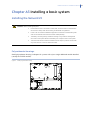
Small polycarbonate housing is adequate for systems with a just a single additional module installed
(usually the TCP/IP module).
Figure 5. Small polycarbonate housing
1
1
1
27
28
NetworX Version 3 Installation Manual
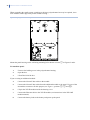
When expanding the small system, switching to the large polycarbonate box may be required, since
more modules cannot physically fit the smaller housing.
Figure 6. Largel polycarbonate housing
1
1
1
Mount the panel housing on the wall using mounting holes shown as items 1 in Figures 5 and 6.
To install the panel:
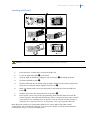
1.
Unscrew the holding screw in the polycarbonate housing.
2.
Open the box.
3.
Lift off the lid of the box.
If you are using an additional module:
4.
Connect the NetworX bus cables to the module.
5.
Connect the NetworX bus cables from the additional module to the panel. Use one of the
internal bus connectors for this purpose (see Figure 1, position 2, 3 and M).
6.
Clip-in the TCP/IP module inside the housing cover.
7.
Connect the Ethernet cable to the TCP/IP module (see instructions in the NX-590E
module manual).
8.
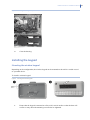
Connect the battery leads to the battery and power up the panel.
NetworX Version 3 Installation Manual
Figure 7. Connecting the battery to the panel.
9.
Close the housing.
Installing the keypad
Mounting the wireless keypad
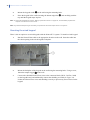
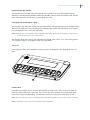
Depending on the configuration, the wireless keypad can be mounted on the wall in a cradle or used
as a portable device.
To install a wireless keypad:
Figure 8. Mounting the wireless keypad.
!
1.
"
Ensure that the keypad is mounted on a flat, solid, vertical surface so that the base will
not flex or warp when the mounting screws/bolts are tightened.
29
30
NetworX Version 3 Installation Manual
2.
Mount the keypad cradle ! on the wall using the mounting holes.
3.
Place the keypad in the cradle inserting the bottom edge first ", and carefully push the
top until the keypad snaps in place.
Note: To replace keypad batteries, see the Battery replacement section on page 157, and the Battery replacement
chapter in the NetworX V3 User Guide.
Note: Any unauthorized opening of the battery compartment will cause tamper alarm in the system.
Mounting the wired keypad
There is also an option to use wired keypads with the NetworX V3 system. To install a wired keypad:
1.
Run the NetworX bus cable to the appropriate location on the wall. Insert the cable into
the cable opening in the wired keypad's backplate.
Figure 9. Wired keypad's backplate
1
2.
Mount the backplate of the keypad on the wall using the mounting holes. Using a screw,
fasten the tamper trigger 1 to the wall.
3.
Connect the shielded NetworX bus wires to the connector block (BUS+, DATA, COM)
on the keypad board, and additionally connect the shielding to COM (see Figure 10).
Isolate the NetworX bus wires and shielding correctly to prevent any short circuits on the
keypad.
NetworX Version 3 Installation Manual
Figure 10. Wired keypad connector block.
4.
At the panel side, run the NetworX bus wires through the ferrite (see Figure 11,
position 1), making one loop, and connect the wires to the standard NetworX bus
contacts (see Figure 1, position 4). Additionally, connect the shielding to COM (see
Figure 11, position 2).
Figure 11. Panel connector block and the ferrite.
2
1
5.
Carefully close the keypad and tighten the 2 screws at the bottom side.
Note: Any opening of the keypad enclosure will cause tamper alarm in the system.
6.
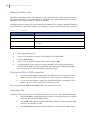
Power up the panel. Select a language from the list with the ½¾ keys and press OK.
7.
Select default settings from the Load Country Defaults list with the ½¾ keys and press
OK.
8.
At the Partition Number prompt, type the partition number and press OK.
9.
At the Keypad Number prompt, type the keypad number and press OK.
31
32
NetworX Version 3 Installation Manual
There is a slight difference in keypad reaction speed between the wired and wireless keypad, because
the wireless keypad needs more time to communicate with the control panel. Please allow appropriate
time to send data between the panel and the wireless keypad, especially during programming, when
large amount of information is exchanged.
Wireless keypad learning-in procedure
Prior to installing a new wireless keypad into the system, the keypad should first be “learned-in” by
the panel in order to guarantee mutual recognition. With the first keypad successfully installed, the
installer can use this keypad to help learning-in additional ones. The installer can also delete any or
all of the keypads from the system.
For adding the first wireless keypad to the panel, the keypad learn-in procedure should be executed as
shown below. For instructions about installing additional wireless keypads, see Learning-in
additional wireless keypads section.
1.
Power up the panel. It starts the learning mode automatically. The panel stays in this
mode for 2 minutes allowing you to program the first wireless keypad. If the keypad does
not communicate with the panel in this time window, the learning mode is exited. The
learning mode can be restarted by switching panel power off and on again.
2.
Insert the batteries in the wireless keypad. It starts the keypad initialization process.
Note: If the keypad is not brand new (i.e. it was already used with another system), it must be reprogrammed (flashed) first to erase any previous keypad settings, otherwise it will not initialize the learning
mode (see Chapter B11 Updating firmware on page 255).
3.
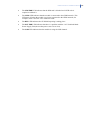
Select a language from the list with the ½¾ keys and press OK.
4.
Select default settings from the Load Country Defaults list with the ½¾ keys and press
OK.
5.
At the Partition Number prompt, type the partition number and press OK.
6.
At the Keypad Number prompt, type the keypad number and press OK.
7.
8.
At the SysID-KID1-KID2 prompt, 3 values need to be entered:
•
SysID: this value represents the System ID or a 3 digit code which should be unique
for this panel.
•
KID1: this value represents Keypad ID 1 and contains the first 3 digits of the code
which should be unique for this wireless keypad.
•
KID2: this value represents Keypad ID 2 and contains the last 3 digits of the code
which should be unique for this wireless keypad. Each of these three values must
range from 001 to 255. If any typed value is incorrect, the keypad displays the blank
SysID-KID1-KID2 prompt again. The combination of unique panel and wireless
keypad identifiers is required in order a wireless keypad is to communicate with the
appropriate panel only. In case multiple wireless keypads are used on the same panel,
each wireless keypad should have different KID1 and KID2 values.
At the EncKey prompt, enter a 24-digit encryption key and press OK. This encryption key
is to secure the wireless communication link between the panel and wireless keypad(s)
and is unique for each panel. Any 24-digit value can be entered. The same encryption key
must be entered in case other wireless keypads are enrolled.
NetworX Version 3 Installation Manual
9.
The keypad communicates with the panel and sends data entered in steps 3 to 8. The
Learn-in Mode message displays briefly.
10.
The keypad is learned-in and displays the System Ready message.
Important: You should not program zero-only strings (for example, "000") as values for SysID, KID1, KID2 nor
Encryption Key, as it will make the keypad non-operational.
Note: If the learned-in keypad's configuration stored in the RF receiver, differs from the actual keypad's configuration,
the RF receiver will start the configuration copying process. It takes a couple of seconds, and during this
process the keypad displays the "Copying" message. During this operation, due to an intensive radio
communication, you should not perform any additional actions on other wireless keypads.
Installing the wireless sirens
In order to guarantee communication between the panel and the siren, each siren must be learned-in.
This procedure requires starting the learn-in mode in the control panel with the menu, and then
tripping the tamper switch of the siren. For all steps required to program a new siren, see Learning-in
wireless sirens on page 176.
To install the wireless siren:
1.
Select the appropriate location to install the siren, and mount the siren base to the wall.
2.
Insert the batteries to power the siren. In case of the indoor siren, the battery holders for
four (4) AA 1.5 V batteries and one (1) 9 V battery are located inside the housing of the
siren. In case of the outdoor siren, you should install the battery pack inside the housing
of the siren. The battery pack contains independent batteries for the speaker and the
beacon.
3.
Wire the battery pack to the siren's terminals.
4.
Learn-in the siren (see Learning-in wireless sirens on page 176).
5.
When installing the outdoor siren, before final commission cut jumper J3 on the siren
PCB. This jumper is used as start-up protection.
6.
Close the cover plate on the siren.
CAUTION: When replacing siren's batteries follow instructions in the siren's manual delivered with your device.
Batteries can explode or cause burns when recharged, incorrectly (dis)assembled, or exposed to fire or
high temperatures. Dispose of used battery according to battery directive instructions and/or as
required by local laws. Keep away from children. Always use batteries that are from the same batch,
and always replace all batteries with fresh ones simultaneously.
33
34
NetworX Version 3 Installation Manual
Figure 12. Wireless indoor siren
1
2
3
4
5
6
9
Speaker
4x AA battery pack
9 V battery
Siren PCB
Siren driver (-)
Siren driver (+)
Open collector output (-)
B
C
D
E
F
G
H
Tamper
Tamper
9 V battery terminal (+)
9 V battery terminal (-)
4x AA battery pack (+)
4x AA battery pack (-)
IO module PCB
NetworX Version 3 Installation Manual
A
Open collector output (+)
TX-7001-05-1 Wireless indoor siren specifications
Power supply specifications
Electronics
Siren part
Number and type of batteries
4 x AA size, 1.5 V, primary cell
Battery capacity
5600 mAh
Board operating voltage
2.1 V … 3.1 V Number and type of batteries
1 x 9V size block, primary cell
Battery capacity
600 mAh
Operating voltage
9 V … 12 V Battery lifetime (typical)
3 years *
Current consumption – IO module (typical)
160 uA at 3.1 V ± 5%
Current consumption – siren (typical)
105 mA at 12 V ± 5%
General feature specifications
Environmental
Operating temperature
−10 °C to +40 °C
Humidity
max 95%, non condensing
Shipping weight
470 g
EN 50131 grade and class
Securtity Grade 2, Environmental Class II
Certification
CE
EN 50131-1 System requirements
EN 50131-4 Warning devices
EN 50131-5-3 Requirements for
interconnections equipment using radio
frequency techniques
Tested and certified by Telefication B.V.
* Assumption: maximum 20 siren activations of 3 minutes per year.
Wireless I/O module specifications
Power supply specifications
Number and type of batteries
4 x AA size, 1.5 V, primary cell
Battery capacity
5600 mAh
Board operating voltage
2.1 V … 3.1 V Battery lifetime, typical
3 years
Current consumption
160 uA at 3.1 V ± 5%
General feature specifications
Number, type and rating of outputs
2 x O/C, 15 V / 3 A max
Number and range of inputs (if wire jumper cut)
1 x, range 0 V … +15 V
Environmental
Operating temperature
−10 °C to +55 °C
Humidity
max 95%, non condensing
Shipping weight
96 g
EN 50131 grade and class
Securtity Grade 2, Environmental Class II
35
36
NetworX Version 3 Installation Manual
Figure 13. Wireless outdoor siren
1
2
3
4
5
6
Siren PCB
Speaker
Beacon
3X lithium battery pack
IO module power cable (black)
IO module power cable (blue)
8
9
A
B
C
D
Tamper
Tamper
Open collector output 2 (+) for beacon
Open collector output 2 (-) for beacon
Open collector output 1 (+) for speaker
Open collector output 1 (-) for speaker
NetworX Version 3 Installation Manual
7
E
IO module power cable (red)
IO module PCB
To allow the IO module to control the output on the outdoor siren, you need to cut jumper 3 and then
optionally 1 and/or 2.
Jumper 3 is a start-up protection. Jumpers 1 and 2 are responsible for timer settings, and you can cut
one of them or both, according to the table below. The maximum siren activity time is limited both
by hardware (jumper) setting, and software (RF Receiver 32>Outputs>Siren/IO>Time) time setting,
whichever is shorter. For example, even if the software setting for a siren is set at 255 minutes, and
the jumper J1 is cut, the siren will sound for 5 minutes only (i.e. according to the hardware limit).
When the same jumper is cut, and the time value for the Siren/IO module is set to 1 minute, the siren
will stop after 1 minute.
Timer programming
Setting
J1
J2
3 minutes (ex-factory)
5 minutes
10 minutes
20 minutes
TX-7201-05-1 Wireless outdoor siren specifications
Power supply specifications
Number and type of batteries
3-cell custom battery pack, lithium
Battery capacity
14 Ah
Electronics, board operating voltage
3.5 V Siren/flash light part operating voltage
10.5 V Battery lifetime (typical)
3 years *
Current consumption – IO module (typical)
160 uA at 3.5 V ± 5%
Current consumption – siren (typical)
293 mA at 10.5 V ± 5%
Current consumption – beacon (typical)
53 mA at 10.5 V ± 5%
General feature specifications
Environmental
Operating temperature
−25 °C to +50 °C
Humidity
max 95%, non condensing
Shipping weight
2.6 kg
EN 50131 grade and class
Security Grade 2, Environmental Class III
Certification
CE
EN 50131-1 System requirements
EN 50131-4 Warning devices
EN 50131-5-3 Requirements for
interconnections equipment using radio
frequency techniques
Tested and certified by Telefication B.V.
* Assumption: maximum 20 siren activations of 3 minutes and beacon activations of 15 minutes per year.
37
38
NetworX Version 3 Installation Manual
Installing the wireless sensors
Mounting the sensors
1.
Select the appropriate location to place the sensor. For recommendations and rules
regarding a correct placement of the particular sensor (motion sensor, door/window,
smoke, etc.), see the sensor manual enclosed with the device you want to install.
2.
Fasten the sensor base to the wall.
3.
Place the sensor battery in the battery holder.
4.
Re-install the sensor board and the cover plate.
Sensor learning-in procedure
In order to guarantee mutual recognition, each installed sensor must be learned-in by the control
panel. This procedure usually requires starting the learn-in mode in the control panel with the menu,
and then tripping the tamper switch in the sensor. For all steps required to program a new sensor, see
the section Programming the wireless detectors on page 173.
NetworX Version 3 Installation Manual
Chapter A4 Programming guidelines
Getting started
This chapter describes a NetworX V3 installation with the menu driven keypad allowing you to
program the system easily using a menu structure.
Country codes
The NetworX V3 has the ability to set different “country codes”. Each country code has specific
default settings. When you start your system for the first time (see Powering up the system below)
and select keypad defaults during the initial keypad setup, the respective country code is also set up
automatically for the panel. Once the country code has been selected, it will remain set, even after an
installer reset. When changing the country code during programming, all existing programming will
be cleared to the defaults for that country.
Note:
For a detailed first keypad installation description, see Wireless keypad learning-in procedure on page 32.
The table below lists the default country codes.
Table 9.
Country codes
Code
Country
0
No country (factory setting)
1
Holland
2
Belgium / Poland
3
Sweden
4
Italy
5
Spain
6
Greece
7
South Africa
8
Israel
9
Spain (PRSGR)
10
Turkey
11
France
17
Turkey Pronet
50
US
For all the countries there are the following default codes:
Table 10.
Default codes
User code
Installer code
Download access code
1234
9713
84800000
39
40
NetworX Version 3 Installation Manual
Note: Press NO key to clear any incorrectly entered user code or other information.
Powering up the system
When the NetworX V3 is powered up for the first time, the keypad language, keypad defaults,
partition and keypad number must be set. These options must also be set each time a keypad is
defaulted.
5.
The Set KP Language option sets the first language of the keypad.
6.
The Load Country Defaults option sets the country specific keypad defaults. It does not
default the keypad.
7.
The Partition Number and Keypad Number options set the keypad address.
Use the navigation keys to scroll between the different options and press OK to select an option. See
Navigating the menus for more information.
Prior to installing a wireless keypad into the system, the keypad should first be “learned-in” by the
panel in order to guarantee mutual recognition. See the Wireless keypad learning-in procedure
section for step-by-step instructions.
Entering programming mode
Your installer code allows you to program the system through the installer menu. There are two
levels in the installer menu. The light menu contains the most important options and the advanced
menu contains additional options. The system cannot be armed while in programming mode on the
current keypad or another keypad.
1.
Press OK at the system prompt and enter your installer code. For a list of default codes,
see the Country codes section.
2.
Use the ½¾ keys to navigate the menu. The full menu map can be found in the Menu
Structure included in your language kit. The light menu is in green text and the advanced
menu is in black text.
3.
Select OK to select an option or use the numerical/character keys to edit the existing
option.
Note:
The light installer menu is displayed by default. To switch to advanced menu, navigate to Installer
Menu>Maintenance Mode>Advanced and select Enabled. The keypad displays the advanced menu until this
option is disabled.
Changing the user interface language
1.
Press OK at the system prompt.
2.
Press OK again to display the system prompt in a different language.
3.
Press OK until you find the language you require.
4.
Continue using the keypad as normal.
Note: When the NetworX V3 is powered up for the first time, only the single language selected during keypad
installation is available. To toggle the user interface language, the available languages must be defined first
(Installer Menu>This Keypad>Set KP Language>Language 1 to 4.)
NetworX Version 3 Installation Manual
Navigating the menus
Note:
•
Press the ½¾ keys to scroll through menu lists and options.
•
Press #½ to move to the same menu item for the previous option. For example, if you
are in a submenu for zone 2, press #½ to move to the same submenu for zone 1.
•
Press # ¾ to move to the same menu item for the next option. For example, if you are
in a submenu for zone 2, press #¾ to move to the same submenu for zone 3.
The keypad may timeout from the menu system and return to the default display.
Quick User Menu
You can access a limited number of menu options without entering your installer code or user code.
This opens the command menu. Commands available in the Quick User Menu allow, for example, to
quickly preview the alarm memory list, reset detectors or start the service check.
1.
Press OK at the system prompt.
2.
Press the ½¾ keys to enter and navigate the Quick User menu.
Selecting a menu option
•
Press OK to select a menu option and move forward in the menu structure.
•
Press NO to reject a menu option and move backwards in the menu structure.
•
Press » (F4) to move through the second line of the LCD display, one word at a
time, from right to left.
•
Press ¼ (F5) to move through the second line of the LCD display, one word at a
time, from left to right.
Changing a menu option
The NetworX V3 has several editors that you can use to change the value of certain programmable
menu options. You can change selection list entries, binary entries, phone numbers and text. This
section describes how to change selection list entries, binary entries, numeric entries and phone
numbers. For information on changing text, see Editing text.
Changing selection list entries
1.
Navigate with the ½¾ keys to the relevant menu option and press OK.
2.
The current value for the menu option is displayed, for example, Enabled.
3.
Press the ½¾ keys to change the value, for example, change Enabled to Disabled.
4.
Press OK to accept the change.
•
If the new value is valid, the keypad beeps once to confirm the change and returns to
the menu option.
41
42
NetworX Version 3 Installation Manual
•
If the new value is invalid, the keypad beeps three times to reject the change and
returns to the menu option.
Press NO to cancel the change and return to the menu option.
5.
Changing binary entries
1.
Navigate with the ½¾ keys to the relevant menu option and press OK.
2.
The current value for the menu option is displayed, for example, 1 2 3 - - - - 8 means that
1, 2, 3 and 8 are on (included) while 4, 5, 6 and 7 are off (excluded).
3.
Press the corresponding numerical key to change a value, for example, press 1 to change
the state of 1 to off and press 4 to change the state of 4 to on. The display changes to - 2 3
4 - - - 8.
4.
Press OK to accept the changes.
•
If the new values are valid, the keypad beeps once to confirm the change and returns
to the menu option.
•
If the new value is invalid, the keypad beeps three times to reject the change and
returns to the menu option.
Press NO to cancel the changes and return to the menu option.
5.
Changing numeric entries
1.
Navigate with the ½¾ keys to the relevant menu option and press OK.
2.
The current value for the menu option is displayed, for example, 55.
3.
Do one of the following:
•
Press a number key to clear the current value and display the value of the key pressed.
•
Press ½ to increase the current value by one.
•
Press ¾ to decrease the current value by one.
•
Press ## to clear the current value to 0.
Press the number keys to enter the value.
4.
5.
Press OK to accept the changes.
•
If the new value is valid, the keypad beeps once to confirm the change and returns to
the menu option.
•
6.
If the new value is invalid, the keypad beeps three times to reject the change and
returns to the menu option.
Press NO to cancel the changes and return to the menu option.
Changing phone numbers and phone prefixes
1.
Navigate with the ½¾ keys to the relevant menu option and press OK.
2.
The current value for the menu option is displayed, for example, 4567999.
NetworX Version 3 Installation Manual
3.
4.
5.
Do one of the following:
•
Press ½ to toggle between insert mode and overwrite mode (insert mode allows you
to insert new numbers and overwrite mode allows you to overwrite existing numbers).
•
Press ¾ to delete the number at the cursor position.
•
Press #¾ to delete all the numbers from the number at the cursor position to the end
of the string.
Do one of the following:
•
Press the keys 0 to 9 to insert new numbers.
•
Press #0 to insert G (to use the GSM instead of the PSTN).
•
Press #1 to insert a star.
•
Press #2 to insert #.
•
Press #3 to insert a four-second delay.
•
Press #4 to insert P (this enables pulse dialing).
Press OK to accept the changes.
•
If the new number is valid, the keypad beeps once to confirm the change and returns
to the menu option.
•
6.
If the new number is invalid, the keypad beeps three times to reject the change and
returns to the menu option.
Press NO to cancel the changes and return to the menu option.
Exiting the menu system
1.
Press NO repeatedly until OK to Exit prompt displays.
Note: If you are not in a value selection mode nor in a value edit mode, you can press ## to display the OK to Exit
prompt. It also means you can exit any menu level immediately by pressing [NO] [#] [#].
2.
Press OK at this prompt to exit the menu system.
After exiting the menu system all devices in the system are enrolled, and changed texts are sent to all
keypads in the system. When it happens, “Processing” and “Copying” messages are displayed
respectively on the keypads. It can take some time, especially in case of wireless keypads, and it is
always recommended to allow these processes to finish without entering anything on the keypad.
Editing text
Overview
The NetworX V3 has a text editor that includes a word library. You can use this editor to change the
text of certain programmable text options.
43
44
NetworX Version 3 Installation Manual
F1
F2
F3
F4
F5
F6
F7
1.
Navigate with the ½¾ keys to the relevant menu option and press OK.
2.
Press OK to select the language you want to edit.
3.
The current text for the menu option is displayed, for example, Zone 2.
4.
F8
Do one of the following:
•
Press ½ to toggle between insert mode and overwrite mode (insert mode allows you
to insert new text and overwrite mode allows you to overwrite existing text).
•
Press ¾ to delete the character at the cursor position.
•
Press #¾ to delete all the characters from the character at the cursor position to the
end of the string.
5.
Press the keys 0 to 9 to insert new characters. Each key cycles through lower case and
then upper case characters.
6.
Press OK to accept the changes. The keypad beeps once to confirm the change and
returns to the menu option.
7.
Press NO to cancel the changes and return to the menu option.
Note:
A flashing cursor highlights the character you are editing. Press F2 to toggle flashing on the current word.
Example
To change a zone name from Zone 2 to Upstairs:
1.
Navigate to Zone 2 and press OK.
2.
Press #F4 to go to the start of the zone name.
3.
Press #F5 to go to the end of the zone name.
4.
Press #¾ to delete all the characters.
5.
Press 8 four times to enter the upper case letter ‘U’.
6.
Press 7 once to enter the lower case letter ‘p’. Continue until you have entered the new
zone name.
7.
Note:
Press OK to save your changes.
Each character key cycles through lower and upper case letters and language specific characters.
NetworX Version 3 Installation Manual
Word library
The word library is a predefined collection of words that speeds up text editing. As you type a
character, the keypad automatically displays a matching word. The word library is enabled by
default. For a complete list of words in the word library, see Appendix 6: Word library words.
•
To accept the word, press F5. The cursor moves to the end of the new word and you
can continue to enter text.
•
To create a shortened version of the word, press F5 to accept the word. The cursor
moves to the end of the new word. Move the cursor to the first unnecessary character
and press #¾ to delete the end of the word.
•
To reject the word, continue entering text as normal.
•
Press the ½¾ keys to scroll through the list of word library words.
To disable the word library:
1.
Navigate with the ½¾ keys to Word Library and press OK.
2.
The current state of the word library is displayed. In this case, it is enabled.
3.
Use the ½¾ keys to change the state to disabled and press OK.
4.
The keypad beeps once to accept the change and returns to Word Library.
Note: In case of wireless keypads, user texts (user names, zone names, etc.) are copied from the keypad to the RF
receiver first and then sent to the target keypad (or one-by-one to consecutive keypads). It takes some time,
and can sporadically affect other communication with the source/target keypad, including false state of the
range indicator and/or status icons. It is a temporary state, and after copying is finished all icons will again
show correct state of the system.
Due to the large number of data being transmitted, it is recommended that no other operations are
performed during copying as it can affect operation of the system. It applies in particular to the wireless
keypads.
Guidelines for location-based programming
You can switch to location-based programming mode. This mode uses devices, locations and
segments. Please notice, that the recommended programming method is to use the menu structure
rather than devices and locations. In order to use location-based programming, follow the procedure
below:
1.
Press OK and type your installer code (factory default is 9713). If the installer code is
valid, the OK=LOC ½¾=MENU screen displays.
2.
At the OK=LOC prompt press OK. The “Enter the device address” screen displays. You
are now in the program mode and ready to select the module to program.
Note: It is impossible to enter program mode if any partition - or the system - is armed.
Selecting the module to program
Since all the modules connected to the NetworX system are programmed through the keypad, the
module you are programming should be the first entry. For example, to program the NetworX control
panel, enter [0]-[#]. The [0] is the module number of the control panel and the [#] is the entry key.
Other module entry numbers can be found in the corresponding manuals or in Appendix 2: Overview
45
46
NetworX Version 3 Installation Manual
of module numbers on page 261. The procedure for programming these devices is the same as for the
control panel, except that the location will be for the module selected.
Programming a location
Note: Before programming the panel, the correct country code must be set in location 213 or through the
installer menu, with This Keypad>Load Country Defaults menu option. It is selected during the first
keypad installation, see Wireless keypad learning-in procedure on page 32.
Once you have entered the number of the module to be programmed, the LCD screen will prompt
you for a location number. Any location can be accessed by directly entering the desired
programming location, followed by the crosshatch (pound) [#] key. If the location you enter is valid,
the top line of the LCD screen will display the location number on the left and the segment number
on the right. The bottom line of the display will show the current data. This data will be displayed
and entered according to the type of data used (numerical, binary, or character data). For instructions
about entering each type of data, see Changing a menu option on page 41. If editing data, confirm the
change by pressing the OK key.
Exiting the program mode
When you have made all the desired changes in programming, it is time to exit the program mode.
Press the NO key twice to exit this programming level, and go to the “Enter the device address”
level. If no additional modules are to be programmed, press the NO key twice again to display the
OK to Exit prompt, and press OK to exit the program mode. If there is another module to be
programmed, you can select it by entering its address, followed by the [#] key (see Selecting the
module to program above).
Note: If you are not in a value selection mode nor in a value edit mode, you can press ## to display the OK to Exit
prompt. It also means you can exit any menu level immediately and display the OK to Exit prompt by
pressing [NO] [#] [#].
Note: You can set up the timeout for the program mode using the Control Panel>System
Settings>Timers>Miscellaneous>Programming Mode Timeout menu option, or by programming location
40, segment 14.
NetworX Version 3 Installation Manual
Chapter A5 Setting up a communicator
Reporting
The NetworX system supports different modes of reporting events to multiple central stations. There
are three phone numbers - each phone number has it own account code, protocol and events. The
configured prefix is common to all three phone numbers. If a four-second delay is specified in the
prefix, the panel does not look for a dial tone, but performs blind-dialling. The following scenarios
are examples of how to set different modes of reporting.
Reporting to one phone number
The control panel reports events to one central station only. You specify settings for phone number 1.
Events for phone number 1 are enabled by default.
Note:
The characters B, C, D, E, F can be used in control panel account codes. The letter ‘A’ cannot be used as part
of the code as it is a termination digit.
Table 11.
Setting up reporting
Level 1
Level 2
Value
Phone Number
Phone Number 1
123456
State
Phone Number 2
Account Code
Phone Number 1
BE5566
Phone Number 2
Protocol
Phone Number 1
SIA
Phone Number 2
Events
Phone Number 1 – Alarms
Enabled
Phone Number 1 – Alarm Restores
Enabled
Phone Number 1 – Tampers and Restores
Enabled
Phone Number 2 – Alarms
Phone Number 2 – Alarm Restores
Phone Number 2 – Tampers and Restores
Backup reporting
Backup reporting configures the control panel to report to two or more central stations. The first
phone number belongs to the main central station and all other phone numbers belong to the backup
central stations. Events are reported to the first number but, if the panel cannot reach this number, it
dials the backup number(s). The control panel makes two calls to each number in sequence. It
47
48
NetworX Version 3 Installation Manual
performs the sequence for the number of times specified in Dial Attempts or until it receives a kiss
off. The same account code is used to report to all numbers. Events for phone number 1 are enabled
by default and events for phone numbers 2 - 3 are disabled by default. If phone number 1 and phone
number 2 are programmed, the default sequence is 1,1 2,2 1,1,2,2 for a total of eight calls to each
number.
Table 12.
Backup reporting
Level 1
Level 2
Value
Phone Number
Phone Number 1
123456
Phone Number 2
456789
Phone Number 1
BE5566
Phone Number 2
445566
Phone Number 1
SIA
Phone Number 2
SIA
Account Code
Protocol
Events
State
Phone Number 1 – Alarms
Enabled
Phone Number 1 – Alarm Restores
Enabled
Phone Number 1 – Tampers and Restores
Enabled
Phone Number 2 – Alarms
Disabled
Phone Number 2 – Alarm Restores
Disabled
Phone Number 2 – Tampers and Restores
Disabled
Dual reporting
Dual reporting configures the control panel to report to two different central stations. Events must be
reported to both phone numbers. The control panel dials the first number twice. If it cannot reach this
number, it dials the second number twice. It performs this sequence for the number of times specified
in Dial Attempts or until it reports the events to both numbers. The same account code is used to
report to both numbers. Events for phone number 1 are enabled by default and events for phone
number 2 are disabled by default.
Table 13.
Dual reporting
Level 1
Level 2
Value
Phone Number
Phone Number 1
123456
Phone Number 2
456789
Phone Number 1
BE5566
Phone Number 2
445566
Account Code
State
NetworX Version 3 Installation Manual
Level 1
Level 2
Value
Protocol
Phone Number 1
SIA
Phone Number 2
SIA
Events
State
Phone Number 1 – Alarms
Enabled
Phone Number 1 – Alarm Restores
Enabled
Phone Number 1 – Tampers and Restores
Enabled
Phone Number 2 – Alarms
Enabled
Phone Number 2 – Alarm Restores
Enabled
Phone Number 2 – Tampers and Restores
Enabled
Split reporting
Split reporting configures the control panel to report to two different central stations. Some events
must be reported to phone number 1 and others to phone number 2. The control panel dials the first
number twice. If it cannot reach this number, it dials the second number twice. It performs this
sequence for the number of times specified in Dial Attempts or until it reports the relevant event to
each number. The same account code is used to report to both numbers. Events for phone number 1
are enabled by default and events for phone numbers 2 are disabled by default.
Table 14.
Split reporting
Level 1
Level 2
Value
Phone Number
Phone Number 1
123456
Phone Number 2
456789
Phone Number 1
BE5566
Phone Number 2
445566
Phone Number 1
SIA
Phone Number 2
SIA
Account Code
Protocol
Events
State
Phone Number 1 – Alarms
Enabled
Phone Number 1 – Alarm Restores
Enabled
Phone Number 1 – Tampers
Disabled
Phone Number 2 – Alarms
Disabled
Phone Number 2 – Alarm Restores
Disabled
Phone Number 2 – Tampers and
Restores
Enabled
49
50
NetworX Version 3 Installation Manual
Section B Programming the
system
NetworX Version 3 Installation Manual
Chapter B1 Selecting the programming
mode
The NetworX V3 system allows to use two different programming modes — location-based
programming or menu-based programming. In location-based programming you use locations and
segments to set appropriate values. In menu-based programming you use a menu tree to
enable/disable particular options or to set values. To select the programming mode:
3.
Press OK at the system prompt and enter your installer code.
4.
The OK=LOC ½¾=MENU prompt displays.
5.
Press OK to select the location-based programming mode or navigate with the ½¾ keys
through the menu to work in the menu-based programming mode.
For general information about navigating menus, and entering or selecting values, see Chapter A4
Programming guidelines on page 39. For general information about location-based programming, see
Guidelines for location-based programming on page 45.
The basic menu structure is as follows:
Figure 14. Installer menu overview
1.
OK=LOC
=MENU
2.
Control Panel
3.
This Keypad
4.
Other keypads
5.
RF Receivers
6.
NX-1701E Proximity Readers
7.
NX-1750 Proxpad
8.
NX-216(E) Input Expanders
9.
NX-320-I Power Modules
10.
NX-507/508E Output Expanders
11.
NX-534E Listen-in Module
12.
NX-535 Voice Module
13.
NX-584 Home Automation
14.
NX-586E Direct Connect
15.
NX-590E TCP/IP Module
16.
NX-7002 GPRS Module
17.
NX-910x VVM
18.
Enrol Modules
19.
Maintenance Mode
Note: For NX xV1 panels when entering the installer menu, the menu tree is limited to the following entries: Device/Loc,
Enrol Modules, This Keypad and Other Keypads.
51
52
NetworX Version 3 Installation Manual
Note: Recording and playback of voice messages (for example, for NX-535) cannot be performed with the NX-1048
location mode. You can record and play voice messages using the menu system only.
NetworX Version 3 Installation Manual
Chapter B2 Programming the control
panel
Overview
You must default the control panel before you begin to program the system. For more information on
enrolling and defaulting, see Chapter B7 Enrolling modules.
Programming inputs
Figure 15. Inputs menu
2.1.1
Zones
2.1.1.1
(1) Zone 1
Zones 2 - 48
Same as above
If more than 8 zones,
zones are first displayed
in groups of 8 and then as
above.
2.1.2
Swinger Count
2.1.3
Zone Types
2.1.3.1
(1) Day Zone
2.1.1.1.1
Zone Type
2.1.1.1.2
Zone Name
2.1.1.1.4
Partitions
Copy Zone
2.1.3.1.1
Input Type
2.1.1.1.3
Zone Types 2 - 30
Same as above
<Language 1>
2.1.1.1.2.1
Languages 2 - 4
Same as above
Fire
24-hour
Keyswitch
Delay 1
Delay 2
Interior
Entry Guard
Cross Zone
Trouble
Follower/Access
2.1.3.1.1.1
2.1.3.1.1.2
2.1.3.1.1.3
2.1.3.1.1.4
2.1.3.1.1.5
2.1.3.1.1.6
2.1.3.1.1.7
2.1.3.1.1.8
2.1.3.1.1.9
2.1.3.1.1.10
Enabled according to 24hour zone option
2.1.3.1.2
Zone Type Name
2.1.3.1.3
Attributes
2.1.3.1.3.1
2.1.3.1.3.2
2.1.3.1.3.3
2.1.3.1.3.4
2.1.3.1.3.5
2.1.3.1.3.6
2.1.3.1.3.7
2.1.3.1.3.8
2.1.3.1.3.9
2.1.3.1.3.10
2.1.3.1.3.11
2.1.3.1.3.12
Resistor Configuration
EOL Resistor Defeat
Loop Response
Swinger Zone
Bypassable
Force Armable
Group Bypass
Zone Activity Monitor
Access Control
Pulsed Keyswitch
Req. To Exit
Holdup
Enabled according to Keyswitch zone option
2.1.3.1.4
Sound
2.1.3.1.4.1
2.1.3.1.4.2
2.1.3.1.4.3
2.1.3.1.4.4
2.1.3.1.5
Reporting
2.1.3.1.5.1
2.1.3.1.5.2
2.1.3.1.5.3
2.1.3.1.5.4
Yelping Siren (Burglary)
Steady Siren (Fire)
Audible Keypad
Chime
Local Only
Restore Reporting
Dialer Delay
Listen-in
Enabled according to Keyswitch zone option
2.1.3.1.6
Copy Zone Type
An input or zone represents a single input in the system.
2.1.3.1.6.1
(1) Day Zone
53
54
NetworX Version 3 Installation Manual
A zone may reside in any combination of partitions. A zone that resides in more than one partition
becomes a common zone and is reported to its lowest partition number. A common zone is armed
only when all the partitions that it belongs to are armed. It is immediately disarmed when one of the
partitions it belongs to is disarmed.
The control panel can have a maximum of two on-board hardwired inputs, and a total of 48 zones
(wired and wireless together).
There are 30 pre-defined zone types. All zone types can be edited by changing their characteristics.
Table 15.
Default zone types
Zone Type
Description of default configuration
Day Zone
Instant when system is armed; trouble zone when system is disarmed. It is permanently active
24 hours a day unless bypassed by forced arming.
24 Hour Audible
Creates an instant yelping siren alarm regardless of the arming state of the control panel. This
zone type is not abortable, but it can be bypassed.
Entry/Exit 1
A trip will start entry delay 1. Absence of a trip during the exit delay will enable the Automatic
Bypass or Instant mode, if so programmed.
Follower
This zone will be instant when the system is armed and no entry or exit delays are being timed. It
is delayed during entry and exit delay times. This zone will not bypass automatically, even if the
Group Bypass command is active.
Interior Follower
with Auto-Bypass
This zone will be instant when the system is armed and no entry or exit delay is being timed. It is
delayed during entry and exit delay times. This zone will bypass automatically, if enabled by the
Group Bypass command.
Instant
This zone creates an instant alarm whenever it is tripped and the system is armed.
24 Hour Silent
Creates an instant silent alarm regardless of the arming state of the control panel. It will not
display on the keypad. This zone is not abortable, but it can be bypassed.
Fire
Indicates a fire zone. This zone cannot be bypassed. The system will rapidly flash the Fire symbol
on the keypad and sound the steady siren each time the zone is shorted. To acknowledge the fire
alarm a user must enter the user code. After the alarm has been cancelled the Fire symbol still
displays on the keypad until a user selects the Detector Reset menu option from the Quick User
(or User) menu.
Entry/Exit 2
A trip will start entry delay 2. Absence of a trip during the exit delay will enable the automatic
bypass or instant mode, if so programmed.
24 Hour Audible
Supervised
Creates an instant audible alarm, regardless of the arming state of the control panel. It will
display on the keypad. This zone is not abortable and cannot be bypassed.
Keyswitch
Momentary
This zone type will arm and disarm the partition or partitions of the control panel where it is
resident, every time the zone state changes for a short time from R to 2R (for example, the DoorWindow Switch is momentarily opened and then closed). Keyswitch arming will report as User 99
in logs and reports. This zone type can only belong to one partition.
Interior Follower
with Cross Zone
This zone will be instant when the system is armed and no entry or exit delay is being timed. It is
delayed during entry and exit delay times. If a “Cross Zone” is not being timed, it will start a “Cross
Zone” timer. If a “Cross Zone” is being timed, it will create an instant alarm. This zone will bypass
automatically, if enabled by the Group Bypass command.
Instant Entry Guard
This zone creates an instant alarm whenever it is tripped and the zone is timed. It will start an
entry delay time 2 if it is tripped, provided that the system is armed and the stay/instant mode is
on.
Entry/Exit 1 with
Group Bypass
A trip will start entry delay 1. This zone will bypass when the “Group Bypass” command is entered
at the keypad. Absence of a trip during exit delay will enable the automatic bypass or instant
mode, if so programmed.
Interior Follower
with Group Bypass
This zone will be instant when the system is armed and no entry or exit delays are being timed. It
is delayed during entry/exit delay times. This zone will bypass when the “Group Bypass”
command is entered at the keypad. This zone will bypass automatically, if enabled by the Group
Bypass command.
Instant with Group
This zone creates an instant alarm whenever it is tripped and the system is armed. This zone will
NetworX Version 3 Installation Manual
55
Bypass
bypass when the “Group Bypass” command is entered at the keypad
Keyswitch
Maintained
This zone type will arm/disarm the partition or partitions of the control panel where it is resident,
as long as the zone state is changed from R to 2R (for example, the Door-Window Switch is
opened or closed) and kept in this state. Keyswitch arming will report as User 99 in logs and
reports.
Entry/Exit 1 Force
Armable
A trip will start entry delay 1. Absence of a trip during exit delay will enable the automatic bypass
or instant mode, if so programmed. This zone is force armable, which means the system can be
“Force Armed” even if this zone has been violated. In this condition, the “Ready” icon will flash
indicating the zone is not secure. At the end of the exit delay, the zone will be bypassed. If the
zone becomes secured at any time during the arming cycle, it will be unbypassed and will
become active in the system. If “Bypass Report” is enabled, the force arming zones can be
programmed to report bypass when they are force armed (default).
Entry/Exit 2 Force
Armable
A trip will start entry delay 2. Absence of a trip during exit delay will enable the automatic bypass
or instant mode, if so programmed. This zone is force armable (see description above).
Entry/Exit 1 with
Chime
A trip will start entry delay 1. Absence of a trip during exit delay will enable the automatic bypass
or instant mode, if so programmed. When the control panel is disarmed and the chime mode
has been set, this zone will act as a chime zone.
Audible Technical
Alarm Supervised
Any trip on a technical zone creates an audible alarm, regardless of the arming state of the
control panel. This zone can be bypassed.
Silent Technical
Alarm Supervised
Any trip on a silent technical zone creates a silent alarm, regardless of the arming state of the
control panel. Only the transmitter will be activated. This zone can be bypassed.
Interior Instant
This zone creates an instant alarm whenever it is tripped during the arming state of the control
panel. This zone will bypass automatically, if enabled in segment 1 of location 23, or when this
system is armed in the “Stay” mode.
Instant Chime
A trip will create an alarm when the system is armed. When the control panel is disarmed and
the chime mode has been set, this zone will act as a chime zone.
Follower Chime
This zone will be instant when the system is armed and no entry or exit delays are being timed. It
is delayed during entry and exit delay times. This zone will not bypass automatically, even if the
Group Bypass command is active. When the control panel is disarmed and the chime mode has
been set, this zone will act as a chime zone.
24 Hour Audible
Local Supervised
Creates an instant audible alarm, regardless of the arming state of the control panel. It will
display on the keypad. This zone type will NOT be reported.
Instant Force
Armable
This zone creates an instant alarm whenever the system is armed. This zone is force armable.
Instant Monitor
Activity
This zone creates an instant alarm whenever the system is armed. It will send a report if the zone
activity time is reached without a change of state.
Instant EOL Defeat
This zone creates an instant alarm whenever the system is armed. When the loop is closed, the
zone is ready. Opening of the loop means a faulted zone.
24 Hour Medical
Audible Supervised
Creates an instant audible alarm, regardless of the arming state of the control panel. It will
display on the keypad. A medical report will be sent to the CMS.
Defining a zone
You must select the language in which to program the new name and also assign partitions to the
zone. You can select the zone type and zone name for each new zone. The following steps explain
how to select the zone type and zone name for a new zone.
1.
Navigate with the ½¾ keys to Control Panel>Inputs>Zones and press OK.
2.
Select the zone number of the new zone to be configured and press OK.
3.
Select Zone Type and press OK.
4.
Scroll to the relevant zone type and press OK.
5.
Select Zone Name and press OK.
56
NetworX Version 3 Installation Manual
6.
Scroll to the relevant language and press OK. The current name for zone is displayed, for
example, Zone 1.
7.
Press ½ to enter overwrite mode and press the keys 0 to 9 to insert new characters.
8.
Press OK to accept the changes.
9.
The keypad beeps once to confirm the change and returns to Zone Name.
10.
Scroll to Partitions and press OK. The current partition(s) for that zone are displayed, for
example, 1 - - - means that the zone is assigned to partition 1.
11.
Press the corresponding numerical key to include or exclude a partition, for example,
press 1 to exclude partition 1 and press 3 to include partition 3. The display changes to
- - 3 -. The zone is now assigned to partition 3. You can assign a zone to multiple
partitions (common zone).
12.
Press OK to accept the changes.
13.
The keypad beeps once to confirm the change and returns to Partitions.
Copying zone settings
You can copy the settings for the current zone to another zone or a set of other zones. All the zone
settings (except the user defined zone name and RF settings) are copied to the target zones. The
following steps explain how to copy the settings from one zone to another.
1.
Navigate with the ½¾ keys to Control Panel>Inputs>Zones and press OK.
2.
Select the relevant zone number and press OK.
3.
Scroll to Copy Zone and press OK.
4.
The keypad prompts you to enter the start zone.
5.
Enter the number of the first zone to which the settings will be copied and press OK.
6.
The keypad prompts you to enter the end zone.
7.
Enter the number of the last zone to which the settings will be copied and press OK.
8.
The keypad prompts you to confirm your selection.
9.
Press OK.
10.
Copying message is displayed while the zone settings are copied. When copying is
complete, the keypad beeps once and returns to Copy Zone.
Editing a zone type
A zone type is a collection of characteristics. All the zones included in a particular zone type share
the same characteristics. Each zone must belong to a zone type. There are 30 pre-defined zone types
which you can edit. To edit a zone type, you must enable the advanced menu. The following example
edits a Day Zone zone type so that the input type is 24-hour (i.e. creates an alarm when triggered
even if the partition it belongs to is disarmed) and it can be automatically bypassed after five alarms
within one arm period.
1.
Ensure the advanced menu is enabled.
2.
Navigate with the ½¾ keys to Control Panel>Inputs>Zone Types and press OK.
3.
Select Day Zone>Input Type>24-hour>Yes and press OK.
NetworX Version 3 Installation Manual
4.
The keypad beeps once to confirm the change and returns to 24-hour.
5.
Scroll to Attributes>Swinger Zone>Yes and press OK.
6.
The keypad beeps once to confirm the change and returns to Swinger Zone.
7.
Set the value of Inputs>Swinger Count to 5. For more information see Setting swinger
count below.
Setting swinger count
The swinger shutdown function allows the selected zone to be automatically bypassed after a
specified number of alarms. To configure swinger count, you must enable the advanced menu. The
following example sets swinger count to 5. This means that any zone for which swinger shutdown is
enabled can be activated five times within one arm period before it is automatically bypassed.
Bypassing a swinger zone also resets the counter for that zone to zero.
1.
Ensure the advanced menu is enabled.
2.
Navigate with the ½¾ keys to Control Panel>Inputs>Swinger Count and press OK.
3.
Enter 5 and press OK.
4.
The keypad beeps once to confirm the change and returns to Swinger Count.
57
58
NetworX Version 3 Installation Manual
Programming outputs
Figure 16. Outputs menu
2.2.1
Prog Outputs
2.2.1.1
1 (<Any Siren>)
2.2.1.1.1
Event
2.2.1.1.1.1
2.2.1.1.1.2
Outputs 2 - 4
Same as above
2.2.1.1.1.3
2.2.1.1.1.4
2.2.1.1.1.5
2.2.1.1.1.6
2.2.1.1.1.7
2.2.1.1.1.8
2.2.1.1.4
Time Unit
Time
Partitions
2.2.1.1.5
Attributes
2.2.1.1.2
2.2.1.1.3
2.2.1.1.5.1
2.2.1.1.5.2
2.2.1.1.5.3
2.2.1.1.5.4
2.2.1.1.5.5
2.2.1.1.5.6
2.2.2
Internal Siren
2.2.2.1
Sounds On
2.2.2.1.1
Phone Line Cut
2.2.2.1.1.1
2.2.2.1.1.2
2.2.2.1.2
2.2.2.1.3
2.2.2.1.4
2.2.2.2
Short Blast On
2.2.2.2.4
2.2.3.1.1
Phone Line Cut
2.2.2.2.3
2.2.3
Keypads
2.2.2.3
Output Signal Type
2.2.3.1
Sound On
2.2.3.1.1.1
2.2.3.1.1.2
2.2.3.1.2
2.2.3.1.3
2.2.3.1.4
2.2.3.1.5
2.2.3.1.6
2.2.3.1.7
Latched
Code Stops Timer
Only if Closed
Only if Open
Inverted
External Siren
When Armed
When Disarmed
Tampers
Expander Trouble
Cross Zone Verification
Arming
Exit Delay Expired
Closing Kissoff
Keyswitch Arming
2.2.2.2.1
2.2.2.2.2
Alarms
Arm/Disarm
Communications
Keypads
Sirens
Tamper/Fault
Tests
Miscellaneous
When Armed
When Disarmed
Mains Failure
Low Battery
Cross Zone Verification
Tampers
Expander Trouble
Emergency Keys
The control panel includes up to 2 programmable on-board auxiliary outputs. To program on-board
outputs, select Installer Menu>Control Panel>Outputs.
Configuring an output
You can change the characteristics of each output. You must specify the events and/or partitions that
activate an output and the length of time for which the output is activated. The events are grouped in
the programming tree. A full list of all possible selectable events can be found in the Table 16,
Control panel output events. The following example configures output 1 to activate for 15 minutes
when a burglary alarm occurs.
1.
Navigate with the ½¾ keys to Control Panel>Outputs>Prog Outputs>Output 1 and
press OK.
2.
Scroll to Event>Alarms>Burglary Alarm and press OK.
3.
The keypad beeps once to confirm the change and returns to Alarms.
4.
Scroll to Time Unit>Minutes and press OK.
NetworX Version 3 Installation Manual
5.
The keypad beeps once to confirm the change and returns to Time Unit.
6.
Scroll to Time and press OK.
7.
Select 15 min. and press OK to accept the changes.
8.
The keypad beeps once to confirm the change and returns to Time.
Table 16.
Data
Control panel output events
Event
0
1
2
3
4
5
6
7
8
9
10
11
12
13
14
15
16
17
18
19
20
21
22
23
24
Burglary alarm
Fire alarm
24 hour alarm
Trouble alarm
Tamper alarm
Yelping siren
Steady siren
Any siren
Any bypass
AC fail
Low battery
Duress
Aux 1 keypad (fire alarm)
Aux 2 keypad (medical alarm)
Panic keypad
Keypad tamper
Automatic test
Alarm memory (solid)
Entry
Exit
Entry or exit
Armed state
Disarmed state
Ready
Not ready
25
26
27
28
29
Fire
Fire trouble
Chime
Expander trouble
Dynamic battery test time
Data
30
31
32
33
34
35
36
37
38
39
40
41
42
43
44
45
46
47
48
49
50
51
52
53
54
55
56
57
58
59
Event
Open period
Closed period
Listen-in
Line seizure
Reserved
Fail to communicate
Telephone line fault
Program mode
Download in process
Reserved
Short circuit (overcurrent on 12 V DC)
Box tamper
Siren tamper
Any open
Any short
Any fault (open/short on non-fire zone)
Any alarm
Audible keypad
Code entry (see note below)
Keyfob function 1
Keyfob function 2
Always ON
Autoarm warning time
Any siren when in away mode
Progress of entry/exit (follows keypad
buzzer)
Auxiliary communication failure
Radio test
Any siren when armed in any mode
Alarm memory (pulsating)
Zone inactivity
If set to follow condition, these events are one second.
Note:
When Event 48 is programmed, it is possible to program a user code's authorization to select which output(s)
a particular code activates.
Configuring the internal siren
You can specify conditions and/or events that activate the internal siren. To configure the internal
siren, you must enable the advanced menu. The following example configures a short blast of the
internal siren when the system is armed using a keyswitch.
1.
Ensure the advanced menu is enabled.
59
60
NetworX Version 3 Installation Manual
2.
Navigate with the ½¾ keys to Control Panel>Outputs>Internal Siren>Short Blast On
and press OK.
3.
Scroll to Keyswitch Arming>Yes and press OK.
4.
The keypad beeps once to confirm the change and returns to Keyswitch Arming.
Programming the keypad sounder
You can specify conditions and/or events that activate the keypad sounder. To configure the sounder,
you must enable the advanced menu. The following example programs the keypad sounder to
activate when an expander trouble condition occurs.
1.
Ensure the advanced menu is enabled.
2.
Navigate with the ½¾ keys to Control Panel>Outputs>Keypads>Sound On and press
OK.
3.
Scroll to Expander Trouble>Enabled and press OK.
4.
The keypad beeps once to confirm the change and returns to Expander Trouble.
Assigning codes
Figure 17. Installer codes menu
2.3.1
4/6 Digit Codes
2.3.2
Installer Code
2.3.2.1
Code
2.3.3
Duress Code
Guard Codes 16 17
User Auth for Progrm.
2.3.2.2
Authority
2.3.2.2.1
2.3.2.2.2
2.3.2.2.3
2.3.2.2.4
2.3.2.2.5
2.3.2.3
Partitions
2.3.2.2.6
Arm Only After Closing
Arm Only
Arm/Disarm
Master Code
Bypass Zones
Reports Open/Close
System codes can be either four or six digits long. This menu allows to program/change the installer
code and the duress code. A duress code disarms the system and activates a duress alarm. This is a
silent alarm that sends a special report to the central station. To program codes, select Installer
Menu>Control Panel>Codes.
Note: For EN/INCERT compliance, system access ID needs to be in 6 digit format.
Setting up the installer code
An installer code may have associated arming options and access rights. To set the authority and
access rights, you must enable the advanced menu. The following example assigns partitions 1 and 2
to a new installer code that can be used only to arm the system.
1.
Ensure the advanced menu is enabled.
2.
Navigate with the ½¾ keys to Control Panel>Codes>Installer Code>Code and press
OK.
NetworX Version 3 Installation Manual
3.
Enter the new code and press OK.
4.
Enter the new code and press OK.
5.
The keypad beeps once to confirm the change and returns to Code.
6.
Scroll to Authority>Arm Only>Yes and press OK.
7.
The keypad beeps once to confirm the change and returns to Arm Only.
8.
Navigate with the ½¾ keys to Partitions and press OK.
9.
Press the corresponding numerical key to include partitions 1 and 2 and to exclude all
other partitions and press OK.
10.
The keypad beeps once to confirm the change and returns to Partitions.
61
62
NetworX Version 3 Installation Manual
Setting communication options
Figure 18. Communication menu
2.4.1
Central Station
2.4.1.1
Phone Numbers
2.4.1.1.1
Phone Number 1
Phone Numbers 2 - 6
Same as above
2.4.1.1.1.5
Phone Number
Account Code
Protocol
Dial Attempts
Backup Control
2.4.1.1.1.6
Events
2.4.1.1.1.1
2.4.1.1.1.2
2.4.1.1.1.3
2.4.1.1.1.4
2.4.1.1.1.4.1
Arm/Disarm/Alarm
2.4.1.1.1.4.1.1
2.4.1.1.1.4.1.2
2.4.1.1.1.4.1.3
2.4.1.2
Account Codes
2.4.1.3.1
2.4.1.1.1.4.1.4
(1) Partition 1
Partitions 2 - 4
Same as above
2.4.1.3
2.4.1.1.1.4.2
Tamper/Fault
2.4.1.1.1.4.2.1
2.4.1.1.1.4.2.2
AutoCancel/Abort
2.4.1.1.1.4.2.3
2.4.1.1.1.4.2.4
2.4.1.1.1.4.2.5
2.4.1.1.1.4.2.6
2.4.1.1.1.4.2.7
2.4.1.1.1.4.3
Power
2.4.1.1.1.4.3.1
2.4.1.1.1.4.3.2
2.4.1.1.1.4.4
2.4.1.1.1.4.5
2.4.2
Up/Download
2.4.2.7
Callback Phone Number
DL Access Code
Callback Required
Rings to Answer
Answer Machine Defeat
Call PC on Autotest
Require Code for Download
2.4.2.8
Lockout
2.4.2.1
2.4.2.2
2.4.2.3
2.4.2.4
2.4.2.5
2.4.2.6
2.4.2.8.1
2.4.2.8.2
2.3.2.8.3
2.4.2.8.4
2.4.3
Autotest
2.4.3.5
Hours/Days?
Interval
Hour
Minute
Time Since Test
2.4.4.1
Partition Rprt
2.4.3.1
2.4.3.2
2.4.3.3
2.4.3.4
2.4.4
Reporting
2.4.4.1.1
2.4.1.1.1.5
Partitions to Report
2.4.4.1.1.1
Opening/Closing
Zone Bypass
Zone Restore
Zone Trouble
Zone Tamper
Cancel
Recent Closing
Exit Error
System Shutdown
Local Programming
Comms Settings
Download Settings
(1) Partition 1 Reports
Partitions 2 - 4
Same as above
2.4.4.1.1.2
2.4.4.1.1.3
2.4.4.1.1.4
2.4.4.1.1.5
2.4.4.1.1.6
2.4.4.1.1.7
2.4.4.1.1.8
2.4.4.2
System Reports
2.4.4.2.1
Tamper/Fault
2.4.4.2.1.1
2.4.4.2.1.2
2.4.4.2.1.3
2.4.4.2.1.4
2.4.4.2.1.5
2.4.4.2.1.6
2.4.4.2.2
Power
2.4.4.2.2.1
2.4.4.2.2.2
2.4.4.2.2.3
2.4.4.2.3
Communications
2.4.4.2.3.1
2.4.4.2.3.2
2.4.4.2.3.3
2.4.4.2.3.4
2.4.4.2.4
Miscellaneous
2.4.4.2.4.1
2.4.4.2.4.2
2.4.4.2.4.3
2.4.4.2.5
2.4.4.2.6
2.4.5
Custom Format
2.4.4.3
Report Codes
2.4.5.1
Features 1
Features 2
Inter-Digit Time
2.4.5.2
Bypass on Force Arm
First to Open/Last to Close
See next figure
Box Tamper
Expander Trouble
Siren Supervision
RF Sensor Lost
RF Low Battery
CleanMe
Mains Failure
Low Battery
Aux Overcurrent
Phone Line Cut
Fail to Communicate
Autotest
Autotest only when Armed
Log Full
Start/End Programming
End Download
Communications
Miscellaneous
Alarms
Alarm Restores
Opening/Closing
Zone Bypass and Restores
Tampers
Tamper Restore
Zone Trouble and Restores
Expander Trouble and Restores
Siren/Line Cut and Restores
RF Sensor Lost and Restores
RF Low Battery and Restores
Power Trouble and Restores
Aux Short Circuit and Restores
2.4.1.1.1.4.4.2
Fail to Communicate
Test Reports
2.4.1.1.1.4.5.1
Program/Download
2.4.1.1.1.4.4.1
NetworX Version 3 Installation Manual
Figure 19. Report codes menu
2.4.4.3
Report Codes
2.4.4.3.1
2.4.4.3.2
Zone Types
Partition Reports
(1) Day Zone
2.4.4.3.1.1.1
Zone Types 2 - 30
Same as above
2.4.4.3.1.1.2
2.4.4.3.1.1
(1) Partition 1
2.4.4.3. 2.1
Partitions 2 - 4
Same as above
2.4.4.3.1.1.3
2.4.4.3.2.1.1
2.4.4.3.2.1.2
2.4.4.3.2.1.3
2.4.4.3.2.1.4
2.4.4.3.2.1.5
2.4.4.3.2.1.6
2.4.4.3.2.1.7
2.4.4.3.2.1.8
Event Code
SIA Code
CID Code
Restore
Bypass
Tamper
Trouble
Sensor Low Battery
Sensor Lost
Opening
Closing
For slow speed formats only
2.4.4.3.3
Keypad
2.4.4.3.3.1
2.4.4.3.3.2
2.4.4.3.3.3
2.4.4.3.3.4
2.4.4.3.3.5
Duress Code
Keypad Aux 1 (Fire)
Keypad Aux 2 (Medical)
Keypad Panic
Keypad Tamper
For slow speed formats only
2.4.4.3.4
Power
2.4.4.3.4.1
2.4.4.3.4.2
2.4.4.3.4.3
Mains Failure
Low Battery
Aux Overcurrent
For slow speed formats only
2.4.4.3.5
Tamper/Fault
2.4.4.3.5.1
2.4.4.3.5.2
2.4.4.3.5.3
2.4.4.3.5.4
2.4.4.3.5.5
Box Tamper
Siren Tamper
Phone Line Cut
Expander Trouble
Fail to Communicate
For slow speed formats only
2.4.4.3.6
Miscellaneous
2.4.4.3.6.1
2.4.4.3.6.2
2.4.4.3.6.3
2.4.4.3.6.4
2.4.4.3.6.5
2.4.4.3.6.6
Log Full
Autotest
Cancel
Recent Closing
Start/End Programming
End Download
For slow speed formats only
The control panel can report to a central station after all or specified events. Communication between
the control panel and the central station is monitored to ensure against damage or faults. The control
panel can also communicate with up/download software when a download session has been
established. To program control panel communication options, select Installer Menu>Control
Panel>Communications.
Defining communication with a central station
You can specify up to three central stations to which the control panel reports events. You can also
select the events to be reported to each station. For more information on setting up a communicator,
see Appendix 3, Communicator formats.
You can set a number of conditions that must be met before a communication session is established
between the control panel and the central station. To enable restore report options, you must enable
the advanced menu.
The following example configures the control panel to ring the central station three times before a
fail to communicate condition occurs for the Phone Number 1.
1.
Ensure the advanced menu is enabled.
63
64
NetworX Version 3 Installation Manual
2.
Navigate with the ½¾ keys to Control Panel>Communications>Central Station and
press OK.
3.
Scroll to Phone numbers>Phone Number 1>Dial Attempts and press OK.
4.
Select 3 and press OK.
5.
The keypad beeps once to confirm the change and returns to Dial Attempts.
Defining communication with a mobile phone
You can also treat a telephone (for example, your mobile phone) as a central station. This way you
can send voice messages with the NX-535 voice module (if installed) when particular events happen,
or you can send a siren tone to your mobile phone in case of an alarm.
When you do not have a PSTN analog line installed, you can easily program the panel to use a builtin or external GSM dialer instead.
The following example configures the control panel to ring your phone using the built-in GSM dialer,
and send a siren tone to your phone in case of an alarm.
1.
Navigate with the ½¾ keys to Control Panel>Communications>Central Station and
press OK.
2.
Scroll to Phone numbers>Phone Number 2>Phone Number and press OK.
3.
Type #0 to enter the letter "G", then type your phone number and press OK. The letter
"G" at the beginning of the phone number tells the panel to use a GSM dialer (NX-7002)
instead of a panel's analog dialer.
4.
The keypad beeps once to confirm the change and returns to Phone Numbers.
5.
Navigate with the ½¾ keys to Protocol and press OK.
6.
Select Siren Tone and press OK.
7.
Navigate with the ½¾ keys to Events and select Arm/Disarm/Alarm>Alarms, enable it
and press OK. Make sure all other options under Events are disabled.
8.
The keypad beeps once to confirm the change and returns to Events.
9.
Navigate with the ½¾ keys to Backup Control, enter 1, and then press OK. Entering a
"1" will cause the panel to ring your phone after executing a call to the regular central
station (Phone Number 1.)
10.
The keypad beeps once to confirm the change and returns to Backup Control.
Defining communication with upload/download software
You can set up a number of conditions that must be met before a communication session is
established between the control panel and the up/download software. For more information on
programming using the upload/download software, see Chapter B10 Programming with the DL900
software.
NetworX Version 3 Installation Manual
Configuring the system autotest
The autotest is run at configured intervals to ensure communication between the control panel and
central station or the control panel and up/download software is functioning correctly. The following
example sets the system autotest to run every Friday at 12.45, assuming that today is Wednesday.
1.
Navigate with the ½¾ keys to Control
Panel>Communications>Autotest>Hours/Days?>Days and press OK.
2.
Scroll to Interval>7 days and press OK.
3.
The keypad beeps once to confirm the change and returns to Hours/Days?.
4.
Scroll to Hour>12 and press OK.
5.
The keypad beeps once to confirm the change and returns to Hour.
6.
Scroll to Minutes>45 and press OK.
7.
The keypad beeps once to confirm the change and returns to Minutes.
8.
Scroll to Time Since Test>5 Days and press OK.
9.
The keypad beeps once to confirm the change and returns to Time Since Test.
Enabling reporting
You must enable event reporting in the control panel and program the events and zone types for
which reports are sent. You must specify the format of the report and, in the case of voice reports,
you must map each event to a recorded message. You can map one message to a number of events.
The following example enables voice reporting to phone number 2 for a phone line cut event and
assigns a voice message to this event.
1.
Navigate with the ½¾ keys to Control Panel>Communications>Central Station and
press OK.
2.
Scroll to Phone Numbers>Phone Number 2>Protocol>Vocal and press OK.
3.
The keypad beeps once to confirm the change and returns to Protocol.
4.
Navigate with the ½¾ keys to Control Panel>Communications>Reporting>Report
Codes>Tamper/Fault and press OK.
5.
Scroll to Phone Line Cut and press OK.
6.
Type the number of the message that you want to map to that zone and press OK.
7.
The keypad beeps once to confirm the change and returns to Phone Line Cut.
65
66
NetworX Version 3 Installation Manual
Configuring partitions
Figure 20. Partitions menu
(1) Partition 1
2.5.1
2.5.1.1
Timers
2.5.1.1.4
Entry Time 1
Exit Time 1
Entry Time 2
Exit Time 2
2.5.1.2.1
Arming
2.5.1.1.1
2.5.1.1.2
Partitions 2 - 4
Same as above
2.5.1.1.3
2.5.1.2
Feature Select
2.5.1.2.1.1
2.5.1.2.1.2
2.5.1.2.1.3
2.5.1.2.1.4
2.5.1.2.1.5
2.5.1.2.1.6
2.5.1.2.1.7
2.5.1.2.1.8
2.5.1.2.1.9
2.5.1.2.1.10
2.5.1.2.1.11
2.5.1.2.1.12
2.5.1.2.2
Keypads
2.5.1.2.2.1
2.5.1.2.2.2
2.5.1.2.2.3
2.5.1.2.2.4
2.5.1.2.2.5
2.5.1.2.2.6
2.5.1.2.3
Bypass
2.5.1.2.3.1
2.5.1.2.3.2
2.5.1.2.3.3
2.5.1.2.3.4
2.5.1.2.3.5
2.5.1.2.4
Miscellaneous
2.5.1.2.4.1
2.5.1.2.4.2
Quick Arm
Re-exit
Silent Auto Arm
Autom. Instant
Final Set Door
Instant Night
Instant Stay Toggle
Arm with Tamper Mem/FTC
Arm with Low Battery
Keyswitch Arm STAY
Late to Close/Early to Open
Auto Arm in Stay Mode
Silent PA
Audible PA
Fire/Aux 1
Medical/Aux 2
Keypress Tamper
LED Extinguish
Auto Bypass
Code Required
Sounder Alert
Bypass Toggle
No Forced Bypass
Mains/Batt Sounder Alert
Tamper if Zone Lost
A partition is a group of zones which operate as a unit and can be armed and disarmed independently
of other partitions in the system. A partition is also known as an area. The control panel can be
divided into separate partitions with distinct zones, keypad and user codes for each partition. Arming
and bypass options can be set for each partition. To program partition settings, select Installer
Menu>Control Panel>Partition Settings.
Setting timers
You can specify the time in which a user must disarm or arm a system before a full alarm occurs. The
following example sets time within which the user must disarm the system (10 seconds). It also sets
the time within which the user must leave the protected zone after arming the system (12 seconds).
1.
Navigate with the ½¾ keys to Control Panel>Partition
Settings>Partition 1>Timers>Entry 1 and press OK.
2.
Enter 10 and press OK.
3.
The keypad beeps once to confirm the change and returns to Entry 1.
4.
Scroll to Exit 1 and press OK.
5.
Enter 12 and press OK.
6.
The keypad beeps once to confirm the change and returns to Exit 1.
NetworX Version 3 Installation Manual
Configuring a partition
You can set partition features including arming and bypassing options. You can also enable life
safety keys for the partition keypads. The following example allows the system to be armed silently
according to the auto-arm schedule, and enables the personal alarm combination keys so they activate
a personal attack alarm when pressed.
1.
Ensure the advanced menu is enabled.
2.
Navigate with the ½¾ keys to Control Panel>Partition Settings>Partition 1>Feature
Select>Arming and press OK.
3.
Scroll to Silent Auto Arm>Yes and press OK.
4.
The keypad beeps once to confirm the change and returns to Silent Auto Arm.
5.
Navigate with the ½¾ keys to Keypads>Silent PA>Yes and press OK.
6.
Note:
The keypad beeps once to confirm the change and returns to Silent PA.
When the Silent Auto Arm option is enabled, the partitions are armed automatically according to the
schedule set with Control Panel>Arm Schedule>Auto Arm menu at a preset time without the keypad buzzer
sounding.
67
68
NetworX Version 3 Installation Manual
Configuring the system
Figure 21. System settings menu
2.6.1
Timers
2.6.1.1
Zones
2.6.1.1.1
2.6.1.1.2
2.6.1.1.3
2.6.1.1.4
2.6.1.2
Power
2.6.1.2.1
2.6.1.2.2
2.6.1.2.3
2.6.1.3
Sounders
2.6.1.3.1
2.6.1.3.2
2.6.1.4
Communications
2.6.1.4.1
2.6.1.4.2
2.6.1.4.3
2.6.1.5
Miscellaneous
2.6.1.5.1
2.6.1.5.2
2.6.1.5.3
2.6.2
Feature Select
2.6.2.1
Inputs
2.6.2.1.1
2.6.2.1.2
2.6.2.1.3
2.6.2.1.4
2.6.2.1.5
2.6.2.1.6
2.6.2.1.7
2.6.2.2
Diagnostics
2.6.2.2.1
2.6.2.2.2
2.6.2.2.3
2.6.2.2.4
2.6.2.3
Clock
2.6.2.3.1
2.6.2.3.2
2.6.2.3.3
2.6.2.4
Miscellaneous
2.6.2.4.1
2.6.2.4.2
2.6.2.4.3
2.6.2.4.4
2.6.2.4.5
2.6.2.4.6
2.6.2.4.7
2.6.2.4.8
2.6.2.4.9
Fire Verification Time
Zone Act. Unit
Zone Activity Monitor
Cross Zone Timer
Dynamic Batt Test
AC Failure Rprt Delay
Power Up Delay
Siren Timeout
Chime Time
Dialer Delay
Listen-in Time
Phone Line Cut Delay
Programming Mode Timeout
Auto-Arm Warning Time
Auto-Arm Retry Timer
On-board zones
Box Tamper
ExitError limited to EE1
Double Pulse
Force Default Zone Types
A+B/Cross Zone
Immediate Zone Restore
Batt Missing Test
Dynamic Batt Test at Arming
Manual Siren Test
Manual Dialer Test
Use Crystal for Clock
Show Lost Clock Message
Summer/Winter Time
Fire Siren
User Code Resets Tamper Memory
Use GSM If Line Trouble
First Alarm Logic
Log Protection
KP Shutdown Mode
Silent Exit Always
Transformer Size
EN Mode
Configurable system settings include timers, input features, the system clock and serial port and
various tests that can be performed on the control panel. To program system settings, select Installer
Menu>Control Panel>System Settings.
Setting timers
You can set timers to control the duration of various system functions. The following example sets
the internal siren timer to five minutes. When the siren starts ringing, the timer starts counting down.
When the timer is finished, the siren automatically stops.
1.
Ensure the advanced menu is enabled.
2.
Navigate with the ½¾ keys to Control Panel>System Settings and press OK.
3.
Scroll to Timers>Sounders>Internal Siren Timeout and press OK.
NetworX Version 3 Installation Manual
4.
Enter 5 and press OK.
5.
The keypad beeps once to confirm the change and returns to Internal Siren Timeout.
Configuring system features
You can specify various system features, enable the tests that can be performed on the control panel
and set clock options. The following example programs the control panel to activate the siren and
make a manual test call to the central station during the do self tests.
1.
Ensure the advanced menu is enabled.
2.
Navigate with the ½¾ keys to Control Panel>System Settings>Feature Select and press
OK.
3.
Scroll to Diagnostics>Manual Siren Test>Enabled and press OK.
4.
The keypad beeps once to confirm the change and returns to Manual Siren Test.
5.
Scroll to Manual Dialer Test>Enabled and press OK.
6.
The keypad beeps once to confirm the change and returns to Manual Dialer Test.
Setting arm schedules
Figure 22. Arm Schedules menu
2.7.1
Arm Only After Close
2.7.1.1
(1) Partition 1
Partitions 2 - 4
Same as above
2.7.1.1.1
2.7.1.1.2
2.7.1.1.3
2.7.1.1.4
2.7.1.1.5
2.7.1.1.6
2.7.1.1.7
2.7.2
Auto Arm
2.7.2.1
(1) Partition 1
Partitions 2 - 4
Same as above
2.7.2.1.1
2.7.2.1.2
2.7.2.1.3
2.7.2.1.4
2.7.2.1.5
2.7.2.1.6
2.7.2.1.7
2.7.2.1.8
2.7.3
Auto Disarm
2.7.3.1
(1) Partition 1
Partitions 2 - 4
Same as above
2.7.3.1.1
2.7.3.1.2
2.7.3.1.3
2.7. 3.1.4
2.7. 3.1.5
2.7. 3.1.6
2.7.3.1.7
2.7.4
Schedule Times
2.7.4.1
Opening
2.7.4.1.1
2.7.4.1.2
2.7.4.2
Closing/Autoarm
2.7.4.2.1
2.7.4.2.2
Sunday
Monday
Tuesday
Wednesday
Thursday
Friday
Saturday
Sunday
Monday
Tuesday
Wednesday
Thursday
Friday
Saturday
45 Minute Retry
Sunday
Monday
Tuesday
Wednesday
Thursday
Friday
Saturday
Hour
Minute
Hour
Minute
The control panel can be programmed to automatically disarm (open) and arm (close) partitions at
specified times on specified days. To program auto-arm schedules, you must enable the advanced
69
70
NetworX Version 3 Installation Manual
menu. Select Installer Menu>Maintenance Mode>Advanced Menu>Enabled and press OK. Then
select Installer Menu>Control Panel>Arm Schedules.
Note: If reports are sent, the user code will be 97 in logs and reports.
Note: If an alarm happens during the period of time when the system is automatically armed, the system will not
automatically disarm. In order to disarm the system after an alarm the user code is required.
Setting up schedules
You can set up a schedule to control the opening and autoarming events for each partition. The
following example sets a schedule for partition 1 so that it is automatically closed at 18.00 on a
Monday if there is no activity in the building. If there is activity at closing time, the control panel will
try to arm after every 45 minutes of inactivity until the next opening time, or until the system is
armed manually.
1.
Ensure the advanced menu is enabled.
2.
Navigate with the ½¾ keys to Control Panel>Arm Schedules and press OK.
3.
Scroll to Auto Arm>Partition 1>Sunday>Yes and press OK.
4.
The keypad beeps once to accept the change and returns to Sunday.
5.
Scroll to 45 Minute Retry>Enabled and press OK.
6.
The keypad beeps once to accept the change and returns to 45 Minute Retry.
7.
Navigate with the ½¾ keys to Schedule Times>Closing/Autoarm>Hour and press OK.
8.
Enter 18 and press OK.
9.
The keypad beeps once to confirm the change and returns to Hour.
10.
Scroll to Minute and press OK.
11.
Enter 0 and press OK.
12.
The keypad beeps once to confirm the change and returns to Minute.
Glossary
Location
Term
Definition
2
Control Panel
This groups all options relating to the central processing
unit of the alarm system. The control panel monitors the
detection devices and activates any number of signalling
devices.
2.1
Inputs
A menu entry that groups options relating to all zones.
2.1.1
Zones
A menu entry that groups zone options.
2.1.1.1.1
Zone Type
A menu option that specifies the zone type of a particular
zone.
2.1.1.1.2
Zone Name
A menu option that allows the installer to define names for
each installed zone. For example, Zone 1 can be named
Living Room PIR.
NetworX Version 3 Installation Manual
Location
Term
Definition
2.1.1.1.3
Partitions
A menu entry that lists the partitions assigned to the
selected zone. The selected zone can trigger an event on
these partitions.
A zone may reside in any combination of partitions. A zone
that resides in more than one partition becomes a
common zone and is reported to its lowest partition
number. A common zone is armed only when all the
partitions that it belongs to are armed. It is disarmed the
moment one of the partitions it belongs to is disarmed.
2.1.1.1.4
Copy Zone
A menu option that copies the settings for an individual
zone to a contiguous set of other zones.
2.1.2
Swinger Count
A zone characteristic that includes the selected zone in the
swinger counter for an partition. Each partition has a
swinger counter, and every zone trip in that partition
increments the swinger count for that partition. When the
count reaches the programmed number of trips, the panel
bypasses the last tripped zone and clears the counter.
An Inputs menu entry that contains the swinger count.
2.1.3
Zone Types
A menu entry that groups zone type characteristics and
allows the installer to select a pre-defined zone type. There
are 30 pre-defined zone types. The characteristics of each
zone can be changed. For example, if a keypad beeps, if
the zone is a delay 1 or delay 2 zone, a 24-hour zone and
so on.
2.1.3.1.1
Input Type
A menu entry that groups options that determine the basic
features of the selected zone type.
2.1.3.1.1.1
Fire
A zone type that reports a fire alarm when activated.
2.1.3.1.1.2
24-hour
A zone type where reaction is not dependent on the
arm/disarm state of the system. It is permanently active 24
hours a day unless bypassed by forced arming. An
example of a 24-hour zone is a fire, panic or glassbreak
zone.
2.1.3.1.1.3
Keyswitch
A zone type that can be used to arm or disarm a partition
using a switch connected to a zone instead of a code. Both
pulsed and maintained keyswitches can be used.
2.1.3.1.1.4
Delay 1
A zone type whose events can be delayed for a specified
interval before a zone creates an alarm. This type of zone is
usually used to allow exit and entry to a building. The time
intervals for a Delay 1 zone are defined in Entry 1 and Exit
1.
2.1.3.1.1.5
Delay 2
A zone type whose events can be delayed for a specified
interval before a zone creates an alarm. This type of zone is
usually used to allow exit and entry to a building. The time
intervals for a Delay 2 zone are defined in Entry 2 and Exit
2.
2.1.3.1.1.6
Interior
A zone type that is automatically bypassed when the
system is armed in stay mode.
71
72
NetworX Version 3 Installation Manual
Location
Term
Definition
2.1.3.1.1.7
Entry Guard
A zone type that reduces false alarms. If an armed entry
guard zone is opened, the keypad sounder activates and
the entry delay starts before creating an alarm. This can be
programmed as a zone type.
2.1.3.1.1.8
Cross Zone
A zone type that requires two or more trips within a
specified time before it will report an alarm.
2.1.3.1.1.9
Trouble
A zone type that sends an alarm when the system is armed
and trouble when the system is disarmed.
2.1.3.1.1.10
Follower/Access
A zone type that follows a state of the entry/exit zone.
Usually it is a delayed zone when the system is open, and
an instant burglary zone during non-entry times This option
allows to toggle the follower setting. This option is visible
only if the 24-hour input type option is disabled.
2.1.3.1.2
Zone Type Name
A menu option that specifies the name of a particular zone
type. This option also allows the name to be edited.
2.1.3.1.3
Attributes
A menu entry that groups the additional characteristics of
the selected zone type.
2.1.3.1.3.1
End of Line Resistor
A zone characteristic that specifies that two 3k3 end of line
resistors are used.
An end of line resistor (EOL) is a resistor that is placed on
the line to stop the signal being bounced back.
2.1.3.1.3.2
Defeat EOL Resistor
A menu option that disables the end of line resistor of the
specified zone type.
2.1.3.1.3.3
Loop Response
A zone characteristic of on-board control panel zones that
specifies the response rate. This can be either 500 ms or 50
ms.
2.1.3.1.3.4
Swinger Zone
A zone characteristic that allows the selected zone to be
automatically bypassed after a specified number of
alarms.
2.1.3.1.3.5
Bypassable
A zone characteristic that allows the zone to be bypassed.
2.1.3.1.3.6
Force Armable
A zone characteristic that allows the zone to be force
armed.
2.1.3.1.3.7
Group Bypass
A zone characteristic that allows the user to bypass
multiple zones with a single operation.
2.1.3.1.3.8
Zone Activity Monitor
A zone characteristic that sends a report to the central
station when the zone does not change conditions within a
specified time period.
2.1.3.1.3.9
Access Control
A zone characteristic that enables the zone to act as an
access entry point (door shunt). Do not enable this setting
unless the system is configured with a door control.
2.1.3.1.3.10
Pulsed Keyswitch
A zone characteristic that allows a zone input to be used
with a momentary keyswitch. Each activation of the
keyswitch toggles the armed state of the control. This
NetworX Version 3 Installation Manual
Location
Term
Definition
option is visible only if the Keyswitch input type option is
enabled.
2.1.3.1.3.11
Req. To Exit
A zone characteristic that enables the zone to act as a
request to exit input.
2.1.3.1.3.12
Holdup
A zone characteristic that enables the zone to act as a
holdup zone. The holdup zone can be activated by a
switch, a push button, or a panic button on a keyfob
assigned to the holdup zone type. Holdup is a silent alarm
with reported HA SIA code. See Appendix 7 for more
information.
2.1.3.1.4
Sound
A menu entry that groups sounder characteristics for a
particular zone type. These characteristics determine the
sounds produced by the sirens and keypads when the
selected zone is activated.
2.1.3.1.4.1
Yelping Siren (Burglary)
A menu option that sounds a burglary siren when a zone is
activated.
2.1.3.1.4.2
Steady Siren (Fire)
A menu option that sets whether a zone type activates a
fire or a burglary siren.
2.1.3.1.4.3
Audible Keypad
A menu option that activates the keypad buzzer when an
alarm occurs.
2.1.3.1.4.4
Chime
A menu option that sets whether a zone type activates a
chime.
A chime is generally a single stroke signal and is often used
as an indication on a shop door. This can be set as a zone
type. There is a beep on chime activation and no beep on
deactivation.
2.1.3.1.5
Reporting
A menu entry that groups reporting options for the
selected zone type.
2.1.3.1.5.1
Local Only
A zone characteristic that causes that zone not to report
alarms to the central station. Locally, the sirens are
activated according to the other zone type characteristics.
This option is visible only if the Keyswitch input type option
is disabled.
2.1.3.1.5.2
Restore Reporting
A menu option that causes restore events to be reported to
the central station.
2.1.3.1.5.3
Dialer Delay
A menu option that sets the length of time (in seconds) the
dialer waits before reporting an abortable alarm. If the
system is disarmed during this time, the abortable alarm is
not sent to the central station. The delay can be from 0-255
seconds. A value of 0 means that there is no abort delay.
73
74
NetworX Version 3 Installation Manual
Location
Term
Definition
2.1.3.1.5.4
Listen-in
A menu option that sends a report to the central station
indicating that a listen-in session must be started.
In order to use listen-in, a NX-534E listen-in module must
be installed and a microphone must be connected. When
an alarm is generated and reported, the central station can
listen to what is happening on the premises.
Certain protocols (such as SIA, Contact ID and 200Bd FSK)
have ‘listen-in blocks’ that are communicated with the
alarm code and indicate that a listen-in session must be
started.
2.1.3.1.6
Copy Zone Type
A menu option that copies the settings for a zone type to a
new zone type.
2.2
Outputs
A menu entry that groups options relating to
programmable outputs.
2.2.1
Prog Outputs
A menu entry that groups options that configure outputs.
2.2.1.1.1
Event
Any occurrence such as system arming, faults and alarms.
A menu option that specifies which event activates an
output.
2.2.1.1.1.1
Alarms
A menu option that groups together the alarm events that
can be selected to trigger an output.
2.2.1.1.1.2
Arm/Disarm
A menu option that groups the events that can be used to
trigger outputs. The entry is available to make selection of
output events more convenient.
2.2.1.1.1.3
Communications
A menu option that groups together the communication
events that can be selected to trigger an output.
2.2.1.1.1.4
Keypads
A menu option that groups the keypad events that trigger
an output.
2.2.1.1.1.5
Sirens
A menu option that groups together the siren events that
can be selected to trigger an output.
2.2.1.1.1.6
Tamper/Fault
A menu option that groups together the tamper and
trouble events that can be selected to trigger an output.
2.2.1.1.1.7
Tests
An Outputs menu option that groups together the test
events that can be selected to trigger an output.
2.2.1.1.2
Time Unit
A menu option that specifies whether the outputs are
timed in minutes or seconds.
2.2.1.1.3
Time
A menu option that sets the length of time for which an
output is activated. If it is set to 0, the output follows the
event.
NetworX Version 3 Installation Manual
Location
Term
Definition
2.2.1.1.4
Partitions
A menu entry that lists the partitions assigned to the
selected output. The selected output can be triggered by
an event on these partitions.
A zone may reside in any combination of partitions. A zone
that resides in more than one partition becomes a
common zone and is reported to its lowest partition
number. A common zone is armed only when all the
partitions that it belongs to are armed. It is disarmed the
moment one of the partitions it belongs to is disarmed.
2.2.1.1.5
Attributes
A menu entry that groups the programmable attributes of
the selected output.
2.2.1.1.5.1
Latched
A menu option that causes an output to remain activated
until a code is entered at the keypad.
2.2.1.1.5.2
Code Stops Timer
A menu entry that allows the timer used on programmable
outputs to be reset by entering a valid user code.
2.2.1.1.5.3
Only if Closed
A menu option that activates an output after closing time
and before opening time. During these times, codes can be
used to arm/disarm the system. A timer is used to set these
times.
2.2.1.1.5.4
Only if Open
A menu option that activates an output between opening
time and closing time.
2.2.1.1.5.5
Inverted
A menu option that enables a mode that inverts the state
of an output (normally activated and then deactivated
when an event occurs).
2.2.2
Internal Siren
A menu entry that groups options that set the
conditions/events that activate the internal siren. This is a
siren which sounds within the building.
2.2.2.1
Sounds On
A menu entry that groups events that activate the internal
siren.
2.2.2.1.1
Phone Line Cut
A menu entry that groups options that activate the internal
siren when a phone line cut event occurs.
2.2.2.1.1.1
When Armed
A menu option that activates the internal siren if a phone
line cut event occurs while the system is armed.
2.2.2.1.1.2
When Disarmed
A menu option that activates the internal siren if a phone
line cut event occurs while the system is disarmed.
2.2.2.1.2
Tampers
A menu option that activates the internal siren when a
tamper occurs.
2.2.2.1.3
Expander Trouble
A menu option that activates the internal sound when an
expander trouble condition occurs.
2.2.2.1.4
Cross Zone Verification
A menu option that activates the internal siren during a
cross zone verification time.
2.2.2.2
Short Blast On
A menu entry that groups internal sounder options. Each
option specifies a time at which the sounder blasts. These
options are: Arming, Exit Delay Expired, Closing Kissoff and
Keyswitch Arming.
75
76
NetworX Version 3 Installation Manual
Location
Term
Definition
2.2.2.2.1
Arming
A menu option that causes the internal sounder to blast
when the system arms.
2.2.2.2.2
Exit Delay Expired
A menu option that causes the internal sounder to blast
when the exit time expires.
2.2.2.2.3
Closing Kissoff
A menu option that causes the internal sounder to blast
when the central station receives a closing report.
2.2.2.2.4
Keyswitch Arming
A menu option that causes the internal sounder to blast
when the system is armed by keyswitch or armed and
disarmed by keyswitch. There is one blast for arming and
two blasts for disarming.
2.2.2.3
Output Signal Type
A menu option that converts the internal siren to accept a
speaker. The built-in 112db siren driver can be converted to
a 1-amp voltage output. The siren can be 15 or 30 Watt
maximum, with an impedance of 4, 8 or 16 ohms.
2.2.3
Keypads
A menu option that groups keypad buzzer options.
2.2.3.1
Sound On
A menu entry that groups events that activate the keypad
buzzer.
2.2.3.1.1
Phone Line Cut
A menu entry that groups options that activate the keypad
buzzer when a phone line cut event occurs.
2.2.3.1.1.1
When Armed
A menu option that activates the keypad buzzer if a phone
line cut event occurs while the system is armed.
2.2.3.1.1.2
When Disarmed
A menu option that activates the keypad buzzer if a phone
line cut event occurs while the system is disarmed.
2.2.3.1.2
Mains Failure
A menu option that activates the keypad buzzer when the
mains power supply fails.
2.2.3.1.3
Low Battery
A menu option that activates the keypad buzzer when a
low battery event occurs.
2.2.3.1.4
Cross Zone Verification
A menu option that activates the keypad buzzer during a
cross zone verification time.
2.2.3.1.5
Tampers
A menu option that activates the keypad buzzer when a
tamper occurs.
2.2.3.1.6
Expander Trouble
A menu option that activates the keypad buzzer when an
expander trouble condition occurs.
2.2.3.1.7
Emergency Keys
A menu option that activates the keypad buzzer for
emergency keys.
2.3
Codes
A menu entry that groups user code options.
2.3.1
4/6 Digit Codes
A menu option that specifies whether a four or six digit
code is used.
2.3.2
Installer Code
A four or six-digit code used to program the system. It
specifies the partitions and parts of the system the installer
can access. It can also be used as a standard arm/disarm
code, in which case it becomes user 255.
NetworX Version 3 Installation Manual
Location
Term
Definition
A Codes menu entry that groups installer code options.
2.3.2.1
Code
A menu option that sets the user code. This is a series of
four or six numbers that allows access to the system.
2.3.2.2
Authority
A menu entry that groups access options. These options
specify the level of access an individual has when using the
control panel.
2.3.2.2.1
Arm Only After Closing
A menu option that specifies a code that arms the system
during the close window only (when the system is
scheduled to be armed). If entered during the open window
when the system is turned off, the code does not arm the
system.
2.3.2.2.2
Arm Only
A menu option that specifies a code that arms the system
and does not perform any other function. For example, the
code issued to service staff.
2.3.2.2.3
Arm/Disarm
A menu option that specifies a four-digit or six-digit code
that arms or disarms the system depending on its current
status.
2.3.2.2.4
Master Code
A menu option that specifies a code that can program
other user codes provided it has access to the same
partitions as the user code. The user 1 code is the default
master code.
2.3.2.2.5
Bypass Zones
A menu option that allows the selected code to bypass
zones.
2.3.2.2.6
Reports Open/Close
A menu option that specifies a code that reports arms
(close) and disarms (open) to the central station.
2.3.2.3
Partitions
A Codes menu entry that lists the partitions assigned to the
selected code. The selected code can trigger an event on
these partitions.
2.3.3
Duress Code
A menu option that sets the duress code. A duress code
disarms the system and activates a duress alarm. This is a
silent alarm that sends a special report to the central
station.
2.3.4
GuardCodes 16 17
A menu option that sets the codes 16 and 17 as guard
codes.
In this case, user codes 16 and 17 cannot be programmed
or changed anymore via a master code. They can only be
changed via the up/download software. Guard code 16 will
be able to arm/disarm at any time. Guard code 17 will only
be able to arm/disarm during an alarm condition. Only
when an alarm condition occurs, guard code 17 will be
able to disarm the system. After having evaluated the
alarm condition, guard code 17 can arm the system again
but will not be able to disarm anymore (see also location
41, segment 1, option 7).
77
78
NetworX Version 3 Installation Manual
Location
Term
Definition
2.3.5
User Auth for Progrm.
A menu option specifying that user authorisation is
required in order to enter program mode.
2.4
Communications
A menu entry that groups options for communication
between the control panel and the up/download software
or central stations.
2.4.1
Central Station
A menu entry that groups options relating to the central
station. This is a remote location that is designed to
monitor signals and reports from alarm systems and
summon assistance if necessary. This is also known as a
control station or ARC.
2.4.1.1
Phone Numbers
A menu entry that groups phone number reporting options.
2.4.1.1.1.1
Phone Number
A menu option that sets the phone number to which events
are reported. The control panel can report to up to three
phone numbers.
2.4.1.1.1.2
Account Code
A menu option that specifies the unique code sent from the
modem in the control panel to the selected phone number.
This code is used to identify and charge the user. Separate
account codes can be set up for each phone number and
each partition. This is also known as the account number.
The letters B, C, D, E and F can be included in control panel
account codes.
2.4.1.1.1.3
Protocol
A menu option that sets the communicator format used to
transmit to the receiver connected to a phone. Up to three
phones can be set up. Multiple formats are available, such
as Contact ID, SIA, 4+2 and pager format. Contact ID and
SIA are the recommended formats.
Consult the instructions for your central station receiver to
determine which format is compatible.
2.4.1.1.1.4
Dial Attempts
A menu option that specifies the number of dial attempts (1
to 15 attempts) that the communicator makes when
reporting to the central station.
2.4.1.1.1.5
Backup Control
A menu option that specifies the way backup call attempts
are handled for the particular phone. The exact behaviour
depends on the phone this setting is programmed for. For
example, programming a “0” will cause the control panel to
make the designated number of call attempts to the first
backup phone before setting the “Fail To Communicate”
condition and stop reporting. Programming a “1” will cause
the control panel to stop trying to communicate after the
designated number of attempts have been made to the
currently programmed phone. If a “2” is programmed in
this segment, it will cause the control panel to make the
dial attempts in increments of two. The first two attempts
will be made to the current phone, the next two attempts
to the backup phone, then repeating until the total number
of attempts designated in “Dial Attempts” is completed.
2.4.1.1.1.6
Events
A menu entry that groups settings that control which
events are reported for phone communication.
2.4.1.1.1.6.1
Arm/Disarm/Alarm
A menu entry that groups the events that are reported to
NetworX Version 3 Installation Manual
Location
Term
Definition
the selected phone number.
2.4.1.1.1.6.1.1
Alarms
A menu option that sends a report to the selected phone
number when an alarm occurs.
2.4.1.1.1.6.1.2
Alarm Restores
A menu option that sends a report to the selected phone
number when the alarm has been restored after an alarm.
2.4.1.1.1.6.1.3
Opening/Closing
A menu option that sends a report to the selected phone
number stating when the system is opened (disarmed) and
closed (armed).
2.4.1.1.1.6.1.4
Zone Bypass and Restores
A menu option that sends a report to the selected phone
number when a zone is bypassed. A report is also sent
when the zone is restored (un-bypassed).
2.4.1.1.1.6.2
Tamper/Fault
A menu entry that groups together the tamper and fault
events that are reported to the selected phone number.
2.4.1.1.1.6.2.1
Tampers
A menu option that sends a report to the selected phone
number when a tamper occurs.
2.4.1.1.1.6.2.2
Tamper Restores
A report is sent when the previous tamper is no longer
active.
2.4.1.1.1.6.2.3
Zone Trouble and Restores
A menu option that sends a report to the selected phone
number when a zone fault condition occurs. A report is also
sent when the fault condition is no longer active.
2.4.1.1.1.6.2.4
Expander Trouble and Restores
A menu option that sends an expander fault and restore
report to the selected phone number.
2.4.1.1.1.6.2.5
Siren/Line Cut and Restores
A menu option that sends a report to the selected phone
number when a siren or phone line fault occurs. A restore
report is sent when the fault is fixed.
2.4.1.1.1.6.2.6
RF Sensor Lost and Restores
A menu option that sends a report to the selected phone
number when an RF sensor is missing. A restore report is
sent to the central station when the receiver receives a
valid signal from the lost transmitter.
2.4.1.1.1.6.2.7
RF Low Battery and Restores
A menu option that sends a report to the selected phone
number when a low battery condition occurs in an RF
sensor. A restore report is also sent when the low battery
condition is no longer active.
2.4.1.1.1.6.3
Power
A menu entry that groups the power events that are
reported to the selected phone number.
2.4.1.1.1.6.3.1
Power Trouble and Restores
A menu option menu option that reports mains failure,
mains restore, low battery and low battery restore events
to the selected phone number.
2.4.1.1.1.6.3.2
Aux Short Circuit and Restores
A menu option that sends a report to the selected phone
number when short circuit is detected. A restore report is
also sent when the short circuit condition is fixed.
79
80
NetworX Version 3 Installation Manual
Location
Term
Definition
2.4.1.1.1.6.4
Communications
A menu entry that groups together the communication
events that are reported to the selected phone number.
2.4.1.1.1.6.4.1
Fail to Communicate
A menu option that reports a fail to communicate event to
the selected phone number.
2.4.1.1.1.6.4.2
Test Reports
A menu option that sends a test report to the selected
phone number at pre-programmed intervals. The units can
be set in days or hours.
2.4.1.1.1.6.5.1
Program/Download
A menu option that reports programming and
up/download events to the selected phone number.
2.4.1.1.1.7
Partitions to Report
A menu option that specifies which partitions are reported
to the selected phone number.
Important: When you select a partition, ALL events from
this partition are reported to the assigned central station,
and individual event settings selected in the Events section
are disregarded. If you want to select individual events to
be reported to the particular phone number, do not set any
partitions in this location.
2.4.1.2
Partition Account Codes
A menu option that lists the account codes for each
partition. The account code is sent when the relevant
partition is reported.
2.4.1.3
Dialer Auto Cancel/Abort
A menu option that makes the Cancel and/or Abort
features of a dialer automatic when the system is
disarmed. It means that pressing the Cancel button
(programmable function button) is not required after a
disarm code is entered. The Cancel and Abort features
must be enabled to permit this Auto feature to work. For
proper operation of these features, "Dialer Abort Delay"
must be enabled in the zone configuration group.
2.4.2
Up/Download
A menu entry that groups options used to control
download sessions between the up/download software
and the control panel.
2.4.2.1
Callback Phone Number
A menu option that specifies the telephone number that
the control panel dials if the Callback Required option is
enabled.
2.4.2.2
Download Access Code
A menu option that specifies the eight-digit access code
sent by the up/download software to the control panel. The
panel permits downloading to occur when it receives this
code.
2.4.2.3
Call Back Reqd
A menu option that controls access of the up/download
software to the control panel. When the software calls the
control panel, the panel answers the call and then hangs
up. After approximately 36 seconds, the panel calls the
software back.
2.4.2.4
Rings to Answer
A menu option that sets the number of rings that must
occur before the panel answers to start a download
session. If the value is 0, the panel will never pick up the
phone line.
NetworX Version 3 Installation Manual
Location
Term
Definition
2.4.2.5
Answer Machine Defeat
A menu entry used to defeat an answering machine. If twocall Answer Machine Defeat AMD is enabled, two telephone
calls are required to defeat the answering machine. On the
first call, the phone rings once or twice. The control panel
detects the rings and starts a 45-second timer. During this
timer, the control panel answers the next call on the first
ring. This is not recommended for commercial applications.
2.4.2.6
Call PC on Autotest
A menu option that allows the panel to use call back when
the central station performs an autotest. After the test
report is delivered to the central station, the panel calls the
up/download software using the call back phone number.
Actions, such as upload event log and download phone
numbers, can be selected in the up/download software.
2.4.2.7
Require Code for Download
A menu option that requires a user code to be entered
before downloading can start.
2.4.2.8
Lockout
A menu entry that groups options that lock certain system
functions.
2.4.2.8.1
System Shutdown
A menu option that allows the up/download software to
shutdown the control panel. This option can be set only
from the up/download software. The shutdown LCD
message is shown to explain the reason for the shutdown.
During shutdown the system is completely inactive. It is not
possible to arm/disarm the system and no reports or sirens
are activated.
2.4.2.8.2
Local Programming
A Communications menu option that disables the installer
menu. This option can be set only through the
up/download software.
2.3.2.8.3
Comms Settings
A menu option that prevents the installer changing the
communication settings (telephone numbers, account
codes and so on). This option must be set using the
up/download software.
2.4.2.8.4
Download Settings
A menu option that prevents the installer changing the
following download settings:
Answer Machine Defeat
Callback Required
Lockout>System Shutdown
Lockout>Local Programming
Lockout>Comms Settings
Lockout>Download Settings
Call PC on Autotest
This option must be set through the up/download
software.
2.4.3
Autotest
A menu entry that groups options that configure the
automatic test run by the system.
2.4.3.1
Hours/Days?
A menu option that specifies whether the autotest occurs
after a specified number of days or hours. The autotest can
be suppressed if another report has been sent.
2.4.3.2
Interval
A menu option that sets the length of time between
autotests. The basic unit is set in the Hours/Days? option.
The Hour and Minute options set the time at which the test
81
82
NetworX Version 3 Installation Manual
Location
Term
Definition
is performed.
2.4.3.5
Time Since Test
A menu option that sets the length of time since the last
autotest. It controls when the next autotest report is sent to
the central station.
2.4.4
Reporting
A menu entry that groups reporting options.
2.4.4.1
Partition Reports
A menu option that specifies the events that are enabled
for each partition. Events specified in this option are related
to all partitions in the system.
2.4.4.1.1
Opening/Closing
A menu option that enables opening/closings reporting.
2.4.4.1.2
Zone Bypass
A menu option that that sends a report to the central
station when zones are bypassed.
2.4.4.1.3
Zone Restore
A menu option that sends a report to the central station
when zones are restored.
2.4.4.1.4
Zone Trouble
A menu option that sends a report to the central station
when a zone fault condition occurs.
2.4.4.1.5
Zone Tamper
A menu option that sends a report to the central station
when a zone tamper occurs.
2.4.4.1.6
Cancel
A menu option that enables cancel reporting. A cancel
report is sent to the central station when the system is
disarmed (within the time specified by the dialer delay)
after an alarm.
2.4.4.1.7
Recent Closing
A menu option that sends a report to the central station if
an alarm occurs within five minutes after the panel has
been armed. The user number that armed the system is
also sent.
2.4.4.1.8
Exit Error
A menu option that specifies that the control panel sends
an exit error report if an entry/exit zone is faulted when the
exit delay expires. This report is sent along with the user
number that armed the system, if the panel is not disarmed
before the entry delay expires. The alarm report is also
sent. Even if this feature is not enabled, the siren sounds if
any entry/exit zone is faulted when the exit delay expires.
2.4.4.2
System Reports
A menu entry that groups options relating to system
reports.
2.4.4.2.1
Tamper/Fault
A menu entry that groups together the tamper and fault
events that are reported to the central station.
2.4.4.2.1.1
Box Tamper
A menu option that enables the box tamper switch on the
control panel. The control panel has an input for a normally
closed tamper switch. When opened, a box tamper is
reported as an event.
2.4.4.2.1.2
Expander Trouble
A menu option that sends a report to the central station
when an expander fault condition occurs.
2.4.4.2.1.3
Siren Supervision
A menu option that monitors the siren to detect cut wires. If
the wires are cut, the control panel sends a report to the
central station.
NetworX Version 3 Installation Manual
Location
Term
Definition
2.4.4.2.1.4
RF Sensor Lost
A menu option that sends a report to the central station,
when an RF sensor is missing.
RF sensors send out supervision signals every 15 or 64
minutes, depending on the frequency. An RF receiver must
receive these signals within a specified time window. This
window is set by the Supervision timer. If the RF receiver
does not receive these signals during the time window, the
RF sensor is considered missing.
2.4.4.2.1.5
RF Low Battery
A menu option that sends a report to the central station
when a low battery condition occurs in an RF sensor.
2.4.4.2.1.6
CleanMe
A menu option that sends a report to the central station
when a smoke detector is dirty.
2.4.4.2.2
Power
A menu entry that groups the power events that are
reported to the central station.
2.4.4.2.2.1
Mains Failure
A menu option that sends a report to the central station
when the mains power supply fails. A delay time can be set
for this report.
2.4.4.2.2.2
Low Battery
A menu option that enables low battery reporting on the
control panel.
2.4.4.2.2.3
Aux Overcurrent
A menu option that enables overcurrent reporting. A report
is sent to the selected central station when too much
current is drawn from a device powered by the system.
2.4.4.2.3
Communications
A menu entry that groups together the communication
events that are reported to the central station.
2.4.4.2.3.1
Phone Line Cut
A menu option that sends a report is sent to the central
station the moment the phone line cut is restored.
2.4.4.2.3.2
Fail to Communicate
A menu option that sends a report to the central station
when the system has failed to communicate with the
central station after the number of attempts set in Dial
Attempts. The report is sent when communication with the
central station has been restored.
2.4.4.2.3.3
Autotest
A menu option that enables reporting of autotest events to
the central station at a specified interval.
2.4.4.2.3.4
Autotest only when Armed
A menu option that allows test calls to be made only when
the system is armed.
2.4.4.2.4.1
Log Full
A menu option that sends a report to the central station
when the event log is full.
2.4.4.2.4.2
Start/End Programming
A menu option that causes reports to be sent to a specified
phone number. A report is sent when local programming
begins and ends.
2.4.4.2.4.3
End Download
A menu option that sends a report to the central station
when downloading from the up/download software to the
control panel is complete.
2.4.4.2.5
Bypass on Force Arm
A menu option that enables bypass reporting when a zone
is force armed.
83
84
NetworX Version 3 Installation Manual
Location
Term
Definition
2.4.4.2.6
First to Open/Last to Close
A menu option that sends a report to the central station
stating when the system opened and closed. This option
can only be used in a multi-partitioned system.
A report is sent stating the first partition opened. A log is
then kept recording when the other partitions opened and
when they closed. This information is sent in a second
report when the last open partition closes.
2.4.4.3
Report Codes
A menu option that groups codes that are sent to the
central station when a particular event occurs.
2.4.4.3.1
Zone Types
A menu entry that groups all reporting codes for the
selected zone type.
2.4.4.3.1.1.1
Event Code
A menu option that sets the event code reported for the
selected zone type.
2.4.4.3.1.1.2
SIA Code
A menu option that sets the SIA code reported for the
selected zone type.
2.4.4.3.1.1.3
CID Code
A menu option that specifies the Contact ID code to be
used when reporting the selected zone type.
2.4.4.3.2
Partition Reports
A menu entry that groups all reporting for particular
partitions.
2.4.4.3.2.1.1
Restore
A menu option that groups the report codes sent to the
central station when the system is restored.
2.4.4.3.2.1.2
Bypass
A menu option that groups the report codes sent to the
central station when the partition is bypassed.
2.4.4.3.2.1.3
Tamper
A menu option that groups the report codes sent to the
central station when a tamper event occurs.
2.4.4.3.2.1.4
Trouble
A menu entry that groups the report codes sent to the
central station when a trouble event occurs.
2.4.4.3.2.1.5
Sensor Low Battery
A menu entry that groups the report codes sent to the
central station if a low battery condition is reported for a
sensor in the particular partition.
2.4.4.3.2.1.6
Sensor Lost
A menu entry that groups the report codes sent to the
central station when a sensor lost event occurs in the
particular partition.
2.4.4.3.2.1.7
Opening
A menu entry that groups the codes reported on an
opening (disarm) event for the particular partition.
2.4.4.3.2.1.8
Closing
A menu entry that groups the report codes sent to the
central station when the particular partition is being closed
(armed).
2.4.4.3.3
Keypad
A menu entry that groups the report codes sent to the
central station for keypad related events.
2.4.4.3.3.1
Duress Code
A menu entry that groups the report codes sent for a
duress event.
A duress situation is one in which a user is being
NetworX Version 3 Installation Manual
Location
Term
Definition
threatened and forced to disarm the system. A duress code
is entered to disarm the system as normal and a duress
alarm is activated.
2.4.4.3.3.2
Keypad Aux 1 (Fire)
A menu entry that groups the report codes sent for the
keypad aux 1 (fire) event.
2.4.4.3.3.3
Keypad Aux 2 (Medical)
A menu entry that groups the report codes sent for the
keypad aux 2 (medical) event.
2.4.4.3.3.4
Keypad Panic
A menu entry that groups the report codes sent for the
keypad panic event.
2.4.4.3.3.5
Keypad Tamper
A menu entry that groups the report codes sent for the
keypad tamper event.
2.4.4.3.4
Power
A menu entry that groups report codes sent to the central
station when power related events occur.
2.4.4.3.4.1
Mains Failure
A menu entry that groups the codes used to report a mains
failure event.
2.4.4.3.4.2
Low Battery
A menu entry that groups report codes sent to the central
station for a low battery event. A restore report is sent to
the central station when this condition is no longer active.
2.4.4.3.4.3
Aux Overcurrent
A menu entry that groups the report codes sent to the
central station when an overcurrent event occurs.
2.4.4.3.5
Tamper/Fault
A menu entry that groups together the codes used to
report tamper and fault events to the central station.
2.4.4.3.5.1
Box Tamper
A menu entry that groups the report codes sent to the
central station when a box tamper event occurs.
2.4.4.3.5.2
Siren Tamper
A menu entry that groups report codes sent to the central
station when a siren tamper has occurred.
2.4.4.3.5.3
Zone Fault
A menu entry that groups report codes that are sent to the
central station when a zone fault condition occurs.
2.4.4.3.5.4
Siren Tamper
A menu entry that groups report codes sent to the central
station when a siren tamper has occurred.
2.4.4.3.5.5
Phone Line Cut
A menu entry that groups the report codes sent when a
phone line is cut.
2.4.4.3.5.6
Expander Fault
A menu entry that groups report codes sent to the central
station when an expander fault event occurs.
2.4.4.3.5.7
Fail to Communicate
A menu entry that groups the report codes sent to the
central station when a fail to communicate event occurs.
2.4.4.3.6
Miscellaneous
A menu entry that groups together the codes used to
report selected other events to the central station.
2.4.4.3.6.1
Log Full
A menu entry that groups the report codes sent to the
central station when the event log is full.
2.4.4.3.6.2
Autotest
A menu entry that groups the report codes sent to the
central station when an autotest is performed.
85
86
NetworX Version 3 Installation Manual
Location
Term
Definition
2.4.4.3.6.3
Cancel
A menu option that enables cancel reporting. A cancel
report is sent to the central station when the system is
disarmed (within the time specified by the dialer delay)
after an alarm.
2.4.4.3.6.4
Recent Closing
A menu option that sends a report to the central station if
an alarm occurs within five minutes after the panel has
been armed. The user number that armed the system is
also sent.
2.4.4.3.6.5
Start/End Programming
A menu entry that groups the reporting codes sent to the
central station when programming starts, and when the
installer leaves programming mode.
2.4.4.3.6.6
End Download
A menu entry that groups the report codes sent to the
central station when downloading is complete.
2.4.5
Custom Format
A menu option that allows you to build communication
formats if using a non-standard central station. Consult
technical support before using this option and the related
options.
2.4.5.1
Features 1
A menu option that allows you to configure your own
reporting protocol based on the options enabled. Consult
technical support before using this option and the related
options.
2.4.5.2
Features 2
A menu option that allows you to configure your own
reporting protocol based on the options enabled. Consult
technical support before using this option and the related
options.
2.4.5.3
Inter-Digit Time
A menu option that sets the inter-digit time for custom
pulse format (time between output digits). The inter-digit
time is the value programmed on this location, divided by
the pulse-rate (PPS) of the programmed format. For
example, when the value 10 is programmed here and a
pulse format of 20 PPS is used, the inter-digit time is 10/20
= 0.5 sec. Consult technical support before using this
option and the related options.
2.5
Partition Settings
A menu entry that groups all partition settings. These
settings include partition features, partition timers and so
on.
2.5.1.1
Timers
A menu entry that groups timer options.
2.5.1.1.1
Entry Time 1
A menu option that sets the time within which the user
must disarm the partition before a full alarm occurs. This
time can be between 10 and 255 seconds.
2.5.1.1.2
Exit Time 1
A menu option that sets the time within which the user
must leave the protected zone after arming the partition
before a full alarm occurs. When arming in Away mode, the
keypad can beep to warn the user (see keypad menu
options), also System Arming, Leave Now screen displays
until the end of the exit delay time. This time can be
between 10 and 255 seconds.
NetworX Version 3 Installation Manual
Location
Term
Definition
2.5.1.1.3
Entry Time 2
A menu option that sets the time within which the user
must disarm the partition before a full alarm occurs. This
time can be between 10 and 255 seconds.
2.5.1.1.4
Exit Time 2
A menu option that sets the time within which the user
must leave the protected zone after arming the partition
before a full alarm occurs. When arming in Away mode, the
keypad can beep to warn the user (see keypad menu
options), also System Arming, Leave Now screen displays
until the end of the exit delay time. This time can be
between 10 and 255 seconds.
2.5.1.2
Feature Select
A menu entry that groups all optional features relating to
partitions.
2.5.1.2.1
Arming
A menu entry that groups the arming characteristics of the
selected partition.
2.5.1.2.1.1
Quick Arm
A menu option that enables the function keys for part
arming and for full arming. These options work on a singlepartition keypad only. If the Quick Arm menu option is
enabled, the user can arm the system by simply pressing
the Arm Away, Arm Stay or Night Mode button, otherwise it
is necessary to enter the user code first. (To arm a system
in the Away mode with a single-partition keypad it is
enough to enter the user code).
2.5.1.2.1.2
Re-exit
A menu option that enables the exit delay without
disarming the partition.
The exit delay can be restarted if in arm stay mode by
using the Arm Away command in the user menu or by
pressing a function key programmed by the installer to
activate arm away.
2.5.1.2.1.3
Silent Auto Arm
A menu option that arms the partition automatically at a
preset time without the keypad buzzer sounding.
2.5.1.2.1.4
Automatic Instant
A menu option that enables the automatic instant feature
of entry zones.
If no exit is detected (the entry/exit zone is not opened and
closed) after the partition is armed, the entry delay timer is
cancelled, creating an instant zone. If the exit is detected
(the user leaves the premises after arming the partition),
the entry timer stays active, creating an entry delay.
2.5.1.2.1.5
Final Set Door
A menu option applicable for secondary entry/exit zones
only (zones with Delay 2 option set).
If the final set door option is enabled, the exit time will
immediately expire as soon as the secondary entry/exit
zone becomes ready again (the door is opened and closed
when the user leaves the premises). This feature can only
be used in combination with magnetic door contacts.
2.5.1.2.1.6
Instant Night
A menu option that enables the instant Night mode
selection from the keypad (no toggle). In this mode, the
control panel will bypass all zones that have the Entry
Guard feature enabled, and the partition will be armed
without an exit delay. The partition must be disarmed to
cancel this mode.
87
88
NetworX Version 3 Installation Manual
Location
Term
Definition
2.5.1.2.1.7
Instant Stay Toggle
A menu option that enables a toggled setting of the Arm
Stay (F4) function key (toggling between Stay and Instant
mode for a partition). When this option is enabled, pressing
the F4 key once arms the system in the Stay mode.
Subsequently pressing the F4 key toggles the armed
partition between the Stay mode and the Instant mode.
When this option is disabled, toggling with the F4 key does
not work, and the F4 key can be used for arming the
system in the Stay mode only.
Note: In the master mode you can toggle only a single
partition at the time.
2.5.1.2.1.8
Arm with Tamper Mem/FTC
A menu option that allows to arm the partition even if
previous tamper alarm indicators and/or Failed To
Communicate events have not been cleared from memory.
2.5.1.2.1.9
Arm with Low Battery
A menu option that allows to arm the partition even if the
Battery Low event has been triggered.
2.5.1.2.1.10
Keyswitch Arm Stay
A menu option that allows to arm the partition in Stay
mode with a keyswitch.
2.5.1.2.1.11
Late to Close/Early to Open
A menu option that sends a report to the central station
when the system is armed late or disarmed early. If an
opening occurs before the preset opening time, the control
panel will send an "Early Open" report. If it fails to close on
or before the designated closing time, the control panel will
send a "Late to Close" report. You can set up the opening
and closing times by setting the respective options in the
Control Panel>Arm Schedules menu group.
2.5.1.2.1.12
Auto Arm in Stay Mode
A menu option that allows to autoarm the partition in Stay
mode. You can set up the automatic arming and disarming
times by setting the respective options in the Control
Panel>Arm Schedules menu group.
2.5.1.2.2
Keypads
A menu entry that groups keypad options.
2.5.1.2.2.1
Silent PA
A menu option that prevents all audible and visual
indications when a personal attack alarm occurs.
2.5.1.2.2.2
Audible PA
A menu entry that causes the keypad to beep and sounds
the internal and external sirens when a PA alarm is
activated.
2.5.1.2.2.3
Fire/Aux 1
A menu option that activates a key with the Fire Alarm
function assigned, for all the keypads in the selected
partition (see also This Keypad>Function Keys option
description). When this option is enabled and the Fire Alarm
key is pressed at the keypad, a fire alarm is generated. See
Programming the function keys on page 154.
Note: The report codes in slow formats sent for the keypad
aux 1 (fire) event are configured with the Control
Panel>Communications>Reporting>Report
Codes>Keypad>Keypad Aux 1 (Fire) menu option.
NetworX Version 3 Installation Manual
Location
Term
Definition
2.5.1.2.2.4
Medical/Aux 2
A menu option that activates a key with the Medical Alarm
function assigned, for all the keypads in the selected
partition (see This Keypad>Function Keys option
description). When this option is enabled and the Medical
Alarm key is pressed at the keypad, a medical alarm is
generated. See Programming the function keys on page
154.
Note: The report codes in slow formats sent for the keypad
aux 2 (medical) event are configured with the Control
Panel>Communications>Reporting>Report
Codes>Keypad>Keypad Aux 2 (Medical) menu option.
2.5.1.2.2.5
Keypress Tamper
A menu option that disables the keypad for 60 seconds
and sends a tamper signal to the central station if 30 key
presses are entered without producing a valid code.
2.5.1.2.2.6
LED Extinguish
A menu option that enables or disables hiding status icons
on a display for the selected partition. If enabled, the status
icons disappear 20 seconds after the last key press (only
the power icon stays visible). There are two LED Extinguish
options (one for a partition and one for a keypad in This
Keypad menu), and both must be enabled for this feature
to work on a particular keypad in the particular partition.
When the user sets the LED Extinguish option for the
Control Panel to Enable then he must restart power supply
for the control panel. After restarting, this function will be
enabled.
When the user wants to disable this option he must set it to
Disable, and restart the power supply. The system then
waits for a valid user code. The LED Extinguish option gets
disabled after the user enters the user code (for example,
arm the system, accept an alarm, enter the user menu,
etc.).
2.5.1.2.3
Bypass
To temporarily remove a zone from operation when arming
the system.
A menu entry that groups bypass options.
2.5.1.2.3.1
Auto Bypass
A menu option that automatically bypasses interior
follower zones if no exit is detected during the exit delay
time. The exit is detected by the opening and closing of an
entry/exit zone.
2.5.1.2.3.2
Code Required
A menu option that specifies whether a user code is
required for bypassing zones.
2.5.1.2.3.3
Sounder Alert
A menu option that activates the keypad buzzer when a
user arms the system with one or more zones bypassed.
2.5.1.2.3.4
Bypass Toggle
A menu option that allows an interior zone be bypassed or
included while the system is armed.
2.5.1.2.3.5
No Forced Bypass
A menu option that disables auto bypassing of force
armable zones. Auto bypassing is enabled when this option
is set to No.
2.5.1.2.4.1
Mains/Batt Sounder Alert
A menu option that causes the keypad sounder to beep
upon arming or disarming if the mains power is missing or
a low battery is detected.
89
90
NetworX Version 3 Installation Manual
Location
Term
Definition
2.5.1.2.4.2
Tamper if Zone Lost
A menu option that sends a report to the central station
when a wireless zone sensor is lost and activates a tamper
alarm. Different reports are sent depending on the system
status. When armed the tamper and the lost report are
sent. When disarmed only the lost report is sent.
2.6
System Settings
A menu entry that groups programmable system features
and reporting options.
2.6.1
Timers
A menu entry that groups timer options.
2.6.1.1
Zones
A menu entry that groups time settings relating to zones.
2.6.1.1.1
Fire Verification Time
A menu option that sets the amount of time within which a
second trip must occur on a smoke detector in order to
generate an alarm.
2.6.1.1.2
Zone Inact. Unit
A menu option that allows the zone inactivity option to be
configured in hours or days.
2.6.1.1.3
Zone Activity Monitor
A menu option that sets the zone inactivity time. It is
possible to specify this time in minutes or hours.
2.6.1.1.4
Cross Zone Timer
A menu option that sets the cross zone time in minutes.
This can be from 0 to 255 minutes, where 0 = no cross
zoning.
2.6.1.2
Power
A menu entry that groups the timer options relating to
power events.
2.6.1.2.1
Batt Dynamic Test Duration
A menu option that sets the length of time that the control
panel performs the Dynamic Battery test. This can be
between 0 to 30 minutes where 0 is no test.
2.6.1.2.2
Mains Report Delay
A menu option that sets the length of time between
detecting a mains failure on the control panel and sending
a report to the central station. The restore event is sent
four minutes after the mains is restored.
2.6.1.2.3
Power Up Delay
A menu option that sets the time between mains restore
after a power failure and the system powering up again.
This can be set from 0-60 seconds. 0 means no power up
delay.
2.6.1.3
Sounders
A menu entry that groups timers for the internal siren,
external siren and chime duration on the keypad.
2.6.1.3.1
Internal Siren Timeout
A menu option that sets the length of time the internal
siren rings before automatically cutting out. This time can
be between 0 and 255 minutes. When set to 0, the siren is
active until a valid code is entered on the keypad.
2.6.1.3.2
Chime Time
A menu option that sets the length of time that the chime
operates. This time can be set in 50 ms (1/20th second)
increments from 0-12 seconds. 0 = follows zone.
2.6.1.4
Communications
A menu option that groups timers for communication
events.
NetworX Version 3 Installation Manual
Location
Term
Definition
2.6.1.4.1
Dialer Abort Delay
A menu option that creates a delay, programmed in
seconds, in reporting an alarm to the central station.
2.6.1.4.2
Listen-in Time
A menu option that sets the length of time the central
station can listen for sounds of intrusion by means of
microphones at the alarm site.
2.6.1.4.3
Phone Line Cut Delay
A menu option that sets the length of time before a phone
line cut is signalled after a phone line cut is detected.
A phone line fault is displayed in Service Check>Reset when
Phone Line Cut Delay = 0.
2.6.1.5.1
Programming Mode Timeout
A menu option that sets the length of time the control
panel can be in programming mode. This time can be
between 1 and 255 minutes. When set to 0, the
programming mode times out after 15 minutes.
2.6.1.5.2
Auto Arm Warning Time
A menu option that sets the length of the warning signal
emited during auto arming. This time can be between 1
and 255 minutes, with 1 minute being a default value.
2.6.1.5.3
Auto Arm Retry Timer
A menu option that sets the auto arm cycle timer. This time
can be between 1 and 255 minutes, with 45 minutes as a
default value.
2.6.2
Feature Select
A menu entry that groups all optional features relating to
control panel system settings.
2.6.2.1
Inputs
A menu entry that groups options that enable features
relating to inputs.
2.6.2.1.1
On-board zones
A menu option that disables the wired zones on the control
panel. This provides a completely wireless alarm system.
2.6.2.1.2
Box Tamper
A menu option that enables the box tamper switch on the
control panel. The NetworX V3 has an input for a normally
closed tamper switch. When opened, a box tamper is
reported as an event.
2.6.2.1.3
ExitError limited to EE1
A menu option that limits the Exit Error to
Entry/Exit Delay 1.
2.6.2.1.4
Double Pulse
A menu option that will allow two trips on the same crosszone to activate an alarm.
2.6.2.1.5
Force Default Zone Types
A menu option that uses the default zone types in the
country defaults for the selected country rather than
configured zone types.
2.6.2.1.6
A+B/Cross Zone
When this feature is enabled, a first trigger from a zone will
send a BG report (unverified alarm or B-alarm) for that
zone. The B-alarm message will be written in the log. In
addition, a fix 30 minute timer will start. If a zone is
triggered for a 2nd time within the 30 minutes time frame,
this zone will send a BA report (burglary alarm or verified
alarm) to the monitoring station. If there is no 2nd zone
that was triggered within 30 minutes, the timer will be
cleared. A+B alarm reporting only works with intrusion
zone types using the SIA formats. When this feature is
enabled, the standard cross-zoning feature will be inactive.
91
92
NetworX Version 3 Installation Manual
Location
Term
Definition
2.6.2.1.7
Immediate Zone Restore
A menu option that sets the way zones are restored. When
it is On, the zones restore immediately. In this case all the
alarms and restores are sent as they occur even in case of
multiple alarms. When this option is Off, the zones restore
only when the siren is off or disarmed. In this case a second
or subsequent alarm will not be sent until the siren times
out.
2.6.2.2
Diagnostics
A menu entry that groups test options. These options
specify the tests that can be performed on the control
panel.
2.6.2.2.1
Batt Missing Test
A menu option that enables a test to determine whether
the battery is connected to the system. This test is usually
performed automatically when the system is first powered
up and periodically thereafter.
2.6.2.2.2
Dynamic Batt Test at Arming
A menu option that enables a dynamic battery test at
arming. This is an automatic test carried out by the control
panel at the moment of arming to ensure the battery is
working properly. The panel lowers the battery charging
voltage in order to draw current from the battery. If the
system is not armed between 00:01 and 23:59, the test is
performed at 00:00.
2.6.2.2.3
Manual Siren Test
A menu option that activates the siren test when the LCD &
Self Test command is selected from the user menu.
2.6.2.2.4
Manual Dialer Test
A menu option that includes a dialer test in the user’s
manual test. A manual test call is made to the central
station and the corresponding signal is transmitted.
2.6.2.3
Clock
A menu entry that groups options that configure the clock.
2.6.2.3.1
Use Int.Crystal for Clock
A menu option that provides an accurate clock in situations
where different mains frequencies are used: 50 Hz or 60 Hz
are possible selections.
2.6.2.3.2
Lost Clock Indication
A menu option that enables the service message ‘Panel
Loss of time'.
2.6.2.3.3
Summer/Winter Time
A menu option that allows automatic switching of summer
and winter time.
2.6.2.4.1
Steady Siren (Fire)
A menu option that sets the type of siren activated when a
fire alarm occurs. This can be either yelping or temporal.
2.6.2.4.2
User Code Resets Tamper
Memory
A menu option that allows a user to reset the system after a
tamper alarm. If this option is disabled, an installer must
reset the system each time a tamper occurs. The user
should identify the cause of the alarm before arming the
system and contact the installer if necessary.
2.6.2.4.3
Use GSM If Line Trouble
A menu option that specifies the backup phone number
over GSM. This phone number is used when the on-board
dialer fails.
2.6.2.4.4
First Alarm Logic
A menu option that enables first alarm logic. This feature
affects the way multiple alarms are displayed on a keypad.
If this option is enabled and multiple alarms occur during an
armed cycle, the keypad will display the first tripped zone
only before disarming. After disarming, the first zone tripped
NetworX Version 3 Installation Manual
Location
Term
Definition
will be the one that says "Alarm Memory" with the "Alarm"
message flashing. If this option is disabled, all tripped zones
will be displayed as well as all bypassed zones.
2.6.2.4.5
Log Protection
A menu option that prevents a single, non-zone reportable
event to fill up the event memory. The event will only be
logged for a maximum of 3 times between closings or code
entry.
2.6.2.4.6
KP Shutdown Mode
A menu option that causes the keypad to display a "Please
Enter Your Code" prompt, power-on icon and "NOT OK to
arm" icon only, hiding the system status.
Note: The keypad can be programmed to display the date
and time instead of the "Please Enter Your Code"
message. This feature can be enabled or disabled
by selecting Installer menu>This Keypad>Keypad
Features>Advanced Options>KP Shutdown shows
Clock menu option.
2.6.2.4.7
Silent Exit Always
A menu option that prevents the exit time buzzer activating
whenever the system is armed or during the re-exit time.
Setting this option also doubles the exit delay (for example,
if it is set to 30 seconds it changes to 60 seconds).
2.6.2.4.8
EN Mode
A menu option that allows to switch off the EN 50131
Mode. This menu option is displayed only when the
EN 50131 Mode is active.
2.7
Arm Schedules
A menu entry that groups scheduling options. These
options configure the schedules used by the control panel
for auto arming.
2.7.1
Arm Only After Close
A menu option that specifies the days of the week that
each partition is open. On these days, “arm only after
closing” codes will be able to arm and disarm during the
open window. On days not selected here, “arm only after
closing” codes will not disarm.
2.7.2
Auto Arm
A menu option that allows the control panel to auto arm at
a specified time. At this time, the keypad beeps for 50
seconds before the panel arms. The arming process is
stopped if a code is entered on the keypad.
2.7.2.1.8
45 Minute Retry
A menu option that causes the panel to try to arm after
every 45 minutes of inactivity until the next opening time,
or until the system is armed. The 45-minute timer is
extended when there is activity in the building. This causes
the Ready icon to turn off and on. If closing reports are
sent, the user code is 97.
2.7.3
Auto Disarm
A menu option that allows the control panel to auto disarm
at a specified time.
2.7.4
Schedule Times
A menu entry that groups entries related to automatic
arming, opening and closing schedules.
2.7.3.1
Opening
A menu option that sets the time at which the selected
schedule enters the open state. At this time, the control
panel enables codes designated as ‘Arm only after closing’.
93
94
NetworX Version 3 Installation Manual
Location
Term
Definition
2.7.3.2
Closing/Autoarm
A menu option that sets the time after which the partitions
selected in Partitions Autoarming start to arm
automatically. Users with arm only after closing rights can
arm the partitions selected in Partitions Opening only after
this time.
2.8
Reset Settings
A menu entry that groups entries related to default panel
settings.
2.8.1
Country Code
A menu option that sets a default country code for the
panel.
2.8.2
Reset Settings
A menu option that resets all the control panel settings to
their factory defaults.
2.8.3
Switch to EN
A menu option that switches the panel to the EN 50131compatible settings. For additional information about the
EN 50131 norm, see Appendix 7.
Control panel programming locations
Telephone number 1
LOCATION 0 - PHONE N° 1 (20 segments, numerical data)
The first telephone number is programmed in location 0. A “14” indicates the end of the phone
number. Delays of four seconds can be programmed at any point in the phone number by
programming a “13” in the appropriate segment. The system will always wait for a dial tone, unless
the first digit of the phone number is a “13”; in this case, it will only delay. Tone (DTMF) dialling is
default. If you want pulse tone dialling, program a “15” in the segment where pulse dialling should
begin. If the entire number should be pulse dialling, program a “15” in the first segment. Program an
“11” for a “*”, and a “12” for a “#”.
Note: A zero is programmed as a “0”.
LOCATION 1 - ACCOUNT CODE FOR PHONE N° 1 (6 segments, numerical data)
Location 1 is used to program the account code that is sent when phone N°1 is dialled. A zero in the
account code is programmed as a “0”. A “10” indicates the end of the account code, so program a
“10” in the segment immediately after the last digit of the account code. If the account code is 6
digits long, program all 6 segments.
NetworX Version 3 Installation Manual
LOCATION 2 - COMMUNICATOR FORMAT FOR PHONE N° 1 (1 segment, numerical data)
Location 2 contains the communicator format used to transmit to the receiver that is connected to
phone N°1. Consult the instructions for your central station receiver to determine which format is
compatible. See Appendix 3 for all available format selections. If you require a format other than
those listed, review the override options described in location 18 in order to create the appropriate
format. In order to create a special format, a “15” must be programmed in location 2 in addition to
the entries in location 18. If this location contains a “0”, the built-in communicator will be disabled,
and the NetworX V3 will function as a ‘local only’ control.
LOCATION 3 - DIAL ATTEMPTS/BACKUP CONTROL FOR PHONE N° 1 (2 segm., numerical data)
Segment 1- Dial attempts: Location 3, segment 1 is used to enter the number of dial attempts (1 to
15) which the communicator will make to phone N°1 before it ends the notification process. Factory
default is “8” and the communicator will make 8 attempts to the first number.
Note: There will be a waiting time of 12 seconds between the first two dial attempts, and a waiting time of 60 seconds
between each subsequent dial attempt.
Segment 2 - Phone N° 1 backup control: Programming a “0” in segment 2 of this location will
cause the NetworX V3 to make the designated number of attempts to phone N°2 before setting the
“Fail To Communicate” condition and stop reporting. Programming a “1” in this segment will cause
the NetworX V3 to stop trying to communicate after the designated number of attempts have been
made to phone N°1. If a “2” is programmed in this segment, it will cause the NetworX V3 to make
the dial attempts in increments of two. The first two attempts will be made to phone N°1, the next
two attempts to phone N°2, then repeating until the total number of attempts designated in Segment 1
is completed.
Reporting events to phone number 1
Phone N°1 has two programming locations that are used to select the events which are reported to
this phone number.
Location 4 is used to select which events are reported to phone N°1. Location 5 is used to select
which partitions are reported to phone N°1. If you do not want dual or split reporting, use location 4
to select all events to phone N°1, and leave location 5 at the factory default of “0”. If you want dual
or split reporting, and the split is based on the event type (such as alarm, open/close, etc.), you should
use location 4 to select only those events that should be reported to phone N°1, and you should leave
location 5 at the factory default of “0”. If you want dual or split reporting, and the split is based on
partition, you should program location 4 as a “0” and use location 5 to select those partitions that are
to be reported to phone N°1. If no events are to be reported to phone N°1, both locations should be
programmed as “0”.
LOCATION 4 - EVENTS REPORTED TO PHONE N° 1 (2 segments, feature selection data)
Segment 1
1=
2=
Alarms
Opening and closings
95
96
NetworX Version 3 Installation Manual
3=
4=
5=
Segment 2
6=
7=
8=
Zone bypass and bypass restores
Zone trouble and trouble restores
Power fail (AC failure), low battery, power restore (AC restore) , and low
battery bestore
Bell cut, bell cut restore, telephone line restore
Test reports
Start and end programming, download complete and log full
1=
2=
3=
4=
5=
6=
7=
8=
Zone and box tamper
Auxiliary power over-current, and restore
Wireless sensor missing and restore
Wireless sensor low battery and restore
Expander trouble and restore (keypads are considered as expanders)
Fail to communicate
Alarm restore
Tamper restore
LOCATION 5 - PARTITIONS REPORTED TO PHONE N° 1 (1 segment, feature selection data)
Location 5 is used when the events to be reported to a phone number are based on the partition,
regardless of the event. If you use this location, you should program location 4 as “0”.
Segment 1
1=
2=
3=
4=
Partition 1
Partition 2
Partition 3
Partition 4
Telephone number 2
LOCATION 6 - PROGRAMMING PHONE N° 2 (20 segments, numerical data)
Phone N°2 is programmed in location 6. A “14” indicates the end of the phone number. Delays of
four seconds can be programmed at any point in the phone number by programming a “13” in the
appropriate segment. The system will always wait for a dial tone unless the first digit of the phone
number is a “13”; in this case, it will only delay. Tone (DTMF) dialling is default. If you want pulse
tone dialling, program a “15” in the segment where pulse dialling should begin. If the entire number
should be pulse dialling, program a “15” in the first segment. Program an “11” for a “*”, and a “12”
for a “#”.
Note: A zero is programmed as a “0”.
LOCATION 7 - ACCOUNT CODE FOR PHONE N° 2 (6 segments of numerical data)
Use location 7 to program the account code that is sent when phone N°2 is dialled. A zero in the
account code is programmed as a “0”. A “10” indicates the end of the account code, so program a
“10” in the segment immediately after the last digit of the account code. If the account code is 6
NetworX Version 3 Installation Manual
digits long, program all 6 segments. If this location is left unprogrammed, account code 1 will be
used when the second phone number is dialled.
LOCATION 8 - COMMUNICATOR FORMAT FOR PHONE N° 2 (1 segment, numerical data)
Location 8 contains the communicator format used to transmit to the receiver that is connected to
phone N°2. Consult the instruction manual for your central station receiver in order to determine
which format is compatible. See Appendix 3 for all available format selections. If you require a
format other than those listed, review the override options described in Location 18 to create the
appropriate format. In order to create a special format, a “15” must be programmed in location 8, in
addition to the entries in location 18. If this location contains a “0”, format 1 will be used when
phone N°2 is dialled.
LOCATION 9 - DIAL ATTEMPTS/BACKUP CONTROL FOR PHONE N° 2 (2 segments, numerical
data)
Segment 1, dial attempts: Segment 1 of location 9 is used to enter the number of dial attempts (1 to
15 attempts) that the communicator will make to phone N°2 before it ends the notification process.
Factory default is “0”, and the communicator will make the same number of attempts as those
programmed in location 3.
Note: There will be a waiting time of 12 seconds between the first two dial attempts, and a waiting time of 60 seconds
between each subsequent dial attempt (regardless of the number dialled).
Segment 2, phone N° 2 backup control: Programming a “0” in segment 2 of this location will cause
the NetworX V3 to make the designated number of attempts to phone N°1 before setting the “fail to
communicate” condition and stop reporting. Programming a “1” in this segment will cause the
NetworX V3 to stop trying to communicate after the designated number of attempts have been made
to phone N°2. If a “2” is programmed in this segment, it will cause the NetworX V3 to make the dial
attempts in increments of two. The first two attempts will be made to phone N°2, the next two
attempts to phone N°1, then repeating until the total number of attempts designated in segment 1 is
completed.
Reporting events to phone number 2
Phone N°2 can be used to back up phone N°1, or as a second receiver to multi-report or split-report
events. Phone N°2 has two programming locations that are used to select the events that are reported
to this phone number. Location 10 is used to select the events which are reported to phone N°2, and
location 11 is used to select which partitions are reported to phone N°2. If you do not want dual or
split reporting, location 10 and location 11 should be left at the factory default of “0”. If you want
multi-reporting or split reporting, and the split is based on the event type (such as alarm, open close
etc.), location 10 should be used to select only those events that should be reported to phone N°2, and
location 11 should be left at the factory default of “0”. If you want dual or split reporting, and the
split is based on partition, then location 10 should be programmed as “0”, and location 11 should be
used to select those partitions that are to be reported to phone N°2. If no events are to be reported to
phone N°2, both locations should be at “0”.
97
98
NetworX Version 3 Installation Manual
LOCATION 10 - EVENTS REPORTED TO PHONE N° 2 (2 segments of feature selection data)
Segment 1
Segment 2
1=
2=
3=
4=
5=
6=
7=
8=
Alarms
Opening and closings
Zone bypass and bypass restores
Zone trouble and trouble restores
Power fail (AC failure), low battery, power restore (AC restore) , and low
battery restore
Bell cut, bell cut restore, telephone line restore
Test reports
Start and end programming, download complete and log full
1=
2=
3=
4=
5=
6=
7=
8=
Zone and box tamper
Auxiliary power overcurrent, and restore
Wireless sensor missing and restore
Wireless sensor low battery and restore
Expander trouble and restore (keypads are considered as expanders)
Fail to communicate
Alarm restore
Tamper restore
LOCATION 11 - PARTITIONS REPORTED TO PHONE N° 2 (1 segment, feature selection data)
Location 11 is used when events to be reported to a phone number are based on the partition,
regardless of the event. If this location is used, location 10 should be “0”.
Segment 1
1=
2=
3=
4=
Partition 1
Partition 2
Partition 3
Partition 4
Telephone number 3
LOCATION 12 - PROGRAMMING PHONE N° 3 (20 segments, numerical data)
Phone N°3 is programmed in location 12. A “14” indicates the end of the phone number. Delays of
four seconds can be programmed at any point in the phone number by programming a “13” in the
appropriate segment. The system will always wait for a dial tone unless the first digit of the phone
number is a “13”; in this case, it will only delay. Tone (DTMF) dialling is default. If you want pulse
tone dialling, program a “15” in the segment where pulse dialling should begin. If the entire number
should be pulse dialling, program a “15” in the first segment. Program an “11” for a “*”, and a “12”
for a “#”.
Note: A zero is programmed as a “0”.
NetworX Version 3 Installation Manual
LOCATION 13 - ACCOUNT CODE FOR PHONE N° 3 (6 segments, numerical data)
Use location 13 to program the account code that is sent when phone N°3 is dialled. A zero in the
account code is programmed as a “0”. A “10” indicates the end of the account code, so program a
“10” in the segment immediately after the last digit of the account code. If the account code is 6
digits long, program all 6 segments. If location 6 is left un-programmed, account code 1 will be used
when phone N°3 is dialled.
LOCATION 14 - COMMUNICATOR FORMAT FOR PHONE N° 3 (1 segment, numerical data)
Location 14 contains the communicator format used to transmit to the receiver that is connected to
phone N°3. Consult the instruction manual for your central station receiver in order to determine
which format is compatible. See Appendix 3 for all available format selections. If you require a
format other than those listed, review the override options described in location 18 to create the
appropriate format. In order to create a special format, a “15” must be programmed in location 14, in
addition to the entries in location 18. If this location contains a “0”, format 1 will be used when
phone N°3 is dialled.
LOCATION 15 - DIAL ATTEMPTS/BACKUP CONTROL FOR PHONE N° 3 (2 segments, numerical
data)
Segment 1, dial attempts: Segment 1 of location 15 is used to enter the number of dial attempts (1
to 15) that the communicator will make to phone N°3 before it ends the notification process. Factory
default is “0”, and the communicator will make the same number of attempts as those programmed in
location 3.
There will be a waiting time of 12 seconds between the first two dial attempts, and a waiting time of
60 seconds between each subsequent dial attempt (regardless of the number dialled).
Segment 2 - Phone N° 3 backup control: Programming a “0” in segment 2 of this location will
cause the NetworX V3 to make the designated number of attempts to phone N°2 before setting the
“Fail To Communicate” condition and stop reporting. Programming a “1” in this segment will cause
the NetworX V3 to stop trying to communicate after the designated number of attempts have been
made to phone N°3. If a “2” is programmed in this segment, it will cause the NetworX V3 to make
the dial attempts in increments of two. The first two attempts will be made to phone N°3, the next
two attempts to phone N°2, then repeating until the total number of attempts designated in segment 1
is completed.
Reporting events to phone number 3
Phone N°3 can be used as a third receiver to multi-report or split report events. Phone N°3 has two
programming locations that are used to select the events that are reported to this phone number.
Location 16 is used to select which events are reported to phone N°3, and location 17 is used to select
which partitions are reported to phone N°3. If you do not want dual or split reporting, location 16 and
location 17 should be left at the factory default of “0”. If you want multi-reporting or split reporting,
and the split is based on the event type (such as alarm, open/close, etc.), then location 16 should be
used to select only those events that should be reported to phone N°3, and location 17 should be left
99
100
NetworX Version 3 Installation Manual
at the factory default of “0”. If you want dual or split reporting, and the split is based on partition,
then location 16 should be programmed to “0” and location 17 should be used to select those
partitions that are to be reported to phone N°3. If no events are to be reported to phone N°3, both
locations should be at “0”.
LOCATION 16 - EVENTS REPORTED TO PHONE N° 3 (2 segments, feature selection data)
Segment 1
Segment 2
1=
2=
3=
4=
5=
6=
7=
8=
Alarms
Opening and closings
Zone bypass and bypass restores
Zone trouble and trouble restores
Power fail (AC failure), low battery, power restore (AC restore), and low
battery restore
Bell cut, bell cut restore, telephone line restore
Test reports
Start and end programming, download complete and log full
1=
2=
3=
4=
5=
6=
7=
8=
Zone and box tamper
Auxiliary power overcurrent, and restore
Wireless sensor missing and restore
Wireless sensor low battery and restore
Expander trouble and restore (keypads are considered as expanders)
Fail to communicate
Alarm restore
Tamper restore
LOCATION 17 - PARTITIONS REPORTED TO PHONE N°3 (1 segment, feature selection data)
Location 17 is used when the events to be reported to a phone number are based on the partition,
regardless of the event. If this location is used, location 16 should be “0”.
Segment 1
1=
2=
3=
4=
Partition 1
Partition 2
Partition 3
Partition 4
Special formats
LOCATION 18 - CUSTOM COMMUNICATOR FORMAT (see locations 2, 8, and 14)
Segment 1
1=
2=
3=
4=
5=
6=
7=
8=
On for 1800hz transmit; Off for 1900hz
On for 2300hz handshake; Off for 1400hz
On for checksum parity; Off for double round parity
On for 2 digit event code; Off for 1 digit event code
On for extended reporting; Off for non-extended reporting
Reserved
On for 20 PPS; Off for 10 or 40 PPS
On for 10 PPS; Off for 20 or 40 PPS
NetworX Version 3 Installation Manual
Segment 2
1=
2=
3=
4=
5=
6=
7=
8=
On for pager format (no handshake required).
On for 1400/2300 handshake
Reserved
Reserved
On for Contact ID
On for SIA
On for 3 digit event code
On for DTMF
Segment 3
Reserved
Segment 4
Inter-digit time for pulse format:
The inter-digit time is the value programmed on this location, divided by the pulserate (PPS) of the programmed format. This is programmed in a binary way: in order to
program the value “10”, options 2 and 4 must be selected, for value “5”, options 1
and 3 must be selected.
Ex: when the value 10 is programmed on segment 4 and a pulse format of 20 PPS is
used, the inter-digit time is 10/20 = 0.5 sec.
Download parameters
LOCATION 19 - DOWNLOAD ACCESS CODE (8 segments, numerical data)
Location 19 contains the eight-digit access code that the NetworX V3 must receive from the
downloading software before the panel will allow downloading. The factory default code is
84800000.
LOCATION 20 - NUMBER OF RINGS TO ANSWER (1 segment, numerical data)
Location 20 contains the number of rings to answer for a download. Enter a number from “0”
(disabled) to “15”. Factory default is “8”, so the NetworX V3 will answer after 8 rings.
LOCATION 21 - DOWNLOAD CONTROL (1 segment, feature selection data)
Location 21 contains the feature selections to control download sessions. The following features can
be enabled or disabled using this location (see the feature definitions on pages 5-11).
Segment 1
1=
2=
3=
4=
5=
6=
On: enables two call answering machine defeat
Reserved
On: requires call-back before download session
Shutdown (can only be viewed from the keypad; must be changed by
downloading)
On: locks all local programming. (can only be viewed from the keypad; must
be changed by downloading)
On: locks programming of all locations associated with the communicator
(can only be viewed from the keypad; must be changed by downloading)
101
102
NetworX Version 3 Installation Manual
7=
8=
On: locks out download section. (If “On”, locations 19-22 cannot be viewed
from the keypad; can only be viewed from the keypad when “Off”.)
On: enables call-back at auto test interval
LOCATION 22 - DOWNLOAD CALL BACK NUMBER (20 segments, numerical data)
If a telephone number is programmed into this location, and “Require Call-back” is enabled in
location 21, the control panel will hang up for approximately 36 seconds (ensuring that the calling
party has disconnected), and then call back. The system will always wait for a dial tone unless the
first digit of the phone number is a “13”; in this case, it will only delay. Tone (DTMF) dialling is
default. If you want pulse tone dialling, program a “15” in the segment where pulse dialling should
begin. If the entire number should be pulse dialling, program a “15” in the first segment. Four-second
delays can be obtained anywhere in the sequence by programming a “13” in the appropriate delay
location.
Note: A zero is programmed as a “0”.
Warning: You should always check that the callback phone number is accurate before disconnecting.
Feature and report selections (for partition 1)
LOCATION 23 - PARTITION 1, FEATURE AND REPORT SELECTIONS (5 segments, feature
selection data)
Location 23 is used to enable certain features that the user can access or see from the keypad of the
system. In addition, certain communicator reports are enabled in location 23. Each of these features
can be enabled by partition. For additional partition information, see locations 88-109.
If the feature selection location for any partition is left blank, that partition will use this location for
the feature selection. This location contains 5 segments of 8 features each (see the feature
definitions).
Segment 1
1=
2=
3=
4=
5=
6=
7=
8=
Segment 2
1=
2=
3=
4=
5=
6=
7=
8=
On: enables the quick arm feature (for exit and stay mode)
On: enables the re-exit feature
On: enables the automatic bypass feature (of interior zones)
On: enables the silent keypad panic feature (overrides the audible panic
selection)
On: enables the audible keypad panic feature
On: enables the keypad Aux 1 feature (FIRE)
On: enables the keypad Aux 2 feature (MEDICAL)
On: enables the keypad multiple code attempt tamper feature (keypad
lockout)
On: enables the LED extinguish feature
On: enables the require code for bypassing feature
On: enables the zone bypassed sounder alert feature
On: enables the AC power/low battery sounder alert feature
On: enables bypass toggle
On: enables silent auto arm
On: enables the automatic instant feature (of entry/exit zones)
On: enables final set door
NetworX Version 3 Installation Manual
Segment 3
1=
2=
3=
4=
5=
6=
7=
8=
On: enables opening and closing reports
On: enables zone bypass reporting
On: enables zone restore reporting
On: enables zone trouble reporting
On: enables zone tamper reporting
On: enables the cancel reporting
On: enables the recent closing report
On: enables the exit error report
Segment 4
1=
2=
3=
4=
5=
6=
On: enables late to close / early to open reporting
On: enables auto arm in STAY mode
On: enables instant NIGHT mode
On: tamper when sensor lost if armed
On: enables instant STAY mode (toggle)
On: arming allowed with tamper memory / communication failure/ expander
trouble
On: arming allowed with battery trouble
On: keyswitch zone arms in STAY mode
7=
8=
Segment 5
1=
2=
3=
4=
5=
6=
7=
8=
On: Disables auto-bypassing of force armable zones at the end of the exit
delay
Reserved
Reserved
Reserved
Reserved
Reserved
Reserved
Reserved
Entry/Exit timers
LOCATION 24 - ENTRY / EXIT TIMERS (6 segments, numerical data)
Location 24 is used to program the entry/exit times. There are 2 separate entry/exit times.
Segment 1
Entry time 1
Segment 2
Exit time 1
Segment 3
Entry time 2
Segment 4
Exit time 2
This is the entry time that will be used when a delay 1 zone
type initiates an entry delay.
Valid entries are 10-255 seconds.
This is the exit time that will be used for all zones designated
as delay 1.
Valid entries are 10-255 seconds.
This is the entry time that will be used when a delay 2 zone
type initiates an entry delay.
Valid entries are 10-255 seconds.
This is the exit time that will be used for all zones designated
as delay 2.
Valid entries are 10-255 seconds.
103
104
NetworX Version 3 Installation Manual
Segment 5
Segment 6
Reserved
Reserved
Zone configurations and partition selection
DEFAULT ZONE CONFIGURATIONS
Zones can be programmed to be one of thirty different zone configurations (zone types). The default
zone configurations are listed below. Programming locations 110-169 can customise all zone
configurations.
DATA
DESCRIPTION OF DEFAULT CONFIGURATION
1
DAY ZONE
Instant when system is armed; trouble zone when system is disarmed.
24 HOUR AUDIBLE
Creates an instant yelping siren alarm regardless of the arming state of the control panel. This zone
type is not abortable. This zone can be bypassed.
ENTRY/EXIT DELAY 1
A trip will start entry delay 1. Absence of a trip during the exit delay will enable the Automatic Bypass or
Instant mode, if so programmed.
FOLLOWER (WITH AUTO-BYPASS DISABLED)
This zone will be instant when the system is armed and no entry or exit delays are being timed. It is
delayed during entry and exit delay times. This zone will not bypass automatically, even if enabled in
segment 1 of location 23.
INTERIOR FOLLOWER (WITH AUTO-BYPASS ENABLED)
This zone will be instant when the system is armed and no entry or exit delay is being timed. It is
delayed during entry and exit delay times. This zone will bypass automatically, if enabled in segment 1
of location 23.
INSTANT
2
3
4
5
6
This zone creates an instant alarm whenever it is tripped and the system is armed.
7
8
9
10
11
12
24 HOUR SILENT
Creates an instant silent alarm regardless of the arming state of the control panel. It will not display on
the keypad. This zone is not abortable, but can be bypassed.
FIRE
Indicates a fire zone. This zone cannot be bypassed. The system will rapidly flash the Fire symbol on the
keypad and sound the steady siren each time the zone is shorted. To acknowledge the fire alarm a user
must enter the user code. After the alarm has been cancelled the Fire symbol still displays on the
keypad until a user selects the Detector Reset menu option from the Quick User (or User) menu.
ENTRY/EXIT DELAY 2
A trip will start entry delay 2. Absence of a trip during the exit delay will enable the automatic bypass or
instant mode, if so programmed.
24 HOUR AUDIBLE SUPERVISED
Creates an instant audible alarm, regardless of the arming state of the control panel. It will display on
the keypad. This zone is not abortable and cannot be bypassed.
MOMENTARY KEYSWITCH ZONE
This zone type will arm and disarm the partition or partitions of the control panel where it is resident,
every time the zone state changes for a short time from R to 2R (for example, the Door-Window Switch
is momentarily opened and then closed). Keyswitch arming will report as User 99 in logs and reports.
This zone type can only belong to 1 partition.
INTERIOR FOLLOWER WITH “CROSS ZONE” ENABLED
This zone will be instant when the system is armed and no entry or exit delay is being timed. It is
delayed during entry and exit delay times. If a “Cross Zone” is not being timed, it will start a “Cross
Zone” timer. If a “Cross Zone” is being timed, it will create an instant alarm. This zone will bypass
automatically, when enabled in segment 1 of location 23.
NetworX Version 3 Installation Manual
13
14
15
16
INSTANT ENTRY GUARD
This zone creates an instant alarm whenever it is tripped and the zone is timed. It will start an entry
delay time 2 if it is tripped, provided that the system is armed and the stay/instant mode is on.
ENTRY/EXIT DELAY 1 WITH GROUP BYPASS ENABLED
A trip will start entry delay 1. This zone will bypass when the “Group Bypass” command is entered at the
keypad. Absence of a trip during exit delay will enable the automatic bypass or instant mode, if so
programmed.
INTERIOR FOLLOWER WITH GROUP BYPASS ENABLED
This zone will be instant when the system is armed and no entry or exit delays are being timed. It is
delayed during entry/exit delay times. This zone will bypass when the “Group Bypass” command is
entered at the keypad. This zone will bypass automatically, if enabled in segment 1 of location 23.
INSTANT WITH GROUP BYPASS ENABLED
This zone creates an instant alarm whenever it is tripped and the system is armed. This zone will
bypass when the “Group Bypass” command is entered at the keypad
17
18
19
20
21
22
23
24
25
26
27
28
MAINTAINED KEYSWITCH
This zone type will arm/disarm the partition or partitions of the control panel where it is resident, as
long as the zone state is changed from R to 2R (for example, the Door-Window Switch is opened or
closed) and kept in this state. Keyswitch arming will report as user 99 in logs and reports.
ENTRY/EXIT DELAY 1 FORCE ARMABLE
A trip will start entry delay 1. Absence of a trip during exit delay will enable the automatic bypass or
instant mode, if so programmed. This zone is force armable, which means the system can be “Force
Armed” even if this zone has been violated. In this condition, the “Ready” icon will flash indicating the
zone is not secure. At the end of the exit delay, the zone will be bypassed. If the zone becomes secured
at any time during the arming cycle, it will be unbypassed and will become active in the system. If
“Bypass Report” is enabled, the force arming zones can be programmed to report bypass when they
are force armed (default).
ENTRY/EXIT DELAY 2 FORCE ARMABLE
A trip will start entry delay 2. Absence of a trip during exit delay will enable the automatic bypass or
instant mode, if so programmed. This zone is force armable (see description above).
ENTRY/EXIT DELAY 1 WITH CHIME ENABLED
A trip will start entry delay 1. Absence of a trip during exit delay will enable the automatic bypass or
instant mode, if so programmed. When the control panel is disarmed and the chime mode has been
set, this zone will act as a chime zone.
TECHNICAL ALARM, SUPERVISED, AUDIBLE
Any trip on a technical zone creates an audible alarm, regardless of the arming state of the control
panel. This zone can be bypassed.
TECHNICAL ALARM, SUPERVISED, SILENCE
Any trip on a silent technical zone creates a silent alarm, regardless of the arming state of the control
panel. Only the transmitter will be activated. This zone can be bypassed.
INTERIOR INSTANT ZONE
This zone creates an instant alarm whenever it is tripped during the arming state of the control panel.
This zone will bypass automatically, if enabled in segment 1 of location 23, or when this system is
armed in the “Stay” mode.
INSTANT ZONE WITH CHIME ENABLED
A trip will create an alarm when the system is armed. When the control panel is disarmed and the
chime mode has been set, this zone will act as a chime zone.
FOLLOWER ZONE WITH CHIME ACTIVATED
This zone will be instant when the system is armed and no entry or exit delays are being timed. It is
delayed during entry and exit delay times. This zone will not bypass automatically, even if enabled in
segment 1 of location 23. When the control panel is disarmed and the chime mode has been set, this
zone will act as a chime zone.
24 HOUR, AUDIBLE, SUPERVISED, LOCAL
Creates an instant audible alarm, regardless of the arming state of the control panel. It will display on
the keypad. This zone type will NOT be reported.
INSTANT ZONE FORCE ARMABLE
This zone creates an instant alarm whenever the system is armed. This zone is force armable (see
feature definitions, pages 5-11).
INSTANT ZONE ACTIVITY MONITOR ENABLED
This zone creates an instant alarm whenever the system is armed. It will send a report if the zone
105
106
NetworX Version 3 Installation Manual
29
30
activity time is reached without a change of state (see location 40, segment 11 and locations 110-169).
INSTANT ZONE WITH END OF LINE RESISTOR DEFEAT
This zone creates an instant alarm whenever the system is armed. When the loop is closed, the zone is
ready. Opening of the loop means a faulted zone (see locations 110-169).
24 HOUR, MEDICAL, AUDIBLE, SUPERVISED
Creates an instant audible alarm, regardless of the arming state of the control panel. It will display on
the keypad. A medical report will be sent to the CMS.
LOCATION 25 - ZONES 1-8 CONFIGURATION GROUP (8 segments, numerical data)
Location 25 contains the configuration group (zone type) for zones 1-8. Segment 1 is for zone 1, and
segment 8 is for zone 8. You will find the default configurations in the table above.
LOCATION 26 - PARTITION SELECT, ZONES 1-8 (8 segments, feature selection data)
Location 26 is used to select the partition(s) in which zones 1 - 8 reside. A zone may reside in any
combination of the 4 partitions. If a burglary zone resides in more than 1 partition, that zone will only
be active when all the partitions in which it is resident in are armed. A zone that resides in more than
1 partition will be reported to its lowest partition number. Location 26 has 8 segments. Segment 1
corresponds to zone 1, and segment 8 corresponds to zone 8.
Segment 1-8
1=
2=
3=
4=
Partition 1
Partition 2
Partition 3
Partition 4
LOCATION 27 - ZONES 9-16 CONFIGURATION GROUP (8 segments, numerical data)
Location 27 contains the configuration group (zone type) for zones 9 -16. Segment 1 is for zone 9,
and segment 8 is for zone 16. You will find the default configurations in the table above.
LOCATION 28 - PARTITION SELECT, ZONES 9-16 (8 segments, feature selection data)
Location 28 is used to select the partition(s) in which zones 9-16 reside. A zone may reside in any
combination of the 4 partitions. If a burglary zone resides in more than 1 partition, that zone will only
be active when all the partitions are armed. A zone that resides in more than 1 partition will be
reported to its lowest partition. Location 28 has 8 segments. Segment 1 corresponds to zone 9 and
Segment 8 corresponds to zone 16.
Segment 1-8
1=
2=
3=
4=
Partition 1
Partition 2
Partition 3
Partition 4
NetworX Version 3 Installation Manual
LOCATION 29 - ZONES 17-24 CONFIGURATION GROUP (8 segments, numerical data)
Location 29 contains the configuration group (zone type) for zones 17-24. Segment 1 is for zone 17,
segment 8 is for zone 24. You will find the default configurations in the table above.
LOCATION 30 - PARTITION SELECT, ZONES 17-24 (8 segments, feature selection data)
Location 30 is used to select the partition(s) in which zones 17-24 reside. A zone may reside in any
combination of the 4 partitions. If a burglary zone resides in more than 1 partition, that zone will only
be active when all the partitions are armed. A zone that resides in more than 1 partition will be
reported to its lowest partition. Location 30 has 8 segments. Segment 1 corresponds to zone 17 and
segment 8 corresponds to zone 24.
Segment 1-8
1=
2=
3=
4=
Partition 1
Partition 2
Partition 3
Partition 4
LOCATION 31 - ZONES 25-32 CONFIGURATION GROUP (8 segments, numerical data)
Location 31 contains the configuration group (zone type) for zones 25-32. Segment 1 is for zone 25,
segment 8 is for zone 32. You will find the default configurations in the table above.
LOCATION 32 - PARTITION SELECT, ZONES 25-32 (8 segments, feature selection data)
Location 32 is used to select the partition(s) in which zones 25-32 reside. A zone may reside in any
combination of the 4 partitions. If a burglary zone resides in more than 1 partition, that zone will only
be active when all the partitions are armed. A zone that resides in more than 1 partition will be
reported to its lowest partition. Segment 1 corresponds to zone 25 and segment 8 corresponds to zone
32.
Segment 1-8
1=
2=
3=
4=
Partition 1
Partition 2
Partition 3
Partition 4
LOCATION 33 - ZONES 33-40 CONFIGURATION GROUP (8 segments, numerical data)
Location 33 contains the configuration group (zone type) for zones 33-40. Segment 1 is for zone 33,
and segment 8 is for zone 40. You will find the default configurations in the table above.
107
108
NetworX Version 3 Installation Manual
LOCATION 34 - PARTITION SELECT, ZONES 33-40 (8 segments of feature selection data)
Location 34 is used to select the partition(s) in which zones 33-40 reside. A zone may reside in any
combination of the 4 partitions. If a burglary zone resides in more than 1 partition, that zone will only
be active when all partitions are armed. A zone that resides in more than 1 partition will be reported
to its lowest partition. Segment 1 corresponds to zone 33 and segment 8 corresponds to zone 40.
Segment 1-8
1=
2=
3=
4=
Partition 1
Partition 2
Partition 3
Partition 4
LOCATION 35 - ZONES 41-48 CONFIGURATION GROUP (8 segments of numerical data)
Location 35 contains the configuration group (zone type) for zones 41-48. Segment 1 is for zone 41,
and segment 8 is for zone 48. You will find the default configurations in the table above.
LOCATION 36 - PARTITION SELECT, ZONES 41-48 (8 segments, feature selection data)
Location 36 is used to select the partition or partitions in which zones 41-48 reside. A zone may
reside in any combination of the 4 partitions. If a burglary zone resides in more than 1 partition, that
zone will only be active when all the partitions are armed. A zone that resides in more than 1
partition will be reported to its lowest partition. Location 36 has 8 segments. Segment 1 corresponds
to zone 41 and segment 8 corresponds to zone 48.
Segment 1-8
1=
2=
3=
4=
Partition 1
Partition 2
Partition 3
Partition 4
General options
LOCATION 37 - SIREN AND SYSTEM SUPERVISION (7 segments, feature selection data)
Location 37 is used to enable various system feature and reporting options. Please note that since the
I/O module in the wireless siren acts as an output expander, the wireless siren's behaviour is different
than the BELL output's behaviour in some cases.
Segment 1
1=
2=
3=
4=
5=
6=
7=
8=
On: if siren sounds for “Telephone Line Cut” when armed
On: if siren sounds for “Telephone Line Cut” when disarmed
On: if siren* blast at arming (pulse)
On: if siren* blast at exit expiration (pulse)
On: if siren* blast at closing kiss-off (pulse)
On: if siren sounds during a “Cross Zone” verification time
On: if siren sounds for a zone or box tamper
On: if siren* blasts 1 time for keyswitch or wireless arming; 2 times for
disarming
* BELL output only on NetworX V3
NetworX Version 3 Installation Manual
Segment 2
1=
Segment 3
1=
2=
3=
4=
5=
6=
7=
8=
On: if siren driver should be a voltage output. Off: if on-board siren driver is
enabled
On: if sirens* sound for expander trouble
On: for zones to restore immediately. Off: for zones to restore only when the
siren is off or disarmed
On: if dynamic battery test is performed at arming. Off: if dynamic battery test
is performed at disarming (See location 40)
On: if battery missing test is performed every 12 seconds
On: if manual bell (BELL output, I/O and relays) test is performed during self
test function
On: if manual communicator test is performed during self test function
On: if Box Tamper terminals on the control panel are enabled
* BELL output only on NetworX V3
On: if box tamper report is enabled
On: if AC fail reporting is enabled
On: if low battery reporting is enabled
On: if Aux. power overcurrent report is enabled
On: if siren supervision report is enabled
On: if restore telephone line cut report is enabled
On: A+B Alarm. Off: cross-zoning
On: if expander trouble reporting is enabled
Segment 4
1=
2=
3=
4=
5=
6=
7=
8=
On: if fail to communicate report is enabled
On: if log full report is enabled
On: if autotest report is enabled
On: if start/end programming report is enabled
On: if end download report is enabled
On: if sensor low battery report is enabled
On: if sensor missing report is enabled
On: if autotest report is enabled ONLY when the system is armed
Segment 5
1=
On: enable lost clock indication
2=
Reserved
3=
4=
5=
6=
7=
8=
Reserved
On: will allow two trips on same cross-zone to activate an alarm
On: will not allow zones that are force armed to report bypass
On: enables silent exit option
On: activate “first disarm reporting” - “last arm reporting” for partitions
On: switch “summer/wintertime” and vice versa
Segment 6
1=
2=
3=
4=
5=
6=
7=
8=
Segment 7
1=
2=
3-8
Reserved
On: Use internal crystal for clock
On: zone activity monitor in hours (not in days)
On: enables first alarm logic
On: enables log protection
On: disables Clean Me report
On: siren* output is steady in case of fire alarm
On: valid user code will reset tamper memory
* BELL output only on NetworX V3
On: dial via GSM when phone line trouble (*)
On: Exit Error limited to Entry/Exit delay 1
Reserved
2=
3=
4=
5=
6=
7=
8=
109
110
NetworX Version 3 Installation Manual
(*) Note: This feature is only used when the GSM module is enrolled by the panel and if the GSM module is used as
backup (GSM voice channel) for the PSTN dialer of the panel. Also telephone line monitoring needs to be
enabled in location 40. Do not use this feature as the only backup feature of the PSTN dialer but use this in
addition with the standard backup options as described in the GSM module manual.
LOCATION 38 - SWINGER SHUTDOWN COUNT
Location 38 contains the number of trips on a zone before that zone will be automatically bypassed.
From 0 to 255. Refer to the feature definitions.
LOCATION 39 - KEYPAD SOUNDER CONTROL (1 segment, feature selection data)
Segment 1
1=
2=
3=
4=
5=
6=
7=
8=
On: if keypad sounds for “Telephone Line Cut” when the system is armed
On: if keypad sounds for “Telephone Line Cut” when disarmed
On: if keypad sounds for an AC power failure
On: if keypad sounds when a low battery is detected
On: if keypad sounds during cross zone trip time
On: if keypad sounds for zone and box tampers
On: if keypad sounds for Emergency keys
Expander trouble
LOCATION 40 - SYSTEM TIMERS (14 segments, numerical data)
Location 40 contains the duration of various system timing functions. Example: If you want the
duration of the dynamic battery test to be 30 minutes, you should program [3]- [0]-[*] in segment 1
of this location. The [3]-[0] is the number of minutes; the [*] stores the data, and moves to the next
segment of this location.
Segment 1
Segment 2
Segment 3
Segment 4
Segment 5
Segment 6
Segment 7
Segment 8
Segment 9
Segment 10
Segment 11
Segment 12
Segment 13
Segment 14
Dynamic battery test duration in minutes, 0-30 minutes (“0” = no test)
AC fail report delay in minutes, 0-255 minutes
Power up delay in seconds, 0-60 seconds (“0” = no power up delay)
Siren time in minutes, 1-255 minutes
Telephone line cut delay in seconds, 0-255 seconds (“0” = no telephone line
monitoring enabled)
Cross zone time in minutes, 0-255 (“0” = no cross zoning)
Chime time in 50 ms. (1/ 20th second) increments from 0-12 seconds (“0” = follows
zone 255 latched)
Dial delay in seconds, 0-255 seconds (0 no abort delay)
Fire alarm verification time in seconds, 120-255 seconds (“0” = no fire alarm
verification). Values less than 120 s. are considered as 120 s.
Listen-in time in seconds, 0-255 (“ 0” = no listen-in time)
Zone activity monitor feature timed in hours/days, 0-255 (“0” = disabled)
Auto arming warning timer, 1-255 minutes
Auto arming retry timer, 1-255 minutes
Programming Timeout, 1-255 minutes (“0” = 15 minutes)
LOCATION 41 - CODE REQUIREMENTS (1 segment, feature data)
Segment 1
1=
On: enables the 6-digit code option. If 6-digit option is enabled, all
NetworX Version 3 Installation Manual
arm/disarm codes and the installer code are 6 digits. If this option is enabled,
the default user 1 code is [1]-[2]-[3]-[4]-[5]-[6].
Note: If you enable this option, verify that the installer code is a six-digit code
before you exit from programming
2=
3=
4=
5=
6=
7=
8=
On: requires code entry for the perform callback download function and the
answer incoming call for download function
On: enables Auto Cancel / Abort
Reserved
On: keypad shutdown mode
On: user authorization to enter program mode
On: codes 16 and 17 are guard codes
Reserved
LOCATION 42 - INSTALLER CODE (6 segments, numerical data)
Location 42 contains the installer code (“Go To Program” code). This location contains a code with
either 4 or 6 digits. If the 6-digit code option is enabled in Location 41, THIS CODE MUST
CONTAIN SIX (6) DIGITS. If this option is not enabled in location 41, the last 2 segments (digits)
will be ignored. With the NetworX system disarmed, the installer code can be used to enter the
program mode.
LOCATION 43 - GO TO PROGRAM CODE PARTITION AND AUTHORIZATION (2 segments,
feature selection data)
The “Go To Program Code” can be used as a standard arm/disarm code. When using the code to arm
or disarm, the user ID is 255. (It is not possible to change this code in the run mode).
Segment 1
Segment 2
1=
2=
3=
4=
5=
6=
7=
8=
1=
2=
3=
4=
Reserved
On: enables “Go To Program Code” as an arm only code
On: enables “Go To Program Code” as an arm only, after closing
On: enables “Go To Program Code” as a master arm/disarm code (can change user codes)
On: enables “Go To Program Code” as an arm/disarm code
On: enables “Go To Program Code” to bypass zones
On: enables “Go To Program Code” opening and closing reports
Reserved
On: enables the “Go To Program Code” for partition 1
On: enables the “Go To Program Code” for partition 2
On: enables the “Go To Program Code” for partition 3
On: enables the “Go To Program Code” for partition 4
LOCATION 44 - DURESS CODE (6 segments, numerical data)
Location 43 contains the “Duress” code. This Location contains either 4 or 6 digits. If the 6-digit
code option is enabled in location 41, THIS CODE MUST CONTAIN SIX (6) DIGITS. If the 6-digit
option is not enabled in location 41, the last 2 digits will be ignored. If the duress code is
programmed, it will work for all partitions.
111
112
NetworX Version 3 Installation Manual
Programming the outputs
LOCATION 45 - AUXILIARY OUTPUT 1-2 PARTITION SELECTION (2 segments, feature selection
data)
Location 45 is used to select the partition(s) in which the events must occur before the output (relay)
will activate. Location 45 has 2 segments. Segment 1 corresponds to output 1, and segment 2
corresponds to output 2.
Segment 1
(Auxiliary 1)
Segment 2
(Auxiliary 2)
1= Partition #1
2= Partition #2
3= Partition #3
4= Partition #4
1= Partition #1
2= Partition #2
3= Partition #3
4= Partition #4
LOCATION 46 - AUXILIARY OUTPUT 1-2 SPECIAL TIMING (2 segments, feature selection data)
Location 46 contains special timing feature activation for the 2 auxiliary outputs (relays). Segment 1
corresponds to output 1, segment 2 corresponds to output 2.
Segment 1-2
1=
2=
3=
4=
5=
6=
7=
8=
On: if output should be timed in minutes; Off: if timed in seconds
On: if output should latch; Off: if output should be timed
On: if output should stop timing when the code is entered; Off: if the
output should continue to time when the code is entered
On: if output should only activate between the closing and opening time
in locations 52 and 53
On: if output should only activate between the opening and closing time
in locations 52 and 53
On: if output should be inverted
Reserved
Reserved
LOCATION 47 - AUXILIARY OUTPUT 1 (relay 1), EVENT AND TIME (2 segments, numerical data)
Segment 1
Segment 2
Use the chart below to select the event that will activate auxiliary output 1 (relay 1)
Program the timing from 0-255 (minutes or seconds, depending on the data
programmed in segment 1, location 46). Programming a “0” makes the output
follow the event
LOCATION 48 - AUXILIARY OUTPUT 2 (relay 2), EVENT AND TIME (2 segments, numerical data)
Segment 1
Segment 2
Use the chart below to select the event that will activate auxiliary output 2 (relay 2)
Program the timing from 0-255 (minutes or seconds, depending on the data
programmed in segment 2, location 46). Programming a “0” makes the output
follow the event
NetworX Version 3 Installation Manual
Table 17.
Data
Auxiliary output event selection
Event
0
1
2
3
4
5
6
7
8
9
10
11
12
13
14
15
16
17
18
19
20
21
22
23
24
Burglary alarm
Fire alarm
24 hour alarm
Trouble alarm
Tamper alarm
Yelping siren
Steady siren
Any siren
Any bypass
AC fail
Low battery
Duress
Aux 1 keypad (fire alarm)
Aux 2 keypad (medical alarm)
Panic keypad
Keypad tamper
Autotest
Alarm memory (solid)
Entry
Exit
Entry or exit
Armed state
Disarmed state
Ready
Not ready
25
26
27
28
29
Fire
Fire trouble
Chime
Expander trouble
Dynamic battery test time
Data
30
31
32
33
34
35
36
37
38
39
40
41
42
43
44
45
46
47
48♦
49♣
50♣
51
52
53
54
55
56
57
58
59
Event
Open period
Closed period
Listen-in
Line seizure
Reserved
Fail to communicate
Telephone line fault
Program mode
Download in process
Reserved
Short circuit (overcurrent on 12 V DC)
Box tamper
Siren tamper
Any open
Any short
Any fault (open/short on non-fire zone)
Any alarm
Beeping keypad
Code entry (see note below)
Key FOB function 1
Key FOB function 2
Always ON
Autoarm warning time
Any siren when in away mode
Progress of entry/exit (follows keypad
buzzer)
Auxiliary communication failure
Radio test
Any siren when armed in any mode
Alarm memory (pulsating)
Zone inactivity
Notes:
♦
♣
When event 48 is programmed, it is possible to program a user code authorisation to select the
output(s), which a particular code will activate.
Events 49 and 50 require one or more of the following to operate: wireless receivers or
cardreaders.
If set to follow condition, these events will be 1 second.
Setup for auto-test, auto-arm and opening/closing times
LOCATION 51 - AUTOTEST CONTROL (4 segments, numerical data)
Segment 1
Segment 2
Segment 3
Segment 4
Program a “1” if the interval is to be in hours; program a “0” for days. Add a “2” to
suppress the daily test or a “3” to suppress the hourly test if any report has been
sent
Program the autotest interval from 1-255 hours/days
Program the autotest report hour in 24 hour format (if the interval is in hours, this
segment Is ignored)
Program the autotest report time, number of minutes after the hour
113
114
NetworX Version 3 Installation Manual
LOCATION 52 - OPENING TIME/AUTOMATIC DISARMING TIME (2 segments, numerical data)
Location 52 contains the time (in 24 hour format) when the NetworX V3 will enable the disarm
capability for codes designated as ‘arm only after closing’. This time is only valid on those days
programmed in location 54. This is also the time when the panel will automatic disarm.
Note: Opening time must be earlier than closing time so that auto arm, Aux. outputs, or code authorisation can
function properly.
Segment 1
Segment 2
Program the hour of the opening time
Program the minutes after the hour of the opening time
LOCATION 53 - CLOSING TIME/AUTOMATIC ARMING TIME (2 segments, numerical data)
Location 53 contains the time (in 24 hour format) when the NetworX V3 will disable the disarm
capability for codes designated as ‘arm only after closing’. This is also the time when the automatic
arming sequence will begin (if this option is enabled in location 55).
Note: Opening time must be earlier than closing time so that auto arm, auxiliary outputs, or code authorisation can
function properly.
Segment 1
Segment 2
Program the hour of the closing / auto arm time
Program the minutes after the hour of the closing / auto arm time
LOCATION 54 - DAYS OF THE WEEK “ARM ONLY AFTER CLOSE WINDOW” CODES FUNCTION IN
PARTITIONS 1 THRU 4 (4 Segments, feature selection data)
Location 54 selects the days of the week on which each partition is open. On these days, “arm only
after close window” codes will be able to arm and disarm during “open window”. On days not
selected here, “arm only after close window” codes will not disarm. Segment 1 is for partition 1, and
segment 4 is for partition 4 (see locations 52 and 53 for the opening and closing times for the open
days).
Segment 1-4
1=
2=
3=
4=
5=
6=
7=
8=
“Arm only after close window” will arm/disarm on Sunday
“Arm only after close window” will arm/disarm on Monday
“Arm only after close window” will arm/disarm on Tuesday
“Arm only after close window” will arm/disarm on Wednesday
“Arm only after close window” will arm/disarm on Thursday
“Arm only after close window” will arm/disarm on Friday
“Arm only after close window” will arm/disarm on Saturday
Reserved
LOCATION 55 - DAYS OF THE WEEK FOR AUTO ARMING IN PARTITIONS 1 THRU 4 (4 segments,
feature selection data)
Location 55 selects the days on which each partition will auto-arm. Segment 1 is for partition 1, and
segment 4 is for partition 4. If a zone is faulted before the warning timer and stays faulted during the
NetworX Version 3 Installation Manual
warning timer, the zone will automatically be bypassed. If the zone restores, it will be unbypassed
and active in the system.
Segment 1-4
1=
2=
3=
4=
5=
6=
7=
8=
Auto arming on Sunday
Auto arming on Monday
Auto arming on Tuesday
Auto arming on Wednesday
Auto arming on Thursday
Auto arming on Friday
Auto arming on Saturday
Disable retry timer
Communicator codes for slow speed formats only
Note: Locations 56-83 are only used when reporting events to a pager, or when using a slow format such as 4+2.
When using Contact ID or SIA, there is no need to program these locations.
LOCATION 56 - RESTORE COMMUNICATOR CODE, SLOW SPEED FORMATS ONLY (4 segments,
numerical data)
Location 56 contains the event code for a zone “Restore” for a 4+2 and 3+1 format. For a 4+2
format, the digit programmed in this location will be sent as the tens digit of the restore event code.
The zone ID will always be reported as the ones digit of the zone number (e.g. zone 12 = 2,
zone 44 = 4).
This location contains 4 segments. Any segment left as “0” will follow the segment 1 selection.
Segment 1
Segment 2
Segment 3
Segment 4
Partition 1
Partition 2
Partition 3
Partition 4
“Restore Code”
“Restore Code”
“Restore Code”
“Restore Code”
LOCATION 57 - BYPASS COMMUNICATOR CODE, SLOW SPEED FORMATS ONLY (4 segments,
numerical data)
Location 57 contains the event code for a zone “Bypass” with a 4+2 and 3+1 format. For a 4+2
format, the digit programmed in this location will be sent as the tens digit of the bypass event code.
The zone ID will always be reported as the ones digit of the zone number (e.g. zone 12 = 2, zone 44
= 4).
This location contains 4 segments. Any segment left as “0” will follow the segment 1 selection.
Segment 1
Segment 2
Segment 3
Segment 4
Partition 1
Partition 2
Partition 3
Partition 4
“Bypass Code”
“Bypass Code”
“Bypass Code”
“Bypass Code”
115
116
NetworX Version 3 Installation Manual
LOCATION 58 - TAMPER COMMUNICATOR CODE, SLOW SPEED FORMATS (4 segments,
numerical data)
Location 58 contains the event code for a zone “Tamper” with a 4+2 and 3+1 format. For a 4+2
format, the digit programmed in this location will be sent as the tens digit of the tamper event code.
The zone ID will always be reported as the ones digit of the zone number (e.g. zone 12 = 2, zone 44
= 4).
This location contains 4 segments. Any segment left as “0” will follow the segment 1 selection.
Segment 1
Segment 2
Segment 3
Segment 4
Partition 1
Partition 2
Partition 3
Partition 4
“Tamper Code”
“Tamper Code”
“Tamper Code”
“Tamper Code”
LOCATION 59 - TROUBLE COMMUNICATOR CODE, SLOW SPEED FORMATS ONLY (4 segments,
numerical data)
Location 59 contains the event code for a zone “Trouble” with a 4+2 and 3+1 format. For the 4+2
format, the digit programmed in this location will be sent as the tens digit of the trouble event code.
The zone ID will always be reported as the ones digit of the zone number (e.g. zone 12 = 2, zone 44
= 4).
This location contains 4 segments. Any segment left as “0” will follow segment 1 selection.
Segment 1
Segment 2
Segment 3
Segment 4
Partition 1
Partition 2
Partition 3
Partition 4
“Trouble Code”
“Trouble Code”
“Trouble Code”
“Trouble Code”
LOCATION 60 - SENSOR LOW BATTERY COMMUNICATOR CODE, SLOW SPEED FORMATS ONLY
(4 segments, numerical data)
Location 60 contains the event code for a zone “Sensor Low Battery” for a 4+2 and 3+1 format. For a
4+2 format, the digit programmed in this location will be sent as the tens digit of the sensor low
battery event code. The zone ID will always be reported as the ones digit of the zone number (e.g.
zone 12 = 2, zone 44 = 4).
This location contains 4 segments. Any segment left as “0” will follow the Segment 1 selection.
Segment 1
Segment 2
Segment 3
Segment 4
Partition 1
Partition 2
Partition 3
Partition 4
“Sensor Low battery Code”
“Sensor Low battery Code”
“Sensor Low battery Code”
“Sensor Low battery Code”
LOCATION 61 - SENSOR MISSING COMMUNICATOR CODE, SLOW SPEED FORMATS ONLY (4
segments, numerical data)
Location 61 contains the event code for a zone “Sensor-missing” for a 4+2 and 3+1 format. For a 4+2
format, the digit programmed in this location will be sent as the tens digit of the sensor missing event
NetworX Version 3 Installation Manual
code. The zone ID will always be reported as the ones digit of the zone number (e.g. zone 12 = 2,
zone 44 = 4).
This location contains 4 segments. Any segment left as “0” will follow the Segment 1 selection.
Segment 1
Segment 2
Segment 3
Segment 4
Partition 1
Partition 2
Partition 3
Partition 4
“Sensor Missing Code”
“Sensor Missing Code”
“Sensor Missing Code”
“Sensor Missing Code”
LOCATION 62 - DURESS COMMUNICATOR CODE, SLOW SPEED FORMATS ONLY (2 segments,
numerical data)
Location 62 contains the tens and ones digits that will be sent for a 4+2 and 3+1 format if the duress
code is enabled in location 44. Segment 1 contains the tens digit, and segment 2 contains the ones
digit.
For a 3+1 format, only the segment 1 digit (tens) will be sent.
LOCATION 63 - KEYPAD AUXILIARY 1 COMMUNICATOR CODE, SLOW SPEED FORMATS ONLY (2
segments, numerical data)
Location 63 contains the tens and ones digits that will be sent for a 4+2 and 3+1 format if the keypad
“Auxiliary 1” (FIRE) is enabled in the partition feature selection. Segment 1 contains the tens digit;
segment 2 contains the ones digit.
For a 3+1 format, only the segment 1 digit (tens) will be sent.
LOCATION 64 - KEYPAD AUXILIARY 2 COMMUNICATOR CODE, SLOW SPEED FORMATS ONLY (2
segments, numerical data)
Location 64 contains the tens and ones digits that will be sent for a 4+2 and 3+1 format if the keypad
“Auxiliary 2” (MEDICAL) is enabled in the partition feature selection. Segment 1 contains the tens
digit; segment 2 contains the ones digit.
For a 3+1 format, only the segment 1 digit (tens) will be sent.
LOCATION 65 - KEYPAD PANIC COMMUNICATOR CODE, SLOW SPEED FORMATS ONLY (2
segments, numerical data)
Location 65 contains the tens and ones digits that will be sent for a 4+2 and 3+1 format if the keypad
“Panic” is enabled in the partition feature selection. Segment 1 contains the tens digit, and segment 2
contains the ones digit.
For a 3+1 format, only the segment 1 digit (tens) will be sent.
117
118
NetworX Version 3 Installation Manual
LOCATION 66 - KEYPAD MULTIPLE CODE ENTRY TAMPER COMMUNICATOR CODE, SLOW
SPEED FORMATS ONLY (2 segments, numerical data)
Location 66 contains the tens and ones digits that will be sent for a 4+2 and 3+1 format if the keypad
“Multiple Code Entry” (Tamper) is enabled in the partition feature selection. Segment 1 contains the
tens digit, and segment 2 contains the ones digit.
For a 3+1 format, only the segment 1 digit (tens) will be sent.
LOCATION 67 - BOX TAMPER / BOX TAMPER RESTORE COMMUNICATOR CODE, SLOW SPEED
FORMATS ONLY (4 segments, numerical data)
Location 67 contains the tens and ones digits that will be sent for a 4+2 and 3+1 format if the “Box
Tamper” feature is enabled in location 37. Segment 1 contains the tens digit of the “Box Tamper”.
Segment 2 contains the ones digit of the “Box Tamper”. Segment 3 contains the tens digit of the
“Box Tamper Restore”. Segment 4 contains the ones digit of the “Box Tamper Restore”.
For a 3+1 format, only the segment 1 resp. segment 3 digit (tens) will be sent.
LOCATION 68 - AC FAIL / AC FAIL RESTORE COMMUNICATOR CODES, SLOW SPEED FORMATS
ONLY (4 segments, numerical data)
Location 68 contains the tens and ones digits for a 4+2 and 3+1 format that will be sent if “AC Fail
Reporting” is enabled. Segment 1 contains the tens digit of the “AC Fail Reporting”. Segment 2
contains the ones digit of the “AC Fail Reporting”. Segment 3 contains the tens digit of the “AC Fail
Restore”. Segment 4 contains the ones digit of the “AC Fail Restore”.
For a 3+1 format, only the segment 1 resp. segment 3 digit (tens) will be sent.
LOCATION 69 - LOW BATTERY / LOW BATTERY RESTORE COMMUNICATOR CODES, SLOW
SPEED FORMATS ONLY (4 segments, numerical data)
Location 69 contains the tens and ones digits for a 4+2 and 3+1 format that will be sent if “Low
Battery Reporting” is enabled. Segment 1 contains the tens digit of the “Low Battery Reporting”.
Segment 2 contains the ones digit of the “Low Battery Reporting”. Segment 3 contains the tens digit
of the “Low Battery Restore”. Segment 4 contains the ones digit of the “Low Battery Restore”.
For a 3+1 format, only the segment 1 digit resp. segment 3 digit (tens) will be sent.
NetworX Version 3 Installation Manual
LOCATION 70 - AUX POWER OVERCURRENT/ AUX POWER OVERCURRENT RESTORE
COMMUNICATOR CODES, SLOW SPEED FORMATS ONLY (4 segments, numerical data)
Location 70 contains the tens and ones digits for a 4+2 and 3+1 format that will be sent if “Aux
Power Overcurrent Reporting” is enabled. Segment 1 contains the tens digit of the “Aux Power
Overcurrent Reporting”. Segment 2 contains the ones digit of the “Aux Power Overcurrent
Reporting”. Segment 3 contains the tens digit of the “Aux Power Overcurrent Restore”. Segment 4
contains the ones digit of the “Aux Power Overcurrent Restore”.
For a 3+1 format, only the segment 1 resp. segment 3 digit (tens) will be sent.
LOCATION 71 - BELL TAMPER AND BELL TAMPER RESTORE COMMUNICATOR CODES, SLOW
SPEED FORMATS ONLY (4 segments, numerical data)
Location 71 contains the tens and ones digits for a 4+2 and 3+1 format that will be sent if siren
supervision reporting is enabled. Segment 1 contains the tens digit of the “Bell Tamper Reporting”.
Segment 2 contains the ones digit of the “Bell Tamper Reporting”. Segment 3 contains the tens digit
of the “Bell Tamper Restore”. Segment 4 contains the ones digit of the “Bell Tamper Restore”.
For a 3+1 format, only the segment 1 resp. segment 3 digit (tens) will be sent.
LOCATION 72 - TELEPHONE LINE CUT RESTORE COMMUNICATOR CODES, SLOW SPEED
FORMATS ONLY (4 segments, numerical data)
Location 72 contains the tens and ones digits for a 4+2 and 3+1 format that will be sent if “Telephone
Line Cut Restore Reporting” is enabled. Segment 1 and segment 2 are reserved. Segment 3 contains
the tens digit of the “Telephone Line Cut Restore”. Segment 4 contains the ones digit of the
“Telephone Line Cut Restore”.
For a 3+1 format, only the segment 3 digit (tens) will be sent.
LOCATION 73 - Reserved
LOCATION 74 - EXPANDER TROUBLE AND EXPANDER TROUBLE RESTORE COMMUNICATOR
CODES, SLOW SPEED FORMATS ONLY (4 segments, numerical data)
Location 74 contains the tens and ones digits for a 4+2 and 3+1 format that will be sent if “Expander
Trouble Reporting” is enabled. Segment 1 contains the tens digit of the “Expander Trouble
Reporting”. Segment 2 contains the ones digit of the “Expander Trouble Reporting”. Segment 3
contains the tens digit of the “Expander Trouble Restore”. Segment 4 contains the ones digit of the
“Expander Trouble Restore”.
For a 3+1 format, only the segment 1 digit resp. segment 3 digit (tens) will be sent.
119
120
NetworX Version 3 Installation Manual
LOCATION 75 - FAIL TO COMMUNICATE COMMUNICATOR CODE, SLOW SPEED FORMATS ONLY
(2 segments, numerical data)
Location 75 contains the tens and ones digits for a 4+2 and 3+1 format that will be sent if the “Fail
To Communicate Reporting” is enabled. Segment 1 contains the tens digit, and segment 2 contains
the ones digit.
For a 3+1 format, only the segment 1 digit (tens) will be sent.
LOCATION 76 - LOG FULL COMMUNICATOR CODE, SLOW SPEED FORMATS ONLY (2 segments,
numerical data)
Location 76 contains the tens and ones digits for a 4+2 and 3+1 format if the “Log Full Reporting” is
enabled. Segment 1 contains the tens digit, and segment 2 contains the ones digit.
For a 3+1 format, only the segment 1 digit (tens) will be sent.
LOCATION 77 - OPENING COMMUNICATOR CODE, SLOW SPEED FORMATS ONLY (8 segments,
numerical data)
Location 77 contains the tens digit for a 4+2 and 3+1 format if “Opening Reporting” is enabled. The
ones digit is the ones digit of the user number that did the opening. If the user is greater than 9, the
numbers will begin repeating (e.g. code 6 = 6, code 45 = 5).
This location contains 8 segments. Any segment left as “0” will follow the segment 1 selection.
If you need to report openings and closings with a unique code per user, Contact ID or SIA format
must be used.
Segment 1
Segment 2
Segment 3
Segment 4
Opening code for partition 1
Opening code for partition 2
Opening code for partition 3
Opening code for partition 4
LOCATION 78 - CLOSING COMMUNICATOR CODE, SLOW SPEED FORMATS ONLY (8 segments,
numerical data)
Location 78 contains the tens digit for a 4+2 and 3+1 format if “Closing Reporting” is enabled. The
ones digit is the ones digit of the user number that did the opening. If the user is greater than 9, the
numbers will begin repeating (e.g. code 6 = 6, code 45 = 5).
This location contains 8 segments. Any segment left as “0” will follow the segment 1 selection.
NetworX Version 3 Installation Manual
If you need to report openings and closings with a unique code per user, Contact ID or SIA format
must be used.
Segment 1
Segment 2
Segment 3
Segment 4
Closing code for partition 1
Closing code for partition 2
Closing code for partition 3
Closing code for partition 4
LOCATION 79 - AUTOTEST COMMUNICATOR CODE, SLOW SPEED FORMATS ONLY (2 segments,
numerical data)
Location 79 contains the tens and ones digits for a 4+2 and 3+1 format that will be sent if “Autotest”
or “Manual Test” is enabled. Segment 1 contains the tens digit, and segment 2 contains the ones
digit.
For a 3+1 format, only the segment 1 digit (tens) will be sent.
LOCATION 80 - RECENT CLOSING AND EXIT ERROR COMMUNICATOR CODE, SLOW SPEED
FORMATS ONLY (2 segments, numerical data)
Location 80 contains the tens digit for a 4+2 and 3+1 format that will be sent if “Recent Closing”
and/or “Exit Error Reporting” is enabled. Segment 1 contains the tens digit for the “Recent Closing
Reporting”. Segment 2 contains the tens digit for the “Exit Error Reporting”. The ones digit is the
ones digit of the user number that did the opening. If the user is greater than 9, the numbers will
begin repeating (e.g. code 6 = 6, code 45 = 5).
If you need to report Recent Closings and Exit Errors with a unique code per user, Contact ID or SIA
format must be used.
LOCATION 81 - START PROGRAM AND END PROGRAM COMMUNICATOR CODES, SLOW SPEED
FORMATS ONLY (4 segments, numerical data)
Location 81 contains the tens and ones digits for a 4+2 and 3+1 format that will be sent if “Start /
End Programming Reporting” is enabled. Segment 1 contains the tens digit of the “Start Program
Reporting”. Segment 2 contains the ones digit of the “Start Program Reporting”. Segment 3 contains
the tens digit of the “End Program Reporting”. Segment 4 contains the ones digit of the “End
Program Reporting”.
For a 3+1 format, only the segment 1 digit resp. segment 3 digit (tens) will be sent.
LOCATION 82 - END DOWNLOAD COMMUNICATOR CODE, SLOW SPEED FORMATS ONLY (4
segments, numerical data)
121
122
NetworX Version 3 Installation Manual
Location 82 contains the tens and ones digits for a 4+2 and 3+1 format that will be sent if “End
Downloading Reporting” is enabled. Segment 1 and 2 are reserved. Segment 3 contains the tens digit
of the “End Download Reporting”. Segment 4 contains the ones digit of the “End Download
Reporting”.
Note: A start download report will be sent to the internal event log.
For a 3+1 format, only the segment 1 digit (tens) will be sent.
LOCATION 83 - CANCEL COMMUNICATOR CODE, SLOW SPEED FORMATS ONLY (1 segments,
numerical data)
Location 83 contains the tens digit for a 4+2 and 3+1 format that will be sent if “Cancel Reporting” is
enabled. Segment 1 contains the tens digit for the “Cancel Communicator Reporting”. The ones digit
is the ones digit of the user number that did the opening. If the user is greater than 9, the numbers will
begin repeating (e.g. code 6 = 6, code 45 = 5).
If you need to report Cancels with a unique code per user, Contact ID or SIA format must be used.
LOCATION 84 - BUS FAULT AND BUS FAULT RESTORE COMMUNICATOR CODES, SLOW SPEED
FORMATS ONLY (4 segments, numerical data)
Location 84 contains the tens and ones digits for a 4+2 and 3+1 format that will be sent if “Short
circuits and ground faults” reporting is enabled. Segment 1 contains the tens digit of the “Bus Fault
Reporting”. Segment 2 contains the ones digit of the “Bus Fault Reporting”. Segment 3 contains the
tens digit of the “Bus Fault Restore”. Segment 4 contains the ones digit of the “Bus Fault Restore”.
For a 3+1 format, only the segment 1 digit resp. segment 3 digit (tens) will be sent.
LOCATIONS 85-87 - RESERVED
Programming partition parameters
Locations 88-109 are for programming different account codes and/or features for each partition. If a
location is left unprogrammed, the feature for partition 1 and the account code for the phone number
will be used.
NetworX Version 3 Installation Manual
LOCATION 88 - ACCOUNT CODE FOR PARTITION 1 (6 segments, numerical data)
Location 88 contains the account code that is sent when partition 1 is reported. If location 88 is left
unprogrammed (all “10”s), then the account code corresponding to the phone number that is dialled
will be used. If the account code is less than six digits, program a “10” in the segment immediately
after the last digit of the account code. If the account code is 6 digits long, program all 6 segments.
LOCATION 89 - ACCOUNT CODE FOR PARTITION 2 (6 segments, numerical data)
Location 89 contains the account code that is sent when partition 2 is reported. If location 89 is left
unprogrammed (all “10”s), then the account code corresponding to the phone number that is dialled
will be used. If the account code is less than six digits, program a “10” in the segment immediately
after the last digit of the account code. If the account code is 6 digits long, program all 6 segments.
LOCATION 90 - PARTITION 2 FEATURE AND REPORTING SELECTIONS (5 segments, feature
selection data)
Location 90 is used to enable certain features that the user can access or see from the keypad of the
system. In addition, certain communicator reports are enabled in this location. Each of these features
can be enabled by partition. This location contains 5 segments, with eight possible features per
segment. Refer to location 23 for the feature selections. If all the segments are blank (nothing
enabled), the features for partition 1 will be used.
LOCATION 91 - PARTITION 2 ENTRY EXIT TIMERS (6 segments, numerical data)
Location 91 is used to enter the entry and exit times, in seconds. There are 2 separate entry and exit
times. Valid entries are 10-255 seconds. If all the segments are “0”, the entry and exit times for
partition 1 will be used.
Segment 1
Entry time 1
Segment 2
Segment 3
Exit time 1
Entry time 2
Segment 4
Segment 5
Segment 6
Exit time 2
Reserved
Reserved
Entry time that will be used when a delay 1 zone type
initiates an entry delay
Exit time that will be used for all zones designated as delay 1
Entry time that will be used when a delay 2 zone type
initiates an entry delay
Exit time that will be used for all zones designated as delay 2
LOCATION 92 - ACCOUNT CODE FOR PARTITION 3 (6 segments, numerical data)
The account code that is sent when reporting partition 3 is programmed in location 92. If location 92
is left unprogrammed (all “10”), then the account code corresponding to the phone number that is
dialled will be used. If the account code is less than six digits, program a “10” in the segment
immediately after the last digit of the account code. If the account code is 6 digits long, program all 6
segments.
123
124
NetworX Version 3 Installation Manual
LOCATION 93 - PARTITION 3 FEATURE AND REPORTING SELECTIONS (5 segments, feature
selection data)
Location 93 is used to enable certain features that the user can access or see from the keypad of the
system. In addition, certain communicator reports are enabled in this location. Each of these features
can be enabled by partition. This location contains 5 segments, with eight possible features per
segment. Refer to location 23 for the feature selections. If all the segments are blank (nothing
enabled), the features for partition 1 will be used.
LOCATION 94 - PARTITION 3 ENTRY EXIT TIMERS (6 segments, numerical data)
Location 94 is used to enter the entry and exit times, in seconds. There are 2 separate entry and exit
times. Valid entries are 10-255 seconds. If all the segments are “0”, the entry and exit times for
partition 1 will be used.
Segment 1
Entry time 1
Segment 2
Segment 3
Exit time 1
Entry time 2
Segment 4
Segment 5
Segment 6
Exit time 2
Reserved
Reserved
Entry time that will be used when a delay 1 zone type
initiates an entry delay
Exit time that will be used for all zones designated as delay 1
Entry time that will be used when a delay 2 zone type
initiates an entry delay
Exit time that will be used for all zones designated as delay 2
LOCATION 95 - ACCOUNT CODE FOR PARTITION 4 (6 segments, numerical data)
The account code that is sent when reporting partition 4 is programmed in location 95. If location 95
is left unprogrammed (all “10”) then the account code corresponding to the phone number that is
dialled will be used. If the account code is less than six digits, program a “10” in the segment
immediately after the last digit of the account code. If the account code is 6 digits long, program all 6
segments.
LOCATION 96 - PARTITION 4 FEATURE AND REPORTING SELECTIONS (5 segments, feature
selection data)
Location 96 is used to enable certain features that the user can access or see from the keypad of the
system. In addition, certain communicator reports are enabled in this location. Each of these features
can be enabled by partition. This location contains 5 segments, with eight possible features per
segment. Refer to location 23 for the feature selections. If all the segments are blank (nothing
enabled), the features for partition 1 will be used.
NetworX Version 3 Installation Manual
LOCATION 97 - PARTITION 4 ENTRY EXIT TIMERS (6 segments, numerical data)
Location 97 is used to enter the entry and exit times in seconds. There are 2 separate entry and exit
times. Valid entries are 10-255 seconds. If all the segments are “0”, the entry and exit times for
partition 1 will be used.
Segment 1
Entry time 1
Segment 2
Segment 3
Exit time 1
Entry time 2
Segment 4
Segment 5
Segment 6
Exit time 2
Reserved
Reserved
Entry time that will be used when a delay 1 zone type
initiates an entry delay
Exit time that will be used for all zones designated as delay 1
Entry time that will be used when a delay 2 zone type
initiates an entry delay
Exit time that will be used for all zones designated as delay 2
Programming zone configuration groups
Locations 110-169 are used to change the zone configurations as listed in the table on page 104.
These locations are considered as advanced programming, and they should only be changed if you
have a thorough understanding of the operation of each bit.
LOCATION 110 - CONFIGURATION GROUP 1 ALARM EVENT CODE (1 segment, numerical data)
Location 110 contains the event code that is sent for a Contact ID or SIA report. The desired event
code should be chosen from the Table 38 or Table 39 in Appendix 1. The zone ID will be the zone
that is in alarm.
This location is not used for slow speed formats (like 4+2 and 3+1). This location may also contain
the alarm report code for the Robofon format (value 00-99).
LOCATION 111 - CONFIGURATION GROUP 1 CHARACTERISTIC SELECT (5 segments, feature
selection data)
Segment 1
1=
2=
3=
4=
5=
6=
7=
8=
Segment 2
1=
2=
3=
4=
5=
6=
Fire (turn on if this is a fire zone)
24 hour (turn on for non-fire 24 hour zones)
Keyswitch zone (normally open switch)
Follower (turn on for burglary zones that are Instant during non-entry times)
Delay 1 zone (follows timer 1 Entry and Exit times)
Delay 2 zone (follows timer 2 Entry and Exit times)
Interior (turn on if this zone should Automatically Bypass or Bypass for Stay
Arming)
Local only (turn on if this zone should not be reported)
Remark: for a maintained keyswitch (ON/OFF), program both “keyswitch”
and “local”
On: if configuration group will beep the keypad for alarm
On: if configuration group will sound the yelping siren for alarm
On: if configuration group will sound the steady siren for alarm
On: if configuration group will chime
On: if configuration group can be bypassed
On: if configuration group is included in the group shunt
125
126
NetworX Version 3 Installation Manual
Segment 3
Segment 4
Segment 5
(*) Note:
7=
8=
1=
2=
3=
4=
5=
6=
7=
8=
1=
2=
3=
4=
5=
6=
7=
8=
1-8
On: if configuration group is force armable
On: if configuration group is entry guard
On: enables Fast Loop Response. (50mS) - Off= 500mS
On: enables Double End Of Line Tamper zone. (Mainly used for tamper on
wireless zones)
On: enables Trouble Reporting zone. (Day zone and Fire zones)
On: if configuration group is a Cross Zone
On: enables Dialer Delay zone. (See location 40)
On: if configuration group will use swinger shutdown. (See location 38)
On: enables Restore reporting
On: enables Listen-In. (See location 40)
On: enables zone activity monitor
On: enables end of line resistor defeat on non-fire/non-keyswitch zones
On : enables zone to act as request to exit input / disables for alarm
activation
On: enables zone to act as access entry point (Door Shunt) (*)
Reserved
Reserved
Reserved
Reserved
Reserved
Refer to NX-17xx door control installer manual. Do not enable this segment unless
configured with Door Control.
LOCATION 112 - CONFIGURATION GROUP 2 ALARM EVENT CODE (1 segment, numerical data)
Location 112 contains the event code that is sent for a Contact ID or SIA report. The desired event
code should be chosen from the Table 38 or Table 39 in Appendix 1. The zone ID will be the zone
that is in alarm.
This location is not used for slow speed formats (like 4+2 and 3+1). This location may also contain
the alarm report code for the Robofon format (value 00-99).
LOCATION 113 - CONFIGURATION GROUP 2 CHARACTERISTIC SELECT (5 segments, feature
selection data)
Use the “Configuration Group Characteristic Selections” described in Location 111.
LOCATION 114 - CONFIGURATION GROUP 3 ALARM EVENT CODE (1 segment, numerical data)
Location 114 contains the event code that is sent for a Contact ID or SIA report. The desired event
code should be chosen from the Table 38 or Table 39 in Appendix 1. The zone ID will be the zone
that is in alarm.
This location is not used for slow speed formats (like 4+2 and 3+1). This location may also contain
the alarm report code for the Robofon format (value 00-99).
NetworX Version 3 Installation Manual
LOCATION 115 - CONFIGURATION GROUP 3 CHARACTERISTIC SELECT (5 segments, feature
selection data)
Use the “Configuration Group Characteristic Selections” described in Location 111.
LOCATION 116 - CONFIGURATION GROUP 4 ALARM EVENT CODE (1 segment, numerical data)
Location 116 contains the event code that is sent for a Contact ID or SIA report. The desired event
code should be chosen from the Table 38 or Table 39 in Appendix 1. The zone ID will be the zone
that is in alarm. This location is not used for slow speed formats (like 4+2 and 3+1). This location
may also contain the alarm report code for the Robofon format (value 00-99).
LOCATION 117 - CONFIGURATION GROUP 4 CHARACTERISTIC SELECT (5 segments, feature
selection data)
Use the “Configuration Group Characteristic Selections” described in Location 111.
LOCATION 118 - CONFIGURATION GROUP 5 ALARM EVENT CODE (1 segment, numerical data)
Location 118 contains the event code that is sent for a Contact ID or SIA report. The desired event
code should be chosen from the Table 38 or Table 39 in Appendix 1. The zone ID will be the zone
that is in alarm.
This location is not used for slow speed formats (like 4+2 and 3+1). This location may also contain
the alarm report code for the Robofon format (value 00-99).
LOCATION 119 - CONFIGURATION GROUP 5 CHARACTERISTIC SELECT (5 segments, feature
selection data)
Use the “Configuration Group Characteristic Selections” described in Location 111.
LOCATION 120 - CONFIGURATION GROUP 6 ALARM EVENT CODE (1 segment, numerical data)
Location 120 contains the event code that is sent for a Contact ID or SIA report. The desired event
code should be chosen from the Table 38 or Table 39 in Appendix 1. The zone ID will be the zone
that is in alarm.
127
128
NetworX Version 3 Installation Manual
This location is not used for slow speed formats (like 4+2 and 3+1). This location may also contain
the alarm report code for the Robofon format (value 00-99).
LOCATION 121 - CONFIGURATION GROUP 6 CHARACTERISTIC SELECT (5 segments, feature
selection data)
Use the “Configuration Group Characteristic Selections” described in Location 111.
LOCATION 122 - CONFIGURATION GROUP 7 ALARM EVENT CODE (1 segment, numerical data)
Location 122 contains the event code that is sent for a Contact ID or SIA report. The desired event
code should be chosen from the Table 38 or Table 39 in Appendix 1. The zone ID will be the zone
that is in alarm.
This location is not used for slow speed formats (like 4+2 and 3+1). This location may also contain
the alarm report code for the Robofon format (value 00-99).
LOCATION 123 - CONFIGURATION GROUP 7 CHARACTERISTIC SELECT (5 segments, feature
selection data)
Use the “Configuration Group Characteristic Selections” described in Location 111.
LOCATION 124 - CONFIGURATION GROUP 8 ALARM EVENT CODE (1 segment, numerical data)
Location 124 contains the event code that is sent for a Contact ID or SIA report. The desired event
code should be chosen from the Table 38 or Table 39 in Appendix 1. The zone ID will be the zone
that is in alarm.
This location is not used for slow speed formats (like 4+2 and 3+1). This location may also contain
the alarm report code for the Robofon format (value 00-99).
LOCATION 125 - CONFIGURATION GROUP 8 CHARACTERISTIC SELECT (5 segments, feature
selection data)
Use the “Configuration Group Characteristic Selections” described in Location 111.
NetworX Version 3 Installation Manual
LOCATION 126 - CONFIGURATION GROUP 9 ALARM EVENT CODE (1 segment, numerical data)
Location 126 contains the event code that is sent for a Contact ID or SIA report. The desired event
code should be chosen from the Table 38 or Table 39 in Appendix 1. The zone ID will be the zone
that is in alarm.
This location is not used for slow speed formats (like 4+2 and 3+1). This location may also contain
the alarm report code for the Robofon format (value 00-99).
LOCATION 127 - CONFIGURATION GROUP 9 CHARACTERISTIC SELECT (5 segments, feature
selection data)
Use the “Configuration Group Characteristic Selections” described in Location 111.
LOCATION 128 - CONFIGURATION GROUP 10 ALARM EVENT CODE (1 segment, numerical
data)
Location 128 contains the event code that is sent for a Contact ID or SIA report. The desired event
code should be chosen from the Table 38 or Table 39 in Appendix 1. The zone ID will be the zone
that is in alarm.
This location is not used for slow speed formats (like 4+2 and 3+1). This location may also contain
the alarm report code for the Robofon format (value 00-99).
LOCATION 129 - CONFIGURATION GROUP 10 CHARACTERISTIC SELECT (5 segments, feature
selection data)
Use the “Configuration Group Characteristic Selections” described in Location 111.
LOCATION 130 - CONFIGURATION GROUP 11 ALARM EVENT CODE (1 segment, numerical
data)
Location 130 contains the event code that is sent for a Contact ID or SIA report. The desired event
code should be chosen from the Table 38 or Table 39 in Appendix 1. The zone ID will be the zone
that is in alarm.
This location is not used for slow speed formats (like 4+2 and 3+1). This location may also contain
the alarm report code for the Robofon format (value 00-99).
129
130
NetworX Version 3 Installation Manual
LOCATION 131 - CONFIGURATION GROUP 11 CHARACTERISTIC SELECT (5 segments, feature
selection data)
Use the “Configuration Group Characteristic Selections” described in Location 111.
LOCATION 132 - CONFIGURATION GROUP 12 ALARM EVENT CODE (1 segment, numerical
data)
Location 132 contains the event code that is sent for a Contact ID or SIA report. The desired event
code should be chosen from the Table 38 or Table 39 in Appendix 1. The zone ID will be the zone
that is in alarm.
This location is not used for slow speed formats (like 4+2 and 3+1). This location may also contain
the alarm report code for the Robofon format (value 00-99).
LOCATION 133 - CONFIGURATION GROUP 12 CHARACTERISTIC SELECT (5 segments, feature
selection data)
Use the “Configuration Group Characteristic Selections” described in Location 111.
LOCATION 134 - CONFIGURATION GROUP 13 ALARM EVENT CODE (1 segment, numerical
data)
Location 134 contains the event code that is sent for a Contact ID or SIA report. The desired event
code should be chosen from the Table 38 or Table 39 in Appendix 1. The zone ID will be the zone
that is in alarm.
This location is not used for slow speed formats (like 4+2 and 3+1). This location may also contain
the alarm report code for the Robofon format (value 00-99).
LOCATION 135 - CONFIGURATION GROUP 13 CHARACTERISTIC SELECT (5 segments, feature
selection data)
Use the “Configuration Group Characteristic Selections” described in Location 111.
NetworX Version 3 Installation Manual
LOCATION 136 - CONFIGURATION GROUP 14 ALARM EVENT CODE (1 segment, numerical
data)
Location 136 contains the event code that is sent for a Contact ID or SIA report. The desired event
code should be chosen from the Table 38 or Table 39 in Appendix 1. The zone ID will be the zone
that is in alarm.
This location is not used for slow speed formats (like 4+2 and 3+1). This location may also contain
the alarm report code for the Robofon format (value 00-99).
LOCATION 137 - CONFIGURATION GROUP 14 CHARACTERISTIC SELECT (5 segments, feature
selection data)
Use the “Configuration Group Characteristic Selections” described in Location 111.
LOCATION 138 - CONFIGURATION GROUP 15 ALARM EVENT CODE (1 segment, numerical
data)
Location 138 contains the event code that is sent for a Contact ID or SIA report. The desired event
code should be chosen from the Table 38 or Table 39 in Appendix 1. The zone ID will be the zone
that is in alarm.
This location is not used for slow speed formats (like 4+2 and 3+1). This location may also contain
the alarm report code for the Robofon format (value 00-99).
LOCATION 139 - CONFIGURATION GROUP 15 CHARACTERISTIC SELECT (5 segments, feature
selection data)
Use the “Configuration Group Characteristic Selections” described in Location 111.
LOCATION 140 - CONFIGURATION GROUP 16 ALARM EVENT CODE (1 segment, numerical
data)
Location 140 contains the event code that is sent for a Contact ID or SIA report. The desired event
code should be chosen from the Table 38 or Table 39 in Appendix 1. The zone ID will be the zone
that is in alarm.
This location is not used for slow speed formats (like 4+2 and 3+1). This location may also contain
the alarm report code for the Robofon format (value 00-99).
131
132
NetworX Version 3 Installation Manual
LOCATION 141 - CONFIGURATION GROUP 16 CHARACTERISTIC SELECT (5 segments, feature
selection data)
Use the “Configuration Group Characteristic Selections” described in Location 111.
LOCATION 142 - CONFIGURATION GROUP 17 ALARM EVENT CODE (1 segment, numerical
data)
Location 142 contains the event code that is sent for a Contact ID or SIA report. The desired event
code should be chosen from the Table 38 or Table 39 in Appendix 1. The zone ID will be the zone
that is in alarm.
This location is not used for slow speed formats (like 4+2 and 3+1). This location may also contain
the alarm report code for the Robofon format (value 00-99).
LOCATION 143 - CONFIGURATION GROUP 17 CHARACTERISTIC SELECT (5 segments, feature
selection data)
Use the “Configuration Group Characteristic Selections” described in Location 111.
LOCATION 144 - CONFIGURATION GROUP 18 ALARM EVENT CODE (1 segment, numerical
data)
Location 144 contains the event code that is sent for a Contact ID or SIA report. The desired event
code should be chosen from the Table 38 or Table 39 in Appendix 1. The zone ID will be the zone
that is in alarm.
This location is not used for slow speed formats (like 4+2 and 3+1). This location may also contain
the alarm report code for the Robofon format (value 00-99).
LOCATION 145 - CONFIGURATION GROUP 18 CHARACTERISTIC SELECT (5 segments, feature
selection data)
Use the “Configuration Group Characteristic Selections” described in Location 111.
LOCATION 146 - CONFIGURATION GROUP 19 ALARM EVENT CODE (1 segment, numerical
data)
Location 146 contains the event code that is sent for a Contact ID or SIA report. The desired event
code should be chosen from the Table 38 or Table 39 in Appendix 1. The zone ID will be the zone
that is in alarm.
NetworX Version 3 Installation Manual
This location is not used for slow speed formats (like 4+2 and 3+1). This location may also contain
the alarm report code for the Robofon format (value 00-99).
LOCATION 147 - CONFIGURATION GROUP 19 CHARACTERISTIC SELECT (5 segments, feature
selection data)
Use the “Configuration Group Characteristic Selections” described in Location 111.
LOCATION 148 - CONFIGURATION GROUP 20 ALARM EVENT CODE (1 segment, numerical
data)
Location 148 contains the event code that is sent for a Contact ID or SIA report. The desired event
code should be chosen from the Table 38 or Table 39 in Appendix 1. The zone ID will be the zone
that is in alarm.
This location is not used for slow speed formats (like 4+2 and 3+1). This location may also contain
the alarm report code for the Robofon format (value 00-99).
LOCATION 149 - CONFIGURATION GROUP 20 CHARACTERISTIC SELECT (5 segments, feature
selection data)
Use the “Configuration Group Characteristic Selections” described in Location 111.
LOCATION 150 - CONFIGURATION GROUP 21 ALARM EVENT CODE (1 segment, numerical
data)
Location 150 contains the event code that is sent for a Contact ID or SIA report. The desired event
code should be chosen from the Table 38 or Table 39 in Appendix 1. The zone ID will be the zone
that is in alarm.
This location is not used for slow speed formats (like 4+2 and 3+1). This location may also contain
the alarm report code for the Robofon format (value 00-99).
LOCATION 151 - CONFIGURATION GROUP 21 CHARACTERISTIC SELECT (5 segments, feature
selection data)
Use the “Configuration Group Characteristic Selections” described in Location 111.
133
134
NetworX Version 3 Installation Manual
LOCATION 152 - CONFIGURATION GROUP 22 ALARM EVENT CODE (1 segment, numerical
data)
Location 152 contains the event code that is sent for a Contact ID or SIA report. The desired event
code should be chosen from the Table 38 or Table 39 in Appendix 1. The zone ID will be the zone
that is in alarm.
This location is not used for slow speed formats (like 4+2 and 3+1). This location may also contain
the alarm report code for the Robofon format (value 00-99).
LOCATION 153 - CONFIGURATION GROUP 22 CHARACTERISTIC SELECT (5 segments, feature
selection data)
Use the “Configuration Group Characteristic Selections” described in Location 111.
LOCATION 154 - CONFIGURATION GROUP 23 ALARM EVENT CODE (1 segment, numerical
data)
Location 154 contains the event code that is sent for a Contact ID or SIA report. The desired event
code should be chosen from the Table 38 or Table 39 in Appendix 1. The zone ID will be the zone
that is in alarm.
This location is not used for slow speed formats (like 4+2 and 3+1). This location may also contain
the alarm report code for the Robofon format (value 00-99).
LOCATION 155 - CONFIGURATION GROUP 23 CHARACTERISTIC SELECT (5 segments, feature
selection data)
Use the “Configuration Group Characteristic Selections” described in Location 111.
LOCATION 156 - CONFIGURATION GROUP 24 ALARM EVENT CODE (1 segment, numerical
data)
Location 156 contains the event code that is sent for a Contact ID or SIA report. The desired event
code should be chosen from the Table 38 or Table 39 in Appendix 1. The zone ID will be the zone
that is in alarm.
This location is not used for slow speed formats (like 4+2 and 3+1). This location may also contain
the alarm report code for the Robofon format (value 00-99).
NetworX Version 3 Installation Manual
LOCATION 157 - CONFIGURATION GROUP 24 CHARACTERISTIC SELECT (5 segments, feature
selection data)
Use the “Configuration Group Characteristic Selections” described in Location 111.
LOCATION 158 - CONFIGURATION GROUP 25 ALARM EVENT CODE (1 segment, numerical
data)
Location 158 contains the event code that is sent for a Contact ID or SIA report. The desired event
code should be chosen from the Table 38 or Table 39 in Appendix 1. The zone ID will be the zone
that is in alarm.
This location is not used for slow speed formats (like 4+2 and 3+1). This location may also contain
the alarm report code for the Robofon format (value 00-99).
LOCATION 159 - CONFIGURATION GROUP 25 CHARACTERISTIC SELECT (5 segments, feature
selection data)
Use the “Configuration Group Characteristic Selections” described in Location 111.
LOCATION 160 - CONFIGURATION GROUP 26 ALARM EVENT CODE (1 segment, numerical
data)
Location 160 contains the event code that is sent for a Contact ID or SIA report. The desired event
code should be chosen from the Table 38 or Table 39 in Appendix 1. The zone ID will be the zone
that is in alarm.
This location is not used for slow speed formats (like 4+2 and 3+1). This location may also contain
the alarm report code for the Robofon format (value 00-99).
LOCATION 161 - CONFIGURATION GROUP 26 CHARACTERISTIC SELECT (5 segments, feature
selection data)
Use the “Configuration Group Characteristic Selections” described in Location 111.
LOCATION 162 - CONFIGURATION GROUP 27 ALARM EVENT CODE (1 segment, numerical
data)
Location 162 contains the event code that is sent for a Contact ID or SIA report. The desired event
code should be chosen from the Table 38 or Table 39 in Appendix 1. The zone ID will be the zone
that is in alarm.
135
136
NetworX Version 3 Installation Manual
This location is not used for slow speed formats (like 4+2 and 3+1). This location may also contain
the alarm report code for the Robofon format (value 00-99).
LOCATION 163 - CONFIGURATION GROUP 27 CHARACTERISTIC SELECT (5 segments, feature
selection data)
Use the “Configuration Group Characteristic Selections” described in Location 111.
LOCATION 164 - CONFIGURATION GROUP 28 ALARM EVENT CODE (1 segment, numerical
data)
Location 164 contains the event code that is sent for a Contact ID or SIA report. The desired event
code should be chosen from the Table 38 or Table 39 in Appendix 1. The zone ID will be the zone
that is in alarm.
This location is not used for slow speed formats (like 4+2 and 3+1). This location may also contain
the alarm report code for the Robofon format (value 00-99).
LOCATION 165 - CONFIGURATION GROUP 28 CHARACTERISTIC SELECT (5 segments, feature
selection data)
Use the “Configuration Group Characteristic Selections” described in Location 111.
LOCATION 166 - CONFIGURATION GROUP 29 ALARM EVENT CODE (1 segment, numerical
data)
Location 166 contains the event code that is sent for a Contact ID or SIA report. The desired event
code should be chosen from the Table 38 or Table 39 in Appendix 1. The zone ID will be the zone
that is in alarm.
This location is not used for slow speed formats (like 4+2 and 3+1). This location may also contain
the alarm report code for the Robofon format (value 00-99).
LOCATION 167 - CONFIGURATION GROUP 29 CHARACTERISTIC SELECT (5 segments, feature
selection data)
Use the “Configuration Group Characteristic Selections” described in Location 111.
NetworX Version 3 Installation Manual
LOCATION 168 - CONFIGURATION GROUP 30 ALARM EVENT CODE (1 segment, numerical
data)
Location 168 contains the event code that is sent for a Contact ID or SIA report. The desired event
code should be chosen from the Table 38 or Table 39 in Appendix 1. The zone ID will be the zone
that is in alarm.
This location is not used for slow speed formats (like 4+2 and 3+1). This location may also contain
the alarm report code for the Robofon format (value 00-99).
LOCATION 169 - CONFIGURATION GROUP 30 CHARACTERISTIC SELECT (5 segments, feature
selection data)
Use the “Configuration Group Characteristic Selections” described in Location 111.
LOCATIONS 170-205 - RESERVED
LOCATION 206 – AUTO DISARM DAY SELECTOR (4 segments, feature selection data)
Location 206 selects which days each partition will auto disarm. Segment 1 is for partition 1 and
segment 4 is for partition 4.
Segment 1-4
1=
2=
3=
4=
5=
6=
7=
8=
Auto disarming on Sunday
Auto disarming on Monday
Auto disarming on Tuesday
Auto disarming on Wednesday
Auto disarming on Thursday
Auto disarming on Friday
Auto disarming on Saturday
Reserved
LOCATIONS 207-211 - RESERVED
LOCATION 212 – PROGRAMMING THE LCD KEYPAD ADDRESS (1 segment, numerical data)
The system requires at least 1 LCD keypad. The panel will get the zone descriptions from the first
language from that LCD keypad which has the address defined in location 212. It is recommended
that it will be placed in location 1 keypad 1. This will allow location 212 to be left at the factory
default. If the LCD keypad is selected as something other than partition 1 / keypad 1, program the
appropriate address in location 212. Select the address from the location chart.
Keypad
1
2
3
4
Part 1
192
200
208
216
Part 2
193
201
209
217
Part 3
194
202
210
218
Part 4
195
203
211
219
137
138
NetworX Version 3 Installation Manual
LOCATION 213 – PROGRAMMING THE COUNTRY CODE (1 segment, numerical data)
The NetworX system has the ability to set different “country codes”. Each country code has specific
default settings. Before start programming the system, it is important to select the country code that
is required (see table below). Once the country code has been selected, it will remain set, even after
an installer reset. When changing the country code during programming, all existing programming
will be cleared to the defaults for that country.
Code
Country
0
No country (factory setting)
1
Holland
2
Belgium / Poland
3
Sweden
4
Italy
5
Spain
6
Greece
7
South Africa
8
Israel
9
Spain (PRSGR)
10
Turkey
11
France
17
Turkey Pronet
50
US
NetworX Version 3 Installation Manual
NetworX V3 location-programming worksheets
Factory defaults for NetworX V3 are in bold italic text. These defaults are for the country code 2
(Belgium/Poland).
Loc
0
1
2
3
4
5
6
7
8
9
10
Description
Default
Programming data
14-14-14-14-14-14-14-14-1414-14-14-14-14-14-14-14-1414-14
10 – 10 – 10 – 10 – 10 – 10
PHONE 1, ACCOUNT CODE
0
PHONE 1, REPORTING FORMAT
8
PHONE 1, DIAL ATTEMPTS
0
BACKUP CONTROL
PHONE 1, SELECTING EVENTS TO REPORT TO PHONE 1
Segment 1 (Circle Numbers To Program)
Segment 2 (Circle Numbers To Program)
Alarms
Tampers (zones and box)
1
1
Open/Close
Short Circuit
2
2
Bypass
Sensor Lost
3
3
Zone Trouble
Sensor Low Battery
4
4
Power Trouble (AC Failure or Low Batt.)
Expander Trouble (incl. keypad)
5
5
Siren & Telephone Fault
Failure To Communicate
6
6
Test Reports
Alarm Restore
7
7
Program, Download, & Log Full
Tamper Restore
8
8
PHONE 1, SELECTING WHICH PARTITIONS REPORT TO PHONE 1
Segment 1 (Circle Numbers To Program)
1
Partition 1
2
Partition 2
3
Partition 3
4
Partition 4
PHONE 1
14-14-14-14-14-14-14-14-14-1414-14-14-14-14-14-14-14-14-14
10 – 10 – 10 – 10 – 10 – 10
PHONE 2, ACCOUNT CODE
0
PHONE 2, REPORTING FORMAT
8
PHONE 2, DIAL ATTEMPTS
0
BACKUP CONTROL
PHONE 2, SELECTING EVENTS TO REPORT TO PHONE 2
Segment 1 (Circle Numbers To Program)
Segment 2 (Circle Numbers To Program)
1
Alarms
1
Tampers (zones and box)
2
Open/Close
2
Short Circuit
3
Bypass
3
Sensor Lost
4
Zone Trouble
4
Sensor Low Battery
5
Power Trouble (AC Failure or Low Batt.)
5
Expander Trouble (incl. keypad)
6
Siren & Telephone Fault
6
Failure To Communicate
7
Test Reports
7
Alarm Restore
8
Program, Download, & Log Full
8
Tamper Restore
PHONE 2
11
PHONE 2, SELECTING WHICH PARTITIONS REPORT TO PHONE 2
Segment 1 (Circle Numbers To Program)
1
Partition 1
139
140
NetworX Version 3 Installation Manual
2
3
4
12
13
14
15
16
17
Partition 2
Partition 3
Partition 4
14-14-14-14-14-14-14-14-14-1414-14-14-14-14-14-14-14-14-14
10 – 10 – 10 – 10 – 10 – 10
PHONE 3, ACCOUNT CODE
0
PHONE 3, REPORTING FORMAT
8
PHONE 3, DIAL ATTEMPTS
0
BACKUP CONTROL
PHONE 3, SELECTING EVENTS TO REPORT TO PHONE 3
Segment 1 (Circle Numbers To Program)
Segment 2 (Circle Numbers To Program)
1
Alarms
1
Tampers (zones and box)
2
Open/Close
2
Short Circuit
3
Bypass
3
Sensor Lost
4
Zone Trouble
4
Sensor Low Battery
5
Power Trouble (AC Failure or Low Batt.)
5
Expander Trouble (incl. keypad)
6
Siren & Telephone Fault
6
Failure To Communicate
7
Test Reports
7
Alarm Restore
8
Program, Download, & Log Full
8
Tamper Restore
PHONE 3, SELECTING WHICH PARTITIONS REPORT TO PHONE 3
Segment 1 (Circle Numbers To Program)
1
Partition 1
2
Partition 2
3
Partition 3
4
Partition 4
PHONE 3
18
FORMAT OVERRIDE
Segment 1 (Circle Numbers To Program)
Segment 2 (Circle Numbers To Program)
1
On = 1800hz transmit; Off = 1900hz
1
On = pager format (no handshake required)
2
On = 2300hz handshake; Off = 1400hz
2
On = 1400/2300 handshake
3
On =checksum parity; Off = double round
3
Reserved
par.
4
On = 2 digit event code; Off = 1 digit code
4
Reserved
5
On = extended reporting; Off =non5
On = Contact ID
extended
6
Reserved
6
On = SIA
7
On = 20 PPS; Off = 10 or 40 PPS
7
On = 3 digit event code
8
On = 10 PPS; Off = 20 or 40 PPS
8
On = DTMF
Segment 3 RESERVED
Segment 4 INTER-DIGIT TIME
0-0-0-0
19
DOWNLOAD ACCESS CODE
20
RINGS TO ANSWER DOWNLOAD
21
1
8-4-8-0-0-0-00
8
DOWNLOAD CONTROL
Segment 1 (Circle Numbers To Program)
Enables two-call answering machine defeat
NetworX Version 3 Installation Manual
2
3
4
5
6
7
8
Reserved
Requires callback before downloading
Shutdown control panel
Lock out local programming
Lock out communicator programming
Lock out download section
Enables callback at autotest interval
22
CALLBACK PHONE NUMBER
23
PARTITION 1, FEATURE SELECTION
Segment 1
1
Quick Arm
1
2
Re-Exit
2
3
4
5
6
7
8
24
25
26
14-14-14-14-14-14-14-14-1414-14-14-14-14-14-14-14-1414-14
Segment 2
LED extinguish enable
Require user code for bypassing
zones
Bypass sounder alert
AC power/ low battery sounder alert
Enables bypass toggle
Enables silent auto arm
Enables automatic instant (entry/exit)
Final set door
Auto Bypass (interior)
3
4
Silent Panic
Audible Panic
5
Auxiliary 1
6
Auxiliary 2
7
Multi Keypress
8
Tamper
Segment 4
1
Late to close/early to open
2
Auto arm in stay mode
3
Enables instant night
4
Tamper when sensor lost if armed
5
Enables instant stay toggle
6
Arming with tamper mem./ comm.
failure
7
Arming with battery trouble
8
Keyswitch zone arms in stay mode
ENTRY/EXIT TIMERS
Segment 1 (Entry Time 1)
Segment 2 (Exit Time 1)
Segment 3 (Entry Time 2)
Segment 4 (Exit Time 2)
Reserved
Reserved
1
2
Segment 3
Open/Close
Bypass
3
4
5
6
7
8
Restore
Trouble
Tamper
Cancel
Recent Closing
Exit Error
1
2
3
4
5
6
Segment 5
Disables auto bypassing of force armable zones
Reserved
Reserved
Reserved
Reserved
Reserved
7
8
Reserved
Reserved
30
60
30
60
0
0
3-5-6-6-6-6-6-6
ZONES 1-8, CONFIGURATION GROUPS
ZONES 1-8, PARTITION SELECTION (Segment 1=Zone 1 thru Segment 8=Zone 8)
Segments
1
2
3
4
5
6
Partition 1
1
1
1
1
1
1
Partition 2
2
2
2
2
2
2
Partition 3
3
3
3
3
3
3
Partition 4
4
4
4
4
4
4
7
1
2
3
4
8
1
2
3
4
141
142
NetworX Version 3 Installation Manual
27
28
29
30
31
32
33
34
35
36
37
6-6-6-6-6-6-6-6
ZONES 9-16, CONFIGURATION GROUPS
ZONES 9-16, PARTITION SELECTION (Segment 1=Zone 9 thru Segment 8=Zone 16)
Segments
1
2
3
4
5
6
Partition 1
1
1
1
1
1
1
Partition 2
2
2
2
2
2
2
Partition 3
3
3
3
3
3
3
Partition 4
4
4
4
4
4
4
6-6-6-6-6-6-6-6
ZONES 17-24, CONFIGURATION GROUPS
ZONES 17-24, PARTITION SELECTION (Segment 1=Zone 17 thru Segment 8=Zone 24)
Segments
1
2
3
4
5
6
Partition 1
1
1
1
1
1
1
Partition 2
2
2
2
2
2
2
Partition 3
3
3
3
3
3
3
Partition 4
4
4
4
4
4
4
6-6-6-6-6-6-6-6
ZONES 25-32, CONFIGURATION GROUPS
ZONES 25-32, PARTITION SELECTION (Segment 1=Zone 25 thru Segment 8=Zone 32)
Segments
1
2
3
4
5
6
Partition 1
1
1
1
1
1
1
Partition 2
2
2
2
2
2
2
Partition 3
3
3
3
3
3
3
Partition 4
4
4
4
4
4
4
6-6-6-6-6-6-6-6
ZONES 33-40, CONFIGURATION GROUPS
ZONES 33-40, PARTITION SELECTION (Segment 1=Zone 33 thru Segment 8=Zone 40)
Segments
1
2
3
4
5
6
Partition 1
1
1
1
1
1
1
Partition 2
2
2
2
2
2
2
Partition 3
3
3
3
3
3
3
Partition 4
4
4
4
4
4
4
6-6-6-6-6-6-6-6
ZONES 41-48, CONFIGURATION GROUPS
ZONES 41-48, PARTITION SELECTION (Segment 1=Zone 41 thru Segment 8=Zone 48)
Segments
1
2
3
4
5
6
Partition 1
1
1
1
1
1
1
Partition 2
2
2
2
2
2
2
Partition 3
3
3
3
3
3
3
Partition 4
4
4
4
4
4
4
7
1
2
3
4
8
1
2
3
4
7
1
2
3
4
8
1
2
3
4
7
1
2
3
4
8
1
2
3
4
7
1
2
3
4
8
1
2
3
4
7
1
2
3
4
8
1
2
3
4
SIREN AND SYSTEM SUPERVISION
1
2
3
4
5
6
7
8
1
2
3
4
Segment 1 (Circle Numbers To Program)
Siren sounds for telephone line cut while armed (BELL output and wireless sirens)
Siren sounds for telephone line cut while disarmed (BELL output and wireless sirens)
Siren blast at arming (pulse) (BELL output: YES; wireless sirens: NO)
Siren blast at exit delay expiration (pulse) (BELL output: YES; wireless sirens: NO)
Siren blast at closing kissoff (pulse)
Siren sounds during a cross zone verification time
Siren sounds for a tamper
Siren blast once for keyswitch arming, twice for disarming (BELL output: YES; wireless sirens: NO)
Segment 2 (Circle Numbers To Program)
Convert siren driver to voltage out
Siren sounds for expander trouble (BELL output: YES; wireless sirens: NO)
Zones to always restore
Dynamic battery test performed upon arming
NetworX Version 3 Installation Manual
5
6
7
8
1
2
3
4
5
6
7
8
1
2
3
4
5
6
7
8
1
2
3
4
5
6
7
8
1
2
3
4
5
6
7
8
37
1
2
1-8
38
39
Battery missing test performed every 12 seconds
Manual bell test performed during self-test function (BELL output, I/O and relays)
Manual communicator test performed during self-test function
Box tamper enabled
Segment 3 (Circle Numbers To Program)
Box Tamper report enabled
AC Fail report enabled
Low Battery report enabled
Auxiliary power overcurrent report enabled
Siren supervision report enabled
Restore Telephone Line Cut report enabled
A+B alarm
Expander trouble report enabled
Segment 4 (Circle Numbers To Program)
Failure To Communicate report enabled
Log Full report enabled
Autotest report enabled
Start and End Programming report enabled
End Download report enabled
Sensor Low Battery report enabled
Sensor Missing report enabled
Autotest report enabled ONLY when system is armed
Segment 5 (Circle Numbers To Program)
Lost Clock indication enabled
Reserved
Reserved
Enable two trips on the same cross-zone to activate the alarm
Disable bypass reports for force armed zones
Silent exit. This function also doubles the exit delay (for example, if exit delay is set to 30 seconds, it
changes to 60 seconds).
Activate “first disarm reporting” - “last arm reporting” for partitions
Automatic switch summer/wintertime and vice versa
Segment 6 (Circle Numbers To Program)
Reserved
Use internal crystal for clock
Enable zone activity in hours (not in days)
Enable first alarm logic
Enable log protection
Disable Clean Me report
Siren output is steady in case of fire alarm (BELL output: YES; wireless sirens: NO)
User code will reset tamper memory
Segment 7 (Circle Numbers To Program)
Dial via GSM when phone line trouble (only when GSM module is enrolled)
Exit Error limited to Entry/Exit delay 1
Reserved
SWINGER COUNTDOWN COUNT
KEYPAD SOUNDER CONTROL
1
2
Segment 1 (Circle Numbers To Program)
Keypad sounds for Telephone Line Cut when in the Armed state
Keypad sounds for Telephone Line Cut when in the Disarmed state
0
143
144
NetworX Version 3 Installation Manual
3
4
5
6
7
8
40
41
SYSTEM TIMERS
Segment 1 Dynamic Battery Test duration (0-30 minutes)
Segment 2 AC Failure report delay (0-255 minutes)
Segment 3 Power Up Delay (0-60 seconds)
Segment 4 Siren Time (1-255 minutes)
Segment 5 Telephone Line Cut delay (0-255 seconds)
Segment 6 Cross Zone Time (0-255 minutes)
Segment 7 Chime Time in 50 ms increments (0-255)
Segment 8 Dialer delay (0-255 seconds)
Segment 9 Fire Alarm Verification Time (120-255 seconds)
Segment
Listen-In Time (0-255 seconds)
10
Segment
Zone monitor timer hours/days (0-255)
11
Segment
Auto arming warning timer (1-255 minutes)
12
Segment
Auto arming retry timer (1-255 minutes)
13
Segment
Programming timeout (1-255 minutes) (“0”=15 minutes)
14
0
60
0
3
0
5
5
0
0
0
0
1
45
0
USER CODE REQUIREMENTS
1
2
3
4
5
6
7
8
42
43
Keypad sounds upon AC Power Failure
Keypad sounds upon Low Battery Detection
Keypad sounds during Cross Zone Trip Time
Keypad sounds for Tamper Alarm
Keypad sounds for Emergency keys
Keypad sounds for Expander Trouble
Segment 1 (Circle Numbers To Program)
Enables six digit code option. All arm/disarm/Go to program codes require six digits
Requires valid user code entry for site initiated downloading and panel initiated downloading
functions
Enables Auto Cancel / Abort
Reserved
On: keypad shutdown mode
On: user authorization to enter program mode
On: codes 16 and 17 are guard codes
Reserved
9-7-1-3-0-0
GO TO PROGRAM CODE
GO TO PROGRAM CODE PARTITION AND AUTHORIZATION
Segment 1 (Circle Numbers To Program)
1
Reserved
2
Enables “Go To Program Code” as an arm only code
3
Enables “Go To Program Code” as an arm only code after closing
4
Enables “Go To Program Code” as a master arm/disarm code (can change user codes)
5
Enables “Go To Program Code” as an arm/disarm code
6
Enables “Go To Program Code” to bypass zones
7
Enables “Go To Program Code” opening and closing reports
8
Reserved
NetworX Version 3 Installation Manual
1
2
3
4
Segment 2 (Circle Numbers To Program)
Enables “Go To Program Code” for partition #1.
Enables “Go To Program Code” for partition #2.
Enables “Go To Program Code” for partition #3.
Enables “Go To Program Code” for partition #4.
44
DURESS CODE
45
AUXILIARY OUTPUTS 1-2 PARTITION SELECTION
Segments
1
Partition 1
1
Partition 2
2
Partition 3
3
Partition 4
4
AUXILIARY OUTPUTS 1-2 SPECIAL TIMING
Segments
Auxiliary output timed in minutes
Auxiliary output to latch
Auxiliary output to stop timing when user code is entered
Auxiliary output to activate only between closing and opening
time
Auxiliary output to activate only between opening and closing
time
Invert auxiliary output (0 volts going to 12 volts when activated)
Reserved
Reserved
AUXILIARY OUTPUT 1, EVENT & TIME (relays 1)
Segment 1 Program the event number for output 1
Segment 2 Program the timing for output 1
AUXILIARY OUTPUT 2, EVENT & TIME (relays 2)
Segment 1 Program the event number for output 2
Segment 2 Program the timing for output 1
46
47
48
51
52
53
15-15-15-15-1515
2
1
2
3
4
1
1
2
3
4
2
1
2
3
4
5
5
6
7
8
6
7
8
7=Each siren activation
0 sec.=follow event
7=Each siren activation
0 sec.=follow event
AUTOTEST CONTROL
Segment 1 Program a “1” if the interval is hours, or a “0” for
days. Add a “2” to suppress the daily test or a “3”
to suppress the hourly test
Segment 2 Program the autotest interval from 1-255 days or
hours
Segment 3 Program the autotest report in 24 hour time
format
Segment 4 Program the autotest report time, minutes after
the hour
OPENING TIME / AUTO DISARM TIME
Segment 1
Program the hour of the opening time
Segment 2
Program the minutes after the hour of the opening time
CLOSING TIME / AUTO ARMING TIME
Segment 1
Program the hour of the closing time / auto arming time
0
1
2
0
8
0
20
145
146
NetworX Version 3 Installation Manual
Segment 2
54
55
56
57
58
59
60
Program the minutes after hour of closing / auto arming
time
0
DAYS OF THE WEEK WHEN “ARM ONLY AFTER CLOSE” WILL ARM/DISARM IN PARTITIONS 1-4
Segments
1
2
3
Sunday
1
1
1
Monday
2
2
2
Tuesday
3
3
3
Wednesday
4
4
4
Thursday
5
5
5
Friday
6
6
6
Saturday
7
7
7
Reserved
8
8
8
DAYS OF THE WEEK WHEN “AUTO ARMING” WILL OCCUR IN PARTITIONS 1-4
Segments
1
2
3
Sunday
1
1
1
Monday
2
2
2
Tuesday
3
3
3
Wednesday
4
4
4
Thursday
5
5
5
Friday
6
6
6
Saturday
7
7
7
Disable
8
8
8
retry
RESTORE COMMUNICATOR CODE, SLOW SPEED FORMATS ONLY
Segment 1 Partition 1 restore code
Segment 2 Partition 2 restore code
Segment 3 Partition 3 restore code
Segment 4 Partition 4 restore code
BYPASS COMMUNICATOR CODE, SLOW SPEED FORMATS ONLY
Segment 1 Partition 1 bypass code
Segment 2 Partition 2 bypass code
Segment 3 Partition 3 bypass code
Segment 4 Partition 4 bypass code
TAMPER COMMUNICATOR CODE, SLOW SPEED FORMATS ONLY
Segment 1 Partition 1 tamper code
Segment 2 Partition 2 tamper code
Segment 3 Partition 3 tamper code
Segment 4 Partition 4 tamper code
TROUBLE COMMUNICATOR CODE, SLOW SPEED FORMATS ONLY
Segment 1 Partition 1 trouble code
Segment 2 Partition 2 trouble code
Segment 3 Partition 3 trouble code
Segment 4 Partition 4 trouble code
SENSOR LOW BATTERY COMMUNICATOR CODE, SLOW SPEED FORMATS ONLY
Segment 1 Partition 1 sensor low battery code
Segment 2 Partition 2 sensor low battery code
Segment 3 Partition 3 sensor low battery code
4
1
2
3
4
5
6
7
8
4
1
2
3
4
5
6
7
8
0
0
0
0
0
0
0
0
0
0
0
0
0
0
0
0
0
0
0
NetworX Version 3 Installation Manual
61
62
63
64
65
66
67
68
69
70
71
72
73
74
75
76
77
78
79
80
81
82
83
84
8587
88
89
90
0
Segment 4 Partition 4 sensor low battery code
SENSOR MISSING COMMUNICATOR CODE, SLOW SPEED FORMATS ONLY
Segment 1 Partition 1 sensor missing code
Segment 2 Partition 2 sensor missing code
Segment 3 Partition 3 sensor missing code
Segment 4 Partition 4 sensor missing code
0
0
0
0
COMMUNICATOR CODES FOR SLOW SPEED FORMATS ONLY
DURESS
AUXILIARY 1 (fire)
AUXILIARY 2 (medical alarm)
KEYPAD PANIC
KEYPAD MULTIPLE CODE ENTRY TAMPER
BOX TAMPER / BOX TAMPER RESTORE
AC FAIL / AC RESTORE
LOW BATTERY / LOW BATTERY RESTORE
POWER SHORT / POWER SHORT RESTORE
BELL TAMPER / BELL TAMPER RESTORE
TELEPHONE LINE CUT RESTORE
Reserved
EXPANDER TROUBLE / EXPANDER TROUBLE RESTORE
FAILURE TO COMMUNICATE
LOG FULL COMMUNICATOR CODE
OPENING CODE COMMUNICATOR CODE
Segment 1 Opening Code for partition 1
Segment 2 Opening Code for partition 2
Segment 3 Opening Code for partition 3
Segment 4 Opening Code for partition 4
CLOSING COMMUNICATOR CODE
Segment 1 Closing Code for partition 1
Segment 2 Closing Code for partition 2
Segment 3 Closing Code for partition 3
Segment 4 Closing Code for partition 4
AUTOTEST COMMUNICATOR CODE
RECENT CLOSING AND EXIT ERROR
START PROGRAMMING / END PROGRAMMING
RESERVED / END DOWNLOAD
CANCEL COMMUNICATOR CODE
BUS FAULT / BUS FAULT RESTORE
RESERVED
PARTITION 1, ACCOUNT CODE
PARTITION 2, ACCOUNT CODE
PARTITION 2, FEATURE SELECTION
Segment 1
1
Quick Arm
1
2
Re-Exit
2
3
4
5
Auto Bypass (interior)
Silent Panic
Audible Panic
3
4
5
0-0
0-0
0-0
0-0
0-0
0-0-0-0
0-0-0-0
0-0-0-0
0-0-0-0
0-0-0-0
0-0-0-0
0-0
0-0-0-0
0-0
0-0
0
0
0
0
0
0
0
0
0-0
0-0
0-0-0-0
0-0-0-0
0
0-0-0-0
10-10-10-10-10-10
10-10-10-10-10-10
Segment 2
LED extinguish enable
Require user code for bypassing
zones
Bypass sounder alert
AC power/ low battery sounder alert
Enables bypass toggle
1
2
Segment 3
Open/Close
Bypass
3
4
5
Restore
Trouble
Tamper
147
148
NetworX Version 3 Installation Manual
6
7
8
91
Auxiliary 1
6
Enables silent auto arm
6
Cancel
Auxiliary 2
7
Enables automatic instant (entry/exit)
7
Recent Closing
Multi Keypress Tamper
8
Final set door
8
Exit Error
Segment 4
Segment 5
1
Late to close/early to open
1
Disables auto bypassing of force armable zones
2
Auto arm in stay mode
2
Reserved
3
Enables instant night
3
Reserved
4
Tamper when sensor lost if armed
4
Reserved
5
Enables instant stay toggle
5
Reserved
6
Arming with tamper mem./ comm. failure
6
Reserved
7
Arming with battery trouble
7
Reserved
8
Keyswitch zone arms in stay mode
8
Reserved
ENTRY/EXIT TIMERS
Segment 1 (Entry Time 1)
0
Segment 2 (Exit Time 1)
0
Segment 3 (Entry Time 2)
0
Segment 4 (Exit Time 2)
0
Reserved
0
Reserved
0
92
PARTITION 3, ACCOUNT CODE
93
PARTITION 3, FEATURE SELECTION
Segment 1
1
Quick Arm
1
2
Re-Exit
2
94
10-10-10-10-1010
Segment 2
Segment 3
LED extinguish enable
1
Open/Close
Require user code for bypassing
2
Bypass
zones
3
Auto Bypass (interior)
3
Bypass sounder alert
3
Restore
4
Silent Panic
4
AC power/ low battery sounder alert
4
Trouble
5
Audible Panic
5
Enables bypass toggle
5
Tamper
6
Auxiliary 1
6
Enables silent auto arm
6
Cancel
7
Auxiliary 2
7
Enables automatic instant (entry/exit)
7
Recent Closing
8
Multi Keypress Tamper
8
Final set door
8
Exit Error
Segment 4
Segment 5
1
Late to close/early to open
1
Disables auto bypassing of force armable zones
2
Auto arm in stay mode
2
Reserved
3
Enables instant night
3
Reserved
4
Tamper when sensor lost if armed
4
Reserved
5
Enables instant stay toggle
5
Reserved
6
Arming with tamper mem./ comm. failure
6
Reserved
7
Arming with battery trouble
7
Reserved
8
Keyswitch zone arms in stay mode
8
Reserved
ENTRY/EXIT TIMERS
Segment 1 (Entry Time 1)
0
Segment 2 (Exit Time 1)
0
Segment 3 (Entry Time 2)
0
Segment 4 (Exit Time 2)
0
Reserved
0
Reserved
0
NetworX Version 3 Installation Manual
95
PARTITION 4, ACCOUNT CODE
96
PARTITION 4, FEATURE SELECTION
Segment 1
1
Quick Arm
1
2
Re-Exit
2
97
110
111
10-10-10-10-1010
Segment 2
Segment 3
LED extinguish enable
1
Open/Close
Require user code for bypassing
2
Bypass
zones
3
Auto Bypass (interior)
3
Bypass sounder alert
3
Restore
4
Silent Panic
4
AC power/ low battery sounder alert
4
Trouble
5
Audible Panic
5
Enables bypass toggle
5
Tamper
6
Auxiliary 1
6
Enables silent auto arm
6
Cancel
7
Auxiliary 2
7
Enables automatic instant (entry/exit)
7
Recent Closing
8
Multi Keypress Tamper
8
Final set door
8
Exit Error
Segment 4
Segment 5
1
Late to close/early to open
1
Disables auto bypassing of force armable zones
2
Auto arm in stay mode
2
Reserved
3
Enables instant night
3
Reserved
4
Tamper when sensor lost if armed
4
Reserved
5
Enables instant stay toggle
5
Reserved
6
Arming with tamper mem./ comm. failure
6
Reserved
7
Arming with battery trouble
7
Reserved
8
Keyswitch zone arms in stay mode
8
Reserved
ENTRY/EXIT TIMERS
Segment 1 (Entry Time 1)
0
Segment 2 (Exit Time 1)
0
Segment 3 (Entry Time 2)
0
Segment 4 (Exit Time 2)
0
Reserved
0
Reserved
0
4
CONFIGURATION GROUP 1 ALARM CODE
CONFIGURATION GROUP 1 CHARACTERISTIC SELECT
Segment 1 (Circle Numbers To Program)
1
Fire (enable for fire zone)
5
Delay 1 zone (enable to follow Timer 1 Entry/Exit
times)
2
24 Hour (enable for non-fire 24 hour zone)
6
Delay 2 zone (enable to follow Timer 1 Entry / Exit
times)
3
Keyswitch zone
7
Interior (Enable for auto bypass or stay arming)
4
Follower (enable for burglary zones that
8
Local Only (enable if zone is not to be reported)
are instant during non-entry times)
Segment 2 (Circle Numbers To Program)
1
Keypad audible on alarm
5
Bypassable
2
Yelping siren on alarm
6
Group Bypass
3
Steady siren on alarm
7
Force armable
4
Chime
8
Entry Guard
Segment 3 (Circle Numbers To Program)
5
Dialer Delay zone
1
Fast Loop Response
2
6
Swinger zone
Double End of Line Tamper zone
3
Trouble zone (Fire and Day zone)
7
Restore reporting
8
Listen-In
4
Cross Zone
Segment 4 (Circle Numbers To Program)
1
Zone activity monitor
5
Reserved
2
End of line resistor defeat
6
Reserved
149
150
NetworX Version 3 Installation Manual
3
4
1-8
Zone acts as request to exit input
7
Reserved
Zone acts as acces control zone
8
Reserved
Segment 5 (Circle Numbers To Program)
Reserved
Note: The defaults listed in the odd-numbered locations below represent the five segments of each of those locations.
Use the five segment charts from location 111 to understand these defaults.
112
113
114
115
116
117
118
119
120
121
122
123
124
125
126
127
128
129
130
131
132
133
134
135
136
137
138
139
140
141
142
143
144
145
146
147
148
149
150
151
152
153
154
155
CONFIGURATION GROUP 2 ALARM EVENT CODE
CONFIGURATION GROUP 2 CHARACTERISTIC SELECT
CONFIGURATION GROUP 3 ALARM EVENT CODE
CONFIGURATION GROUP 3 CHARACTERISTIC SELECT
CONFIGURATION GROUP 4 ALARM EVENT CODE
CONFIGURATION GROUP 4 CHARACTERISTIC SELECT
CONFIGURATION GROUP 5 ALARM EVENT CODE
CONFIGURATION GROUP 5 CHARACTERISTIC SELECT
CONFIGURATION GROUP 6 ALARM EVENT CODE
CONFIGURATION GROUP 6 CHARACTERISTIC SELECT
CONFIGURATION GROUP 7 ALARM EVENT CODE
CONFIGURATION GROUP 7 CHARACTERISTIC SELECT
CONFIGURATION GROUP 8 ALARM EVENT CODE
CONFIGURATION GROUP 8 CHARACTERISTIC SELECT
CONFIGURATION GROUP 9 ALARM EVENT CODE
CONFIGURATION GROUP 9 CHARACTERISTIC SELECT
CONFIGURATION GROUP 10 ALARM EVENT CODE
CONFIGURATION GROUP 10 CHARACTERISTIC SELECT
CONFIGURATION GROUP 11 ALARM EVENT CODE
CONFIGURATION GROUP 11 CHARACTERISTIC SELECT
CONFIGURATION GROUP 12 ALARM EVENT CODE
CONFIGURATION GROUP 12 CHARACTERISTIC SELECT
CONFIGURATION GROUP 13 ALARM EVENT CODE
CONFIGURATION GROUP 13 CHARACTERISTIC SELECT
CONFIGURATION GROUP 14 ALARM EVENT CODE
CONFIGURATION GROUP 14 CHARACTERISTIC SELECT
CONFIGURATION GROUP 15 ALARM EVENT CODE
CONFIGURATION GROUP 15 CHARACTERISTIC SELECT
CONFIGURATION GROUP 16 ALARM EVENT CODE
CONFIGURATION GROUP 16 CHARACTERISTIC SELECT
CONFIGURATION GROUP 17 ALARM EVENT CODE
CONFIGURATION GROUP 17 CHARACTERISTIC SELECT
CONFIGURATION GROUP 18 ALARM EVENT CODE
CONFIGURATION GROUP 18 CHARACTERISTIC SELECT
CONFIGURATION GROUP 19 ALARM EVENT CODE
CONFIGURATION GROUP 19 CHARACTERISTIC SELECT
CONFIGURATION GROUP 20 ALARM EVENT CODE
CONFIGURATION GROUP 20 CHARACTERISTIC SELECT
CONFIGURATION GROUP 21 ALARM EVENT CODE
CONFIGURATION GROUP 21 CHARACTERISTIC SELECT
CONFIGURATION GROUP 22 ALARM EVENT CODE
CONFIGURATION GROUP 22 CHARACTERISTIC SELECT
CONFIGURATION GROUP 23 ALARM EVENT CODE
CONFIGURATION GROUP 23 CHARACTERISTIC SELECT
2
2-125-278
7
5-125-25678
5
45-125-25678
5
457-125-25678
4
0-125-25678
0
2-5-278
1
1-13-378
7
6-125-25678
13
24-12-78
3
3-0-2
5
457-125-245678
4
0-1258-25678
7
5-1256-25678
5
457-1256-25678
4
0-1256-25678
3
38-0-2
7
5-1257-25678
7
6-1257-25678
7
5-1245-25678
20
24-125-278
20
24-5-278
5
7-125-25678
NetworX Version 3 Installation Manual
4
0-1245-25678
5
45-1245-25678
3
248-125-2
4
0-1257-25678
4
0-125-25678-1
4
0-125-5678-2
11
24-125-278
0-0-0-0-0-0-0-0
156
157
158
159
160
161
162
163
164
165
166
167
168
169
170205
CONFIGURATION GROUP 24 ALARM EVENT CODE
CONFIGURATION GROUP 24 CHARACTERISTIC SELECT
CONFIGURATION GROUP 25 ALARM EVENT CODE
CONFIGURATION GROUP 25 CHARACTERISTIC SELECT
CONFIGURATION GROUP 26 ALARM EVENT CODE
CONFIGURATION GROUP 26 CHARACTERISTIC SELECT
CONFIGURATION GROUP 27 ALARM EVENT CODE
CONFIGURATION GROUP 27 CHARACTERISTIC SELECT
CONFIGURATION GROUP 28 ALARM EVENT CODE
CONFIGURATION GROUP 28 CHARACTERISTIC SELECT
CONFIGURATION GROUP 29 ALARM EVENT CODE
CONFIGURATION GROUP 29 CHARACTERISTIC SELECT
CONFIGURATION GROUP 30 ALARM EVENT CODE
CONFIGURATION GROUP 30 CHARACTERISTIC SELECT
RESERVED
206
DAYS OF THE WEEK WHEN “AUTO DISARMING” WILL OCCUR IN PARTITIONS 1-4
Segments
1
2
3
Sunday
1
1
1
Monday
2
2
2
Tuesday
3
3
3
Wednesday
4
4
4
Thursday
5
5
5
Friday
6
6
6
Saturday
7
7
7
Reserved
8
8
8
207211
RESERVED
212
213
LCD KEYPAD ADDRESS FOR XSIA ZONE DESCRIPTIONS
COUNTRY CODE
192
0
4
1
2
3
4
5
6
7
8
151
152
NetworX Version 3 Installation Manual
Chapter B3 Programming the NX-1048
keypad
Overview
Each NX-1048 keypad has a sounder and an LCD display that displays messages in a number of
possible languages.
Each NX-1048 keypad must be enrolled, defaulted to the country settings for the selected country
and defaulted to the factory defaults before starting to program the system. For more information on
enrolling and defaulting, see Chapter B7 Enrolling modules. For step-by-step instructions concerning
the very first wireless keypad installation, see the Wireless keypad learning-in procedure section, and
for instructions about installing additional wireless keypads, see the Learning-in additional wireless
keypads section.
To program the current keypad, select Installer Menu>This Keypad.
NetworX Version 3 Installation Manual
Figure 23. NX-1048 keypad menu
3.2
Keypad Number
Partition Nbr
3.3
Keypad Features
3.1
3.3.13
Case Tamper
Silent Keypad
Ding-Dong Chime
5 sec silence
Armed Zone Info
Beep on Panics
Master keypad
Service Message
Custom Message
Custom Msg.Lock
Clock
24-hour Clock
Battery Change Allowed
3.3.14
Advanced Options
3.3.1
3.3.2
3.3.3
3.3.4
3.3.5
3.3.6
3.3.7
3.3.8
3.3.9
3.3.10
3.3.11
3.3.12
3.3.14.6
Type OK for Menu
LED Extinguish
Hide PINs
Beep on RF loss
Always Master mode
User Phone Editing
3.3.14.7
Buzzer On Exit
3.3.14.1
3.3.14.2
3.3.14.3
3.3.14.4
3.3.14.5
3.3.14.8
3.3.14.9
3.3.14.10
3.3.14.11
3.3.14.12
3.3.14.13
3.3.14.14
3.3.15
Pry Off Switch
3.3.15.1
3.3.15.2
3.4
Function Keys
3.4.1
Light Control
3.3.14.7.2
Exit Time 1
Exit Time 2
3.3.14 .8.1
Device 1
3.3.14.8.1.1
Devices 2 - 10
Same as above
3.3.14.8.1.2
3.3.14.7.1
Unit Code
House Code
Latch Faults Until Viewed
Display Contact Central Station
KP Shutdown shows Clock
KP Shutdown allows Disarm
Status LED
Status LED Always On
Always Tamper
Only Arm AWAY if On the Wall
F1 Function
F2 - F8 Functions
Same as above
3.5
Set KP Language
3.5.1
Language 1
Languages 2 - 4
Same as above
3.6
Program KP Text
3.6.1
Zones/Messages
3.6.1.1
<Language 1>
3.6.1.1.1
Zone Names
3.6.1.1.1.1
(1) Zone 1
Zones 2 - 48
Same as above
Languages 2 - 4
Same as above
3.6.1.1.2
Partition Names
3.6.1.1.2.1
(1) Partition 1
Partitions 2 - 4
Same as above
Custom Message
Shutdown Message
3.6.1.1.3.1
3.6.1.1.4
3.6.1.1.5
Copy Language
3.6.1.1.5.1
3.6.1.1.3
3.6.2
User Names
3.5.3.1
3.6.1.1.3.2
Line 1
Line 2
(1) User Name 1
User Names 2 - 99
Same as above
3.6.3
3.7
Copy Keypad
3.6.4
3.6.5
Word Library
Copy All Texts
3.7.1
To One Keypad
3.7.2
3.10
Load Country Defaults
Reset Settings
Switch to EN
3.11
Diagnostics
3.8
3.9
3.11.1
3.11.2
3.11.3
3.11.4
3.12
3.13
3.14
Model
Version
Traceability
Zone Type Names
To All Keypads
3.5.4.1
(1) Day Zone
Zone Type Names 2 - 30
Same as above
3.7.1.1
(1) Partition 1
Partitions 2 - 4
Same as above
Good Packet Count
Checksum Fail Packet Count
Framing Error Packet Count
Last Bad Packet
3.7.1.1.1
Keypad 1
Keypads 2 - 4
Same as above
Language 1
153
154
NetworX Version 3 Installation Manual
Configuring the NX-1048 keypad features
General options
You can configure the LCD display, the keypad sounder and combination keys. The following
example configures the keypad so that all codes are displayed as stars rather than in digits. It also
configures the keypad sounder to beep when a wireless receiver does not report within the
supervision window.
1.
Navigate with the ½¾ keys to This Keypad>Keypad Features and press OK.
2.
Scroll to Display>Hide PINs>Yes and press OK.
3.
The keypad beeps once to confirm the change and returns to Hide PINs.
4.
Navigate with the ½¾ keys to Beep on RF loss>Yes and press OK.
5.
The keypad beeps once to confirm the change and returns to Beep on RF loss.
You can also configure the keypad to hide system status. This is a system-wide option. It causes all
keypads to display a "Please Enter Your Code" prompt, power-on icon and "NOT OK to arm" icon
only, after 30 seconds of keypad inactivity. There is also an option to display time and date instead of
this prompt. In order to operate a blanked keypad you have to enter your user code (both in armed
and disarmed state).
1.
Navigate with the ½¾ keys to Control Panel>System Settings>Feature
Select>Miscellaneous>KP Shutdown Mode and press OK.
2.
Scroll to Enabled and press OK.
3.
The keypad beeps once to confirm the change and returns to KP Shutdown Mode.
4.
In order to display time and date instead of the "Please Enter Your Code" prompt,
navigate with the ½¾ keys to This Keypad>Keypad Features>Advanced Options>KP
Shutdown shows Clock>Enabled and press OK.
5.
The keypad beeps once to confirm the change and returns to KP Shutdown shows Clock
There is an additional option to disarm the system directly from the blanked state, without "waking it
up" first, i.e. avoiding the necessity to enter the user code twice.
1.
Navigate with the ½¾ keys to This Keypad>Keypad Features>Advanced Options and
press OK.
2.
Scroll to KP Shutdown allows Disarm>Enabled and press OK.
3.
The keypad beeps once to confirm the change and returns to KP Shutdown allows
Disarm.
Programming the function keys
The NX-1048 keypad has 8 function keys F1 to F8. The keys F1, F2, F7 and F8 can be configured to
perform any action listed in the Table 19 Available function key actions. The other function keys F3, F4, F5 and F6 - have a permanent assigned function and cannot be configured. This way you can
create shortcuts for actions that otherwise require selecting a number of the user menu options or
NetworX Version 3 Installation Manual
entering codes. The way the functions actually work depends on other system settings, for example
the Arm Away function works as a single-button shortcut only in the single-partition mode if the
Installer Menu>Control Panel>Partition Settings>Partition 1>Feature Select>Arming>Quick Arm
menu option was set. Some functions are assigned to particular keys by default, and can be made
permanent (fixed) at the factory.
Note: When arming the system with a function key, both logs and reports show User 98 as the user who armed the
system.
There are the following default key assignments:
Table 18.
Default function key assignments
Key
Default function
F1
Panic Keypad
F2
Fire Alarm
F3
Arm Away (factory fixed key)
F4
Arm Stay (factory fixed key)
F5
Disarm (works in Master Mode only) (factory fixed key)
F6
Select zones to bypass (factory fixed key)
F7
Arm in Night Mode
F8
Medical
You can program any function key, unless it is fixed at the factory. The following example
configures the F1 key so it performs the manual fire alarm function.
1.
Navigate with the ½¾ keys to Installer Menu>This Keypad>Function Keys and press
OK.
2.
Scroll to F1 Function>Fire Alarm and press OK.
3.
The keypad beeps once to confirm the change and returns to F1 Function.
4.
Navigate with the ½¾ keys to Control Panel>Partition Settings>Partition 1>Feature
Select>Keypads>Fire/Aux 1 and press OK.
5.
Select Enabled and press OK.
6.
The keypad beeps once to confirm the change and returns to Fire/Aux 1.
Table 19.
Available function key actions
Function
Action description
Disabled
Disables the function key.
Arm Away Mode
Arms the system in Away mode. Arming with the function key will report as User 98.
Note: This shortcut works only if the Quick Arm menu option was set. It works differently in
the master mode and in the single-partition mode. For more information, see the Master
Keypad, and the Quick Arm menu option descriptions in the glossary.
Arm Stay Mode
Arms the system in Stay mode. Arming with the function key will report as User 98.
Note: This shortcut works only if the Quick Arm menu option was set. For the Stay mode to
work correctly, interior zones must be set. It works differently in the master mode and in the
single-partition mode. For more information on this button behaviour, see the Master
Keypad, and the Quick Arm menu option description in the glossary.
Bypass Zones
Selects a zone to bypass. It is a shortcut for the User Menu>Bypass Zones menu option.
155
156
NetworX Version 3 Installation Manual
The Enter Zone No. prompt displays. Type the zone number and press OK. Repeat this action
for subsequent zones you want to bypass. To remove a zone from the bypassed zone set
enter its number again. To partarm the system with the selected zones bypassed, enter the
user code. Disarming the system clears the bypassed zone set.
Group Bypass
Automatically bypasses all the zones with the Group Bypass attribute set (for example,
Interior Follower with Group Bypass Enabled zone type). It is a shortcut for the User
Menu>Group Bypass menu option. To cancel Group Bypass function press the button again.
To partially arm the system with the selected zones bypassed, enter the user code.
Disarming the system clears the bypassed zone set.
Light Control
Allows to turn on or off the X-10 devices connected to the system. It is a shortcut for the
User Menu>Light Control menu option.
Alarm Memory
Displays the alarm memory list. It is a shortcut for the User Menu>Alarm Memory menu
option. The way the list of alarms is displayed depends also on a setting of the First Alarm
Logic menu option (see First Alarm Logic).
Service Check
Performs the service check. It is a shortcut for the User Menu>Service Check menu option.
Detector Reset
Resets all the detectors. It is a shortcut for the User Menu>Detector Reset menu option.
Answer U/D Call
Answers an upload/download call. It is a shortcut for the User Menu>Download>Answer U/D
Call menu option.
Begin U/D Call
Starts an upload/download call. It is a shortcut for the User Menu>Download>Begin U/D Call
menu option.
Silent Exit
Prevents the exit time buzzer activating when the system is armed or during the re-exit
time. It is a shortcut for the User Menu>Silent Exit menu option. This function also doubles
the exit delay (for example, if exit delay is set to 30 seconds, it changes to 60 seconds).
Chime
Toggles the Chime mode off and on (there is a chime icon displayed to indicate the mode
selected) for the Chime type zones. A chime is often used as an indication on a shop door.
There is a beep on chime activation and no beep on deactivation.
Panic Keypad
Starts the panic alarm, which can be cancelled by entering the user code. Depending on the
partition settings, the panic alarm can be silent or audible (see Emergency Keys, Silent PA,
Audible PA, Speaker Lockout menu option descriptions in the glossaries). The alarm is
reported and is listed in the event log.
Note: When you press the panic key and This keypad>Keypad Features>Beep on Panics
option is disabled, no keystroke sound is emitted.
Medical (Aux2)
Starts the medical alarm, which can be cancelled by entering the user code. The alarm is
reported and is listed in the event log. For the function to work, the Medical/Aux 2 menu
option must be set for the partition. Depending on the Emergency Keys menu option setting,
this alarm can be silent or audible.
Fire Alarm
Starts the fire alarm, which is always audible. The alarm is reported and is listed in the event
log. For the function to work, the Fire/Aux 2 menu option must be set for the partition.
Phone Number
Allows the user to enter up to three telephone numbers to which events are reported by the
control panel. It is a shortcut for the User Menu>Phone Numbers menu option. For the
function to work, the User Phone Editing menu option must be enabled, and the voice
protocol must be set for reporting. Voice protocols typically report to the homeowner’s
mobile phone rather than to the central station.
The Phone No. prompt displays. Type the telephone ID (1 to 3) and press OK. The Enter Phone
No. prompt displays. Type the telephone number the way it should be dialled by the
communicator (including the all necessary prefixes) and press OK.
Arm Night Mode
Arms the system in Night mode. Arming with the function key will report as User 98.
Note: This shortcut works only if the Quick Arm menu option was set. For this mode to work
correctly, entry guard zones must be set. It works differently in the master mode and in the
single-partition mode. For more information on this button behavior, see the Master Keypad,
and the Quick Arm menu option description in the glossary.
Cancel
Pressing the Cancel button stops sending reports to the central station.
Info Key
This function displays the Custom Message on the LCD screen. Displaying is finished after
OK or No key is pressed.
NetworX Version 3 Installation Manual
Setting up the tamper switch
The wireless keypad has a pry-off switch. The installer decides how the keypad behaves whenever
removed from its wall mounting plate. The option Always Tamper actually fixes the wireless keypad
to the wall just like a wired one, while disabling this option renders the keypad fully portable within
the reach of the RF link. An additional option Only Arm AWAY if On the Wall ensures that the
keypad is always mounted onto its bracket before arming in the Away mode. Both these options
together ensure that the keypad will stay on the wall as long as the system is armed. The following
example fixes the wireless keypad to the wall.
1.
Navigate with the ½¾ keys to Installer Menu>This Keypad>Keypad Features>Pry Off
Switch and press OK.
2.
Scroll to Always Tamper>Enabled and press OK.
3.
The keypad beeps once to confirm the change and returns to Always Tamper.
4.
Navigate with the ½¾ keys to Only Arm AWAY if On the Wall and press OK.
5.
Scroll to Enabled and press OK.
6.
The keypad beeps once to confirm the change and returns to Only Arm AWAY if On the
Wall.
Battery replacement
Wireless keypads hold four AA-sized 2800 mAh cells for powering the keypad itself, and two extra
AA-sized 2800 mAh cells for supplying power to the backlight. The backlight cells are not
supervised. Typical operation, defined as five arming and disarming cycles per 24 hours, shall result
in an expected battery lifetime of at least 3 years. Fully configuring a typical installation through a
wireless keypad will reduce battery lifetime by somewhere between 10 days and one month. The
wireless keypad has an operating battery compartment switch to protect the keypad’s integrity. As
opposed to the backlight battery compartment, the operating battery compartment can never be
opened without creating a tamper alarm unless the user follows a proper procedure and the partition
the keypad belongs to is disarmed.
Note: Any unauthorized opening of the battery compartment will cause tamper alarm in the system. When in installer
mode, the installer can replace keypad batteries anytime. It may require resetting the system if the wireless
keypad is the only keypad in the system, therefore it is recommended to initiate the installer mode from
another keypad, if available. The battery compartment must be closed while restarting the panel to avoid
tamper alarm.
157
158
NetworX Version 3 Installation Manual
Backlight battery replacement
1.
Push the battery compartment cover in a direction indicated by the arrow symbol on the
cover.
2.
Open the backlight battery compartment and replace batteries.
Operating battery replacement
The master user is allowed to perform the operating battery replacement according to the following
procedure.
3.
Disarm the system.
4.
Press OK and enter your master user code to open the User Menu.
NetworX Version 3 Installation Manual
5.
Navigate with the ½¾ keys to Change Batteries and press OK. Note, that Change
Batteries option in User Menu is available only when keypad partitions are disarmed and
when the This Keypad>Keypad Features>Battery Change Allowed menu option (in the
Installer Menu) is set to Yes.
6.
Open the backlight battery compartment as described above.
7.
Unscrew two screws inside the backlight battery compartment as shown below.
8.
Open the operating battery compartment and replace all four batteries. You have 5
minutes to finish this operation. You must use Duracell or Energizer "AA" batteries only.
159
160
NetworX Version 3 Installation Manual
9.
After replacing batteries, you have to close the battery compartment in 30 seconds.
10.
If "Type # to finish" message is displayed, press the # key to restore normal keypad
operation.
CAUTION: Batteries can explode or cause burns when recharged, incorrectly (dis)assembled, or exposed to
fire or high temperatures. Dispose of used battery according to battery directive instructions
and/or as required by local laws. Keep away from children.
Only replace the batteries with Energizer or Duracell AA batteries. Do not use a different type of
batteries. Always use batteries that are from the same batch, and always replace all batteries
with fresh ones simultaneously.
Master mode
You can program a keypad to act as a single-partition keypad or a master keypad by default. A
single-partition keypad allows the user to arm one partition only while a master keypad allows the
user to arm one or more partitions. A user with appropriate rights can change a single-partition
keypad to a master keypad and vice versa.
1.
Navigate with the ½¾ keys to This Keypad>Keypad Features>Master Keypad and press
OK.
NetworX Version 3 Installation Manual
•
Select Yes to set the keypad as a master keypad by default.
•
Select No to set the keypad as a single-partition keypad by default.
2.
Press OK to save the setting.
3.
The keypad beeps once to confirm the change and returns to Master Keypad.
Assigning X-10 devices
The keypad can be used to activate selected X-10 devices. The following example programs the unit
code (3) and house code (L) for device 1.
1.
Navigate with the ½¾ keys to This Keypad>Keypad Features>Advanced Options>Light
Control>Device 1 and press OK.
2.
Scroll to Unit Code and press OK.
3.
Select 3 and press OK.
4.
The keypad beeps once to confirm the change and returns to Unit Code.
5.
Scroll to House Code and press OK.
6.
Select L and press OK.
7.
The keypad beeps once to confirm the change and returns to House Code.
Copying keypad settings
The current keypad settings can be copied to one or multiple keypads in the system. The following
example copies the current keypad settings to another keypad in the system.
1.
Navigate with the ½¾ keys to This Keypad>Copy Keypad>To One Keypad and press
OK.
2.
Select the relevant partition number and press OK.
3.
Select the number of the keypad to which the settings will be copied and press OK.
4.
The keypad displays the message Copying while copying the settings and returns to
Keypad # when copying is complete.
Note: In case of wireless keypads, settings are copied from the keypad to the RF receiver first and then sent to the
target keypad (or one-by-one to consecutive keypads). It takes some time, and can sporadically affect other
communication with the source/target keypad, including false state of the range indicator and/or status
icons. It is a temporary state, and after copying is finished all icons will again show correct state of the
system.
Due to the large number of data being transmitted, it is recommended that no other operations are
performed during copying as it can affect operation of the system. It applies in particular to the wireless
keypads.
Configuring keypad text
The keypad supports more than 10 different languages. The installer can select up to 4 languages
(Language 1 to Language 4) for the end-user keypad operation. You can set several languages on the
keypad. The following example configures French as the second keypad language.
1.
Navigate with the ½¾ keys to This Keypad>Set KP Language and press OK.
2.
The current language is displayed as Language 1.
161
162
NetworX Version 3 Installation Manual
3.
Scroll to Language 2 and press OK.
4.
Use the ½¾ keys to select Français and press OK.
5.
The keypad returns to Set KP Language.
6.
Repeat these steps to set other languages.
Setting installer messages
Up to four messages can be displayed on the LCD when the keypad is idle or when it times out from
a menu. If you enable more than one message, the messages are shown in a continuous cycle.
•
Installer custom message
•
Date and time
•
Service required message
•
System ready/not ready
To enable the custom message:
1.
Navigate with the ½¾ keys to This Keypad and press OK.
2.
Select Keypad Features>Custom Message and press OK. The current status of the
installer message is displayed. In this case, it is disabled by default.
3.
Use the ½¾ keys to change the status to enabled and press OK.
4.
The keypad beeps once to accept the change and returns to Custom Message.
To edit the custom message:
1.
Navigate with the ½¾ keys to This Keypad and press OK.
2.
Select Program KP Text, press OK, and then select a language using the ½¾ keys.
3.
Scroll to Zones/Messages>Custom Message, press OK, and then edit the appropriate line
of the message.
4.
Press OK. The keypad beeps once to accept the change and returns to Custom Message.
Edit the other line of the message, if required.
Setting the keypad partition and keypad number
When you first power up the keypad, you are prompted to set the language, the default country and
the partition and keypad number for the current keypad. The keypad can connect to the bus only after
you set these numbers. The partition number and keypad number prompts are displayed for the initial
setting only. To change these numbers again, scroll to This Keypad>Partition Number and This
Keypad>Keypad Number.
Setting the exit buzzer options
You can configure a behaviour of the warning signal emitted during the exit delay, when the user is
leaving premises. The menu entries responsible for the keypad buzzer are partially located in the
NetworX Version 3 Installation Manual
Partition Settings and System Settings groups of the Control Panel menu. These settings affect all the
keypads in the system or all the keypads in the partition. For example to cancel the keypad exit
buzzer completely for all the keypads:
1.
Navigate with the ½¾ keys to Control Panel and press OK.
2.
Scroll to System Settings>Feature Select>Miscellaneous>Silent Exit Always.
3.
Use the ½¾ keys to change the status to Yes and press OK.
4.
The keypad beeps once to accept the change and returns to Silent Exit Always.
You can also silence the particular keypad. The following options cancel the exit buzzer and chime
on the current keypad only:
1.
Navigate with the ½¾ keys to This Keypad and press OK.
2.
Select Keypad Features>Silent Keypad and press OK.
3.
Use the ½¾ keys to change the status to Yes and press OK.
4.
The keypad beeps once to accept the change and returns to Silent Keypad.
To set advanced buzzer options for the keypad on partition 1, when exit delays are set to 20 seconds
and 10 seconds respectively:
1.
Navigate with the ½¾ keys to Control Panel and press OK.
2.
Scroll to Partition Settings>Partition 1>Timers>Exit Time 1 and press OK.
3.
Type 20 and press OK.
4.
The keypad beeps once to accept the change and returns to Exit Time 1.
5.
Scroll to Partition Settings>Partition 1>Timers>Exit Time 2 and press OK.
6.
Type 10 and press OK.
7.
The keypad beeps once to accept the change and returns to Exit Time 2.
8.
Navigate with the ½¾ keys to This Keypad and press OK.
9.
Scroll to Keypad Features>Advanced Options>Buzzer On Exit>Exit Time 1.
10.
Use the ½¾ keys to change the status to enabled and press OK.
11.
The keypad beeps once to accept the change and returns to Exit Time 1.
12.
Scroll to Keypad Features>Advanced Options>Buzzer On Exit>Exit Time 2.
13.
Use the ½¾ keys to change the status to disabled and press OK.
14.
The keypad beeps once to accept the change and returns to Exit Time 2.
This setting will cancel the final confirmation beep at the end of the exit time, and cause the keypad
to beep slowly for the first 10 seconds and then to beep fast for the last 10 seconds of the exit delay
countdown.
Note: This option works for the Arm Away mode only; for the Arm Stay mode the keypad is always silent.
The keypad buzzer behaviour depends on both Buzzer On Exit>Exit Time 1 and Buzzer On Exit>Exit
Time 2 settings, and is described in the following table:
163
164
NetworX Version 3 Installation Manual
Table 20.
Behaviour of the keypad buzzer based on the Buzzer On Exit settings (example).
ET1 = 10 s
ET2 = 20 s
Expect
OFF
OFF
Silence for 20 s + confirmation beep
OFF
ON
20 s slow beep
ON
OFF
10 s fast beep + confirmation beep
ON
ON
20 s slow beep + confirmation beep
ET1 = 20 s
ET2 = 10 s
Expect
OFF
OFF
Silence for 20 s + confirmation beep
OFF
ON
10 s slow beep + confirmation beep
ON
OFF
10 s slow beep + 10s fast beep
ON
ON
20 s slow beep + confirmation beep
ET1 = 10 s
ET2 = 10 s
Expect
OFF
OFF
Silence for 10 s + confirmation beep
OFF
ON
10 s slow beep
ON
OFF
10 s fast beep + confirmation beep
ON
ON
10 s slow beep + confirmation beep
Glossary
Location
Term
Definition
3
This Keypad
A menu entry that groups the settings of the current
keypad. It allows resetting of the keypad, configuration of
keypad features and verification of software version and
models.
3.1
Keypad Number
A menu option that sets the keypad number within the
partition. The keypad can be numbered from one to eight.
The selected number links to the module number reported
to the central station in the case of tampers or expansion
troubles.
3.2
Partition Number
A menu entry menu option that specifies the partition that
the selected keypad can access if it is a single-partition
keypad. Together with the keypad number, it determines
the keypad bus module number for both single-partition
and master keypads.
3.3
Keypad Features
A menu entry that groups keypad options.
3.3.1
Case Tamper
A menu option that sends a tamper report to the central
station and activates a siren and/or the keypad when
interference with keypad housing occurs.
A tamper occurs when the casing of a piece of hardware
(for example, the control panel, sound box or keypad) is
interfered with. The panel has an input for a normally
closed tamper switch. When opened, a box/case tamper is
reported as an event.
3.3.2
Silent Keypad
3.3.3
Ding Dong Chime
A menu option that silences the keypad’s entry/exit
sounder and chime only.
A menu option that sets the sound a chime makes. It is
either a ding dong or a beep.
NetworX Version 3 Installation Manual
Location
Term
Definition
3.3.4
5 sec silence
3.3.5
Armed Zone Info
3.3.6
Beep on Panics
A menu option that sounds a keypad beep when the panic
function key (personal attack alarm, medical alarm or fire
alarm) is held down. When this option is disabled, all three
panic function keys are mute (no keystroke sound is
emitted).
3.3.7
Master Keypad
A menu option that sets the default mode of the selected
keypad to master mode. This is a mode of operation on a
keypad that allows a user or installer access multiple
partitions within the system and to perform functions in
these partitions. In order to arm (in Stay, Night or Away
mode) or disarm a partition the user must enter the user
code, select the partition, and then press the appropriate
function button.
A menu option that silences the pulsing keypad sounder
for five seconds when a key is pressed.
A menu option that enables the mode that displays zone
status on the keypad when the system is armed. When this
mode is disabled, zone status information is not displayed
when armed.
A master keypad can be temporarily switched to operate
in single-partition mode and a single-partition keypad can
be temporarily switched to operate in master mode.
3.3.8
Service Message
A menu option that enables or disables the service
messages on the keypad.
A message displayed on the LCD keypad informing the
user or installer of a system fault. The service message
disappears from the keypad when the installer enters and
leaves programming mode. The message is used as an
Engineer Reset.
3.3.9
Custom Message
A menu option that shows or hides the custom message
on the LCD keypad.
3.3.10
Custom Message Lock
A menu option that makes the customized keypad
message on the programmed keypad independent from
other keypads in the system. If disabled, editing the
custom message on any keypad affects all keypads in the
system, i.e. all keypads always display the same message.
3.3.11
Clock
A menu option that displays the clock on the keypad. This
is the internal real time clock used for the schedules and
autotest intervals.
3.3.12
24-hour Clock
A menu option that switches between 24-hour and 12hour notation.
3.3.13
Battery Change Allowed
A menu option that allows the user to replace keypad
batteries. See Battery replacement on page 157 for the
battery replacement procedure description.
3.3.14
Advanced Options
A menu entry that groups LCD display options for the
keypad.
3.3.14.1
Type OK for Menu
A menu option that enables the menu prompt ‘Type OK for
Menu’.
165
166
NetworX Version 3 Installation Manual
Location
Term
Definition
3.3.14.2
LED Extinguish
A menu option that enables or disables LED Extinguish
function for an individual keypad. Both options (the one for
a partition an the one for a keypad) must be enabled for
this feature to work. It turns off all status icons on the
keypad (except for the Power icon) after 20 seconds
without a key press. All icons are displayed again when
any key is pressed.
3.3.14.3
Hide PINs
A menu option that displays the user code as dashes when
programming codes using the keypad. If this option is
disabled, each digit is shown rather than displayed as a
dash.
3.3.14.4
Beep on RF loss
A menu option that activates the keypad sounder, causing
it to beep, when an RF zone is lost. This beep indicates that
the receiver did not receive the supervision signal from the
wireless transmitter.
On the wired keypad the RF Zone Lost event is signalized
by three beeps every 5 minutes. On the wireless keypad
the RF Zone Lost event is signalized after 15 seconds from
the wake up and then every 5 minutes from the last signal
if the keypad is in the active mode.
3.3.14.5
Always Master Mode
A menu option that enables a mode on a master keypad in
which partition status is always displayed regardless of
each partition state.
3.3.14.6
User Phone Editing
A menu option that allows the user to change the phone
numbers used for alarm reporting.
Typically, the installer programs the central station phone
numbers and is the only person who can change the
number.
However, when voice protocol and siren protocol are used,
the user can change the phone number. These protocols
typically report to the homeowner’s mobile phone rather
than to the central station.
3.3.14.7
Buzzer On Exit
A menu entry that specifies that the keypad should beep
during the exit delay countdown (Exit 1 or Exit 2). Also
System Arming, Leave Now screen displays until the end of
the exit delay time.
Note: This option works for the Arm Away mode only, for
the Arm Stay mode the keypad is always silent. Also see
the Silent Exit Always control panel menu option.
3.3.14.8
Light Control
A menu entry that groups X-10 device options for the
selected keypad.
3.3.14.8.1
Unit Code
A menu option that sets the X-10 unit code used to identify
a particular X-10 device on the selected module.
3.3.14.8.2
House Code
A menu option that sets the code used to identify a
particular premises. It is necessary in case any
neighbouring premises also has an X-10 home automation
system.
More information on the X-10 home automation system
can be found at www.x-10europe.com.
3.3.14.9
Latch Faults until Viewed
A menu option that, if enabled, sets the keypad to display
NetworX Version 3 Installation Manual
Location
Term
Definition
the alarms until they have been viewed.
3.3.14.10
Display Contact Central Station
A menu option that, if enabled, sets the keypad to display
the message Contact Central Station after an alarm has
been reported and the system disarmed.
3.3.14.11
KP Shutdown shows Clock
A menu option that causes the keypad to display the date
and time instead of the "Please Enter Your Code" message.
3.3.14.12
KP Shutdown allows Disarm
A menu option that, if enabled, allows a blanked keypad to
be disarmed.
3.3.14.13
Status LED
A menu option that, if enabled, turns on the backlighting
for the state indicator (GE logo) on the keypad.
3.3.14.14
Status LED Always On
A menu option that, if set to Yes, causes the state indicator
to be on at all times. This option is accessible only on a
wired keypad.
3.3.15
Pry Off Switch
A menu entry that groups the wireless keypad options
related to the pry off switch.
3.3.15.1
Always Tamper
A menu option that turns on the wireless keypad's pry off
switch. It actually fixes the wireless keypad to the wall just
like a wired one, while disabling this option renders the
keypad fully portable within the reach of the RF link.
3.3.15.2
Only Arm-away if On the Wall
A menu option that allows to arm the system in Away
mode only if the wireless keypad is on the wall.
3.4
Function Keys
A menu entry that groups all programmable function key
options.
Function keys are dedicated for a particular function as
programmed by the installer. See Programming the
function keys on page 154.
3.5
Set KP Language
A menu option that selects the keypad interface languages
available to the user. It is possible to select up to four
languages (Language 1 to 4) out of all available interface
languages. The languages selected here, can be then
toggled by the user (or installer) with the OK key.
3.6
Program KP Text
A menu entry that groups the language options of the
current keypad. It allows the installer to set options such as
zone name descriptors and user names.
3.6.1
Zones/Messages
A menu entry that groups descriptors, such as zone names
and custom messages. These names and messages are
language dependent, for example, setting a display
language also changes displayed zone names to the ones
defined for this language.
3.6.1.1.1
Zone Names
A menu option that specifies the name of each zone and
allows these names to be edited.
3.6.1.1.2
Partition Names
A menu option that specifies the name of each partition.
167
168
NetworX Version 3 Installation Manual
Location
Term
Definition
3.6.1.1.3
Custom Message
A This Keypad menu option that edits the custom
message.
3.6.1.1.4
Shutdown Message
A menu option that edits the message that is displayed on
the keypad when the control panel is in shutdown mode.
3.6.1.1.5
Copy Language
A menu option that copies information from the current
keypad descriptors to another or multiple keypads in the
system. Included are the zone descriptors, custom
message, shutdown message, zone names and partition
names.
3.6.2
User Names
A menu option that specifies a name for each user code.
The maximum length of a user name is 15 characters.
3.6.3
Zone Type Names
A menu option that allows the installer to define names for
each installed zone type. For example, Type 1 can be
named Burglary A Alarm, Type 2 can be named Fire Alarm,
Type 3 can be named Entry/Exit and so on.
3.6.4
Word Library
A menu option that enables the word library. This is a
predefined collection of words that speed up text editing.
As the user/installer types a character, the keypad
automatically displays a matching word. The word library
is enabled by default.
3.6.5
Copy All Texts
A menu option that copies all textual information from the
current keypad to all other keypads in the system. Included
are user names, custom message, shutdown message,
zone names and partition names in all languages set on
the source keypad. Copying happens after exiting from the
installer menu.
3.7
Copy Keypad
A menu option that copies the current keypad settings to
another or multiple keypads in the system.
3.7.1
To One Keypad
A menu option that specifies that the current keypad
settings are copied to one specific keypad.
3.7.2
To All Keypads
A menu option that specifies that the current keypad
settings are copied to all connected keypads.
IMPORTANT: In the system with mixed (wired and wireless)
keypads, it is strongly recommended to start this
command from a WIRED keypad. Triggering this command
from a wireless keypad in the mixed system can end with
a timeout and cause incorrect copying results.
3.8
Load Country Defaults
A menu option that defaults the keypad to the country
settings for the selected country.
3.9
Reset Settings
A menu option that defaults the keypad to factory defaults.
3.10
Switch to EN
A menu option that switches the keypad to the EN 50131compatible settings. For additional information about the
EN 50131 norm, see Appendix 7.
3.11
Diagnostics
A menu entry that groups the wireless keypad options
related to keypad's diagnostics, like good packet count,
last bad packet, etc.
NetworX Version 3 Installation Manual
Location
Term
Definition
3.12
Model
A menu option that displays the current model of the
keypad.
3.13
Version
A menu option that displays the current software version
of the keypad.
3.14
Traceability
A menu entry that groups the keypad additional
information, like serial number, manufacture date, and
firmware revision.
Technical specifications
NX-1048-R-W wireless LCD keypad
Power supply specifications
Electronics
Optional backlight
Number and type of batteries
4 x AA size, 1.5 V, primary cell
Battery capacity
5700 mAh
Battery lifetime, typical [1]
3 years
Number and type of batteries
2 x AA size, 1.5 V, primary cell
Battery capacity
2850 mAh
Battery lifetime, typical
6 months
Board operating voltages, electronics and backlight
2.1 V … 3.1 V Current consumption – sleep mode, alphanumeric
display OFF
70.0 uA at 3.1 V ± 5%
Current consumption – active mode, alphanumeric
display ON
21.7 mA at 3.1 V ± 5%
Current consumption – transmitting RF, alphanumeric
display OFF
39.1 mA at 3.1 V ± 5%
Current consumption – standby, alphanumeric display
OFF
9.7 mA at 3.1 V ± 5%
Current consumption – optional backlight, when ON
30.0 mA at 3.1 V ± 5%
General feature specifications
PCB Size
Dimensions (width x height x depth)
158 x 88 x 1.2 mm
Housing Size
Dimensions (width x height x depth)
178 x 102 x 28 mm
Environmental
Operating temperature
−10 °C to +55 °C
Humidity
Max 95%, non condensing
Shipping weight
441 g
EN 50131 grade and class
Security Grade 2, Environmental Class II
ACE type
Type B - Moveable
169
170
NetworX Version 3 Installation Manual
Certification
CE
EN 50131-1 System requirements
EN 50131-3 Control and indicating equipment
EN 50131-6 Power Supplies
EN 50131-5-3 Requirements for interconnections
equipment using radio frequency techniques
Tested and certified by Telefication B.V.
[1] Replace batteries within 30 days after Battery low indicator becomes active.
NX-1048-W LCD keypad (wired)
Power supply specifications
Power supply voltage
9 V … 14.4 V ± 2%
Current consumption – backlight ON, buzzer ON
35.0 mA at 13.8 V ± 5%
Current consumption – backlight ON, buzzer OFF
28.9 mA at 13.8 V ± 5%
Current consumption – standby
13.8 mA at 13.8V ± 5%
General feature specifications
PCB Size
Dimensions (width x height x depth)
158 x 88 x 1.2 mm
Housing Size
Dimensions (width x height x depth)
178 x 102 x 20 mm
Environmental
Operating temperature
−10 °C to +55 °C
Humidity
Max 95%, non condensing
Shipping weight
227 g
EN 50131 grade and class
Security Grade 2, Environmental Class II
ACE type
Type B - Fixed
Certification
CE
EN 50131-1 System requirements
EN 50131-3 Control and indicating equipment
Tested and certified by Telefication B.V.
NetworX Version 3 Installation Manual
Chapter B4 Programming the other
keypads
Figure 24. Other keypads menu
4.1
(1) Partition 1
Keypad 1
4.1.1.1
Keypads 2 - 4
Same as above
4.1.1.2
4.1.1
Partitions 2 - 4
Same as above
4.1.1.3
4.1.1.4
Model
Version
Reset Settings
Switch to EN
To program other keypads, select Installer Menu>Other Keypads and select the partition containing
the keypad. You can view the keypad version and model and default the selected keypad.
Glossary
Location
Term
Definition
4
Other keypads
A menu entry that groups programming options for other
keypads in the system.
4.1.1.1
Model
A menu option that displays the current model of the
selected keypad.
4.1.1.2
Version
A menu option that displays the current software version of
the selected keypad.
4.1.1.3
Reset Settings
A menu option that defaults the selectedd keypad to
factory defaults.
4.1.1.4
Switch to EN
A menu option that switches the selected keypad to the
EN 50131-compatible settings. For additional information
about the EN 50131 norm, see Appendix 7.
171
172
NetworX Version 3 Installation Manual
Chapter B5 Setting up the RF receivers
Programming the RF system
Figure 25. RF menu
5.1
RF Receiver 32
5.1.1
Start Zone
* For additional 868 RF receivers only
RF Receivers 33 - 39
Same as above
5.1.2
Learn RF Device
Del. RF Device
5.1.3
5.1.4
RSSI RF Device
5.1.2.1
Learn RF Zone
5.1.2.1.1
(1) Zone 1
5.1.2.2
Learn RF Keypad
5.1.2.1.1
RF Keypad 1
5.1.2.3
Learn RF Sir/IO
5.1.2.1.1
RF Siren/IO 1
5.1.2.4
Sequential Programming
5.1. 3.1
Del. RF Zone
5.1. 3.1.1
RF Zone 1
5.1.3.2
Del. RF Keypad
5.1. 3. 2.1
RF Keypad 1
5.1. 3. 3
Del. RF Sir/IO
5.1.3.3.1
RF Siren/IO 1
5.1.4.1
RF Sensors
5.1.4.1.1
RF Zone 1
5.1.4.2
RF Keypads
5.1.4.2.1
RF Keypad 1
5.1.4.3
RF Sirens/IO
5.1.4.3.1
RF Siren/IO 1
5.1.4.4
RSSI Check Zone*
RSSI Value*
Last Round Count**
5.1.2.1.1.1
5.1.2.1.1.2
Internal Siren
External Siren
* For additional 868 RF receivers only
** For 433 RF receivers only
5.1.5
Inputs
Sensor 1
5.1.5.1
Sensors 2 - 48
Same as above
5.1.5.1.5
Supervised
Fire Supervision
Option 1
Option 2
Option 3
5.1.5.1.6
Keyfob
5.1. 5.1.1
5.1.5.1.2
5.1.5.1.3
5.1. 5.1.4
5.1.5.1.6.3
Keyfob Funct 1
Keyfob Funct 2
Partitions
5.1.5.1.7.1
5.1. 5.1.7.2
Internal Reed
External Contact
5.1. 5.1.8.1
Tamper
5.1.5.1.6.1
5.1. 5.1.6.2
5.1. 5.1.7
Door/Window*
* For 433 RF receivers only
5.1.5.1.8
Smoke*
* For 433 RF receivers only
5.1.6
Outputs
I/O 1 Output 1
5.1. 6.1
Outputs 2 - 8
Same as above
5.1.7
I/O Output User Auth.
User 1
5.1.7.1
5.1. 5.1.9
Enabled
5.1. 6.1.1
5.1.6.1.5
Event
Zone/User
Time Unit
Time
Partitions
5.1. 6.1.6
1 Pulse On
5.1.6.1.2
5.1.6.1.3
5.1.6.1.4
5.1. 6.1.6.1
5.1.6.1.6.2
5.1.6.1.7
Attributes
5.1.6.1.7.1
5.1.6.1.7.2
5.1.6.1.7.3
5.1.6.1.7.4
5.1. 6.1.8
X-10 Address
5.1. 6.1.8.1
5.1.6.1.8.2
5.1.8
Receiver Features
5.1.8.1
Jam Detection
5.1.8.2
Supervision
5.1.8.4
Keyfob User ID
Keyfob Disarming
5.1.8.5
Wake Up Options
5.1.8.3
5.1. 8. 2.2
5.1. 8. 2.3
Normal Window
Short Window
Fire Window
5.1.8.5. 1
RF Keypad 1
5.1. 8. 2.1
5.1.8.5.1.1
5.1.8.5.1.2
5.1.8.5.1.3
5.1.8.5.1.4
5.1.8.6
5.1.8.7
5.1.9
Sirens/IO Features
5.1.9.1
IDs
Attenuated Mode
RF Siren/IO 1
5.1. 8.6.2
Encryption Key
System ID
5.1.8.6.3
Device IDs
5.1. 8.6.1
5.1.9.1.1
Threshold
5.1. 9.1.2
Voltage Level
5.1. 9.1.3
Antipassivation
5.1.10.1
5.1. 10.2
5.1.10.3
5.1.10.4
5.1.11
5.1.12
Reset Settings
Switch to EN
Serial Number
Manufacture Date
Firmware Revision
Model
5.1.9.1.4
Traceability
On
On
On
On
Entry Timer
Exit Timer
Pulsing Buzzer
Chime
RF Keypads
5.1. 8.6.3.2
RF Sirens/IO
5.1.9.1.1.1
5.1.9.1.2.1
5.1. 9.1.4.1
5.1.9.1.4.2
Traceability
Unit Code
House Code
5.1. 8.6.3.1
5.1. 9.1.2.2
5.1.10
Output Latched
Code Stops Timer
Log Event
Global Siren
External Siren
Wake
Wake
Wake
Wake
5.1. 9.1.1.2
Sirens/IO 2 - 4
Same as above
Arming
Exit Delay Expired
5.1.9.1.4.3
Low Battery
Low Aux Voltage
Battery
Auxiliary
Serial Number
Manufacture Date
Firmware Revision
NetworX Version 3 Installation Manual
The built-in wireless receiver of the NetworX V3 is compatible with wireless sensors and keyfobs of
the type 868MHz Generation 2 only. Existing receivers (868MHz FM and 433MHz AM) can also be
connected to the NetworX V3 databus. The NetworX V3 built-in receiver is enrolled as module 32.
Defaulting the wireless modules
You must enrol and default each RF receiver before you begin programming the system.
1.
Navigate with the ½¾ keys to RF Receivers and press OK.
2.
Select the relevant module bus ID and press OK. In this case select RF Receiver 32 and
press OK.
3.
Select Reset Settings and press OK.
4.
A confirmation message is displayed. Press OK to accept the default settings.
5.
The keypad sounder beeps once to confirm the reset.
Programming the wireless detectors
1.
Navigate with the ½¾ keys to RF Receivers and press OK.
Note: It is recommended to not learn any devices from keypad which belongs to a partition different then Partition 1.
2.
Select the relevant module bus ID and press OK. In this case select RF Receiver 32 and
press OK.
3.
Scroll to Start Zone and press OK.
4.
Enter the starting zone of the receiver. In case of the RF Receiver 32 (the NetworX V3
built-in 868MHz Gen2 receiver), this option is not visible. In the NetworX V3 system,
you can set this value for additional RF receivers only. For the RF receiver 32, the
starting zone is always zone 1.
5.
Scroll to Learn RF Device and press OK.
6.
To learn-in more than one device, scroll to Sequential Programming, select Yes and press
OK.
7.
Scroll to Learn RF Zone and press OK.
8.
Enter the zone number to start with. In this case, enter 9 to program the detectors in zones
9 and 10 and press OK.
9.
Tamper the different detectors in sequence. To do this, you activate the sensor’s tamper
switch. Table 21 Learning RF transmitters explains how to activate each type of sensor.
Table 21.
Learning RF transmitters
Transmitter
Action
Door/Window
Activate the tamper switch by removing the cover.
PIR
Activate the tamper switch by removing the cover.
DUAL
Activate the tamper switch by removing the back plate from the DUAL.
173
174
NetworX Version 3 Installation Manual
Transmitter
Action
Fire detector
Press and hold the test button.
Note: Some fire detectors require activating the tamper switch instead.
See the detector manual for exact instructions.
Note: If installer wants to replace a fire sensor (the zone type is set to Fire)
then the installer at the beginning should change the zone type to the
other type, delete the sensor, learn-in and mount a new sensor, and then
set up back the Fire zone type.
Two Button Panic
Press and hold the two buttons together.
Four Button Keyfob
This keyfob needs a special procedure to start the learn-in mode. See the
keyfob manual for precise instructions.
Note: If the key sequence, that is required to start the learn-in mode on
the keyfob, is accidentally triggered by the user, the keyfob creates a new
encryption key. It stops all communication between the keyfob and the
radio module. In order to fix it, the installer needs to delete the keyfob
using the RF Receivers menu, and then to learn-in the keyfob again.
10.
Press ## (or press NO repeatedly) to leave the programming mode. The OK to Exit
prompt is displayed. Press OK. The system now functions as a normal alarm system.
Note: You can use the Del. RF Device menu option. to delete an enrolled RF zone (sensor).
Note: It is recommended to first learn-in a detector and then to set up detector's parameters, especially the zone type.
Note: Partition number stored with the alarm event is the first partition the triggered sensor belongs to. So if the
sensor belongs to partitions 1 and 4, the partition number sent with the event will be 1. It should be taken
into consideration when setting up multi-partition sensors or configuring outputs based on alarm events.
Also, in case of tamper on the zone assigned to all partitions, "Siren On" flag is activated only for Partition 1,
so alarm icon is activated only on keypads with assigned Partition 1 (partition 1 keypads and master
keypads).
Learning-in additional wireless keypads
Wireless keypads are a separate type of wireless devices that require different programming
procedures. The procedure below allows to program additional keypads in the system. For step-bystep instructions about installing the very first wireless keypad, see the Wireless keypad learning-in
procedure section.
1.
Using the existing keypad, enter the programming mode, navigate with the ½¾ keys to
RF Receivers and press OK.
Note: It is recommended to not learn any devices from a keypad which belongs to a partition different then Partition 1.
2.
Select the relevant module bus ID and press OK. For example, you can select RF
Receiver 32, which is the NetworX V3 built-in receiver.
3.
Select Learn RF Device>Learn RF Keypad, and then select the new keypad number (RF
Keypad 1 to 4) and press OK. The panel starts the learning-in procedure, and the Learn-in
Mode message is displayed.
NetworX Version 3 Installation Manual
Insert the batteries into the new wireless keypad. It starts the keypad initialization
process.
4.
Note: If the wireless keypad is not brand new (i.e. it was already used with another system), it must be reprogrammed (flashed) first to erase any previous keypad settings, otherwise it will not initialize the learning
mode (see Chapter B11 Updating firmware on page 255).
5.
On the new keypad, select a language from the list with the ½¾ keys and press OK.
6.
Select default settings from the Load Country Defaults list with the ½¾ keys and press
OK.
7.
At the Partition Number prompt, type the partition number and press OK.
8.
At the Keypad Number prompt, type the keypad number and press OK.
9.
At the SysID-KID1-KID2 prompt, 3 values need to be entered:
•
SysID: this value represents the System ID or a 3 digit code which should be unique
for this panel.
•
KID1: this value represents Keypad ID 1 and contains the first 3 digits of the code
which should be unique for this wireless keypad.
•
KID2: this value represents Keypad ID 2 and contains the last 3 digits of the code
which should be unique for this wireless keypad. Each of these three values must
range from 001 to 255. If any typed value is incorrect, the keypad displays the blank
SysID-KID1-KID2 prompt again. The combination of unique panel and wireless
keypad identifiers is required in order a wireless keypad is to communicate with the
appropriate panel only. In case multiple wireless keypads are used on the same panel,
each wireless keypad should have different KID1 and KID2 values.
10.
At the EncKey prompt, enter a 24-digit encryption key and press OK. This encryption key
is to secure the wireless communication link between the panel and wireless keypad(s)
and is unique for each panel. Any 24-digit value can be entered. The same encryption key
must be entered when successive wireless keypads are enrolled.
11.
The new keypad communicates with the panel and sends data entered in steps 5 to 10.
The Learn-in Mode message displays briefly.
12.
The new keypad is learned-in and displays the Programming in Progress message. To
clear this message you have to exit programming mode on the first keypad.
Important: You should not program zero-only strings (for example, "000") as values for SysID, KID1, KID2 nor
Encryption Key, as it will make the keypad non-operational.
Note: If the learned-in keypad's configuration stored in the RF receiver, differs from the actual keypad's configuration,
the RF receiver will start the configuration copying process. It takes a couple of seconds, and during this
process the keypad displays the "Copying" message. During this operation, due to an intensive radio
communication, you should not perform any additional actions on other wireless keypads.
Deleting wireless keypads
You can delete wireless keypads from the system. The following example deletes the wireless
keypad number 2.
1.
Using the other keypad, enter the programming mode, navigate with the ½¾ keys to RF
Receivers and press OK.
2.
Select the RF Receiver 32 and press OK.
175
176
NetworX Version 3 Installation Manual
3.
Select Del. RF Device>Del. RF Keypad, and then select the keypad number of the keypad
you want to delete (RF Keypad 2) and press OK.
4.
The keypad number 2 is deleted, and all its programming information is removed from
memory.
Note: You cannot delete the currently used wireless keypad (the one used for programming).
Note: After deleting the wireless keypad, you have to default it to clear any existing settings. To do this, press
F1+6+Down Arrow simultaneously for a few seconds. The wireless keypad can only be brought back to
defaults (to initiate the startup process) if it is not in the range of an active NetworX V3 panel, i.e. the signal
strenght icon must show X.
Learning-in IO modules
In order to add a wireless siren or IO module to the system perform the following steps:
1.
Enter the programming mode on the keypad, navigate with the ½¾ keys to RF Receivers
and press OK.
Note: It is recommended to not learn any devices from a keypad which belongs to a partition different then Partition 1.
2.
Select the relevant module bus ID and press OK. For example, you can select RF
Receiver 32, which is a built-in receiver on the NetworX V3 panel board.
3.
Select Learn RF Device>Learn Siren/IO, and then select the new siren/IO module
number (Siren/IO 3 to 4) and press OK.
4.
Select Internal Siren and press OK.The panel starts the learning-in procedure, and the
Learn-in Mode message is displayed on the keypad(s).
5.
Power-up the IO module by connecting a battery pack or inserting batteries (consult the
device's manual for details).
6.
Wait until the LED on the IO module board blinks for 0.5 second.
7.
Trip the IO module tamper switch, simulating the closing of the housing for at least 0.5
second and maximum of 5 seconds, and release the tamper again.
8.
The LED on the IO module will blink for 1 second, ant the keypad beeps once to confirm
the module is programmed.
9.
The IO module is learned-in. Close the IO module housing.
Note: You can delete an IO module using the Del. RF Device menu option.
Learning-in wireless sirens
In order to add a wireless siren to the system perform the following steps:
1.
Enter the programming mode on the keypad, navigate with the ½¾ keys to RF Receivers
and press OK.
Note: It is recommended to not learn any devices from keypad which belongs to a partition different then Partition 1.
2.
Select the relevant module bus ID and press OK. For example, you can select RF
Receiver 32, which is a built-in receiver on the NetworX V3 panel board.
NetworX Version 3 Installation Manual
3.
Select Learn RF Device> Learn Siren/IO, and then select the new siren number (Siren/IO
1 to 4) and press OK.
4.
Depending on the siren type, select Internal Siren or External Siren and press OK. The
panel starts the learning-in procedure, and the Learn-in Mode message is displayed on the
keypad(s).
5.
Power-up the IO module in the siren with tamper open by connecting a battery pack or
inserting batteries (consult the siren's manual for details).
6.
Wait until the LED on the IO module board blinks for 0.5 second.
7.
Trip the siren's tamper switch, simulating the closing of the housing for at least 0.5
second and maximum of 5 seconds, and release the tamper again.
8.
The LED on the IO module will blink for 1 second, and the keypad beeps once to confirm
the siren is programmed.
9.
The siren is learned-in. Insert the batteries powering the siren, if necessary, and close the
siren housing.
Any new IO module is learned-in by default as a universal siren, i.e. its both outputs are triggered by
the Any Siren event. In order to program it as a burglary-only or a fire-only siren you have to select
appropriate triggering event (i.e. Burglary Siren or Fire Siren) under RF Receivers>RF Receiver
32>Outputs>I/O x Output y>Event.
Note: For a detailed description of the steps required to install the particular siren, see the siren's installation manual.
Note: You can delete a siren using the Del. RF Device menu option.
Configuring receiver features
Configurable receiver features include tampers and communication errors. The following example
enables RF jamming detection on RF receiver 32. RF communication is considered to be jammed
when there has been a jamming signal for more than 30 seconds in a 60 second window.
1.
Navigate with the ½¾ keys to RF Receivers>RF Receiver 32>Receiver Features and
press OK.
2.
Scroll to Jam Detection>Enabled and press OK.
3.
The keypad beeps once to accept the change and returns to Jam Detection.
Configuring IO modules
The I/O module is a PCB-only device, which can be connected to any application, thus allowing the
application to be controlled through a wireless link. The application to be controlled must have a
power supply of its own. One important application for the I/O module is the wireless siren/beacon,
which has its own battery pack to operate on while using the I/O module for wireless control and
supervision (see Installing the wireless sirens on page 33).
The I/O module and its batteries must be located inside the tamper-protected housing of the
application it controls and supervises. Opening of this housing is reported to the panel as a tamper
condition.
177
178
NetworX Version 3 Installation Manual
Any new IO module is learned-in by default as a universal siren, i.e. its both outputs are triggered by
the Any Siren event. In order to assign another trigger, you have to select an appropriate event under
RF Receivers>RF Receiver 32>Outputs>I/O x Output y>Event.
You can program the event triggering a particular output, set time the output is on (in minutes or
seconds, or until the user code is entered), and assign user permissions to activate outputs. The
following example sets the event triggering the output 1 on the IO module 3 as Not Ready to Arm.
The partition selected to trip this output is partition 1. The output is switched on for 6 minutes.
1.
Navigate with the ½¾ keys to RF Receivers>RF Receiver 32>Outputs and press OK.
2.
Scroll to I/O 3 Output 1 and press OK.
3.
Select Event>Not Ready to Arm and press OK.
4.
The keypad beeps once to accept the change and returns to Event.
5.
Navigate with the ½¾ keys to Time Unit and press OK. Select Minutes and press OK.
6.
The keypad beeps once to accept the change and returns to Time Unit.
7.
Navigate with the ½¾ keys to Time, enter 6 and press OK.
8.
The keypad beeps once to accept the change and returns to Time.
9.
Navigate with the ½¾ keys to Partitions and press OK. Select partition 1 only and press
OK.
10.
The keypad beeps once to accept the change and returns to Partitions.
Note: Activation time of the external siren can be between 3 and 15 minutes.
The following example sets the event that switches on the output 2 on the IO module 4 as Follow
X10 Commands. The IO module behaves then like a standard X10 device. The X10 unit code
assigned to this output is 5 and the X10 house code is P.
1.
Navigate with the ½¾ keys to RF Receivers>RF Receiver 32>Outputs and press OK.
2.
Scroll to I/O 4 Output 2 and press OK.
3.
Select Event>Follow X10 Commands and press OK.
4.
The keypad beeps once to accept the change and returns to Event.
5.
Navigate with the ½¾ keys to X10 Address>Unit Code, enter 5 and press OK.
6.
The keypad beeps once to accept the change and returns to Unit Code.
7.
Navigate with the ½¾ keys to X10 Address>House Code, scroll to P and press OK.
8.
The keypad beeps once to accept the change and returns to House Code.
The list of events that can be selected during IO module programming is as follows:
Table 22.
Nr.
RF receiver output events
Event
Nr.
Event
Nr.
Event
0**
Burglary alarm
18
Entry
26
Fire trouble
1**
Fire alarm
19
Exit
45**
Code entry
2**
24 hour alarm
20
Entry or exit
46
Key FOB function 1
4**
Tamper Alarm
21
Armed
47
Key FOB function 2
NetworX Version 3 Installation Manual
Nr.
Event
Nr.
Event
Nr.
Event
5
Yelping Siren (Burglary)
22
Disarmed
56
Follow X-10 commands
6
Steady Siren (Fire)
23
Ready to arm
59
Armed in STAY mode
7
Any siren
24
Not ready to arm
17
Alarm memory
25
Fire
**
If set to follow condition, these events are one second.
Note: Events related to a zone alarm are recognized by the event code stored in zone configuration.
Therefore events 0 to 4 require correct zone configuration to work as expected (particularly Control
Panel>Communications>Reporting>Report Codes>Zone Types must be set correctly). For example, in
order for a 24 hour alarm zone to trigger an IO module, the report code must be set to 6 (24 Hour
Burglary) or 9 (24 Hour Non Burglary).
Note: Partition number stored with the alarm event is the first partition the triggered sensor belongs to.
So if the sensor belongs to partitions 1-4 the partition number sent with the event will be 1. It should be
taken into consideration when setting up multi-partition sensors.
IO modules can be also triggered by keyfob buttons. This way you can turn on and off some external
device or activate a wireless siren. To do this you must activate the switch output functionality for the
keyfob, and correctly set the event triggering the selected output on the particular IO module. The
following example configures the button 1 on the keyfob (light bulb button), to allow it to toggle the
output 1 on the I/O module 4 ON and OFF.
Note: Output cannot be latched when this functionality is enabled (i.e. RF Receiver 32>Outputs>I/O 4 Output
1>Attributes>Output Latched MUST be set to NO), otherwise after triggering output with the keyfob you will
not be able to switch it off with the keyfob.
Note: If the user wants to use the bulb button at the 4-button keyfob to arm the system then the Quick Arm menu
option and approprite partitions must be enabled.
1.
Navigate with the ½¾ keys to RF Receivers>RF Receiver 32>Inputs and press OK.
2.
Scroll to the correct Sensor n (where the keyfob is already programmed) and then select
Keyfob>Keyfob Funct 1 and press OK.
3.
Scroll to Switch Output 1 and press OK. The keypad beeps once to accept the change and
returns to Keyfob Funct 1.
4.
Navigate with the ½¾ keys to RF Receivers>RF Receiver 32>Outputs and press OK.
5.
Scroll to I/O 4 Output 1 and press OK.
6.
Select Event>Keyfob Funct 1 and press OK.
7.
The keypad beeps once to accept the change and returns to Event.
8.
Navigate with the ½¾ keys to I/O 4 Output 1>Time, enter 0 and press OK.
9.
The keypad beeps once to accept the change and returns to Time.
10.
Navigate with the ½¾ keys to I/O 4 Output 1>Partitions and press OK. Select partition
1 only and press OK.
11.
The keypad beeps once to accept the change and returns to Partitions.
12.
Navigate with the ½¾ keys to I/O 4 Output 1>Attributes>Output Latched and press OK.
Select No and press OK.
13.
The keypad beeps once to accept the change and returns to Output Latched. The Code
Stops Timer option is ignored in this case, so it does not have to be set.
179
180
NetworX Version 3 Installation Manual
After the siren/IO module is learned-in you need to set up threshold values and turn the
antipassivation feature ON, if necessary. Lithium cells require regular exercising to prevent electrode
passivation, which leads to an increase of the internal cell resistance. Antipassivation is a function
that avoids formation of this passivation layer. The following example sets the threshold low battery
value to 30 x 0.1 V, threshold low auxillary voltage to 98 x 0.1 V and turns the antipassivation
feature ON for the RF siren/IO module 1.
1.
Navigate with the ½¾ keys to RF Receivers>RF Receiver 32>Sirens/IO Features and
press OK.
2.
Scroll to RF Siren/IO 1 and press OK.
3.
Scroll to Threshold and press OK.
4.
Scroll to Low Battery and press OK. Set the low battery threshold to 30 x 0.1 V with the
½¾ keys and press OK. The keypad beeps once to accept the change and returns to Low
Battery.
5.
Scroll to Low Aux Voltage and press OK. Set the low auxillary voltage threshold to
98 x 0.1 V with the ½¾ keys and press OK. The keypad beeps once to accept the change
and returns to Low Aux Voltage.
6.
Navigate with the ½¾ keys to Sirens/IO Features>RF Siren/IO 1>Antipassivation and
press OK.
7.
Select Enabled and press OK.
8.
The keypad beeps once to accept the change and returns to Antipassivation.
Recommended settings depend on the type of application the IO module is used for, and are as
follows:
Application
Outdoor Siren
Indoor Siren
Standalone IO module
Low Battery Trip
Antipassivation
Operational battery
3.0 V
Enabled
Siren battery
9.8 V
Operational battery
2.3 V
Siren battery
9.0 V
Operational battery
2.3 V
Disabled
Disabled
Setting supervision windows
There are three wireless supervision options: Short Window, Normal Window and Fire Window. The
PIR sensor and door/window sensors follow the short and normal supervision windows.
•
If a PIR or door/windows sensor does not report within the time specified in Short
Window, the system does not allow the user to arm the system.
•
If a PIR or door/windows sensor does not report within the time specified in Normal
Window, an RF Sensor Lost condition is reported to the central station and a service
message is displayed on the keypad.
868 MHz transmitters typically report every 20 minutes.
Note:
If you are installing a system in Holland or Belgium, you must set the supervision values to 2 hours as long
supervision window. Set the short supervision window in Belgium and Holland to 24 minutes. Fire transmitter
supervision windows should be set to 4 hours.
NetworX Version 3 Installation Manual
Smoke detectors follow the fire window. 868 MHz smoke sensors report every 64 minutes. Smoke
detectors follow the fire supervision window only and report to the central station when not reporting
within the fire window.
On the wired keypad the RF Zone Lost event is signalized by three beeps every 5 minutes. On the
wireless keypad the RF Zone Lost event is signalized after 15 seconds from the wake up and then
every 5 minutes from the last signal if the keypad is in the active mode. Please be aware, that entering
a valid code (for example arming/disarming) suppresses beep signalling for 12 hours. This
functionality depends also on the "Beep on RF loss" menu option (see Glossary in the keypad
chapter).
Testing wireless sensors
The Remote Signal Strength Indication Value (RSSI) is a measure of the RF reception and is similar
to the indication on a mobile phone. The value is linked to the level of the signal between the
wireless sensors and the RF receiver. On an 868 MHz system, the RF receiver stores the signal
strength of the transmission it receives from the sensor in a specified zone. The values in this zone
are read as follows:
•
Values over 105: The sensor will not work properly and must be moved to another
location.
•
Values between 105 and 90: The sensor will work but ideally should be moved to
another location.
•
Values between 90 and 80: These are low values but the sensor will still work
properly.
•
Values between 80 and 50: These are normal working values for sensor located at a
longer distance from the receiver.
•
Values smaller than 50: Perfect conditions.
RSSI Values may change due to environmental circumstances, for example, additional furniture or
metal constructions. The following example tests the RSSI value of zone 2 on receiver 32.
1.
Navigate with the ½¾ keys to RF Receivers>RF Receiver 32 and press OK.
2.
Scroll to RSSI RF Device> RF Sensors>RF Zone 2 and press OK.
3.
The RSSI value is displayed on the keypad.
The following example tests the RSSI value of the RF keypad 3 on receiver 32.
1.
Navigate with the ½¾ keys to RF Receivers>RF Receiver 32 and press OK.
2.
Scroll to RSSI RF Device> RF Keypads>RF Keypad 3 and press OK.
3.
The RSSI value is displayed on the keypad.
The following example tests the RSSI value of the RF siren/IO module 2 on receiver 32.
1.
Navigate with the ½¾ keys to RF Receivers>RF Receiver 32 and press OK.
2.
Scroll to RSSI RF Device> RF Sirens/IO>Siren/IO 2 and press OK.
3.
The RSSI value is displayed on the keypad.
181
182
NetworX Version 3 Installation Manual
Disabling wireless sensors
You can program a receiver to disable a wireless sensor. This does not remove the sensor
identification from the module’s memory. The wireless sensor can be reactivated later or a new
sensor can be learned into the zone. The following example removes sensor 10 learned in on receiver
32.
1.
Navigate with the ½¾ keys to RF Receivers>RF Receiver 32 and press OK.
2.
Scroll to Inputs>Sensor 10>Enabled>No and press OK.
3.
The keypad beeps once to accept the change and returns to Enabled.
Glossary
Term
Definition
1 Pulse On
A menu entry that groups options enabling/disabling a single siren pulse at
arming or at the exit delay expiration. This options work for the following
output events only: Any siren, Burglary siren, Burglary alarm, 24 hour alarm.
Antipassivation
A menu entry that enables/disables the siren's battery antipassivation feature.
When enabled, a small current flows through IO module output 2 every 30
seconds in order to improve the siren's battery life.
Attributes
A menu entry that groups additional configuration options for IO modules.
Code Stops Timer
A menu option that specifies the way entering code by the user affects the way
the output is timed. If set to Yes, the output should be reset if a code is entered
while it is being timed. When set to No, the output stays timed (not reset) after
a code is entered.
Note: Do not set up this option for system status events (such as "Ready to
Arm", "Not Ready to Arm", "Armed", "Disarmed") because once the output is
triggered it will not reset to reflect current status unless the user code is
entered.
Del. RF Device
A menu entry that groups entries related to deleting RF devices from the
system.
Del. RF Keypad
A menu entry that allows to delete the selected RF keypad.
Del. RF Sensor
A menu entry that allows to delete the selected RF sensor (zone).
Del. RF Sir/IO
A menu entry that allows to delete the selected RF siren or IO module.
Door/Window
A RF Receiver menu option that configures door/window settings on an RF
receiver. It includes the use of internal reed and additional external contact of
the door/windows transmitters.
Enabled
A menu entry that enables/disables the selected sensor.
Event
Selects the event that will trigger the output. See Table 22 for the specific
events that can be selected.
NetworX Version 3 Installation Manual
Term
Definition
External Contact
A menu option on an RF door/window sensor that enables an additional
external contact. When the external contact is triggered, an alarm is generated
on the same zone number as the door/window sensor (reed contact) itself.
Fire Supervision
A menu option that specifies that the receiver uses the fire supervision timing
window.
Fire Window
A menu option that specifies the RF supervision to be used for RF smoke/fire
detectors. The RF smoke/fire detectors send a supervision every 64 minutes.
Global Siren
A menu option that specifies whether the output is triggered on events that
cannot be assigned to a partition, for example, an expander tamper. If there is
a Siren On flag on any partition, the Global Siren flag is not tested.
House Code
A menu option that sets the code used to identify a particular premises. It is
necessary in case any neighbouring premises also has an X-10 home
automation system.
More information on the X-10 home automation system can be found at
www.x-10europe.com.
I/O Output User Auth.
When activating outputs with a user code (event 45), this option can be used to
restrict certain codes from activating certain outputs.
Inputs
A menu entry that groups options relating to RF zones only.
Internal Reed
A menu option on an RF door/window sensor that enables the internal reed
contact.
Jam Detection
A menu option that enables the detection of RF jamming.
Keyfob
A menu entry that groups options relating to any device that sends commands
by a wireless receiver.
Keyfob Disarming
When this option is set to Normal (loc 193 bit 6) user can arm and disarm using
keyfob buttons.
When this option is set to Restricted user can arm, but can disarm only during
entry time or when partition is part-armed.
Keyfob Funct 1
A menu option that enables the light bulb button on the keyfob for the selected
RF zone on the selected RF receiver. If this option is enabled, pressing the light
bulb button sends a keyfob function 1 event. Control panel auxiliary outputs
and NX-507E/NX-508E outputs can be programmed to respond to this event. If
this option is disabled, pressing the light bulb button starts the Arm Away
mode.
Note: It is an equivalent of Option 1 (above) and it can be set in either place.
Keyfob Funct 2
A menu option that enables the * button on the keyfob for the selected RF zone
on the selected RF receiver. If this option is enabled, pressing the * button
sends a keyfob function 2 event. Control panel auxiliary outputs and NX507E/NX-508E outputs can be programmed to respond to this event. If this
option is disabled, pressing the * button starts the Arm Stay mode.
Note: It is an equivalent of Option 2 (above) and it can be set in either place.
183
184
NetworX Version 3 Installation Manual
Term
Definition
Keyfob User ID
A menu option that makes the keyfob report as the zone that it is learned into.
When this option is disabled, all keyfobs report their open/closing reports as
user 99.
Learn RF Keypad
A menu command that triggers the learn-in mode for the RF keypad.
Learn RF Sir/IO
A menu command that triggers the learn-in mode for the siren or IO module.
Learn RF Zone
A menu command that triggers the learn-in mode for the RF zone (sensor).
Learn-RF Device
A menu option that enables the mode in which a new wireless device is
enrolled on the system.
Log Event
A menu option that specifies whether the output switching on and off is
logged.
Model
A menu option that displays the model of the selected receiver.
Normal Window
A menu option that specifies the normal supervision window for RF devices. RF
devices on 868 MHz typically report every 15 minutes. Depending on the
country regulations, this timer must be set to specific values.
Option 1
A menu option used for configuring a sensor. For actual setting description, see
the particular sensor manual. For example, in case of a keyfob it enables the
keyfob function 1 (see below).
Option 2
A menu option used for configuring a sensor. For actual setting description, see
the particular sensor manual. For example, in case of a keyfob it enables the
keyfob function 2 (see below).
Option 3
A menu option used for configuring a sensor. For actual setting description, see
the particular sensor manual.
Output Latched
A menu option that specifies the way the output is timed. If set to Yes, the
output will latch until a code is entered. When set to No, the output is timed
according to Time setting.
Note: Do not set up this option for system status events (such as "Ready to
Arm", "Not Ready to Arm", "Armed", "Disarmed") because once the output is
triggered it will not reset to reflect current status unless the user code is
entered.
Outputs
A menu entry that groups programmable options for IO modules.
Partitions
A menu entry that lists the partitions assigned to the selected keyfob. The
selected keyfob can trigger an event on these partitions.
A zone may reside in any combination of partitions. A zone that resides in more
than one partition becomes a common zone and is reported to its lowest
partition number. A common zone is armed only when all the partitions that it
belongs to are armed. It is disarmed the moment one of the partitions it
belongs to is disarmed.
Partitions
Selects the partition(s) that will trigger the output when the event occurs in
these partition(s).
NetworX Version 3 Installation Manual
Term
Definition
Receiver Features
A menu entry that groups programmable options for RF receivers.
Reset Settings
A menu option that defaults the selected receiver to factory defaults.
RF Keypads
A menu entry that displays the RSSI value for the selected wireless keypad.
RF Receiver 32
A menu entry that groups all options for the selected RF receiver. The
integrated NetworX V3 RF receiver has ID 32.
RF Sensors
A menu entry that displays the RSSI value for the selected wireless zone.
RF Sirens/IO
A menu entry that displays the RSSI value for the selected wireless siren or IO
module.
RSSI RF Device
A menu entry that groups entries related to measuring RF signal strengths.
Sequential Programming
A menu option that allows a group of RF sensors to be enrolled in sequence.
Once the first sensor (Start Learning sensor) is configured, the detectors are
learned-in in sequence. The value of ‘Start Learning’ is increased automatically.
This option allows easier programming.
Short Window
A menu option that specifies the short supervision window for RF devices. RF
devices on 868 MHz typically report every 15 minutes. Depending on the
country regulations, this timer must be set to specific values.
Sirens/IO Features
A menu entry that groups troubleshooting options for IO modules.
Smoke
A menu entry that groups smoke sensor options.
Start Zone
A menu option that specifies the first zone number of zones on the RF receiver.
Note: In case of the RF Receiver 32 (the NetworX V3 built-in 868MHz Gen2
receiver), this option is not visible. In the NetworX V3 system, you can set this
value for additional RF receivers only. For the receiver 32 the starting zone is
always zone 1.
Supervised
A menu option that enables supervision of the selected RF sensor.
Supervision
A menu entry that groups wireless supervision options.
Switch to EN
A menu option that switches the RF receiver to the EN 50131-compatible
settings. For additional information about the EN 50131 norm, see Appendix 7.
System ID
A menu entry that allows to set the SysID value. System ID is a 3 digit code
which should be unique for the panel.
Tamper
A menu option that enables/disables the tamper of a smoke sensor.
Threshold
A menu entry that allows to set the Low Battery threshold and the Low Aux
Voltage threshold for the particular IO module/siren.
Time
Selects the amount of time an output will remain activated when an output
triggers. If this location is programmed as a zero, the output will follow the
particular event (latched).
185
186
NetworX Version 3 Installation Manual
Term
Definition
Time Unit
A menu option that specifies the time unit (set in Control Output Events>Time
option) as minutes or seconds.
Traceability
A menu entry that groups additional information, like serial number,
manufacture date, and firmware revision for the particular IO module/siren.
Traceability
A menu entry that groups additional information, like serial number,
manufacture date, and firmware revision.
Unit Code
A menu option that sets the X-10 unit number used to identify a particular X-10
device on the selected module.
Version
A menu option that displays the current software version of the selected
receiver.
Voltage Level
A menu entry that displays battery voltage level and auxiliary voltage level for
the particular IO module/siren.
Wake On Entry Timer
When this option is set to Enabled, all the wireless keypads get active on Entry
Timer start, i.e. they wake up from the sleep mode in order to indicate it . When
this option is set to Disabled, keypads do not wake up.
Wake On Exit Timer
When this option is set to Enabled, all the wireless keypads get active on Exit
Timer start, i.e. they wake up from the sleep mode in order to indicate it. When
this option is set to Disabled, keypads do not wake up.
Wake On Pulsing Buzzer
When this option is set to Enabled, all the wireless keypads get active on
Pulsing Buzzer, i.e. they wake up from the sleep mode in order to emit it. When
this option is set to Disabled, keypads do not wake up, and sound is not
emitted. Please note, that also other keypad settings can affect whether the
acoustic signal is actually emitted or not, for example, Keypad Features>Silent
Keypad.
Wake Up On Chime
When this option is set to Enabled, all the wireless keypads get active on
Chime, i.e. they wake up from the sleep mode in order to emit it. When this
option is set to Disabled, keypads do not wake up, and chime is not emitted.
Please note, that also other keypad settings can affect whether the acoustic
signal is actually emitted or not, for example, Keypad Features>Silent Keypad.
X-10 Address
A menu entry that groups X-10 configuration options for IO modules.
Zone/User
Selects the zone or user number necessary to trigger an output. If this location
is programmed as a zero (“0”), any zone or user will activate the output (see
also location 68).
The zone/user filter is active only for following events: Burglary Alarm, Fire
Alarm, 24h Alarm, Zone Tamper (it filters out zones for all these events), and
Code Entry (it filters out users). For all other events this setting is ignored.
NetworX Version 3 Installation Manual
Programming locations for the RF receivers
In the Table 23 you can find list of locations related to the output events. Please note, that
descriptions for locations 70, 71 and 72 given below for the output 1, pertain also to the respective
locations for the outputs 2 to 8.
Table 23.
Output
RF receiver location map – locations related to output events.
Location
70
1
71
72
73
2
74
75
76
3
77
78
79
4
80
81
82
5
83
84
6
85
Segment
Type
Description
1
dec value
Event number
2
dec value
Zone / user number
3
dec value
Time
1
option
Special configuration
2
option
Partition
1
hex value
X-10 unit code
2
hex value
X-10 house code
1
dec value
Event number
2
dec value
Zone / user number
3
dec value
Time
1
option
Special configuration
2
option
Partition
1
hex value
X-10 unit code
2
hex value
X-10 house code
1
dec value
Event number
2
dec value
Zone / user number
3
dec value
Time
1
option
Special configuration
2
option
Partition
1
hex value
X-10 unit code
2
hex value
X-10 house code
1
dec value
Event number
2
dec value
Zone / user number
3
dec value
Time
1
option
Special configuration
2
option
Partition
1
hex value
X-10 unit code
2
hex value
X-10 house code
1
dec value
Event number
2
dec value
Zone / user number
3
dec value
Time
1
option
Special configuration
2
option
Partition
1
hex value
X-10 unit code
2
hex value
X-10 house code
1
dec value
Event number
2
dec value
Zone / user number
IO module
IO module 1
IO module 2
IO module 3
187
188
NetworX Version 3 Installation Manual
Output
Location
86
87
88
7
89
90
91
8
92
93
Segment
Type
Description
3
dec value
Time
1
option
Special configuration
2
option
Partition
1
hex value
X-10 unit code
2
hex value
X-10 house code
1
dec value
Event number
2
dec value
Zone / user number
3
dec value
Time
1
option
Special configuration
2
option
Partition
1
hex value
X-10 unit code
2
hex value
X-10 house code
1
dec value
Event number
2
dec value
Zone / user number
3
dec value
Time
1
option
Special configuration
2
option
Partition
1
hex value
X-10 unit code
2
hex value
X-10 house code
IO module
IO module 4
LOCATION 70 - PROGRAMMING THE EVENT, USER/ZONE AND TIME FOR OUTPUT 1 (3
segments, numerical data)
Segment 1 - Event
Selects the event that will trigger the output. See chart below for the specific events that can be
selected.
Segment 2 - Zone/user
Selects the zone or user number necessary to trigger an output. If this location is programmed as a
zero (“0”), any zone or user will activate the output (see also location 68). The zone/user filter is
active only for following events: Burglary Alarm, Fire Alarm, 24h Alarm, Zone Tamper (it filters out
zones for all these events), and Code Entry (it filters out users). For all other events this setting is
ignored.
Segment 3 - Time
Selects the amount of time an output will remain activated when an output triggers. If this location is
programmed as a zero, the output will follow the particular event.
NetworX Version 3 Installation Manual
189
LOCATION 71 - PROGRAMMING SPECIAL FUNCTIONS AND PARTITIONS FOR OUTPUT 1 (2
segments, feature selection data)
Segment 1 - selects the following special conditions
Option
1
2
3
Function
ON
If output should time in minutes
OFF
If output times in seconds
ON
Output “Latch”: should latch until a code is entered
OFF
Output is timed
ON
Timed or output should be reset if a code is entered while it is being timed
OFF
Stays timed (not reset) after code is entered
8
Reserved
Segment 2 - selects the following partitions
Option
Function
1
ON
If the event should activate when it occurs in partition 1
2
ON
If the event should activate when it occurs in partition 2
3
ON
If the event should activate when it occurs in partition 3
4
ON
If the event should activate when it occurs in partition 4
LOCATION 72 - PROGRAMMING THE X-10 LOCATION FOR OUTPUT 1 (2 segments, numerical
data)
Segment 1 - Unit code
Program a number from 0-15 to represent the corresponding X-10 unit code from the following table.
Module
1
2
3
4
5
6
7
8
9
10
11
12
13
14
15
16
Segm 1
0
1
2
3
4
5
6
7
8
9
10
11
12
13
14
15
Segment 2 - House code
Program a number from 0-15 to represent the corresponding house code from the following table.
X-10 Location code (house code)
0=A
4=E
8=I
12=M
1=B
5=F
9=J
13=N
2=C
6=G
10=K
14=O
3=D
7=H
11=L
15=P
190
NetworX Version 3 Installation Manual
LOCATIONS 150-159 - AUTHORIZING USERS 1 - 99 TO TRIGGER OUTPUTS 1 - 8 (10 segments,
feature selection data)
When activating outputs with a user code (event 45), locations 150-159 can be used to restrict certain
codes from activating certain outputs. Each location contains 10 segments. Segment 1 corresponds to
user 1, segment 10 corresponds to user 10. The LED’s correspond to outputs 1 - 8.
Location
Segments
Type
150
10
option
151
10
option
152
10
option
AUTHORIZING USERS 21 - 30 TO TRIGGER OUTPUTS 1 - 8
153
10
option
AUTHORIZING USERS 31 - 40 TO TRIGGER OUTPUTS 1 - 8
154
10
option
AUTHORIZING USERS 41 - 50 TO TRIGGER OUTPUTS 1 - 8
155
10
option
AUTHORIZING USERS 51 - 60 TO TRIGGER OUTPUTS 1 - 8
156
10
option
AUTHORIZING USERS 61 - 70 TO TRIGGER OUTPUTS 1 - 8
157
10
option
AUTHORIZING USERS 71 - 80 TO TRIGGER OUTPUTS 1 - 8
158
10
option
AUTHORIZING USERS 81 - 90 TO TRIGGER OUTPUTS 1 - 8
159
10
option
AUTHORIZING USERS 91 - 99 TO TRIGGER OUTPUTS 1 - 8
Option
1
2
3
4
5
6
7
8
Function
AUTHORIZING USERS 1 - 10 TO TRIGGER OUTPUTS 1 – 8
Segment 1 – user 1, segment 2 – user 2 ….. segment 10 – user 10
AUTHORIZING USERS 11 - 20 TO TRIGGER OUTPUTS 1 – 8
Segment 1 – user 11, segment 2 – user 12 ….. segment 10 – user 20
Function
ON
Code will activate Output 1
OFF
Code will NOT activate output 1
ON
Code will activate Output 2
OFF
Code will NOT activate output 2
ON
Code will activate Output 3
OFF
Code will NOT activate output 3
ON
Code will activate Output 4
OFF
Code will NOT activate output 4
ON
Code will activate Output 5
OFF
Code will NOT activate output 5
ON
Code will activate Output 6
OFF
Code will NOT activate output 6
ON
Code will activate Output 7
OFF
Code will NOT activate output 7
ON
Code will activate Output 8
OFF
Code will NOT activate output 8
NetworX Version 3 Installation Manual
Chapter B6 Setting up the GSM/GPRS
module (NX-7002)
Overview
In case you want to add GSM/GPRS functionality to the panel, you need to use an NetworX V3
model which has the GSM/GPRS on-board or you need to add a separate NX-7002 module. Only one
GSM/GPRS module can be used and will have module number 78. The GSM/GPRS module features
include:
•
Wireless event reporting.
•
12 configurable report destinations.
•
Selectable reportable events from four partitions.
•
Compatible with PSTN or ISDN reporting.
•
PSTN/ISDN can be used as backup.
•
SIA reporting using TCP/IP over GPRS.
•
XSIA reporting using TCP/IP over GPRS.
•
Contact ID reporting using TCP/IP over GPRS.
•
Contact ID or SIA reporting formats over SMS.
•
HomeText (plain language) SMS reporting.
•
SIA reporting with optional partition modifiers using SMS messages.
•
XSIA reporting using SMS text messages.
•
Control panel can use GSM in addition to PSTN (reporting all panel protocols using
GSM).
•
Wireless upload/download using GSM CSD connection.
•
Wireless upload/download using a GPRS connection.
•
Upload/download may be initiated remotely or locally.
•
Optional automatic download sessions. These normally follow test calls. Test call
reporting can be switched off so that there is automatic download calls without test
report calls.
•
Provides backup for the panel and external dialers.
Enrolling the GSM/GPRS module
When you select the enrol modules process, the GSM/GPRS module is enrolled on both the control
panel and the keypad. The keypad must enrol the module in order to display the relevant menu
191
192
NetworX Version 3 Installation Manual
options. To verify enrolling, check that the event log contains an enrol event for the GSM/GPRS
module.
1.
Press OK at the system prompt and enter your installer code.
2.
Navigate with the ½¾ keys to Enrol Modules>Enrol and press OK.
3.
The keypad starts enrolling the modules. The Enrolling Modules message is displayed
while enrolment is taking place (approximately 12 seconds).
4.
When the modules have been enrolled, a beep sounds and the message disappears.
5.
To verify the enrolled modules, navigate with the ½¾ keys to Maintenance Mode and
press OK.
6.
Scroll to Log Review and press OK. When the control panel enrols a module, it adds an
enrol event to the event log. This event contains the module number. Scroll through the
event log to verify that the GSM/GPRS module has been enrolled (module ID 78).
Note:
Each time you exit programming mode, the modem resets and restarts and reads the PIN number, network
operator, SMS center number and any other information, from the configuration.
Enrolling the SIM card on the GSM network
1.
Enter programming mode.
2.
Select NX-7002 Module>Options>GSM>SIM PIN Code and press OK.
3.
Enter the SIM PIN and press OK.
4.
Exit programming mode. The SIM PIN is automatically enrolled on the GSM network.
Enrolling the SIM card on the GPRS network
1.
Enter programming mode.
2.
Select NX-7002 Module>Options>GSM>SIM PIN Code and press OK.
3.
Enter the SIM PIN and press OK.
4.
Obtain an Access Point Number from the supplier. Select NX-7002
Module>Options>Network>GPRS APN and enter it.
5.
You may need to enter the PPP password and PPP user ID required by the network. To do
this select NX-7002 Module>Options>Network>User ID and NX-7002
Module>Options>Network>Password. This step is not usually required.
6.
Exit programming mode. The SIM PIN is automatically enrolled on the GSM network
NetworX Version 3 Installation Manual
Inserting a SIM card
"
!
Bus
Err
GPRS
SIM
Acti e
Err
Reportin
g
PSU
Err
GSM in
Use
OPEN
OPEN
OPEN
LOCK
LOCK
1
2
3
4
5
LOCK
$
#
OPEN
OPEN
LOCK
LOCK
%
&
OPEN
OPEN
LOCK
LOCK
CAUTION: You must be free of all static electricity when handling electronic components.
1.
Power down the system before inserting the SIM Card.
2.
Locate the SIM card holder ! on the board.
3.
Open the SIM card holder by sliding the clip as shown in " and lifting the holder.
4.
The SIM card holder opens #.
5.
Slide the SIM card into the holder using the guides. Make sure the contacts (gold pads)
facing the circuit board and the angled corner face out $.
6.
Make sure that the SIM card is placed properly in the holder and close the SIM card
holder %.
7.
Slide the clip back to the original position as shown in &.
8.
Power up the system. Do not enter programming mode until the SIM card selects the
network operator. The SIM card automatically selects a network operator when enrolled
on the network. To manually select an operator, enter the relevant network operator in
GSM Operator>Operator Selection. See Appendix A for a list of operator ID codes.
Most SIM cards contain a pre-programmed SMS service center address and under normal
circumstances, this should not be changed. If you do need to change it, include the international
country prefix using a '+' instead of leading zeros.
193
194
NetworX Version 3 Installation Manual
Testing the RSSI value
During the enrolling procedure, it is mandatory to check the RSSI value (signal strength) of the NX7002 and record it in the system documentation. The RSSI value is linked to the signal level of the
GSM network and ranges from 0-31, with 99 as unknown.
The RSSI value may change due to environmental circumstances, for example, additional furniture or
metal constructions. If an RSSI reading is not satisfactory, move the antenna to get a better reception.
Table 24.
RSSI values
Value
Explanation
Values between 1 and 4
The module will not work properly and must be moved to another location.
Values between 5 and 9
The module will work but ideally should be moved to another location.
Values between 10 and 16
These are normal working values for the module located at a longer distance from
the receiver.
Values above 17
Perfect conditions.
1.
Enter programming mode.
2.
Select NX-7002 Module>Options>GSM>RSSI Value and press OK.
3.
Note the RSSI reading.
4.
Select NX-7002 Module>Options>Status Check and press OK.
5.
Scroll through the status messages to ensure the SIM card is logged onto the GSM
network and the SIM card PIN is not blocked. See Obtaining the GSM/GPRS module
status on page 207 for more information on status messages.
Testing the GSM or GPRS connection
•
You can test if the module is logged into the GSM network by selecting NX-7002
Module>Options>Status Check>GSM Connection>Logged into GSM Network.
•
You can test if the module is logged into the GPRS network by selecting NX-7002
Module>Options>GSM>Status Check>GPRS Connected.
You can also check the NETW and GPRS LEDs on the NetworX V3 board.
Reporting LEDs
The LEDs located on the NetworX V3 board indicate the current status of the GSM/GPRS module.
•
The flashing BUS LED indicates that the module is receiving messages over the bus
rather than from the GSM/GPRS network.
•
The NETW LED indicates that the GSM/GPRS module is currently using the GSM
network (voice channel or CSD).
•
The GSM COM LED indicates that the module is connected to the GSM network.
NetworX Version 3 Installation Manual
•
The SIM ERR LED indicates that the SIM card is blocked and a PUK code is
required to unblock it.
•
The GPRS LED indicates that the module is connected to the GPRS network. This
LED turns off when the module is no longer connected to the GPRS network, for
example, when it uses the voice channel or CSD.
•
The REP LED indicates that TCP/SMS reporting is taking place.
•
The PSU ERR LED indicates that there is a problem with the 3.8 V Switched Mode
Power Supply Unit (the modem power source is too low).
•
The GSM LED indicates that the module is using the CSD channel.
195
196
NetworX Version 3 Installation Manual
Programming the GSM/GPRS module (NX-7002)
Figure 26. NX-7002 menu structure
15.1
Reporting
15.1.1
Report Control
(1) Report 1
15.1.1.1
15.1.1.1.1
Reports 2 - 6
Same as above
15.1.1.1.2
Destination
Backup Destination
15.1.1.1.3
Events
15.1.1.1.3.1
Arm/Disarm/Alarm
Alarm s and Restores
Opening/Closing
Zone Bypass and Restores
15.1.1.1.3.1.1
15.1.1.1.3.1.2
15.1.1.1.3.1.3
15.1.1.1.3.2
Tamper/Fault
15.1.1.1.3.2.6
Tampers
Zone Trouble and Restores
Expander Trouble and Restores
Siren/Line Cut and Restores
RF Sensor Lost and Restores
RF Low Battery and Restores
15.1.1.1.3.2.1
15.1.1.1.3.2.2
15.1.1.1.3.2.3
15.1.1.1.3.2.4
15.1.1.1.3.2.5
Report Delay
Report When
15.1.1.1.4
15.1.1.1.5
15.1.2
TCP/IP Reporting
15.1.2.1
Receivers
15.1.2.2
15.1.2.4
Report Format
Receiver Polling
Polling Time
15.1.2.5
TCP/IP Protocol
15.1.2.3
15.1.3
SMS Reporting
15.1.3.1
Receiver 2
Same as above
HomeText
15.1.3.1.2
15.1.3.1.3
Protocol
Site Address
Users
15.1.4.3
Registered Phone Access
Any Phone Access
15.1.4.4
15.1.5.1
15.1.6
Report Attempts
15.1.6.1
Power Trouble and Restores
Aux Short Circuit and Restores
15.1.1.1.3.4
Communications
15.1.1.1.3.4.1
15.1.1.1.3.4.2
Fail to Communicate
Test Reports
15.1.1.1.3.5.1
15.1.1.1.3.5.2
Program/Download
Zone Activity Monitor
15.1.1.1.3.5
Miscellaneous
15.1.2.1.1.1
15.1.2.1.1.2
IP Address
Account Code
Receiver Number
Line Number
15.1.3.1.3.1
15.1.4.2
Account Codes
15.1.1.1.3.3.1
15.1.1.1.3.3.2
15.1.2.1.1.3
Phone Number
Account Code
15.1.3.1.1
(1) Receiver 1
15.1.4.1
15.1.5
Power
15.1.2.1.1.4
Receiver 2
Same as above
15.1.4
(1) Receiver 1
15.1.2.1.1
15.1.1.1.3.3
15.1.4.2.1
HomeText Usr 1
Users 2-16
Same as above
15.1.3.1.3.2
15.1.3.1.3.3
15.1.3.1.3.4
SIA Single Evts
SIA Comb'd Evts
SIA partition mods
Contact ID
15.1.4.2.1.3
15.1.4.2.1.4
Phone Number
Report Groups
Language
Max Joined SMSs
15.1.4.2.1.5
System Control
15.1.4.2.1.1
15.1.4.2.1.2
(1) Partition 1
Partitions 2-4
Same as above
15.1.6.2
15.1.7
15.1.8
15.1.9
15.1.10
15.1.11
15.1.12
15.2
Up/Download
15.2.1
15.2.2
15.2.3
15.2.4
15.2.5
15.2.6
15.2.7
15.2.8
15.2.9
15.2.10
15.2.11
15.2.12
15.3
Options
15.3.1
Backup Format
Report XSIA
Line Fault Indication
Line Fault Reporting
RSSI in Test Call
All Abort
Connection Type
15.1.6.3
15.1.6.4
15.1.6.5
Max Report Attempts
FTC Report Attempts
Max Reports in 24h
Report Timeout
Control Panel Timeout
15.2.1.1
15.2.1.2
GSM
SIM PIN Code
15.3.1.2
GSM Operator
15.3.1.2.1
15.3.1.5
SMS Service Center Address
RSSI Value
Bit Error Rate
15.3.1.6
Connection Fault
15.3.1.4
15.3.1.6.1
15.3.1.6.2
15.3.1.7
GSM Engine Info
15.3.2.1
Speed
Use V.110
Mode
15.3.1.7.1
15.3.1.7.2
CSD
15.3.2.2
15.3.2.3
Network
15.3.3.1
15.3.3.2
15.3.3.3
15.3.3.4
15.3.3.5
15.3.1.7.3
15.3.1.7.4
Status Check
15.3.3.6
Port Numbers
15.3.4.1
GSM Connection
15.3.4.2
Power
15.3.4.3
15.5
15.6
15.7
15.3.4.1.2
15.3.3.6.1
15.3.4.2.1
15.3.4.2.2
Application
15.3.4.3.1
15.8
15.3.4.3.3
15.3.4.3.4
15.3.5
HomeText
15.3.5.1
15.3.5.2
Manufacturer
Type
Software Revision
Serial Number
15.3.4.1.1
15.3.4.3.2
Model
Version
Traceability
Reset Settings
Switch to EN
Line Fault RF Level
Line Fault Delay
15.3.4.1.3
15.3.4.1.4
15.3.4.2.3
15.4
Operator
Selection
Current Operator
DHCP Assigned IP Address
User ID
Password
GPRS APN
GPRS APN 2
GPRS Disconnect Delay
15.3.3.6.2
15.3.4
User Number
Password
CSD
TCP/IP
15.3.1.1
15.3.1.3
15.3.3
15.1.4.2.1.5.2
Phone Number
IP Address
Site Initiated
Remote Initiated
Allow Calls From
Auto-answer
Callback Required
Auto U/D at Test Time
Max U/D Authentication Attempts
U/D Authentication Disable Time
U/D Call Back after Voice Call
15.3.1.2.2
15.3.2
15.1.4.2.1.5.1
System Control
15.3.5.3
Light Control
15.3.5.3.1
15.3.4.1.8
15.3.4.1.9
Battery Fault
GSM PSU Fault
Bus Power Fault
Downloading
Download Starting
Reporting
Reached 24h Report Limit
Keypad for Zone Text
Send Unrecognised SMS to Admin
15.3.5.2
15.3.4.1.5
15.3.4.1.6
15.3.4.1.7
TCP/IP Alarm Port
U/D Port
GSM Engine Comms
SIM PIN Accepted
Logged into GSM Network
SIM PUK Required
Sending SMS
Using GSM Audio
Using GSM CSD
GPRS Connected
Good RSSI
Device 1
Devices 2 - 10
15.3.4.1.1
15.3.4.1.2
15.3.4.1.3
15.3.4.1.4
15.3.5. 3.1 .1
15.3.5.3.1.2
Unit Code
House Code
HomeText Control
Only Registered Phones
Password Always Required
Bad Attempts for Disable
NetworX Version 3 Installation Manual
You must enrol and default the GSM/GPRS module before you begin to program the system. For
more information on enrolling and defaulting, see Enrolling the system modules on page 235. To
program the GSM/GPRS module, select Installer Menu>NX-7002 Module.
Programmable options
You can program the module using a keypad or DL900 software. You can select the following:
•
The reporting format to be used.
•
The reporting destination.
•
The reporting connection parameters.
•
The reportable event selections.
•
When reports are sent.
•
The upload/download destination.
•
The upload/download connection parameters.
•
Download sessions during test calls.
Reporting
Overview
When an event occurs, depending on how the GSM/GPRS module is programmed, it is formatted as
an XSIA, SIA or Contact ID event. It can then be sent out via TCP/IP or SMS.
•
TCP/IP reporting can take place over a GPRS (PPP) network.
•
SMS reporting can take place over a GSM network.
There are twelve configurable report destinations. SMS reporting can use a maximum of two, TCP/IP
reporting can use a maximum of two and HomeText reporting can use a maximum of eight report
destinations.
There are six configurable report controllers. Each report controller can be assigned a main and
backup destination.
There are three reporting protocols, each is allocated a maximum number of instances.
Reporting protocol
Number of instances
SMS
2
TCP/IP
2
HomeText
8
197
198
NetworX Version 3 Installation Manual
The module can send primary, secondary and backup reports.
Important: Actual reports sent depend on both control panel report settings (Control
Panel>Communications>Reporting) and GSM/GPRS module report settings (NX-7002
Module>Reporting>Report Control). For example, if the particular partition event, like Opening/Closing, is to be
reported, it must be enabled at both Control Panel>Communications>Reporting>Partition
Rprt>Opening/Closing and at NX-7002 Module>Reporting>Report Control>Events>Opening/Closing. The same
applies to system reports, like Box Tamper, Programming or Expander Trouble.
HomeText
HomeText is a new report protocol that sends an SMS message of reported events to a telephone
number. The Hometext reports are similar in appearance to the reports in the event log that are
viewed on the keypad.
HomeText uses SMS messaging to send a report in a specified language. HomeText can use six
reporting destinations.
Each report destination consists of:
•
a primary reporting transport option (Hometext groups 1 - 8, SMS 1, SMS 2 etc.); and
•
an event list.
HomeText can store up to 16 telephone numbers for reporting. Each telephone number can belong to
any combination of the eight HomeText groups and must be assigned to one of the 12 available
languages.
A HomeText group can be sent to one of the report destinations that report specified events. All
telephone numbers belonging to a HomeText group will receive SMS messages of reported events
for that group.
HomeText Control
HomeText allows the users to send and receive SMS messages from a mobile phone to control their
security system.
Messages can consist of a registered telephone number assigned to the particular user, a password,
commands and values.
Note:
•
The telephone number part is necessary only if the system is configured to accept
commands from unregistered phones, and the user calls from the telephone unknown
to the system. If entering a phone number also a password is required. See the
Registered Phone Access and the Any Phone Access menu option descriptions in the
glossary.
•
The system can be set up to always use a password. If so, a password must be entered
before the command.
•
Commands are instructions sent to the security system.
•
Values are information that the user wants to send or receive from the system.
More information on HomeText control can be found in Reporting protocols and formats section on page 209.
NetworX Version 3 Installation Manual
Report methods
SMS
You can send reports by SMS in SIA, XSIA, and Contact ID report formats. You can configure one
event list for each report destination.
TCP/IP
You can send reports by TCP/IP in SIA, XSIA, and Contact ID report formats. You can configure
one event list for each report destination
Report controllers
The GSM/GPRS module contains six report controllers. You can configure the events to be reported
and specify two reporting destinations for each report controller. Two of these can be SMS, two can
be TCP/IP. The backup destination, which is used if there is a reporting device problem, should be
another reporting device, for example PSTN.
Setting up the report controllers
Each of the report controllers can be set up separately.
Note:
•
Navigate with the ½¾ keys to NX-7002 Module>Reporting>Report Control >Report
n and press OK to select the report control you want to work on.
•
Navigate with the ½¾ keys to NX-7002 Module>Reporting>TCP/IP
Reporting>Report Format and press OK to select the report format.
•
Navigate with the ½¾ keys to NX-7002 Module>Reporting >SMS Reporting to set
up SMS.
All events for Report 1 are enabled by default.
Primary and secondary reporting
Reporting for each report controller is done from the GSM/GPRS module or via another reporting
device.
Primary Reporting
If the GSM/GPRS module is used for primary reporting, it acts as the main reporting device for the
security system. You should:
•
Navigate with the ½¾ keys to NX-7002 Module>Reporting>Report Control>Report
n>Destination and press OK.
•
Enable the autotest report on the panel phone events and panel system events.
•
Ensure the reporting format on the reporting device is the same as that set on the
GSM/GPRS reporting device.
199
200
NetworX Version 3 Installation Manual
If the GSM/GPRS module is used for secondary reporting, another reporting device, for example a
reporting device on the panel, is the primary reporting device. The GSM/GPRS module is only used
as a reporting device if the primary reporting device fails. You should:
•
Navigate with the ½¾ keys to NX-7002 Module>Reporting>Report Control>Report
n>Backup Destination and press OK.
•
Ensure the reporting format on the reporting device is the same as that set on the
GSM/GPRS module.
Secondary Reporting
The GSM/GPRS module acts as backup for another dialer. It reports the event when the control panel
or other dialer fails to report.
GSM/GPRS module as backup (SMS / GPRS)
Control panel
The report control monitors the control panel and reports the selected events if the control panel fails
to report them.
Set a report control to Report When>Panel Dialer Problem.
Program the first report destination and report format.
NX-590
The NX-590 is a TCP/IP auxiliary dialer. When it fails to report, it sends an expansion event, which
the NX-7002 reports.
•
Set a report control to Report When>Report Always.
•
Enable Test Report events only.
Program the first report destination and ensure the NX-7002 report format is the same as that used by
the NX-590.
GSM/GPRS module as backup (audio reporting)
Control panel
The control panel can send reports using GSM audio instead of PSTN. Alternatively, it can be
configured to use both GSM audio and PSTN.
•
Configure reporting on the control panel.
•
Select Installer Menu>Control Panel>System Settings>Feature
Select>Miscellaneous>Use GSM If Line Trouble.
NetworX Version 3 Installation Manual
Note:
You can also program this by entering 'G' at the start of the phone number to use the GSM instead of the
PSTN. Press #0 to enter 'G' on the keypad.
If you are programming the system using the DL900 software, enter ‘A’ at the start of the telephone number.
Control panel/ GSM/GPRS module as backup for the GSM/GPRS module
Backup reports are sent when the GSM/GPRS module fails to send primary reports. Backup reports
can be sent by another report control on the module or by another device on the system.
Other report control of the GSM/GPRS module as backup
•
Set a report control to Report When>Report Always.
•
Program the first and backup report destinations to one of the TCP/IP or SMS
destinations or set another report control as the report control backup destination.
Control panel as backup
When the GSM/GPRS module fails to report, it sends an expansion event which the control panel or
auxiliary dialer reports.
•
Select NX-7002 Module>Reporting>Report Control>Report 1>Backup
Destination>Other Dialer
•
Set a report control to Report When>Report Always on the panel.
•
Enable the autotest report on the panel phone events and panel system events.
•
Ensure the reporting format on the dialer is the same as that set in NX-7002
Module>Reporting>Backup Format.
GSM CSD connection (upload/download call back from audio)
GSM CSD connection is a feature that lets you upload/download without having to pay the extra cost
of a CSD telephone number/service. Instead, you call in on the audio telephone number to begin an
upload/download session.
Note:
Use the DL900 version that supports GSM downloading.
To begin an upload/download session with the call back from audio feature enabled:
1.
Select NX-7002 Module>Up/Download>U/D Call Back after Voice Call>Yes and press
OK.
2.
Call the GSM/GPRS module analog telephone number.
3.
Between two and ten seconds cancel the call.
4.
GSM/GPRS module waits for ten seconds and then starts an upload/download session.
To begin an upload/download session with the call back from audio feature enabled and using the
NX-534E in combination with GSM/GPRS module:
1.
Call the GSM/GPRS module analog telephone number.
2.
GSM/GPRS module answers the call for the control panel and then hangs up.
201
202
NetworX Version 3 Installation Manual
After the hang up the NX-7002 starts an upload/download session.
3.
Setting up polling
You can set up the GSM/GPRS module to report periodically to a receiver that it is still active. This
is known as polling. Polling is more frequent than a daily test call but less frequent than continuous
monitoring. If you configure a very short polling time, polling occurs very frequently and can
generate large quantities of data. When setting the polling time, you should consider the speed of the
GPRS network, possible connection delays and the cost of data transmission.
•
Navigate with the ½¾ keys to NX-7002 Module>Reporting>TCP/IP
Reporting>Receiver Polling, select On and press OK to enable polling.
•
Navigate with the ½¾ keys to NX-7002 Module>Reporting>TCP/IP
Reporting>Polling Time and enter the time in minutes (0-255) and press OK to set
the TCP/IP polling time.
Upload/download
GSM CSD connection.
The upload/download access code is set on the control panel in
Communications>Up/Download>Download Access Code. The following example configures the
GSM/GPRS module GPRS module to answers calls from phone number 5666666 only. The PC
initiates the upload/download session.
1.
Navigate with the ½¾ keys to Up/Download>Connection Type>CSD. This sets the
connection type. This must be done before the phone number and IP address can be
programmed.
2.
Navigate with the ½¾ keys to NX-7002 Module>Up/Download and press OK.
3.
Scroll to Remote Initiated>Enabled and press OK.
4.
The keypad beeps once to accept the change and returns to Remote Initiated.
5.
Scroll to Phone Number and press OK.
6.
Press #¾ to clear the current value.
7.
Enter 5666666 and press OK.
8.
The keypad beeps once to accept the change and returns to Phone Number.
9.
Navigate to Up/Download>Allow Calls From and select Known Phone Number.
10.
You must configure the GSM/GPRS module data phone number on the upload/download
PC. Ask your network provider for this number.
11.
You must also configure the GSM modem on the upload/download PC. Select
Program>Setup>GSM Modem setup. Enter S7=60S10=255X0T+MS=9,1,9600,9600 in
the Initialization string 2 field.
NetworX Version 3 Installation Manual
203
GPRS connection.
The connection is made via a TCP/IP network. Instead of a phone number, an IP address is set. The
Callback Required and Allow Calls From options are ignored.
1.
Navigate with the ½¾ keys to Up/Download>Connection Type>TCP/IP. This sets the
connection type and must be done before the phone number and IP address can be
programmed.
2.
Navigate with the ½¾ keys to NX-7002 Module>Up/Download>IP Address and press
OK.
3.
Press #¾ to clear the current value.
4.
Enter the IP Address and press OK.
5.
Navigate with the ½¾ keys to NX-7002 Module>Options>Network>Port Numbers>U/D
Port and press OK
6.
Select the U/D port and press OK.
Note: When GPRS reporting (TCP/IP) is set then is recommended to use the TCP/IP Up/Download (by default
Up/Download is set to CSD). This will cause the 7002 to be connected to GPRS, and reporting will be faster
and cheaper.
Reporting summary
The following table summarises the programming information required for different types of
reporting.
Table 25.
Reporting Summary
Report type
Contact ID over SMS
SIA over SMS
Information
required
Menu Option
Phone Number
Select NX-7002 Module>Reporting>SMS Reporting>Receiver n>Phone
number.
Account code
Select NX-7002 Module>Reporting>SMS Reporting>Receiver n>Account
Code.
Protocol
Select NX-7002 Module>Reporting>SMS Reporting>Receiver
n>Protocol>Contact ID.
Destination
Select NX-7002 Module>Reporting>Report Control>Report
n>Destination>SMS1 or SMS 2.
SMS Service
Centre
Select NX-7002 Module>Options>GSM>SMS Service Center Address.
Phone Number
Select NX-7002 Module>Reporting>SMS Reporting>Receiver n>Phone
number.
Account code
Select NX-7002 Module>Reporting>SMS Reporting>Receiver n>Account
Code.
Protocol
Select NX-7002 Module>Reporting>SMS Reporting>Receiver
n>Protocol.
Select SIA Separate, SIA Combined or SIA Partition Modified.
Destination
Select NX-7002 Module>Reporting>Report Control>Report
n>Destination>SMS1 or SMS 2.
204
NetworX Version 3 Installation Manual
Report type
XSIA over SMS
Information
required
Menu Option
SMS Service
Centre
Select NX-7002 Module>Options>GSM>SMS Service Center Address.
Phone Number
Select NX-7002 Module>Reporting>SMS Reporting>Receiver n>Phone
number.
Account code
Select NX-7002 Module>Reporting>SMS Reporting>Receiver n>Account
Code.
Enable XSIA
Select NX-7002 Module>Reporting>XSIA
Destination
Select NX-7002 Module>Reporting>Report Control>Report
n>Destination>SMS1 or SMS 2.
Protocol
Select NX-7002 Module>Reporting>SMS Reporting>Receiver
n>Protocol.
Select SIA Separate, SIA Combined or SIA Partition Modified.
XSIA over TCP/IP reporting
SMS Service
Centre
Select NX-7002 Module>Options>GSM>SMS Service Center Address.
Destination
Select NX-7002 Module>Reporting>Report Control>Report
n>Destination>TCP/IP 1 or 2.
IP address
Select NX-7002 Module>Reporting>TCP/IP
Reporting>Receivers>Receiver n>IP Address.
Account Code
Select NX-7002 Module>Reporting>TCP/IP
Reporting>Receivers>Receiver n>Account Code.
Note:
HomeText Reporting
When HomeText reporting is
enabled, you will receive SMS
text messages about the alarm
system status to your mobile
phone.
XSIA account numbers are 6 digits long.
Receiver Number
Select NX-7002 Module>Reporting>TCP/IP
Reporting>Receivers>Receiver n>Receiver Number.
Line Number
Select NX-7002 Module>Reporting>TCP/IP
Reporting>Receivers>Receiver n>Line Number.
Enable XSIA
Select NX-7002 Module>Reporting>XSIA
Protocol
Select NX-7002 Module>Reporting>TCP/IP Reporting>Report
Format>SIA.
Set the keypad
from which zone
and user names
are obtained.
Select NX-7002 Module>Options>HomeText>Keypad for Zone Text.
HomeText phone
number
Select NX-7002 Module>Reporting>HomeText>Users>HomeText User
n>Phone Number.
HomeText system
location
Select NX-7002 Module>Reporting>HomeText>Site Address
HomeText
Select NX-7002 Module>Reporting>HomeText>Users>HomeText User
NetworX Version 3 Installation Manual
Report type
HomeText Control
Information
required
Menu Option
language
n>Language
HomeText Report
groups
Select NX-7002 Module>Reporting>HomeText>Users>HomeText User
n>Report Groups
Send
unrecognised text
messages to the
administrator.
Select NX-7002 Module>Options>HomeText>Relay Unrecognised SMS
to Admin.
User code
User Menu>Users>User n>User Code
When HomeText control is
enabled, you can control your
alarm system by sending SMS
text messages from your
mobile phone.
Note:
205
Note:
Phone 1 is the administrator phone.
Note: In order to be recognized by the system, every HomeText user
must have a valid user code configured in the control panel, otherwise
the system will not accept a command. Any attempt to register, or set
up, a HomeText user without assigned user code will cause sending
the “Unauthorised, access denied” SMS message by the system.
Set up phone 1 and
then use the SMS
commands to register
more phones
User number
NX-7002 Module>Reporting>HomeText>Users>HomeText User
n>System Control>User Number
Enable HomeText
Control
Select NX-7002 Module>Options>HomeText>System Control>Home
Text Control>Enable.
Set up the user
password
Select NX-7002 Module>Reporting>HomeText>Users>HomeText User
n>System Control>Password
The user must
enter a password
before sending a
HomeText
command
Select NX-7002 Module>Options>HomeText>System Control>Password
Always Required>Enable.
Commands are
accepted only
from HomeText
phone numbers.
Select NX-7002 Module>Options>HomeText>System Control>Only
Registered Phones>Enable.
Allow the user to
send HomeText
commands from
a registered
phone only.
Select NX-7002 Module>Reporting>HomeText>Registered Phone
Access>Users n
Note: Only users included on this list are granted rights to send
HomeText commands to the system. Removing a user from this list
suspends all user's rights to send HomeText commands, including Any
Phone Access privileges.
206
NetworX Version 3 Installation Manual
Report type
Information
required
Allow the user to
send HomeText
commands from
any phone.
TCP/IP network connection
Menu Option
Select NX-7002 Module>Reporting>HomeText>Any Phone
Access>Users n
Note: Sending a HomeText message from the unregistered phone
requires the following syntax:
[Registered Phone Number] [password] command [values]
GPRS Access Point Select NX-7002 Module>Options>Network>GPRS APN.
Number
PPP Login
Select NX-7002 Module>Options>Network>User ID.
PPP Password
Select NX-7002 Module>Options>Network>Password.
TCP/IP Alarm Port
Select NX-7002 Module>Options>Network>Port Numbers>TCP/IP
Alarm Port.
This should match the port number on the receiver side.
TCP/IP reporting
Status Check
Select NX-7002 Module>Options>Status Check>GSM Connection>GPRS
Connected.
Destination
Select NX-7002 Module>Reporting>Report Control>Report
n>Destination>TCP/IP 1 or 2.
IP address
Select NX-7002 Module>Reporting>TCP/IP
Reporting>Receivers>Receiver n>IP Address.
Account Code
Select NX-7002 Module>Reporting>TCP/IP
Reporting>Receivers>Receiver n>Account Code.
Note:
Up/downloading over GSM
Receiver Number
Select NX-7002 Module>Reporting>TCP/IP
Reporting>Receivers>Receiver n>Receiver Number.
Line Number
Select NX-7002 Module>Reporting>TCP/IP
Reporting>Receivers>Receiver n>Line Number.
Protocol
Select NX-7002 Module>Reporting>TCP/IP Reporting>Report
Format>SIA.
Enable Polling
Select NX-7002 Module>Reporting>TCP/IP Reporting>Polling Time.
GSM Data Phone
Number
Select NX-7002 Module>Up/Download>Phone Number.
Allow Calls from
Select NX-7002 Module>Up/Download>Allow Calls From.
Note:
Note:
Up/downloading over GPRS
SIA account numbers are 6 digits long. Contact ID account
numbers are 4 digits long. Add leading zeros to create an 8digit number.
Use the DL900 version that supports GSM downloading.
Only allows incoming data calls from specific phone
numbers.
Connection Type
Select NX-7002 Module>Up/Download>Connection Type>CSD.
GPRS IP address
Select NX-7002 Module>Up/Download>IP Address.
Note:
Use the DL900 version that supports GPRS downloading.
NetworX Version 3 Installation Manual
Information
required
Report type
Voice channel
207
Menu Option
U/D Port
Select NX-7002 Module>Options>Network>Port Numbers>U/D Port.
Connection Type
Select NX-7002 Module>Up/Download>Connection Type>TCP/IP.
Phone Number
Select Installer Menu>Control Panel>System Settings>Feature
Select>Miscellaneous> Use GSM If Line Trouble
Note:
Protocol
Select Installer Menu>Control Panel>Communication>Central
Station>Phone Numbers>Phone Number n>Protocol.
Note:
Backup
This can only be used when the phone line monitor is
enabled on the panel.
If you want to use the Voice over GSM as the primary means
of reporting, program a ‘10’ in front of the phone number.
Use the latest panel software. All programming is done via
the panel.
Use any of the panel protocols (SIA, ContactID).
Select Installer Menu>Control Panel>Communication>Phone Number
>Phone Number n>Events>Communications>Test Reports.
Note:
Use GSM reporting as backup.
Using the GSM/GPRS module
This section provides information on using the GSM/GPRS GPRS module.
Obtaining the GSM/GPRS module status
System status information is GSM/GPRS specific.
1.
Enter programming mode.
2.
Navigate with the keys to NX-7002 Module>Options>Status Check and press OK.
3.
Scroll through the status messages to view the current status of the module. Table 26,
Status messages explains each status message.
Table 26.
Status messages
GSM Connection
Message
Description
GSM Engine Comms
The modem is responding to AT commands.
SIM PIN Accepted
The SIM is valid and programmed correctly.
Logged into GSM Network
The SIM has been enrolled on the GSM network.
SIM PUK Required
The SIM PIN code is blocked. Put the SIM into a mobile phone and enter
the PUK code to unblock it.
208
NetworX Version 3 Installation Manual
Power
Message
Description
Sending SMS
The module is sending a report to the SMS destination.
Using GSM Audio
The module is sending an audio report from the control to the audio
destination.
Using GSM CSD
The module is sending data.
GPRS Connected
The module is communicating with the GPRS network.
Good RSSI
Good level of the received signal.
Battery Fault
There is a problem with the main battery.
SM PSU Fault
There is a problem with the 3.8 V power supply for the GPRS modem
caused by a problem with the main battery.
Bus Power Fault
There is a problem with the 13.8 V voltage supplied by the bus to the
module.
Troubleshooting
Table 27.
Troubleshooting problems and solutions
Problem
Caused by
Do this
The module is not sending messages.
The antenna is faulty or
missing.
Ensure the antenna is attached. Replace the
old or faulty antenna.
The SIM PIN Accepted message is off. The
module provides GSM modem
information but no GSM operation works.
The SIM card is not inserted or
inserted incorrectly.
Insert the SIM card correctly.
The SIM card is blocked. The SIM PIN
Accepted message is off and the SIM PUK
Required message is displayed.
The SIM PIN code is not
correctly programmed.
Insert the SIM card into a mobile phone and
enter the PUK code.
The Logged into GSM Network message is
off and the Current Operator menu entry
is blank.
The GSM operator ID number
is incorrect.
Enter 00000 to enable automatic operator
selection.
Autotest
You can run a periodic autotest to ensure the system is working correctly. Autotest parameters are
configured on the control panel. You can configure the control panel to run autotests and place
autotest events in the event log without reporting them. You can then configure the GSM/GPRS
module to report the autotest events. You must enable the autotest event in the Control Panel menu,
using Events>Communications>Test Reports options.
NetworX Version 3 Installation Manual
Reporting protocols and formats
Reporting fixed codes in SIA and Contact ID
Table 28 lists the event codes sent for different reports (if enabled) when using SIA and Contact ID
formats. The numbers in brackets following the event is the number that is reported as the zone
number. If there are no parentheses, the zone is 0. An asterisk represents the first character from the
event code of the zone that is bypassed or in trouble.
Table 28.
Event codes
Report
Contact ID
SIA
Report
Contact ID
SIA
Manual test
601
RX
Keypad tamper
137
TA
Autotest
602
RP
Keypad panic (audible)
120
PA
Open (user number)
401
OP
Keypad panic (silent)
121
HA
Close (user number)
401
CL
Duress
121
HA
Cancel (user number)
406
OC
Keypad auxiliary 1
110
FA
Download complete
412
RS
Keypad auxiliary 2
100
MA
Start program
627
LB
RF sensor lost (zone number)
381
*T
End program
628
LX
RF sensor restore (zone
number)
381
*R
Recent close (user number)
401
CR
Sensor low battery (zone
number)
384
XT
Exit error (user number)
457
EE
Sensor battery restore (zone
number)
384
XR
Event log full
605
JL
Zone trouble (zone number)
380
*T
Fail to communicate
354
RT
Zone trouble restore (zone
number)
380
*R
Expander trouble (device
number)
333
ET
Zone tamper (zone number)
137
TA
Expander restore (device
number)
333
ER
Zone tamper restore (zone
number)
137
TR
Telephone fault
351
LT
Zone bypass (zone number)
570
*B
Telephone restore
351
LR
Bypass restore (zone number)
570
*U
Siren tamper (device
number)
321
YA
Early open/late close
451
OK
Siren restore (device
number)
321
YH
Zone activity fault
391
NA
Aux power over current
(device number)
312
YP
Zone activity restore
391
NS
Aux power restore (device
number)
312
YQ
Fail to close
454
CI
209
210
NetworX Version 3 Installation Manual
Report
Contact ID
SIA
Report
Contact ID
SIA
Low battery (device
number)
309
YT
RF jamming
344
XQ
Low battery restore (device
number)
309
YR
RF jamming restore
344
XH
Mains fail (device number)
301
AT
Smoke detector clean me
393
YX
Mains restore (device
number)
301
AR
Smoke detector clean me
restore
393
YZ
Box tamper (device
number)
137
TA
Box tamper restore (device
number)
137
TR
Special Reports
Table 29.
Special Reports
Report
Contact ID
SIA
Fail to communicate over PSTN
354 (0)
RT000
GSM module problem
354 (1)
RT001
Fail to communicate over SMS
354 (2)
RT002
Fail to communicate over GPRS
354 (2)
RT002
GSM Login Failure
351 (193)
LT193
GSM Login Success
351 (193)
LR193
Low RSSI
351 (194)
LT194
Good RSSI
351 (194)
LR194
GPRS Down
351 (195)
LT195
GPRS OK
351 (195)
LR195
RSSI Value combined with test call (vvv= RSSI
value)
RXvvv
SMS SIA reporting message format
SIA reporting over SMS can be set to one of three modes: separate events, combined events and
reporting with partition modifiers.
Separate events
Account codes are used to identify partitions. Events for separate account codes are sent in separate
messages using the syntax:
•
>aaaaaa eennn [eennn …].
See Table 30 for a detailed syntax description.
NetworX Version 3 Installation Manual
Table 30.
Reporting syntax
Format key
Description
>
The message opening character.
aaaaaa
A six-digit account code.
ee
A two-digit SIA code.
nnn
A three-digit number, e.g. zone number.
Rin
Partition modifier, 'Ri' is literal, n is the partition number.
.
The message closing character.
/
Separator
[X]
X is optional
[X …]
X is optional and may be repeated one or more times.
The settings and events in Table 31 are transmitted in the following messages.
Table 31.
•
>123456 BA001 BA003.
•
>987654 YT000.
•
>345678 TA030.
Example settings and events
Setting
Value
System account code for the given destination
987654
Partition 1 account code
123456
Partition 3 account code
345678
BA on zone 1
Partition 1
BA on zone 3
Partition 1
Low battery on panel
YT000
TA on zone 30
Partition 3
Combined events
Account codes are used to identify partitions. Events for separate accounts codes can be sent in the
same message using the syntax:
•
aaaaaa eennn [eennn …][/aaaaaa eennn [eennn …]…].
See Table 30 for a detailed syntax description.
The settings and events in Table 31 are transmitted in the following message.
•
>123456 BA001 BA003/987654 YT000/345678 TA030.
211
212
NetworX Version 3 Installation Manual
Reporting with partition modifiers
Partition modifiers are used to identify partitions. Events with partition modifiers are sent using the
syntax:
•
>aaaaaa eennn[/Rin] [eennn[/Rin] …].
See Table 30 for a detailed syntax description.
The settings and events in Table 31 are transmitted in the following message.
•
> 987654 BA001/Ri1 BA003/Ri1 YT000 TA030/Ri3.
SMS Contact ID reporting
Each SMS message contains only one event. The information in the message is the same as a Contact
ID message sent over the PSTN with the digits coded using ASCII instead of DTMF.
The following syntax is used
•
Table 32.
aaaa18qnnnggppp
Contact ID reporting syntax
Format key
Description
aaaa
Account number for the event that follows. Hexadecimal digits A - F are in upper case
18
Shows that this is a Contact ID message.
q
Contact ID qualifier. '1' = activation, '3' = restore.
nnn
Three-digit Contact ID event number (decimal).
gg
Two-digit group number (decimal). This contains the partition that generated the event, or zero
for a non-partition event
ppp
Three-digit point number (decimal). This contains the zone, user or module number for the event.
0
Contact ID checksum. This ‘0’ can be ignored.
Example
The following example shows Partition 3 account code E9D3 has a keypad tamper (Contact ID 137)
on zone 30 partition 3.
•
Table 33.
E9D318113703030
Contact ID example
Part of Message
Format key
Description
E9D3
aaaaa
Account number E9D3
18
18
Shows that this is a Contact ID message.
NetworX Version 3 Installation Manual
Part of Message
Format key
Description
1
q
Activation
137
nnn
Contact ID event number
03
gg
Partition 3
030
ppp
Zone 30
213
HomeText control
Users can use HomeText to send commands and information to and receive information from the
security system.
Message format
Messages can consist of a registered telephone number assigned to the particular user, a password,
commands and values. All these elements are not case-sensitive. No national characters are allowed
and should not be used - neither in commands nor in values - for example, you should type espanol
instead of Español.
•
The telephone number part is necessary only if the system is configured to accept
commands from unregistered phones, and the user calls from the telephone unknown
to the system. If entering the phone number also a password is required. For more
information, see the Registered Phone Access and the Any Phone Access menu option
descriptions in the glossary.
•
A system can be set up to always use a password. If so, enter a password before the
command.
•
Commands are instructions sent to the security system. They are shown in bold
below.
•
[Values] are information the user wants to send or receive from the system. They are
shown italicised between brackets [ ] below.
•
If you need to enter more than one value in a list, they need to be separated by spaces.
For example, to bypass zones 2, 4 and 6, send the command bypass 2 4 6.
To Do This
Send This
Explanation
Example
Get your system status
status
Sends the system status to
your phone.
status
Get your system status from an
unregistered phone if you have
Any Phone Access rights
[registered_phone_number
Password] status
Sends the system status to
your unregistered phone.
32444123456 44aa44 status where
32444123456 is your registered phone
number (NOT the number you are calling
from) and 44aa44 is your password.
Note: You can also use this syntax
(adding the registered phone number
and the password to the beginning of
the command) when sending any other
command from an unregistered phone.
214
NetworX Version 3 Installation Manual
To Do This
Arm your system
Disarm your system
Send This
arm [partition list]
disarm [partition list]
Explanation
Arms the system remotely.
Instead of the partition
numbers you can use a
keyword ALL for all
partitions.
Disarms the system
remotely.
Example
arm 1 to arm partition 1
arm 1 3 to arm partitions 1 and 3
arm all to arm all partitions
32444123456 44aa44 arm 1 3 to arm
partitions 1 and 3 from an unregistered
phone, where 32444123456 is your
registered phone number and 44aa44 is
your password.
disarm 1 to disarm partition 1
disarm 1 3 to disarm partitions 1 and 3
disarm all to disarm all partitions
Partarm your system
partarm [partition list]
Partarms the system
remotely.
partarm 1 to arm partition 1
partarm 1 3 to arm partitions 1 and 3
partarm all to arm all partitions
Get the status of the specified
zones
Get a list of zones with
problems
zone status [partition list]
zone faults [partition list]
Sends the status of the
zone(s) to your phone (for
example, informs whether
the zone is bypassed or
open.) Sending a command
without a partition list
returns information for all
partitions.
zone status 1 to receive the message
with zone status from zones assigned to
partition 1
Sends a list of zones with
problems (like tamper, low
battery, zone lost, etc.) to
your phone. Sending a
command without a
partition list returns
information for all partitions.
zone faults 1 to receive fault information
from zones assigned to partition 1
zone status all to receive the message
with zone status for all zones
zone faults all to receive the message
with zone faults for all zones
Bypass zones
bypass [zone list]
Bypasses the specified
zones.
bypass 1 3 to bypass zones 1 and 3
Read events from the event log
events [number]
Sends the specified event or
events from the event log to
the phone.
events 1 to read the last (newest) event
from the panel log
events [range]
events 1 3 to read the last 3 events from
the panel log
events returns the 10 most recent
events
Set a connection to a home
automation device
output [output_number
X10_house_code X10_unit]
Connects a specified home
automation device.
output 2 A 1 to set output two to control
X-10 device with house code A and unit
number 1
Switch on X-10 outputs
on [output list]
Switches on an X-10 output.
on 1 4 7 to switch on X-10 outputs 1, 4
and 7
Switch off X-10 outputs
off [output list]
Switches off an X-10 output.
off 1 4 7 to switch off X-10 outputs 1, 4
and 7
Activate an auxiliary function
switch aux [output list]
Changes the auxiliary
function that occurs when it
is activated, for example by
a button on a keyfob.
switch aux 1 to activate aux output 1 on
the panel
Change your user code
user code [new user code]
Changes your user code.
user code 0101 to change your own
user code to 0101
Change another user code
user code [user number new
user code]
Changes another persons’
user code.
user code 2 0101 to change the user
code to 0101 for the user 2
Delete a user code
delete user code [user number]
Deletes a user code.
delete user code 2 to delete the user
code for the user 2
Start reporting
start reporting
Sends reports from the
NX7002.
start reporting
on all to switch on all X-10 outputs
off all to switch off all X-10 outputs
NetworX Version 3 Installation Manual
To Do This
Send This
Explanation
215
Example
Stop reporting until system rearm
stop reporting
Stops reports being sent
form the NX7002 until the
system is rearmed.
stop reporting
Stop reporting until you start it
again
stop reporting permanent
Stops reports being sent
from the NX7002 until the
start reporting command is
sent.
stop reporting permanent
Register your phone
register [phone number user
number]
The phone is registered with
your alarm system.
register 32444123456 2 to register the
number 32444123456 to user 2
Register your phone with a new
password
register [phone number user
number Password]
The phone is registered with
your alarm system with a
new password.
register 32444123456 1 44aa44 to
register the number 32444123456 to
user 1 with a password 44aa44
To change language
language [language]
The language the SMS texts
use is changed. The
available arguments
(languages) are: English,
Dutch, Espanol, Suomi,
Italiano, Polska, Portugues,
Svenska, Francais, Dansk,
Deutsch and Norsk.
language deutsch to change the
interface to German
Note: no national
characters are to be used in
typed arguments.
To get a list of SMS commands
help
Sends a list of valid SMS
commands to your phone.
help
To get a users details
user details [user number]
Sends the users details to
your phone.
user details 2 to receive a message with
information about user 2
To get the current configuration
of outputs
list outputs
Sends a list of how the
outputs are currently
programmed to your phone.
list outputs
To get a list of users
list users
To disable access from the
disable phone [phone number]
specified phone
To enable access from the
enable phone [phone number]
specified phone
Sends a list of all currently
registered users and their
phone numbers.
Disables the SMS system
control from the particular
phone.
Enables a previously
disabled SMS system
control from the particular
phone.
list users
disable phone 32444123456 to disable
HomeText control from this phone
number
enable phone 32444123456 to enable
HomeText control from this phone
number
To change your password
password [new password]
Changes your password.
password 44aa44 to change a
password assigned to your phone to
44aa44
To change another persons
SMS password
password phone [phone
number new password]
Changes another person’s
password.
password phone 32444123456 44aa44
to change a password assigned to the
number 32444123456 to 44aa44
Receiving SMS messages from a security system
HomeText can be set up to send two types of text messages to a user’s phone.
•
Confirmation messages are sent after a message has been received. They let the user
know the message has been received and the command has been carried out.
216
NetworX Version 3 Installation Manual
•
Report messages are sent after events. These are similar to the reports in the event
log viewed on the keypad.
Message
Meaning
Alarm partition list
There is an alarm in the partitions listed.
Armed partition list
The partitions listed have been armed.
Partarmed partition list
The partitions listed have been part armed.
Disarmed partition list
The partitions listed have been disarmed.
Not ready partition list
The partitions listed cannot be armed.
Partition n Open zone list
The zones listed in this partition are open.
Partition n Bypassed zone list
The zones listed in this partition are bypassed.
HomeText reporting
The following is an example of a HomeText report sent to a control centre.
GE[Security]
01/04 05:57 Close
[Arm] P1 User 1
01/04 05:57 Close
[Arm] P2 User 1
Table 34.
HomeText example
Part of Message
Description
GE[Security]
Site address
01/04 05:57
Date and time
Close [Arm]
Action reported
P1
Partition number
User 1
User name
Glossary
Term
A
Definition
NetworX Version 3 Installation Manual
217
Term
Definition
Account Code
A Reporting setting that configures the SIA or Contact ID account number for the selected report
receiver. SIA account numbers are 6 digits long. Contact ID account numbers are 4 digits long. The
letters A, B, C, D, E and F can be included in account codes.
Alarm Restores
A Reporting setting that sends a report to the selected report control when the alarm has been
restored after an alarm.
Alarms
A Reporting setting that sends a report to the selected report control when an alarm occurs.
All abort
A Control Panel menu entry that cancels all pending reports if the system is disarmed during
reporting.
Allow Calls From
An Up/download setting that answers calls from a known phone number only. To enable this setting,
you must enable Remote Initiated and program the phone number of the PC in Up/Download>Phone
Number.
Any Phone Access
A Reporting menu entry that lists all the users with rights to send HomeText commands from the
phone unknown to the system.
Note: Sending a HomeText message from the unknown phone requires adding the phone number
registered for the user and the user password at the beginning of the command. They are used by
the system to confirm the user's identity. For example, type 32444123456 44aa44 status to send a
status command, where 32444123456 is your telephone number registered in the system, and
44aa44 is your password.
Application
An Options menu entry that groups application related status messages.
Arm/Disarm/Alarm
A Reporting menu entry that groups the events that are reported to the selected report control.
Auto U/D at Test
Time
An Up/download setting that configures the NX-7002 to automatically dial the PC to initiate an
upload/download session after an autotest. You must program the autotest on the control panel.
Auto-answer
An Up/download setting that configures the NX-7002 to automatically answer any incoming calls. To
enable this setting, you must enable Remote Initiated.
Aux Short Circuit and
Restores
A Reporting setting that sends a report to the selected report control when too much current is
detected. A restore report is also sent when the overcurrent condition is fixed.
B
Backup Destination
A Reporting setting that configures the backup destination for the selected report control. If using
another device as the backup destination, set the reporting format in Reporting>Backup Format and
enable test report events in the backup device.
Backup Format
A Reporting setting that configures the reporting format when using another device as backup. You
must set the same reporting format on the backup device.
Battery Fault
An Options setting that indicates that there is a problem with the battery.
Bit Error Rate
An Options setting that displays the current Bit Error Rate (BER). The BER value is periodically updated
when the NX-7002 is logged into the network. This information is used for verification purposes only.
BER values range from 0% to 7%, with 99 as unknown. It is applicable to GPRS only.
Bus Power Fault
An Options setting that indicates that there is a problem with power to the bus.
C
Callback Required
An Up/download setting that configures the NX-7002 to call back the PC in order to initiate an
upload/download session. To enable this setting, you must enable Remote Initiated.
CID
Contact ID reporting protocol
Communications
A Reporting menu entry that groups together the communication events that are reported to the
selected report control.
218
NetworX Version 3 Installation Manual
Term
Definition
Connection Fault
An Options menu entry that groups connection fault options. A connection fault occurs when the
module cannot log into the GSM network.
Connection Type
An Up/Download menu entry that selects a CSD or GPRS connection.
Contact ID
A Reporting menu entry that selects the Contact ID protocol.
Control Panel
Timeout
A Reporting setting that configures the maximum time during which the control panel must report an
event. If the NX-7002 report control is configured for secondary reporting and the control panel does
not report the event during this time, the report control reports the event.
This can be from 1 to 255 seconds. If set to 0, the setting is disabled.
CSD
Circuit Switched Data. This is a communication format used to upload/download data. It is similar to
a modem but it is wireless and built in to the NX-7002.
An Options menu entry that groups CSD connection options.
Current Operator
An Options setting that displays the name of the automatically or manually selected GSM network
operator. This setting is valid only when the NX-7002 is logged into the GSM network.
D
Destination
A Reporting setting that configures the report destination for the selected report control.
DHCP Assigned IP
Address
An Options setting that displays the IP address that is assigned to the NX-7002 when it logs into the
GPRS network.
DL900
A PC upload/download program for NetworX systems.
Download
The process of sending programming information or data on the panel to a PC running
upload/download software or to the central station.
Download Starting
An Options setting that indicates that downloading is about to start.
Downloading
An Options setting option that indicates that downloading is taking place.
E
Event
An alarm condition that has been detected by the control panel.
Event log
A list of events that occur in the system regardless of the armed state of the system. They are held in
a sequential event buffer with a time and date stamp. When the log is full, it overwrites the oldest
entries with new data. These events can later be viewed through downloading.
Events
A Reporting menu entry that contains all configurable events for each report control. All events for
report control 1 are enabled by default. Events for all other report controls are disabled by default.
Enabled events are formatted into one or more messages according to pre-configured settings and
sent to the selected report destination.
You must enable Test Reports if using the NX-7002 as backup to another auxiliary dialer.
Expander Trouble
and Restores
A Reporting setting that sends an expander trouble and restore report to the selected report control.
F
Fail to Communicate
A Reporting setting that reports a fail to communicate event to the selected report control.
FTC Report Attempts
A Reporting setting that configures the number of attempts that can be made to a specific report
destination before the Fail to Communicate condition is set. This can be from 1 to 15.
G
NetworX Version 3 Installation Manual
219
Term
Definition
Good RSSI
An Options setting that indicates that the current RSSI level is equal to or greater than the minimum
signal quality level configured in Line Fault RF Level. If the RSSI level drops below this value a GSM line
fault is indicated.
GPRS
General Packet Radio Service. A global standard for wireless communications. It supports a range of
bandwidths and can transmit and receive both small bursts and large amounts of data.
An Options menu entry that allows a GPRS connection for up/download.
GPRS APN
An Options setting that configures the GPRS access point name. Contact the network provider to
obtain this name. This is a mandatory setting if using TCP/IP reporting.
GPRS APN 2
An Options setting that configures a second GPRS access point name. Contact the network provider
to obtain this name. This is used if the connection cannot be made via the GPRS APN.
GPRS Connected
An Options setting that indicates that the module is logged into the GPRS network.
GPRS Disconnect
Delay
This contains the length of time with no activity before the GPRS disconnects.
GSM
Global System for Mobile Communications. A global standard for wireless communications. It
supports narrowband Time Division Multiple Access (TDMA).
An Options menu entry that groups GSM connection options.
GSM Connection
An Options menu entry that groups GSM connection settings.
GSM Engine Comms
An Options setting that indicates that communication with the GSM module is established.
GSM Engine Info
An Options menu entry that groups information returned from the on-board GSM module on the GSM
module.
GSM Operator
An Options menu entry that groups information on the current GSM operator and allows a specific
GSM operator to be manually selected.
H
Hit 24H Report Limit
An Options setting that indicates that the maximum number of reports allowed in 24 hours has been
reached. This applies to SMS and GPRS reports.
HomeText
An Options menu entry that groups together HomeText information,
HomeText Control
An Options setting that enables or disables HomeText.
I
IP Address
A Reporting setting that configures the address of the selected TCP/IP receiver.
An Up/download setting that configures the address of the selected TCP/IP receiver.
K
Keypad for Zone Text
An Options setting that selects the keypad from which zone and user names are obtained.
L
Language
A Reporting setting that sets the language used for SMS messages.
Line Fault Delay
An Options setting that configures the length of time the RSSI signal must be below the Line Fault RF
Level before a line fault is generated. This can be from 0 to 255 seconds.
Line Fault Indication
A Reporting setting that enables the display of GSM/GPRS line faults.
Line Fault Reporting
A Reporting setting that enables the reporting of GSM/GPRS line faults.
220
NetworX Version 3 Installation Manual
Term
Definition
Line Fault RF Level
An Options setting that configures the acceptable level of the RSSI signal. If the signal falls below this
level for the amount of time set in Line Fault Delay, a line fault is generated. This can be from 1 to 31.
If set to 0, the setting is disabled.
Line Number
A Reporting setting that configures the line number associated with the selected receiver account.
Logged into GSM
Network
An Options setting that indicates that the GSM module is logged into the GSM network.
M
Manufacturer
An Options setting that contains the GSM Engine Manufacturer Identification.
Max Joined SMSs
A Reporting option that sets the maximum number of text messages that can be joined together and
sent as a single SMS.
Max Report Attempts
A Reporting setting that configures the number of attempts the NX-7002 makes to send a report. This
can be from 0 to 15.
Max Reports in 24h
A Reporting setting that configures the maximum number of reports that can be sent by the NX-7002
in 24 hours. The NX-7002 stops reporting when the number of messages in a 24 hours exceeds this
number. This can be from 1 to 255. If set to 0, there is no limitation. This applies to SMS and TCP/IP.
Max U/D
Authentication
Attempts
An Up/Download setting that contains the maximum number of attempts that are made each time
the Up/Download report is made. After this number of attempts, the system is disabled for the length
of time set in U/D Authentication Disable Time.
Mode
An Options setting that configures the mode used for site initiated CSD GSM calls. If you are
experiencing problems with upload/download, change this setting from transparent mode to nontransparent mode or vice versa.
See also Transparent mode and Non-transparent mode
Model
A menu option that displays the current model of the GPRS module.
Module address
A NetworX bus module number is assigned to each system module. The system uses this number to
identify the module. It is also used to report module problems (such as tampers and module
supervision lost) to the central station. The NX-7002 module address is 78.
N
Network
An Options menu entry that groups network options.
Non transparent
mode
An operating mode for CSD on a GSM network. An intermediate modem is used on the network to
transfer data from one modem to another.
O
Only Registered
Phones
An Options menu setting that allows commands to be accepted only from registered HomeText
phone numbers.
Opening/Closing
A Reporting setting that sends a report to the selected report control stating when the system is
opened (disarmed) and closed (armed).
Operator Selection
An Options setting that configures the GSM network operator used by the NX-7002. Set this to 00000
to allow the SIM card automatically select a network operator. Alternatively, enter an operator ID
code to manually select a network operator.
The Logged into GSM Network message does not appear if an invalid selection is made or the
network is unreachable.
Options
P
A menu entry that groups the NX-7002 options.
NetworX Version 3 Installation Manual
221
Term
Definition
Partition Account
Codes
A Reporting menu entry that lists the account codes for each partition. The account code is sent
when the relevant partition is reported. There are two sets of account codes. The first set assigns an
account code to each report destination. The second set assigns an account code to each partition. If
you attempt to use both sets, the partition account code takes precedence.
See also Account Code
Password
An Options setting that configures the password for a PAP login. Contact the network provider to
confirm if a PAP login is required and to obtain the user ID and password.
Password Always
Required
An Options menu setting that requires a password to be included when a HomeText message is sent
to the system. Passwords must be between 6 and 16 characters and contain at least one number
between
0-9. They should only have alphanumeric characters and no spaces.
Phone Number
A Reporting setting that sets the phone number to which SMS reports are sent.
An Up/download setting that sets the phone number of the PC running the upload/download
software.
Polling Time
A Reporting setting that configures the length of theTCP/IP polling time.
This value must match the TCP/IP polling time set on a TCP/IP receiver. The value chosen is
determined by the level of security required and the cost of data transmission. This can be from 1 to
255 minutes on the NX-7002 and 1 to 255 seconds on the NX-590. If set to 0, the option is disabled.
Polling Units
A Reporting setting that sets polling time in either hours or minutes.
Port Numbers
An Options menu entry that groups TCP/IP port options.
Power
A Options menu entry that groups power related status messages.
Power
A Reporting menu entry that groups the power events that are reported to the selected report
control.
Power Trouble and
Restores
A Reporting setting that reports mains failure, mains restore, low battery and low battery restore
events to the selected report control.
Primary reporting
The main means of reporting selected events.
See also Secondary reporting
Program/Download
A Reporting setting that reports programming and up/download events to the selected report
control.
Protocol
A Reporting setting that configures the communicator format used to report to the selected SMS
receiver. Consult the instructions for your central station receiver to determine which format is
compatible.
PUK code
Personal Unblocking Key. The code to use to unblock the SIM card. The SIM card can block when an
incorrect SIM PIN is entered repeatedly.
R
Receiver Number
A Reporting setting that configures the phone line receiver number associated with the receiver
account.
Receiver Polling
A Reporting setting that configures the NX-7002 to send polling messages to the report receivers.
Receivers
A Reporting menu entry that groups TCP/IP receiver options.
Registered Phone
Access
A Reporting menu entry that lists all the users with rights to send HomeText commands from the
phone registered in the system.
Note: Only users listed here are granted rights to send HomeText commands to the system.
Removing a user from this list suspends all user's rights to send HomeText commands, including Any
Phone Access privileges.
Relay Unrecognised
SMS to Admin
An Options menu option, that if enabled, sends any unrecognised text messages to the administrator.
222
NetworX Version 3 Installation Manual
Term
Definition
Remote Initiated
An Up/download setting that allows an upload/download session between the NX-7002 and the PC
to be initiated by the PC. The PC dials into the NX-7002. You must dial the data phone number to dial
into the GSM for upload/download. This setting is dependent on other settings (Allow Calls From,
Auto-answer and Callback Required).
Report Attempts
A Reporting menu entry that groups report options.
Report Control
A block of reporting data that contains configurations to format selected events into one or more
messages according to pre-configured settings and send them to specified destinations.
A Reporting menu entry that groups report control options.
Report Delay
A Reporting setting that configures the delay in seconds before the NX-7002 module reports. If any
other events occur during this delay, they are sent with the first event in one message. This can be
from 0 to 255 seconds. This setting is valid only if using SMS reporting.
Report Format
A Reporting setting that configures the communicator format used to report to the selected TCP/IP
receiver. Consult the instructions for your central station receiver to determine which format is
compatible.
Report Groups
A Reporting option that sets which reports are sent to the phone number.
Report Timeout
A Reporting setting that configures the maximum length of time for each attempt by the NX-7002 to
report to each receiver. If the report is not successful during this time, the attempt is abandoned. This
can be from 0 to 255 seconds.
Report When
A Reporting setting that enables primary reporting (Report Always) or secondary reporting (Panel
Dialer Problem) for the selected report control.
See also Primary Reporting and Secondary Reporting
Report XSIA
A Reporting setting that enables XSIA reporting. When this option is enabled, reports are sent in XSIA
format instead of SIA format. In short, it means that User/Zone names will be added to the reports. It
does not affect reports in any other format,.
Reporting
A menu entry that groups reporting options for the GPRS module.
An Options menu option that displays a status message when reporting is taking place.
Reset Settings
A menu option that defaults the GPRS module. This is a necessary procedure on all components
before starting to program the system.
RF Low Battery and
Restores
A Reporting setting that sends a report to the selected report control when a low battery condition
occurs in an RF sensor. A restore report is also sent when the low battery condition is no longer
active.
RF Sensor Lost and
Restores
A Reporting setting that sends a report to the selected report control when an RF sensor is missing. A
restore report is sent to the central station when the receiver receives a valid signal from the lost
transmitter.
RSSI
Received Signal Strength Indicator. This indicates the field signal strength of the NX-7002.
RSSI in test call
A Reporting menu entry that adds the RSSI strength into the test report.
RSSI Value
Received Signal Strength Indication Value. This is a measure of the RF reception and is similar to the
indication on a mobile phone.
An Options setting that displays the current RSSI value. The RSSI value is periodically updated when
logged into the network. RSSI values range from 0 to 31 with 99 as unknown.
S
Secondary reporting
The means of reporting events that the control panel fails to report.
Sending SMS
An Options menu option that indicates that the module is sending an SMS message over the GSM
network.
Serial Number
An Options setting that displays the serial number of the GSM modem used by the NX-7002. It is used
for diagnostics only.
NetworX Version 3 Installation Manual
223
Term
Definition
SIA
Securities Industry Association (reporting protocol).
SIA Comb’d Evts
A menu entry that sets SMS reporting options so that events for separate account codes can be sent
in the same message.
SIA partition mods
A menu entry that allows partition modifiers to identify partitions.
SIA Single Evts
A menu entry that sets SMS reporting options so that events are grouped and sent as separate
messages to separate account codes.
SIM card PUK code
See PUK code
SIM PIN Accepted
An Options setting that indicates that the PIN number for the SIM card has been entered correctly.
SIM PIN Code
An Options setting that configures the code used to enrol the SIM card on the GSM network.
SIM PUK Required
An Options setting that indicates that the SIM card has been blocked and a PUK code must be
entered to unblock it. Put the card into a mobile phone and enter the PUK code. When the card has
been unblocked put it back into the GPRS module.
Siren/Line Cut and
Restores
A Reporting setting that sends a report to the selected report control when a siren or phone fault
occurs. A restore report is sent when the fault is fixed.
Site Address
A Reporting menu option that contains the site address.
Site Initiated
An Up/download setting that allows an upload/download session between the NX-7002 and the PC
to be initiated from a keypad.
SM PSU Trouble
An Options setting that indicates that there is a problem with its 3.8 V Switched Mode Power Supply
Unit.
SMS
Short Message Service (SMS) is a service for sending short text messages to mobile phones.
SMS Reporting
A Reporting menu entry that groups SMS reporting options.
SMS Service Centre
Address (SMCS)
An Options setting that configures the SMS service centre phone number. Usually, this number should
be left blank as it is dialled automatically by the SIM card. It should include the country code.
Software Revision
An Options setting that displays the current software version of the GSM engine.
Speed
An Options setting that configures the baud rate for CSD/GSM download. This setting must match the
baud rate set on the PC modem.
Status Check
An Options menu entry that groups status messages for GSM events. See chapter 5 for more
information on status messages.
Switch to EN
A menu option that switches the NX-7002 module to the EN 50131-compatible settings. For
additional information about the EN 50131 norm, see Appendix 7.
System Control
An Options menu entry that groups together HomeText system settings.
T
Tamper/Fault
A Reporting menu entry that groups together the tamper and trouble events that are reported to the
selected report control.
Tampers and
Restores
A Reporting setting that sends a report to the selected report control when a tamper occurs. A report
is also sent when the tamper is no longer active.
TCP/IP Alarm Port
An Options setting that configures the number of the TCP/IP port to which polling and alarms are
reported. The default is 9999 and under normal circumstances should not be changed.
TCP/IP Reporting
A Reporting menu entry that groups TCP/IP reporting options.
224
NetworX Version 3 Installation Manual
Term
Definition
Test Reports
A Reporting setting that sends a test report to the selected report control at pre-programmed
intervals. The units can be set in days or hours.
Traceability
A menu entry that groups additional information, like serial number, manufacture date, and firmware
revision.
Transparent mode
An operating mode for CSD on a GSM network. Data is transferred directly from one modem to
another modem.
Type
An Options setting that displays the type of GSM modem used by the NX-7002.
U
U/D Authentication
Disable Time
An Up/Download setting that contains the length of time for which the system is disabled after the
maximum number of authentication attempts has been exceeded.
U/D Call Back after
Voice Call
An Up/Download setting that starts an up/download session after a voice call.
U/D Port
An Options setting that indicates that configures the port for GPRS up/download.
Up/Download
A menu entry that groups options used to control download sessions between the up/download
software and the control panel.
Upload
The process of retrieving information from a PC running the upload/download software.
Use V1.110
An Options setting that enables V.110 for site-initiated CSD GSM calls. Enable this setting if the PC is
on an ISDN line and is using an ISDN modem.
User ID
An Options setting that configures the user ID for a PAP login. Contact the network provider to
confirm if a PAP login is required and to obtain the user ID and password.
Using GSM Audio
An Options setting that indicates that the module is using GSM audio. The GSM audio channel is used
when the panel reports through the voice channel of the GSM network.
Using GSM CSD
An Options setting that indicates that the module is using GSM CSD.
See also CSD
V
Version
A menu option that displays the current software version of the GPRS module.
X
XSIA
Extended Securities Industry Association (reporting protocol). This adds a zone or user name when
appropriate to the report.
Z
Zone Bypass and
Restores
A Reporting setting that sends a report to the selected report control when a zone is bypassed. A
report is also sent when the zone is restored (un-bypassed).
Zone Inactivity
Monitor
A Reporting setting that sends a report to the selected report control when a zone inactivity event
occurs.
Zone Trouble and
Restores
A Reporting setting that sends a report to the selected report control when a zone trouble condition
occurs. A report is also sent when the trouble condition is no longer active.
NetworX Version 3 Installation Manual
GSM/GPRS module location-based programming
worksheets
In the table below, you can find all the data required for location-based programming. In order to
program the GSM/GPRS module, you should follow the procedure below:
1.
Press OK to enter programming mode.
2.
Next, type your installer code. At the OK=LOC prompt press OK. The “Enter the device
address” prompt displays. You are now in the program mode and ready to select the
module to program.
3.
Press 78# to select the GSM/GPRS module.
4.
Program the values from the table below.
5.
When all the desired changes in programming have been made, quit programming mode
for the GPRS module by pressing twice the NO key. The NetworX V3 will exit
programming and return to the “Enter the device address” level. Pressing twice the NO
key again will exit the program mode.
Note: Each time you exit programming mode, the modem restarts and reads the PIN number, network operator and
SMSC address number from the NX-7002 configuration.
Table 35.
NX-7002 programming worksheets
(Factory defaults are in bold italic text)
LOC
0
1
2
DESCRIPTION
DEFAULT
PROGRAMMING DATA
MODE OF OPERATION FEATURE SELECTION
Segment 1 (Circle Numbers To Program)
Segment 2 (Circle Numbers To Program)
1
Enable site initiated downloading
1
Use SIA DCS as backup format (Contact ID if off)
2
Enable remote initiated downloading
2
Reserved
3
Remote initiated download must be from
3
Reserved
known source
4
Enable remote download at test time
4
Reserved
5
Enable auto-answer incoming CSD GSM
5
Reserved
download call
6
Callback required for incoming CSD GSM
6
Reserved
download call
7
Use V.110 for site-initiated CSD GSM calls
7
Reserved
8
Use non-transparent mode for site
8
Reserved
initiated CSD GSM calls
Segment 3 (Circle Numbers To Program)
Segment 4 (Circle Numbers To Program)
1
Reserved
1
Reserved
2
Polling enable (for UL AA)
2
Reserved
3
Reserved
3
Reserved
4
TCP/IP Reporting in SIA (Contact ID if off)
4
Reserved
5
Reserved
5
Reserved
6
Reserved
6
Reserved
7
Use 3-DES encryption
7
Reserved
8
Up/downloading
using GSM CSD (GSM GPRS if off)
8
Reserved
0
DESTINATION SELECTION FOR REPORT
CONTROL 1
0
BACKUP DESTINATION SELECTION FOR REPORT
CONTROL 1
225
226
NetworX Version 3 Installation Manual
LOC
3
4
5
6
7
8
9
10
11
12
DESCRIPTION
DEFAULT
0
REPORT DELAY FOR REPORT CONTROL 1
EVENT SELECTION FOR REPORT CONTROL 1 (BY PARTITION)
Segment 1
1-2-3-4-5-6-7-8
Alarms and Restores
Segment 2
1-2-3-4-5-6-7-8
Open/Close
Segment 3
1-2-3-4-5-6-7-8
Bypass
Segment 4
1-2-3-4-5-6-7-8
Zone Trouble
Segment 5
1-2-3-4-5-6-7-8
Power Trouble (AC Failure / Low
Batt.)
Segment 6
1-2-3-4-5-6-7-8
Siren & Telephone Fault
Segment 7
1-2-3-4-5-6-7-8
Test Reports
Segment 8
1-2-3-4-5-6-7-8
Program, Download, & Log Full
Segment 9
1-2-3-4-5-6-7-8
Tampers (zones and box)
Segment 10
1-2-3-4-5-6-7-8
Short Circuit
Segment 11
1-2-3-4-5-6-7-8
Sensor Lost
Segment 12
1-2-3-4-5-6-7-8
Sensor Low Battery
Segment 13
1-2-3-4-5-6-7-8
Expander Trouble (incl. keypad)
Segment 14
1-2-3-4-5-6-7-8
Failure To Communicate
Segment 15
1-2-3-4-5-6-7-8
Zone Activity Monitoring
Segment 16
1-2-3-4-5-6-7-8
Reserved
0
DESTINATION SELECTION FOR REPORT
CONTROL 2
0
BACKUP DESTINATION SELECTION FOR REPORT
CONTROL 2
0
REPORT DELAY FOR REPORT CONTROL 2
EVENT SELECTION FOR REPORT CONTROL 2 (BY PARTITION)
Segment 1
0-0-0-0-0-0-0-0
Alarms and Restores
Segment 2
0-0-0-0-0-0-0-0
Open/Close
Segment 3
0-0-0-0-0-0-0-0
Bypass
Segment 4
0-0-0-0-0-0-0-0
Zone Trouble
Segment 5
0-0-0-0-0-0-0-0
Power Trouble (AC Failure / Low
Batt.)
Segment 6
0-0-0-0-0-0-0-0
Siren & Telephone Fault
Segment 7
0-0-0-0-0-0-0-0
Test Reports
Segment 8
0-0-0-0-0-0-0-0
Program, Download, & Log Full
Segment 9
0-0-0-0-0-0-0-0
Tampers (zones and box)
Segment 10
0-0-0-0-0-0-0-0
Short Circuit
Segment 11
0-0-0-0-0-0-0-0
Sensor Lost
Segment 12
0-0-0-0-0-0-0-0
Sensor Low Battery
Segment 13
0-0-0-0-0-0-0-0
Expander Trouble (incl. keypad)
Segment 14
0-0-0-0-0-0-0-0
Failure To Communicate
Segment 15
0-0-0-0-0-0-0-0
Zone Activity Monitoring
Segment 16
0-0-0-0-0-0-0-0
Reserved
0
DESTINATION SELECTION FOR REPORT
CONTROL 3
0
BACKUP DESTINATION SELECTION FOR REPORT
CONTROL 3
0
REPORT DELAY FOR REPORT CONTROL 3
EVENT SELECTION FOR REPORT CONTROL 3 (BY PARTITION)
Segment 1
0-0-0-0-0-0-0-0
Alarms and Restores
Segment 2
0-0-0-0-0-0-0-0
Open/Close
Segment 3
0-0-0-0-0-0-0-0
Bypass
Segment 4
0-0-0-0-0-0-0-0
Zone Trouble
PROGRAMMING DATA
NetworX Version 3 Installation Manual
LOC
DESCRIPTION
Segment 5
13
14
15
16
17
18
19
20
DEFAULT
0-0-0-0-0-0-0-0
Power Trouble (AC Failure / Low
Batt.)
Segment 6
0-0-0-0-0-0-0-0
Siren & Telephone Fault
Segment 7
0-0-0-0-0-0-0-0
Test Reports
Segment 8
0-0-0-0-0-0-0-0
Program, Download, & Log Full
Segment 9
0-0-0-0-0-0-0-0
Tampers (zones and box)
Segment 10
0-0-0-0-0-0-0-0
Short Circuit
Segment 11
0-0-0-0-0-0-0-0
Sensor Lost
Segment 12
0-0-0-0-0-0-0-0
Sensor Low Battery
Segment 13
0-0-0-0-0-0-0-0
Expander Trouble (incl. keypad)
Segment 14
0-0-0-0-0-0-0-0
Failure To Communicate
Segment 15
0-0-0-0-0-0-0-0
Zone Activity Monitoring
Segment 16
0-0-0-0-0-0-0-0
Reserved
0
DESTINATION SELECTION FOR REPORT
CONTROL 4
0
BACKUP DESTINATION SELECTION FOR REPORT
CONTROL 4
0
REPORT DELAY FOR REPORT CONTROL 4
EVENT SELECTION FOR REPORT CONTROL 4 (BY PARTITION)
Segment 1
0-0-0-0-0-0-0-0
Alarms and Restores
Segment 2
0-0-0-0-0-0-0-0
Open/Close
Segment 3
0-0-0-0-0-0-0-0
Bypass
Segment 4
0-0-0-0-0-0-0-0
Zone Trouble
Segment 5
0-0-0-0-0-0-0-0
Power Trouble (AC Failure / Low
Batt.)
Segment 6
0-0-0-0-0-0-0-0
Siren & Telephone Fault
Segment 7
0-0-0-0-0-0-0-0
Test Reports
Segment 8
0-0-0-0-0-0-0-0
Program, Download, & Log Full
Segment 9
0-0-0-0-0-0-0-0
Tampers (zones and box)
Segment 10
0-0-0-0-0-0-0-0
Short Circuit
Segment 11
0-0-0-0-0-0-0-0
Sensor Lost
Segment 12
0-0-0-0-0-0-0-0
Sensor Low Battery
Segment 13
0-0-0-0-0-0-0-0
Expander Trouble (incl. keypad)
Segment 14
0-0-0-0-0-0-0-0
Failure To Communicate
Segment 15
0-0-0-0-0-0-0-0
Zone Activity Monitoring
Segment 16
0-0-0-0-0-0-0-0
Reserved
0
DESTINATION SELECTION FOR REPORT
CONTROL 5
0
BACKUP DESTINATION SELECTION FOR REPORT
CONTROL 5
0
REPORT DELAY FOR REPORT CONTROL 5
EVENT SELECTION FOR REPORT CONTROL 5 (BY PARTITION)
Segment 1
0-0-0-0-0-0-0-0
Alarms and Restores
Segment 2
0-0-0-0-0-0-0-0
Open/Close
Segment 3
0-0-0-0-0-0-0-0
Bypass
Segment 4
0-0-0-0-0-0-0-0
Zone Trouble
Segment 5
0-0-0-0-0-0-0-0
Power Trouble (AC Failure / Low
Batt.)
Segment 6
0-0-0-0-0-0-0-0
Siren & Telephone Fault
Segment 7
0-0-0-0-0-0-0-0
Test Reports
Segment 8
0-0-0-0-0-0-0-0
Program, Download, & Log Full
Segment 9
0-0-0-0-0-0-0-0
Tampers (zones and box)
Segment 10
0-0-0-0-0-0-0-0
Short Circuit
PROGRAMMING DATA
227
228
NetworX Version 3 Installation Manual
LOC
21
22
23
24
25
26 - 31
32
33
34
35 – 59
60
61
62
63
64 - 100
DESCRIPTION
DEFAULT
PROGRAMMING DATA
Segment 11
0-0-0-0-0-0-0-0
Sensor Lost
Segment 12
0-0-0-0-0-0-0-0
Sensor Low Battery
Segment 13
0-0-0-0-0-0-0-0
Expander Trouble (incl. keypad)
Segment 14
0-0-0-0-0-0-0-0
Failure To Communicate
Segment 15
0-0-0-0-0-0-0-0
Zone Activity Monitoring
Segment 16
0-0-0-0-0-0-0-0
Reserved
0
DESTINATION SELECTION FOR REPORT
CONTROL 6
0
BACKUP DESTINATION SELECTION FOR REPORT
CONTROL 6
0
REPORT DELAY FOR REPORT CONTROL 6
EVENT SELECTION FOR REPORT CONTROL 6 (BY PARTITION)
Segment 1
0-0-0-0-0-0-0-0
Alarms and Restores
Segment 2
0-0-0-0-0-0-0-0
Open/Close
Segment 3
0-0-0-0-0-0-0-0
Bypass
Segment 4
0-0-0-0-0-0-0-0
Zone Trouble
Segment 5
0-0-0-0-0-0-0-0
Power Trouble (AC Failure / Low
Batt.)
Segment 6
0-0-0-0-0-0-0-0
Siren & Telephone Fault
Segment 7
0-0-0-0-0-0-0-0
Test Reports
Segment 8
0-0-0-0-0-0-0-0
Program, Download, & Log Full
Segment 9
0-0-0-0-0-0-0-0
Tampers (zones and box)
Segment 10
0-0-0-0-0-0-0-0
Short Circuit
Segment 11
0-0-0-0-0-0-0-0
Sensor Lost
Segment 12
0-0-0-0-0-0-0-0
Sensor Low Battery
Segment 13
0-0-0-0-0-0-0-0
Expander Trouble (incl. keypad)
Segment 14
0-0-0-0-0-0-0-0
Failure To Communicate
Segment 15
0-0-0-0-0-0-0-0
Zone Activity Monitoring
Segment 16
0-0-0-0-0-0-0-0
Reserved
PRIMARY REPORTING FLAGS FOR REPORT CONTROL 1 TO 6
Segment 1 (Circle Numbers To Program)
1
On = Report Control 1 is Primary Reporting Flag / Off = Report Control 1 is Backup for control panel
2
On = Report Control 2 is Primary Reporting Flag / Off = Report Control 2 is Backup for control panel
3
On = Report Control 3 is Primary Reporting Flag / Off = Report Control 3 is Backup for control panel
4
On = Report Control 4 is Primary Reporting Flag / Off = Report Control 4 is Backup for control panel
5
On = Report Control 5 is Primary Reporting Flag / Off = Report Control 5 is Backup for control panel
6
On = Report Control 6 is Primary Reporting Flag / Off = Report Control 6 is Backup for control panel
7
Reserved
8
Reserved
RESERVED
PPP (dial-up account) user ID (chars 1 - 16)
PPP (dial-up account) user ID (chars 17 - 32)
PPP (dial-up account) password
RESERVED
Name of GPRS access point - APN (chars 1 - 16)
Name of GPRS access point - APN (chars 17 32)
Name of GPRS access point - APN (chars 33 48)
Name of GPRS access point - APN (chars 49 64)
RESERVED
NetworX Version 3 Installation Manual
LOC
101
102
103
104-108
109
110-118
119
120
121-138
139
140
141
142
143
144
145
146
147-153
154
155
156
157
162
163
164
165
166
167
DESCRIPTION
DEFAULT
0.0.0.0
NX-7002 assigned IP address (DHCP)
0.0.0.0
IP address for TCP/IP receiver 1
0.0.0.0
IP address for TCP/IP receiver 2
RESERVED
0.0.0.0
IP address for download computer
RESERVED
9.9.9.9
Receiver alarm and poll port
9.9.9.8
Receiver download port
RESERVED
0-0-0-0-0-0-0-0
TCP/IP 1 Account number
0-0-0-0
TCP/IP 1 Receiver number
0-0-0-0
TCP/IP 1 Line number
0-0-0-0-1-0-0-0
TCP/IP 2 Account number
0-0-0-0
TCP/IP 2 Receiver number
0-0-0-0
TCP/IP 2 Line number
0-0-0-0-0-0-0-0
SMS 1 Account number
0-0-0-0-0-0-0-0
SMS 2 Account number
RESERVED
0-0-0-0-0-0-0-0
Account number partition 1
0-0-0-0-0-0-0-0
Account number partition 2
0-0-0-0-0-0-0-0
Account number partition 3
0-0-0-0-0-0-0-0
Account number partition 4
TIMERS AND COUNTERS
Segment 1
Max Number of network attempts
Segment 2
Report attempts for Fail To Communicate
Segment 3
Maximum reports in 24 hours (TCP/IP, SMS)
Segment 4
Time in seconds for overall network attempt
Segment 5
Reserved
Segment 6
TCP/IP Polling time in minutes for PPP connections
Segment 7
Maximum time for PPP dialup in minutes
Segment 8
Maximum number of PPP dialup attempts
Segment 9
Reserved
Segment 10
Baud rate for CSD/GSM download
Segment 11
GSM line fault RSSI threshold
Segment 12
GSM line fault time in seconds
Segment 13
Control reporting timeout in seconds for secondary
reporting
Segment 14
GPRS disconnect delay in seconds
Segment 15
Maximum Download authentication attempts
Segment 16
Download authentication disable time
14-14-14-14-14-14-14-14SMS 1 Phone number
14-14-14-14-14-14-14-1414-14-14-14-14
0
SMS 1 Format
14-14-14-14-14-14-14-14SMS 2 Phone number
14-14-14-14-14-14-14-1414-14-14-14-14
0
SMS 2 Format
14-14-14-14-14-14-14-14SMS service centre address (phone number)
14-14-14-14-14-14-14-1414-14-14-14-14
PROGRAMMING DATA
8
4
20
60
20
0
2
6
5
60
180
255
10
30
229
230
NetworX Version 3 Installation Manual
LOC
DESCRIPTION
DEFAULT
14-14-14-14-14-14-14-1414-14-14-14-14-14-14-1414-14-14-14-14
10-10-10-10-10-10-10-10
0-0-0-0-0-0
(name of operator)
99
99
PROGRAMMING DATA
168
U/D call-back phone number (for CSD GSM)
169
170
171
172
173
174
GSM SIM PIN code
GSM operator selection
Current GSM operator (read only)
Current GSM RSSI (read only)
Current GPRS Bit Error Rate % (read only)
DEVICE STATUS FLAGS (read only)
Segment 1
1
On = Communication with GSM modem OK
2
On = SIM card PIN is OK
3
On = Logged in to the GSM network
4
On = Sending SMS
5
On = Using GSM audio connection
6
On = Using GSM CSD connection
7
On = Connected to GPRS network
8
On = SIM card PUK code required
Segment 2
1
On = Battery voltage failure
2
On = GSM PSU voltage failure
3
On = Bus voltage failure
4
On = Communication channel failure
5
On = U/D session in progress
6
On = U/D session starting
7
On = Reporting in progress
8
On = Good RSSI Level
Segment 3
1
On = Max reports in 24h limit reached
Reserved
2-8
(name of manufacturer)
GSM modem manufacturer (read only)
(name of model)
GSM modem model (read only)
(software revision)
GSM modem software revision (read only)
(serial number)
GSM modem serial number (read only)
Reserved
MISCELLANEOUS FEATURE SELECTION
Segment 1
Reserved
Segment 2
1
On = Enable HomeText Control
2
On = only commands from registered phone numbers are accepted
Off = commands from any phone number are accepted
3
On = A password must be included with the HomeText message
Off = A password only required for HomeText messages from unregistered phone(s)
4
On = Forward unrecognized received SMS messages to the Administrator Phone
5
On = Initiate an up/download session via call-back when audio call is detected
6
On = Enable XSIA reporting for SIA overall media types
7
On = TCP/IP polling time in hours
Off = TCP/IP polling time in minutes
8
Reserved
Segment 3
1
On = Disable GSM/GPRS Line Fault indication on keypad
175
176
177
178
179-199
200
NetworX Version 3 Installation Manual
LOC
201
202
203
204-215
216
217-224
225
226
227
228
229
DESCRIPTION
DEFAULT
2
On = Disable GSM/GPRS Line Fault reporting
3
On = Send RSSI combined with test call
4-8 Reserved
Segment 4 - 8
Reserved
Reserved
5
Segment 1 Number of bad attempts for per
phone disable of HomeText
control
Segment 2 LCD keypad address for zone text
192
Segment 3 Reserved
3
Time for RSSI Line Fault Restore
Reserved
x.xx
Current software version (read only)
Reserved
0-0-0-0-0-0-0-0
HomeText Site characters 1-16
0-0-0-0-0-0-0-0
HomeText Site characters 17-32
HomeText User Numbers
Segment 1
0
User Number for Phone Number 1
Segment 2
0
User Number for Phone Number 2
Segment 3
0
User Number for Phone Number 3
Segment 4
0
User Number for Phone Number 4
Segment 5
0
User Number for Phone Number 5
Segment 6
0
User Number for Phone Number 6
Segment 7
0
User Number for Phone Number 7
Segment 8
0
User Number for Phone Number 8
Segment 9
0
User Number for Phone Number 9
Segment 10
0
User Number for Phone Number 10
Segment 11
0
User Number for Phone Number 11
Segment 12
0
User Number for Phone Number 12
Segment 13
0
User Number for Phone Number 13
Segment 14
0
User Number for Phone Number 14
Segment 15
0
User Number for Phone Number 15
Segment 16
0
User Number for Phone Number 16
HOMETEXT REPORT GROUPS FOR PHONE NUMBERS 1-16
Segment 1
1-0-0-0-0-0-0-0
Assigned Report Groups to Phone 1
Segment 2
0-0-0-0-0-0-0-0
Assigned Report Groups to Phone 2
Segment 3
0-0-0-0-0-0-0-0
Assigned Report Groups to Phone 3
Segment 4
0-0-0-0-0-0-0-0
Assigned Report Groups to Phone 4
Segment 5
0-0-0-0-0-0-0-0
Assigned Report Groups to Phone 5
Segment 6
0-0-0-0-0-0-0-0
Assigned Report Groups to Phone 6
Segment 7
0-0-0-0-0-0-0-0
Assigned Report Groups to Phone 7
Segment 8
0-0-0-0-0-0-0-0
Assigned Report Groups to Phone 8
Segment 9
0-0-0-0-0-0-0-0
Assigned Report Groups to Phone 9
Segment 10
0-0-0-0-0-0-0-0
Assigned Report Groups to Phone 10
Segment 11
0-0-0-0-0-0-0-0
Assigned Report Groups to Phone 11
Segment 12
0-0-0-0-0-0-0-0
Assigned Report Groups to Phone 12
Segment 13
0-0-0-0-0-0-0-0
Assigned Report Groups to Phone 13
Segment 14
0-0-0-0-0-0-0-0
Assigned Report Groups to Phone 14
Segment 15
0-0-0-0-0-0-0-0
Assigned Report Groups to Phone 15
Segment 16
0-0-0-0-0-0-0-0
Assigned Report Groups to Phone 16
4
Max. number of concatenated SMS messages
PROGRAMMING DATA
231
232
NetworX Version 3 Installation Manual
LOC
DESCRIPTION
230-231
232
Reserved
HomeText Phone Number 1
233
HomeText Phone Number 2
234
HomeText Phone Number 3
235
HomeText Phone Number 4
236
HomeText Phone Number 5
237
HomeText Phone Number 6
238
HomeText Phone Number 7
239
HomeText Phone Number 8
240
HomeText Phone Number 9
241
HomeText Phone Number 10
242
HomeText Phone Number 11
243
HomeText Phone Number 12
244
HomeText Phone Number 13
245
HomeText Phone Number 14
DEFAULT
14-14-14-14-14-1414-14-14-14-14-1414-14-14-14-14-1414-14-14
14-14-14-14-14-1414-14-14-14-14-1414-14-14-14-14-1414-14-14
14-14-14-14-14-1414-14-14-14-14-1414-14-14-14-14-1414-14-14
14-14-14-14-14-1414-14-14-14-14-1414-14-14-14-14-1414-14-14
14-14-14-14-14-1414-14-14-14-14-1414-14-14-14-14-1414-14-14
14-14-14-14-14-1414-14-14-14-14-1414-14-14-14-14-1414-14-14
14-14-14-14-14-1414-14-14-14-14-1414-14-14-14-14-1414-14-14
14-14-14-14-14-1414-14-14-14-14-1414-14-14-14-14-1414-14-14
14-14-14-14-14-1414-14-14-14-14-1414-14-14-14-14-1414-14-14
14-14-14-14-14-1414-14-14-14-14-1414-14-14-14-14-1414-14-14
14-14-14-14-14-1414-14-14-14-14-1414-14-14-14-14-1414-14-14
14-14-14-14-14-1414-14-14-14-14-1414-14-14-14-14-1414-14-14
14-14-14-14-14-1414-14-14-14-14-1414-14-14-14-14-1414-14-14
14-14-14-14-14-1414-14-14-14-14-1414-14-14-14-14-1414-14-14
PROGRAMMING DATA
NetworX Version 3 Installation Manual
LOC
DESCRIPTION
DEFAULT
14-14-14-14-14-1414-14-14-14-14-1414-14-14-14-14-1414-14-14
14-14-14-14-14-1414-14-14-14-14-1414-14-14-14-14-1414-14-14
246
HomeText Phone Number 15
247
HomeText Phone Number 16
248
249
250
251
252
253
254
255
256
257
258
259
260
261
262
263
264
265
266
267
268
269
270
271
272
273
HomeText Password for Phone Number 1
HomeText Password for Phone Number 2
HomeText Password for Phone Number 3
HomeText Password for Phone Number 4
HomeText Password for Phone Number 5
HomeText Password for Phone Number 6
HomeText Password for Phone Number 7
HomeText Password for Phone Number 8
HomeText Password for Phone Number 9
HomeText Password for Phone Number 10
HomeText Password for Phone Number 11
HomeText Password for Phone Number 12
HomeText Password for Phone Number 13
HomeText Password for Phone Number 14
HomeText Password for Phone Number 15
HomeText Password for Phone Number 16
Home Text Language Selection for Phone Number 1
Home Text Language Selection for Phone Number 2
Home Text Language Selection for Phone Number 3
Home Text Language Selection for Phone Number 4
Home Text Language Selection for Phone Number 5
Home Text Language Selection for Phone Number 6
Home Text Language Selection for Phone Number 7
Home Text Language Selection for Phone Number 8
Home Text Language Selection for Phone Number 9
Home Text Language Selection for Phone Number
10
Home Text Language Selection for Phone Number
11
Home Text Language Selection for Phone Number
12
Home Text Language Selection for Phone Number
13
Home Text Language Selection for Phone Number
14
Home Text Language Selection for Phone Number
15
Home Text Language Selection for Phone Number
16
Choose from
language ISO 639 ID
language
Danish
dan
Italian
Dutch
nla
Norwegian
English
eng
Polish
Finnish
fin
Portuguese
French
fra
Spanish
German
deu
Swedish
274
275
276
277
278
279
___
___
___
___
___
___
___
___
___
___
___
___
___
___
___
___
ISO 639 ID
ita
nor
pol
por
esl
sve
PROGRAMMING DATA
233
234
NetworX Version 3 Installation Manual
LOC
280-282
283
284
DESCRIPTION
DEFAULT
Reserved
X-10 HOUSE CODE FOR OUTPUTS 1 – 10 (HOMETEXT CONTROL)
Segment 1
X-10 House Code output 0
Segment 2
X-10 House Code for output 1
Segment 3
X-10 House Code for output 2
Segment 4
X-10 House Code for output 3
Segment 5
X-10 House Code for output 4
Segment 6
X-10 House Code for output 5
Segment 7
X-10 House Code for output 6
Segment 8
X-10 House Code for output 7
Segment 9
X-10 House Code for output 8
Segment 10
X-10 House Code for output 9
X-10 UNIT CODE FOR OUTPUTS 1 – 10 (HOMETEXT CONTROL)
Segment 1
X-10 Unit Code for output 0
Segment 2
X-10 Unit Code for output 1
Segment 3
X-10 Unit Code for output 2
Segment 4
X-10 Unit Code for output 3
Segment 5
X-10 Unit Code for output 4
Segment 6
X-10 Unit Code for output 5
Segment 7
X-10 Unit Code for output 6
Segment 8
X-10 Unit Code for output 7
Segment 9
X-10 Unit Code for output 8
Segment 10
X-10 Unit Code for output 9
0
1
2
3
4
5
6
7
8
9
0
1
2
3
4
5
6
7
8
9
PROGRAMMING DATA
NetworX Version 3 Installation Manual
Chapter B7 Enrolling modules
Figure 27. Enrol menu
1.1
1.2
Enrol
Number of Modules
To enrol and default the system modules, you must enable the advanced menu. Select Maintenance
Mode>Advanced Menu>Enabled and press OK.
Enrolling the system modules
When you select the enrol modules process, new modules are enrolled on both the control panel and
the keypad. The keypad must enrol modules in order to display the relevant menu options.
1.
Press OK at the system prompt and enter your installer code.
2.
Navigate with the ½¾ keys to Enrol Modules>Enrol and press OK.
3.
The keypad starts enrolling the modules. The Enrolling message is displayed while
enrolment is taking place (approximately 12 seconds). When the modules have been
enrolled, a beep sounds and the message disappears.
4.
When the modules have been enrolled, the keypad returns to Enrol.
5.
Verify the enrolled modules. Navigate with the ½¾ keys to Maintenance Mode and press
OK.
6.
Scroll to Log Review and press OK. When the control panel enrols a module, it adds an
enrol event to the event log. This event contains the module number. Scroll through the
event log to verify that each module has been enrolled.
Note:
The modules are enrolled each time you leave programming mode. In this case, the Enrolling message is
displayed but no beep sounds.
Note:
Installer should enroll the system after adding or deleting NX devices. Not doing this can cause unexpected
messages or tamper alarms.
Defaulting the modules
Each module can be defaulted. It is recommended that you default each module before modifying its
settings.
1.
Navigate with the ½¾ keys to Reset Settings in the relevant module menu and press OK.
In this case, select Control Panel>Reset Settings to restore the default control panel
settings.
2.
A confirmation message is displayed. Press OK to accept the default settings.
3.
The keypad sounder beeps once to confirm the reset.
235
236
NetworX Version 3 Installation Manual
Glossary
Location
Term
Definition
17
Enrol Modules
A menu option that activates the process by which the control
makes an internal list of all keypads and modules connected to the
system.
17.1
Enrol
A menu entry that groups enrolled module information.
17.2
Number of Modules
A menu option that displays the total number of installed modules.
NetworX Version 3 Installation Manual
Chapter B8 Reading the event log
Overview
Figure 28. Maintenance Mode menu structure
18.1
Zone Status
18.2
Log Review
18.3
Mand. Event Log
18.4
Alarm Memory
18.5
Service Check
18.6
Detector Reset
18.7
Light Control
18.8
Advanced Menu
The event log displays the details of all the events that occur from when you turn the system on. A
maximum of 512 events are held in the event log.
To read the event log:
1.
Press OK at the system prompt and enter your installer code.
2.
Navigate with the ½¾ keys to Maintenance Mode and press OK.
3.
Scroll to Log Review and press OK.
4.
The last event added to the log is shown. The > symbol indicates that the message must
be scrolled horizontally.
Press F5 ( X ) to scroll to the right and view the rest of the event description. Table 36
Event description explains each part of the event description.
Alarm P3 Warehouse
17:32 25/09 48>
•
5.
Warehouse
Press F5 ( X )
48 Office 028
In this case, an alarm occurred in zone 48 (with the assigned zone name Office) in
partition 3 (with the assigned partition name Warehouse) at 17:32 on September 25.
No report was sent to the central station. This is the twenty-eighth event in the log.
Press the ½¾ keys to scroll through the events in the log.
237
238
NetworX Version 3 Installation Manual
Table 36.
Event description
Event description
Explanation
L1
Event Type PN Partition Name
L2
HH:MM DD/MM UN/ZN Zone/User Name LOG
Event Type
The type of event that occurred.
PN
The number of the partition in which the event occurred.
Partition Name
The name of the partition in which the event occurred.
Zone/User Name
The zone name or user name.
UN/ZN
The user number, zone number or device number.
HH:MM
The hour and the minute the event occurred.
DD/MM
The day and month the event occurred.
LOG
The position of the event in the event log.
Event log events
Table 37.
Event list
Event message
Explanation
10 unsuccessful
download attempts
This is a security feature. This event occurs if someone tries to hack into the system.
Alarm
An alarm has been tripped.
Alarm Restore
See Alarm event message.
Autotest
An autotest message was sent to the central station.
Aux Com Fail
Failure to communicate with the external module, for example, the TCP/IP module.
Aux Com Fail Restore See Aux Com Fail event message.
Box Tamper
A box tamper.
Burglary
A burglary zone has been tripped.
Burglary Restore
See Burglary event message.
Bus Fault
Panel detects when bus is shorted to ground, forced to High level or there is a problem
with receiving valid bytes. About 8 seconds after this problem is detected this event will
be logged and the external bus will get disconnected for about 5 minutes. If this
situation does not disappear after 5 minutes then the external bus will be disabled for
another 5 minutes. Entering installer code will log Bus Fault Restore event and enable
the bus again.
Bus Fault Restore
See Bus Fault event message.
NetworX Version 3 Installation Manual
Event message
Explanation
Bypass
A zone is bypassed.
Bypass Restore
See Bypass event message.
Cancel
The report to the central station has been cancelled. This occurs when a user enters a
code after an alarm.
CleanMe
A smoke detector is dirty.
CleanMe Restore
See CleanMe event message.
Clock Set
A user set the date and time.
Close (arm)
Closing (arm) by a specific user.
Code Entry
The lock of the access reader has been triggered.
The lock can be triggered by an accepted proximity card or by an Egress switch. An
Egress switch is a button that can be pressed by a user to open the lock of the door. It
can also be called Request-to-Exit (RTE). When the Code Entry option is activated, the
reader sends a log message to the control panel, indicating that the lock has been
triggered.
Cross-Trip
Tripping the cross zone.
Data Lost
The panel has been unable to send alarm messages to the central station. The panel
tries to send these messages a number of times as specified in the FTC (dial attempts
before Fail to Communicate). Any pending reportable events are lost.
Device Tamper
Restore
See Box Tamper event message.
Device Tamper
Restore
See Box Tamper event message.
Disarm from Alarm
A user disarmed the panel during an alarm.
Duress
A duress code entered by a user. An alarm message is sent to the central station.
Early Open
A user disarmed the system before the open time specified in the panel schedules.
End Download
The end of an up/download.
End Prog
End programming. The installer left programming mode.
End Walktest
See Walktest event message.
Enrolled
Modules are enrolled on the bus. The module numbers are recorded.
Exit Error
An exit door remained open after the exit delay expired.
Expander Fault
Restore
See Expander Trouble event message.
Expander Trouble
A problem with an expander module.
Expansion Event
A bus device generated an event to report conditions not described by other events.
Fail to Communicate
The control panel or module tried to send a message to a central station but failed.
Fault Restore
See Trouble event message.
239
240
NetworX Version 3 Installation Manual
Event message
Explanation
Fire
A fire alarm has been tripped.
Fire Restore
See Fire event message.
First Open
The time at which the first partition was opened.
Forced Door
The door was opened without an authorisation from the system.
Forced Door Restore
See Forced Door event message.
Ground Fault
Grounding problem occured.
Ground Fault
Restore
See Ground Fault event message.
Keypad Tamper
A keypad tamper.
Last Close
The time at which the last partition was closed.
Late Close
A user disarmed the system after the closing time specified in the panel schedules.
Line Fault
Telephone line faults.
Line Fault Restore
See Telephone Fault event message.
Listen-in
The start of a listen-in session.
Log Full
The event log is full and the events must be reported to the up/download software. An
event can also be sent to the central station.
Low Batt Restore
See Low Battery event message.
Low Battery
The standby battery for the control panel/expansion module is low.
Mains Fail Restore
See Mains Failure event message.
Mains Failure
The 220 V has disappeared.
Manual Fire
A manual fire alarm generated by pressing the keys 1 and 3 on the keypad.
Manual Test
A manual test call to the central station.
Medical (Aux2)
A medical alarm generated by pressing the keys 4 and 6 on the keypad.
Off-normal Autotest
Off normal automatic test result.
Open (disarm)
Opening (disarm) by a specific user.
Output Restore
See Output event message.
Output Trip
An output has been activated.
Over-current
An excessive amount of current has been drawn from one of the outputs.
Over-current
Restore
See Over-current event message.
PA Panic Alarm
A personal attack alarm has been tripped.
Panic Keypad
A panic alarm generated by pressing the function key on the keypad.
NetworX Version 3 Installation Manual
Event message
Explanation
Partarm
Part arm of the system by a specific user.
Pulse count
Displays the puse count from a shock sensor zone and the zone number after an alarm.
RAM Check Failure
Failure of the RAM check.
Recent Closing
An alarm occurred within five minutes of the panel being armed.
Re-exit
A special feature of false alarm prevention.
Reset
A user has manually reset a smoke detector.
RF Jam Restore
See RF Jammed event message.
RF Jammed
RF jamming.
RF Low Battery
An RF transmitter has reported a low battery.
RF Low Battery
Restore
See RF Low Battery event message.
ROM Check Failure
Failure of the ROM check.
Service End
End of the ‘Installer on-site’ (service mode).
Service Start
Start of the ‘Installer on-site’ (service mode).
Shutdown
Remote system shutdown executed by the installer.
Shutdown Restore
See Shutdown event message.
Silent Panic
A silent panic alarm.
Siren Tamper
A siren tamper.
Siren Tamper
Restore
See Siren Tamper event message.
Start Download
The start of an up/download.
Start Prog
Start programming. The installer entered programming mode.
System Inactivity
The system was inactive for a period of time longer then the preset time.
Tamper
A tamper.
Tamper Restore
See Tamper event message.
Trouble
A trouble condition.
Walktest
The start of a walktest.
Zone Inactive
Restore
See Zone Inactivity event message.
Zone Inactivity
A zone inactivity monitoring event.
Zone Lost
An RF transmitter has lost the supervision with the wireless receiver. This happens
when the transmitter has not reported its supervision message to the RF receiver within
the long supervision window. See appendix 5.
Zone Lost Restore
See Zone Lost event message.
241
242
NetworX Version 3 Installation Manual
Note:
Soak test events are placed in the event log with an asterisk beside them. They are not reported.
Glossary
Location
Term
Definition
18
Maintenance Mode
A menu entry that groups options relating to issuing
commands by the installer.
18.1
Zone Status
A menu entry that indicates the zone status.
18.2
Log Review
A menu command that is used to view the event log. The
event log is a list of events that occur in the system,
regardless of the armed state of the system. They are held
in a sequential event buffer with a time and date stamp.
When the log is full, it overwrites the oldest entries with
new data. These events can later be viewed through
downloading.
18.3
Mand. Event Log
A menu command that is used to view the mandatory
event log.
18.4
Alarm Memory
A menu option that displays a list of alarms and where they
occurred. Only the alarms that have occurred during the
last arm/disarm cycle are shown in the alarm memory log.
The way the list of alarms is displayed depends also on a
setting of the First Alarm Logic menu option (see First
Alarm Logic).
18.5
Service Check
A menu command that is used to verify service messages.
The service message disappears when the installer enters
and then leaves programming mode. If User Code Resets
Tamper Memory is enabled, a user can reset the service
message by entering a user code.
18.6
Detector Reset
A menu command that resets two-wire and four-wire
smoke detectors and the Fire symbol display on the
keypad. For hardwired smoke detectors, the power supply
to the smoke detectors is cut temporarily.
RF smoke detectors have an auto reset because the RF
communication is uni-directional (from RF detector to RF
receiver). This command does not reset RF smoke
detectors but should still be used to reset the Fire symbol
displayed on the keypad.
18.7
Light Control
A menu option that lists the X-10 devices that can be
turned ON/OFF.
18.8
Advanced Menu
A menu option that activates certain options in the installer
menu structure.
NetworX Version 3 Installation Manual
Chapter B9 NX-586E
Overview
The NX-586E direct connect module is an optional device used to interface the up/download
software directly to the control panel when the on-board serial port is not available. The NX-586E
direct connect module has four programming memories. The NX-586E can store up to four (4)
NetworX alarm panel configurations (panel only, no modules) within its own non-volatile memory.
These files can be created using the DL900 software (1.13 or later) without a panel attached (power
must still be supplied). The files can also be created using the installer program mode on any existing
NetworX panel without the need for any computer. The files stored on the Direct Connect unit can be
transferred to any panel of the same type or read by the DL900 software for reviewing, editing and
archiving purposes.
Connecting the NX-586E direct connect module
Connecting the NX-586E to a PC
Figure 29. NX-586E
2
4
3
5
6
1
1
RS232 connector
4
Waiting for bus communication LED
2
RJ11 (rear-entry connector)
5
Sending data LED
3
Waiting for host communication LED
6
Receiving data LED
6.
Connect the NX-586E direct connect module to the serial port of the PC. The layout of
the 25 PIN serial connector on the PCB is:
243
244
NetworX Version 3 Installation Manual
Table 38.
NX-586E direct connect module serial connector
Sub
D9
D25
RXD
PIN 2
PIN 3
TXD
PIN 3
PIN 2
GND
PIN 5
PIN 7
Connect the cable to the NX-586E direct connect module.
7.
8.
Using stripped wires, connect the cable with alligator clips to a NetworX V3 panel as
follows:
•
Red to POS
•
Black to COM
•
Green to DATA
Connecting the NX-586E to a PC and a panel
Connect the NX-586E direct connect module to the serial port of the PC and the panel as shown in
the previous section.
NetworX Version 3 Installation Manual
Figure 30. Connecting the NX-586E to a PC and a panel
!
NX-586
"
DATA
#
POS
COM
NX-10
Connecting the NX-586E to a panel
Connect the cable with alligator clips to a NetworX V3 panel as follows:
•
Red to POS
•
Black to COM
•
Green to DATA
Programming the NX-586E direct connect module
Figure 31. NX-586E menu structure
13.1
Files
13.1.
File 1
Files 2 - 4
Same as above
13.2
Options
13.2.1
13.1.1.
13.1.1.2
13.1.1.3
Panel Type
Panel to File
File to Panel
Speed
The control panel’s programming memory can be copied to one of the four programming memories
in the NX-586E direct connect module and vice-versa. You must enrol and default the module before
you begin to program the system. For more information on enrolling and defaulting, see Chapter B7
Enrolling modules.
245
246
NetworX Version 3 Installation Manual
To program the NX-586E using the NX-1048 keypad, select Installer Menu>NX-586E Direct
Connect Module. To program the NX-586E using a PC, start the DL900 up/download software on
the PC.
Note: It is recommended to up/download data when the keypad is in the operating mode only (not in the
programming mode). If you are in the Installer Menu the keypad can time out and start copying process
which will interfere with or stop up/downloading in progress.
Enabling memory transfer using the keypad
The following example uses the NX-1048 keypad to copy the control panel’s programming memory
to the NX-586E programming memory 2. It then copies programming information from the NX586E programming memory 3 to the control panel.
1.
Navigate with the ½¾ keys to NX-586E Direct Connect Module>Files and press OK.
2.
To write information from the control panel to the NX-586E, scroll to File 2>Panel to
File and press OK.
3.
Select Yes to confirm and press OK.
4.
The control panel’s programming memory is copied to the NX-586E direct connect
module’s programming memory 2. The Receiving Data LED on the NX-586E direct
connect module flashes while the data is received. The keypad sounder chimes when the
operation is successful.
5.
To read information from the NX-586E to the control panel, scroll to File 3>File to
Panel and press OK.
6.
Select Yes to confirm and press OK.
7.
The information in the NX-586E programming memory 3 is copied to the current control
panel. The Sending Data LED on the NX-586E direct connect module flashes while the
data is received. The keypad sounder chimes when the operation is successful.
8.
A triple beep sounds if any error occurs when reading or sending data.
Panel to PC memory transfer using DL900 software
1.
Start the DL900 upload/download software.
2.
Select: Program>Setup>Direct Connect Settings.
3.
Select the correct port number and baud rate. Protocol must be Binary (default). The baud
rate should match the NX-586E. Default is 9600. Click OK.
4.
Select the account to use.
5.
Select Download>Direct Connect.
Note: You can also use the tool bar or the [F11] key.
6.
Download as normal. You cannot perform the following:
•
View keypad status
•
Enroll devices
NetworX Version 3 Installation Manual
247
Writing data from the DL900 software to the NX-586E
Note: In the next steps, COM and POS can be connected to any 12 VDC source, and DATA does not need to be
connected.
1.
Start the DL900 upload/download software.
2.
Select: Program>Setup>Direct Connect Settings.
3.
Select the correct port number and baud rate. Protocol must be Binary (default). The baud
rate should match the NX-586E. Default is 9600. Click OK.
4.
Select the account to use.
5.
Select: Download>Write Panel Data To 586.
6.
You will be warned this could overwrite user codes (if they were changed by the user).
7.
Select the location in the NX-586E where the data will be stored.
Note: This will overwrite the existing data without further prompting.
8.
A screen will appear indicating that the data is being sent. When this screen disappears,
the process is complete.
Reading data from the NX-586E to the DL900 software
Note: In the next steps, COM and POS can be connected to any 12 VDC source, and DATA does not need to be
connected.
1.
Start the DL900 upload/download software.
2.
Select: Program>Setup>Direct Connect Settings.
3.
Select the correct port number and baud rate. Protocol must be Binary (default). The baud
rate should match the NX-586E. Default is 9600. Click OK.
4.
Select the account to use.
5.
Select: Download>Read Panel Data From 586.
6.
Select the location in the NX586E from which the data will be retrieved.
7.
A screen will appear indicating that the data is being read. When this screen disappears,
the process is complete.
Location programming for the NX-586E
The only location used on the NX-586E is location 0. The seven segments have the following
functions and meaning:
Table 39.
Segment 1
Used to set the task to perform (read or write) and display the result of the task requested.
0 = Idle condition
1 = Read panel configuration into a file
2 = Write a file’s configuration into the panel
10 = Working
11 = Invalid command; installer entered a value other than 1 or 2
12 = Invalid file number; installer entered a file number other than 1-4
13 = Incorrect panel type; the panel and file types do not match
COMMAND
COMMAND
RESULT
RESULT
RESULT
RESULT
248
NetworX Version 3 Installation Manual
14 = Incorrect access code; the panel and file access code do not match
15 = Timeout; the requested command had no data exchange for 3 seconds
16 = Aborted; the previous command was aborted by attempting another command
20= Transfer successful; the previous read or write command was successful
RESULT
RESULT
RESULT
RESULT
Segment 2
Used to hold the file number for the requested read or write command. The only valid values are 1-4. This
segment is always set to 0 after any command to prevent accidentally overwriting an incorrect file.
Segments
3-6
Used to indicate the panel type stored in files 1-4 respectively.
Results 1 - 3 applies to the standard NetworX panels (NX-4 / NX-6 / NX-8).
Result 4 applies to the NX-8E panel.
Result 10 applies to the NX-4V2 panel
Result 11 applies to the NX-6V2 panel
Result 12 applies to the NX-8V2 panel
Result 15 applies to NetworX V3 panel.
Segment 7
Used to set the baud rate for the RS-232 connection (must match that of the DL-900 program). The valid
values are 0-7 and will be reset to 4 (9600 baud - factory default) if set incorrectly.
0= 600 Baud
2= 2400 Baud (2.4K)
4= 9600 Baud (9.6K)
6= 38400 Baud (38.4K)
1= 1200 Baud (1.2K)
3= 4800 Baud (4.8K)
5= 19200 Baud (19.2K)
7= 76800 Baud (76.8K)
Glossary
Location
Term
Definition
13
NX-586E
A menu optional device used to interface the up/download
software directly to the control panel when the on board
serial port is not available.
13.1
Files
A menu entry that groups the four programming memories
in the direct connect module.
13.1.1
File 1
A menu option that selects the programming memories
within the direct connect module. There are four possible
programming memories.
13.1.1.1
Panel Type
A menu option that displays panel type information
currently stored in one of the four programming memory
files in the direct connect module.
13.1.1.2
Panel to File
A menu option that copies a panel’s programming to one
of the programming memories in the direct connect
module. There are four possible programming memories in
the NX-586E.
13.1.1.3
File to Panel
A menu option to copy programming memory from one of
the four memory locations contained in the direct connect
module, to the control panel.
13.2.1
Speed
A menu option that sets the data communications speed
from the NX-586E direct connect module to the control
panel. This can be set from 600 baud to 76.8k baud. It is
recommended to use the default setting of 9600 baud.
NetworX Version 3 Installation Manual
Technical Specifications
Power supply specifications
Power supply voltage
12V ± 2%
Consumption
30 mA at 12V ± 2%
General feature specifications
Housing Size
Dimensions (width x height x depth)
42x96x22 mm
Environmental
Operating temperature
+0° C to + 40 °C
Humidity
Max 93% non condensing
Shipping Weight (including bus cable)
120 g
Telephone requirement
Touchtone
Telephone
249
250
NetworX Version 3 Installation Manual
Chapter B10 Programming with the DL900
software
Other methods of programming
You can program the system using the NX-1048 keypad or using the DL900 software. This software
allows you to download the programming information on the control panel to the computer running
the DL900 software, change it and upload the changes from the computer to the panel. It also allows
you to view the program log and event log. To program the system using this software, you must
connect the control panel to the computer.
Note: If you want to change the download access code, you have to do it both in the panel through the menu (Control
Panel>Communications>Up/Download>DL Access Code) and in the DL900 program (Control
Panel>Advanced>Download access>Access code), otherwise DL900 will use a default access code.
Connecting the panel to the computer
You can connect the control panel to the computer either directly via the RS232 serial port or
remotely via a modem.
Connecting using a serial port
Connecting via a serial port is useful if you are on site and want to connect directly to the alarm
system.
The connection to the NetworX V3 panel is made through the RS232 port using the NX-586E
module, which provides a standard RS232 bi-directional DB-9 connector. The NX-586E can be used
as a programming tool on any panel, as it is connected to the data bus. It stores control panel settings
that can be up/downloaded using the keypad or a computer. For more information on reading data
from the NX-586E, see Chapter B9 NX-586E.
To use the DL900 software with a direct connection:
1.
Double click the icon for the software or click Start>Programs>Caddx>DL900.
2.
The DL900 Download Software window and the Master access screen open.
3.
Enter the operator name and password and click OK.
4.
The Operator access screen opens.
5.
Enter the current operator and password and click OK.
6.
To connect to the panel directly via the serial port, select Download>Connect>Direct
connect using 586. The Connecting message box opens.
NetworX Version 3 Installation Manual
7.
To connect to the panel via a TCP/IP network, select Download>Connect>Connect
TCP/IP. The IP Address screen opens. Enter the IP address and click OK.
8.
When you are finished uploading or downloading, select Download>Disconnect.
Note:
The default operator is Caddx and the default password is 1234. You may have to enter this twice.
Connecting using a modem
You can connect the control panel to the computer remotely via a modem. This can be useful if you
are not on site and want to connect to the alarm system.
You can connect normally or connect using answering machine defeat (AMD). If you use AMD, the
automatically timed two-call-answer-machine-defeat sequence is used.
To use the DL900 software with a modem connection:
1.
Follow steps 1 - 5 in Connecting using a serial port above.
2.
Make sure that the modem settings are correct. For more information about modem
settings, see the DL900 Online Help.
3.
Select Download>Connect> Connect Using AMD.
4.
A message box opens saying Initializing modem.
5.
The computer connects to the panel.
6.
When you are finished uploading or downloading, select Download>Disconnect or click
the Disconnect icon.
Note: Not all modems are supported. For a list of compatible modems, please contact GE Security.
Programming with upload/download software
Downloading allows you to read the existing programming data or the event log from the control
panel. Uploading allows you to send programming data, that you have set up using the DL900
software, from the computer to the control panel. When you program the system using DL900, the
keypad can be reset after the system is powered down. This prevents text getting lost.
Before you download or upload information, do the following:
1.
Ensure that the relevant control panel options are programmed correctly. There are a
minimum number of options that you must set before you can program the control panel
using the up/download software.
2.
Ensure that the up/download access code is the same in both the up/download software
and the control panel. See chapter A-1 Introducing the NetworX V3 system for the correct
default code.
3.
If you are connecting remotely, make sure that the modem settings are correct. For more
information about modem settings, see the DL900 Online Help.
4.
Connect to the panel via the serial port or modem.
5.
Select Download>Read all to download all the data from the control panel. The computer
downloads the data from the panel.
251
252
NetworX Version 3 Installation Manual
Select Download>Send all to upload all the data to the control panel. The computer
uploads the data to the panel.
The data that is downloaded and the downloading speed depend on the Send All/Read All settings.
The default number of strings sent to the keypad is 192 but it is possible to limit the number of
strings sent. If the default number is reduced, download time decreases. For more information on
setting up/download options, see the DL900 Online Help.
6.
Note: It is recommended to up/download data when the keypad is in the operating mode only (not in the
programming mode). If you are in the Installer Menu the keypad can time out and start copying process
which will interfere with or stop up/downloading in progress.
Programming tasks
You can perform all available programming tasks using the DL900 software. Table 40 DL900 menu
paths shows the DL900 menu path for each task.
Table 40.
DL900 menu paths
Task
DL900 menu option
Adding customer notes
View>Customers>Notes
Adding operators
Program>Setup>Add/Change operators
Backing up the database
Tools>Backup database
Changing a customer record
View>Customers>Single customer
Changing a master or operator password
Program>Change password
Changing operator rights
Program>Setup>Add/Change operators
Changing the download options
Program>Setup>Download options
Changing the partitions
Control Panel >Main>Partition
Changing the report settings
Control Panel >Main>Phone numbers
Changing the system 1 settings
Control Panel >Main>System 1
Changing the system 2 settings
Control Panel >Main>System 2
Changing the system 3 settings
Control Panel >Main>System 3
Changing the DL900 settings
Program>Setup>Program setup
Changing the user arm/disarm codes
Control Panel >Main>Codes
Compacting the database
Tools>Compact database
Connecting via the modem
Download>Connect >Connect using AMD
Connecting via the serial port
Download>Connect>Direct connect using 586
Copying a customer’s panel settings
Program>Setup>Copy options
NetworX Version 3 Installation Manual
Task
DL900 menu option
Deleting a customer record
View>Customers>Single customer
Deleting the event log
Download>Event log>Delete Event log
Downloading
Download>Send all
Downloading and updating the device list
Download>Device list>Enroll devices
Downloading the event log
Download>Event log>Read entire log
Exporting a database
Tools>Export database
Importing a database
Tools>Import database
Loading the default settings
Control Panel>Default Control data from>Factory defaults
Logging in
Start>Programs>Caddx>DL900
Printing a customer record list
Program>Print preview>Customer list
Printing a program log
Program>Print preview>Program log
Printing a programming worksheet
Program>Print preview>Programming worksheet
Printing an operator list
Program>Print preview>Operator list
Printing customer notes
Program>Print preview>Notes
Printing the event log
Program>Print preview>Event log
Programming the NX-1701E
Expanders>NX-1701E>1
Programming the NX-320-I
Expanders>NX-320-I>1
Programming the NX-507E/NX-508E
Expanders>NX-507E/NX-508E>1
Programming the NX-534E
Expanders>NX-534E
Programming the NX-535
Expanders>NX-535
Programming the keypad text
Expanders>Keypad text
Programming the keypads
Expanders>Keypad options>Partition 1>Keypad 1
Programming the wireless receivers
Expanders>Wireless>1
Programming the zones
Control panel>Main (Zones tab)
Repairing the database
Tools>Repair database
Restoring the database
Tools>Restore database
Retrieving and viewing a customer record
View>Customers>Single customer
Running diagnostics
Tools>Diagnostics
Setting auto call back options
Program>Setup>Auto callback
Setting customer account options
View>Customers>Account options
Setting the country and language
Program>Setup>Country/Language
253
254
NetworX Version 3 Installation Manual
Task
DL900 menu option
Setting the download access
Control Panel>Advanced>Download access
Setting the format overrides
Control Panel>Advanced>Overrides
Setting the outputs
Control Panel>Advanced>Auxiliary outputs
Setting the TCP/IP settings
Program>Setup>TCP/IP Settings
Setting the timed functions
Control Panel>Advanced>Autotest and clock
Setting the zone type
Control Panel>Advanced>Zone types
Setting up a customer record
View>Customers>Single customer
Setting up a modem
Program>Setup>Modem setup
Setting up answering machine defeat
Program>Setup>AMD setup
Specifying the direct connect settings
Program>Setup>Direct connect settings
Switching operators
Program>Next operator
Uninstalling the software
Start>Settings>Control Panel
Uploading
Download>Read all
Viewing a customer record list
View>Customers>List
Viewing an operator list
Program>Setup>Add/Change operators
Viewing the auto answer failures
View>Customers>Auto answer failures
Viewing the control panel settings
Control panel>Main
Viewing the event log
Download>Event log>Read entire log
Viewing the keypad status
View>Keypad status
NetworX Version 3 Installation Manual
255
Chapter B11 Updating firmware
Overview
You can upgrade the NetworX V3 system firmware if necessary. Upgrading to a new version may be
required in order to add a new functionality to the system, add another language to the interface,
include additional menu options or to fix potential problems.
To upgrade the firmware you need the following:
•
PC with Windows OS and .NET Framework 2.0 installed;
•
USB cable with a mini-USB connector fitting the mini-USB socket on the panel or
the keypad board;
•
flash tool (Flasher application and driver);
•
upgrade files (files with the .fdk extension) for the panel and/or for appropriate
system modules.
CAUTION: If the NX-9104 VVMIQ module is installed in the system, before upgrading firmware disconnect the ribbon
cable connecting the VVMIQ module with the control panel.
CAUTION: Do not connect the control panel or the keypad to the computer if the firmware upgrade software is not installed!
Update procedure
1.
Install the flash tool (Flasher application and a driver) on the computer. For more
information, see the installation instructions included with the Flasher application.
2.
Start installer mode in the alarm system using the keypad.
3.
Deactivate the box tamper switch on the relevant board.
If connecting the USB cable to the control panel board:
•
Navigate with the ½¾ keys to Control Panel>System Settings>Feature
Select>Inputs>Box Tamper and press OK.
•
Select Disabled and press OK.
If connecting the USB cable to the keypad board:
•
Navigate with the ½¾ keys to This Keypad>Keypad Features>Case Tamper and
press OK.
•
4.
Select Disabled and press OK.
Start the Flasher application, and check what ports are available in the Available Ports
list. Make notes if the list is long.
256
NetworX Version 3 Installation Manual
5.
Connect the USB cable to the computer.
6.
Open the panel housing or the keypad enclosure and connect the mini-USB cable
connector to the mini-USB socket on the panel (see Figure 1, position I ) or on the
keypad board.
7.
If the NX-9104 VVMIQ module is installed, disconnect the power supply (both mains
and battery), disconnect the ribbon cable connecting the VVMIQ module with the control
panel, and reconnect the power supply.
8.
Click Refresh button in the Flasher interface. An additional new port will display in the
Available Ports list, for example, COM 5. Under normal circumstances, it is the COM
port with the highest number, and it gets selected automatically. Select the new port in the
list, if necessary.
9.
In the Flasher application, select the element you want to upgrade (Control board, GSM
module, Radio module or Keypad), click the "..." (Browse) button next to it, and open the
appropriate *.FDK file for this element on your computer.
10.
If you like to verify if the new file contains a different firmware version than the one
already programmed in the panel or the other module you want to update, click Verify to
compare the contents and to display a status message.
11.
Click the Program button. The upgrade operation starts, and the status bar displays
progress. Also the keypad displays progress messages. After all data is copied, "Flasher
success" message displays on the computer.
12.
Repeat steps 8 to 10 for all the modules you want to upgrade.
13.
Unplug the mini-USB connector from the board.
14.
If the NX-9104 VVMIQ module was disconnected in step 7, disconnect the power
supply, connect the VVMIQ ribbon cable, and then reconnect power to the panel.
15.
Close the housing.
16.
Start installer mode and enable the previously disabled tamper switch using the menu
(select Enabled in step 3).
IMPORTANT: After the Radio Module is reflashed, it must be defaulted or fully programmed with the NX-586E direct
connect module with the previously stored sensor configuration.
NetworX Version 3 Installation Manual
Section C References
257
258
NetworX Version 3 Installation Manual
Appendix 1: Reporting codes in Contact ID or SIA
Table 41 Event codes lists the event codes sent for different reports (if enabled) when using Contact
ID or SIA formats. The numbers in brackets following the event is the number that is reported as the
zone number. If there are no parentheses, the zone is 0. An asterisk represents the first character from
the event code of the zone that is bypassed or in fault.
Table 41.
Event codes
Report
Contact
ID
SIA
Report
Contact ID
SIA
AC fail
301
AT
Panic
120
PA
AC fail restore
301
AR
RAM Check Failure
303
IA
Alarm restore
000
R
Recent closing (user number)
459
CR
Auto-test
602
RP
RF FM jam
344
XQ
AUX Comm Fail
304
YN
RF FM jam restore
344
XH
AUX Comm Fail Restore
304
YN
RF jam
344
XQ
Auxiliary 2 panic
100
MA
RF jam restore
344
XH
Bus Fault
307
IA
ROM Check Failure
304
IA
Bus Fault Restore
307
NR
Silent panic / B-alarm
130
BG
Bypass (zone number)
570
*B
Siren tamper (device number)
321
YA
321
YH
Bypass restore (zone
number)
570
*U
Siren tamper restore (device
number)
Cancel (user number)
406
OC
Sprinkler supervisory
200
SS
Closed with zones bypassed
456
CG
Sprinkler supervisory restore
200
SR
Closing (user number)
401
CL
Start download
411
RB
Control box tamper
137
TA
Start of cross time
138
UA
Control box tamper restore
137
TR
Start of listen in
606
LF
Control power up
602
RP
Start program
627
LB
Duress
121
HA
System Inactivity
304
YN
Early to open
451
OK
Tamper
137
TA
End download
412
RS
Tamper restore
137
TR
End program
628
LX
Technician left
628
LX
Exit error (user number)
457
EE
Technician on site
627
LB
Expander trouble (device
number)
333
ET
Telephone fault
351
LT
Expander trouble restore
(device number)
333
ER
Telephone fault restore
351
LR
Fail to communicate
354
RT
Trouble (zone number)
380
*T
Faults Overwrite
408
CF
Trouble restore (zone number)
380
*R
Forced Door
423
DF
TX low battery
384
XT
Forced Door Restore
423
DR
TX low battery restore
384
XR
Ground fault
310
GF
Unknown Event
304
YN
NetworX Version 3 Installation Manual
Report
Contact
ID
SIA
Report
Contact ID
SIA
Ground fault restore
310
GK
Unknown Event
304
YN
Holdup Event
376
HA
User Code Added
660
JY
Holdup Restore Event
376
HR
User Code Change
660
UC
Keypad tamper
137
TA
User Code Deleted
660
JX
Late to close
454
CI
User Option Change
660
LS
Log full
605
JL
Verified burglary
130
BA
Low battery
309
YT
Verified burglary restore
130
BR
Low battery restore
309
YR
Verified fire
110
FA
Manual fire
110
FA
Verified fire restore
110
FR
Manual test
601
TX
Zone Clean-me
393
YX
Off-normal AutoTest
608
RY
Zone Clean-me restore
393
YZ
Opening (user number)
401
OP
Zone inactive
391
NA
Opening after alarm (user
number)
406
OR
Zone inactive restore
391
NS
Over-current (device
number)
312
YP
Zone lost (zone number)
381
*T
Over-current restore (device
number)
312
YQ
Zone lost restore (zone
number)
381
*R
The NetworX V3 has the ability to report SIA level 1 transmissions to either or both phone numbers.
Each report in SIA consists of an Event Code and a Zone or User ID. The Zone ID will be the zone
number that is in alarm. The event code will come from the chart below, and it will be programmed
in the configuration group event code.
Table 42.
Reporting zone codes - SIA
Programmed Event Code
SIA Code
Description
0
HA
Holdup Alarm
1
FA
Fire Alarm
2
PA
Panic alarm
3
BA
Burglary Alarm
4
BA
Burglary Alarm
5
BA
Burglary Alarm
6
UA
Untyped Alarm
7
BA
Burglary Alarm
8
BA
Burglary Alarm
9
UA
Untyped Alarm
10
HA
Holdup Alarm
11
MA
Medical Alarm
12
PA
Panic alarm
13
TA
Tamper Alarm
14
RP
Periodic Test
15
GA
Gas Alarm
16
KA
Heat Alarm
17
WA
Water Alarm
259
260
NetworX Version 3 Installation Manual
Programmed Event Code
SIA Code
Description
18
QA
Emergency Alarm
19
SA
Sprinkler Alarm
20
ZA
Freeze Alarm
21
KH
Heat Alarm Restore
22
FA
Manual Fire Alarm
The NetworX V3 can report Ademco Contact ID transmissions. Each report in Contact ID consists of
an Event Code and a Zone ID. The zone ID is the zone that generated the alarm. The event code will
come from the chart below, and it will be programmed in the configuration group event code.
Table 43.
Reporting zone codes - Contact ID
Programmed Event Code
Contact ID
Description
0
122
Silent Panic
1
110
Fire Alarm
2
120
Panic alarm
3
130
Burglary Alarm
4
131
Perimeter Alarm
5
132
Interior Alarm
6
133
24 Hour Burglary
7
134
Entry Alarm
8
135
Day/Night Alarm
9
150
Non Burglary 24 Hour
10
121
Duress Alarm
11
100
Medical Alarm
12
123
Audible Panic Alarm
13
137
Tamper Alarm
14
602
Periodic Test
15
151
Gas Detected
16
158
High Temp
17
154
Water Leakage
18
140
General Alarm
19
140
General Alarm
20
159
Low Temp
21
158
Heat Alarm Restore
22
115
Manual Fire Alarm
NetworX Version 3 Installation Manual
Appendix 2: Overview of module numbers
Every keypad, expansion module and wireless receiver module has a module number.
Table 44.
Module numbers
Module
Module number
NetworX V3 control panel
0
NX-507E/NX-508E Output expander modules
24-31
Wireless receivers
32-39
Note: NetworX V3 on-board receiver has the address 32.
IO Modules (it includes wireless sirens)
52-55
NX-534E Listen-In Module
64
NX-535 Voice Module
77
NX-7002 GPRS Module
78
Note: The NetworX V3 may have a GSM/GPRS interface onboard.
NX-590E TCP\IP Module
79
NX-9104 VVMIQ Module
65
NX-320-I Auxiliary power modules
84-91
261
262
NetworX Version 3 Installation Manual
NX-1701E door swipe modules
Table 45.
NX-1701E module numbers
Learn-in sequence
Module number
Learn-in sequence
Module number
1
113
9
121
2
114
10
122
3
115
11
123
4
116
12
124
5
117
13
125
6
118
14
126
7
119
15
127
8
120
Keypads
Table 46.
Keypad module numbers
Keypad
Partition 1
Partition 2
Partition 3
Partition 4
1
192
193
194
195
2
200
201
202
203
3
208
209
210
211
4
216
217
218
219
5
224
225
226
227
6
232
233
234
235
7
240
241
242
243
8
248
249
250
251
NetworX Version 3 Installation Manual
Appendix 3: Communicator formats
One of several communicator formats can be used to transmit to the receiver connected to phone
number 1. Consult the instructions for your central station receiver to determine which format is
compatible. Table 47 Communicator formats lists the selectable communication formats.
Table 47.
Communicator formats
DATA
FORMAT
0
1
2
3
4
5
6
7
Local
Ademco Contact ID
Ademco 4/2 Express
Reserved
Reserved
Siren Tone Format
Reserved
SIA (level 1, supporting level
2 partition modifier and level
3 listen-in block)
Reserved
Radionics extended fast with
parity
8
9
10
11
Reserved
Ademco/Silent Knight Slow
12
Silent Knight 4+2 fast
13
Sescoa/Franklin Fast
14
SIA (level 1, supporting level 3
listen-in block)
Custom format
15
16
17
18
Notes:
Vocal format
XSIA (level 1, supporting level
3 listen-in block)
XSIA (level 1, supporting level
2 partition modifier and level
3 listen-in block)
DESCRIPTION
Communicator is disabled
DTMF format
DTMF format
Siren sound, for domestic dialling*
FSK format.
Extended event code 1800 Hz transmit 2300 Hz
handshake single round w/parity 40 PPS extended hex
capability
1900 Hz transmit 1400 Hz handshake 10 PPS double round
parity
Two-digit event code 1900 Hz transmit 1400 Hz
handshake 20 PPS double round parity
1800 Hz transmit 2300 Hz handshake 20 PPS hex double
round
FSK format
(See location 18 for the control panel, or Control
Panel>Communications>Custom Format menu options)
Voice messages via NX-535, for domestic dialling*
FSK format
FSK format.
The siren tone format (format 5) can be kissed off by pressing the “*” key on the telephone set (persistent
tone of 250 ms is required).
If you want to trigger a “kiss-off” signal via a GSM, you have to take into account that this function is network
provider dependent.
Entering a valid user code on a keypad will stop the dialer when using the siren or vocal format.
If you require a format other than those listed, set the override options in Control
Panel>Communications>Custom Format to build the appropriate format. In addition, select Format Override
in Communications>Central Station>Phone Numbers>Phone Number n>Protocol.
The voice dialer protocol does not generate an FTC (failure to communicate).
263
264
NetworX Version 3 Installation Manual
Appendix 4: Service messages
The keypad displays service messages as a result of manual and automatic tests. Table 48 Service
messages lists each message and outlines the action you should take to resolve the problem. When
the keypad beeps due to a fault condition, press the # key to view the fault condition information.
After pressing the # key faults are displayed in the particular order. The order is as following:
1.
Panel overcurrent
2.
Siren trouble
3.
Box tamper
4.
Fail to communicate
5.
Line fault
6.
Loss of time
7.
Mains fault
8.
Low battery
9.
Remote over current
10.
Remote fail to communicate
11.
Remote low battery
12.
Remote box tamper
13.
Expansion trouble
14.
Remote siren fault
15.
RF jam
16.
Zone problem
17.
Bus fault
Table 48.
Service messages
Message
Definition
Action
Panel
Box Tamper
There has been interference with the
control panel casing.
Ensure that the casing is mounted correctly on a
flat surface and is not damaged. If there is no
damage, close the casing securely.
Panel
Fail to
Communicate
The control panel tried to send a
message to the central station but
failed.
Ensure that the phone line is connected properly.
Use a test phone to check that the phone service
is available. Ensure that the central station phone
number, account and protocol options are
correct.
Panel
Loss of Time
The control panel has had a total loss of
power and the clock must be reset.
Reset the system clock and date using the User
Menu>Set Date/Time menu option..
NetworX Version 3 Installation Manual
Message
Definition
Action
Panel
Low Battery
The standby battery for the control
panel is low.
The battery may need replacing. This may be a
temporary condition caused by a long power
failure.
Panel
Over-Current
The control panel has detected an
excessive amount of current being
drawn from one of the outputs and has
disabled the output as a means of
protection.
Check the system for wiring faults.
Panel
Line Fault
The phone line connected to the control
panel is not working properly.
Ensure that the phone line is connected properly.
Use a test phone to check proper service.
Panel
Mains Fault
The mains power supply to the control
panel is missing.
Reconnect the power supply and ensure it is
working properly.
Panel
Siren Fault
The connection to the control panel’s
siren is broken.
Repair the open circuit.
Remote
Fail to
Communicate
A reporting module tried to send a
message to the central station but
failed.
Ensure that the phone line is connected properly.
Use a test phone to check that the phone service
is available. Ensure that the central station phone
number, account and protocol options are
correct. Check that the module is connected and
working.
Remote
Box Tamper
There has been interference with the
casing of an expansion module.
Ensure that the casing is not damaged and is
mounted correctly on a flat surface. If there is no
damage, close the casing securely.
Remote
Low Battery
The standby battery in an expansion
module is low.
The battery may need replacing. This may be a
temporary condition caused by a long power
failure.
Remote
Over-Current
The expansion module has detected an
excessive amount of current being
drawn from one of its outputs and has
disabled the output as a means of
protection.
Check the module for wiring faults.
Remote
Mains Fault
The mains power supply is not
connected to an expansion module
power supply.
Reconnect the mains power supply and ensure it
is working properly.
Remote
Siren Fault
The connection to an expansion
module’s siren is broken.
Repair the open circuit.
Remote
Trouble
An expansion module or keypad is not
reporting to the control panel.
Ensure that the module is connected properly to
the control panel.
Tamper
Zone X
There is a problem with the wiring or
the sensor is damaged.
Check the zone and zone sensors for damage and
repair any faults.
Zone Problem
Press OK
There is a problem with a zone or
zones. Press OK to identify the zone(s)
and the problem condition.
One of the following messages is
displayed when you press OK.
An overcurrent message can be reset only by
triggering the siren correctly, for example, by
generating a tamper on a zone that activates the
sirens. This is a security feature to ensure that the
overcurrent message has disappeared and the
sirens can work properly again.
265
266
NetworX Version 3 Installation Manual
Message
Definition
CleanMe
Open
Action
A specific smoke
detector (for example,
DP721) is dirty. The
panel detects a degree
of pollution in the
chamber of the
fire/smoke detectors.
Clean the detection chamber of the smoke
detector.
There is a problem
with the wiring.
Check the zone and zone sensors for damage and
repair any faults.
Note: This message is not shown on the LCD
display, only listed in the event log.
Note: This message is displayed in case of wired
zones only.
Lost
The system has not
received RF sensor
transmissions for a
long period of time.
Depending on how the
system is
programmed, this
condition activates a
service report. In
addition, it may
activate a tamper
alarm if armed.
Ensure that the wireless zone module is receiving
power and has not been tampered with. Repair
any faults.
Low Battery
An RF sensor battery is
low.
Replace the battery.
Short Loss
The system has not
received RF sensor
transmissions for a
short period of time.
This condition prevents
arming.
Ensure that the wireless zone module is receiving
power and has not been tampered with. Repair
any faults.
NetworX Version 3 Installation Manual
267
Appendix 5: Tasks summary
Users with different rights are allowed to perform different tasks in the system. Table 49 System
tasks lists each task. Black fields indicate tasks that cannot be performed at the particular level, while
white fields indicate allowed actions. Checkmarks denote tasks that can be performed conditionally,
and conditions required are explained in the Condition column.
Table 49.
System tasks
Task
Installer
Master user
User
No code
Condition
Adjusting the LCD contrast
Answer an up/download
call
*
* If the 2.4.2.7 Require Code for
Download menu option is set to No.
* If authority allows (see settings in
the Authority menu group).
Arm and disarm the
system
*
Bypass a zone
*
*
**
*
*
** If the keypad is in a singlepartition mode, and the 2.5.2.1.1
Quick Arm menu option is set to Yes,
you can arm without entering the
user code, just by pressing the F3, F4
or F7 function key.
* If authority allows (see settings in
the Authority menu group).
Configure home
automation devices
Control home automation
devices
* If enabled for master users., i.e. if
the 2.6.2.4.2 User Code Resets
Tamper Memory menu option is set
to Yes.
Engineer tamper reset
*
Initiate an up/download
call
*
* If enabled for use without a code,
i.e. if the 2.4.2.7 Require Code for
Download menu option is set to No.
Perform a configured test
Perform a service check
Perform a walktest
Program voice phone
numbers
*
*
* If the 3.1.6 User Phone Editing
menu option is set to Enabled.
Reset fire detector
Set system date and time
Set user authority level
Set user codes
Switch between master
mode and single-partition
mode
View the alarm memory
View the event log
*
* Only own code, Duress Code and
GuardCodes 16 17.
268
NetworX Version 3 Installation Manual
Appendix 6: Word library
Table 50.
Word library
Alarm
Delay
Exterior
House
Microwave
Room
Smoke
Up
Area
Den
Fire
Infrared
Motion
Rumpus
Sound
Utility
Audio
Detector
Front
Instant
North
Safe
South
Vault
Back
Dining
Game
Interior
Nursery
Sensor
Stairs
Warehouse
Bathroom
Door
Garage
Junk
Office
Shock
Storage
West
Beam
Down
Glassbreak
Kitchen
Panic
Shop
Study
Window
Bedroom
Duress
Guest
Library
Pantry
Side
Tamper
Wing
Button
East
Hall
Light
Phone
Skylight
Television
Wireless
Ceiling
Emergency
Heat
Living
PIR
Sliding
Fault
Yard
Closet
Exit
Holdup
Master
Porch
Small
TV
Zone
NetworX Version 3 Installation Manual
Appendix 7: EN 50131 compliance
This chapter describes guidelines, actions, default values and settings required for the NetworX V3
alarm system to reach compliance with the EN 50131 standard. EN 50131 is the European norm that
defines how intruder alarm systems should operate.
Setting the EN mode
When setting up a new EN 50131-compliant system you should perform the following actions:
1.
Learn-in all (wired and wireless) keypads.
2.
Enter the installer mode.
3.
Execute RF Receivers>Switch to EN.
4.
Execute Control Panel>Reset Settings>Switch to EN.
5.
Execute This Keypad>Switch to EN.
6.
Execute Other Keypads>Switch to EN for all other keypads.
7.
Execute NX-7002 Module>Switch to EN.
8.
Program remaining settings (like user codes, reporting, etc.).
9.
Reset the control panel by switching the control panel’s power supply off and on
(including the battery).
When the existing system is being migrated to EN 50131-compliant settings, perform only
steps 2 to 8. Please note, that when the system is switched to EN many options take EN-specific
default values that may differ from the previously set ones. For the list of default EN values, see
Table 51 below.
Note: Setting the EN mode in the system without the telephone line connected or without the GSM modem configured
will cause the Fail to Communicate error. It is recommended to connect and configure both means of
communication when switching to the EN mode. If the telephone line is not going to be connected, the
Phone Line Cut Delay must be set to 0 after setting the EN mode (Control Panel>System
Settings>Timers>Communications>Phone Line Cut Delay). If GPRS is not going to be configured, Receiver
Polling must be set to Disabled (NX-7002 Module>Reporting>TCP/IP Reporting>Receiver Polling).
Please note, that the Switch to EN command causes configuration copying that takes about 15
additional seconds to finish after the menu is exited. It is strongly recommended to wait for all
actions to end before entering anything on the keypads in the updating system.
Note: Changing default EN options will make the panel not compliant with EN 50131 regulations, and any already
available Compliance labeling should be removed. In order to stay fully compliant with EN regulations these
options must stay set according to the Table 51, only in this case it is allowed to add the compliance
labeling.
Note: The installer needs to learn-in I/O modules and sirens first and then to switch the Radio Module to the EN 50131
mode, otherwise default values for I/O modules and sirens will not be set automatically.
269
270
NetworX Version 3 Installation Manual
Table 51.
Default EN 50131 settings
Option
Setting
Where
Menu path
Clock
Off
CP
Control Panel>System Settings>Feature
Select>Clock>Use Cristal for Clock
Arm with Low Battery
No
CP
Control Panel>Partition Settings>Partition n>Feature
Select>Arming>Arm with Low Battery
Arm with Tamper Mem/FTC
No
CP
Control Panel>Partition Settings>Partition n>Feature
Select>Arming>Arm with Tamper Mem/FTC
Box Tamper
Yes
CP
Control Panel>System Settings>Feature
Select>Inputs>Box Tamper
Bypass - code required
Yes
CP
Control Panel>Partition Settings>Partition n>Feature
Select>Bypass>Code Required
EN Display Restrict
Yes
CP
Control Panel>System Settings>Feature
Select>Miscellaneous>EN Display Restrict
EN Mode
Yes
CP
Control Panel>System Settings>Feature
Select>Miscellaneous>EN Mode
Entry Time
30 s
CP
Control Panel>Partition Settings>Partition
n>Timers>Entry Time 1/2
Exit Time
30 s
CP
Control Panel>Partition Settings>Partition
n>Timers>Exit Time 1/ Exit Time 2
Forced Arming
No
CP
Control Panel>Inputs>Zone Types>Zone
Type n>Attributes>Force Armable (for all zone types)
Immediate Zone Restore
Yes
CP
Control Panel>System Settings>Feature
Select>Inputs>Immediate Zone Restore
Log Protection
No
CP
Control Panel>System Settings>Feature
Select>Miscellaneous>Log Protection
Quick Arm
No
CP
Control Panel>Partition Settings>Partition n>Feature
Select>Arming>Quick Arm
Tamper if Zone Lost
No
CP
Control Panel>Partition Settings>Partition n>Feature
Select>Miscellaneous>Tamper if Zone Lost
User Code Resets Tamper Memory
Yes
CP
Control Panel>System Settings>Feature
Select>Miscellaneous>User Code Resets Tamper
Memory
Swinger Shutdown
0
CP
Control Panel>Inputs>Swinger Shutdown
Phone line cut fault delay
10
seconds
CP
Control Panel>System Settings>Timers>
Communications>Phone Line Cut Delay
Autotest - in days
Days
CP
Control
Panel>Communications>Autotest>Hours/Days?
Autotest interval
1
CP
Control Panel>Communications>Autotest>Interval
Keypress Tamper
Yes
CP
Control Panel>Partition Settings>>Partition n>Feature
Select>Keypads>Keypress Tamper
Open/Close event reporting
Yes
CP
Control Panel>Communications>Central
Station>Phone Numbers>Phone Number
n>Events>Arm/Disarm/Alarm>Opening/Closing
Exit Error reporting
Yes
CP
Control Panel>Communications>Reporting>Partition
Report>Exit Error
Siren sounds for expander trouble
No
CP
Control Panel>Outputs>Internal Siren>Sound
On>Expander Trouble
Failure To Communicate report
enabled
Yes
CP
Control Panel>Communications>Reporting>System
Reports>Communications>Fail to Communicate
NetworX Version 3 Installation Manual
RF Low Battery
Yes
CP
Control Panel>Communications>Reporting>System
Reports>Tamper/Fault>RF Low Battery
RF Sensor Lost
Yes
CP
Control Panel>Communications>Reporting>System
Reports>Tamper/Fault>RF Sensor Lost
Failure To Communicate report
enabled
Yes
CP
Control Panel> Communications>Central
Station>Phone Numbers>Phone Number
n>Events>Communications>Fail to Communicate
Autotest report enabled
Yes
CP
Control Panel>Communications>Reporting>System
Reports>Communications>Autotest
Summer/wintertime automatic
switch
Enabled
CP
Control Panel>System Settings>Feature
Select>Clock>Summer/Winter Time
Installer code can arm/disarm
Yes
CP
Control Panel> Codes>Installer
Code>Authority>Arm/Disarm
Reports Open/Close for the
installer code
Yes
CP
Control Panel> Codes>Installer Code>Authority>
Reports Open/Close
LED Extinguish
No
CP
Control Panel>Partition Settings>Partition n>Feature
Select>Keypads>LED Extinguish
AC power/low battery sounder
alert
No
CP
Control Panel>Partition Settings>>Partition n>Feature
Select>Miscellaneous>Mains/Batt Sounder Alert
Silent exit
No
CP
Control Panel>System Settings>Features
Select>Miscellaneous>Silent Exit Always
FTC Report Attempts
6
GSM
NX-7002 Module>Reporting>Report Attempts>FTC
Report Attempts
Line Fault Indication
Yes
GSM
NX-7002 Module>Reporting>Line Fault Indication
Line Fault Reporting
Yes
GSM
NX-7002 Module>Reporting>Line Fault Reporting
Report Timeout
60
GSM
NX-7002 Module>Reporting>Report Attempts>Report
Timeout
Receiver Polling
Enabled
GSM
NX-7002 Module>Reporting> TCP/IP Reporting>
Receiver Polling
Polling Time
1 minute
GSM
NX-7002 Module>Reporting> TCP/IP Reporting>
Polling Time
Max Reports in 24 Hours
0
GSM
NX-7002 Module>Reporting> Report Attempts> Max
Reports in 24h
HomeText Control
Disabled
GSM
NX-7002 Module>Options> HomeText >System
Control>HomeText Control
Battery Change Allowed
No
KP
This Keypad>Keypad Features> Battery Change
Allowed
Case Tamper
Yes
KP
This Keypad>Keypad Features>Case Tamper
F1 Functional Key
Alarm
Memory
KP
This Keypad>Function Keys>F1 Function
Hide PINs
Yes
KP
This Keypad>Keypad Features>Advanced
Options>Hide PINs
Beep on RF loss
No
KP
This Keypad>Keypad Features>Advanced
Options>Beep on RF loss
KP Shutdown allows Disarm
Yes
KP
This Keypad>Keypad Features>Advanced
Options>KP Shutdown allows Disarm (recommended)
KP Shutdown shows Clock
Yes
KP
This Keypad>Keypad Features>Advanced Options>
KP Shutdown shows Clock
Latch Faults Until Viewed
No
KP
This Keypad>Keypad Features>Advanced
Options>Latch Faults Until Viewed
Silent Keypad
No
KP
This Keypad>Keypad Features>Silent Keypad
271
272
NetworX Version 3 Installation Manual
Status LED
Yes
KP
This Keypad>Keypad Features>Advanced
Options>Status LED
Status LED Always On
Yes
KP
This Keypad>Keypad Features>Advanced
Options>Status LED Always On
Tamper when removed from wall
Yes
KP
This Keypad>Keypad Features>Pry Off
Switch>Always Tamper
LED Extinguish
Yes
KP
This Keypad>Keypad Features>Advanced
Options>LED Extinguish
Jam Detection
Yes
RM
RF Receivers>RF Receiver 32>Receiver Features>Jam
Detection
Fire Supervision
No
RM
RF Receivers>RF Receiver 32>Inputs>Sensor n>Fire
Supervision (for each sensor)
Normal Window
1 hour
RM
RF Receivers>RF Receiver 32>Receiver
Features>Supervision>Normal Window
Short Window
20
minutes
RM
RF Receivers>RF Receiver 32>Receiver
Features>Supervision>Short Window
Supervised
Yes
RM
RF Receivers>RF Receiver 32>Inputs>Sensor
n>Supervised (for each sensor)
RM
RF Receivers>RF Receiver 32>Receiver
Features>Wake Up Options>RF Keypad n>Wake On
Entry Timer (for each keypad)
RM
RF Receivers>RF Receiver 32>Receiver
Features>Wake Up Options>RF Keypad n>Wake On
Exit Timer (for each keypad)
RM
RF Receivers>RF Receiver 32>Receiver
Features>Wake Up Options>RF Keypad n>Wake On
Pulsing Buzzer (for each keypad)
Wake On Entry Timer
Wake On Exit Timer
Wake On Pulsing Buzzer
Alarm signal timer for sirens
Yes
Yes
Yes
Maximum
of 15
minutes;
if more
than 15
minutes
then 3
minutes
are set.
RF Receivers>RF Receiver 32>Outputs> I/O x Output y
>Time Unit>Minutes (for each siren)
RF Receivers>RF Receiver 32>Outputs>I/O x Output y
>Time (for each siren)
RM
All sirens must be learned-in before switching to the
EN mode.
Users
Access levels
According to the EN 50131 standard, there are 4 access levels which determine who can operate the
system.
•
Access Level 1 - General public (limited to viewing status).
•
Access Level 2 - Users and the Master user.
•
Access Level 3 - Installer, but only with Access Level 2 permission.
•
Access Level 4 - Manufacturer, but only with with Access Level 2 and Access Level
3 permission. Access Level 4 is optional.
NetworX Version 3 Installation Manual
Permission for the installer
The installer can access the sytem only with the user’s permission (even if the installer has the
authority to arm/disarm the partition). Before the installer is able to enter the installer code, the user
must cancel the active screen saver by entering the user code.
Changing user codes and/or rights
The installer is not allowed to change any user information. The appropriate menu is available for the
Master User (adding new users, deleting users, changing user names and authorities) or the regular
user (changing the user’s own code and name).
Note: The Master User is not allowed to edit/change other users codes. The only person allowed to change the user
code is the user the particular code belongs to.
Any changes to the user code or user authorities are logged. Two events - User Code Changed and
User Option Changed - are logged in each case respectively.
Keypad
The keypad in a EN 50131-compliant system must have an additional screw keeping the cover in
place.
Screen saver
In the EN 50131 Mode, the screen saver functionality is always active. The screen saver turns on
after 30 seconds of the user’s inactivity. You can also turn it on manually by pressing both arrow
keys on the keypad simultaneously. To cancel the screen saver you have to enter the user code.
Note: The screen saver also turns on immediately after the Exit Delay expiration, even if it is shorter than 30 seconds.
Note: If Screensaver is active, also chime and function keys are disabled.
273
274
NetworX Version 3 Installation Manual
Keypad keypress tamper
EN 50131 requires detection of repeated invalid authorisation attempts done with logical keys.
During code entering every entered digit is indicated by a number (1, 2, 3, etc.) in the right lower
corner of a display. A valid code must be entered within 60 seconds from the first keypress,
otherwise it is treated as invalid.
After 5 incorrect attempts the keypad gets disabled for 90 seconds. During the Keypad Keypress
Tamper all pressed keys are ignored. This state is indicated on a display by information "Keypad
Locked". If the Keypad Keypress Tamper occured then the Keypress Tamper event is logged with the
partition number and the keypad ID.
The multipartition keypad also gets locked after 5 incorrect attempts. The multipartition keypad with
the Partition Keypress Tamper received from the control panel allows to operate on not locked
partitions. If not all partitions are locked, locked partitions are indicated on a multipartition keypad
by exclamation marks "!". If the Keypad Keypress Tamper occured at the particular multipartition
keypad or all keypad partitions are locked then "Keypad Locked" message is displayed and the whole
keypad is disabled.
Incomplete Exit
If during arming, the Entry/Exit zone (for example, an exit door) is open at the end of the exit time
then the system will not be armed and the special SIA code EE will be reported. Each Exit Error
event is visible as a fault to acknowledge and it should be acknowledged.
Keypad volume turned down
If the keypad volume is set to 0 then in case of a reject beep (silenced) "Err" will be displayed for 1
second instead of digit icons. It allows the user/installer to notice that the setting was rejested by the
system and the attempted change was unsuccessful.
Menu
Some menu options differ when the system is in the EN 50131 mode.
Set Date/Time
When in the EN 50131 mode the Set Date/Time menu option is displayed under Installer
Menu>Maintenance Mode. When the EN mode is disabled, this menu option is available in the User
menu.
EN Mode
This menu is visible in the EN mode only, and can be used for switching this mode off. It is
available at Control Panel>System Settings>Feature Select>Miscellaneous>EN Mode.
Please note, that switching the EN 50131 Mode off does not change back any options set by
switching this mode on previously. They must be set up manually as needed.
NetworX Version 3 Installation Manual
Manual Dialer Test
This menu option is added to the User Menu in the EN 50131 Mode. It allows the user to
manually test the dialer when the Dialer Fault is signalled by the system.
Mandatory Event Log
This menu option is added to the User Menu in the EN 50131 Mode. It allows the user to
review the mandatory log.
Holdup alarm
Switching to the EN 50131 Mode changes the “24h Silent” zone type into the “Holdup” zone type.
Two new events: “Holdup” and “Holdup Restore” are also added to the system.
The holdup zone can be activated by a switch, a push button, or a panic button on a keyfob assigned
to the holdup zone type. Activated holdup zones generate a holdup event. Holdup is a silent alarm
with reported HA SIA code. Holdup state is also indicated with the Trouble icon (a triangle with an
exclamation mark) on the keypad. Holdup restore event (HR SIA code) is sent only after the holdup
alarm is acknowledged by the user with the Fault Acknowledging/Overriding functionality.
Note: It’s recommended to change names of holdup zones to adequate names reflecting their functionality.
Fire alarm
The Fire alarm function is an additional function for the EN 50131 compliance.
Keyfobs
Using keyfobs in EN 50131-compliant systems is prohibited.
Scheduled arming/disarming
Scheduled arming/disarming in EN 50131-compliant systems is prohibited.
RF Receivers
Attenuated mode
According to the EN 50131, 6dB attenuation of RF link is required during installation to ensure that
during normal system operation environmental changes wouldn’t influence system stability. To enter
the attenuated mode, select RF Recevers>Receiver Features>Attenuated mode>Enable. Attenuation
command is executed only in the programming mode and can be disabled manually by the installer
with the Attenuated mode menu option or is disabled automatically when switching from the
programming mode to the user mode.
275
276
NetworX Version 3 Installation Manual
Event logs
In the EN 50131-compliant system two event logs are created - one containing all events, and the
other containing events that are mandatory to log according to the norm (see Table 52).
In order to access the full log, select from the menu User Menu>Log review. To access the
mandatory log, select from the menu User Menu>Mandatory log review.
Events in the mandatory log are limited to three the same events from the same source in one
arm/disarm cycle. If the event from one source was stored in mandatory log 3 times during one cycle,
next identical events are not stored in the mandatory event log.
The following table contains list of all events available in the NetworX V3 system, with numbers
and their original names. Events marked with X are mandatory. All other events are non-mandatory.
Table 52.
Mandatory and non-mandatory events
Event number
Event name
Mandatory
0
ALARM
X
1
ALARM RESTORE
X
2
BYPASS
X
3
BYPASS RESTORE
X
4
TAMPER
X
5
TAMPER RESTORE
X
6
TROUBLE
7
TROUBLE RESTORE
8
TX LOW BATTERY
X
9
TX LOW BATTERY RESTORE
X
10
ZONE LOST
X
11
ZONE LOST RESTORE
X
12
START OF CROSS TIME
13
RESERVED
14
RESERVED
15
ZONE INACTIVE
16
ZONE INACTIVE RESTORE
17
SPECIAL EXPANSION EVENT- ELC_EXPANSION_EVENT_TYPE
18
DURESS
19
MANUAL FIRE
20
AUXILLARY 2 PANIC
21
B-ALARM
X
22
PANIC
X
23
KEYPRESS TAMPER
X
24
CONTROL BOX TAMPER
X
25
CONTROL BOX TAMPER EVENT
X
26
AC FAIL
27
AC FAIL RESTORE
28
LOW BATTERY
X
X
NetworX Version 3 Installation Manual
29
LOW BATTERY RESTORE
X
30
OVER-CURRENT
31
OVER-CURRENT RESTORE
32
SIREN TAMPER
X
33
SIREN TAMPER RESTORE
X
34
TELEPHONE FAULT
X
35
TELEPHONE FAULT RESTORE
X
36
EXPANDER TROUBLE
X
37
EXPANDER TROUBLE RESTORE
X
38
FAIL TO COMMUNICATE
X
39
LOG FULL
40
USER OPENING
X
41
USER CLOSING
X
42
USER EXIT ERROR
X
43
USER RECENT CLOSING
44
AUTOTEST
45
START PROGRAM
X
46
END PROGRAM
X
47
START DOWNLOAD
48
END DOWNLOAD
49
CANCEL
50
GROUND FAULT
51
GROUND FAULT RESTORE
52
MANUAL TEST
53
CLOSED WITH ZONES BYPASSED
54
START OF LISTEN IN
55
TECHNICIAN ON SITE
56
TECHNICIAN LEFT
57
CONTROL POWER UP
58
EARLY TO OPEN
59
LATE TO CLOSE
60
RF JAM
X
61
RF JAM RESTORE
X
62
ZONE CLEAN-ME
63
ZONE CLEAN-ME RESTORE
64
RESERVED
65
RESERVED
66
VERIFIED FIRE
67
VERIFIED FIRE RESTORE
68
USER OPENING AFTER ALARM
69
FORCED DOOR
70
FORCED DOOR RESTORE
71
OFF-NORMAL AUTOTEST
X
277
278
NetworX Version 3 Installation Manual
72
RAM CHECK FAILURE
X
73
ROM CHECK FAILURE
X
74
SYSTEM INACTIVITY
75
AUX COMM FAIL
76
AUX COMM FAIL RESTORE
77
RESERVED
78
RESERVED
79
BUS PROBLEM (SMS MQC494)
X
80
BUS PROBLEM RESTORE (SMS MQC494)
X
81
USER CODE CHANGED
X
82
USER CODE AUTHORITY CHANGED
X
83
RF JAM
X
84
RF JAM RESTORE
X
85
USER CODE ADDED
X
86
USER CODE DELETED
X
87
HOLD-UP
X
88
HOLD-UP RESTORE
X
89
OVERRIDE
X
90
RESERVED
91
RESERVED
92
RESERVED
93
RESERVED
94
RESERVED
95
RESERVED
96
RESERVED
97
RESERVED
98
RESERVED
99
RESERVED
100
RESERVED
101
RESERVED
103
RESERVED
103
RESERVED
104
RESERVED
105
RESERVED
106
RESERVED
107
RESERVED
108
RESERVED
109
RESERVED
110
RESERVED
111
RESERVED
112
RESERVED
113
PULSE COUNT
114
10 UNSUCCESSFUL U/D ATTEMPTS
NetworX Version 3 Installation Manual
115
SHUTDOWN RESTORE
116
SHUTDOWN
117
DEVICE ENROLLED
118
OUTPUT RESTORE
119
CLOCK SET
120
FIRST TO OPEN
121
LAST TO CLOSE
122
PIN USED WITH BIT 7 SET
123
BEGIN WALK-TEST MODE
124
END WALK-TEST MODE
125
RE-EXIT
126
OUTPUT TRIP
127
DATA LOST
X
Prevention of setting and fault acknowledging
Faults indicate problems in the system. Some of them can be solved by the user (like closing an open
zone) but others may require calling the installer. In the EN 50131 Mode, every fault in the system
must be acknowledged or overriden by the user. Active critical faults prevent arming of the system.
You can tell you need to acknowledge faults when “Zones Not Ready” or “Service Required” is
displayed on the keypad. Fault Acknowledging/Overriding mechanism can be activated by pressing
the “#” key or is activated automatically after disarming an alarmed partition.
Faults are displayed according to their importance, starting with the most important fault. Tampers
are displayed first, then Alarm Memory, Zone Open, Zone Trouble, Zone Lost, and others. For the
exact fault order, see Table 53 Fault descriptions below. There is a possibility to scroll up/down the
fault list by using up/down arrow keys. If scrolling is possible arrows are displayed on the right side
of the screen. If there is only one fault and overriding is not possible, no arrows are displayed.
When any fault is still active, arming of the system is impossible, and the fault must be fixed first (or
overriden if possible) to allow the user to arm the system.
An active fault is displayed as:
Fault Name
Active
A non-active but unconfirmed fault is displayed as:
Fault Name
OK-Confirm
and can be confirmed by pressing “OK”.
When the system is armed, overriding is not allowed and the following message is displayed instead:
Fault Name
Inactive
279
280
NetworX Version 3 Installation Manual
Non-critical active faults can be overriden by the user without fixing them, if necessary. Non-critical
faults are: Zone Open, Zone Trouble, Zone Lost, Zone Low Battery, Panel Mains Fault, RF Jammed,
and others. Non-critical faults indicate problems that should be fixed but they do not prevent arming
after overriding.
Critical faults cannot be overriden by the user. Critical faults are: Panel Box Tamper, Device Box
Tamper, Siren Tamper, Zone Tamper and Zone Alarm Memory. Zone alarm memory can be simply
acknowledged by the user but other physical problems must always get fixed first.
Overriding is allowed if:
•
there are no active critical faults, and
•
there are no unconfirmed critical faults, and
•
there is at least one non-critical active fault, and
•
the system is disarmed.
Overriding option is shown at the end of the fault list (only if it is allowed) as:
Override Faults
OK-Confirm
After pressing OK, opened zones will be bypassed and other faults will be ignored. The user will be
able to arm the system.
Overriding can be cancelled. To do it, the user needs to activate Fault Acknowledging/Overriding
mechanism again by pressing "#", scroll through faults to the override message, and then press "#".
Override Faults
#-Cancel
After pressing # bypassed zones will get to the normal state again and other faults will not be ignored
(arming will be impossible).
In the rare case when the fault list changed while being previewed (the fault was added or removed),
the following message is displayed at the end of the list:
Changed Fault List
OK-Recheck
Pressing OK allows to display the current fault list.
Faults that can be shown in the fault list are (in the order given):
Table 53.
Fault descriptions
ID
Fault
Displayed text
Critical
1
Panel Box Tamper
Panel Box Tamper
Yes
2
Remote Box Tamper
Box Tamper Device XXX
Yes
3
Panel Siren Tamper
Panel Siren Tamper
Yes
4
--
5
Zone Tamper P1
Zone X Name Tamper
Yes
6
Zone Tamper P2
Zone X Name Tamper
Yes
7
Zone Tamper P3
Zone X Name Tamper
Yes
8
Zone Tamper P4
Zone X Name Tamper
Yes
NetworX Version 3 Installation Manual
9
Zone Alarm P1
Zone X Name Alarm Memory
Yes
10
Zone Alarm P2
Zone X Name Alarm Memory
Yes
11
Zone Alarm P3
Zone X Name Alarm Memory
Yes
12
Zone Alarm P4
Zone X Name Alarm Memory
Yes
13
P1 Not Ready to Arm
Zone X Name Open
No
14
P2 Not Ready to Arm
Zone X Name Open
No
15
P3 Not Ready to Arm
Zone X Name Open
No
16
P4 Not Ready to Arm
Zone X Name Open
No
17
Zone Trouble P1
Zone X Name Trouble
No
18
Zone Trouble P2
Zone X Name Trouble
No
19
Zone Trouble P3
Zone X Name Trouble
No
20
Zone Trouble P4
Zone X Name Trouble
No
21
Zone Lost P1
Zone X Name Lost
No
22
Zone Lost P2
Zone X Name Lost
No
23
Zone Lost P3
Zone X Name Lost
No
24
Zone Lost P4
Zone X Name Lost
No
25
Zone Low Bat P1
Zone X Name RF Low Battery
No
26
Zone Low Bat P2
Zone X Name RF Low Battery
No
27
Zone Low Bat P3
Zone X Name RF Low Battery
No
28
Zone Low Bat P4
Zone X Name RF Low Battery
No
29
Panel Fail To Communicate
Panel Fail to Communicate
No
30
Loss of Time
Loss of Time
No
31
Panel Low Battery
Panel Low Battery
No
32
Panel Over-Current
Panel Over-current
No
33
Panel Line Fault
Panel Line Fault
No
34
Panel Mains Fault
Panel Mains Fault
No
35
--
36
Panel Bus Fault
System Bus Error
No
37
RF Jamming
RF Jammed
No
38
RF FM Jamming
FM Jammed
No
39
Remote Trouble
Device XXX Trouble
No
40
Remote FTC
Device XXX Fail to Communicate
No
41
Remote Siren Fault
Device XXX Siren Fault
No
42
Remote Mains Fault
Device XXX Mains Fault
No
43
Remote Over Current
Device XXX Over-current
No
44
Remote Low Battery
Device XXX Low Battery
No
45
Keypress Tamper P1
Keypress Tamper Partition 1 Name
No
46
Keypress Tamper P2
Keypress Tamper Partition 2 Name
No
47
Keypress Tamper P3
Keypress Tamper Partition 3 Name
No
48
Keypress Tamper P4
Keypress Tamper Partition 4 Name
No
49
Incomplete Exit P1
Exit Error Partition 1 Name
No
50
Incomplete Exit P2
Exit Error Partition 2 Name
No
51
Incomplete Exit P3
Exit Error Partition 3 Name
No
52
Incomplete Exit P4
Exit Error Partition 4 Name
No
53
GSM Service Inaccessible
GSM Service Inaccessible
No
281
282
NetworX Version 3 Installation Manual
54
Panel not ready after enroll
Panel Not Ready to Arm
Other
where:
•
“XXX” in “Device XXX” means the NetworX device address,
•
“X” in “Zone X” means the zone number.
Note: Tamper from the zone, tamper from the expander and tamper from the siren on the board is logged each time a
new tamper occurs. Tamper Restore and Alarm Restore is reported when the user acknowledges it. In the
multi partition system it is sufficient to acknowledge alarm or tamper from one of available partitions.
Note: When the keypad used is a Master keypad, the faults are additionally filtered based on partitions assigned to the
user logged to the current keypad. If the user’s rights are limited to particular partitions, only information
about these partitions is displayed.
Reporting
In the EN 50131 Mode, the report delivery must be confirmed. As a result, not all available
transmission media may be used as the primary destination. SMS and HomeText report delivery
cannot be confirmed, so they can be used as backup reports only, preferably as additional report
controls (Report Control 2, etc.)
The primary destination in the EN 50131-compliant system can be PSTN, GPRS or TCP/IP. To
minimize the report transmission time from the panel to the monitoring station, it is recommended to
limit destinations for a single report control to the primary destination only. For example, for the
Report Control 1 the Destination should be set as GPRS TCP/IP 1, and Backup Destination as
Disabled. When the primary channel is GPRS TCP/IP, backup shouldn’t be set as Other Dialer
through NX10GSM as it can slow down the transmission.
The transmission path (PSTN and GPRS) can be tested after installation by using the function
"Manual Dialer Test" in the user menu.
To make it working you need to enable it in the Installer menu Control Panel > System Settings >
Feature Select > Diagnostics > Manual Dialer Test.
A guide to the identfication of simple/common faults can be found in Chapter B6 “Setting up the
GSM/GPRS module (NX-7002)”.
NetworX Version 3 Installation Manual
Index
A
Dual reporting.............................................. 48
AMD...........................................251, 252, 254
Duress code.................................................. 60
Audio reporting ..........................................200
E
Autotest ......................................................209
Editing text .................................................. 43
B
Editors.......................................................... 41
Backup reporting ..........................................47
EN50131 compliance ................................ 269
Battery replacement....................................157
Enrolling
Binary entries ...............................................42
GSM network......................................... 192
C
NX-7002 ................................................ 191
Central station ..............................................63
Enrolling modules...................................... 235
Code
Event
duress ........................................................60
codes ...................................................... 258
event........................................................258
description.............................................. 237
installer .....................................................60
list........................................................... 238
system .......................................................60
Event codes................................................ 209
Communications...........................................62
Event log............................ 237, 252, 253, 254
Communicator formats...............................263
events ..................................................... 238
Connection
testing......................................................194
Contact ID ....................................15, 209, 258
Exit prompt .......................................... 43, 174
F
Firmware
SMS ........................................................203
Control panel
communication .........................................62
updating.................................................. 255
G
GSM
Control panel
enrollling ................................................ 192
inputs.........................................................53
H
outputs.......................................................58
HomeText .......................................... 191, 198
Control panel
control .................................................... 205
upload/download.......................................64
message format ...................................... 213
Control panel
messages ................................................ 216
reporting....................................................65
reporting ................................................. 204
D
I
DB-9 connector ..........................................250
I/O module
Defaulting modules ....................................235
DL900...................................64, 197, 250, 252
Downloading ..............................................251
specifications............................................ 35
Installer
code .......................................................... 60
283
284
NetworX Version 3 Installation Manual
messages .................................................162
LEDs ...................................................... 194
Internal siren.................................................59
reporting ................................................. 198
J
O
K
Outputs......................................................... 15
Keypad
P
installing ...................................................29
Partition
number ............................................162, 163
settings ..................................................... 66
partition...........................................162, 163
timers........................................................ 66
sounder......................................................60
Phone
Keypads
numbers.................................................... 42
copying settings ......................................161
prefixes..................................................... 42
maximum number of.................................15
Polling........................................................ 202
programming...................................152, 171
Power connection ........................................ 25
Keys
navigation keys .........................................21
Primary reporting....................................... 199
Program log ............................................... 253
L
Programming mode ..................................... 40
M
Q
Master mode ...............................................160
Quick User Menu......................................... 41
Module ID ..................................................192
R
Module numbers.........................................261
References ..................................................... 9
N
Report
Navigating menus.........................................41
formats ..................................................... 15
Numeric entries ............................................42
Report controllers ...................................... 199
NX-1048 wired keypad
Report methods.......................................... 199
specifications ..........................................170
NX-1048 wireless keypad
specifications ..........................................169
NX-586E
Reporting ..................................................... 47
backup ...................................................... 47
control panel....................................... 62, 65
dual........................................................... 48
connecting...............................................243
formats ..................................................... 47
memory transfer......................................246
split........................................................... 49
reading data.............................................246
Reporting summary ................................... 203
writing data .............................................246
RF sensors
NX-590
setting for NX-7002 ................................200
NX-7002
suspending.............................................. 182
RS232 serial port ....................................... 250
RSSI value
backup format .........................................200
range....................................................... 194
enrolling..................................................191
testing ..................................................... 194
NetworX Version 3 Installation Manual
S
TCP/IP
Safety terms and symbols...............................9
network connection ................................ 206
Schedules......................................................69
reporting ................................................. 206
Secondary reporting ...................................200
Text editor.................................................... 43
Selection lists................................................41
Troubleshooting......................................... 208
Sensors
U
installing ...................................................38
Up/downloading ........................................ 202
Service messages........................................264
GPRS...................................................... 207
SIA ...............................................15, 209, 258
GSM....................................................... 206
SMS ........................................................203
Updating
SIM card
inserting ..................................................193
Sirens
installing ...................................................33
SMS SIA
firmware ................................................. 255
Upload/download....................................... 250
Uploading .......................................... 251, 254
User interface language ....................... 40, 161
V
combined events .....................................212
Voice channel ............................................ 207
partition modifiers ..................................212
W
reporting..................................................211
Wireless indoor siren
separate events ........................................211
Specifications
I/O module ................................................35
specifications............................................ 35
Wireless keypad........................................... 19
Wireless outdoor siren
NX-1048 wired keypad...........................170
NX-1048 wireless keypad.......................169
specifications............................................ 37
Wiring
wireless indoor siren .................................35
control panel............................................. 26
wireless outdoor siren ...............................37
Word library ........................................ 45, 268
Split reporting...............................................49
X-10 ........................................................... 161
Status messages ..........................................208
XSIA
Supervision.................................................180
SMS........................................................ 204
Swinger count...............................................57
TCP/IP.................................................... 204
System
autotest......................................................65
Z
Zone
codes .........................................................60
definition .................................................. 55
settings ......................................................68
settings ..................................................... 56
tasks ........................................................267
type........................................................... 56
timers ........................................................68
Zones
System status ..............................................207
maximum number of................................ 15
T
modifying ................................................. 56
285
286
NetworX Version 3 Installation Manual