Download User's Guide User's Guide
Transcript
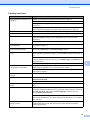
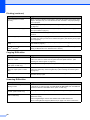
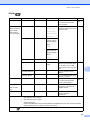
Printing (continued) Difficulty Suggestions Photo paper does not feed correctly. When you print on Brother Photo paper, load one extra sheet of the same photo paper in the paper tray. An extra sheet has been included in the paper package for this purpose. Clean the paper pick-up rollers. (See Cleaning the paper pick-up rollers on page 36.) Machine feeds multiple pages. Make sure the paper is loaded correctly in the paper tray. (See Loading paper and other print media on page 8.) Check that more than two types of paper are not loaded in the paper tray at any one time. There is a paper jam. Make sure the paper length guide is set to the correct paper size. Do not extend the paper tray when you load A5 or smaller size paper. (See Printer jam or paper jam on page 44.) Printed pages are not stacked neatly. Make sure you are using the paper support flap. (See Loading paper and other print media on page 8.) Machine does not print from Try to reduce the print resolution. (See Printing for Windows® or Printing and Faxing for Macintosh in the Software User’s Guide.) Adobe ® Illustrator®. Copying Difficulties Difficulty Suggestions Vertical black lines or streaks appear on copies. Vertical black lines or streaks on copies are typically caused by dirt or correction fluid on the scanner. Clean scanner glass and white plastic above it. (See Cleaning the scanner glass on page 35.) Poor copy results when using the ADF. (DCP-J715W only) Try using the scanner glass. (See Using the scanner glass on page 21.) Vertical black lines or streaks appear in copies. (DCP-J715W only) Vertical black lines or streaks on copies are typically caused by dirt or correction fluid on the glass strip. Clean the glass strip. (See Cleaning the scanner glass on page 35.) Fit to Page does not work correctly. Make sure the document is not skewed on the scanner glass. Reposition the document and try again. Scanning Difficulties Difficulty Suggestions TWAIN/WIA errors appear when starting to scan. Make sure the Brother TWAIN/WIA driver is chosen as the primary source. In PaperPort™11SE with OCR, click File, Scan or Get Photo and click Select to choose the Brother TWAIN/WIA driver. (DCP-J715W only) Poor scanning results when using the ADF. (DCP-J715W only) Try using the scanner glass. (See Using the scanner glass on page 21.) OCR does not work. (DCP-J715W only) Try increasing the scanner resolution. 48 (Macintosh users) Presto! PageManager must be downloaded and installed before use. See Accessing Brother Support (Macintosh) on page 3 for further instructions.