1
Chapter 7 ____________________________________________________________ Technical Data
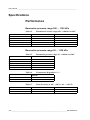
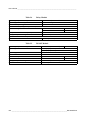
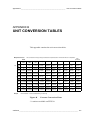
Table 18
Long Term Stability
Class A
500 ... 1100 hPa
50 ... 1100 hPa
Class B
±0.10hPa/year
±0.10hPa/year
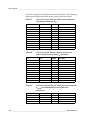
*Defined as ±2 standard deviation limits of endpoint non-linearity,
hysteresis or repeatability error.
**Defined as ±2 standard deviation limits of inaccuracy of the working
standard including traceability to NIST.***Defined as the root sum of
the squares (RSS) of endpoint non-linearity, hysteresis error,
repeatability error and calibration uncertainty at room temperature
****Defined as ±2 standard deviation limits of temperature dependence
over the operating temperature range.
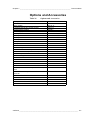
Operating Environment
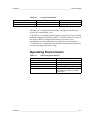
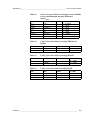
Table 19
Operating Environment
Pressure range
Temperature range
operating
with local display
Maximum pressure limit
Electromagnetic compatibility
500 ... 1100 hPa, 50 ... 1100 hPa
-40 ... +60°C (-40 ... +140 °F)
0 ... +60°C (-32 ... +140 °F)
500 hPa abs.
EMC standard EN61326-1:1997+
Am1:1998 + Am2:2001: Industrial
Environment
VAISALA ______________________________________________________________________ 117