1
Pin Assignment and Definition
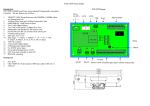
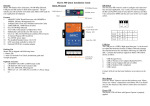
Power Input Connector
PAC-4000 uses +9VDC to 40VDC power and input
from three ports plug-in screw terminal connector.
Auto-polarity and surge protection are included in
power input circuitry of PAC-4000 to provide power
protection. Shielding ground provides better EMI
protection. Please wire the shielding ground to an
appropriate grounded metal surface
Serial Ports:
Port 1~2: Software selectable RS-232 or isolated RS-485. If
RS-485 is chosen, please use terminal block connector for RS485.
Port 3~4: RS-232 port with hardware flow control
Note: Only Port 2 support RS-232 full modem control
DSR,DCD and DTR.
Reset Button
Press the “Reset” button to activate the hardware reset.
You should only use this function if the software does
not function properly.
Power LED
The Power LED will show solid green if power is
properly applied
Ready LED
The Ready LED will show solid green if Matrix 518
complete system boot up. If Ready LED is off during
system boot up, please check if power input is correct.
Turn off the power and restart Matrix 518 again. If
Ready LED is still off, please contact the manufacture
for technical support.
Link and Act LED
When Ethernet port are connected to the network, Link
LED will show solid green. If there is traffic is the
Ethernet line, the yellow Act LED will flash.
Serial Port LED
When RXD line is high then Yellow light is ON and
when TXD line is high, Green light is ON.
Ethernet Port
Serial Console Port:
Serial console port is located inside the box at JP4 of M502. You need a special console cable (CB-BHDB9-020) to
access it
1
2
3
4
TxD
RxD
VCC3
GND
TxD: RS-232 transmit
RxD: RS-232 receive
VCC3: 3.3 VCC Output
GND: Signal ground
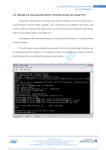
Use any terminal software such as hyper terminal and configure
the setting as follow:
Baud Rate: 115200
Data bits: 8
Parity: N
Stop bit: 1
Terminal type: VT100
Note : We provide a utility software, setconsole to redirect the
console port to any one of the serial port. Therefore user do not
need to open the case to access the physical console port.
Please refer to setconsole command in the Artila utility section.