1
Loader Menu
Loader menu helps user to select the run level of system boot
up. User need to use serial console to enter loader menu.
Please configure the serial port of terminal as follow:
Frequently Asked Question
1. Forgot password:
If you forgot the password for login, please use serial console and
use run level 1 to boot system. Use passwd to change the password
setting.
Baud Rate: 115200
Data bits: 8
Parity: N
Stop bit: 1
Flow Control: None
Terminal type: VT100
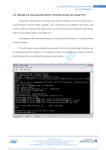
Once power up PAC-4000, please repeatedly keying “@” and
you will see the loader menu appear as follow:
2. Forgot the IP address
If you forgot the PAC-4000 IP address, you can use the Java
Manager available in Artila CD to search the IP address of PAC4000 Or use serial console port to find out the IP address by
#ifconfig
If you miss the timing, please power on again the PAC-4000
and do it again. Select U will prompt the run level selection
message. Run level 0 is halt, run level 1 is single user
( disable login and service ). Run level 2~5 are multiple
users and run level 6 is reboot. To view the run level
configuration, please check
/etc/inittab
3. System fail to boot
If you mess up the root file system and make the system fail to boot,
PAC-4000 will automatically switch to boot from Dataflash file
system and a console menu will show up at console port to help user
perform system recovery. System Recovery Section will tell you
how to recover the system.