1
4. SELECTING AN INSTALLATION
LOCATION
If using the remote control sensor, setting is required. Refer to 6.3.5. RC
(Remote Controller) Thermistor Setting.
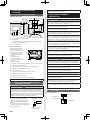
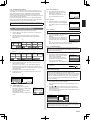
4. 1. Dimensions and Name of parts
Remote controller unit
(a) (b) (c) (d)
(a)
23
(29/32)
45.3 (1-25/32)
63.5 (2-1/2)
20.4 (13/16)
120 (4-23/32)
120 (4-23/32)
30 (1-3/16) 33 (1-5/16)
83.5 (3-9/32)
Hole: 9 × 4.5
(11/32 × 3/16)
15.3 (19/32)
Unit: mm (in.)
Hole: 12.5 × 4.5
(1/2 × 3/16)
Hole: 6 × 4.5
(1/4 × 3/16)
Room temperature sensor (inside)
(b) On/Off button:
It is possible to operate only while displaying the Monitor Mode screen.
(c)
LED lamp (Operation indicator)
(d) Touch panel display
Monitor mode screen
The home screen of this unit.
Except for in the following
cases, the screen will go back
to the main screen if there is
no operation for over 10 min.
(Unsaved settings will be
cancelled.)
• In Emergency Stop.
• In Transferring data.
• In checking the indoor unit
position
• In Function Setting
(a)
(a)
(b)
Office
(d)
(c)
Fri 10:00AM
Fan
Set Temp.
Mode
26.0
Cool
°C
Room Temp.
Status
Auto
26.0°C
Menu
(d)
(e)
(f)
(g)
(h)
WARNING
Always use the accessories and specified installation work parts. Check
the state of the installation parts. Not using the specified parts will cause
units to fall off, water leakage, electric shock, fire, etc.
Install at a place that can withstand the weight of the unit and install
positively so that the unit will not topple or fall.
When installing this unit, make sure that there are no children nearby.
Otherwise, injury or electric shock could result.
Before starting installation work, turn off the power of this unit and the
connection destination. Do not turn on the power again until installation is
completed. Otherwise, it will cause electric shock or fire.
Use the accessories or specified power supply cable and remote controller
cables. Do not modify power supply cable and remote controller cables
other than those specified, do not use extension cords, and do not use
independent branch wiring. Overcurrent may cause electric shock or fire.
Install the remote controller cables securely to the terminal block. Confirm
that external force is not applied to the cable. Use remote controller cables
made of the specified wire. If intermediate connection or insertion fixing
are imperfect, it will cause electric shock, fire, etc.
When connecting the remote controller cable, route the cables so that the
rear case of this unit is securely fixed. If the rear case is imperfectly fixed,
it may cause fire or overheating of the terminals.
Perform functional earthing work positively. Do not connect the functional
earthing wire to a telephone earth (Ground) wire, water pipe, or conductor
rod.
Always fasten the outside covering of the connection cable with the cable
tie. If the insulator is chafed, electric discharge may occur.
(i)
(d)
Set Temp.: Set the operating temperature. Refer to operating manual.
CAUTION
Do not set the DIP switch or rotary switch of this unit except as specified
in this manual or the operating manual supplied with the air conditioner.
Setting the switches other than specified will cause an accident or trouble.
Use an insulated screwdriver to set the DIP switches.
(b) R.C. Group name: Refer to 6.3.4.
(c)
5. INSTALLING THE REMOTE
CONTROLLER
Mode: Set the operation mode. Refer to operating manual.
(d) Status icons: Refer to operating manual.
Before opening the case of this unit, completely discharge static electricity
charged on you body. Not doing so will cause trouble.
(e)
Clock: Refer to 6.2.4.
Do not touch the circuit board and circuit board parts directly with your
hands. Otherwise, injury or electric shock could result.
(f)
Fan: Set the fun speed. Refer to operating manual.
Do not overtighten the screws. It will cause damage of this unit.
(g) Room temperature: Refer to 4.2. and 6.3.5.
(h) Menu: Set the various settings.
(i)
Status: Check the status of indoor unit and error.
This product uses a Bitmap font made and developed by Ricoh Company, Ltd.
4. 2.
SETTING THE ROOM TEMPERATURE
DETECTION LOCATION
CAUTION
As the temperature sensor of remote controller detects the temperature near
the wall, when there is a certain difference between the room temperature
and the wall temperature, the sensor will not detect the room temperature
correctly sometimes. Especially when the outer side of the wall on which the
sensor is positioned is exposed to the open air, it is recommended to use the
temperature sensor of the indoor unit to detect the room temperature when
the indoor and outdoor temperature difference is significant.
The detection location of the room
temperature can be selected from the
following 2 methods. Choose the detection
location that is best for the installation
location.
The temperature sensor of the indoor unit or
the remote controller can be used to detect
the room temperature.
A sensor of the indoor
unit (inside)
Install the remote controller cables 1 m away from television and radio to
avoid distorted images and noise.
Confirm the name of each terminal block of the unit and connect the wiring
in accordance with the directions given in the manual. Improper wiring
work will damage the electric parts and cause smoke and fire.
When installing the connection cable near a source of electromagnetic
waves, use shielded cable. Otherwise, a breakdown or malfunction could
result.
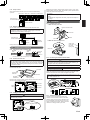
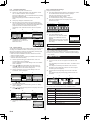
5. 1. Wiring types
5.1.1. Single control
Indoor unit
When there is a
functional earthing
Remote controller
A sensor of the remote
controller (inside)
En-2
Be careful so that the front case does not fall after the front case screws
are removed. Otherwise, injury could result.