1
CheetaSwitch Workgroup-3518
Using a Sniffer Port for Analysis
You can mirror the traffic from a target port to a sniffer port for real-time analysis.
You can then attach a logic analyzer or RMON probe to the analysis port and
study the traffic crossing target port in a completely unobtrusive manner. When
mirroring a port, note that:
•
•
•
If a port belongs to a trunk, you cannot specify it as an analysis or monitored port.
The analysis port must be included in the same VLAN as the monitored port.
Ideally, the bandwidth of the analysis port should be higher than that of the
monitored port. Otherwise, if the bandwidth of both ports is the same, some
packets may be dropped under heavy loading.
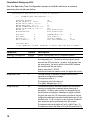
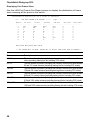
Use the Port Mirror Configuration screen to set up port mirroring as shown below:
CheetahSwitch-3518 Version 1.0.5 S1 Mar 17 1999 Rev1
!!!!!
PORT MIRROR CONFIGURATION
ANALYSIS PORT :
1
MONITORED PORT:
2
ACTION
ACTIVATE
:
!!!!!
SAVE PREV MAIN
** USE ARROW KEYS TO MOVE, ENTER KEY TO SELECT AND SPACE BAR TO CHANGE **
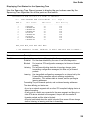
Parameter
Analysis Port
Monitored Port
Action
16
Description
The port that will "duplicate" or "mirror" all the traffic happening on
the monitored port.
The port whose traffic will be monitored.
Enables or disables the mirror function.