1
CheetaSwitch Workgroup-3518
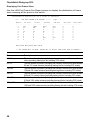
Displaying Port Status
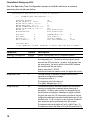
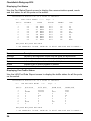
Use the Port Status Report screen to display the communication speed, mode
and link status for all the ports on the switch.
CheetahSwitch-3518 Version 1.0.5 S1 Mar 17 1999 Rev1
!!!!!
PORT #
-----1
2
3
4
5
6
7
8
9
PORT STATUS REPORT
AUTONEGO
--------Yes
Yes
Yes
Yes
Yes
Yes
Yes
Yes
Yes
!!!!!
Page:
SPEED
---------100 MBPS
100 MBPS
10
MBPS
100 MBPS
10
MBPS
100 MBPS
100 MBPS
100 MBPS
10
MBPS
1
DUPLEX
-----Half
Half
Half
Half
Half
Half
Half
Half
Half
ENABLE
-----Yes
Yes
Yes
Yes
Yes
Yes
Yes
Yes
Yes
LINK
---Up
Up
Down
Up
Down
Up
Up
Up
Down
PREV_PAGE NEXT_PAGE PREV MAIN
** USE ARROW KEYS TO MOVE, ENTER KEY TO SELECT AND SPACE BAR TO CHANGE **
Parameter
Autonego
Speed
Duplex
Enable
Link
Description
Indicates if auto-negotiation is used to set the speed and duplex mode.
Indicates the transmission speed currently used by this port.
Indicates if the duplex mode is set to half or full duplex.
Indicates if port is currently enabled or disabled.
Indicates if the port has a valid connection.
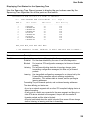
Displaying Port Traffic Status
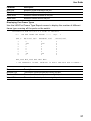
Use the LAN Port Data Report screen to display the traffic status for all the ports
on the switch.
CheetahSwitch-3518 Version 1.0.5 S1 Mar 17 1999 Rev1
!!!!!
PORT #
-----1
2
3
4
5
6
7
8
9
LAN PORT DATA REPORT
BYTE RCVD
-----------0
686088
0
0
0
0
0
88320
0
!!!!!
BYTE SENT
-----------951494
265406
0
919
0
0
0
0
0
Page:
1
FRAME RCVD
-----------0
4881
0
0
0
0
0
390
0
FRAME SENT
-----------6062
1182
0
66
0
0
0
0
0
PREV_PAGE NEXT_PAGE PREV MAIN
** USE ARROW KEYS TO MOVE, ENTER KEY TO SELECT AND SPACE BAR TO CHANGE **
26