1
Intel® Data Plane Development Kit
(Intel® DPDK)
Sample Applications User Guide
June 2014
Document Number: 328218-008
Introduction
INFORMATION IN THIS DOCUMENT IS PROVIDED IN CONNECTION WITH INTEL PRODUCTS. NO LICENSE, EXPRESS OR IMPLIED,
BY ESTOPPEL OR OTHERWISE, TO ANY INTELLECTUAL PROPERTY RIGHTS IS GRANTED BY THIS DOCUMENT. EXCEPT AS
PROVIDED IN INTEL'S TERMS AND CONDITIONS OF SALE FOR SUCH PRODUCTS, INTEL ASSUMES NO LIABILITY WHATSOEVER
AND INTEL DISCLAIMS ANY EXPRESS OR IMPLIED WARRANTY, RELATING TO SALE AND/OR USE OF INTEL PRODUCTS INCLUDING
LIABILITY OR WARRANTIES RELATING TO FITNESS FOR A PARTICULAR PURPOSE, MERCHANTABILITY, OR INFRINGEMENT OF ANY
PATENT, COPYRIGHT OR OTHER INTELLECTUAL PROPERTY RIGHT.
A "Mission Critical Application" is any application in which failure of the Intel Product could result, directly or indirectly, in personal
injury or death. SHOULD YOU PURCHASE OR USE INTEL'S PRODUCTS FOR ANY SUCH MISSION CRITICAL APPLICATION, YOU
SHALL INDEMNIFY AND HOLD INTEL AND ITS SUBSIDIARIES, SUBCONTRACTORS AND AFFILIATES, AND THE DIRECTORS,
OFFICERS, AND EMPLOYEES OF EACH, HARMLESS AGAINST ALL CLAIMS COSTS, DAMAGES, AND EXPENSES AND REASONABLE
ATTORNEYS' FEES ARISING OUT OF, DIRECTLY OR INDIRECTLY, ANY CLAIM OF PRODUCT LIABILITY, PERSONAL INJURY, OR
DEATH ARISING IN ANY WAY OUT OF SUCH MISSION CRITICAL APPLICATION, WHETHER OR NOT INTEL OR ITS
SUBCONTRACTOR WAS NEGLIGENT IN THE DESIGN, MANUFACTURE, OR WARNING OF THE INTEL PRODUCT OR ANY OF ITS
PARTS.
Intel may make changes to specifications and product descriptions at any time, without notice. Designers must not rely on the
absence or characteristics of any features or instructions marked "reserved" or "undefined". Intel reserves these for future
definition and shall have no responsibility whatsoever for conflicts or incompatibilities arising from future changes to them. The
information here is subject to change without notice. Do not finalize a design with this information.
The products described in this document may contain design defects or errors known as errata which may cause the product to
deviate from published specifications. Current characterized errata are available on request.
Contact your local Intel sales office or your distributor to obtain the latest specifications and before placing your product order.
Copies of documents which have an order number and are referenced in this document, or other Intel literature, may be obtained
by calling 1-800-548-4725, or go to: http://www.intel.com/design/literature.htm.
Intel and the Intel logo are trademarks or registered trademarks of Intel Corporation or its subsidiaries in the United States and
other countries.
*Other names and brands may be claimed as the property of others.
Copyright © 2014, Intel Corporation. All rights reserved.
Intel® Data Plane Development Kit (Intel® DPDK)
Sample Application User Guide
2
June 2014
Document Number: 328218-008
Introduction
Contents
1
Introduction ..................................................................................................... 10
1.1
2
Command Line Sample Application ..................................................................... 11
2.1
2.2
2.3
2.4
3
3.4
Overview .............................................................................................. 23
Building the Application .......................................................................... 23
Running the Application .......................................................................... 24
IPv4 Multicast Sample Application ....................................................................... 26
6.1
6.2
6.3
6.4
7
Compiling the Application........................................................................ 21
Running the Application .......................................................................... 21
Explanation ........................................................................................... 21
4.3.1
EAL Initialization....................................................................... 21
4.3.2
Starting Application Unit Lcores .................................................. 22
IPv4 Fragmentation Sample Application ............................................................... 23
5.1
5.2
5.3
6
Overview .............................................................................................. 15
Compiling the Application........................................................................ 16
Running the Application .......................................................................... 16
3.3.1
Getting Statistics ...................................................................... 16
Explanation ........................................................................................... 17
3.4.1
Initialization ............................................................................. 17
3.4.2
Packet Forwarding .................................................................... 18
3.4.3
Managing TAP Interfaces and Bridges .......................................... 19
Hello World Sample Application .......................................................................... 21
4.1
4.2
4.3
5
Overview .............................................................................................. 11
Compiling the Application........................................................................ 11
Running the Application .......................................................................... 12
Explanation ........................................................................................... 12
2.4.1
EAL Initialization and cmdline Start ............................................. 12
2.4.2
Defining a cmdline Context ........................................................ 12
Exception Path Sample Application ...................................................................... 15
3.1
3.2
3.3
4
Documentation Roadmap ........................................................................ 10
Overview .............................................................................................. 26
Building the Application .......................................................................... 26
Running the Application .......................................................................... 27
Explanation ........................................................................................... 27
6.4.1
Memory Pool Initialization .......................................................... 28
6.4.2
Hash Initialization ..................................................................... 28
6.4.3
Forwarding .............................................................................. 29
6.4.4
Buffer Cloning .......................................................................... 30
IP Reassembly Sample Application ...................................................................... 33
7.1
7.2
7.3
Overview .............................................................................................. 33
Compiling the Application........................................................................ 33
Running the Application .......................................................................... 34
June 2014
Document Number: 328218-008
Intel® Data Plane Development Kit (Intel® DPDK)
Sample Applications User Guide
3
Introduction
7.4
8
Kernel NIC Interface Sample Application .............................................................. 38
8.1
8.2
8.3
8.4
8.5
8.6
9
9.2
9.3
9.4
Overview .............................................................................................. 58
Compiling the Application........................................................................ 58
Running the Application .......................................................................... 59
Explanation ........................................................................................... 60
10.4.1 Hash Initialization ..................................................................... 60
10.4.2 LPM Initialization ...................................................................... 61
10.4.3 Packet Forwarding for Hash-based Lookups ................................. 62
10.4.4 Packet Forwarding for LPM-based Lookups ................................... 63
L3 Forwarding with Power Management Sample Application ................................... 64
11.1
11.2
11.3
11.4
12
Overview .............................................................................................. 48
9.1.1
Virtual Function Setup Instructions ............................................. 50
Compiling the Application........................................................................ 50
Running the Application .......................................................................... 50
Explanation ........................................................................................... 51
9.4.1
Command Line Arguments ......................................................... 51
9.4.2
Mbuf Pool Initialization .............................................................. 51
9.4.3
Driver Initialization ................................................................... 52
9.4.4
RX Queue Initialization .............................................................. 53
9.4.5
TX Queue Initialization .............................................................. 54
9.4.6
Receive, Process and Transmit Packets ........................................ 54
L3 Forwarding Sample Application ...................................................................... 58
10.1
10.2
10.3
10.4
11
Overview .............................................................................................. 38
Compiling the Application........................................................................ 39
Loading the Kernel Module ...................................................................... 39
Running the Application .......................................................................... 40
KNI Operations ...................................................................................... 41
Explanation ........................................................................................... 41
8.6.1
Initialization ............................................................................. 42
8.6.2
Packet Forwarding .................................................................... 45
8.6.3
Callbacks for Kernel Requests .................................................... 46
L2 Forwarding Sample Application (in Real and Virtualized Environments) ............... 48
9.1
10
Explanation ........................................................................................... 35
7.4.1
IPv4 Fragment Table Initialization ............................................... 35
7.4.2
Mempools Initialization .............................................................. 36
7.4.3
Packet Reassembly and Forwarding ............................................ 36
7.4.4
Debug logging and Statistics Collection ....................................... 37
Introduction .......................................................................................... 64
Overview .............................................................................................. 64
Compiling the Application........................................................................ 65
Explanation ........................................................................................... 66
11.4.1 Power Library Initialization ......................................................... 66
11.4.2 Monitoring Loads of Rx Queues .................................................. 67
11.4.3 P-State Heuristic Algorithm ........................................................ 69
11.4.4 C-State Heuristic Algorithm ........................................................ 70
L3 Forwarding in a Virtualization Environment Sample Application .......................... 71
12.1
12.2
Overview .............................................................................................. 78
Compiling the Application........................................................................ 79
Intel® Data Plane Development Kit (Intel® DPDK)
Sample Application User Guide
4
June 2014
Document Number: 328218-008
Introduction
12.3
12.4
13
Link Status Interrupt Sample Application ............................................................. 81
13.1
13.2
13.3
13.4
14
14.2
14.3
14.4
Example Applications.............................................................................. 94
15.1.1 Building the Sample Applications ................................................ 94
15.1.2 Basic Multi-process Example ...................................................... 94
15.1.2.1 Running the Application .............................................. 94
15.1.2.2 How the Application Works .......................................... 96
15.1.3 Symmetric Multi-process Example .............................................. 96
15.1.3.1 Running the Application .............................................. 97
15.1.3.2 How the Application Works .......................................... 98
15.1.4 Client-Server Multi-process Example ........................................... 99
15.1.4.1 Running the Application .............................................. 99
15.1.4.2 How the Application Works ........................................ 100
15.1.5 Master-slave Multi-process Example .......................................... 101
15.1.5.1 Master-slave Process Models ..................................... 101
15.1.5.2 Slave Process Recovery Mechanism ............................ 102
15.1.5.3 Floating Process Support .......................................... 103
15.1.5.4 Run the Application .................................................. 104
15.1.5.5 Explanation ............................................................. 105
QoS Metering Sample Application ..................................................................... 108
16.1
16.2
16.3
16.4
17
Overview .............................................................................................. 89
14.1.1 I/O RX Logical Cores ................................................................. 90
14.1.2 I/O TX Logical Cores ................................................................. 90
14.1.3 Worker Logical Cores ................................................................ 90
Compiling the Application........................................................................ 90
Running the Application .......................................................................... 91
Explanation ........................................................................................... 91
14.4.1 Application Configuration ........................................................... 91
14.4.2 NUMA Support.......................................................................... 92
Multi-process Sample Application ........................................................................ 94
15.1
16
Overview .............................................................................................. 81
Compiling the Application........................................................................ 81
Running the Application .......................................................................... 82
Explanation ........................................................................................... 82
13.4.1 Command Line Arguments ......................................................... 82
13.4.2 Mbuf Pool Initialization .............................................................. 82
13.4.3 Driver Initialization ................................................................... 82
13.4.4 Interrupt Callback Registration ................................................... 84
13.4.5 RX Queue Initialization .............................................................. 85
13.4.6 TX Queue Initialization .............................................................. 85
13.4.7 Receive, Process and Transmit Packets ........................................ 86
Load Balancer Sample Application ....................................................................... 89
14.1
15
Running the Application .......................................................................... 79
Explanation ........................................................................................... 80
Overview ............................................................................................ 108
Compiling the Application...................................................................... 108
Running the Application ........................................................................ 109
Explanation ......................................................................................... 109
QoS Scheduler Sample Application .................................................................... 111
17.1
Overview ............................................................................................ 111
June 2014
Document Number: 328218-008
Intel® Data Plane Development Kit (Intel® DPDK)
Sample Applications User Guide
5
Introduction
17.2
17.3
17.4
18
Intel® QuickAssist Technology Sample Application .............................................. 117
18.1
18.2
18.3
19
19.4
Compiling the Application...................................................................... 131
Running the Application ........................................................................ 131
Explanation ......................................................................................... 131
20.3.1 Initialization and Main Loop ..................................................... 131
20.3.2 Managing Timers .................................................................... 132
VMDQ and DCB Forwarding Sample Application .................................................. 134
21.1
21.2
21.3
21.4
22
Overview ............................................................................................ 121
Compiling the Application...................................................................... 123
Running the Application ........................................................................ 123
19.3.1 Running the Core Application ................................................... 124
19.3.2 Running the Control Application ................................................ 124
Code Overview .................................................................................... 124
19.4.1 Core Application - qw .............................................................. 125
19.4.1.1 EAL and Drivers Setup .............................................. 125
19.4.1.2 Shared Variables Setup ............................................ 125
19.4.1.3 Application Arguments .............................................. 126
19.4.1.4 Mbuf Pool Initialization ............................................. 126
19.4.1.5 Ports Configuration and Pairing .................................. 126
19.4.1.6 Logical Cores Assignment ......................................... 127
19.4.1.7 Receive, Process and Transmit Packets ....................... 127
19.4.2 Control Application - qwctl ....................................................... 130
19.4.2.1 Command Definitions ............................................... 130
19.4.2.2 Accessing Shared Variables ....................................... 130
Timer Sample Application ................................................................................ 131
20.1
20.2
20.3
21
Overview ............................................................................................ 117
18.1.1 Setup .................................................................................... 118
Building the Application ........................................................................ 119
Running the Application ........................................................................ 119
18.3.1 Intel® QuickAssist Technology Configuration Files ....................... 119
18.3.2 Traffic Generator Setup and Application Startup ......................... 120
Quota and Watermark Sample Application ......................................................... 121
19.1
19.2
19.3
20
Compiling the Application...................................................................... 112
Running the Application ........................................................................ 112
17.3.1 Interactive mode .................................................................... 114
17.3.2 Example ................................................................................ 115
Explanation ......................................................................................... 115
Overview ............................................................................................ 134
Compiling the Application...................................................................... 135
Running the Application ........................................................................ 136
Explanation ......................................................................................... 136
21.4.1 Initialization ........................................................................... 136
21.4.2 Statistics Display .................................................................... 138
Vhost Sample Application ................................................................................ 139
22.1
22.2
22.3
22.4
Background ......................................................................................... 139
Sample Code Overview ......................................................................... 140
Supported Distributions ........................................................................ 142
Prerequisites ....................................................................................... 142
Intel® Data Plane Development Kit (Intel® DPDK)
Sample Application User Guide
6
June 2014
Document Number: 328218-008
Introduction
22.5
22.6
22.7
22.8
22.9
23
22.4.1 Installing Packages on the Host ................................................ 142
22.4.2 Setting up the Execution Environment ....................................... 143
22.4.3 Setting up the Guest Execution Environment .............................. 144
Compiling the Sample Code .................................................................. 144
Running the Sample Code ..................................................................... 145
22.6.1 Parameters ............................................................................ 146
Running the Virtual Machine (QEMU) ...................................................... 147
22.7.1 Redirecting QEMU to vhost-net Sample Code ............................. 148
22.7.2 Mapping the Virtual Machine’s Memory ...................................... 148
22.7.3 QEMU Wrapper Script .............................................................. 148
22.7.4 Libvirt Integration ................................................................... 149
22.7.5 Common Issues...................................................................... 150
Running Intel® DPDK in the Virtual Machine ............................................ 150
22.8.1 Testpmd MAC Forwarding ........................................................ 151
22.8.2 Running Testpmd ................................................................... 151
Passing Traffic to the Virtual Machine Device ........................................... 152
Netmap Compatibility Sample Application .......................................................... 153
23.1
23.2
23.3
23.4
23.5
23.6
24
Introduction ........................................................................................ 153
Available APIs ..................................................................................... 153
Caveats .............................................................................................. 153
Porting Netmap Applications .................................................................. 154
Compiling the “bridge” Sample Application .............................................. 155
Running the “bridge” Sample Application ................................................ 155
Internet Protocol (IP) Pipeline Sample Application ............................................... 156
24.1
24.2
24.3
25
Overview ............................................................................................ 156
Compiling the Application...................................................................... 156
Running the Sample Code ..................................................................... 156
Test Pipeline Application .................................................................................. 158
25.1
25.2
25.3
Overview ............................................................................................ 158
Compiling the Application...................................................................... 158
Running the Application ........................................................................ 159
25.3.1 Application Command Line ....................................................... 159
25.3.2 Table Types and Behavior ........................................................ 159
25.3.3 Input Traffic ........................................................................... 161
Figures
Figure
Figure
Figure
Figure
Figure
Figure
Figure
Figure
Figure
Figure
Figure
1.
2.
3.
4.
5.
6.
7.
8.
9.
10.
11.
Packet Flow...................................................................................................... 15
Kernel NIC Application Packet Flow ..................................................................... 39
Performance Benchmark Setup (Basic Environment) ............................................. 49
Performance Benchmark Setup (Virtualized Environment) ...................................... 49
Load Balancer Application Architecture ................................................................ 89
Example Data Flow in a Symmetric Multi-process Application ................................. 97
Example Data Flow in a Client-Server Symmetric Multi-process Application .............. 99
Master-slave Process Workflow ......................................................................... 101
Slave Process Recovery Process Flow ................................................................ 103
QoS Scheduler Application Architecture ............................................................. 111
Intel® QuickAssist Technology Application Block Diagram .................................... 117
June 2014
Document Number: 328218-008
Intel® Data Plane Development Kit (Intel® DPDK)
Sample Applications User Guide
7
Introduction
Figure
Figure
Figure
Figure
Figure
Figure
Figure
Figure
Figure
Figure
12.
13.
14.
15.
16.
17.
18.
19.
20.
21.
Pipeline Overview ........................................................................................... 122
Ring-based Processing Pipeline Performance Setup ............................................. 123
Threads and Pipelines...................................................................................... 128
Packet Flow Through the VMDQ and DCB Sample Application ............................... 135
QEMU Virtio-net (prior to vhost-net) ................................................................. 139
Virtio with Linux* Kernel Vhost ......................................................................... 140
Vhost-net Architectural Overview ...................................................................... 141
Packet Flow Through the vhost-net Sample Application ....................................... 142
Packet Flow on TX in DPDK-testpmd ................................................................. 151
Test Pipeline Application .................................................................................. 158
Tables
Table 1.
Table 2.
Table 3.
Output Traffic Marking ..................................................................................... 110
Entity Types ................................................................................................... 116
Table Types ................................................................................................... 159
Intel® Data Plane Development Kit (Intel® DPDK)
Sample Application User Guide
8
June 2014
Document Number: 328218-008
Introduction
Revision History
Date
June 2014
Revision
008
Description
Supports public software release 1.7.0
Added Section 12.0, “L3 Forwarding with Access Control Sample Application”
February 2014
007
Supports pubic software release 1.7.0 EA1:
Added Section 24.0, “Internet Protocol (IP) Pipeline Sample Application”
Added Section 25.0, “Test Pipeline Application”
January 2014
006
Supports public software release 1.6.0:
Added Section 22.0. “Vhost Sample Application”
Added Section 23.0, “Netmap Compatibility Sample Application”
October 2013
005
Supports public software release 1.5.1
September 2013
004
Supports public software release 1.5.0
August 2013
003
Supports Public software release 1.4.1
June 2013
002
Supports Public software release 1.3.1
November 2012
001
Supports Public software release 1.2.3
§
June 2014
Document Number: 328218-008
Intel® Data Plane Development Kit (Intel® DPDK)
Sample Applications User Guide
9
Introduction
1
Introduction
This document describes the sample applications that are included in the Intel® Data
Plane Development Kit (Intel® DPDK). Each chapter describes a sample application that
showcases specific functionality and provides instructions on how to compile, run and
use the sample application.
1.1
Documentation Roadmap
The following is a list of Intel® DPDK documents in suggested reading order:
Release Notes: Provides release-specific information, including supported
features, limitations, fixed issues, known issues and so on. Also, provides the
answers to frequently asked questions in FAQ format.
Getting Started Guides: Describes how to install and configure the Intel® DPDK
software for your operating system; designed to get users up and running quickly
with the software.
Programmer's Guide: Describes:
The software architecture and how to use it (through examples), specifically in
a Linux* application (linuxapp) environment
The content of the Intel® DPDK, the build system (including the commands that
can be used in the root Intel® DPDK Makefile to build the development kit and
an application) and guidelines for porting an application
Optimizations used in the software and those that should be considered for new
development
A glossary of terms is also provided.
API Reference: Provides detailed information about Intel® DPDK functions, data
structures and other programming constructs.
Sample Applications User Guide: Describes a set of sample applications. Each
chapter describes a sample application that showcases specific functionality and
provides instructions on how to compile, run and use the sample application.
§§
Intel® Data Plane Development Kit (Intel® DPDK)
Sample Application User Guide
10
June 2014
Document Number: 328218-008
Command Line Sample Application
2
Command Line Sample
Application
This chapter describes the Command Line sample application that is part of the Intel®
Data Plane Development Kit (Intel® DPDK).
2.1
Overview
The Command Line sample application is a simple application that demonstrates the
use of the command line interface in the Intel® DPDK. This application is a readline-like
interface that can be used to debug an Intel® DPDK application, in a Linux* application
environment.
Caution:
The rte_cmdline library should not be used in production code since it is not validated
to the same standard as other Intel® DPDK libraries. See also the “rte_cmdline library
should not be used in production code due to limited testing” item in the “Known
Issues” section of the Release Notes.
The Command Line sample application supports some of the features of the GNU
readline library such as, completion, cut/paste and some other special bindings that
make configuration and debug faster and easier.
The application shows how the rte_cmdline application can be extended to handle a
list of objects. There are three simple commands:
Note:
2.2
add obj_name IP: Add a new object with an IP/IPv6 address associated to it.
del obj_name: Delete the specified object.
show obj_name: Show the IP associated with the specified object.
To terminate the application, use Ctrl-d.
Compiling the Application
1. Go to example directory:
export RTE_SDK=/path/to/rte_sdk
cd ${RTE_SDK}/examples/cmdline
2. Set the target (a default target is used if not specified). For example:
export RTE_TARGET=x86_64-native-linuxapp-gcc
Refer to the Intel® DPDK Getting Started Guide for possible RTE_TARGET values.
June 2014
Document Number: 328218-008
Intel® Data Plane Development Kit (Intel® DPDK)
Sample Applications User Guide
11
Command Line Sample Application
3. Build the application:
make
2.3
Running the Application
To run the application in linuxapp environment, issue the following command:
$ ./build/cmdline -c f -n 4
Refer to the Intel® DPDK Getting Started Guide for general information on running
applications and the Environment Abstraction Layer (EAL) options.
2.4
Explanation
The following sections provide some explanation of the code.
2.4.1
EAL Initialization and cmdline Start
The first task is the initialization of the Environment Abstraction Layer (EAL). This is
achieved as follows:
int
MAIN(int argc, char **argv)
{
ret = rte_eal_init(argc, argv);
if (ret < 0)
rte_panic("Cannot init EAL\n");
Then, a new command line object is created and started to interact with the user
through the console:
cl = cmdline_stdin_new(main_ctx, "example> ");
cmdline_interact(cl);
cmdline_stdin_exit(cl);
The cmdline_interact() function returns when the user types Ctrl-d and in this
case, the application exits.
2.4.2
Defining a cmdline Context
A cmdline context is a list of commands that are listed in a NULL-terminated table, for
example:
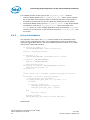
cmdline_parse_ctx_t main_ctx[] = {
(cmdline_parse_inst_t *) &cmd_obj_del_show,
(cmdline_parse_inst_t *) &cmd_obj_add,
(cmdline_parse_inst_t *) &cmd_help,
NULL,
};
Intel® Data Plane Development Kit (Intel® DPDK)
Sample Application User Guide
12
June 2014
Document Number: 328218-008
Command Line Sample Application
Each command (of type cmdline_parse_inst_t) is defined statically. It contains a
pointer to a callback function that is executed when the command is parsed, an opaque
pointer, a help string and a list of tokens in a NULL-terminated table.
The rte_cmdline application provides a list of pre-defined token types:
String Token: Match a static string, a list of static strings or any string.
Number Token: Match a number that can be signed or unsigned, from 8-bit to
32-bit.
IP Address Token: Match an IPv4 or IPv6 address or network.
Ethernet* Address Token: Match a MAC address.
In this example, a new token type obj_list is defined and implemented in the
parse_obj_list.c and parse_obj_list.h files.
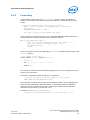
For example, the cmd_obj_del_show command is defined as shown below:
struct cmd_obj_add_result {
cmdline_fixed_string_t action;
cmdline_fixed_string_t name;
struct object *obj;
};
static void cmd_obj_del_show_parsed(void *parsed_result,
struct cmdline *cl,
attribute ((unused)) void *data)
{
/* ...*/
}
cmdline_parse_token_string_t cmd_obj_action =
TOKEN_STRING_INITIALIZER(struct cmd_obj_del_show_result,
action, "show#del");
parse_token_obj_list_t cmd_obj_obj =
TOKEN_OBJ_LIST_INITIALIZER(struct cmd_obj_del_show_result, obj,
&global_obj_list);
cmdline_parse_inst_t cmd_obj_del_show = {
.f = cmd_obj_del_show_parsed, /* function to call */
.data = NULL, /* 2nd arg of func */
.help_str = "Show/del an object",
.tokens = { /* token list, NULL terminated */
(void *)&cmd_obj_action,
(void *)&cmd_obj_obj,
NULL,
},
};
This command is composed of two tokens:
The first token is a string token that can be show or del.
The second token is an object that was previously added using the add command
in the global_obj_list variable.
June 2014
Document Number: 328218-008
Intel® Data Plane Development Kit (Intel® DPDK)
Sample Applications User Guide
13
Command Line Sample Application
Once the command is parsed, the rte_cmdline application fills a
cmd_obj_del_show_result structure. A pointer to this structure is given as an
argument to the callback function and can be used in the body of this function.
§§
Intel® Data Plane Development Kit (Intel® DPDK)
Sample Application User Guide
14
June 2014
Document Number: 328218-008
Exception Path Sample Application
3
Exception Path Sample
Application
The Exception Path sample application is a simple example that demonstrates the use
of the Intel® DPDK to set up an exception path for packets to go through the Linux*
kernel. This is done by using virtual TAP network interfaces. These can be read from
and written to by the Intel® DPDK application and appear to the kernel as a standard
network interface.
3.1
Overview
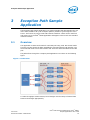
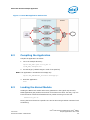
The application creates two threads for each NIC port being used. One thread reads
from the port and writes the data unmodified to a thread-specific TAP interface. The
second thread reads from a TAP interface and writes the data unmodified to the NIC
port.
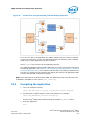
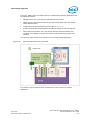
The packet flow through the exception path application is as shown in the following
figure.
Figure 1. Packet Flow
To make throughput measurements, kernel bridges must be setup to forward data
between the bridges appropriately.
June 2014
Document Number: 328218-008
Intel® Data Plane Development Kit (Intel® DPDK)
Sample Applications User Guide
15
Exception Path Sample Application
3.2
Compiling the Application
1. Go to example directory:
export RTE_SDK=/path/to/rte_sdk
cd ${RTE_SDK}/examples/exception_path
2. Set the target (a default target will be used if not specified). For example:
export RTE_TARGET=x86_64-native-linuxapp-gcc
This application is intended as a linuxapp only. See the Intel® DPDK Getting
Started Guide for possible RTE_TARGET values.
3. Build the application:
make
3.3
Running the Application
The application requires a number of command line options:
.build/exception_path [EAL options] -- -p PORTMASK -i IN_CORES -o
OUT_CORES
where:
-p PORTMASK: A hex bitmask of ports to use
-i IN_CORES: A hex bitmask of cores which read from NIC
-o OUT_CORES: A hex bitmask of cores which write to NIC
Refer to the Intel® DPDK Getting Started Guide for general information on running
applications and the Environment Abstraction Layer (EAL) options.
The number of bits set in each bitmask must be the same. The coremask -c parameter
of the EAL options should include IN_CORES and OUT_CORES. The same bit must not be
set in IN_CORES and OUT_CORES. The affinities between ports and cores are set
beginning with the least significant bit of each mask, that is, the port represented by
the lowest bit in PORTMASK is read from by the core represented by the lowest bit in
IN_CORES, and written to by the core represented by the lowest bit in OUT_CORES.
For example to run the application with two ports and four cores:
./build/exception_path -c f -n 4 -- -p 3 -i 3 -o c
3.3.1
Getting Statistics
While the application is running, statistics on packets sent and received can be
displayed by sending the SIGUSR1 signal to the application from another terminal:
killall -USR1 exception_path
The statistics can be reset by sending a SIGUSR2 signal in a similar way.
Intel® Data Plane Development Kit (Intel® DPDK)
Sample Application User Guide
16
June 2014
Document Number: 328218-008
Exception Path Sample Application
3.4
Explanation
The following sections provide some explanation of the code.
3.4.1
Initialization
Setup of the mbuf pool, driver and queues is similar to the setup done in the L2
Forwarding sample application (see Chapter 9 “L2 Forwarding Sample Application (in
Real and Virtualized Environments)” for details). In addition, the TAP interfaces must
also be created. A TAP interface is created for each lcore that is being used. The code
for creating the TAP interface is as follows:
/*
*Create a tap network interface, or use existing one with same name.
*If name[0]='\0' then a name is automatically assigned and returned in
name.
*/
static int tap_create(char *name)
{
struct ifreq ifr;
int fd, ret;
fd = open("/dev/net/tun", O_RDWR);
if (fd < 0)
return fd;
memset(&ifr, 0, sizeof(ifr));
/* TAP device without packet information */
ifr.ifr_flags = IFF_TAP | IFF_NO_PI;
if (name && *name)
rte_snprinf(ifr.ifr_name, IFNAMSIZ, name);
ret = ioctl(fd, TUNSETIFF, (void *) &ifr);
if (ret < 0) {
close(fd);
return ret;
}
if (name)
rte_snprintf(name, IFNAMSIZ, ifr.ifr_name);
return fd;
}
The other step in the initialization process that is unique to this sample application is
the association of each port with two cores:
One core to read from the port and write to a TAP interface
A second core to read from a TAP interface and write to the port
This is done using an array called port_ids[], which is indexed by the lcore IDs. The
population of this array is shown below:
tx_port = 0;
rx_port = 0;
June 2014
Document Number: 328218-008
Intel® Data Plane Development Kit (Intel® DPDK)
Sample Applications User Guide
17
Exception Path Sample Application
RTE_LCORE_FOREACH(i) {
if (input_cores_mask & (1ULL << i)) {
/* Skip ports that are not enabled */
while ((ports_mask & (1 << rx_port)) == 0) {
rx_port++;
if (rx_port > (sizeof(ports_mask) * 8))
goto fail; /* not enough ports */
}
port_ids[i] = rx_port++;
} else if (output_cores_mask & (1ULL << i)) {
/* Skip ports that are not enabled */
while ((ports_mask & (1 << tx_port)) == 0) {
tx_port++;
if (tx_port > (sizeof(ports_mask) * 8))
goto fail; /* not enough ports */
}
port_ids[i] = tx_port++;
}
}
3.4.2
Packet Forwarding
After the initialization steps are complete, the main_loop() function is run on each
lcore. This function first checks the lcore_id against the user provided
input_cores_mask and output_cores_mask to see if this core is reading from or
writing to a TAP interface.
For the case that reads from a NIC port, the packet reception is the same as in the L2
Forwarding sample application (see Section 9.4.6, “Receive, Process and Transmit
Packets” on page 54). The packet transmission is done by calling write() with the file
descriptor of the appropriate TAP interface and then explicitly freeing the mbuf back to
the pool.
/* Loop forever reading from NIC and writing to tap */
for (;;) {
struct rte_mbuf *pkts_burst[PKT_BURST_SZ];
unsigned i;
const unsigned nb_rx = rte_eth_rx_burst(port_ids[lcore_id], 0,
pkts_burst, PKT_BURST_SZ);
lcore_stats[lcore_id].rx += nb_rx;
for (i = 0; likely(i < nb_rx); i++) {
struct rte_mbuf *m = pkts_burst[i];
int ret = write(tap_fd, rte_pktmbuf_mtod(m, void*),
rte_pktmbuf_data_len(m));
rte_pktmbuf_free(m);
if (unlikely(ret<0))
lcore_stats[lcore_id].dropped++;
else
lcore_stats[lcore_id].tx++;
}
}
For the other case that reads from a TAP interface and writes to a NIC port, packets
are retrieved by doing a read() from the file descriptor of the appropriate TAP
interface. This fills in the data into the mbuf, then other fields are set manually. The
packet can then be transmitted as normal.
Intel® Data Plane Development Kit (Intel® DPDK)
Sample Application User Guide
18
June 2014
Document Number: 328218-008
Exception Path Sample Application
/* Loop forever reading from tap and writing to NIC */
for (;;) {
int ret;
struct rte_mbuf *m = rte_pktmbuf_alloc(pktmbuf_pool);
if (m == NULL)
continue;
ret = read(tap_fd, m->pkt.data, MAX_PACKET_SZ);
lcore_stats[lcore_id].rx++;
if (unlikely(ret < 0)) {
FATAL_ERROR("Reading from %s interface failed",
tap_name);
}
m->pkt.nb_segs = 1;
m->pkt.next = NULL;
m->pkt.pkt_len = (uint16_t)ret;
m->pkt.data_len = (uint16_t)ret;
ret = rte_eth_tx_burst(port_ids[lcore_id], 0, &m, 1);
if (unlikely(ret < 1)) {
rte_pktmuf_free(m);
lcore_stats[lcore_id].dropped++;
}
else {
lcore_stats[lcore_id].tx++;
}
}
To set up loops for measuring throughput, TAP interfaces can be connected using
bridging. The steps to do this are described in the Managing TAP Interfaces and Bridges
section that follows.
3.4.3
Managing TAP Interfaces and Bridges
The Exception Path sample application creates TAP interfaces with names of the format
tap_dpdk_nn, where nn is the lcore ID. These TAP interfaces need to be configured for
use:
ifconfig tap_dpdk_00 up
To set up a bridge between two interfaces so that packets sent to one interface can be
read from another, use the brctl tool:
brctl addbr "br0"
brctl addif br0 tap_dpdk_00
brctl addif br0 tap_dpdk_03
ifconfig br0 up
The TAP interfaces created by this application exist only when the application is
running, so the steps above need to be repeated each time the application is run. To
avoid this, persistent TAP interfaces can be created using openvpn:
openvpn --mktun --dev tap_dpdk_00
June 2014
Document Number: 328218-008
Intel® Data Plane Development Kit (Intel® DPDK)
Sample Applications User Guide
19
Exception Path Sample Application
If this method is used, then the steps above have to be done only once and the same
TAP interfaces can be reused each time the application is run. To remove bridges and
persistent TAP interfaces, the following commands are used:
ifconfig br0 down
brctl delbr br0
openvpn --rmtun --dev tap_dpdk_00
§§
Intel® Data Plane Development Kit (Intel® DPDK)
Sample Application User Guide
20
June 2014
Document Number: 328218-008
Hello World Sample Application
4
Hello World Sample Application
The Hello World sample application is an example of the simplest Intel ® DPDK
application that can be written. The application simply prints an “helloworld” message
on every enabled lcore.
4.1
Compiling the Application
1. Go to the example directory:
export RTE_SDK=/path/to/rte_sdk
cd ${RTE_SDK}/examples/helloworld
2. Set the target (a default target is used if not specified). For example:
export RTE_TARGET=x86_64-native-linuxapp-gcc
See the Intel® DPDK Getting Started Guide for possible RTE_TARGET values.
3. Build the application:
make
4.2
Running the Application
To run the example in a linuxapp environment:
$ ./build/helloworld -c f -n 4
Refer to Intel® DPDK Getting Started Guide for general information on running
applications and the Environment Abstraction Layer (EAL) options.
4.3
Explanation
The following sections provide some explanation of code.
4.3.1
EAL Initialization
The first task is to initialize the Environment Abstraction Layer (EAL). This is done in
the main() function using the following code:
int
MAIN(int argc, char **argv)
{
ret = rte_eal_init(argc, argv);
if (ret < 0)
rte_panic("Cannot init EAL\n");
June 2014
Document Number: 328218-008
Intel® Data Plane Development Kit (Intel® DPDK)
Sample Applications User Guide
21
Hello World Sample Application
This call finishes the initialization process that was started before main() is called (in
case of a Linuxapp environment). The argc and argv arguments are provided to the
rte_eal_init() function. The value returned is the number of parsed arguments.
4.3.2
Starting Application Unit Lcores
Once the EAL is initialized, the application is ready to launch a function on an lcore. In
this example, lcore_hello() is called on every available lcore. The following is the
definition of the function:
static int
lcore_hello( attribute ((unused)) void *arg)
{
unsigned lcore_id;
lcore_id = rte_lcore_id();
printf("hello from core %u\n", lcore_id);
return 0;
}
The code that launches the function on each lcore is as follows:
/* call lcore_hello() on every slave lcore */
RTE_LCORE_FOREACH_SLAVE(lcore_id) {
rte_eal_remote_launch(lcore_hello, NULL, lcore_id);
}
/* call it on master lcore too */
lcore_hello(NULL);
The following code is equivalent and simpler:
rte_eal_mp_remote_launch(lcore_hello, NULL, CALL_MASTER);
Refer to the Intel® DPDK API Reference for detailed information on the
rte_eal_mp_remote_launch() function.
§§
Intel® Data Plane Development Kit (Intel® DPDK)
Sample Application User Guide
22
June 2014
Document Number: 328218-008
IP Fragmentation Sample Application
5
IP Fragmentation Sample
Application
The IPv4 Fragmentation application is a simple example of packet processing using
the Intel® Data Plane Development Kit (Intel® DPDK). The application does L3
forwarding with IPv4 and IPv6 packet fragmentation.
5.1
Overview
The application demonstrates the use of zero-copy buffers for packet fragmentation.
The initialization and run-time paths are very similar to those of the L2 forwarding
application (see Chapter 9 “L2 Forwarding Sample Application (in Real and Virtualized
Environments)” for more information). This guide highlights the differences between
the two applications.
There are three key differences from the L2 Forwarding sample application:
The first difference is that the IP Fragmentation sample application makes use of
indirect buffers.
The second difference is that the forwarding decision is taken based on information
read from the input packet’s IP header.
The third difference is that the application differentiates between IP and non-IP
traffic by means of offload flags.
The Longest Prefix Match (LPM for IPv4, LPM6 for IPv6) table is used to store/lookup an
outgoing port number, associated with that IP address. Any unmatched packets are
forwarded to the originating port.
By default, input frame sizes up to 9.5 KB are supported. Before forwarding, the input
IP packet is fragmented to fit into the “standard” Ethernet* v2 MTU (1500 bytes).
5.2
Building the Application
To build the application:
1. Go to the sample application directory:
export RTE_SDK=/path/to/rte_sdk
cd ${RTE_SDK}/examples/ip_fragmentation
4. Set the target (a default target is used if not specified). For example:
export RTE_TARGET=x86_64-native-linuxapp-gcc
See the Intel® DPDK Getting Started Guide for possible RTE_TARGET values.
3. Build the application:
June 2014
Document Number: 328218-008
Intel® Data Plane Development Kit (Intel® DPDK)
Sample Applications User Guide
23
IP Fragmentation Sample Application
make
5.3
Running the Application
The LPM object is created and loaded with the pre-configured entries read from global
l3fwd_ipv4_route_array and l3fwd_ipv6_route_array tables. For each input packet,
the packet forwarding decision (that is, the identification of the output interface for the
packet) is taken as a result of LPM lookup. If the IP packet size is greater than default
output MTU, then the input packet is fragmented and several fragments are sent via
the output interface.
Application usage:
./build/ip_fragmentation [EAL options] -- -p PORTMASK [-q NQ]
where:
-p PORTMASK is a hexadecimal bitmask of ports to configure
-q NQ is the number of queue (=ports) per lcore (the default is 1)
To run the example in linuxapp environment with 2 lcores (2,4) over 2 ports(0,2) with
1 RX queue per lcore:
./build/ip_fragmentation -c 0x14 -n 3 -- -p 5
EAL: coremask set to 14
EAL: Detected lcore 0 on socket 0
EAL: Detected lcore 1 on socket 1
EAL: Detected lcore 2 on socket 0
EAL: Detected lcore 3 on socket 1
EAL: Detected lcore 4 on socket 0
...
Initializing port 0 on lcore 2... Address:00:1B:21:76:FA:2C, rxq=0
txq=2,0 txq=4,1
done: Link Up - speed 10000 Mbps - full-duplex
Skipping disabled port 1
Initializing port 2 on lcore 4... Address:00:1B:21:5C:FF:54, rxq=0
txq=2,0 txq=4,1
done: Link Up - speed 10000 Mbps - full-duplex
Skipping disabled port 3IP_FRAG: Socket 0: adding route 100.10.0.0/16
(port 0)
IP_FRAG: Socket 0: adding route 100.20.0.0/16 (port 1)
...
IP_FRAG: Socket 0: adding route
0101:0101:0101:0101:0101:0101:0101:0101/48 (port 0)
IP_FRAG: Socket 0: adding route
0201:0101:0101:0101:0101:0101:0101:0101/48 (port 1)
...
IP_FRAG:
IP_FRAG:
IP_FRAG:
IP_FRAG:
entering main loop on lcore 4
-- lcoreid=4 portid=2
entering main loop on lcore 2
-- lcoreid=2 portid=0
To run the example in linuxapp environment with 1 lcore (4) over 2 ports(0,2) with 2
RX queues per lcore:
Intel® Data Plane Development Kit (Intel® DPDK)
Sample Application User Guide
24
June 2014
Document Number: 328218-008
IP Fragmentation Sample Application
./build/ip_fragmentation -c 0x10 -n 3 -- -p 5 -q 2
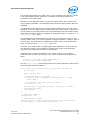
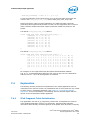
To test the application, flows should be set up in the flow generator that match the
values in the l3fwd_ipv4_route_array and/or l3fwd_ipv6_route_array table.
The default l3fwd_ipv4_route_array table is:
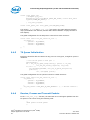
struct l3fwd_ipv4_route l3fwd_ipv4_route_array[] = {
{IPv4(100, 10, 0, 0), 16, 0},
{IPv4(100, 20, 0, 0), 16, 1},
{IPv4(100, 30, 0, 0), 16, 2},
{IPv4(100, 40, 0, 0), 16, 3},
{IPv4(100, 50, 0, 0), 16, 4},
{IPv4(100, 60, 0, 0), 16, 5},
{IPv4(100, 70, 0, 0), 16, 6},
{IPv4(100, 80, 0, 0), 16, 7},
};
The default l3fwd_ipv6_route_array table is:
struct l3fwd_ipv6_route l3fwd_ipv6_route_array[]
{{1, 1, 1, 1, 1, 1, 1, 1, 1, 1, 1, 1, 1,
{{2, 1, 1, 1, 1, 1, 1, 1, 1, 1, 1, 1, 1,
{{3, 1, 1, 1, 1, 1, 1, 1, 1, 1, 1, 1, 1,
{{4, 1, 1, 1, 1, 1, 1, 1, 1, 1, 1, 1, 1,
{{5, 1, 1, 1, 1, 1, 1, 1, 1, 1, 1, 1, 1,
{{6, 1, 1, 1, 1, 1, 1, 1, 1, 1, 1, 1, 1,
{{7, 1, 1, 1, 1, 1, 1, 1, 1, 1, 1, 1, 1,
{{8, 1, 1, 1, 1, 1, 1, 1, 1, 1, 1, 1, 1,
};
= {
1, 1,
1, 1,
1, 1,
1, 1,
1, 1,
1, 1,
1, 1,
1, 1,
1},
1},
1},
1},
1},
1},
1},
1},
48,
48,
48,
48,
48,
48,
48,
48,
0},
1},
2},
3},
4},
5},
6},
7},
For example, for the input IPv4 packet with destination address: 100.10.1.1 and
packet length 9198 bytes, seven IPv4 packets will be sent out from port #0 to the
destination address 100.10.1.1: six of those packets will have length 1500 bytes and
one packet will have length 318 bytes.IP Fragmentation sample application provides
basic NUMA support in that all the memory structures are allocated on all sockets that
have active lcores on them.
Refer to the Intel® DPDK Getting Started Guide for general information on running
applications and the Environment Abstraction Layer (EAL) options.
§§
June 2014
Document Number: 328218-008
Intel® Data Plane Development Kit (Intel® DPDK)
Sample Applications User Guide
25
IPv4 Multicast Sample Application
6
IPv4 Multicast Sample
Application
The IPv4 Multicast application is a simple example of packet processing using the
Intel® Data Plane Development Kit (Intel® DPDK). The application performs L3
multicasting.
6.1
Overview
The application demonstrates the use of zero-copy buffers for packet forwarding. The
initialization and run-time paths are very similar to those of the L2 forwarding
application (see Chapter 9 “L2 Forwarding Sample Application (in Real and Virtualized
Environments)” for details more information). This guide highlights the differences
between the two applications. There are two key differences from the L2 Forwarding
sample application:
The IPv4 Multicast sample application makes use of indirect buffers.
The forwarding decision is taken based on information read from the input packet’s
IPv4 header.
The lookup method is the Four-byte Key (FBK) hash-based method. The lookup table is
composed of pairs of destination IPv4 address (the FBK) and a port mask associated
with that IPv4 address.
For convenience and simplicity, this sample application does not take IANA-assigned
multicast addresses into account, but instead equates the last four bytes of the
multicast group (that is, the last four bytes of the destination IP address) with the
mask of ports to multicast packets to. Also, the application does not consider the
Ethernet addresses; it looks only at the IPv4 destination address for any given packet.
6.2
Building the Application
To compile the application:
1. Go to the sample application directory:
export RTE_SDK=/path/to/rte_sdk
cd ${RTE_SDK}/examples/ipv4_multicast
2. Set the target (a default target is used if not specified). For example:
export RTE_TARGET=x86_64-native-linuxapp-gcc
See the Intel® DPDK Getting Started Guide for possible RTE_TARGET values.
3. Build the application:
make
Intel® Data Plane Development Kit (Intel® DPDK)
Sample Application User Guide
26
June 2014
Document Number: 328218-008
IPv4 Multicast Sample Application
Note: The compiled application is written to the build subdirectory. To have the application
written to a different location, the O=/path/to/build/directory option may be specified in
the make command.
6.3
Running the Application
The application has a number of command line options:
./build/ipv4_multicast [EAL options] -- -p PORTMASK [-q NQ]
where,
-p PORTMASK: Hexadecimal bitmask of ports to configure
-q NQ: determines the number of queues per lcore
Note: Unlike the basic L2/L3 Forwarding sample applications, NUMA support is not provided
in the IPv4 Multicast sample application.
Typically, to run the IPv4 Multicast sample application, issue the following command
(as root):
./build/ipv4_multicast -c 0x00f -n 3 -- -p 0x3 -q 1
In this command:
The -c option enables cores 0, 1, 2 and 3
The -n option specifies 3 memory channels
The -p option enables ports 0 and 1
The -q option assigns 1 queue to each lcore
Refer to the Intel® DPDK Getting Started Guide for general information on running
applications and the Environment Abstraction Layer (EAL) options.
6.4
Explanation
The following sections provide some explanation of the code. As mentioned in the
overview section, the initialization and run-time paths are very similar to those of the
L2 Forwarding sample application (see Chapter 9 “L2 Forwarding Sample Application (in
Real and Virtualized Environments)” for more information). The following sections
describe aspects that are specific to the IPv4 Multicast sample application.
June 2014
Document Number: 328218-008
Intel® Data Plane Development Kit (Intel® DPDK)
Sample Applications User Guide
27
IPv4 Multicast Sample Application
6.4.1
Memory Pool Initialization
The IPv4 Multicast sample application uses three memory pools. Two of the pools are
for indirect buffers used for packet duplication purposes. Memory pools for indirect
buffers are initialized differently from the memory pool for direct buffers:
packet_pool = rte_mempool_create("packet_pool", NB_PKT_MBUF,
PKT_MBUF_SIZE, 32, sizeof(struct rte_pktmbuf_pool_private),
rte_pktmbuf_pool_init, NULL, rte_pktmbuf_init, NULL, rte_socket_id(), 0);
header_pool = rte_mempool_create("header_pool", NB_HDR_MBUF,
HDR_MBUF_SIZE, 32, 0, NULL, NULL, rte_pktmbuf_init, NULL,
rte_socket_id(), 0);
clone_pool = rte_mempool_create("clone_pool", NB_CLONE_MBUF,
CLONE_MBUF_SIZE, 32, 0, NULL, NULL, rte_pktmbuf_init, NULL,
rte_socket_id(), 0);
The reason for this is because indirect buffers are not supposed to hold any packet
data and therefore can be initialized with lower amount of reserved memory for each
buffer.
6.4.2
Hash Initialization
The hash object is created and loaded with the pre-configured entries read from a
global array:
static int
init_mcast_hash(void)
{
uint32_t i;
mcast_hash_params.socket_id = rte_socket_id();
mcast_hash = rte_fbk_hash_create(&mcast_hash_params);
if (mcast_hash == NULL){
return -1;
}
for (i = 0; i < N_MCAST_GROUPS; i ++){
if (rte_fbk_hash_add_key(mcast_hash, mcast_group_table[i].ip,
mcast_group_table[i].port_mask) < 0) { return -1;
}
}
return 0;
}
Intel® Data Plane Development Kit (Intel® DPDK)
Sample Application User Guide
28
June 2014
Document Number: 328218-008
IPv4 Multicast Sample Application
6.4.3
Forwarding
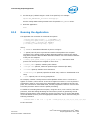
All forwarding is done inside the mcast_forward() function. Firstly, the Ethernet*
header is removed from the packet and the IPv4 address is extracted from the IPv4
header:
/* Remove the Ethernet header from the input packet */
iphdr = (struct ipv4_hdr *)rte_pktmbuf_adj(m, sizeof(struct
ether_hdr));
RTE_MBUF_ASSERT(iphdr != NULL);
dest_addr = rte_be_to_cpu_32(iphdr->dst_addr);
Then, the packet is checked to see if it has a multicast destination address and if the
routing table has any ports assigned to the destination address:
if(!IS_IPV4_MCAST(dest_addr) ||
(hash = rte_fbk_hash_lookup(mcast_hash, dest_addr)) <= 0 ||
(port_mask = hash & enabled_port_mask) == 0) {
rte_pktmbuf_free(m);
return;
}
Then, the number of ports in the destination portmask is calculated with the help of the
bitcnt() function:
/* Get number of bits set. */
static inline uint32_t bitcnt(uint32_t v)
{
uint32_t n;
for (n = 0; v != 0; v &= v - 1, n++)
;
return (n);
}
This is done to determine which forwarding algorithm to use. This is explained in more
detail in the next section.
Thereafter, a destination Ethernet address is constructed:
/* construct destination ethernet address */ dst_eth_addr =
ETHER_ADDR_FOR_IPV4_MCAST(dest_addr);
Since Ethernet addresses are also part of the multicast process, each outgoing packet
carries the same destination Ethernet address. The destination Ethernet address is
constructed from the lower 23 bits of the multicast group ORed with the Ethernet
address 01:00:5e:00:00:00, as per RFC 1112:
# define ETHER_ADDR_FOR_IPV4_MCAST(x) \
(rte_cpu_to_be_64(0x01005e000000ULL | ((x) & 0x7fffff)) >> 16)
June 2014
Document Number: 328218-008
Intel® Data Plane Development Kit (Intel® DPDK)
Sample Applications User Guide
29
IPv4 Multicast Sample Application
Then, packets are dispatched to the destination ports according to the portmask
associated with a multicast group:
for (port = 0; use_clone != port_mask; port_mask >>= 1, port++) {
/* Prepare output packet and send it out. */
if ((port_mask & 1) != 0) {
if (likely ((mc = mcast_out_pkt(m, use_clone)) != NULL))
mcast_send_pkt(mc,
&dst_eth_addr.as_addr,
qconf, port);
else if (use_clone == 0)
rte_pktmbuf_free(m);
}
}
The actual packet transmission is done in the mcast_send_pkt() function:
static inline void mcast_send_pkt(struct rte_mbuf *pkt,
struct ether_addr *dest_addr, struct lcore_queue_conf *qconf, uint8_t
port)
{
struct ether_hdr *ethdr;
uint16_t len;
/* Construct Ethernet header. */
ethdr = (struct ether_hdr *)rte_pktmbuf_prepend(pkt,
(uint16_t) sizeof(*ethdr));
RTE_MBUF_ASSERT(ethdr != NULL);
ether_addr_copy(dest_addr, ðdr->d_addr);
ether_addr_copy(&ports_eth_addr[port], ðdr->s_addr);
ethdr->ether_type = rte_be_to_cpu_16(ETHER_TYPE_IPv4);
/* Put new packet into the output queue */
len = qconf->tx_mbufs[port].len;
qconf->tx_mbufs[port].m_table[len] = pkt;
qconf->tx_mbufs[port].len = ++len;
/* Transmit packets */
if (unlikely(MAX_PKT_BURST == len))
send_burst(qconf, port);
}
6.4.4
Buffer Cloning
This is the most important part of the application since it demonstrates the use of zerocopy buffer cloning. There are two approaches for creating the outgoing packet and
although both are based on the data zero-copy idea, there are some differences in the
detail.
The first approach creates a clone of the input packet, for example, walk though all
segments of the input packet and for each of segment, create a new buffer and attach
that new buffer to the segment (refer to rte_pktmbuf_clone() in the rte_mbuf library
for more details). A new buffer is then allocated for the packet header and is
prepended to the cloned buffer.
Intel® Data Plane Development Kit (Intel® DPDK)
Sample Application User Guide
30
June 2014
Document Number: 328218-008
IPv4 Multicast Sample Application
The second approach does not make a clone, it just increments the reference counter
for all input packet segment, allocates a new buffer for the packet header and
prepends it to the input packet.
Basically, the first approach reuses only the input packet's data, but creates its own
copy of packet's metadata. The second approach reuses both input packet’s data and
metadata.
The advantage of first approach is that each outgoing packet has its own copy of the
metadata, so we can safely modify the data pointer of the input packet. That allows us
to skip creation if the output packet is for the last destination port and instead modify
input packet’s header in place. For example, for N destination ports, we need to invoke
mcast_out_pkt() (N-1) times.
The advantage of the second approach is that there is less work to be done for each
outgoing packet, that is, the “clone” operation is skipped completely. However, there is
a price to pay. The input packet’s metadata must remain intact, so for N destination
ports, we need to invoke mcast_out_pkt() (N) times.
Therefore, for a small number of outgoing ports (and segments in the input packet),
first approach is faster. As the number of outgoing ports (and/or input segments)
grows, the second approach becomes more preferable.
Depending on the number of segments or the number of ports in the outgoing
portmask, either the first (with cloning) or the second (without cloning) approach is
taken:
use_clone = (port_num <= MCAST_CLONE_PORTS &&
m->pkt.nb_segs <= MCAST_CLONE_SEGS);
It is the mcast_out_pkt() function that performs the packet duplication (either with or
without actually cloning the buffers):
static inline struct rte_mbuf *mcast_out_pkt(struct rte_mbuf *pkt,
int use_clone)
{
struct rte_mbuf *hdr;
/* Create new mbuf for the header. */
if (unlikely ((hdr = rte_pktmbuf_alloc(header_pool)) == NULL))
return (NULL);
/* If requested, then make a new clone packet. */
if (use_clone != 0 &&
unlikely ((pkt = rte_pktmbuf_clone(pkt, clone_pool)) == NULL)) {
rte_pktmbuf_free(hdr);
return (NULL);
}
/* prepend new header */
hdr->pkt.next = pkt;
/* update header's fields */
hdr->pkt.pkt_len = (uint16_t)(hdr->pkt.data_len + pkt->pkt.pkt_len);
hdr->pkt.nb_segs = (uint8_t)(pkt->pkt.nb_segs + 1);
June 2014
Document Number: 328218-008
Intel® Data Plane Development Kit (Intel® DPDK)
Sample Applications User Guide
31
IPv4 Multicast Sample Application
/* copy metadata from source packet*/
hdr->pkt.in_port = pkt->pkt.in_port;
hdr->pkt.vlan_macip = pkt->pkt.vlan_macip;
hdr->pkt.hash = pkt->pkt.hash;
hdr->ol_flags = pkt->ol_flags;
rte_mbuf_sanity_check(hdr, RTE_MBUF_PKT, 1);
return (hdr);
}
§§
Intel® Data Plane Development Kit (Intel® DPDK)
Sample Application User Guide
32
June 2014
Document Number: 328218-008
IP Reassembly Sample Application
7
IP Reassembly Sample
Application
The L3 Forwarding application is a simple example of packet processing using the
Intel® DPDK. The application performs L3 forwarding with reassembly for fragmented
IPv4 and IPv6 packets.
7.1
Overview
The application demonstrates the use of the Intel® DPDK libraries to implement packet
forwarding with reassembly for IPv4 and IPv6 fragmented packets. The initialization
and run- time paths are very similar to those of the L2 forwarding application (see
Chapter 9 “L3 Forwarding Sample Application” for more information). The main
difference from the L2 Forwarding sample application is that it reassembles fragmented
IPv4 and IPv6 packets before forwarding. The maximum allowed size of reassembled
packet is 9.5 KB.
There are two key differences from the L2 Forwarding sample application:
• The first difference is that the forwarding decision is taken based on information
read from the input packet’s IP header.
• The second difference is that the application differentiates between IP and non-IP
traffic by means of offload flags.
7.2
The Longest Prefix Match (LPM for IPv4, LPM6 for
IPv6) table is used to store/lookup an outgoing
port number, associated with that IPv4 address.
Any unmatched packets are forwarded to the
originating port.Compiling the Application
To compile the application:
1. Go to the sample application directory:
export RTE_SDK=/path/to/rte_sdk
cd ${RTE_SDK}/examples/ip_reassembly
2. Set the target (a default target is used if not specified). For example:
export RTE_TARGET=x86_64-native-linuxapp-gcc
See the Intel® DPDK Getting Started Guide for possible RTE_TARGET values.
3. Build the application:
June 2014
Document Number: 328218-008
Intel® Data Plane Development Kit (Intel® DPDK)
Sample Applications User Guide
33
IP Reassembly Sample Application
make
7.3
Running the Application
The application has a number of command line options:
./build/ip_reassembly [EAL options] -- -p PORTMASK [-q NQ]
[--maxflows=FLOWS>] [--flowttl=TTL[(s|ms)]]
where:
-p PORTMASK: Hexadecimal bitmask of ports to configure
-q NQ: Number of RX queues per lcore
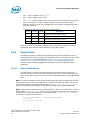
--maxflows=FLOWS: determines maximum number of active fragmented flows (165535). Default value: 4096.
--flowttl=TTL[(s|ms)]: determines maximum Time To Live for fragmented
packet. If all fragments of the packet wouldn’t appear within given time-out, then
they are consirdered as invalid and will be dropped. Valid range is 1ms - 3600s.
Default value: 1s.
To run the example in linuxapp environment with 2 lcores (2,4) over 2 ports(0,2) with
1 RX queue per lcore:
./build/ip_reassembly -c 0x14 -n 3 -- -p 5
EAL: coremask set to 14
EAL: Detected lcore 0 on socket 0
EAL: Detected lcore 1 on socket 1
EAL: Detected lcore 2 on socket 0
EAL: Detected lcore 3 on socket 1
EAL: Detected lcore 4 on socket 0
...
Initializing port 0 on lcore 2... Address:00:1B:21:76:FA:2C, rxq=0
txq=2,0 txq=4,1
done: Link Up - speed 10000 Mbps - full-duplex
Skipping disabled port 1
Initializing port 2 on lcore 4... Address:00:1B:21:5C:FF:54, rxq=0
txq=2,0 txq=4,1
done: Link Up - speed 10000 Mbps - full-duplex
Skipping disabled port 3IP_FRAG: Socket 0: adding route 100.10.0.0/16
(port 0)
IP_RSMBL: Socket 0: adding route 100.20.0.0/16 (port 1)
...
IP_RSMBL: Socket 0: adding route
0101:0101:0101:0101:0101:0101:0101:0101/48 (port 0)
IP_RSMBL: Socket 0: adding route
0201:0101:0101:0101:0101:0101:0101:0101/48 (port 1)
...
IP_RSMBL:
IP_RSMBL:
IP_RSMBL:
IP_RSMBL:
entering main loop on lcore 4
-- lcoreid=4 portid=2
entering main loop on lcore 2
-- lcoreid=2 portid=0
To run the example in linuxapp environment with 1 lcore (4) over 2 ports(0,2) with 2
RX queues per lcore:
Intel® Data Plane Development Kit (Intel® DPDK)
Sample Application User Guide
34
June 2014
Document Number: 328218-008
IP Reassembly Sample Application
./build/ip_reassembly -c 0x10 -n 3 -- -p 5 -q 2
To test the application, flows should be set up in the flow generator that match the
values in the l3fwd_ipv4_route_array and/or l3fwd_ipv6_route_array table.
Please note that in order to test this application, the traffic generator should be
generating valid fragmented IP packets. For IPv6, the only supported case is when no
other extension headers other than fragment extension header are present in the
packet.
The default l3fwd_ipv4_route_array table is:
struct l3fwd_ipv4_route l3fwd_ipv4_route_array[] = {
{IPv4(100, 10, 0, 0), 16, 0},
{IPv4(100, 20, 0, 0), 16, 1},
{IPv4(100, 30, 0, 0), 16, 2},
{IPv4(100, 40, 0, 0), 16, 3},
{IPv4(100, 50, 0, 0), 16, 4},
{IPv4(100, 60, 0, 0), 16, 5},
{IPv4(100, 70, 0, 0), 16, 6},
{IPv4(100, 80, 0, 0), 16, 7},
};
The default l3fwd_ipv6_route_array table is:
struct l3fwd_ipv6_route l3fwd_ipv6_route_array[]
{{1, 1, 1, 1, 1, 1, 1, 1, 1, 1, 1, 1, 1,
{{2, 1, 1, 1, 1, 1, 1, 1, 1, 1, 1, 1, 1,
{{3, 1, 1, 1, 1, 1, 1, 1, 1, 1, 1, 1, 1,
{{4, 1, 1, 1, 1, 1, 1, 1, 1, 1, 1, 1, 1,
{{5, 1, 1, 1, 1, 1, 1, 1, 1, 1, 1, 1, 1,
{{6, 1, 1, 1, 1, 1, 1, 1, 1, 1, 1, 1, 1,
{{7, 1, 1, 1, 1, 1, 1, 1, 1, 1, 1, 1, 1,
{{8, 1, 1, 1, 1, 1, 1, 1, 1, 1, 1, 1, 1,
};
= {
1, 1,
1, 1,
1, 1,
1, 1,
1, 1,
1, 1,
1, 1,
1, 1,
1},
1},
1},
1},
1},
1},
1},
1},
48,
48,
48,
48,
48,
48,
48,
48,
0},
1},
2},
3},
4},
5},
6},
7},
For example, for the fragmented input IPv4 packet with destination address:
100.10.1.1, a reassembled IPv4 packet be sent out from port #0 to the destination
address 100.10.1.1 once all the fragments are collected.
7.4
Explanation
The following sections provide some explanation of the sample application code. As
mentioned in the overview section, the initialization and run-time paths are very similar
to those of the L2 forwarding application (see Chapter 9 “L3 Forwarding Sample
Application” for more information). The following sections describe aspects that are
specific to the IP reassemble sample application.
7.4.1
IPv4 Fragment Table Initialization
This application uses the rte_ip_frag library. Please refer to Programmer’s Guide for
more detailed explanation of how to use this library. Fragment table maintains
information about already received fragments of the packet. Each IP packet is uniquely
June 2014
Document Number: 328218-008
Intel® Data Plane Development Kit (Intel® DPDK)
Sample Applications User Guide
35
IP Reassembly Sample Application
identified by triple <Source IP address>, <Destination IP address>, <ID>. To avoid
lock contention, each RX queue has its own Fragment Table, e.g. the application can’t
handle the situation when different fragments of the same packet arrive through
different RX queues. Each table entry can hold information about packet consisting of
up to RTE_LIBRTE_IP_FRAG_MAX_FRAGS fragments.
frag_cycles = (rte_get_tsc_hz() + MS_PER_S - 1) / MS_PER_S *
max_flow_ttl;
if ((qconf->frag_tbl[queue] = rte_ip_frag_tbl_create(max_flow_num,
IPV4_FRAG_TBL_BUCKET_ENTRIES, max_flow_num, frag_cycles,
socket)) == NULL) {
RTE_LOG(ERR, IP_RSMBL, "ip_frag_tbl_create(%u) on "
"lcore: %u for queue: %u failed\n",
max_flow_num, lcore, queue);
return -1;
}
7.4.2
Mempools Initialization
The reassembly application demands a lot of mbuf’s to be allocated. At any given time
up to (2 * max_flow_num * RTE_LIBRTE_IP_FRAG_MAX_FRAGS * <maximum number of
mbufs per packet>) can be stored inside Fragment Table waiting for remaining
fragments. To keep mempool size under reasonable limits and to avoid situation when
one RX queue can starve other queues, each RX queue uses its own mempool.
nb_mbuf = RTE_MAX(max_flow_num, 2UL * MAX_PKT_BURST) *
RTE_LIBRTE_IP_FRAG_MAX_FRAGS;
nb_mbuf *= (port_conf.rxmode.max_rx_pkt_len + BUF_SIZE - 1) / BUF_SIZE;
nb_mbuf *= 2; /* ipv4 and ipv6 */
nb_mbuf += RTE_TEST_RX_DESC_DEFAULT + RTE_TEST_TX_DESC_DEFAULT;
nb_mbuf = RTE_MAX(nb_mbuf, (uint32_t)NB_MBUF);
rte_snprintf(buf, sizeof(buf), "mbuf_pool_%u_%u", lcore, queue);
if ((rxq->pool = rte_mempool_create(buf, nb_mbuf, MBUF_SIZE, 0,
sizeof(struct rte_pktmbuf_pool_private), rte_pktmbuf_pool_init,
NULL, rte_pktmbuf_init, NULL,
socket, MEMPOOL_F_SP_PUT | MEMPOOL_F_SC_GET)) == NULL) {
RTE_LOG(ERR, IP_RSMBL, "mempool_create(%s) failed", buf);
return -1;
7.4.3
} Packet Reassembly and Forwarding
For each input packet, the packet forwarding operation is done by the
l3fwd_simple_forward() function. If the packet is an IPv4 or IPv6 fragment, then it
Intel® Data Plane Development Kit (Intel® DPDK)
Sample Application User Guide
36
June 2014
Document Number: 328218-008
IP Reassembly Sample Application
calls rte_ipv4_reassemble_packet() for IPv4 packets, or
rte_ipv6_reassemble_packet() for IPv6 packets. These functions either return a
pointer to valid mbuf that contains reassembled packet, or NULL (if the packet can’t be
reassembled for some reason). Then 3fwd_simple_forward() continues with the code
for the packet forwarding decision (that is, the identification of the output interface for
the packet) and actual transmit of the packet.
The rte_ipv4_reassemble_packet() or rte_ipv6_reassemble_packet() are
responsible for:
1. Searching the Fragment Table for entry with packet’s <IP Source Address, IP
Destination Address, Packet ID>
2. If the entry is found, then check if that entry already timed-out. If yes, then free all
previously received fragments, and remove information about them from the entry.
3. If no entry with such key is found, then try to create a new one by one of two
ways:
a.
Use as empty entry
b.
Delete a timed-out entry, free mbufs associated with it mbufs and store a new
entry with specified key in it.
5. Update the entry with new fragment information and check if a packet can be
reassembled (the packet’s entry contains all fragments).
a.
If yes, then, reassemble the packet, mark table’s entry as empty and return
the reassembled mbuf to the caller.
b.
If no, then just return a NULL to the caller.
If at any stage of packet processing a reassembly function encounters an error (can’t
insert new entry into the Fragment table, or invalid/timed-out fragment), then it will
free all associated with the packet fragments, mark the table entry as invalid and
return NULL to the caller.
7.4.4
Debug logging and Statistics Collection
The RTE_LIBRTE_IP_FRAG_TBL_STAT controls statistics collection for the IP Fragment
Table. This macro is disabled by default. To make ip_reassembly print the statistics to
the standard output, the user must send either an USR1, INT or TERM signal to the
process. For all of these signals, the ip_reassembly process prints Fragment table
statistics for each RX queue, plus the INT and TERM will cause process termination as
usual.
§§
June 2014
Document Number: 328218-008
Intel® Data Plane Development Kit (Intel® DPDK)
Sample Applications User Guide
37
Kernel NIC Interface Sample Application
8
Kernel NIC Interface Sample
Application
The Kernel NIC Interface (KNI) is an Intel® DPDK control plane solution that allows
userspace applications to exchange packets with the kernel networking stack. To
accomplish this, Intel® DPDK userspace applications use an IOCTL call to request the
creation of a KNI virtual device in the Linux* kernel. The IOCTL call provides interface
information and the Intel® DPDK's physical address space, which is re-mapped into the
kernel address space by the KNI kernel loadable module that saves the information to
a virtual device context. The Intel® DPDK creates FIFO queues for packet ingress and
egress to the kernel module for each device allocated.
The KNI kernel loadable module is a standard net driver, which upon receiving the
IOCTL call access the Intel® DPDK's FIFO queue to receive/transmit packets from/to
the Intel® DPDK userspace application. The FIFO queues contain pointers to data
packets in the Intel® DPDK. This:
Provides a faster mechanism to interface with the kernel net stack and eliminates
system calls
Facilitates the Intel® DPDK using standard Linux* userspace net tools (tcpdump,
ftp, and so on)
Eliminate the copy_to_user and copy_from_user operations on packets.
The Kernel NIC Interface sample application is a simple example that demonstrates the
use of the Intel® DPDK to create a path for packets to go through the Linux* kernel.
This is done by creating one or more kernel net devices for each of the Intel ® DPDK
ports. The application allows the use of standard Linux tools (ethtool, ifconfig,
tcpdump) with the Intel® DPDK ports and also the exchange of packets between the
Intel® DPDK application and the Linux* kernel.
8.1
Overview
The Kernel NIC Interface sample application uses two threads in user space for each
physical NIC port being used, and allocates one or more KNI device for each physical
NIC port with kernel module’s support. For a physical NIC port, one thread reads from
the port and writes to KNI devices, and another thread reads from KNI devices and
writes the data unmodified to the physical NIC port. It is recommended to configure
one KNI device for each physical NIC port. If configured with more than one KNI
devices for a physical NIC port, it is just for performance testing, or it can work
together with VMDq support in future.
The packet flow through the Kernel NIC Interface application is as shown in the
following figure.
Intel® Data Plane Development Kit (Intel® DPDK)
Sample Application User Guide
38
June 2014
Document Number: 328218-008
Kernel NIC Interface Sample Application
Figure 2. Kernel NIC Application Packet Flow
8.2
Compiling the Application
Compile the application as follows:
1. Go to the example directory:
export RTE_SDK=/path/to/rte_sdk cd
${RTE_SDK}/examples/kni
2. Set the target (a default target is used if not specified)
Note: This application is intended as a linuxapp only.
export RTE_TARGET=x86_64-native-linuxapp-gcc
3. Build the application:
make
8.3
Loading the Kernel Module
Loading the KNI kernel module without any parameter is the typical way an Intel ®
DPDK application gets packets into and out of the kernel net stack. This way, only one
kernel thread is created for all KNI devices for packet receiving in kernel side.
#insmod rte_kni.ko
Pinning the kernel thread to a specific core can be done using a taskset command such
as following:
June 2014
Document Number: 328218-008
Intel® Data Plane Development Kit (Intel® DPDK)
Sample Applications User Guide
39
Kernel NIC Interface Sample Application
#taskset -p 100000 `pgrep –fl kni_thread | awk ‘{print $1}’`
This command line tries to pin the specific kni_thread on the 20th lcore (lcore
numbering starts at 0), which means it needs to check if that lcore is available on the
board. This command must be sent after the application has been launched, as insmod
does not start the kni thread.
For optimum performance, the lcore in the mask must be selected to be on the same
socket as the lcores used in the KNI application.
To provide flexibility of performance, the kernel module of the KNI, located in the kmod
sub-directory of the Intel® DPDK target directory, can be loaded with parameter of
kthread_mode as follows:
#insmod rte_kni.ko kthread_mode=single
This mode will create only one kernel thread for all KNI devices for packet receiving
in kernel side. By default, it is in this single kernel thread mode. It can set core
affinity for this kernel thread by using Linux command taskset.
#insmod rte_kni.ko kthread_mode =multiple
This mode will create a kernel thread for each KNI device for packet receiving in
kernel side. The core affinity of each kernel thread is set when creating the KNI
device. The lcore ID for each kernel thread is provided in the command line of
launching the application. Multiple kernel thread mode can provide scalable higher
performance.
To measure the throughput in a loopback mode, the kernel module of the KNI, located
in the kmod sub-directory of the Intel® DPDK target directory, can be loaded with
parameters as follows:
#insmod rte_kni.ko lo_mode=lo_mode_fifo
This loopback mode will involve ring enqueue/dequeue operations in kernel space.
#insmod rte_kni.ko lo_mode=lo_mode_fifo_skb
This loopback mode will involve ring enqueue/dequeue operations and sk buffer
copies in kernel space.
8.4
Running the Application
The application requires a number of command line options:
kni [EAL options] -- -P -p PORTMASK
--config=”(port,lcore_rx,lcore_tx[,lcore_kthread,...])[,port,lcore_rx,
lcore_tx [,lcore_kthread,...]]”
Where:
-P: Set all ports to promiscuous mode so that packets are accepted regardless of
the packet’s Ethernet MAC destination address. Without this option, only packets
with the Ethernet MAC destination address set to the Ethernet address of the port
are accepted.
-p PORTMASK: Hexadecimal bitmask of ports to configure.
Intel® Data Plane Development Kit (Intel® DPDK)
Sample Application User Guide
40
June 2014
Document Number: 328218-008
Kernel NIC Interface Sample Application
--config=”(port,lcore_rx, lcore_tx[,lcore_kthrea,…]) [,
port,lcore_rx, lcore_tx[,lcore_kthread,…]]”: Determines which lcores of RX,
TX, kernel thread are mapped to which ports.
Refer to Intel® DPDK Getting Started Guide for general information on running
applications and the Environment Abstraction Layer (EAL) options.
The -c coremask parameter of the EAL options should include the lcores indicated by
the lcore_rx and lcore_tx, but does not need to include lcores indicated by
lcore_kthread as they are used to pin the kernel thread on. The -p PORTMASK
parameter should include the ports indicated by the port in --config, neither more nor
less.
The lcore_kthread in --config can be configured none, one or more lcore IDs. In
multiple kernel thread mode, if configured none, a KNI device will be allocated for each
port, while no specific lcore affinity will be set for its kernel thread. If configured one or
more lcore IDs, one or more KNI devices will be allocated for each port, while specific
lcore affinity will be set for its kernel thread. In single kernel thread mode, if configured
none, a KNI device will be allocated for each port. If configured one or more lcore IDs,
one or more KNI devices will be allocated for each port while no lcore affinity will be set
as there is only one kernel thread for all KNI devices.
For example, to run the application with two ports served by six lcores, one lcore of RX,
one lcore of TX, and one lcore of kernel thread for each port:
./build/kni -c 0xf0 –n 4 -- -P –p 0x3 –config=”(0,4,6,8),(1,5,7,9)”
8.5
KNI Operations
Once the KNI application is started, one can use different Linux* commands to manage
the net interfaces. If more than one KNI devices configured for a physical port, only the
first KNI device will be paired to the physical device. Operations on other KNI devices
will not affect the physical port handled in user space application.
Assigning an IP address:
#ifconfig vEth0_0 192.168.0.1
Displaying the NIC registers:
#ethtool -d vEth0_0
Dumping the network traffic:
#tcpdump -i vEth0_0
When the Intel® DPDK userspace application is closed, all the KNI devices are deleted
from Linux*.
8.6
Explanation
The following sections provide some explanation of code.
June 2014
Document Number: 328218-008
Intel® Data Plane Development Kit (Intel® DPDK)
Sample Applications User Guide
41
Kernel NIC Interface Sample Application
8.6.1
Initialization
Setup of mbuf pool, driver and queues is similar to the setup done in the L2 Forwarding
sample application (see Chapter 9 “L2 Forwarding Sample Application (in Real and
Virtualized Environments)” for details). In addition, one or more kernel NIC interfaces
are allocated for each of the configured ports according to the command line
parameters.
The code for creating the kernel NIC interface for a specific port is as follows:
kni = rte_kni_create(port, MAX_PACKET_SZ, pktmbuf_pool, &kni_ops);
if (kni == NULL)
rte_exit(EXIT_FAILURE, "Fail to create kni dev "
"for port: %d\n", port);
The code for allocating the kernel NIC interfaces for a specific port is as follows:
static int
kni_alloc(uint8_t port_id)
{
uint8_t i;
struct rte_kni *kni;
struct rte_kni_conf conf;
struct kni_port_params **params = kni_port_params_array;
if (port_id >= RTE_MAX_ETHPORTS || !params[port_id])
return -1;
params[port_id]->nb_kni = params[port_id]->nb_lcore_k ?
params[port_id]->nb_lcore_k : 1;
for (i = 0; i < params[port_id]->nb_kni; i++) {
/* Clear conf at first */
memset(&conf, 0, sizeof(conf));
if (params[port_id]->nb_lcore_k) {
rte_snprintf(conf.name, RTE_KNI_NAMESIZE,
"vEth%u_%u", port_id, i);
conf.core_id = params[port_id]->lcore_k[i];
conf.force_bind = 1;
} else
rte_snprintf(conf.name, RTE_KNI_NAMESIZE,
"vEth%u", port_id);
conf.group_id = (uint16_t)port_id;
conf.mbuf_size = MAX_PACKET_SZ;
/*
*
The first KNI device associated to a port
*
is the master, for multiple kernel thread
*
environment.
*/
if (i == 0) {
struct rte_kni_ops ops;
struct rte_eth_dev_info dev_info;
memset(&dev_info, 0, sizeof(dev_info));
rte_eth_dev_info_get(port_id, &dev_info);
conf.addr = dev_info.pci_dev->addr;
conf.id = dev_info.pci_dev->id;
Intel® Data Plane Development Kit (Intel® DPDK)
Sample Application User Guide
42
June 2014
Document Number: 328218-008
Kernel NIC Interface Sample Application
memset(&ops, 0, sizeof(ops));
ops.port_id = port_id;
ops.change_mtu = kni_change_mtu;
ops.config_network_if = kni_config_network_interface;
kni = rte_kni_alloc(pktmbuf_pool, &conf, &ops);
} else
kni = rte_kni_alloc(pktmbuf_pool, &conf, NULL);
if (!kni)
rte_exit(EXIT_FAILURE, "Fail to create kni for "
"port: %d\n", port_id);
params[port_id]->kni[i] = kni;
}
return 0;
}
The other step in the initialization process that is unique to this sample application is
the association of each port with lcores for RX, TX and kernel threads.
One lcore to read from the port and write to the associated one or more KNI
devices
Another lcore to read from one or more KNI devices and write to the port
Other lcores for pinning the kernel threads on one by one
This is done by using the`kni_port_params_array[]`array, which is indexed by the
port ID. The code is as follows:
static int
parse_config(const char *arg)
{
const char *p, *p0 = arg;
char s[256], *end;
unsigned size;
enum fieldnames {
FLD_PORT = 0,
FLD_LCORE_RX,
FLD_LCORE_TX,
_NUM_FLD = KNI_MAX_KTHREAD + 3,
};
int i, j, nb_token;
char *str_fld[_NUM_FLD];
unsigned long int_fld[_NUM_FLD];
uint8_t port_id, nb_kni_port_params = 0;
memset(&kni_port_params_array, 0, sizeof(kni_port_params_array));
while (((p = strchr(p0, '(')) != NULL) &&
nb_kni_port_params < RTE_MAX_ETHPORTS)
{ p++;
if ((p0 = strchr(p, ')')) == NULL)
goto fail;
size = p0 - p;
if (size >= sizeof(s)) {
printf("Invalid config parameters\n");
goto fail;
}
June 2014
Document Number: 328218-008
Intel® Data Plane Development Kit (Intel® DPDK)
Sample Applications User Guide
43
Kernel NIC Interface Sample Application
rte_snprintf(s, sizeof(s), "%.*s", size, p);
nb_token = rte_strsplit(s, sizeof(s), str_fld, _NUM_FLD, ',');
if (nb_token <= FLD_LCORE_TX) {
printf("Invalid config parameters\n");
goto fail;
}
for (i = 0; i < nb_token; i++) {
errno = 0;
int_fld[i] = strtoul(str_fld[i], &end, 0);
if (errno != 0 || end == str_fld[i]) {
printf("Invalid config parameters\n");
goto fail;
}
}
i = 0;
port_id = (uint8_t)int_fld[i++];
if (port_id >= RTE_MAX_ETHPORTS) {
printf("Port ID %u could not exceed the maximum %u\n",
port_id, RTE_MAX_ETHPORTS);
goto fail;
}
if (kni_port_params_array[port_id]) {
printf("Port %u has been configured\n", port_id);
goto fail;
}
kni_port_params_array[port_id] =
(struct kni_port_params*)rte_zmalloc("KNI_port_params",
sizeof(struct kni_port_params), CACHE_LINE_SIZE);
kni_port_params_array[port_id]->port_id = port_id;
kni_port_params_array[port_id]->lcore_rx =
(uint8_t)int_fld[i++];
kni_port_params_array[port_id]->lcore_tx =
(uint8_t)int_fld[i++];
if (kni_port_params_array[port_id]->lcore_rx >= RTE_MAX_LCORE ||
kni_port_params_array[port_id]->lcore_tx >= RTE_MAX_LCORE) {
printf("lcore_rx %u or lcore_tx %u ID could not "
"exceed the maximum %u\n",
kni_port_params_array[port_id]->lcore_rx,
kni_port_params_array[port_id]->lcore_tx,
RTE_MAX_LCORE);
goto fail;
}
for (j = 0; i < nb_token && j < KNI_MAX_KTHREAD; i++, j++)
kni_port_params_array[port_id]->lcore_k[j] =
(uint8_t)int_fld[i];
kni_port_params_array[port_id]->nb_lcore_k = j;
}
print_config();
return 0;
fail:
for (i = 0; i < RTE_MAX_ETHPORTS; i++) {
if (kni_port_params_array[i]) {
rte_free(kni_port_params_array[i]);
kni_port_params_array[i] = NULL;
}
Intel® Data Plane Development Kit (Intel® DPDK)
Sample Application User Guide
44
June 2014
Document Number: 328218-008
Kernel NIC Interface Sample Application
}
return -1;
}
8.6.2
Packet Forwarding
After the initialization steps are completed, the main_loop() function is run on each
lcore. This function first checks the lcore_id against the user provided lcore_rx and
lcore_tx to see if this lcore is reading from or writing to kernel NIC interfaces.
For the case that reads from a NIC port and writes to the kernel NIC interfaces, the
packet reception is the same as in L2 Forwarding sample application (see Section 9.4.6
“Receive, Process and Transmit Packets” on page 54). The packet transmission is done
by sending mbufs into the kernel NIC interfaces by rte_kni_tx_burst(). The KNI
library automatically frees the mbufs after the kernel successfully copied the mbufs.
/**
*
*/
Interface to burst rx and enqueue mbufs into rx_q
static void
kni_ingress(struct kni_port_params *p)
{
uint8_t i, nb_kni, port_id;
unsigned nb_rx, num;
struct rte_mbuf *pkts_burst[PKT_BURST_SZ];
if (p == NULL)
return;
nb_kni = p->nb_kni;
port_id = p->port_id;
for (i = 0; i < nb_kni; i++) {
/* Burst rx from eth */
nb_rx = rte_eth_rx_burst(port_id, 0, pkts_burst, PKT_BURST_SZ);
if (unlikely(nb_rx > PKT_BURST_SZ)) {
RTE_LOG(ERR, APP, "Error receiving from eth\n");
return;
}
/* Burst tx to kni */
num = rte_kni_tx_burst(p->kni[i], pkts_burst, nb_rx);
kni_stats[port_id].rx_packets += num;
rte_kni_handle_request(p->kni[i]);
if (unlikely(num < nb_rx)) {
/* Free mbufs not tx to kni interface */
kni_burst_free_mbufs(&pkts_burst[num], nb_rx - num);
kni_stats[port_id].rx_dropped += nb_rx - num;
}
}
}
For the other case that reads from kernel NIC interfaces and writes to a physical NIC
port, packets are retrieved by reading mbufs from kernel NIC interfaces by
June 2014
Document Number: 328218-008
Intel® Data Plane Development Kit (Intel® DPDK)
Sample Applications User Guide
45
Kernel NIC Interface Sample Application
‘rte_kni_rx_burst()‘. The packet transmission is the same as in the L2 Forwarding
sample application (see Section 9.4.6 “Receive, Process and Transmit Packets” on page
54).
/**
* Interface to dequeue mbufs from tx_q and burst tx
*/
static void
kni_egress(struct kni_port_params *p)
{
uint8_t i, nb_kni, port_id;
unsigned nb_tx, num;
struct rte_mbuf *pkts_burst[PKT_BURST_SZ];
if (p == NULL)
return;
nb_kni = p->nb_kni;
port_id = p->port_id;
for (i = 0; i < nb_kni; i++) {
/* Burst rx from kni */
num = rte_kni_rx_burst(p->kni[i], pkts_burst, PKT_BURST_SZ);
if (unlikely(num > PKT_BURST_SZ)) {
RTE_LOG(ERR, APP, "Error receiving from KNI\n");
return;
}
/* Burst tx to eth */
nb_tx = rte_eth_tx_burst(port_id, 0, pkts_burst, (uint16_t)num);
kni_stats[port_id].tx_packets += nb_tx;
if (unlikely(nb_tx < num)) {
/* Free mbufs not tx to NIC */
kni_burst_free_mbufs(&pkts_burst[nb_tx], num - nb_tx);
kni_stats[port_id].tx_dropped += num - nb_tx;
}
}
}
8.6.3
Callbacks for Kernel Requests
To execute specific PMD operations in user space requested by some Linux*
commands, callbacks must be implemented and filled in the struct rte_kni_ops
structure. Currently, setting a new MTU and configuring the network interface (up/
down) are supported.
static struct rte_kni_ops kni_ops = {
.change_mtu = kni_change_mtu,
.config_network_if = kni_config_network_interface,
};
/* Callback for request of changing MTU */
static int
kni_change_mtu(uint8_t port_id, unsigned new_mtu)
{
int ret;
struct rte_eth_conf conf;
if (port_id >= rte_eth_dev_count()) {
Intel® Data Plane Development Kit (Intel® DPDK)
Sample Application User Guide
46
June 2014
Document Number: 328218-008
Kernel NIC Interface Sample Application
RTE_LOG(ERR, APP, "Invalid port id %d\n", port_id);
return -EINVAL;
}
RTE_LOG(INFO, APP, "Change MTU of port %d to %u\n", port_id, new_mtu);
/* Stop specific port */
rte_eth_dev_stop(port_id);
memcpy(&conf, &port_conf, sizeof(conf));
/* Set new MTU */
if (new_mtu > ETHER_MAX_LEN)
conf.rxmode.jumbo_frame = 1;
else
conf.rxmode.jumbo_frame = 0;
/* mtu + length of header + length of FCS = max pkt length */
conf.rxmode.max_rx_pkt_len = new_mtu + KNI_ENET_HEADER_SIZE +
KNI_ENET_FCS_SIZE;
ret = rte_eth_dev_configure(port_id, 1, 1, &conf);
if (ret < 0) {
RTE_LOG(ERR, APP, "Fail to reconfigure port %d\n", port_id);
return ret;
}
/* Restart specific port */
ret = rte_eth_dev_start(port_id);
if (ret < 0) {
RTE_LOG(ERR, APP, "Fail to restart port %d\n", port_id);
return ret;
}
return 0;
}
/* Callback for request of configuring network interface up/down */
static int
kni_config_network_interface(uint8_t port_id, uint8_t if_up)
{
int ret = 0;
if (port_id >= rte_eth_dev_count() || port_id >= RTE_MAX_ETHPORTS)
{ RTE_LOG(ERR, APP, "Invalid port id %d\n", port_id);
return -EINVAL;
}
RTE_LOG(INFO, APP, "Configure network interface of %d %s\n",
port_id, if_up ? "up" : "down");
if (if_up != 0) { /* Configure network interface up */
rte_eth_dev_stop(port_id);
ret = rte_eth_dev_start(port_id);
} else /* Configure network interface down */
rte_eth_dev_stop(port_id);
if (ret < 0)
RTE_LOG(ERR, APP, "Failed to start port %d\n", port_id);
return ret;
}
§§
June 2014
Document Number: 328218-008
Intel® Data Plane Development Kit (Intel® DPDK)
Sample Applications User Guide
47
L2 Forwarding Sample Application (in Real and Virtualized Environments)
9
L2 Forwarding Sample
Application (in Real and
Virtualized Environments)
The L2 Forwarding sample application is a simple example of packet processing using
the Intel® Data Plane Development Kit (Intel® DPDK) which also takes advantage of
Single Root I/O Virtualization (SR-IOV) features in a virtualized environment.
Note: Please note that previously a separate L2 Forwarding in Virtualized Environments
sample application was used, however, in later Intel® DPDK versions these sample
applications have been merged.
9.1
Overview
The L2 Forwarding sample application, which can operate in real and virtualized
environments, performs L2 forwarding for each packet that is received on an RX_PORT.
The destination port is the adjacent port from the enabled portmask, that is, if the first
four ports are enabled (portmask 0xf), ports 1 and 2 forward into each other, and ports
3 and 4 forward into each other. Also, the MAC addresses are affected as follows:
The source MAC address is replaced by the TX_PORT MAC address
The destination MAC address is replaced by 02:00:00:00:00:TX_PORT_ID
This application can be used to benchmark performance using a traffic-generator, as
shown in the Figure 3.
The application can also be used in a virtualized environment as shown in Figure 4.
The L2 Forwarding application can also be used as a starting point for developing a new
application based on the Intel® DPDK.
Intel® Data Plane Development Kit (Intel® DPDK)
Sample Application User Guide
48
June 2014
Document Number: 328218-008
L2 Forwarding Sample Application (in Real and Virtualized Environments)
Figure 3. Performance Benchmark Setup (Basic Environment)
Figure 4. Performance Benchmark Setup (Virtualized Environment)
June 2014
Document Number: 328218-008
Intel® Data Plane Development Kit (Intel® DPDK)
Sample Applications User Guide
49
L2 Forwarding Sample Application (in Real and Virtualized Environments)
9.1.1
Virtual Function Setup Instructions
This application can use the virtual function available in the system and therefore can
be used in a virtual machine without passing through the whole Network Device into a
guest machine in a virtualized scenario. The virtual functions can be enabled in the
host machine or the hypervisor with the respective physical function driver.
For example, in a Linux* host machine, it is possible to enable a virtual function using
the following command:
modprobe ixgbe max_vfs=2,2
This command enables two Virtual Functions on each of Physical Function of the NIC,
with two physical ports in the PCI configuration space. It is important to note that
enabled Virtual Function 0 and 2 would belong to Physical Function 0 and Virtual
Function 1 and 3 would belong to Physical Function 1, in this case enabling a total of
four Virtual Functions.
9.2
Compiling the Application
1. Go to the example directory:
export RTE_SDK=/path/to/rte_sdk cd ${RTE_SDK}/examples/l2fwd
2. Set the target (a default target is used if not specified). For example:
export RTE_TARGET=x86_64-native-linuxapp-gcc
See the Intel® DPDK Getting Started Guide for possible RTE_TARGET values.
3. Build the application:
make
9.3
Running the Application
The application requires a number of command line options:
./build/l2fwd [EAL options] -- -p PORTMASK [-q NQ]
where,
p PORTMASK: A hexadecimal bitmask of the ports to configure
q NQ: A number of queues (=ports) per lcore (default is 1)
To run the application in linuxapp environment with 4 lcores, 16 ports and 8 RX queues
per lcore, issue the command:
$ ./build/l2fwd -c f -n 4 -- -q 8 -p ffff
Refer to the Intel® DPDK Getting Started Guide for general information on running
applications and the Environment Abstraction Layer (EAL) options.
Intel® Data Plane Development Kit (Intel® DPDK)
Sample Application User Guide
50
June 2014
Document Number: 328218-008
L2 Forwarding Sample Application (in Real and Virtualized Environments)
9.4
Explanation
The following sections provide some explanation of the code.
9.4.1
Command Line Arguments
The L2 Forwarding sample application takes specific parameters, in addition to
Environment Abstraction Layer (EAL) arguments (see Section 9.3). The preferred way
to parse parameters is to use the getopt() function, since it is part of a well-defined
and portable library.
The parsing of arguments is done in the l2fwd_parse_args() function. The method of
argument parsing is not described here. Refer to the glibc getopt (3) man page for
details.
EAL arguments are parsed first, then application-specific arguments. This is done at the
beginning of the main() function:
/* init EAL */
ret = rte_eal_init(argc, argv);
if (ret < 0)
rte_exit(EXIT_FAILURE, "Invalid EAL arguments\n");
argc -= ret;
argv += ret;
/* parse application arguments (after the EAL ones) */ ret =
l2fwd_parse_args(argc, argv);
if (ret < 0)
rte_exit(EXIT_FAILURE, "Invalid L2FWD arguments\n");
9.4.2
Mbuf Pool Initialization
Once the arguments are parsed, the mbuf pool is created. The mbuf pool contains a set
of mbuf objects that will be used by the driver and the application to store network
packet data:
/* create the mbuf pool */
l2fwd_pktmbuf_pool =
rte_mempool_create("mbuf_pool", NB_MBUF,
MBUF_SIZE, 32,
sizeof(struct rte_pktmbuf_pool_private),
rte_pktmbuf_pool_init, NULL,
rte_pktmbuf_init, NULL,
SOCKET0, 0);
if (l2fwd_pktmbuf_pool == NULL)
rte_panic("Cannot init mbuf pool\n");
The rte_mempool is a generic structure used to handle pools of objects. In this case, it
is necessary to create a pool that will be used by the driver, which expects to have
some reserved space in the mempool structure, sizeof(struct
rte_pktmbuf_pool_private) bytes. The number of allocated pktmbufs is NB_MBUF,
with a size of MBUF_SIZE each. A per-lcore cache of 32 mbufs is kept. The memory is
allocated in NUMA socket 0, but it is possible to extend this code to allocate one mbuf
pool per socket.
June 2014
Document Number: 328218-008
Intel® Data Plane Development Kit (Intel® DPDK)
Sample Applications User Guide
51
L2 Forwarding Sample Application (in Real and Virtualized Environments)
Two callback pointers are also given to the rte_mempool_create() function:
9.4.3
The first callback pointer is to rte_pktmbuf_pool_init() and is used to initialize
the private data of the mempool, which is needed by the driver. This function is
provided by the mbuf API, but can be copied and extended by the developer.
The second callback pointer given to rte_mempool_create() is the mbuf initializer.
The default is used, that is, rte_pktmbuf_init(), which is provided in the
rte_mbuf library. If a more complex application wants to extend the rte_pktmbuf
structure for its own needs, a new function derived from rte_pktmbuf_init() can
be created.
Driver Initialization
The main part of the code in the main() function relates to the initialization of the
driver. To fully understand this code, it is recommended to study the chapters that
related to the Poll Mode Driver in the Intel® DPDK Programmer’s Guide - Rel 1.4 EAR
and the Intel® DPDK API Reference.
if (rte_eal_pci_probe() < 0)
rte_exit(EXIT_FAILURE, "Cannot probe PCI\n");
nb_ports = rte_eth_dev_count();
if (nb_ports == 0)
rte_exit(EXIT_FAILURE, "No Ethernet ports - bye\n");
if (nb_ports > RTE_MAX_ETHPORTS)
nb_ports = RTE_MAX_ETHPORTS;
/* reset l2fwd_dst_ports */
for (portid = 0; portid < RTE_MAX_ETHPORTS; portid++)
l2fwd_dst_ports[portid] = 0;
last_port = 0;
/*
* Each logical core is assigned a dedicated TX queue on each port.
*/
for (portid = 0; portid < nb_ports; portid++) {
/* skip ports that are not enabled */
if ((l2fwd_enabled_port_mask & (1 << portid)) == 0)
continue;
if (nb_ports_in_mask % 2) {
l2fwd_dst_ports[portid] = last_port;
l2fwd_dst_ports[last_port] = portid;
}
else
last_port = portid;
nb_ports_in_mask++;
rte_eth_dev_info_get((uint8_t) portid, &dev_info);
}
Observe that:
Intel® Data Plane Development Kit (Intel® DPDK)
Sample Application User Guide
52
June 2014
Document Number: 328218-008
L2 Forwarding Sample Application (in Real and Virtualized Environments)
rte_igb_pmd_init_all() simultaneously registers the driver as a PCI driver and
as an Ethernet* Poll Mode Driver.
rte_eal_pci_probe() parses the devices on the PCI bus and initializes recognized
devices.
The next step is to configure the RX and TX queues. For each port, there is only one RX
queue (only one lcore is able to poll a given port). The number of TX queues depends
on the number of available lcores. The rte_eth_dev_configure() function is used to
configure the number of queues for a port:
ret = rte_eth_dev_configure((uint8_t)portid, 1, 1, &port_conf);
if (ret < 0)
rte_exit(EXIT_FAILURE, "Cannot configure device: "
"err=%d, port=%u\n",
ret, portid);
The global configuration is stored in a static structure:
static const struct rte_eth_conf port_conf = {
.rxmode = {
.split_hdr_size = 0,
.header_split
= 0, /**< Header Split disabled */
.hw_ip_checksum = 0, /**< IP checksum offload disabled */
.hw_vlan_filter = 0, /**< VLAN filtering disabled */
.jumbo_frame
= 0, /**< Jumbo Frame Support disabled */
.hw_strip_crc
= 0, /**< CRC stripped by hardware *
},
.txmode = {
.mq_mode = ETH_DCB_NONE
},
};
9.4.4
RX Queue Initialization
The application uses one lcore to poll one or several ports, depending on the -q option,
which specifies the number of queues per lcore.
For example, if the user specifies -q 4, the application is able to poll four ports with
one lcore. If there are 16 ports on the target (and if the portmask argument is -p
ffff), the application will need four lcores to poll all the ports.
ret = rte_eth_rx_queue_setup((uint8_t) portid, 0, nb_rxd,
SOCKET0, &rx_conf,
l2fwd_pktmbuf_pool);
if (ret < 0)
rte_exit(EXIT_FAILURE, "rte_eth_rx_queue_setup: "
"err=%d, port=%u\n",
ret, portid);
The list of queues that must be polled for a given lcore is stored in a private structure
called struct lcore_queue_conf.
June 2014
Document Number: 328218-008
Intel® Data Plane Development Kit (Intel® DPDK)
Sample Applications User Guide
53
L2 Forwarding Sample Application (in Real and Virtualized Environments)
struct lcore_queue_conf
{ unsigned n_rx_port;
unsigned rx_port_list[MAX_RX_QUEUE_PER_LCORE]; struct mbuf_table
tx_mbufs[L2FWD_MAX_PORTS];
}
rte_cache_aligned;
struct lcore_queue_conf lcore_queue_conf[RTE_MAX_LCORE];
The values n_rx_port and rx_port_list[] are used in the main packet processing
loop (see Section 9.4.6 “Receive, Process and Transmit Packets” on page 54 later in
this chapter).
The global configuration for the RX queues is stored in a static structure:
static const struct rte_eth_rxconf rx_conf = {
.rx_thresh = {
.pthresh = RX_PTHRESH,
.hthresh = RX_HTHRESH,
.wthresh = RX_WTHRESH,
},
};
9.4.5
TX Queue Initialization
Each lcore should be able to transmit on any port. For every port, a single TX queue is
initialized.
/* init one TX queue on each port */
fflush(stdout);
ret = rte_eth_tx_queue_setup((uint8_t) portid, 0, nb_txd,
rte_eth_dev_socket_id(portid), &tx_conf);
if (ret < 0)
rte_exit(EXIT_FAILURE, "rte_eth_tx_queue_setup:err=%d,
port=%u\n",
ret, (unsigned) portid);
The global configuration for TX queues is stored in a static structure:
static const struct rte_eth_txconf tx_conf = {
.tx_thresh = {
.pthresh = TX_PTHRESH,
.hthresh = TX_HTHRESH,
.wthresh = TX_WTHRESH,
},
.tx_free_thresh = RTE_TEST_TX_DESC_DEFAULT + 1, /* disable feature */
};
9.4.6
Receive, Process and Transmit Packets
In the l2fwd_main_loop() function, the main task is to read ingress packets from the
RX queues. This is done using the following code:
/*
* Read packet from RX queues
*/
Intel® Data Plane Development Kit (Intel® DPDK)
Sample Application User Guide
54
June 2014
Document Number: 328218-008
L2 Forwarding Sample Application (in Real and Virtualized Environments)
for (i = 0; i < qconf->n_rx_port; i++) {
portid = qconf->rx_port_list[i];
nb_rx = rte_eth_rx_burst((uint8_t) portid, 0,
pkts_burst, MAX_PKT_BURST);
for (j = 0; j < nb_rx; j++) {
m = pkts_burst[j];
rte_prefetch0[rte_pktmbuf_mtod(m, void *));
l2fwd_simple_forward(m, portid);
}
}
Packets are read in a burst of size MAX_PKT_BURST. The rte_eth_rx_burst() function
writes the mbuf pointers in a local table and returns the number of available mbufs in
the table.
Then, each mbuf in the table is processed by the l2fwd_simple_forward() function.
The processing is very simple: process the TX port from the RX port, then replace the
source and destination MAC addresses.
Note: In the following code, one line for getting the output port requires some explanation.
During the initialization process, a static array of destination ports
(l2fwd_dst_ports[]) is filled such that for each source port, a destination port is
assigned that is either the next or previous enabled port from the portmask. Naturally,
the number of ports in the portmask must be even, otherwise, the application exits.
static void
l2fwd_simple_forward(struct rte_mbuf *m, unsigned portid)
{
struct ether_hdr *eth;
void *tmp;
unsigned dst_port;
dst_port = l2fwd_dst_ports[portid];
eth = rte_pktmbuf_mtod(m, struct ether_hdr *);
/* 02:00:00:00:00:xx */
tmp = ð->d_addr.addr_bytes[0];
*((uint64_t *)tmp) = 0x000000000002 + ((uint64_t) dst_port << 40);
/* src addr */
ether_addr_copy(&l2fwd_ports_eth_addr[dst_port], ð->s_addr);
l2fwd_send_packet(m, (uint8_t) dst_port);
}
Then, the packet is sent using the l2fwd_send_packet (m, dst_port) function. For
this test application, the processing is exactly the same for all packets arriving on the
same RX port. Therefore, it would have been possible to call the l2fwd_send_burst()
function directly from the main loop to send all the received packets on the same TX
port, using the burst-oriented send function, which is more efficient.
However, in real-life applications (such as, L3 routing), packet N is not necessarily
forwarded on the same port as packet N-1. The application is implemented to illustrate
that, so the same approach can be reused in a more complex application.
June 2014
Document Number: 328218-008
Intel® Data Plane Development Kit (Intel® DPDK)
Sample Applications User Guide
55
L2 Forwarding Sample Application (in Real and Virtualized Environments)
The l2fwd_send_packet() function stores the packet in a per-lcore and per-txport
table. If the table is full, the whole packets table is transmitted using the
l2fwd_send_burst() function:
/* Send the packet on an output interface */ static int
l2fwd_send_packet(struct rte_mbuf *m, uint8_t port)
{
unsigned lcore_id, len;
struct lcore_queue_conf *qconf;
lcore_id = rte_lcore_id();
qconf = &lcore_queue_conf[lcore_id]; len = qconf->tx_mbufs[port].len;
qconf->tx_mbufs[port].m_table[len] = m; len++;
/* enough pkts to be sent */
if (unlikely(len == MAX_PKT_BURST)) {
l2fwd_send_burst(qconf, MAX_PKT_BURST, port);
len = 0;
}
qconf->tx_mbufs[port].len = len; return 0;
}
To ensure that no packets remain in the tables, each lcore does a draining of TX queue
in its main loop. This technique introduces some latency when there are not many
packets to send, however it improves performance:
cur_tsc = rte_rdtsc();
/*
* TX burst queue drain
*/
diff_tsc = cur_tsc - prev_tsc;
if (unlikely(diff_tsc > drain_tsc)) {
for (portid = 0; portid < RTE_MAX_ETHPORTS; portid++)
{ if (qconf->tx_mbufs[portid].len == 0)
continue;
l2fwd_send_burst(&lcore_queue_conf[lcore_id],
qconf->tx_mbufs[portid].len,
(uint8_t) portid);
qconf->tx_mbufs[portid].len = 0;
}
/* if timer is enabled */
if (timer_period > 0) {
/* advance the timer */
timer_tsc += diff_tsc;
/* if timer has reached its timeout */
if (unlikely(timer_tsc >= (uint64_t) timer_period)) {
/* do this only on master core */
if (lcore_id == rte_get_master_lcore()) {
print_stats();
Intel® Data Plane Development Kit (Intel® DPDK)
Sample Application User Guide
56
June 2014
Document Number: 328218-008
L2 Forwarding Sample Application (in Real and Virtualized Environments)
/* reset the timer */
timer_tsc = 0;
}
}
}
prev_tsc = cur_tsc;
}
§§
June 2014
Document Number: 328218-008
Intel® Data Plane Development Kit (Intel® DPDK)
Sample Applications User Guide
57
L3 Forwarding Sample Application
10
L3 Forwarding Sample
Application
The L3 Forwarding application is a simple example of packet processing using the
Intel® DPDK. The application performs L3 forwarding.
10.1
Overview
The application demonstrates the use of the hash and LPM libraries in the Intel® DPDK
to implement packet forwarding. The initialization and run-time paths are very similar
to those of the L2 forwarding application (see Chapter 9 “L2 Forwarding Sample
Application (in Real and Virtualized Environments)” for more information). The main
difference from the L2 Forwarding sample application is that the forwarding decision is
made based on information read from the input packet.
The lookup method is either hash-based or LPM-based and is selected at compile time.
When the selected lookup method is hash-based, a hash object is used to emulate the
flow classification stage. The hash object is used in correlation with a flow table to map
each input packet to its flow at runtime.
The hash lookup key is represented by a DiffServ 5-tuple composed of the following
fields read from the input packet: Source IP Address, Destination IP Address, Protocol,
Source Port and Destination Port. The ID of the output interface for the input packet is
read from the identified flow table entry. The set of flows used by the application is
statically configured and loaded into the hash at initialization time. When the selected
lookup method is LPM based, an LPM object is used to emulate the forwarding stage for
IPv4 packets. The LPM object is used as the routing table to identify the next hop for
each input packet at runtime.
The LPM lookup key is represented by the Destination IP Address field read from the
input packet. The ID of the output interface for the input packet is the next hop
returned by the LPM lookup. The set of LPM rules used by the application is statically
configured and loaded into the LPM object at initialization time.
In the sample application, hash-based forwarding supports IPv4 and IPv6. LPM-based
forwarding supports IPv4 only.
10.2
Compiling the Application
To compile the application:
1. Go to the sample application directory:
export RTE_SDK=/path/to/rte_sdk cd ${RTE_SDK}/examples/l3fwd
Intel® Data Plane Development Kit (Intel® DPDK)
Sample Application User Guide
58
June 2014
Document Number: 328218-008
L3 Forwarding Sample Application
2. Set the target (a default target is used if not specified). For example:
export RTE_TARGET=x86_64-native-linuxapp-gcc
See the Intel® DPDK Getting Started Guide for possible RTE_TARGET values.
3. Build the application:
make
10.3
Running the Application
The application has a number of command line options:
./build/l3fwd [EAL options] -- -p PORTMASK [-P]
--config(port,queue,lcore)[,(port,queue,lcore)]
[--enable-jumbo [--max-pkt-len PKTLEN]]
[--no-numa][--hash-entry-num][--ipv6]
where,
-p PORTMASK: Hexadecimal bitmask of ports to configure
-P: optinal, sets all ports to promiscuous mode so that packets are accepted
regardless of the packet’s Ethernet MAC destination address. Without this option,
only packets with the Ethernet MAC destination address set to the Ethernet address
of the port are accepted.
--config (port,queue,lcore)[,(port,queue,lcore)]: determines which
queues from which ports are mapped to which cores
--enable-jumbo: optional, enables jumbo frames
--max-pkt-len: optional, maximum packet length in decimal (64-9600)
--no-numa: optional, disables numa awareness
--hash-entry-num: optional, specifies the hash entry number in hexadecimal to be
setup
--ipv6: optional, set it if running ipv6 packets
For example, consider a dual processor socket platform where cores 0-7 and 16-23
appear on socket 0, while cores 8-15 and 24-31 appear on socket 1. Let's say that the
programmer wants to use memory from both NUMA nodes, the platform has only two
ports, one connected to each NUMA node, and the programmer wants to use two cores
from each processor socket to do the packet processing.
To enable L3 forwarding between two ports, using two cores, cores 1 and 2, from each
processor, while also taking advantage of local memory access by optimizing around
NUMA, the programmer must enable two queues from each port, pin to the appropriate
cores and allocate memory from the appropriate NUMA node. This is achieved using the
following command:
./build/l3fwd -c 606 -n 4 -- -p 0x3 --config="(0,0,1),(0,1,2),(1,0,9),(1,1,10)"
In this command:
June 2014
Document Number: 328218-008
Intel® Data Plane Development Kit (Intel® DPDK)
Sample Applications User Guide
59
L3 Forwarding Sample Application
The -c option enables cores 0, 1, 2, 3
The -p option enables ports 0 and 1
The --config option enables two queues on each port and maps each (port,queue)
pair to a specific core. Logic to enable multiple RX queues using RSS and to
allocate memory from the correct NUMA nodes is included in the application and is
done transparently.
The following table shows the mapping in this example:
Port
Queue
lcore
Description
0
0
0
Map queue 0 from port 0 to lcore 0.
0
1
2
Map queue 1 from port 0 to lcore 2.
1
0
1
Map queue 0 from port 1 to lcore 1.
1
1
3
Map queue 1 from port 1 to lcore 3.
Refer to the Intel® DPDK Getting Started Guide for general information on running
applications and the Environment Abstraction Layer (EAL) options.
10.4
Explanation
The following sections provide some explanation of the sample application code. As
mentioned in the overview section, the initialization and run-time paths are very similar
to those of the L2 forwarding application (see Chapter 9 “L2 Forwarding Sample
Application (in Real and Virtualized Environments)” for more information). The
following sections describe aspects that are specific to the L3 Forwarding sample
application.
10.4.1
Hash Initialization
The hash object is created and loaded with the pre-configured entries read from a
global array, and then generate the expected 5-tuple as key to keep consistence with
those of real flow for the convenience to execute hash performance test on 4M/8M/16M
flows.
Note: The Hash initialization will setup both ipv4 and ipv6 hash table, and populate the either
table depending on the value of variable ipv6. To support the hash performance test with up
to 8M single direction flows/16M bi-direction flows, populate_ipv4_many_flow_into_table()
function will populate the hash table with specified hash table entry number(default 4M).
Note: Value of global variable ipv6 can be specified with --ipv6 in the command line. Value of
global variable hash_entry_number, which is used to specify the total hash entry number for
all used ports in hash performance test, can be specified with --hash-entry-num VALUE in
command line, being its default value 4.
#if (APP_LOOKUP_METHOD == APP_LOOKUP_EXACT_MATCH)
static void
setup_hash(int socketid)
{
// ...
Intel® Data Plane Development Kit (Intel® DPDK)
Sample Application User Guide
60
June 2014
Document Number: 328218-008
L3 Forwarding Sample Application
if (hash_entry_number != HASH_ENTRY_NUMBER_DEFAULT)
if (ipv6 == 0) {
/* populate the ipv4 hash */
populate_ipv4_many_flow_into_table(
ipv4_l3fwd_lookup_struct[socketid], hash_entry_number);
} else {
/* populate the ipv6 hash */
populate_ipv6_many_flow_into_table(
ipv6_l3fwd_lookup_struct[socketid], hash_entry_number);
}
} else
if (ipv6 == 0) {
/* populate the ipv4 hash */
populate_ipv4_few_flow_into_table(ipv4_l3fwd_lookup_struct[socketid])
;
} else {
/* populate the ipv6 hash */
populate_ipv6_few_flow_into_table(ipv6_l3fwd_lookup_struct[sock
etid]);
}
}
}
#endif
10.4.2
LPM Initialization
The LPM object is created and loaded with the pre-configured entries read from a
global array.
#if (APP_LOOKUP_METHOD == APP_LOOKUP_LPM)
static void
setup_lpm(int socketid)
{
unsigned i;
int ret;
char s[64];
/* create the LPM table */
rte_snprintf(s, sizeof(s), "IPV4_L3FWD_LPM_%d", socketid);
ipv4_l3fwd_lookup_struct[socketid] = rte_lpm_create(s, socketid,
IPV4_L3FWD_LPM_MAX_RULES, 0);
if (ipv4_l3fwd_lookup_struct[socketid] == NULL)
rte_exit(EXIT_FAILURE, "Unable to create the l3fwd LPM table"
" on socket %d\n", socketid);
/* populate the LPM table */
for (i = 0; i < IPV4_L3FWD_NUM_ROUTES; i++) {
/* skip unused ports */
if ((1 << ipv4_l3fwd_route_array[i].if_out &
enabled_port_mask) == 0)
continue;
ret = rte_lpm_add(ipv4_l3fwd_lookup_struct[socketid],
ipv4_l3fwd_route_array[i].ip,
ipv4_l3fwd_route_array[i].depth,
ipv4_l3fwd_route_array[i].if_out);
June 2014
Document Number: 328218-008
Intel® Data Plane Development Kit (Intel® DPDK)
Sample Applications User Guide
61
L3 Forwarding Sample Application
if (ret < 0) {
rte_exit(EXIT_FAILURE, "Unable to add entry %u to the "
"l3fwd LPM table on socket %d\n",
i, socketid);
}
printf("LPM: Adding route 0x%08x / %d (%d)\n",
(unsigned)ipv4_l3fwd_route_array[i].ip,
ipv4_l3fwd_route_array[i].depth, ipv4_l3fwd_route_array[i].if_out);
}
}
#endif
10.4.3
Packet Forwarding for Hash-based Lookups
For each input packet, the packet forwarding operation is done by the
l3fwd_simple_forward() or simple_ipv4_fwd_4pkts() function for IPv4 packets or
the simple_ipv6_fwd_4pkts() function for IPv6 packets. The
l3fwd_simple_forward() function provides the basic functionality for both IPv4 and
IPv6 packet forwarding for any number of burst packets received, and the packet
forwarding decision (that is, the identification of the output interface for the packet) for
hash-based lookups is done by the get_ipv4_dst_port() or get_ipv6_dst_port()
function. The get_ipv4_dst_port() function is shown below:
static inline uint8_t
get_ipv4_dst_port(void *ipv4_hdr, uint8_t portid,
lookup_struct_t *ipv4_l3fwd_lookup_struct)
{
int ret = 0;
union ipv4_5tuple_host key;
ipv4_hdr = (uint8_t *)ipv4_hdr + offsetof(struct ipv4_hdr, time_to_live);
m128i data = _mm_loadu_si128(( m128i*)(ipv4_hdr));
/* Get 5 tuple: dst port, src port, dst IP address, src IP address
and protocol */
key.xmm = _mm_and_si128(data, mask0);
/* Find destination port */
ret = rte_hash_lookup(ipv4_l3fwd_lookup_struct, (const void
*)&key);
return (uint8_t)((ret < 0)? portid : ipv4_l3fwd_out_if[ret]);
}
The get_ipv6_dst_port() function is similar to the get_ipv4_dst_port()function.
The simple_ipv4_fwd_4pkts() and simple_ipv6_fwd_4pkts() function are optimized
for continuous 4 valid ipv4 and ipv6 packets, they leverage the multiple buffer
optimization to boost the performance of forwarding packets with the exact match on
hash table. The key code snippet of simple_ipv4_fwd_4pkts() is shown below:
static inline void
simple_ipv4_fwd_4pkts(struct rte_mbuf* m[4], uint8_t portid,
struct lcore_conf *qconf)
{
// ...
Intel® Data Plane Development Kit (Intel® DPDK)
Sample Application User Guide
62
June 2014
Document Number: 328218-008
L3 Forwarding Sample Application
data[0] = _mm_loadu_si128(( m128i*)(rte_pktmbuf_mtod(m[0], unsigned
char *) +
sizeof(struct ether_hdr) + offsetof(struct ipv4_hdr, time_to_live)));
data[1] = _mm_loadu_si128(( m128i*)(rte_pktmbuf_mtod(m[1], unsigned
char *) +
sizeof(struct ether_hdr) + offsetof(struct ipv4_hdr, time_to_live)));
data[2] = _mm_loadu_si128(( m128i*)(rte_pktmbuf_mtod(m[2], unsigned
char *) +
sizeof(struct ether_hdr) + offsetof(struct ipv4_hdr, time_to_live)));
data[3] = _mm_loadu_si128(( m128i*)(rte_pktmbuf_mtod(m[3], unsigned
char *) +
sizeof(struct ether_hdr) + offsetof(struct ipv4_hdr, time_to_live)));
key[0].xmm = _mm_and_si128(data[0], mask0);
key[1].xmm = _mm_and_si128(data[1], mask0);
key[2].xmm = _mm_and_si128(data[2], mask0);
key[3].xmm = _mm_and_si128(data[3], mask0);
const void *key_array[4] = {&key[0], &key[1], &key[2],&key[3]};
rte_hash_lookup_multi(qconf->ipv4_lookup_struct, &key_array[0], 4,
ret);
dst_port[0] = (ret[0] < 0)? portid:ipv4_l3fwd_out_if[ret[0]];
dst_port[1] = (ret[1] < 0)? portid:ipv4_l3fwd_out_if[ret[1]];
dst_port[2] = (ret[2] < 0)? portid:ipv4_l3fwd_out_if[ret[2]];
dst_port[3] = (ret[3] < 0)? portid:ipv4_l3fwd_out_if[ret[3]];
// ...
}
The simple_ipv6_fwd_4pkts() function is similar to the simple_ipv4_fwd_4pkts()
function.
10.4.4
Packet Forwarding for LPM-based Lookups
For each input packet, the packet forwarding operation is done by the
l3fwd_simple_forward() function, but the packet forwarding decision (that is, the
identification of the output interface for the packet) for LPM-based lookups is done by
the get_ipv4_dst_port() function below:
static inline uint8_t
get_ipv4_dst_port(struct ipv4_hdr *ipv4_hdr, uint8_t portid, lookup_struct_t *
ipv4_l3fwd_lookup_struct)
{
uint8_t next_hop;
return (uint8_t) ((rte_lpm_lookup(ipv4_l3fwd_lookup_struct,
rte_be_to_cpu_32(ipv4_hdr->dst_addr), &next_hop) == 0)?
next_hop : portid);
}
June 2014
Document Number: 328218-008
Intel® Data Plane Development Kit (Intel® DPDK)
Sample Applications User Guide
63
L3 Forwarding with Power Management Sample Application
11
L3 Forwarding with Power
Management Sample
Application
11.1
Introduction
The L3 Forwarding with Power Management application is an example of power-aware
packet processing using the Intel® DPDK. The application is based on existing L3
Forwarding sample application, with the power management algorithms to control the
P-states and C-states of the Intel processor via a power management library.
11.2
Overview
The application demonstrates the use of the Power libraries in the Intel® DPDK to
implement packet forwarding. The initialization and run-time paths are very similar to
those of the L3 forwarding sample application (see Chapter 10 “L3 Forwarding Sample
Application” for more information). The main difference from the L3 Forwarding sample
application is that this application introduces power-aware optimization algorithms by
leveraging the Power library to control P-state and C-state of processor based on
packet load.
The Intel® DPDK includes poll-mode drivers to configure Intel NIC devices and their
receive (Rx) and transmit (Tx) queues. The design principle of this PMD is to access the
Rx and Tx descriptors directly without any interrupts to quickly receive, process and
deliver packets in the user space.
In general, the Intel® DPDK executes an endless packet processing loop on dedicated
IA cores that include the following steps:
Retrieve input packets through the PMD to poll Rx queue
Process each received packet or provide received packets to other processing cores
through software queues
Send pending output packets to Tx queue through the PMD
In this way, the PMD achieves better performance than a traditional interrupt-mode
driver, at the cost of keeping cores active and running at the highest frequency, hence
consuming the maximum power all the time. However, during the period of processing
light network traffic, which happens regularly in communication infrastructure systems
due to well-known “tidal effect”, the PMD is still busy waiting for network packets,
which wastes a lot of power.
Intel® Data Plane Development Kit (Intel® DPDK)
Sample Application User Guide
64
June 2014
Document Number: 328218-008
L3 Forwarding with Power Management Sample Application
Processor performance states (P-states) are the capability of an Intel processor to
switch between different supported operating frequencies and voltages. If configured
correctly, according to system workload, this feature provides power savings. CPUFreq
is the infrastructure provided by the Linux* kernel to control the processor
performance state capability. CPUFreq supports a user space governor that enables
setting frequency via manipulating the virtual file device from a user space application.
The Power library in the Intel® DPDK provides a set of APIs for manipulating a virtual
file device to allow user space application to set the CPUFreq governor and set the
frequency of specific cores.
This application includes a P-state power management algorithm to generate a
frequency hint to be sent to CPUFreq. The algorithm uses the number of received and
available Rx packets on recent polls to make a heuristic decision to scale frequency
up/down. Specifically, some thresholds are checked to see whether a specific core
running an Intel® DPDK polling thread needs to increase frequency a step up based on
the near to full trend of polled Rx queues. Also, it decreases frequency a step if packet
processed per loop is far less than the expected threshold or the thread’s sleeping time
exceeds a threshold.
C-States are also known as sleep states. They allow software to put an Intel core into a
low power idle state from which it is possible to exit via an event, such as an interrupt.
However, there is a tradeoff between the power consumed in the idle state and the
time required to wake up from the idle state (exit latency). Therefore, as you go into
deeper C-states, the power consumed is lower but the exit latency is increased. Each
C-state has a target residency. It is essential that when entering into a C-state, the
core remains in this C-state for at least as long as the target residency in order to fully
realize the benefits of entering the C-state. CPUIdle is the infrastructure provide by the
Linux kernel to control the processor C-state capability. Unlike CPUFreq, CPUIdle does
not provide a mechanism that allows the application to change C-state. It actually has
its own heuristic algorithms in kernel space to select target C-state to enter by
executing privileged instructions like HLT and MWAIT, based on the speculative sleep
duration of the core. In this application, we introduce a heuristic algorithm that allows
packet processing cores to sleep for a short period if there is no Rx packet received on
recent polls. In this way, CPUIdle automatically forces the corresponding cores to enter
deeper C-states instead of always running to the C0 state waiting for packets.
Note: To fully demonstrate the power saving capability of using C-states, it is recommended
to enable deeper C3 and C6 states in the BIOS during system boot up.
11.3
Compiling the Application
To compile the application:
1. Go to the sample application directory:
export RTE_SDK=/path/to/rte_sdk cd ${RTE_SDK}/examples/l3fwd-power
2. Set the target (a default target is used if not specified). For example:
export RTE_TARGET=x86_64-native-linuxapp-gcc
See the Intel® DPDK Getting Started Guide for possible RTE_TARGET values.
3. Build the application:
June 2014
Document Number: 328218-008
Intel® Data Plane Development Kit (Intel® DPDK)
Sample Applications User Guide
65
L3 Forwarding with Power Management Sample Application
make
11.4
Running the Application
The application has a number of command line options:
./build/l3fwd_power [EAL options] -- -p PORTMASK [-P]
--config(port,queue,lcore)[,(port,queue,lcore)]
[--enable-jumbo [--max-pkt-len PKTLEN]]
[--no-numa]
where,
-p PORTMASK: Hexadecimal bitmask of ports to configure
-P: Sets all ports to promiscuous mode so that packets are accepted regardless of
the packet’s Ethernet MAC destination address. Without this option, only packets
with the Ethernet MAC destination address set to the Ethernet address of the port
are accepted.
--config (port,queue,lcore)[,(port,queue,lcore)]: determines which
queues from which ports are mapped to which cores.
--enable-jumbo: optional, enables jumbo frames
--max-pkt-len: optional, maximum packet length in decimal (64-9600)
--no-numa: optional, disables numa awareness
See Chapter 10 “L3 Forwarding Sample Application” for details. The L3fwd-power
example reuses the L3fwd command line options.
11.5
Explanation
The following sections provide some explanation of the sample application code. As
mentioned in the overview section, the initialization and run-time paths are identical to
those of the L3 forwarding application. The following sections describe aspects that are
specific to the L3 Forwarding with Power Management sample application.
11.5.1
Power Library Initialization
The Power library is initialized in the MAIN routine. It changes the P-state governor to
userspace for specific cores that are under control. The Timer library is also initialized
and several timers are created later on, responsible for checking if it needs to scale
down frequency at run time by checking CPU utilization statistics.
Note: Only the power management related initialization is shown.
int MAIN(int argc, char **argv)
{
struct lcore_conf *qconf;
int ret;
unsigned nb_ports;
Intel® Data Plane Development Kit (Intel® DPDK)
Sample Application User Guide
66
June 2014
Document Number: 328218-008
L3 Forwarding with Power Management Sample Application
uint16_t queueid;
unsigned lcore_id;
uint64_t hz;
uint32_t n_tx_queue, nb_lcores;
uint8_t portid, nb_rx_queue, queue, socketid;
// ...
/* init RTE timer library to be used to initialize per-core timers */
rte_timer_subsystem_init();
// ...
/* per-core initialization */
for (lcore_id = 0; lcore_id < RTE_MAX_LCORE; lcore_id++) {
if (rte_lcore_is_enabled(lcore_id) == 0)
continue;
/* init power management library for a specified core */ ret =
rte_power_init(lcore_id);
if (ret)
rte_exit(EXIT_FAILURE, "Power management library "
"initialization failed on core%d\n", lcore_id);
/* init timer structures for each enabled lcore */
rte_timer_init(&power_timers[lcore_id]);
hz = rte_get_hpet_hz();
rte_timer_reset(&power_timers[lcore_id]
,
hz/TIMER_NUMBER_PER_SECOND, SINGLE, lcore_id,
power_timer_cb, NULL);
// ...
}
// ...
}
11.5.2
Monitoring Loads of Rx Queues
In general, the polling nature of the Intel® DPDK prevents the OS power management
subsystem from knowing if the network load is actually heavy or light. In this sample,
sampling network load work is done by monitoring received and available descriptors
on NIC Rx queues in recent polls. Based on the number of returned and available Rx
descriptors, this example implements algorithms to generate frequency scaling hints
and speculative sleep duration, and use them to control P-state and C-state of
processors via the power management library. Frequency (P-state) control and sleep
state (C-state) control work individually for each logical core, and the combination of
them contributes to a power efficient packet processing solution when serving light
network loads.
The rte_eth_rx_burst() function and the newly-added rte_eth_rx_queue_count()
function are used in the endless packet processing loop to return the number of
received and available Rx descriptors. And those numbers of specific queue are passed
to P-state and C-state heuristic algorithms to generate hints based on recent network
load trends.
June 2014
Document Number: 328218-008
Intel® Data Plane Development Kit (Intel® DPDK)
Sample Applications User Guide
67
L3 Forwarding with Power Management Sample Application
Note: Only power control related code is shown.
static attribute ((noreturn)) int main_loop( attribute ((unused)) void
*dummy)
{
// ...
while (1) {
// ...
/**
* Read packet from RX queues
*/
lcore_scaleup_hint = FREQ_CURRENT;
lcore_rx_idle_count = 0;
for (i = 0; i < qconf->n_rx_queue; ++i)
{ rx_queue = &(qconf->rx_queue_list[i]);
rx_queue->idle_hint = 0;
portid = rx_queue->port_id;
queueid = rx_queue->queue_id;
nb_rx = rte_eth_rx_burst(portid, queueid, pkts_burst,
MAX_PKT_BURST);
stats[lcore_id].nb_rx_processed += nb_rx;
if (unlikely(nb_rx == 0)) {
/**
* no packet received from rx queue, try to
* sleep for a while forcing CPU enter deeper
* C states.
*/
rx_queue->zero_rx_packet_count++;
if (rx_queue->zero_rx_packet_count <=
MIN_ZERO_POLL_COUNT)
continue;
rx_queue->idle_hint = power_idle_heuristic(\
rx_queue->zero_rx_packet_count);
lcore_rx_idle_count++;
} else {
rx_ring_length = rte_eth_rx_queue_count(portid,
queueid);
rx_queue->zero_rx_packet_count = 0;
/**
* do not scale up frequency immediately as
* user to kernel space communication is costly
* which might impact packet I/O for received
* packets.
*/
rx_queue->freq_up_hint =
power_freq_scaleup_heuristic(lcore_id,
rx_ring_length);
}
/* Prefetch and forward packets */
// ...
}
Intel® Data Plane Development Kit (Intel® DPDK)
Sample Application User Guide
68
June 2014
Document Number: 328218-008
L3 Forwarding with Power Management Sample Application
if (likely(lcore_rx_idle_count != qconf->n_rx_queue)) {
for (i = 1, lcore_scaleup_hint =
qconf->rx_queue_list[0].freq_up_hint;
i < qconf->n_rx_queue; ++i) {
rx_queue = &(qconf->rx_queue_list[i]);
if (rx_queue->freq_up_hint > lcore_scaleup_hint)
lcore_scaleup_hint = rx_queue->freq_up_hint;
}
if (lcore_scaleup_hint == FREQ_HIGHEST)
rte_power_freq_max(lcore_id);
else if (lcore_scaleup_hint == FREQ_HIGHER)
rte_power_freq_up(lcore_id);
} else {
/**
*
All Rx queues empty in recent consecutive polls,
*
sleep in a conservative manner, meaning sleep as
*
less as possible.
*/
for (i = 1, lcore_idle_hint =
qconf->rx_queue_list[0].idle_hint;
i < qconf->n_rx_queue; ++i) {
rx_queue = &(qconf->rx_queue_list[i]);
if (rx_queue->idle_hint < lcore_idle_hint)
lcore_idle_hint = rx_queue->idle_hint;
}
if ( lcore_idle_hint < SLEEP_GEAR1_THRESHOLD)
/**
* execute "pause" instruction to avoid context
* switch for short sleep.
*/
rte_delay_us(lcore_idle_hint);
else
/* long sleep force runing thread to suspend */
usleep(lcore_idle_hint);
stats[lcore_id].sleep_time += lcore_idle_hint;
}
}
}
11.5.3
P-State Heuristic Algorithm
The power_freq_scaleup_heuristic() function is responsible for generating a
frequency hint for the specified logical core according to available descriptor number
returned from rte_eth_rx_queue_count(). On every poll for new packets, the length
of available descriptor on an Rx queue is evaluated, and the algorithm used for
frequency hinting is as follows:
If the size of available descriptors exceeds 96, the maximum frequency is hinted.
If the size of available descriptors exceeds 64, a trend counter is incremented by
100.
If the length of the ring exceeds 32, the trend counter is incremented by 1.
June 2014
Document Number: 328218-008
Intel® Data Plane Development Kit (Intel® DPDK)
Sample Applications User Guide
69
L3 Forwarding with Power Management Sample Application
When the trend counter reached 10000 the frequency hint is changed to the next
higher frequency.
Note: The assumption is that the Rx queue size is 128 and the thresholds specified above
must be adjusted accordingly based on actual hardware Rx queue size, which are configured
via the rte_eth_rx_queue_setup() function.
In general, a thread needs to poll packets from multiple Rx queues. Most likely,
different queue have different load, so they would return different frequency hints. The
algorithm evaluates all the hints and then scales up frequency in an aggressive manner
by scaling up to highest frequency as long as one Rx queue requires. In this way, we
can minimize any negative performance impact.
On the other hand, frequency scaling down is controlled in the timer callback function.
Specifically, if the sleep times of a logical core indicate that it is sleeping more than
25% of the sampling period, or if the average packet per iteration is less than
expectation, the frequency is decreased by one step.
11.5.4
C-State Heuristic Algorithm
Whenever recent rte_eth_rx_burst() polls return 5 consecutive zero packets, an idle
counter begins incrementing for each successive zero poll. At the same time, the
function power_idle_heuristic() is called to generate speculative sleep duration in
order to force logical to enter deeper sleeping C-state. There is no way to control Cstate directly, and the CPUIdle subsystem in OS is intelligent enough to select C-state
to enter based on actual sleep period time of giving logical core. The algorithm has the
following sleeping behavior depending on the idle counter:
If idle count less than 100, the counter value is used as a microsecond sleep value
through rte_delay_us() which execute pause instructions to avoid costly context
switch but saving power at the same time.
If idle count is between 100 and 999, a fixed sleep interval of 100 μs is used. A 100
μs sleep interval allows the core to enter the C1 state while keeping a fast
response time in case new traffic arrives.
If idle count is greater than 1000, a fixed sleep value of 1 ms is used until the next
timer expiration is used. This allows the core to enter the C3/C6 states.
Note: The thresholds specified above need to be adjusted for different Intel processors and
traffic profiles.
If a thread polls multiple Rx queues and different queue returns different sleep duration
values, the algorithm controls the sleep time in a conservative manner by sleeping for
the least possible time in order to avoid a potential performance impact.
§§
Intel® Data Plane Development Kit (Intel® DPDK)
Sample Application User Guide
70
June 2014
Document Number: 328218-008
L3 Forwarding with Access Control Sample Application
12
L3 Forwarding with Access
Control Sample Application
The L3 Forwarding with Access Control application is a simple example of packet
processing using the Intel® DPDK. The application performs a security check on
received packets. Packets that are in the Access Control List (ACL), which is loaded
during initialization, are dropped. Others are forwarded to the correct port.
12.1
Overview
The application demonstrates the use of the ACL library in the Intel® DPDK to
implement access control and packet L3 forwarding. The application loads two types of
rules at initialization:
Route information rules, which are used for L3 forwarding
Access Control List (ACL) rules that blacklist (or block) packets with a specific
characteristic
When packets are received from a port, the application extracts the necessary
information from the TCP/IP header of the received packet and performs a lookup in
the rule database to figure out whether the packets should be dropped (in the ACL
range) or forwarded to desired ports. The initialization and run-time paths are similar
to those of the L3 forwarding application (see Chapter 10, “L3 Forwarding Sample
Application” for more information). However, there are significant differences in the
two applications. For example, the original L3 forwarding application uses either LPM or
an exact match algorithm to perform forwarding port lookup, while this application
uses the ACL library to perform both ACL and route entry lookup. The following
sections provide more detail.
Classification for both IPv4 and IPv6 packets is supported in this application. The
application also assumes that all the packets it processes are TCP/UDP packets and
always extracts source/destination port information from the packets.
12.1.1
Tuple Packet Syntax
The application implements packet classification for the IPv4/IPv6 5-tuple syntax
specifically. The 5-tuple syntax consist of a source IP address, a destination IP address,
a source port, a destination port and a protocol identifier. The fields in the 5-tuple
syntax have the following formats:
Source IP address and destination IP address: Each is either a 32-bit field (for
IPv4), or a set of 4 32-bit fields (for IPv6) represented by a value and a mask
length. For example, an IPv4 range of 192.168.1.0 to 192.168.1.255 could be
represented by a value = [192, 168, 1, 0] and a mask length = 24.
June 2014
Document Number: 328218-008
Intel® Data Plane Development Kit (Intel® DPDK)
Sample Applications User Guide
71
L3 Forwarding with Access Control Sample Application
Source port and destination port: Each is a 16-bit field, represented by a lower
start and a higher end. For example, a range of ports 0 to 8192 could be
represented by lower = 0 and higher = 8192.
Protocol identifier: An 8-bit field, represented by a value and a mask, that
covers a range of values. To verify that a value is in the range, use the following
expression: “(VAL & mask) == value”
The trick in how to represent a range with a mask and value is as follows. A range
can be enumerated in binary numbers with some bits that are never changed and
some bits that are dynamically changed. Set those bits that dynamically changed in
mask and value with 0. Set those bits that never changed in the mask with 1, in
value with number expected. For example, a range of 6 to 7 is enumerated as
0b110 and 0b111. Bit 1-7 are bits never changed and bit 0 is the bit dynamically
changed. Therefore, set bit 0 in mask and value with 0, set bits 1-7 in mask with 1,
and bits 1-7 in value with number 0b11. So, mask is 0xfe, value is 0x6.
Note: The library assumes that each field in the rule is in LSB or Little Endian order when
creating the database. It internally converts them to MSB or Big Endian order. When
performing a lookup, the library assumes the input is in MSB or Big Endian order.
12.1.2
Access Rule Syntax
In this sample application, each rule is a combination of the following:
12.1.3
5-tuple field: This field has a format described in Section 12.1.1.
priority field: A weight to measure the priority of the rules. The rule with the higher
priority will ALWAYS be returned if the specific input has multiple matches in the
rule database. Rules with lower priority will NEVER be returned in any cases.
userdata field: A user-defined field that could be any value. It can be the
forwarding port number if the rule is a route table entry or it can be a pointer to a
mapping address if the rule is used for address mapping in the NAT application.
The key point is that it is a useful reserved field for user convenience.
ACL and Route Rules
The application needs to acquire ACL and route rules before it runs. Route rules are
mandatory, while ACL rules are optional. To simplify the complexity of the priority field
for each rule, all ACL and route entries are assumed to be in the same file. To read
data from the specified file successfully, the application assumes the following:
Each rule occupies a single line.
Only the following four rule line types are valid in this application:
ACL rule line, which starts with a leading character '@'
Route rule line, which starts with a leading character 'R'
Comment line, which starts with a leading character '#'
Empty line, which consists of a space, form-feed ('\f'), newline ('\n'), carriage
return ('\r'), horizontal tab ('\t'), or vertical tab ('\v').
Other lines types are considered invalid.
Rules are organized in descending order of priority, which means rules at the head
of the file always have a higher priority than those further down in the file.
Intel® Data Plane Development Kit (Intel® DPDK)
Sample Application User Guide
72
June 2014
Document Number: 328218-008
L3 Forwarding with Access Control Sample Application
A typical IPv4 ACL rule line should have a format as shown below:
IPv4 addresses are specified in CIDR format as specified in RFC 4632. They consist
of the dot notation for the address and a prefix length separated by '/'. For
example, 192.168.0.34/32, where the address is 192.168.0.34 and the prefix
length is 32.
Ports are specified as a range of 16-bit numbers in the format MIN:MAX, where
MIN and MAX are the inclusive minimum and maximum values of the range. The
range 0:65535 represents all possible ports in a range. When MIN and MAX are the
same value, a single port is represented, for example, 20:20.
The protocol identifier is an 8-bit value and a mask separated by '/'. For example:
6/0xfe matches protocol values 6 and 7.
12.1.4
Route rules start with a leading character ‘R’ and have the same format as ACL
rules except an extra field at the tail that indicates the forwarding port number.
Rules File Example
Figure 5 is an example of a rules file. This file has three rules, one for ACL and two for
route information.
Figure 5. Example Rules File
Each rule is explained as follows:
Rule 1 (the first line) tells the application to drop those packets with source IP
address = [1.2.3.*], destination IP address = [192.168.0.36], protocol = [6]/[7]
Rule 2 (the second line) is similar to Rule 1, except the source IP address is
ignored. It tells the application to forward packets with destination IP address =
[192.168.0.36], protocol = [6]/[7], destined to port 1.
Rule 3 (the third line) tells the application to forward all packets to port 0. This is
something like a default route entry.
As described earlier, the application assume rules are listed in descending order of
priority, therefore Rule 1 has the highest priority, then Rule 2, and finally, Rule 3 has
the lowest priority.
June 2014
Document Number: 328218-008
Intel® Data Plane Development Kit (Intel® DPDK)
Sample Applications User Guide
73
L3 Forwarding with Access Control Sample Application
Consider the arrival of the following three packets:
Packet 1 has source IP address = [1.2.3.4], destination IP address =
[192.168.0.36], and protocol = [6]
Packet 2 has source IP address = [1.2.4.4], destination IP address =
[192.168.0.36], and protocol = [6]
Packet 3 has source IP address = [1.2.3.4], destination IP address =
[192.168.0.36], and protocol = [8]
Observe that:
Packet 1 matches all of the rules
Packet 2 matches Rule 2 and Rule 3
Packet 3 only matches Rule 3
For priority reasons, Packet 1 matches Rule 1 and is dropped. Packet 2 matches Rule 2
and is forwarded to port 1. Packet 3 matches Rule 3 and is forwarded to port 0.
For more details on the rule file format, please refer to rule_ipv4.db and rule_ipv6.db
files (inside <RTE_SDK>/examples/l3fwd-acl/).
12.1.5
Application Phases
Once the application starts, it transitions through three phases:
•
Initialization Phase - Perform the following tasks:
Parse command parameters. Check the validity of rule file(s) name(s), number
of logical cores, receive and transmit queues. Bind ports, queues and logical
cores. Check ACL search options, and so on.
Call Environmental Abstraction Layer (EAL) and Poll Mode Driver (PMD)
functions to initialize the environment and detect possible NICs. The EAL
creates several threads and sets affinity to a specific hardware thread CPU
based on the configuration specified by the command line arguments.
Read the rule files and format the rules into the representation that the ACL
library can recognize. Call the ACL library function to add the rules into the
database and compile them as a trie of pattern sets. Note that application
maintains a separate AC contexts for IPv4 and IPv6 rules.
Runtime Phase - Process the incoming packets from a port. Packets are
processed in three steps:
Retrieval: Gets a packet from the receive queue. Each logical core may process
several queues for different ports. This depends on the configuration specified
by command line arguments.
Lookup: Checks that the packet type is supported (IPv4/IPv6) and performs a
5-tuple lookup over corresponding AC context. If an ACL rule is matched, the
packets will be dropped and return back to step 1. If a route rule is matched, it
indicates the packet is not in the ACL list and should be forwarded. If there is
no matches for the packet, then the packet is dropped.
Forwarding: Forwards the packet to the corresponding port.
Final Phase - Perform the following tasks:
Calls the EAL, PMD driver and ACL library to free resource, then quits.
Intel® Data Plane Development Kit (Intel® DPDK)
Sample Application User Guide
74
June 2014
Document Number: 328218-008
L3 Forwarding with Access Control Sample Application
12.2
Compiling the Application
To compile the application:
1. Go to the sample application directory:
export RTE_SDK=/path/to/rte_sdk cd ${RTE_SDK}/examples/l3fwd-acl
2. Set the target (a default target is used if not specified). For example:
export RTE_TARGET=x86_64-native-linuxapp-gcc
See the Intel® DPDK IPL Getting Started Guide for possible RTE_TARGET values.
3. Build the application:
make
12.3
Running the Application
The application has a number of command line options:
./build/l3fwd-acl [EAL options] -- -p PORTMASK [-P] -config(port,queue,lcore)[,(port,queue,lcore)] --rule_ipv4 FILENAME
rule_ipv6 FILENAME [--scalar] [--enable-jumbo [--max-pkt-len PKTLEN]]
[--no-numa]
where,
-p PORTMASK: Hexadecimal bitmask of ports to configure
-P: Sets all ports to promiscuous mode so that packets are accepted regardless of
the packet's Ethernet MAC destination address. Without this option, only packets
with the Ethernet MAC destination address set to the Ethernet address of the port
are accepted.
--config (port,queue,lcore)[,(port,queue,lcore)]: determines which queues from
which ports are mapped to which cores
--rule_ipv4 FILENAME: Specifies the IPv4 ACL and route rules file
--rule_ipv6 FILENAME: Specifies the IPv6 ACL and route rules file
--scalar: Use a scalar function to perform rule lookup
--enable-jumbo: optional, enables jumbo frames
--max-pkt-len: optional, maximum packet length in decimal (64-9600)
--no-numa: optional, disables numa awareness
As an example, consider a dual processor socket platform where cores 0, 2, 4, 6, 8 and
10 appear on socket 0, while cores 1, 3, 5, 7, 9 and 11 appear on socket 1. Let's say
that the user wants to use memory from both NUMA nodes, the platform has only two
ports and the user wants to use two cores from each processor socket to do the packet
processing.
June 2014
Document Number: 328218-008
Intel® Data Plane Development Kit (Intel® DPDK)
Sample Applications User Guide
75
L3 Forwarding with Access Control Sample Application
To enable L3 forwarding between two ports, using two cores from each processor,
while also taking advantage of local memory access by optimizing around NUMA, the
user must enable two queues from each port, pin to the appropriate cores and allocate
memory from the appropriate NUMA node. This is achieved using the following
command:
./build/l3fwd-acl -c f -n 4 -- -p 0x3 -config="(0,0,0),(0,1,2),(1,0,1),(1,1,3)" --rule_ipv4="./rule_ipv4.db" -rule_ipv6="./rule_ipv6.db" --scalar
In this command:
12.4
The -c option enables cores 0, 1, 2, 3
The -p option enables ports 0 and 1
The --config option enables two queues on each port and maps each (port,queue)
pair to a specific core. Logic to enable multiple RX queues using RSS and to
allocate memory from the correct NUMA nodes is included in the application and is
done transparently. The following table shows the mapping in this example:
Port
Queue
lcore
Description
0
0
0
Map queue 0 from port 0 to lcore 0.
0
1
2
Map queue 1 from port 0 to lcore 2.
1
0
1
Map queue 0 from port 1 to lcore 1.
1
1
3
Map queue 1 from port 1 to lcore 3.
The --rule_ipv4 option specifies the reading of IPv4 rules sets from the ./
rule_ipv4.db file.
The --rule_ipv6 option specifies the reading of IPv6 rules sets from the ./
rule_ipv6.db file.
The --scalar option specifies the performing of rule lookup with a scalar function.
Explanation
The following sections provide some explanation of the sample application code. The
aspects of port, device and CPU configuration are similar to those of the L3 forwarding
application (see Chapter 10, “L3 Forwarding Sample Application” for more information).
The following sections describe aspects that are specific to L3 forwarding with access
control.
12.4.1
Parse Rules from File
As described earlier, both ACL and route rules are assumed to be saved in the same
file. The application parses the rules from the file and adds them to the database by
calling the ACL library function. It ignores empty and comment lines, and parses and
validates the rules it reads. If errors are detected, the application exits with messages
to identify the errors encountered.
Intel® Data Plane Development Kit (Intel® DPDK)
Sample Application User Guide
76
June 2014
Document Number: 328218-008
L3 Forwarding with Access Control Sample Application
The application needs to consider the userdata and priority fields. The ACL rules save
the index to the specific rules in the userdata field, while route rules save the
forwarding port number. In order to differentiate the two types of rules, ACL rules add
a signature in the userdata field. As for the priority field, the application assumes
rules are organized in descending order of priority. Therefore, the code only decreases
the priority number with each rule it parses.
12.4.2
Setting Up the ACL Context
For each supported AC rule format (IPv4 5-tuple, IPv6 6-tuple) application creates a
separate context handler from the ACL library for each CPU socket on the board and
adds parsed rules into that context.
Note, that for each supported rule type, application needs to calculate the expected
offset of the fields from the start of the packet. That’s why only packets with fixed
IPv4/ IPv6 header are supported. That allows to perform ACL classify straight over
incoming packet buffer - no extra protocol field retrieval need to be performed.
Subsequently, the application checks whether NUMA is enabled. If it is, the application
records the socket IDs of the CPU cores involved in the task.
Finally, the application creates contexts handler from the ACL library, adds rules parsed
from the file into the database and build an ACL trie. It is important to note that the
application creates an independent copy of each database for each socket CPU involved
in the task to reduce the time for remote memory access.
June 2014
Document Number: 328218-008
Intel® Data Plane Development Kit (Intel® DPDK)
Sample Applications User Guide
77
L3 Forwarding in a Virtualization Environment Sample Application
13
L3 Forwarding in a
Virtualization Environment
Sample Application
The L3 Forwarding in a Virtualization Environment sample application is a simple
example of packet processing using the Intel® DPDK. The application performs L3
forwarding that takes advantage of Single Root I/O Virtualization (SR-IOV) features in
a virtualized environment.
13.1
Overview
The application demonstrates the use of the hash and LPM libraries in the Intel ® DPDK
to implement packet forwarding. The initialization and run-time paths are very similar
to those of the L3 forwarding application (see Chapter 10 “L3 Forwarding Sample
Application” for more information). The forwarding decision is taken based on
information read from the input packet.
The lookup method is either hash-based or LPM-based and is selected at compile time.
When the selected lookup method is hash-based, a hash object is used to emulate the
flow classification stage. The hash object is used in correlation with the flow table to
map each input packet to its flow at runtime.
The hash lookup key is represented by the DiffServ 5-tuple composed of the following
fields read from the input packet: Source IP Address, Destination IP Address, Protocol,
Source Port and Destination Port. The ID of the output interface for the input packet is
read from the identified flow table entry. The set of flows used by the application is
statically configured and loaded into the hash at initialization time. When the selected
lookup method is LPM based, an LPM object is used to emulate the forwarding stage for
IPv4 packets. The LPM object is used as the routing table to identify the next hop for
each input packet at runtime.
The LPM lookup key is represented by the Destination IP Address field read from the
input packet. The ID of the output interface for the input packet is the next hop
returned by the LPM lookup. The set of LPM rules used by the application is statically
configured and loaded into the LPM object at the initialization time.
Note: Please refer to Section 9.1.1 “Virtual Function Setup Instructions” on page 50 for
virtualized test case setup.
Intel® Data Plane Development Kit (Intel® DPDK)
Sample Application User Guide
78
June 2014
Document Number: 328218-008
L3 Forwarding in a Virtualization Environment Sample Application
13.2
Compiling the Application
To compile the application:
1. Go to the sample application directory:
export RTE_SDK=/path/to/rte_sdk
cd ${RTE_SDK}/examples/l3fwd-vf
2. Set the target (a default target is used if not specified). For example:
export RTE_TARGET=x86_64-native-linuxapp-gcc
See the Intel® DPDK Getting Started Guide for possible RTE_TARGET values.
3. Build the application:
make
Note: The compiled application is written to the build subdirectory. To have the application
written to a different location, the O=/path/to/build/directory option may be specified in
the make command.
13.3
Running the Application
The application has a number of command line options:
./build/l3fwd-vf [EAL options] -- -p PORTMASK
--config(port,queue,lcore)[,(port,queue,lcore)]
[--no-numa]
where,
--p PORTMASK: Hexadecimal bitmask of ports to configure
--config (port,queue,lcore)[,(port,queue,lcore]: determines which queues
from which ports are mapped to which cores
--no-numa: optional, disables numa awareness
For example, consider a dual processor socket platform where cores 0,2,4,6, 8, and 10
appear on socket 0, while cores 1,3,5,7,9, and 11 appear on socket 1. Let's say that
the programmer wants to use memory from both NUMA nodes, the platform has only
two ports and the programmer wants to use one core from each processor socket to do
the packet processing since only one Rx/Tx queue pair can be used in virtualization
mode.
To enable L3 forwarding between two ports, using one core from each processor, while
also taking advantage of local memory accesses by optimizing around NUMA, the
programmer can pin to the appropriate cores and allocate memory from the
appropriate NUMA node. This is achieved using the following command:
./build/l3fwd-vf -c 0x03 -n 3 -- -p 0x3 --config="(0,0,0),(1,0,1)"
In this command:
The -c option enables cores 0 and 1
June 2014
Document Number: 328218-008
Intel® Data Plane Development Kit (Intel® DPDK)
Sample Applications User Guide
79
L3 Forwarding in a Virtualization Environment Sample Application
The -p option enables ports 0 and 1
The --config option enables one queue on each port and maps each (port,queue)
pair to a specific core. Logic to enable multiple RX queues using RSS and to
allocate memory from the correct NUMA nodes is included in the application and is
done transparently. The following table shows the mapping in this example:
Port
Queue
lcore
Description
0
0
0
Map queue 0 from port 0 to lcore 0
1
1
1
Map queue 0 from port 1 to lcore 1
Refer to the Intel® DPDK Getting Started Guide for general information on running
applications and the Environment Abstraction Layer (EAL) options.
13.4
Explanation
The operation of this application is similar to that of the basic L3 Forwarding Sample
Application. See Section 10.4 “Explanation” on page 60 for more information.
§§
Intel® Data Plane Development Kit (Intel® DPDK)
Sample Application User Guide
80
June 2014
Document Number: 328218-008
Link Status Interrupt Sample Application
14
Link Status Interrupt Sample
Application
The Link Status Interrupt sample application is a simple example of packet processing
using the Intel® Data Plane Development Kit (Intel® DPDK) that demonstrates how
network link status changes for a network port can be captured and used by an Intel ®
DPDK application.
14.1
Overview
The Link Status Interrupt sample application registers a user space callback for the link
status interrupt of each port and performs L2 forwarding for each packet that is
received on an RX_PORT. The following operations are performed:
RX_PORT and TX_PORT are paired with available ports one-by-one according to the
core mask
The source MAC address is replaced by the TX_PORT MAC address
The destination MAC address is replaced by 02:00:00:00:00:TX_PORT_ID
This application can be used to demonstrate the usage of link status interrupt and its
user space callbacks and the behavior of L2 forwarding each time the link status
changes.
14.2
Compiling the Application
1. Go to the example directory:
export RTE_SDK=/path/to/rte_sdk
cd ${RTE_SDK}/examples/link_status_interrupt
2. Set the target (a default target is used if not specified). For example:
export RTE_TARGET=x86_64-native-linuxapp-gcc
See the Intel® DPDK Getting Started Guide for possible RTE_TARGET values.
3. Build the application:
make
Note: The compiled application is written to the build subdirectory. To have the application
written to a different location, the O=/path/to/build/directory option may be specified on
the make command line.
June 2014
Document Number: 328218-008
Intel® Data Plane Development Kit (Intel® DPDK)
Sample Applications User Guide
81
Link Status Interrupt Sample Application
14.3
Running the Application
The application requires a number of command line options:
./build/link_status_interrupt [EAL options] -- -p PORTMASK [-q NQ][-T
PERIOD]
where,
-p PORTMASK: A hexadecimal bitmask of the ports to configure
-q NQ: A number of queues (=ports) per lcore (default is 1)
-T PERIOD: statistics will be refreshed each PERIOD seconds (0 to disable, 10
default)
To run the application in a linuxapp environment with 4 lcores, 4 memory channels, 16
ports and 8 RX queues per lcore, issue the command:
$ ./build/link_status_interrupt -c f -n 4-- -q 8 -p ffff
Refer to the Intel® DPDK Getting Started Guide for general information on running
applications and the Environment Abstraction Layer (EAL) options.
14.4
Explanation
The following sections provide some explanation of the code.
14.4.1
Command Line Arguments
The Link Status Interrupt sample application takes specific parameters, in addition to
Environment Abstraction Layer (EAL) arguments (see Section 14.3).
Command line parsing is done in the same way as it is done in the L2 Forwarding
Sample Application. See Section 9.4.1, “Command Line Arguments” on page 51 for
more information.
14.4.2
Mbuf Pool Initialization
Mbuf pool initialization is done in the same way as it is done in the L2 Forwarding
Sample Application. See Section 9.4.2, “Mbuf Pool Initialization” on page 51 for more
information.
14.4.3
Driver Initialization
The main part of the code in the main() function relates to the initialization of the
driver. To fully understand this code, it is recommended to study the chapters that
related to the Poll Mode Driver in the Intel® DPDK Programmer’s Guide and the Intel®
DPDK API Reference.
if (rte_eal_pci_probe() < 0)
rte_exit(EXIT_FAILURE, "Cannot probe PCI\n");
Intel® Data Plane Development Kit (Intel® DPDK)
Sample Application User Guide
82
June 2014
Document Number: 328218-008
Link Status Interrupt Sample Application
nb_ports = rte_eth_dev_count();
if (nb_ports == 0)
rte_exit(EXIT_FAILURE, "No Ethernet ports - bye\n");
if (nb_ports > RTE_MAX_ETHPORTS)
nb_ports = RTE_MAX_ETHPORTS;
/*
* Each logical core is assigned a dedicated TX queue on each port.
*/
for (portid = 0; portid < nb_ports; portid++) {
/* skip ports that are not enabled */
if ((lsi_enabled_port_mask & (1 << portid)) == 0)
continue;
/* save the destination port id */
if (nb_ports_in_mask % 2) {
lsi_dst_ports[portid] = portid_last;
lsi_dst_ports[portid_last] = portid;
}
else
portid_last = portid;
nb_ports_in_mask++;
rte_eth_dev_info_get((uint8_t) portid, &dev_info);
}
Observe that:
rte_eal_pci_probe() parses the devices on the PCI bus and initializes recognized
devices.
The next step is to configure the RX and TX queues. For each port, there is only one RX
queue (only one lcore is able to poll a given port). The number of TX queues depends
on the number of available lcores. The rte_eth_dev_configure() function is used to
configure the number of queues for a port:
ret = rte_eth_dev_configure((uint8_t) portid, 1, 1, &port_conf);
if (ret < 0)
rte_exit(EXIT_FAILURE, "Cannot configure device: err=%d, port=%u\n",
ret, portid);
The global configuration is stored in a static structure:
static const struct rte_eth_conf port_conf = {
.rxmode = {
.split_hdr_size = 0,
.header_split
= 0, /**< Header Split disabled */
.hw_ip_checksum = 0, /**< IP checksum offload disabled */
.hw_vlan_filter = 0, /**< VLAN filtering disabled */
.hw_strip_crc
= 0, /**< CRC stripped by hardware *
},
.txmode = {
},
.intr_conf = {
.lsc = 1, /**< link status interrupt feature enabled */
},
};
June 2014
Document Number: 328218-008
Intel® Data Plane Development Kit (Intel® DPDK)
Sample Applications User Guide
83
Link Status Interrupt Sample Application
Configuring lsc to 0 (the default) disables the generation of any link status change
interrupts in kernel space and no user space interrupt event is received. The public
interface rte_eth_link_get() accesses the NIC registers directly to update the link
status. Configuring lsc to non-zero enables the generation of link status change
interrupts in kernel space when a link status change is present and calls the user space
callbacks registered by the application. The public interface rte_eth_link_get() just
reads the link status in a global structure that would be updated in the interrupt host
thread only.
14.4.4
Interrupt Callback Registration
The application can register one or more callbacks to a specific port and interrupt
event. An example callback function that has been written as indicated below.
static void
lsi_event_callback(uint8_t port_id, enum rte_eth_event_type type, void *param)
{
struct rte_eth_link link;
RTE_SET_USED(param);
printf("\n\nIn registered callback...\n");
printf("Event type: %s\n", type == RTE_ETH_EVENT_INTR_LSC ? "LSC
interrupt"
: "unknown event");
rte_eth_link_get_nowait(port_id, &link);
if (link.link_status) {
printf("Port %d Link Up - speed %u Mbps - %s\n\n",
port_id, (unsigned)link.link_speed,
(link.link_duplex == ETH_LINK_FULL_DUPLEX) ?
("full-duplex") : ("half-duplex"));
} else
printf("Port %d Link Down\n\n", port_id);
}
This function is called when a link status interrupt is present for the right port. The
port_id indicates which port the interrupt applies to. The type parameter identifies the
interrupt event type, which currently can be RTE_ETH_EVENT_INTR_LSC only, but other
types can be added in the future. The param parameter is the address of the
parameter for the callback. This function should be implemented with care since it will
be called in the interrupt host thread, which is different from the main thread of its
caller.
The application registers the lsi_event_callback and a NULL parameter to the link
status interrupt event on each port:
rte_eth_dev_callback_register((uint8_t)portid, RTE_ETH_EVENT_INTR_LSC,
lsi_event_callback, NULL);
This registration can be done only after calling the rte_eth_dev_configure() function
and before calling any other function. If lsc is initialized with 0, the callback is never
called since no interrupt event would ever be present.
Intel® Data Plane Development Kit (Intel® DPDK)
Sample Application User Guide
84
June 2014
Document Number: 328218-008
Link Status Interrupt Sample Application
14.4.5
RX Queue Initialization
The application uses one lcore to poll one or several ports, depending on the -q option,
which specifies the number of queues per lcore.
For example, if the user specifies -q 4, the application is able to poll four ports with
one lcore. If there are 16 ports on the target (and if the portmask argument is -p
ffff), the application will need four lcores to poll all the ports.
ret = rte_eth_rx_queue_setup((uint8_t) portid, 0, nb_rxd,
SOCKET0, &rx_conf,
lsi_pktmbuf_pool);
if (ret < 0)
rte_exit(EXIT_FAILURE, "rte_eth_rx_queue_setup: err=%d, port=%u\n",
ret, portid);
The list of queues that must be polled for a given lcore is stored in a private structure
called struct lcore_queue_conf.
struct lcore_queue_conf {
unsigned n_rx_port;
unsigned rx_port_list[MAX_RX_QUEUE_PER_LCORE]; unsigned tx_queue_id;
struct mbuf_table tx_mbufs[LSI_MAX_PORTS];
} rte_cache_aligned;
struct lcore_queue_conf lcore_queue_conf[RTE_MAX_LCORE];
The n_rx_port and rx_port_list[] fields are used in the main packet processing
loop (see Section 14.4.7, “Receive, Process and Transmit Packets” on page 86 later in
this chapter).
The global configuration for the RX queues is stored in a static structure:
static const struct rte_eth_rxconf rx_conf = {
.rx_thresh = {
.pthresh = RX_PTHRESH,
.hthresh = RX_HTHRESH,
.wthresh = RX_WTHRESH,
},
};
14.4.6
TX Queue Initialization
Each lcore should be able to transmit on any port. For every port, a single TX queue is
initialized.
/* init one TX queue logical core on each port */
fflush(stdout);
ret = rte_eth_tx_queue_setup(portid, 0, nb_txd,
rte_eth_dev_socket_id(portid), &tx_conf);
if (ret < 0)
rte_exit(EXIT_FAILURE, "rte_eth_tx_queue_setup: err=%d,port=%u\n",
ret, (unsigned) portid);
June 2014
Document Number: 328218-008
Intel® Data Plane Development Kit (Intel® DPDK)
Sample Applications User Guide
85
Link Status Interrupt Sample Application
The global configuration for TX queues is stored in a static structure:
static const struct rte_eth_txconf tx_conf = {
.tx_thresh = {
.pthresh = TX_PTHRESH,
.hthresh = TX_HTHRESH,
.wthresh = TX_WTHRESH,
},
.tx_free_thresh = RTE_TEST_TX_DESC_DEFAULT + 1, /* disable feature */
};
14.4.7
Receive, Process and Transmit Packets
In the lsi_main_loop() function, the main task is to read ingress packets from the RX
queues. This is done using the following code:
/*
*
Read packet from RX queues
*/
for (i = 0; i < qconf->n_rx_port; i++) {
portid = qconf->rx_port_list[i];
nb_rx = rte_eth_rx_burst((uint8_t) portid, 0,
pkts_burst, MAX_PKT_BURST);
port_statistics[portid].rx += nb_rx;
for (j = 0; j < nb_rx; j++) {
m = pkts_burst[j];
rte_prefetch0(rte_pktmbuf_mtod(m, void *));
lsi_simple_forward(m, portid);
}
}
Packets are read in a burst of size MAX_PKT_BURST. The rte_eth_rx_burst() function
writes the mbuf pointers in a local table and returns the number of available mbufs in
the table.
Then, each mbuf in the table is processed by the lsi_simple_forward() function. The
processing is very simple: processes the TX port from the RX port and then replaces
the source and destination MAC addresses.
Note: In the following code, the two lines for calculating the output port require some
explanation. If portId is even, the first line does nothing (as portid & 1 will be 0), and the
second line adds 1. If portId is odd, the first line subtracts one and the second line does
nothing. Therefore, 0 goes to 1, and 1 to 0, 2 goes to 3 and 3 to 2, and so on.
static void
lsi_simple_forward(struct rte_mbuf *m, unsigned portid)
{
struct ether_hdr *eth;
void *tmp;
unsigned dst_port = lsi_dst_ports[portid];
eth = rte_pktmbuf_mtod(m, struct ether_hdr *);
/* 02:00:00:00:00:xx */
Intel® Data Plane Development Kit (Intel® DPDK)
Sample Application User Guide
86
June 2014
Document Number: 328218-008
Link Status Interrupt Sample Application
tmp = ð->d_addr.addr_bytes[0];
*((uint64_t *)tmp) = 0x000000000002 + (dst_port << 40);
/* src addr */
>s_addr);
ether_addr_copy(&lsi_ports_eth_addr[dst_port], ð-
lsi_send_packet(m, dst_port);
}
Then, the packet is sent using the lsi_send_packet(m, dst_port) function. For this
test application, the processing is exactly the same for all packets arriving on the same
RX port. Therefore, it would have been possible to call the lsi_send_burst() function
directly from the main loop to send all the received packets on the same TX port using
the burst-oriented send function, which is more efficient.
However, in real-life applications (such as, L3 routing), packet N is not necessarily
forwarded on the same port as packet N-1. The application is implemented to illustrate
that so the same approach can be reused in a more complex application.
The lsi_send_packet() function stores the packet in a per-lcore and per-txport table.
If the table is full, the whole packets table is transmitted using the lsi_send_burst()
function:
/* Send the packet on an output interface */ static int
lsi_send_packet(struct rte_mbuf *m, uint8_t port)
{
unsigned lcore_id, len;
struct lcore_queue_conf *qconf;
lcore_id = rte_lcore_id();
qconf = &lcore_queue_conf[lcore_id];
len = qconf->tx_mbufs[port].len;
qconf->tx_mbufs[port].m_table[len] = m;
len++;
/* enough pkts to be sent */
if (unlikely(len == MAX_PKT_BURST)) {
lsi_send_burst(qconf, MAX_PKT_BURST, port);
len = 0;
}
qconf->tx_mbufs[port].len = len;
return 0;
}
To ensure that no packets remain in the tables, each lcore does a draining of the TX
queue in its main loop. This technique introduces some latency when there are not
many packets to send. However, it improves performance:
cur_tsc = rte_rdtsc();
/*
* TX burst queue drain
*/
diff_tsc = cur_tsc - prev_tsc;
if (unlikely(diff_tsc > drain_tsc)) {
/* this could be optimized (use queueid instead of
June 2014
Document Number: 328218-008
Intel® Data Plane Development Kit (Intel® DPDK)
Sample Applications User Guide
87
Link Status Interrupt Sample Application
* portid), but it is not called so often */
for (portid = 0; portid < RTE_MAX_ETHPORTS; portid++) {
if (qconf->tx_mbufs[portid].len == 0)
continue;
lsi_send_burst(&lcore_queue_conf[lcore_id],
qconf->tx_mbufs[portid].len,
(uint8_t) portid);
qconf->tx_mbufs[portid].len = 0;
}
/* if timer is enabled */
if (timer_period > 0) {
/* advance the timer */
timer_tsc += diff_tsc;
/* if timer has reached its timeout */
if (unlikely(timer_tsc >= (uint64_t) timer_period)) {
/* do this only on master core */
if (lcore_id == rte_get_master_lcore()) {
print_stats();
/* reset the timer */
timer_tsc = 0;
}
}
}
prev_tsc = cur_tsc;
}
§§
Intel® Data Plane Development Kit (Intel® DPDK)
Sample Application User Guide
88
June 2014
Document Number: 328218-008
Load Balancer Sample Application
15
Load Balancer Sample
Application
The Load Balancer sample application demonstrates the concept of isolating the packet
I/O task from the application-specific workload. Depending on the performance target,
a number of logical cores (lcores) are dedicated to handle the interaction with the NIC
ports (I/O lcores), while the rest of the lcores are dedicated to performing the
application processing (worker lcores). The worker lcores are totally oblivious to the
intricacies of the packet I/O activity and use the NIC-agnostic interface provided by
software rings to exchange packets with the I/O cores.
15.1
Overview
The architecture of the Load Balance application is presented in the following figure.
Figure 6. Load Balancer Application Architecture
For the sake of simplicity, the diagram illustrates a specific case of two I/O RX and two
I/O TX lcores off loading the packet I/O overhead incurred by four NIC ports from four
worker cores, with each I/O lcore handling RX/TX for two NIC ports.
June 2014
Document Number: 328218-008
Intel® Data Plane Development Kit (Intel® DPDK)
Sample Applications User Guide
89
Load Balancer Sample Application
15.1.1
I/O RX Logical Cores
Each I/O RX lcore performs packet RX from its assigned NIC RX rings and then
distributes the received packets to the worker threads. The application allows each I/O
RX lcore to communicate with any of the worker threads, therefore each (I/O RX lcore,
worker lcore) pair is connected through a dedicated single producer – single consumer
software ring.
The worker lcore to handle the current packet is determined by reading a predefined 1byte field from the input packet:
worker_id = packet[load_balancing_field] % n_workers
Since all the packets that are part of the same traffic flow are expected to have the
same value for the load balancing field, this scheme also ensures that all the packets
that are part of the same traffic flow are directed to the same worker lcore (flow
affinity) in the same order they enter the system (packet ordering).
15.1.2
I/O TX Logical Cores
Each I/O lcore owns the packet TX for a predefined set of NIC ports. To enable each
worker thread to send packets to any NIC TX port, the application creates a software
ring for each (worker lcore, NIC TX port) pair, with each I/O TX core handling those
software rings that are associated with NIC ports that it handles.
15.1.3
Worker Logical Cores
Each worker lcore reads packets from its set of input software rings and routes them to
the NIC ports for transmission by dispatching them to output software rings. The
routing logic is LPM based, with all the worker threads sharing the same LPM rules.
15.2
Compiling the Application
The sequence of steps used to build the application is:
1. Export the required environment variables:
export RTE_SDK=<Path to the Intel DPDK installation folder>
export RTE_TARGET=x86_64-native-linuxapp-gcc
2. Build the application executable file:
cd ${RTE_SDK}/examples/load_balancer make
For more details on how to build the Intel® DPDK libraries and sample applications,
please refer to the Intel® DPDK Getting Started Guide.
Intel® Data Plane Development Kit (Intel® DPDK)
Sample Application User Guide
90
June 2014
Document Number: 328218-008
Load Balancer Sample Application
15.3
Running the Application
To successfully run the application, the command line used to start the application has
to be in sync with the traffic flows configured on the traffic generator side.
For examples of application command lines and traffic generator flows, please refer to
the Intel® DPDK Test Report. For more details on how to set up and run the sample
applications provided with Intel® DPDK package, please refer to the Intel® DPDK
Getting Started Guide.
15.4
Explanation
15.4.1
Application Configuration
The application run-time configuration is done through the application command line
parameters. Any parameter that is not specified as mandatory is optional, with the
default value hard-coded in the main.h header file from the application folder.
The list of application command line parameters is listed below:
1. --rx "(PORT, QUEUE, LCORE), ...": The list of NIC RX ports and queues
handled by the I/O RX lcores. This parameter also implicitly defines the list of I/O
RX lcores. This is a mandatory parameter.
2. --tx "(PORT, LCORE), ...": The list of NIC TX ports handled by the I/O TX
lcores. This parameter also implicitly defines the list of I/O TX lcores. This is a
mandatory parameter.
3. --w "LCORE, ...": The list of the worker lcores. This is a mandatory parameter.
4. --lpm "IP / PREFIX => PORT; ...": The list of LPM rules used by the worker
lcores for packet forwarding. This is a mandatory parameter.
5. --rsz "A, B, C, D": Ring sizes:
a.
A = The size (in number of buffer descriptors) of each of the NIC RX rings read
by the I/O RX lcores.
b.
B = The size (in number of elements) of each of the software rings used by the
I/O RX lcores to send packets to worker lcores.
c.
C = The size (in number of elements) of each of the software rings used by the
worker lcores to send packets to I/O TX lcores.
d.
D = The size (in number of buffer descriptors) of each of the NIC TX rings
written by I/O TX lcores.
4. --bsz "(A, B), (C, D), (E, F)": Burst sizes:
a.
A = The I/O RX lcore read burst size from NIC RX.
b.
B = The I/O RX lcore write burst size to the output software rings.
c.
C = The worker lcore read burst size from the input software rings.
d.
D = The worker lcore write burst size to the output software rings.
June 2014
Document Number: 328218-008
Intel® Data Plane Development Kit (Intel® DPDK)
Sample Applications User Guide
91
Load Balancer Sample Application
e.
E = The I/O TX lcore read burst size from the input software rings.
f.
F = The I/O TX lcore write burst size to the NIC TX.
5. --pos-lb POS: The position of the 1-byte field within the input packet used by the
I/O RX lcores to identify the worker lcore for the current packet. This field needs to
be within the first 64 bytes of the input packet.
The infrastructure of software rings connecting I/O lcores and worker lcores is built by
the application as a result of the application configuration provided by the user through
the application command line parameters.
A specific lcore performing the I/O RX role for a specific set of NIC ports can also
perform the I/O TX role for the same or a different set of NIC ports. A specific lcore
cannot perform both the I/O role (either RX or TX) and the worker role during the
same session.
Example:
./load_balancer -c 0xf8 -n 4 -- --rx "(0,0,3),(1,0,3)" --tx "(0,3),(1,3)"
--w "4,5,6,7" --lpm "1.0.0.0/24=>0; 1.0.1.0/24=>1;" --pos-lb 29
There is a single I/O lcore (lcore 3) that handles RX and TX for two NIC ports (ports 0
and 1) that handles packets to/from four worker lcores (lcores 4, 5, 6 and 7) that are
assigned worker IDs 0 to 3 (worker ID for lcore 4 is 0, for lcore 5 is 1, for lcore 6 is 2
and for lcore 7 is 3).
Assuming that all the input packets are IPv4 packets with no VLAN label and the source
IP address of the current packet is A.B.C.D, the worker lcore for the current packet is
determined by byte D (which is byte 29). There are two LPM rules that are used by
each worker lcore to route packets to the output NIC ports.
The following table illustrates the packet flow through the system for several possible
traffic flows:
Flow #
15.4.2
Source
IP Address
Destination
IP Address
Worker ID
(Worker lcore)
Output
NIC Port
1
0.0.0.0
1.0.0.1
0 (4)
0
2
0.0.0.1
1.0.1.2
1 (5)
1
3
0.0.0.14
1.0.0.3
2 (6)
0
4
0.0.0.15
1.0.1.4
3 (7)
1
NUMA Support
The application has built-in performance enhancements for the NUMA case:
1. One buffer pool per each CPU socket.
2. One LPM table per each CPU socket.
3. Memory for the NIC RX or TX rings is allocated on the same socket with the lcore
handling the respective ring.
In the case where multiple CPU sockets are used in the system, it is recommended to
enable at least one lcore to fulfil the I/O role for the NIC ports that are directly
Intel® Data Plane Development Kit (Intel® DPDK)
Sample Application User Guide
92
June 2014
Document Number: 328218-008
Load Balancer Sample Application
attached to that CPU socket through the PCI Express* bus. It is always recommended
to handle the packet I/O with lcores from the same CPU socket as the NICs.
Depending on whether the I/O RX lcore (same CPU socket as NIC RX), the worker lcore
and the I/O TX lcore (same CPU socket as NIC TX) handling a specific input packet, are
on the same or different CPU sockets, the following run-time scenarios are possible:
1. AAA: The packet is received, processed and transmitted without going across CPU
sockets.
2. AAB: The packet is received and processed on socket A, but as it has to be
transmitted on a NIC port connected to socket B, the packet is sent to socket B
through software rings.
3. ABB: The packet is received on socket A, but as it has to be processed by a worker
lcore on socket B, the packet is sent to socket B through software rings. The packet
is transmitted by a NIC port connected to the same CPU socket as the worker lcore
that processed it.
4. ABC: The packet is received on socket A, it is processed by an lcore on socket B,
then it has to be transmitted out by a NIC connected to socket C. The performance
price for crossing the CPU socket boundary is paid twice for this packet.
§§
June 2014
Document Number: 328218-008
Intel® Data Plane Development Kit (Intel® DPDK)
Sample Applications User Guide
93
Multi-process Sample Application
16
Multi-process Sample
Application
This chapter describes the example applications for multi-processing that are included
in the Intel® DPDK.
16.1
Example Applications
16.1.1
Building the Sample Applications
The multi-process example applications are built in the same way as other sample
applications, and as documented in the Intel® DPDK Getting Started Guide. To build all
the example applications:
1. Set RTE_SDK and go to the example directory:
export RTE_SDK=/path/to/rte_sdk
cd ${RTE_SDK}/examples/multi_process
2. Set the target (a default target will be used if not specified). For example:
export RTE_TARGET=x86_64-native-linuxapp-gcc
See the Intel® DPDK Getting Started Guide for possible RTE_TARGET values.
3. Build the applications:
make
Note: If just a specific multi-process application needs to be built, the final make command
can be run just in that application's directory, rather than at the top-level multi-process
directory.
16.1.2
Basic Multi-process Example
The examples/simple_mp folder in the Intel® DPDK release contains a basic example
application to demonstrate how two Intel® DPDK processes can work together using
queues and memory pools to share information.
16.1.2.1
Running the Application
To run the application, start one copy of the simple_mp binary in one terminal, passing
at least two cores in the coremask, as follows:
./build/simple_mp -c 3 -n 4 --proc-type=primary
Intel® Data Plane Development Kit (Intel® DPDK)
Sample Application User Guide
94
June 2014
Document Number: 328218-008
Multi-process Sample Application
For the first Intel® DPDK process run, the proc-type flag can be omitted or set to auto,
since all Intel® DPDK processes will default to being a primary instance, meaning they
have control over the hugepage shared memory regions. The process should start
successfully and display a command prompt as follows:
$ ./build/simple_mp -c 3 -n 4 --proc-type=primary
EAL: coremask set to 3
EAL: Detected lcore 0 on socket 0
EAL: Detected lcore 1 on socket 0
EAL: Detected lcore 2 on socket 0
EAL: Detected lcore 3 on socket 0
...
EAL: Requesting 2 pages of size 1073741824
EAL: Requesting 768 pages of size 2097152
EAL: Ask a virtual area of 0x40000000 bytes
EAL: Virtual area found at 0x7ff200000000 (size = 0x40000000)
...
EAL: check igb_uio module
EAL: check module finished
EAL: Master core 0 is ready (tid=54e41820)
EAL: Core 1 is ready (tid=53b32700)
Starting core 1
simple_mp >
To run the secondary process to communicate with the primary process, again run the
same binary setting at least two cores in the coremask.
./build/simple_mp -c C -n 4 --proc-type=secondary
When running a secondary process such as that shown above, the proc-type parameter
can again be specified as auto. However, omitting the parameter altogether will cause
the process to try and start as a primary rather than secondary process.
Once the process type is specified correctly, the process starts up, displaying largely
similar status messages to the primary instance as it initializes. Once again, you will be
presented with a command prompt.
Once both processes are running, messages can be sent between them using the send
command. At any stage, either process can be terminated using the quit command.
EAL: Master core 10 is ready (tid=b5f89820)
EAL: Core 11 is ready (tid=84ffe700)
Starting core 11
EAL: Master core 8 is ready (tid=864a3820)
EAL: Core 9 is ready (tid=85995700)
Starting core 9
simple_mp > send hello_secondary
simple_mp > core 9: Received 'hello_secondary'
simple_mp > core 11: Received 'hello_primary'
simple_mp > send hello_primary
simple_mp > quit
June 2014
Document Number: 328218-008
simple_mp > quit
Intel® Data Plane Development Kit (Intel® DPDK)
Sample Applications User Guide
95
Multi-process Sample Application
Note: If the primary instance is terminated, the secondary instance must also be shut-down
and restarted after the primary. This is necessary because the primary instance will clear and
reset the shared memory regions on startup, invalidating the secondary process's pointers.
The secondary process can be stopped and restarted without affecting the primary process.
16.1.2.2
How the Application Works
The core of this example application is based on using two queues and a single
memory pool in shared memory. These three objects are created at startup by the
primary process, since the secondary process cannot create objects in memory as it
cannot reserve memory zones, and the secondary process then uses lookup functions
to attach to these objects as it starts up.
if (rte_eal_process_type() == RTE_PROC_PRIMARY){
send_ring = rte_ring_create(_PRI_2_SEC, ring_size, SOCKET0, flags);
recv_ring = rte_ring_create(_SEC_2_PRI, ring_size, SOCKET0, flags);
message_pool = rte_mempool_create(_MSG_POOL, pool_size,
string_size, pool_cache, priv_data_sz,
NULL, NULL, NULL, NULL,
SOCKET0, flags);
} else {
recv_ring = rte_ring_lookup(_PRI_2_SEC);
send_ring = rte_ring_lookup(_SEC_2_PRI);
message_pool = rte_mempool_lookup(_MSG_POOL);
}
Note, however, that the named ring structure used as send_ring in the primary
process is the recv_ring in the secondary process.
Once the rings and memory pools are all available in both the primary and secondary
processes, the application simply dedicates two threads to sending and receiving
messages respectively. The receive thread simply dequeues any messages on the
receive ring, prints them, and frees the buffer space used by the messages back to the
memory pool. The send thread makes use of the command-prompt library to
interactively request user input for messages to send. Once a send command is issued
by the user, a buffer is allocated from the memory pool, filled in with the message
contents, then enqueued on the appropriate rte_ring.
16.1.3
Symmetric Multi-process Example
The second example of Intel® DPDK multi-process support demonstrates how a set of
processes can run in parallel, with each process performing the same set of packetprocessing operations. (Since each process is identical in functionality to the others, we
refer to this as symmetric multi-processing, to differentiate it from asymmetric multiprocessing - such as a client-server mode of operation seen in the next example,
where different processes perform different tasks, yet co-operate to form a packetprocessing system.) The following diagram shows the data-flow through the
application, using two processes.
Intel® Data Plane Development Kit (Intel® DPDK)
Sample Application User Guide
96
June 2014
Document Number: 328218-008
Multi-process Sample Application
Figure 7. Example Data Flow in a Symmetric Multi-process Application
As the diagram shows, each process reads packets from each of the network ports in
use. RSS is used to distribute incoming packets on each port to different hardware RX
queues. Each process reads a different RX queue on each port and so does not contend
with any other process for that queue access. Similarly, each process writes outgoing
packets to a different TX queue on each port.
16.1.3.1
Running the Application
As with the simple_mp example, the first instance of the symmetric_mp process must
be run as the primary instance, though with a number of other application- specific
parameters also provided after the EAL arguments. These additional parameters are:
-p <portmask>, where portmask is a hexadecimal bitmask of what ports on the
system are to be used. For example: -p 3 to use ports 0 and 1 only.
--num-procs <N>, where N is the total number of symmetric_mp instances
that will be run side-by-side to perform packet processing. This parameter is used
to configure the appropriate number of receive queues on each network port.
--proc-id <n>, where n is a numeric value in the range 0 <= n < N (number of
processes, specified above). This identifies which symmetric_mp instance is being
run, so that each process can read a unique receive queue on each network port.
The secondary symmetric_mp instances must also have these parameters specified,
and the first two must be the same as those passed to the primary instance, or errors
result.
June 2014
Document Number: 328218-008
Intel® Data Plane Development Kit (Intel® DPDK)
Sample Applications User Guide
97
Multi-process Sample Application
For example, to run a set of four symmetric_mp instances, running on lcores 1-4, all
performing level-2 forwarding of packets between ports 0 and 1, the following
commands can be used (assuming run as root):
#
#
#
#
./build/symmetric_mp
./build/symmetric_mp
./build/symmetric_mp
./build/symmetric_mp
-c
-c
-c
-c
2 -n 4 --proc-type=auto -- -p 3 --num-procs=4 --proc-id=0
4 -n 4 --proc-type=auto -- -p 3 --num-procs=4 --proc-id=1
8 -n 4 --proc-type=auto -- -p 3 --num-procs=4 --proc-id=2
10 -n 4 --proc-type=auto -- -p 3 --num-procs=4 --proc-id=3
Note: In the above example, the process type can be explicitly specified as primary or
secondary, rather than auto. When using auto, the first process run creates all the memory
structures needed for all processes - irrespective of whether it has a proc-id of 0, 1, 2 or 3.
Note: For the symmetric multi-process example, since all processes work in the same
manner, once the hugepage shared memory and the network ports are initialized, it is not
necessary to restart all processes if the primary instance dies. Instead, that process can be
restarted as a secondary, by explicitly setting the proc-type to secondary on the command
line. (All subsequent instances launched will also need this explicitly specified, as autodetection will detect no primary processes running and therefore attempt to re-initialize
shared memory.)
16.1.3.2
How the Application Works
The initialization calls in both the primary and secondary instances are the same for the
most part, calling the rte_eal_init(), 1 G and 10 G driver initialization and then
rte_eal_pci_probe() functions. Thereafter, the initialization done depends on
whether the process is configured as a primary or secondary instance.
In the primary instance, a memory pool is created for the packet mbufs and the
network ports to be used are initialized - the number of RX and TX queues per port
being determined by the num-procs parameter passed on the command-line. The
structures for the initialized network ports are stored in shared memory and therefore
will be accessible by the secondary process as it initializes.
if (num_ports & 1)
rte_exit(EXIT_FAILURE, "Application must use an even number of ports\n");
for(i = 0; i < num_ports; i++){
if(proc_type == RTE_PROC_PRIMARY)
if (smp_port_init(ports[i], mp, (uint16_t)num_procs) < 0)
rte_exit(EXIT_FAILURE, "Error initialising ports\n");
}
In the secondary instance, rather than initializing the network ports, the port
information exported by the primary process is used, giving the secondary process
access to the hardware and software rings for each network port. Similarly, the
memory pool of mbufs is accessed by doing a lookup for it by name:
mp = (proc_type == RTE_PROC_SECONDARY) ?
rte_mempool_lookup(_SMP_MBUF_POOL) :
rte_mempool_create(_SMP_MBUF_POOL, NB_MBUFS, MBUF_SIZE, ... )
Intel® Data Plane Development Kit (Intel® DPDK)
Sample Application User Guide
98
June 2014
Document Number: 328218-008
Multi-process Sample Application
Once this initialization is complete, the main loop of each process, both primary and
secondary, is exactly the same - each process reads from each port using the queue
corresponding to its proc-id parameter, and writes to the corresponding transmit
queue on the output port.
16.1.4
Client-Server Multi-process Example
The third example multi-process application included with the Intel® DPDK shows how
one can use a client-server type multi-process design to do packet processing. In this
example, a single server process performs the packet reception from the ports being
used and distributes these packets using round-robin ordering among a set of client
processes, which perform the actual packet processing. In this case, the client
applications just perform level-2 forwarding of packets by sending each packet out on a
different network port.
The following diagram shows the data-flow through the application, using two client
processes.
Figure 8. Example Data Flow in a Client-Server Symmetric Multi-process Application
16.1.4.1
Running the Application
The server process must be run initially as the primary process to set up all memory
structures for use by the clients. In addition to the EAL parameters, the applicationspecific parameters are:
-p <portmask>, where portmask is a hexadecimal bitmask of what ports on the
system are to be used. For example: -p 3 to use ports 0 and 1 only.
• -n <num-clients>, where the num-clients parameter is the number of client
processes that will process the packets received by the server application.
June 2014
Document Number: 328218-008
Intel® Data Plane Development Kit (Intel® DPDK)
Sample Applications User Guide
99
Multi-process Sample Application
Note: In the server process, a single thread, the master thread, that is, the lowest numbered
lcore in the coremask, performs all packet I/O. If a coremask is specified with more than a
single lcore bit set in it, an additional lcore will be used for a thread to periodically print packet
count statistics.
Since the server application stores configuration data in shared memory, including the
network ports to be used, the only application parameter needed by a client process is
its client instance ID. Therefore, to run a server application on lcore 1 (with lcore 2
printing statistics) along with two client processes running on lcores 3 and 4, the
following commands could be used:
# ./mp_server/build/mp_server -c 6 -n 4 -- -p 3 -n 2
# ./mp_client/build/mp_client -c 8 -n 4 --proc-type=auto -- -n 0
# ./mp_client/build/mp_client -c 10 -n 4 --proc-type=auto -- -n 1
Note: If the server application dies and needs to be restarted, all client applications also need
to be restarted, as there is no support in the server application for it to run as a secondary
process. Any client processes that need restarting can be restarted without affecting the
server process.
16.1.4.2
How the Application Works
The server process performs the network port and data structure initialization much as
the symmetric multi-process application does when run as primary. One additional
enhancement in this sample application is that the server process stores its port
configuration data in a memory zone in hugepage shared memory. This eliminates the
need for the client processes to have the portmask parameter passed into them on the
command line, as is done for the symmetric multi-process application, and therefore
eliminates mismatched parameters as a potential source of errors.
In the same way that the server process is designed to be run as a primary process
instance only, the client processes are designed to be run as secondary instances only.
They have no code to attempt to create shared memory objects. Instead, handles to all
needed rings and memory pools are obtained via calls to rte_ring_lookup() and
rte_mempool_lookup(). The network ports for use by the processes are obtained by
loading the network port drivers and probing the PCI bus, which will, as in the
symmetric multi-process example, automatically get access to the network ports using
the settings already configured by the primary/server process.
Once all applications are initialized, the server operates by reading packets from each
network port in turn and distributing those packets to the client queues (software
rings, one for each client process) in round-robin order. On the client side, the packets
are read from the rings in as big of bursts as possible, then routed out to a different
network port. The routing used is very simple. All packets received on the first NIC port
are transmitted back out on the second port and vice versa. Similarly, packets are
routed between the 3rd and 4th network ports and so on. The sending of packets is done
by writing the packets directly to the network ports; they are not transferred back via
the server process.
In both the server and the client processes, outgoing packets are buffered before being
sent, so as to allow the sending of multiple packets in a single burst to improve
efficiency. For example, the client process will buffer packets to send, until either the
buffer is full or until we receive no further packets from the server.
Intel® Data Plane Development Kit (Intel® DPDK)
Sample Application User Guide
100
June 2014
Document Number: 328218-008
Multi-process Sample Application
16.1.5
Master-slave Multi-process Example
The fourth example of Intel® DPDK multi-process support demonstrates a masterslave model that provide the capability of application recovery if a slave process
crashes or meets unexpected conditions. In addition, it also demonstrates the floating
process, which can run among different cores in contrast to the traditional way of
binding a process/thread to a specific CPU core, using the local cache mechanism of
mempool structures.
This application performs the same functionality as the L2 Forwarding sample
application, therefore this chapter does not cover that part but describes functionality
that is introduced in this multi-process example only. Please refer to Chapter 9, “L2
Forwarding Sample Application (in Real and Virtualized Environments)” for more
information.
Unlike previous examples where all processes are started from the command line with
input arguments, in this example, only one process is spawned from the command line
and that process creates other processes. The following section describes this in more
detail.
16.1.5.1
Master-slave Process Models
The process spawned from the command line is called the master process in this
document. A process created by the master is called a slave process. The application
has only one master process, but could have multiple slave processes.
Once the master process begins to run, it tries to initialize all the resources such as
memory, CPU cores, driver, ports, and so on, as the other examples do. Thereafter, it
creates slave processes, as shown in the following figure.
Figure 9. Master-slave Process Workflow
June 2014
Document Number: 328218-008
Intel® Data Plane Development Kit (Intel® DPDK)
Sample Applications User Guide
101
Multi-process Sample Application
The master process calls the rte_eal_mp_remote_launch() EAL function to launch an
application function for each pinned thread through the pipe. Then, it waits to check if
any slave processes have exited. If so, the process tries to re-initialize the resources
that belong to that slave and launch them in the pinned thread entry again. The
following section describes the recovery procedures in more detail.
For each pinned thread in EAL, after reading any data from the pipe, it tries to call the
function that the application specified. In this master specified function, a fork() call
creates a slave process that performs the L2 forwarding task. Then, the function waits
until the slave exits, is killed or crashes. Thereafter, it notifies the master of this event
and returns. Finally, the EAL pinned thread waits until the new function is launched.
After discussing the master-slave model, it is necessary to mention another issue,
global and static variables.
For multiple-thread cases, all global and static variables have only one copy and they
can be accessed by any thread if applicable. So, they can be used to sync or share data
among threads.
In the previous examples, each process has separate global and static variables in
memory and are independent of each other. If it is necessary to share the knowledge,
some communication mechanism should be deployed, such as, memzone, ring, shared
memory, and so on. The global or static variables are not a valid approach to share
data among processes. For variables in this example, on the one hand, the slave
process inherits all the knowledge of these variables after being created by the master.
On the other hand, other processes cannot know if one or more processes modifies
them after slave creation since that is the nature of a multiple process address space.
But this does not mean that these variables cannot be used to share or sync data; it
depends on the use case. The following are the possible use cases:
1. The master process starts and initializes a variable and it will never be changed
after slave processes created. This case is OK.
2. After the slave processes are created, the master or slave cores need to change a
variable, but other processes do not need to know the change. This case is also
OK.
3. After the slave processes are created, the master or a slave needs to change a
variable. In the meantime, one or more other process needs to be aware of the
change. In this case, global and static variables cannot be used to share
knowledge. Another communication mechanism is needed. A simple approach
without lock protection can be a heap buffer allocated by rte_malloc or memzone.
16.1.5.2
Slave Process Recovery Mechanism
Before talking about the recovery mechanism, it is necessary to know what is needed
before a new slave instance can run if a previous one exited.
When a slave process exits, the system returns all the resources allocated for this
process automatically. However, this does not include the resources that were allocated
by the Intel® DPDK. All the hardware resources are shared among the processes, which
include memzone, mempool, ring, a heap buffer allocated by the rte_malloc library, and
so on. If the new instance runs and the allocated resource is not returned, either
resource allocation failed or the hardware resource is lost forever.
Intel® Data Plane Development Kit (Intel® DPDK)
Sample Application User Guide
102
June 2014
Document Number: 328218-008
Multi-process Sample Application
When a slave process runs, it may have dependencies on other processes. They could
have execution sequence orders; they could share the ring to communicate; they could
share the same port for reception and forwarding; they could use lock structures to do
exclusive access in some critical path. What happens to the dependent process(es) if
the peer leaves? The consequence are varied since the dependency cases are complex.
It depends on what the processed had shared. However, it is necessary to notify the
peer(s) if one slave exited. Then, the peer(s) will be aware of that and wait until the
new instance begins to run.
Therefore, to provide the capability to resume the new slave instance if the previous
one exited, it is necessary to provide several mechanisms:
1. Keep a resource list for each slave process. Before a slave process run, the master
should prepare a resource list. After it exits, the master could either delete the
allocated resources and create new ones, or re-initialize those for use by the new
instance.
2. Set up a notification mechanism for slave process exit cases. After the specific
slave leaves, the master should be notified and then help to create a new instance.
This mechanism is provided in Section 16.1.5.1, “Master-slave Process Models” on
page 101.
3. Use a synchronization mechanism among dependent processes. The master should
have the capability to stop or kill slave processes that have a dependency on the
one that has exited. Then, after the new instance of exited slave process begins to
run, the dependency ones could resume or run from the start. The example sends
a STOP command to slave processes dependent on the exited one, then they will
exit. Thereafter, the master creates new instances for the exited slave processes.
The following diagram describes slave process recovery.
Figure 10.
16.1.5.3
Slave Process Recovery Process Flow
Floating Process Support
When the Intel® DPDK application runs, there is always a -c option passed in to
indicate the cores that are enabled. Then, the Intel® DPDK creates a thread for each
enabled core. By doing so, it creates a 1:1 mapping between the enabled core and
each thread. The enabled core always has an ID, therefore, each thread has a unique
core ID in the Intel® DPDK execution environment. With the ID, each thread can easily
access the structures or resources exclusively belonging to it without using function
parameter passing. It can easily use the rte_lcore_id() function to get the value in
every function that is called.
June 2014
Document Number: 328218-008
Intel® Data Plane Development Kit (Intel® DPDK)
Sample Applications User Guide
103
Multi-process Sample Application
For threads/processes not created in that way, either pinned to a core or not, they will
not own a unique ID and the rte_lcore_id() function will not work in the correct way.
However, sometimes these threads/processes still need the unique ID mechanism to
do easy access on structures or resources. For example, the Intel® DPDK mempool
library provides a local cache mechanism (refer to Intel® DPDK Programmer’s Guide,
Section 6.4, “Local Cache”) for fast element allocation and freeing. If using a nonunique ID or a fake one, a race condition occurs if two or more threads/ processes with
the same core ID try to use the local cache.
Therefore, unused core IDs from the passing of parameters with the -c option are used
to organize the core ID allocation array. Once the floating process is spawned, it tries
to allocate a unique core ID from the array and release it on exit.
A natural way to spawn a floating process is to use the fork() function and allocate a
unique core ID from the unused core ID array. However, it is necessary to write new
code to provide a notification mechanism for slave exit and make sure the process
recovery mechanism can work with it.
To avoid producing redundant code, the Master-Slave process model is still used to
spawn floating processes, then cancel the affinity to specific cores. Besides that, clear
the core ID assigned to the Intel® DPDK spawning a thread that has a 1:1 mapping
with the core mask. Thereafter, get a new core ID from the unused core ID allocation
array.
16.1.5.4
Run the Application
This example has a command line similar to the L2 Forwarding sample application with
a few differences.
To run the application, start one copy of the l2fwd_fork binary in one terminal. Unlike
the L2 Forwarding example, this example requires at least three cores since the master
process will wait and be accountable for slave process recovery. The command is as
follows:
#./build/l2fwd_fork –c 1c –n 4 -- -p 3 –f
This example provides another -f option to specify the use of floating process. If not
specified, the example will use a pinned process to perform the L2 forwarding task.
To verify the recovery mechanism, proceed as follows: First, check the PID of the slave
processes:
#ps –fe | grep l2fwd_fork
root 5136
4843 29 11:11 pts/1
root 5145
5136 98 11:11 pts/1
root 5146
5136 98 11:11 pts/1
00:00:05 ./build/l2fwd_fork
00:00:11 ./build/l2fwd_fork
00:00:11 ./build/l2fwd_fork
Then, kill one of the slaves.
#kill -9 5145
Intel® Data Plane Development Kit (Intel® DPDK)
Sample Application User Guide
104
June 2014
Document Number: 328218-008
Multi-process Sample Application
After 1 or 2 seconds, check whether the slave has resumed:
#ps -fe | grep l2fwd_fork
root 5136
4843 3 11:11 pts/1
root 5247
5136 99 11:14 pts/1
root 5248
5136 99 11:14 pts/1
00:00:06 ./build/l2fwd_fork
00:00:01 ./build/l2fwd_fork
00:00:01 ./build/l2fwd_fork
It can also monitor the traffic generator statics to see whether slave processes have
resumed.
16.1.5.5
Explanation
As described in previous sections, not all global and static variables need to change to
be accessible in multiple processes; it depends on how they are used. In this example,
the statics info on packets dropped/forwarded/received count needs to be updated by
the slave process, and the master needs to see the update and print them out. So, it
needs to allocate a heap buffer using rte_zmalloc. In addition, if the -f option is
specified, an array is needed to store the allocated core ID for the floating process so
that the master can return it after a slave has exited accidently.
static int
l2fwd_malloc_shared_struct(void)
{
port_statistics = rte_zmalloc("port_stat",
sizeof(struct l2fwd_port_statistics) * RTE_MAX_ETHPORTS, 0);
if (port_statistics == NULL)
return -1;
/* allocate mapping_id array */
if (float_proc) {
int i;
mapping_id = rte_malloc("mapping_id", sizeof(unsigned) *
RTE_MAX_LCORE, 0);
if (mapping_id == NULL)
return -1;
for (i = 0 ;i < RTE_MAX_LCORE; i++)
mapping_id[i] = INVALID_MAPPING_ID;
}
return 0;
}
For each slave process, packets are received from one port and forwarded to another
port that another slave is operating on. If the other slave exits accidentally, the port it
is operating on may not work normally, so the first slave cannot forward packets to
that port. There is a dependency on the port in this case. So, the master should
recognize the dependency. The following is the code to detect this dependency:
for (portid = 0; portid < nb_ports; portid++) {
/* skip ports that are not enabled */
if ((l2fwd_enabled_port_mask & (1 << portid)) == 0)
continue;
/* Find pair ports' lcores */
find_lcore = find_pair_lcore = 0;
pair_port = l2fwd_dst_ports[portid];
for (i = 0; i < RTE_MAX_LCORE; i++) {
if (!rte_lcore_is_enabled(i))
continue;
for (j = 0; j < lcore_queue_conf[i].n_rx_port;j++) {
June 2014
Document Number: 328218-008
Intel® Data Plane Development Kit (Intel® DPDK)
Sample Applications User Guide
105
Multi-process Sample Application
if (lcore_queue_conf[i].rx_port_list[j] == portid) {
lcore = i;
find_lcore = 1;
break;
}
if (lcore_queue_conf[i].rx_port_list[j] == pair_port) {
pair_lcore = i;
find_pair_lcore = 1;
break;
}
}
if (find_lcore && find_pair_lcore)
break;
}
if (!find_lcore || !find_pair_lcore)
rte_exit(EXIT_FAILURE, "Not find port=%d pair\n", portid);
printf("lcore %u and %u paired\n", lcore, pair_lcore);
lcore_resource[lcore].pair_id = pair_lcore;
lcore_resource[pair_lcore].pair_id = lcore;
}
Before launching the slave process, it is necessary to set up the communication
channel between the master and slave so that the master can notify the slave if its
peer process with the dependency exited. In addition, the master needs to register a
callback function in the case where a specific slave exited.
for (i = 0; i < RTE_MAX_LCORE; i++) {
if (lcore_resource[i].enabled) {
/* Create ring for master and slave communication */
ret = create_ms_ring(i);
if (ret != 0)
rte_exit(EXIT_FAILURE, "Create ring for lcore=%u failed",i);
if (flib_register_slave_exit_notify(i,slave_exit_cb) != 0)
rte_exit(EXIT_FAILURE, "Register master_trace_slave_exit failed");
}
}
After launching the slave process, the master waits and prints out the port statics
periodically. If an event indicating that a slave process exited is detected, it sends the
STOP command to the peer and waits until it has also exited. Then, it tries to clean up
the execution environment and prepare new resources. Finally, the new slave instance
is launched.
while (1) {
sleep(1);
cur_tsc = rte_rdtsc();
diff_tsc = cur_tsc - prev_tsc;
/* if timer is enabled */
if (timer_period > 0) {
/* advance the timer */
timer_tsc += diff_tsc;
/* if timer has reached its timeout */
if (unlikely(timer_tsc >= (uint64_t) timer_period)) {
print_stats();
/* reset the timer */
timer_tsc = 0;
}
}
prev_tsc = cur_tsc;
Intel® Data Plane Development Kit (Intel® DPDK)
Sample Application User Guide
106
June 2014
Document Number: 328218-008
Multi-process Sample Application
/* Check any slave need restart or recreate */
rte_spinlock_lock(&res_lock);
for (i = 0; i < RTE_MAX_LCORE; i++) {
struct lcore_resource_struct *res = &lcore_resource[i];
struct lcore_resource_struct *pair = &lcore_resource[res->pair_id];
/* If find slave exited, try to reset pair */
if (res->enabled && res->flags && pair->enabled) {
if (!pair->flags) {
master_sendcmd_with_ack(pair->lcore_id, CMD_STOP);
rte_spinlock_unlock(&res_lock);
sleep(1);
rte_spinlock_lock(&res_lock);
if (pair->flags)
continue;
}
if (reset_pair(res->lcore_id, pair->lcore_id) != 0)
rte_exit(EXIT_FAILURE, "failed to reset slave");
res->flags = 0;
pair->flags = 0;
}
}
rte_spinlock_unlock(&res_lock);
}
When the slave process is spawned and starts to run, it checks whether the floating
process option is applied. If so, it clears the affinity to a specific core and also sets the
unique core ID to 0. Then, it tries to allocate a new core ID. Since the core ID has
changed, the resource allocated by the master cannot work, so it remaps the resource
to the new core ID slot.
static int
l2fwd_launch_one_lcore( attribute ((unused)) void *dummy)
{
unsigned lcore_id = rte_lcore_id();
if (float_proc) {
unsigned flcore_id;
/* Change it to floating process, also change it's lcore_id */
clear_cpu_affinity();
RTE_PER_LCORE(_lcore_id) = 0;
/* Get a lcore_id */
if (flib_assign_lcore_id() < 0 ) {
printf("flib_assign_lcore_id failed\n");
return -1;
}
flcore_id = rte_lcore_id();
/* Set mapping id, so master can return it after slave exited */
mapping_id[lcore_id] = flcore_id;
printf("Org lcore_id = %u, cur lcore_id = %u\n",lcore_id,
flcore_id);
remapping_slave_resource(lcore_id, flcore_id);
}
l2fwd_main_loop();
/* return lcore_id before return */
if (float_proc) {
flib_free_lcore_id(rte_lcore_id());
mapping_id[lcore_id] = INVALID_MAPPING_ID;
}
return 0;
}
June 2014
Document Number: 328218-008
Intel® Data Plane Development Kit (Intel® DPDK)
Sample Applications User Guide
107
QoS Metering Sample Application
17
QoS Metering Sample
Application
The QoS meter sample application is an example that demonstrates the use of Intel®
DPDK to provide QoS marking and metering, as defined by RFC2697 for Single Rate
Three Color Marker (srTCM) and RFC 2698 for Two Rate Three Color Marker (trTCM)
algorithm.
17.1
Overview
The application uses a single thread for reading the packets from the RX port,
metering, marking them with the appropriate color (green, yellow or red) and writing
them to the TX port.
A policing scheme can be applied before writing the packets to the TX port by dropping
or changing the color of the packet in a static manner depending on both the input and
output colors of the packets that are processed by the meter.
The operation mode can be selected as compile time out of the following options:
Simple forwarding
srTCM color blind
srTCM color aware
srTCM color blind
srTCM color aware
Please refer to RFC2697 and RFC2698 for details about the srTCM and trTCM
configurable parameters (CIR, CBS and EBS for srTCM; CIR, PIR, CBS and PBS for
trTCM).
The color blind modes are functionally equivalent with the color-aware modes when all
the incoming packets are colored as green.
17.2
Compiling the Application
1. Go to the example directory:
export RTE_SDK=/path/to/rte_sdk
cd ${RTE_SDK}/examples/qos_meter
2. Set the target (a default target is used if not specified):
Note: This application is intended as a linuxapp only.
export RTE_TARGET=x86_64-native-linuxapp-gcc
Intel® Data Plane Development Kit (Intel® DPDK)
Sample Application User Guide
108
June 2014
Document Number: 328218-008
QoS Metering Sample Application
3. Build the application:
make
17.3
Running the Application
The application execution command line is as below:
./qos_meter [EAL options] -- -p PORTMASK
The application is constrained to use a single core in the EAL core mask and 2 ports
only in the application port mask (first port from the port mask is used for RX and the
other port in the core mask is used for TX).
Refer to Intel® DPDK Getting Started Guide for general information on running
applications and the Environment Abstraction Layer (EAL) options.
17.4
Explanation
Selecting one of the metering modes is done with these defines:
#define
#define
#define
#define
#define
APP_MODE_FWD
APP_MODE_SRTCM_COLOR_BLIND
APP_MODE_SRTCM_COLOR_AWARE
APP_MODE_TRTCM_COLOR_BLIND
APP_MODE_TRTCM_COLOR_AWARE
#define APP_MODE
0
1
2
3
4
APP_MODE_SRTCM_COLOR_BLIND
To simplify debugging (for example, by using the traffic generator RX side MAC address
based packet filtering feature), the color is defined as the LSB byte of the destination
MAC address.
The traffic meter parameters are configured in the application source code with
following default values:
struct rte_meter_srtcm_params app_srtcm_params[] = {
{.cir = 1000000 * 46, .cbs = 2048, .ebs = 2048},
};
struct rte_meter_trtcm_params app_trtcm_params[] = {
{.cir = 1000000 * 46, .pir = 1500000 * 46, .cbs = 2048, .pbs = 2048},
};
Assuming the input traffic is generated at line rate and all packets are 64 bytes
Ethernet frames (IPv4 packet size of 46 bytes) and green, the expected output traffic
should be marked as shown in the following table:
June 2014
Document Number: 328218-008
Intel® Data Plane Development Kit (Intel® DPDK)
Sample Applications User Guide
109
QoS Metering Sample Application
Table 1.
Output Traffic Marking
Mode
Green (Mpps)
Yellow (Mpps)
Red (Mpps)
srTCM blind
1
1
12.88
srTCM color
1
1
12.88
trTCM blind
1
0.5
13.38
trTCM color
1
0.5
13.38
FWD
14.88
0
0
To set up the policing scheme as desired, it is necessary to modify the main.h source
file, where this policy is implemented as a static structure, as follows:
int policer_table[e_RTE_METER_COLORS][e_RTE_METER_COLORS] =
{
{ GREEN, RED, RED},
{ DROP, YELLOW, RED},
{ DROP, DROP, RED}
};
Where rows indicate the input color, columns indicate the output color, and the value
that is stored in the table indicates the action to be taken for that particular case.
There are four different actions:
GREEN: The packet’s color is changed to green.
YELLOW: The packet’s color is changed to yellow.
RED: The packet’s color is changed to red.
DROP: The packet is dropped.
In this particular case:
Every packet which input and output color are the same, keeps the same color.
Every packet which color has improved is dropped (this particular case can’t
happen, so these values will not be used).
For the rest of the cases, the color is changed to red.
§§
Intel® Data Plane Development Kit (Intel® DPDK)
Sample Application User Guide
110
June 2014
Document Number: 328218-008
QoS Scheduler Sample Application
18
QoS Scheduler Sample
Application
The QoS sample application demonstrates the use of the Intel® DPDK to provide QoS
scheduling.
18.1
Overview
The architecture of the QoS scheduler application is shown in the following figure.
Figure 11.
QoS Scheduler Application Architecture
There are two flavors of the runtime execution for this application, with two or three
threads per each packet flow configuration being used. The RX thread reads packets
from the RX port, classifies the packets based on the double VLAN (outer and inner)
and the lower two bytes of the IP destination address and puts them into the ring
queue. The worker thread dequeues the packets from the ring and calls the QoS
scheduler enqueue/dequeue functions. If a separate TX core is used, these are sent to
the TX ring. Otherwise, they are sent directly to the TX port. The TX thread, if present,
reads from the TX ring and write the packets to the TX port.
June 2014
Document Number: 328218-008
Intel® Data Plane Development Kit (Intel® DPDK)
Sample Applications User Guide
111
QoS Scheduler Sample Application
18.2
Compiling the Application
To compile the application:
1. Go to the sample application directory:
export RTE_SDK=/path/to/rte_sdk cd ${RTE_SDK}/examples/qos_sched
2. Set the target (a default target is used if not specified). For example:
Note: This application is intended as a linuxapp only.
export RTE_TARGET=x86_64-native-linuxapp-gcc
3. Build the application:
make
Note: To get statistics on the sample app using the command line interface as described in
the next section, DPDK must be compiled defining CONFIG_RTE_SCHED_COLLECT_STATS,
which can be done by changing the configuration file for the specific target to be compiled.
18.3
Running the Application
Note: In order to run the application, a total of at least 4 G of huge pages must be set up for
each of the used sockets (depending on the cores in use).
The application has a number of command line options:
./qos_sched [EAL options] -- <APP PARAMS>
Mandatory application parameters include:
--pfc “RX PORT, TX PORT, RX LCORE, WT LCORE, TX CORE”: Packet flow
configuration. Multiple pfc entities can be configured in the command line, having 4
or 5 items (if TX core defined or not).
Optional application parameters include:
-i: It makes the application to start in the interactive mode. In this mode, the
application shows a command line that can be used for obtaining statistics while
scheduling is taking place (see interactive mode below for more information).
--mst n: Master core index (the default value is 1).
--rsz “A, B, C”: Ring sizes:
A = Size (in number of buffer descriptors) of each of the NIC RX rings read by
the I/O RX lcores (the default value is 128).
B = Size (in number of elements) of each of the software rings used by the I/O
RX lcores to send packets to worker lcores (the default value is 8192).
C = Size (in number of buffer descriptors) of each of the NIC TX rings written
by worker lcores (the default value is 256)
--bsz "A, B, C, D": Burst sizes
A = I/O RX lcore read burst size from the NIC RX (the default value is 64)
Intel® Data Plane Development Kit (Intel® DPDK)
Sample Application User Guide
112
June 2014
Document Number: 328218-008
QoS Scheduler Sample Application
B = I/O RX lcore write burst size to the output software rings, worker lcore
read burst size from input software rings,QoS enqueue size (the default value
is 64)
C = QoS dequeue size (the default value is 32)
D = Worker lcore write burst size to the NIC TX (the default value is 64)
--msz M: Mempool size (in number of mbufs) for each pfc (default 2097152)
--rth "A, B, C": The RX queue threshold parameters
A = RX prefetch threshold (the default value is 8)
B = RX host threshold (the default value is 8)
C = RX write-back threshold (the default value is 4)
--tth "A, B, C": TX queue threshold parameters
A = TX prefetch threshold (the default value is 36)
B = TX host threshold (the default value is 0)
C = TX write-back threshold (the default value is 0)
--cfg FILE: Profile configuration to load
Refer to Intel® DPDK Getting Started Guide for general information on running
applications and the Environment Abstraction Layer (EAL) options.
The profile configuration file defines all the port/subport/pipe/traffic class/queue
parameters needed for the QoS scheduler configuration.
The profile file has the following format:
; port configuration [port]
frame overhead = 24
number of subports per port = 1
number of pipes per subport = 4096
queue sizes = 64 64 64 64
; Subport configuration
[subport 0]
tb rate = 1250000000
tb size = 1000000
tc
tc
tc
tc
tc
tc
; Bytes per second
; Bytes
0 rate = 1250000000
;
1 rate = 1250000000
;
2 rate = 1250000000
;
3 rate = 1250000000
;
period = 10
;
oversubscription period = 10;
Bytes per second
Bytes per second
Bytes per second
Bytes per second
Milliseconds
Milliseconds
pipe 0-4095 = 0
; These pipes are configured with pipe profile 0
; Pipe configuration
[pipe profile 0]
tb rate = 305175
tb size = 1000000
; Bytes per second
; Bytes
tc 0 rate = 305175
tc 1 rate = 305175
tc 2 rate = 305175
; Bytes per second
; Bytes per second
; Bytes per second
June 2014
Document Number: 328218-008
Intel® Data Plane Development Kit (Intel® DPDK)
Sample Applications User Guide
113
QoS Scheduler Sample Application
tc 3 rate = 305175
tc period = 40
; Bytes per second
; Milliseconds
tc 0 oversubscription weight = 1
tc 1 oversubscription weight = 1
tc 2 oversubscription weight = 1
tc 3 oversubscription weight = 1
tc
tc
tc
tc
0
1
2
3
wrr
wrr
wrr
wrr
weights
weights
weights
weights
=
=
=
=
1
1
1
1
1
1
1
1
1
1
1
1
1
1
1
1
; RED params per traffic class and color (Green / Yellow / Red)
[red]
tc 0 wred min = 48 40 32
tc 0 wred max = 64 64 64
tc 0 wred inv prob = 10 10 10
tc 0 wred weight = 9 9 9
18.3.1
tc
tc
tc
tc
1
1
1
1
wred
wred
wred
wred
min = 48
max = 64
inv prob
weight =
40 32
64 64
= 10 10 10
9 9 9
tc
tc
tc
tc
2
2
2
2
wred
wred
wred
wred
min = 48
max = 64
inv prob
weight =
40 32
64 64
= 10 10 10
9 9 9
tc
tc
tc
tc
3
3
3
3
wred
wred
wred
wred
min = 48
max = 64
inv prob
weight =
40 32
64 64
= 10 10 10
9 9 9
Interactive mode
These are the commands that are currently working under the command line interface:
Control Commands
—
quit: Quits the application.
General Statistics
stats app: Shows a table with in-app calculated statistics.
stats port X subport Y: For a specific subport, it shows the number of
packets that went through the scheduler properly and the number of packets
that were dropped. The same information is shown in bytes. The information is
displayed in a table separating it in different traffic classes.
stats port X subport Y pipe Z: For a specific pipe, it shows the number of
packets that went through the scheduler properly and the number of packets
that were dropped. The same information is shown in bytes. This information is
displayed in a table separating it in individual queues.
Average queue size
Intel® Data Plane Development Kit (Intel® DPDK)
Sample Application User Guide
114
June 2014
Document Number: 328218-008
QoS Scheduler Sample Application
All of these commands work the same way, averaging the number of packets
throughout a specific subset of queues.
Two parameters can be configured for this prior to calling any of these commands:
qavg n X: n is the number of times that the calculation will take place. Bigger
numbers provide higher accuracy. The default value is 10.
qavg period X: period is the number of microseconds that will be allowed
between each calculation. The default value is 100.
The commands that can be used for measuring average queue size are:
18.3.2
qavg port X subport Y: Show average queue size per subport.
qavg port X subport Y tc Z: Show average queue size per subport for a
specific traffic class.
qavg port X subport Y pipe Z: Show average queue size per pipe.
qavg port X subport Y pipe Z tc A: Show average queue size per pipe for
a specific traffic class.
qavg port X subport Y pipe Z tc A q B: Show average queue size of a
specific queue.
Example
The following is an example command with a single packet flow configuration:
./qos_sched -c a2 -n 4 -- --pfc "3,2,5,7" --cfg ./profile.cfg
This example uses a single packet flow configuration which creates one RX thread on
lcore 5 reading from port 3 and a worker thread on lcore 7 writing to port 2.
Another example with 2 packet flow configurations using different ports but sharing the
same core for QoS scheduler is given below:
./qos_sched -c c6 -n 4 -- --pfc "3,2,2,6,7" --pfc "1,0,2,6,7" --cfg ./profile.cfg
Note that independent cores for the packet flow configurations for each of the RX, WT
and TX thread are also supported, providing flexibility to balance the work.
The EAL coremask is constrained to contain the default mastercore 1 and the RX, WT
and TX cores only.
18.4
Explanation
The Port/Subport/Pipe/Traffic Class/Queue are the hierarchical entities in a
typical QoS application:
A subport represents a predefined group of users.
A pipe represents an individual user/subscriber.
A traffic class is the representation of a different traffic type with a specific loss
rate, delay and jitter requirements; such as data voice, video or data transfers.
A queue hosts packets from one or multiple connections of the same type
belonging to the same user.
June 2014
Document Number: 328218-008
Intel® Data Plane Development Kit (Intel® DPDK)
Sample Applications User Guide
115
QoS Scheduler Sample Application
The traffic flows that need to be configured are application dependent. This application
classifies based on the QinQ double VLAN tags and the IP destination address as
indicated in the following table.
Table 2.
Entity Types
Level Name
Siblings per
Parent
QoS Functional Description
Selected By
Port
-
Ethernet port
Physical port
Subport
Config (8)
Traffic shaped (token bucket)
Outer VLAN tag
Pipe
Config (4k)
Traffic shaped (token bucket)
Inner VLAN tag
Traffic Class
4
TCs of the same pipe services in
strict priority
Destination IP
address (0.0.X.0)
Queue
4
Queue of the same TC serviced in
WRR
Destination IP
address (0.0.0.X)
Please refer to the “QoS Scheduler” chapter in the Intel® DPDK Programmer’s Guide for
more information about these parameters.
§§
Intel® Data Plane Development Kit (Intel® DPDK)
Sample Application User Guide
116
June 2014
Document Number: 328218-008
Intel® QuickAssist Technology Sample Application
19
Intel® QuickAssist Technology
Sample Application
This sample application demonstrates the use of the cryptographic operations provided
by the Intel® QuickAssist Technology from within the Intel® DPDK environment.
Therefore, building and running this application requires having both the Intel ® DPDK
and the QuickAssist Technology Software Library installed, as well as at least one
Intel® QuickAssist Technology hardware device present in the system.
For this sample application, there is a dependency on either of:
19.1
Intel® Communications Chipset 8900 to 8920 Series Software for Linux* package
Intel® Communications Chipset 8925 to 8955 Series Software for Linux* package
Overview
An overview of the application is provided in Figure 12. For simplicity, only two NIC
ports and one Intel® QuickAssist Technology device are shown in this diagram,
although the number of NIC ports and Intel® QuickAssist Technology devices can be
different.
Figure 12.
Intel® QuickAssist Technology Application Block Diagram
The application allows the configuration of the following items:
Number of NIC ports
June 2014
Document Number: 328218-008
Intel® Data Plane Development Kit (Intel® DPDK)
Sample Applications User Guide
117
Intel® QuickAssist Technology Sample Application
Number of logical cores (lcores)
Mapping of NIC RX queues to logical cores
Each lcore communicates with every cryptographic acceleration engine in the system
through a pair of dedicated input – output queues. Each lcore has a dedicated NIC TX
queue with every NIC port in the system. Therefore, each lcore reads packets from its
NIC RX queues and cryptographic accelerator output queues and writes packets to its
NIC TX queues and cryptographic accelerator input queues.
Each incoming packet that is read from a NIC RX queue is either directly forwarded to
its destination NIC TX port (forwarding path) or first sent to one of the Intel ®
QuickAssist Technology devices for either encryption or decryption before being sent
out on its destination NIC TX port (cryptographic path).
The application supports IPv4 input packets only. For each input packet, the decision
between the forwarding path and the cryptographic path is taken at the classification
stage based on the value of the IP source address field read from the input packet.
Assuming that the IP source address is A.B.C.D, then if:
D = 0: the forwarding path is selected (the packet is forwarded out directly)
D = 1: the cryptographic path for encryption is selected (the packet is first
encrypted and then forwarded out)
D = 2: the cryptographic path for decryption is selected (the packet is first
decrypted and then forwarded out)
For the cryptographic path cases (D = 1 or D = 2), byte C specifies the cipher
algorithm and byte B the cryptographic hash algorithm to be used for the current
packet. Byte A is not used and can be any value. The cipher and cryptographic hash
algorithms supported by this application are listed in the crypto.h header file.
For each input packet, the destination NIC TX port is decided at the forwarding stage
(executed after the cryptographic stage, if enabled for the packet) by looking at the RX
port index of the dst_ports[ ] array, which was initialized at startup, being the
outport the adjacent enabled port. For example, if ports 1,3,5 and 6 are enabled, for
input port 1, outport port will be 3 and vice versa, and for input port 5, output port will
be 6 and vice versa.
For the cryptographic path, it is the payload of the IPv4 packet that is encrypted or
decrypted.
19.1.1
Setup
Building and running this application requires having both the Intel ® DPDK package
and the QuickAssist Technology Software Library installed, as well as at least one
Intel® QuickAssist Technology hardware device present in the system.
For more details on how to build and run Intel® DPDK and Intel® QuickAssist
Technology applications, please refer to the following documents:
•
Intel® DPDK Getting Started Guide
Intel® Communications Chipset 8900 to 8920 Series Software for Linux* Getting
Started Guide (440005)
Intel® Data Plane Development Kit (Intel® DPDK)
Sample Application User Guide
118
June 2014
Document Number: 328218-008
Intel® QuickAssist Technology Sample Application
Intel® Communications Chipset 8925 to 8955 Series Software for Linux* Getting
Started Guide (523128)
For more details on the actual platforms used to validate this application, as well as
performance numbers, please refer to the Test Report, which is accessible by
contacting your Intel representative.
19.2
Building the Application
Steps to build the application:
1. Set up the following environment variables:
export RTE_SDK=<Absolute path to the Intel DPDK installation folder>
export ICP_ROOT=<Absolute path to the Intel QAT installation folder>
2. Set the target (a default target is used if not specified). For example:
export RTE_TARGET=x86_64-native-linuxapp-gcc
Refer to the Intel® DPDK Getting Started Guide for possible RTE_TARGET values.
3. Build the application:
cd ${RTE_SDK}/examples/dpdk_qat
make
19.3
Running the Application
19.3.1
Intel® QuickAssist Technology Configuration Files
The Intel® QuickAssist Technology configuration files used by the application are
located in the config_files folder in the application folder. There following sets of
configuration files are included in the Intel® DPDK package:
Stargo CRB (single CPU socket): located in the stargo folder
dh89xxcc_qa_dev0.conf
Shumway CRB (dual CPU socket): located in the shumway folder
dh89xxcc_qa_dev0.conf
dh89xxcc_qa_dev1.conf
Coleto Creek: located in the coleto folder
dh895xcc_qa_dev0.conf
The relevant configuration file(s) must be copied to the /etc/ directory.
Please note that any change to these configuration files requires restarting the Intel®
QuickAssist Technology driver using the following command:
# service qat_service restart
June 2014
Document Number: 328218-008
Intel® Data Plane Development Kit (Intel® DPDK)
Sample Applications User Guide
119
Intel® QuickAssist Technology Sample Application
Refer to the following documents for information on the Intel ® QuickAssist Technology
configuration files:
19.3.2
Intel® Communications Chipset 8900 to 8920 Series Software Programmer’s Guide
Intel® Communications Chipset 8925 to 8955 Series Software Programmer’s Guide
Intel® Communications Chipset 8900 to 8920 Series Software for Linux* Getting
Started Guide.
Intel® Communications Chipset 8925 to 8955 Series Software for Linux* Getting
Started Guide.
Traffic Generator Setup and Application Startup
The application has a number of command line options:
dpdk_qat [EAL options] -- -p PORTMASK [--no-promisc]
[--config '(port,queue,lcore)[,(port,queue,lcore)]']
where,
-p PORTMASK: Hexadecimal bitmask of ports to configure
--no-promisc: Disables promiscuous mode for all ports, so that only packets with
the Ethernet MAC destination address set to the Ethernet address of the port are
accepted. By default promiscuous mode is enabled so that packets are accepted
regardless of the packet's Ethernet MAC destination address.
--config’(port,queue,lcore)[,(port,queue,lcore)]’:
from which ports are mapped to which cores.
determines which queues
Refer to Chapter 10, “L3 Forwarding Sample Application” on page 58 for more detailed
descriptions of the --config command line option.
As an example, to run the application with two ports and two cores, which are using
different Intel® QuickAssist Technology execution engines, performing AES-CBC-128
encryption with AES-XCBC-MAC-96 hash, the following settings can be used:
Traffic generator source IP address: 0.9.6.1
Command line:
./build/dpdk_qat -c 0xff -n 2 -- -p 0x3 --config '(0,0,1),(1,0,2)'
Refer to the Intel® DPDK Test Report for more examples of traffic generator setup and
the application startup command lines. If no errors are generated in response to the
startup commands, the application is running correctly.
§§
Intel® Data Plane Development Kit (Intel® DPDK)
Sample Application User Guide
120
June 2014
Document Number: 328218-008
Quota and Watermark Sample Application
20
Quota and Watermark Sample
Application
The Quota and Watermark sample application is a simple example of packet processing
using Intel® Data Plane Development Kit (Intel® DPDK) that showcases the use of a
quota as the maximum number of packets enqueue/dequeue at a time and low and
high watermarks to signal low and high ring usage respectively.
Additionally, it shows how ring watermarks can be used to feedback congestion
notifications to data producers by temporarily stopping processing overloaded rings and
sending Ethernet flow control frames.
This sample application is split in two parts:
20.1
qw - The core quota and watermark sample application
qwctl - A command line tool to alter quota and watermarks while qw is running
Overview
The Quota and Watermark sample application performs forwarding for each packet that
is received on a given port. The destination port is the adjacent port from the enabled
port mask, that is, if the first four ports are enabled (port mask 0xf), ports 0 and 1
forward into each other, and ports 2 and 3 forward into each other. The MAC addresses
of the forwarded Ethernet frames are not affected.
Internally, packets are pulled from the ports by the master logical core and put on a
variable length processing pipeline, each stage of which being connected by rings, as
shown in Figure 13.
June 2014
Document Number: 328218-008
Intel® Data Plane Development Kit (Intel® DPDK)
Sample Applications User Guide
121
Quota and Watermark Sample Application
Figure 13.
Pipeline Overview
An adjustable quota value controls how many packets are being moved through the
pipeline per enqueue and dequeue. Adjustable watermark values associated with the
rings control a back-off mechanism that tries to prevent the pipeline from being
overloaded by:
Stopping enqueuing on rings for which the usage has crossed the high watermark
threshold
Sending Ethernet pause frames
Only resuming enqueuing on a ring once its usage goes below a global low
watermark threshold
This mechanism allows congestion notifications to go up the ring pipeline and
eventually lead to an Ethernet flow control frame being send to the source.
On top of serving as an example of quota and watermark usage, this application can be
used to benchmark ring based processing pipelines performance using a trafficgenerator, as shown in Figure 14.
Intel® Data Plane Development Kit (Intel® DPDK)
Sample Application User Guide
122
June 2014
Document Number: 328218-008
Quota and Watermark Sample Application
Figure 14.
20.2
Ring-based Processing Pipeline Performance Setup
Compiling the Application
1. Go to the example directory:
export RTE_SDK=/path/to/rte_sdk
cd ${RTE_SDK}/examples/quota_watermark
2. Set the target (a default target is used if not specified). For example:
export RTE_TARGET=x86_64-native-linuxapp-gcc
See the Intel® DPDK Getting Started Guide for possible RTE_TARGET values.
3. Build the application:
make
20.3
Running the Application
The core application, qw, has to be started first.
Once it is up and running, one can alter quota and watermarks while it runs using the
control application, qwctl.
June 2014
Document Number: 328218-008
Intel® Data Plane Development Kit (Intel® DPDK)
Sample Applications User Guide
123
Quota and Watermark Sample Application
20.3.1
Running the Core Application
The application requires a single command line option:
./qw/build/qw [EAL options] -- -p PORTMASK
where,
-p PORTMASK: A hexadecimal bitmask of the ports to configure
To run the application in a linuxapp environment with four logical cores and ports 0 and
2, issue the following command:
./qw/build/qw -c f -n 4 -- -p 5
Refer to the Intel® DPDK Getting Started Guide for general information on running
applications and the Environment Abstraction Layer (EAL) options.
20.3.2
Running the Control Application
The control application requires a number of command line options:
./qwctl/build/qwctl [EAL options] --proc-type=secondary
The --proc-type=secondary option is necessary for the EAL to properly initialize the
control application to use the same huge pages as the core application and thus be
able to access its rings.
To run the application in a linuxapp environment on logical core 0, issue the following
command:
./qwctl/build/qwctl -c 1 -n 4 --proc-type=secondary
Refer to the Intel® DPDK Getting Started Guide for general information on running
applications and the Environment Abstraction Layer (EAL) options.
qwctl is an interactive command line that let the user change variables in a running
instance of qw. The help command gives a list of available commands.
$ qwctl> help
20.4
Code Overview
The following sections provide a quick guide to the application's source code.
Intel® Data Plane Development Kit (Intel® DPDK)
Sample Application User Guide
124
June 2014
Document Number: 328218-008
Quota and Watermark Sample Application
20.4.1
Core Application - qw
20.4.1.1
EAL and Drivers Setup
The EAL arguments are parsed at the beginning of the MAIN() function:
ret = rte_eal_init(argc, argv);
if (ret < 0)
rte_exit(EXIT_FAILURE, "Cannot initialize EAL\n");
argc -= ret;
argv += ret;
Then, a call to init_dpdk(), defined in init.c, is made to initialize the poll mode
drivers:
void
init_dpdk(void)
{
int ret;
/* Bind the drivers to usable devices */
ret = rte_eal_pci_probe();
if (ret < 0)
rte_exit(EXIT_FAILURE, "rte_eal_pci_probe(): error
%d\n", ret);
if (rte_eth_dev_count() < 2)
rte_exit(EXIT_FAILURE, "Not enough ethernet port
available\n");
}
To fully understand this code, it is recommended to study the chapters that relate to
the Poll Mode Driver in the Intel® DPDK Getting Started Guide and the Intel® DPDK API
Reference.
20.4.1.2
Shared Variables Setup
The quota and low_watermark shared variables are put into an rte_memzone using a
call to setup_shared_variables():
void
setup_shared_variables(void)
{
const struct rte_memzone *qw_memzone;
qw_memzone = rte_memzone_reserve(QUOTA_WATERMARK_MEMZONE_NAME,
2 * sizeof(int), rte_socket_id(),
RTE_MEMZONE_2MB);
if (qw_memzone == NULL)
rte_exit(EXIT_FAILURE, "%s\n", rte_strerror(rte_errno));
quota = qw_memzone->addr;
low_watermark = (unsigned int *) qw_memzone->addr + sizeof(int);
}
June 2014
Document Number: 328218-008
Intel® Data Plane Development Kit (Intel® DPDK)
Sample Applications User Guide
125
Quota and Watermark Sample Application
These two variables are initialized to a default value in MAIN() and can be changed
while qw is running using the qwctl control program.
20.4.1.3
Application Arguments
The qw application only takes one argument: a port mask that specifies which ports
should be used by the application. At least two ports are needed to run the application
and there should be an even number of ports given in the port mask.
The port mask parsing is done in parse_qw_args(), defined in args.c.
20.4.1.4
Mbuf Pool Initialization
Once the application's arguments are parsed, an mbuf pool is created. It contains a set
of mbuf objects that are used by the driver and the application to store network
packets:
/* Create a pool of mbuf to store packets */
mbuf_pool = rte_mempool_create("mbuf_pool", MBUF_PER_POOL, MBUF_SIZE, 32,
sizeof(struct
rte_pktmbuf_pool_private),
rte_pktmbuf_pool_init, NULL,
rte_pktmbuf_init, NULL,
rte_socket_id(), 0);
if (mbuf_pool == NULL)
rte_panic("%s\n", rte_strerror(rte_errno));
The rte_mempool is a generic structure used to handle pools of objects. In this case, it
is necessary to create a pool that will be used by the driver, which expects to have
some reserved space in the mempool structure, sizeof(struct
rte_pktmbuf_pool_private) bytes.
The number of allocated pktmbufs is MBUF_PER_POOL, with a size of MBUF_SIZE each. A
per-lcore cache of 32 mbufs is kept. The memory is allocated in on the master lcore's
socket, but it is possible to extend this code to allocate one mbuf pool per socket.
Two callback pointers are also given to the rte_mempool_create() function:
The first callback pointer is to rte_pktmbuf_pool_init() and is used to initialize
the private data of the mempool, which is needed by the driver. This function is
provided by the mbuf API, but can be copied and extended by the developer.
The second callback pointer given to rte_mempool_create() is the mbuf initializer.
The default is used, that is, rte_pktmbuf_init(), which is provided in the rte_mbuf
library. If a more complex application wants to extend the rte_pktmbuf structure for
its own needs, a new function derived from rte_pktmbuf_init() can be created.
20.4.1.5
Ports Configuration and Pairing
Each port in the port mask is configured and a corresponding ring is created in the
master lcore's array of rings. This ring is the first in the pipeline and will hold the
packets directly coming from the port.
Intel® Data Plane Development Kit (Intel® DPDK)
Sample Application User Guide
126
June 2014
Document Number: 328218-008
Quota and Watermark Sample Application
for (port_id = 0; port_id < RTE_MAX_ETHPORTS; port_id++)
if (is_bit_set(port_id, portmask)) {
configure_eth_port(port_id);
init_ring(master_lcore_id, port_id);
}
pair_ports();
The configure_eth_port() and init_ring() functions are used to configure a port
and a ring respectively and are defined in init.c. They make use of the Intel® DPDK
APIs defined in rte_eth.h and rte_ring.h.
pair_ports() builds the port_pairs[] array so that its key-value pairs are a mapping
between reception and transmission ports. It is defined in init.c.
20.4.1.6
Logical Cores Assignment
The application uses the master logical core to poll all the ports for new packets and
enqueue them on a ring associated with the port.
Each logical core except the last runs pipeline_stage() after a ring for each used port
is initialized on that core. pipeline_stage() on core X dequeues packets from core X1's rings and enqueue them on its own rings. See Figure 15.
/* Start pipeline_stage() on all the available slave lcore but the last */
for (lcore_id = 0 ; lcore_id < last_lcore_id; lcore_id++) {
if (rte_lcore_is_enabled(lcore_id) && lcore_id != master_lcore_id) {
for (port_id = 0; port_id < RTE_MAX_ETHPORTS; port_id++)
if (is_bit_set(port_id, portmask))
init_ring(lcore_id, port_id);
rte_eal_remote_launch(pipeline_stage, NULL, lcore_id);
}
}
The last available logical core runs send_stage(), which is the last stage of the
pipeline dequeuing packets from the last ring in the pipeline and sending them out on
the destination port setup by pair_ports().
/* Start send_stage() on the last slave core */
rte_eal_remote_launch(send_stage, NULL, last_lcore_id);
20.4.1.7
Receive, Process and Transmit Packets
Figure 15 shows where each thread in the pipeline is. It should be used as a reference
while reading the rest of this section.
June 2014
Document Number: 328218-008
Intel® Data Plane Development Kit (Intel® DPDK)
Sample Applications User Guide
127
Quota and Watermark Sample Application
Figure 15.
Threads and Pipelines
In the receive_stage() function running on the master logical core, the main task is
to read ingress packets from the RX ports and enqueue them on the port's
corresponding first ring in the pipeline. This is done using the following code:
lcore_id = rte_lcore_id();
/* Process each port round robin style */
for (port_id = 0; port_id < RTE_MAX_ETHPORTS; port_id++) {
if (!is_bit_set(port_id, portmask))
continue;
ring = rings[lcore_id][port_id];
if (ring_state[port_id] != RING_READY) {
if (rte_ring_count(ring) > *low_watermark)
continue;
else
ring_state[port_id] = RING_READY;
}
/* Enqueue received packets on the RX ring */
Intel® Data Plane Development Kit (Intel® DPDK)
Sample Application User Guide
128
June 2014
Document Number: 328218-008
Quota and Watermark Sample Application
nb_rx_pkts = rte_eth_rx_burst(port_id, 0, pkts, *quota);
ret = rte_ring_enqueue_bulk(ring, (void *) pkts, nb_rx_pkts);
if (ret == -EDQUOT) {
ring_state[port_id] = RING_OVERLOADED;
send_pause_frame(port_id, 1337);
}
}
For each port in the port mask, the corresponding ring's pointer is fetched into ring and
that ring's state is checked:
If it is in the RING_READY state, *quota packets are grabbed from the port and put
on the ring. Should this operation make the ring's usage cross its high watermark,
the ring is marked as overloaded and an Ethernet flow control frame is sent to the
source.
If it is not in the RING_READY state, this port is ignored until the ring’s usage
crosses the *low_watermark value.
The pipeline_stage() function’s task is to process and move packets from the
preceding pipeline stage. This thread is running on most of the logical cores to create
and arbitrarily long pipeline.
lcore_id = rte_lcore_id();
previous_lcore_id = get_previous_lcore_id(lcore_id);
for (port_id = 0; port_id < RTE_MAX_ETHPORTS; port_id++) {
if (!is_bit_set(port_id, portmask))
continue;
tx = rings[lcore_id][port_id];
rx = rings[previous_lcore_id][port_id];
if (ring_state[port_id] != RING_READY) {
if (rte_ring_count(tx) > *low_watermark)
continue;
else
ring_state[port_id] = RING_READY;
}
/* Dequeue up to quota mbuf from rx */
nb_dq_pkts = rte_ring_dequeue_burst(rx, pkts, *quota);
if (unlikely(nb_dq_pkts < 0))
continue;
/* Enqueue them on tx */
ret = rte_ring_enqueue_bulk(tx, pkts, nb_dq_pkts);
if (ret == -EDQUOT)
ring_state[port_id] = RING_OVERLOADED;
}
The thread's logic works mostly like receive_stage(), except that packets are moved
from ring to ring instead of port to ring.
In this example, no actual processing is done on the packets, but pipeline_stage()is
an ideal place to perform any processing required by the application.
June 2014
Document Number: 328218-008
Intel® Data Plane Development Kit (Intel® DPDK)
Sample Applications User Guide
129
Quota and Watermark Sample Application
Finally, the send_stage() function’s task is to read packets from the last ring in a
pipeline and send them on the destination port defined in the port_pairs[] array. It is
running on the last available logical core only.
lcore_id = rte_lcore_id();
previous_lcore_id = get_previous_lcore_id(lcore_id);
for (port_id = 0; port_id < RTE_MAX_ETHPORTS; port_id++) {
if (!is_bit_set(port_id, portmask)) continue;
dest_port_id = port_pairs[port_id];
tx = rings[previous_lcore_id][port_id];
if (rte_ring_empty(tx)) continue;
/* Dequeue packets from tx and send them */
nb_dq_pkts = rte_ring_dequeue_burst(tx, (void *) tx_pkts, *quota);
nb_tx_pkts = rte_eth_tx_burst(dest_port_id, 0, tx_pkts,
nb_dq_pkts);
}
For each port in the port mask, up to *quota packets are pulled from the last ring in its
pipeline and sent on the destination port paired with the current port.
20.4.2
Control Application - qwctl
The qwctl application uses the rte_cmdline library to provide the user with an
interactive command line that can be used to modify and inspect parameters in a
running qw application. Those parameters are the global quota and low_watermark
value as well as each ring's built-in high watermark.
20.4.2.1
Command Definitions
The available commands are defined in commands.c.
It is advised to use the cmdline sample application user guide as a reference for
everything related to the rte_cmdline library.
20.4.2.2
Accessing Shared Variables
The setup_shared_variables() function retrieves the shared variables quota and
low_watermark from the rte_memzone previously created by qw.
static void
setup_shared_variables(void)
{
const struct rte_memzone *qw_memzone;
qw_memzone = rte_memzone_lookup(QUOTA_WATERMARK_MEMZONE_NAME); if
(qw_memzone == NULL)
rte_exit(EXIT_FAILURE, "Could't find memzone\n");
quota = qw_memzone->addr;
low_watermark = (unsigned int *) qw_memzone->addr + sizeof(int);
}
§§
Intel® Data Plane Development Kit (Intel® DPDK)
Sample Application User Guide
130
June 2014
Document Number: 328218-008
Timer Sample Application
21
Timer Sample Application
The Timer sample application is a simple application that demonstrates the use of a
timer in an Intel® DPDK application. This application prints some messages from
different lcores regularly, demonstrating the use of timers.
21.1
Compiling the Application
1. Go to the example directory:
export RTE_SDK=/path/to/rte_sdk cd ${RTE_SDK}/examples/timer
2. Set the target (a default target is used if not specified). For example:
export RTE_TARGET=x86_64-native-linuxapp-gcc
See the Intel® DPDK Getting Started Guide for possible RTE_TARGET values.
3. Build the application:
make
21.2
Running the Application
To run the example in linuxapp environment:
$ ./build/timer -c f -n 4
Refer to the Intel® DPDK Getting Started Guide for general information on running
applications and the Environment Abstraction Layer (EAL) options.
21.3
Explanation
The following sections provide some explanation of the code.
21.3.1
Initialization and Main Loop
In addition to EAL initialization, the timer subsystem must be initialized, by calling the
rte_timer_subsystem_init() function.
/* init EAL */
ret = rte_eal_init(argc, argv);
if (ret < 0)
rte_panic("Cannot init EAL\n");
/* init RTE timer library */
rte_timer_subsystem_init();
June 2014
Document Number: 328218-008
Intel® Data Plane Development Kit (Intel® DPDK)
Sample Applications User Guide
131
Timer Sample Application
After timer creation (see the next paragraph), the main loop is executed on each slave
lcore using the well-known rte_eal_remote_launch() and also on the master.
/* call lcore_mainloop() on every slave lcore */
RTE_LCORE_FOREACH_SLAVE(lcore_id) {
rte_eal_remote_launch(lcore_mainloop, NULL, lcore_id);
}
/* call it on master lcore too */
(void) lcore_mainloop(NULL);
The main loop is very simple in this example:
while (1) {
/*
* Call the timer handler on each core: as we don't
* need a very precise timer, so only call
* rte_timer_manage() every ~10ms (at 2 Ghz). In a real
* application, this will enhance performances as
* reading the HPET timer is not efficient.
*/
cur_tsc = rte_rdtsc();
diff_tsc = cur_tsc - prev_tsc;
if (diff_tsc > TIMER_RESOLUTION_CYCLES) {
rte_timer_manage();
prev_tsc = cur_tsc;
}
}
As explained in the comment, it is better to use the TSC register (as it is a per-lcore
register) to check if the rte_timer_manage() function must be called or not. In this
example, the resolution of the timer is 10 milliseconds.
21.3.2
Managing Timers
In the main() function, the two timers are initialized. This call to rte_timer_init() is
necessary before doing any other operation on the timer structure.
/* init timer structures */
rte_timer_init(&timer0);
rte_timer_init(&timer1);
Then, the two timers are configured:
The first timer (timer0) is loaded on the master lcore and expires every second.
Since the PERIODICAL flag is provided, the timer is reloaded automatically by the
timer subsystem. The callback function is timer0_cb().
The second timer (timer1) is loaded on the next available lcore every 333 ms. The
SINGLE flag means that the timer expires only once and must be reloaded
manually if required. The callback function is timer1_cb().
/* load timer0, every second, on master lcore, reloaded automatically
*/ hz = rte_get_hpet_hz();
lcore_id = rte_lcore_id();
rte_timer_reset(&timer0, hz, PERIODICAL, lcore_id, timer0_cb, NULL);
Intel® Data Plane Development Kit (Intel® DPDK)
Sample Application User Guide
132
June 2014
Document Number: 328218-008
Timer Sample Application
/* load timer1, every second/3, on next lcore, reloaded manually */
lcore_id = rte_get_next_lcore(lcore_id, 0, 1);
rte_timer_reset(&timer1, hz/3, SINGLE, lcore_id, timer1_cb, NULL);
The callback for the first timer (timer0) only displays a message until a global counter
reaches 20 (after 20 seconds). In this case, the timer is stopped using the
rte_timer_stop() function.
/* timer0 callback */
static void
timer0_cb( attribute ((unused)) struct rte_timer *tim,
__attribute ((unused)) void *arg)
{
static unsigned counter = 0;
unsigned lcore_id = rte_lcore_id();
printf("%s() on lcore %u\n",
FUNCTION , lcore_id);
/* this timer is automatically reloaded until we decide to
* stop it, when counter reaches 20. */
if ((counter ++) == 20)
rte_timer_stop(tim);
}
The callback for the second timer (timer1) displays a message and reloads the timer on
the next lcore, using the rte_timer_reset() function:
/* timer1 callback */
static void
timer1_cb( attribute ((unused)) struct rte_timer *tim,
_attribute ((unused)) void *arg)
{
unsigned lcore_id = rte_lcore_id();
uint64_t hz;
printf("%s() on lcore %u\n",
FUNCTION , lcore_id);
/* reload it on another lcore */
hz = rte_get_hpet_hz();
lcore_id = rte_get_next_lcore(lcore_id, 0, 1);
rte_timer_reset(&timer1, hz/3, SINGLE, lcore_id, timer1_cb, NULL);
}
§§
June 2014
Document Number: 328218-008
Intel® Data Plane Development Kit (Intel® DPDK)
Sample Applications User Guide
133
VMDQ and DCB Forwarding Sample Application
22
VMDQ and DCB Forwarding
Sample Application
The VMDQ and DCB Forwarding sample application is a simple example of packet
processing using the Intel® DPDK. The application performs L2 forwarding using VMDQ
and DCB to divide the incoming traffic into 128 queues. The traffic splitting is
performed in hardware by the VMDQ and DCB features of the Intel® 82599 10 Gigabit
Ethernet Controller.
22.1
Overview
This sample application can be used as a starting point for developing a new
application that is based on the Intel® DPDK and uses VMDQ and DCB for traffic
partitioning.
The VMDQ and DCB filters work on VLAN traffic to divide the traffic into 128 input
queues on the basis of the VLAN ID field and VLAN user priority field. VMDQ filters split
the traffic into 16 or 32 groups based on the VLAN ID. Then, DCB places each packet
into one of either 4 or 8 queues within that group, based upon the VLAN user priority
field.
In either case, 16 groups of 8 queues, or 32 groups of 4 queues, the traffic can be split
into 128 hardware queues on the NIC, each of which can be polled individually by an
Intel® DPDK application.
All traffic is read from a single incoming port (port 0) and output on port 1, without any
processing being performed. The traffic is split into 128 queues on input, where each
thread of the application reads from multiple queues. For example, when run with 8
threads, that is, with the -c FF option, each thread receives and forwards packets
from 16 queues.
As supplied, the sample application configures the VMDQ feature to have 16 pools with
8 queues each as indicated in Figure 16. The Intel® 82599 10 Gigabit Ethernet
Controller NIC also supports the splitting of traffic into 32 pools of 4 queues each and
this can be used by changing the NUM_POOLS parameter in the supplied code. The
NUM_POOLS parameter can be passed on the command line, after the EAL parameters:
./build/vmdq_dcb [EAL options] -- -p PORTMASK --nb-pools NP
where, NP can be 16 or 32.
Intel® Data Plane Development Kit (Intel® DPDK)
Sample Application User Guide
134
June 2014
Document Number: 328218-008
VMDQ and DCB Forwarding Sample Application
Figure 16.
Packet Flow Through the VMDQ and DCB Sample Application
In Linux* user space, the application can display statistics with the number of packets
received on each queue. To have the application display the statistics, send a SIGHUP
signal to the running application process, as follows:
where, <pid> is the process id of the application process.
The VMDQ and DCB Forwarding sample application is in many ways simpler than the L2
Forwarding application (see Chapter 9, “L2 Forwarding Sample Application (in Real and
Virtualized Environments)”) as it performs unidirectional L2 forwarding of packets from
one port to a second port. No command-line options are taken by this application apart
from the standard EAL command-line options.
Note: Since VMD queues are being used for VMM, this application works correctly when VTd
is disabled in the BIOS or Linux* kernel (intel_iommu=off).
22.2
Compiling the Application
1. Go to the examples directory:
export RTE_SDK=/path/to/rte_sdk cd ${RTE_SDK}/examples/vmdq_dcb
2. Set the target (a default target is used if not specified). For example:
export RTE_TARGET=x86_64-native-linuxapp-gcc
See the Intel® DPDK Getting Started Guide for possible RTE_TARGET values.
3. Build the application:
make
June 2014
Document Number: 328218-008
Intel® Data Plane Development Kit (Intel® DPDK)
Sample Applications User Guide
135
VMDQ and DCB Forwarding Sample Application
22.3
Running the Application
To run the example in a linuxapp environment:
user@target:~$ ./build/vmdq_dcb -c f -n 4 -- -p 0x3 --nb-pools 16
Refer to the Intel® DPDK Getting Started Guide for general information on running
applications and the Environment Abstraction Layer (EAL) options.
22.4
Explanation
The following sections provide some explanation of the code.
22.4.1
Initialization
The EAL, driver and PCI configuration is performed largely as in the L2 Forwarding
sample application, as is the creation of the mbuf pool. See Chapter 9, “L2 Forwarding
Sample Application (in Real and Virtualized Environments).” Where this example
application differs is in the configuration of the NIC port for RX.
The VMDQ and DCB hardware feature is configured at port initialization time by setting
the appropriate values in the rte_eth_conf structure passed to the
rte_eth_dev_configure() API. Initially in the application, a default structure is
provided for VMDQ and DCB configuration to be filled in later by the application.
/* empty vmdq+dcb configuration structure. Filled in programatically */
static const struct rte_eth_conf vmdq_dcb_conf_default = {
.rxmode = {
.mq_mode = ETH_VMDQ_DCB,
.split_hdr_size = 0,
.header_split
= 0, /**< Header Split disabled */
.hw_ip_checksum = 0, /**< IP checksum offload disabled */
.hw_vlan_filter = 0, /**< VLAN filtering disabled */
.jumbo_frame
= 0, /**< Jumbo Frame Support disabled */
},
.txmode = {
.mq_mode = ETH_DCB_NONE,
},
.rx_adv_conf = {
/*
*
should be overridden separately in code with
*
appropriate values
*/
.vmdq_dcb_conf = {
.nb_queue_pools = ETH_16_POOLS,
.enable_default_pool = 0,
.default_pool = 0,
.nb_pool_maps = 0,
.pool_map = {{0, 0},},
.dcb_queue = {0},
},
},
};
Intel® Data Plane Development Kit (Intel® DPDK)
Sample Application User Guide
136
June 2014
Document Number: 328218-008
VMDQ and DCB Forwarding Sample Application
The get_eth_conf() function fills in an rte_eth_conf structure with the appropriate
values, based on the global vlan_tags array, and dividing up the possible user priority
values equally among the individual queues (also referred to as traffic classes) within
each pool, that is, if the number of pools is 32, then the user priority fields are
allocated two to a queue. If 16 pools are used, then each of the 8 user priority fields is
allocated to its own queue within the pool. For the VLAN IDs, each one can be allocated
to possibly multiple pools of queues, so the pools parameter in the
rte_eth_vmdq_dcb_conf structure is specified as a bitmask value.
const uint16_t vlan_tags[] = {
0, 1, 2, 3, 4, 5, 6, 7,
8, 9, 10, 11, 12, 13, 14, 15,
16, 17, 18, 19, 20, 21, 22, 23,
24, 25, 26, 27, 28, 29, 30, 31
};
/* Builds up the correct configuration for vmdq+dcb based on the vlan tags
array
* given above, and the number of traffic classes available for use. */
static inline int
get_eth_conf(struct rte_eth_conf *eth_conf, enum rte_eth_nb_pools num_pools)
{
struct rte_eth_vmdq_dcb_conf conf;
unsigned i;
if (num_pools != ETH_16_POOLS && num_pools != ETH_32_POOLS ) return –1;
conf.nb_queue_pools = num_pools;
conf.enable_default_pool = 0;
conf.default_pool = 0; /* set explicit value, even if not used */
conf.nb_pool_maps = sizeof( vlan_tags )/sizeof( vlan_tags[ 0 ]);
for (i = 0; i < conf.nb_pool_maps; i++){
conf.pool_map[i].vlan_id = vlan_tags[ i ];
conf.pool_map[i].pools = 1 << (i % num_pools);
}
for (i = 0; i < ETH_DCB_NUM_USER_PRIORITIES; i++){
conf.dcb_queue[i] = (uint8_t)(i % (NUM_QUEUES/num_pools));
}
(void) rte_memcpy(eth_conf, &vmdq_dcb_conf_default, sizeof(*eth_conf));
(void) rte_memcpy(ð_conf->rx_adv_conf.vmdq_dcb_conf, &conf,
sizeof(eth_conf->rx_adv_conf.vmdq_dcb_conf));
return 0;
}
Once the network port has been initialized using the correct VMDQ and DCB values, the
initialization of the port's RX and TX hardware rings is performed similarly to that in the
L2 Forwarding sample application. See Chapter 9, “L2 Forwarding Sample Application
(in Real and Virtualized Environments)” for more information.
June 2014
Document Number: 328218-008
Intel® Data Plane Development Kit (Intel® DPDK)
Sample Applications User Guide
137
VMDQ and DCB Forwarding Sample Application
22.4.2
Statistics Display
When run in a linuxapp environment, the VMDQ and DCB Forwarding sample
application can display statistics showing the number of packets read from each RX
queue. This is provided by way of a signal handler for the SIGHUP signal, which simply
prints to standard output the packet counts in grid form. Each row of the output is a
single pool with the columns being the queue number within that pool.
To generate the statistics output, use the following command:
user@host$ sudo killall -HUP vmdq_dcb_app
Please note that the statistics output will appear on the terminal where the
vmdq_dcb_app is running, rather than the terminal from which the HUP signal was sent.
§§
Intel® Data Plane Development Kit (Intel® DPDK)
Sample Application User Guide
138
June 2014
Document Number: 328218-008
Vhost Sample Application
23
Vhost Sample Application
The vhost sample application demonstrates integration of the Intel® Data Plane
Development Kit (Intel® DPDK) with the Linux* KVM hypervisor by implementing the
vhost-net offload API. The sample application performs simple packet switching
between virtual machines based on Media Access Control (MAC) address or Virtual
Local Area Network (VLAN) tag. The splitting of ethernet traffic from an external switch
is performed in hardware by the Virtual Machine Device Queues (VMDQ) and Data
Center Bridging (DCB) features of the Intel® 82599 10 Gigabit Ethernet Controller.
23.1
Background
Virtio networking (virtio-net) was developed as the Linux* KVM para-virtualized
method for communicating network packets between host and guest. It was found that
virtio-net performance was poor due to context switching and packet copying between
host, guest, and QEMU. The following figure shows the system architecture for a virtiobased networking (virtio-net).
Figure 17.
QEMU Virtio-net (prior to vhost-net)
The Linux* Kernel vhost-net module was developed as an offload mechanism for virtionet. The vhost-net module enables KVM (QEMU) to offload the servicing of virtio-net
devices to the vhost-net kernel module, reducing the context switching and packet
copies in the virtual dataplane.
June 2014
Document Number: 328218-008
Intel® Data Plane Development Kit (Intel® DPDK)
Sample Applications User Guide
139
Vhost Sample Application
This is achieved by QEMU sharing the following information with the vhost-net module
through the vhost-net API:
The layout of the guest memory space, to enable the vhost-net module to translate
addresses.
The locations of virtual queues in QEMU virtual address space, to enable the vhost
module to read/write directly to and from the virtqueues.
An event file descriptor (eventfd) configured in KVM to send interrupts to the virtionet device driver in the guest. This enables the vhost-net module to notify (call)
the guest.
An eventfd configured in KVM to be triggered on writes to the virtio-net device’s
Peripheral Component Interconnect (PCI) config space. This enables the vhost-net
module to receive notifications (kicks) from the guest.
The following figure shows the system architecture for virtio-net networking with
vhost-net offload.
Figure 18.
23.2
Virtio with Linux* Kernel Vhost
Sample Code Overview
The Intel® DPDK vhost-net sample code demonstrates KVM (QEMU) offloading the
servicing of a Virtual Machine’s (VM’s) virtio-net devices to an Intel® DPDK-based
application in place of the kernel's vhost-net module.
Intel® Data Plane Development Kit (Intel® DPDK)
Sample Application User Guide
140
June 2014
Document Number: 328218-008
Vhost Sample Application
The Intel® DPDK vhost-net sample code is a simple packet switching application with
the following features:
Management of virtio-net device creation/destruction events.
Mapping of the VM’s physical memory into the Intel® DPDK vhost-net sample
code’s address space.
Triggering/receiving notifications to/from VMs via eventfds.
A virtio-net back-end implementation providing a subset of virtio-net features.
Packet switching between virtio-net devices and the network interface card,
including using VMDQs to reduce the switching that needs to be performed in
software.
The following figure shows the architecture of the Vhost sample application.
Figure 19.
Vhost-net Architectural Overview
The following figure shows the flow of packets through the vhost-net sample
application.
June 2014
Document Number: 328218-008
Intel® Data Plane Development Kit (Intel® DPDK)
Sample Applications User Guide
141
Vhost Sample Application
Figure 20.
23.3
Packet Flow Through the vhost-net Sample Application
Supported Distributions
The example in this section have been validated with the following distributions:
23.4
Fedora* 18
Fedora* 19
Prerequisites
This section lists prerequisite packages that must be installed.
23.4.1
Installing Packages on the Host
The vhost sample code uses the following packages; fuse, fuse-devel, and kernelmodules-extra.
1. Install Fuse Development Libraries and headers :
yum -y install fuse fuse-devel
Intel® Data Plane Development Kit (Intel® DPDK)
Sample Application User Guide
142
June 2014
Document Number: 328218-008
Vhost Sample Application
2. Install the Cuse Kernel Module:
yum -y install kernel-modules-extra
23.4.2
Setting up the Execution Environment
The vhost sample code requires that QEMU allocates a VM’s memory on the hugetlbfs
file system. As the vhost sample code requires hugepages, the best practice is to
partition the system into separate hugepage mount points for the VMs and the vhost
sample code.
Note: This is best-practice only and is not mandatory. For systems that only support 2 MB
page sizes, both QEMU and vhost sample code can use the same hugetlbfs mount point
without issue.
QEMU
VMs with gigabytes of memory can benefit from having QEMU allocate their memory
from 1 GB huge pages. 1 GB huge pages must be allocated at boot time by passing
kernel parameters through the grub boot loader.
1. Calculate the maximum memory usage of all VMs to be run on the system. Then,
round this value up to the nearest Gigabyte the execution environment will require.
2. Edit the /etc/default/grub file, and add the following to the GRUB_CMDLINE_LINUX
entry:
GRUB_CMDLINE_LINUX=”… hugepagesz=1G hugepages=<Number of hugepages
required> default_hugepagesz=1G”
3. Update the grub boot loader:
grub2-mkconfig -o /boot/grub2/grub.cfg
4. Reboot the system.
5. The hugetlbfs mount point (/dev/hugepages) should now default to allocating
gigabyte pages.
Note: Making the above modification will change the system default hugepage size to 1 GB
for all applications.
Vhost Sample Code
In this section, we create a second hugetlbs mount point to allocate hugepages for
the Intel® DPDK vhost sample code.
1. Allocate sufficient 2 MB pages for the Intel® DPDK vhost sample code:
echo 256 > /sys/kernel/mm/hugepages/hugepages-2048kB/ nr_hugepages
2. Mount hugetlbs at a separate mount point for 2 MB pages:
mount –t hugetlbfs nodev /mnt/huge –o pagesize=2M
June 2014
Document Number: 328218-008
Intel® Data Plane Development Kit (Intel® DPDK)
Sample Applications User Guide
143
Vhost Sample Application
The above steps can be automated by doing the following:
1. Edit /etc/fstab to add an entry to automatically mount the second hugetlbfs mount
point:
hugetlbfs
<tab> /mnt/huge
defaults,pagesize=1G
<tab> hugetlbfs
0 0
2. Edit the /etc/default/grub file, and add the following to the GRUB_CMDLINE_LINUX
entry:
GRUB_CMDLINE_LINUX=”… hugepagesz=2M hugepages=256
default_hugepagesz=1G”
…
3. Update the grub bootloader.:
grub2-mkconfig -o /boot/grub2/grub.cfg
4. Reboot the system.
Note: Ensure that the default hugepage size after this setup is 1 GB.
23.4.3
Setting up the Guest Execution Environment
It is recommended for testing purposes that the Intel® DPDK testpmd sample
application is used in the guest to forward packets, the reasons for this are discussed in
Section 23.7, “Running the Virtual Machine (QEMU)” on page 147.
The testpmd application forwards packets between pairs of Ethernet devices, it requires
an even number of Ethernet devices (virtio or otherwise) to execute. It is therefore
recommended to create multiples of two virtio-net devices for each Virtual Machine
either through libvirt or at the command line as follows.
Note: Observe that in the example, “-device” and “-netdev” are repeated for two virtio-net
devices.
user@target:~$ qemu-system-x86_64 … \
-netdev tap,id=hostnet1,vhost=on,vhostfd=<open fd> \
-device virtio-net-pci, netdev=hostnet1,id=net1 \
-netdev tap,id=hostnet2,vhost=on,vhostfd=<open fd> \
-device virtio-net-pci, netdev=hostnet2,id=net1
23.5
Compiling the Sample Code
1. Go to the examples directory:
export RTE_SDK=/path/to/rte_sdk cd ${RTE_SDK}/examples/vhost-net
2. Set the target (a default target is used if not specified). For example:
export RTE_TARGET=x86_64-native-linuxapp-gcc
See the Intel® DPDK Getting Started Guide for possible RTE_TARGET values.
Intel® Data Plane Development Kit (Intel® DPDK)
Sample Application User Guide
144
June 2014
Document Number: 328218-008
Vhost Sample Application
3. Build the application:
make
Note: Note For zero copy, need firstly disable CONFIG_RTE_MBUF_SCATTER_GATHER,
CONFIG_RTE_LIBRTE_IP_FRAG and CONFIG_RTE_LIBRTE_DISTRIBUTOR in the config file and
then re-configure and compile the core lib, and then build the application:
vi ${RTE_SDK}/config/common_linuxapp
change it as follows:
CONFIG_RTE_MBUF_SCATTER_GATHER=n
CONFIG_RTE_LIBRTE_IP_FRAG=n
CONFIG_RTE_LIBRTE_DISTRIBUTOR=n
cd ${RTE_SDK}
make config ${RTE_TARGET}
make install ${RTE_TARGET}
cd ${RTE_SDK}/examples/vhost
make
4. Go to the eventfd_link directory:
cd ${RTE_SDK}/examples/vhost-net/eventfd_link
5. Build the eventfd_link kernel module:
make
23.6
Running the Sample Code
1. Install the cuse kernel module:
modprobe cuse
2. Go to the eventfd_link directory:
export RTE_SDK=/path/to/rte_sdk
cd ${RTE_SDK}/examples/vhost-net/eventfd_link
3. Install the eventfd_link module:
insmod ./eventfd_link.ko
4. Go to the examples directory:
export RTE_SDK=/path/to/rte_sdk cd ${RTE_SDK}/examples/vhost-net
5. Run the vhost-switch sample code
June 2014
Document Number: 328218-008
Intel® Data Plane Development Kit (Intel® DPDK)
Sample Applications User Guide
145
Vhost Sample Application
user@target:~$ ./build/app/vhost-switch -c f -n 4 --huge-dir /
mnt/huge -- -p 0x1 --dev-basename usvhost --dev-index 1
Note: Please note the huge-dir parameter instructs the Intel® DPDK to allocate its memory
from the 2 MB page hugetlbfs.
23.6.1
Parameters
Basename and Index. The Intel® DPDK vhost-net sample code uses a Linux*
character device to communicate with QEMU. The basename and the index are used to
generate the character devices name.
/dev/<basename>-<index>
The index parameter is provided for a situation where multiple instances of the virtual
switch is required.
For compatibility with the QEMU wrapper script, a base name of “usvhost” and an
index of “1” should be used.
user@target:~$ ./build/app/vhost-switch -c f -n 4 --huge-dir /
mnt/huge -- -p 0x1 --dev-basename usvhost --dev-index 1
vm2vm. The vm2vm parameter disable/set mode of packet switching between guests
in the host. Value of “0” means disabling vm2vm implies that on virtual machine
packet transmission will always go to the Ethernet port; Value of “1” means software
mode packet forwarding between guests, it needs packets copy in vHOST, so valid only
in one-copy implementation, and invalid for zero copy implementation; value of “2”
means hardware mode packet forwarding between guests, it allows packets go to the
Ethernet port, hardware L2 switch will determine which guest the packet should
forward to or need send to external, which bases on the packet destination MAC
address and VLAN tag.
user@target:~$ ./build/app/vhost-switch -c f -n 4 --huge-dir /mnt/huge ---vm2vm [0,1,2]
Mergeable Buffers. The mergeable buffers parameter controls how virtio-net
descriptors are used for virtio-net headers. In a disabled state, one virtio-net header is
used per packet buffer; in an enabled state one virtio-net header is used for multiple
packets. The default value is 0 or disabled since recent kernels virtio-net drivers show
performance degradation with this feature is enabled.
user@target:~$ ./build/app/vhost-switch -c f -n 4 --huge-dir /
mnt/huge -- --mergeable [0,1]
Stats. The stats parameter controls the printing of virtio-net device statistics. The
parameter specifies an interval second to print statistics, with an interval of 0 seconds
disabling statistics.
user@target:~$ ./build/app/vhost-switch -c f -n 4 --huge-dir /
mnt/huge -- --stats [0,n]
RX Retry. The rx-retry option enables/disables enqueue retries when the guests RX
queue is full. This feature resolves a packet loss that is observed at high data-rates, by
allowing it to delay and retry in the receive path. This option is enabled by default.
Intel® Data Plane Development Kit (Intel® DPDK)
Sample Application User Guide
146
June 2014
Document Number: 328218-008
Vhost Sample Application
user@target:~$ ./build/app/vhost-switch -c f -n 4 --huge-dir /
mnt/huge -- --rx-retry [0,1]
RX Retry Number. The rx-retry-num option specifies the number of retries on an RX
burst, it takes effect only when rx retry is enabled. The default value is 4.
user@target:~$ ./build/app/vhost-switch -c f -n 4 --huge-dir /
mnt/huge -- --rx-retry 1 --rx-retry-num 5
RX Retry Delay Time. The rx-retry-delay option specifies the timeout (in micro
seconds) between retries on an RX burst, it takes effect only when rx retry is enabled.
The default value is 15.
user@target:~$ ./build/app/vhost-switch -c f -n 4 --huge-dir /
mnt/huge -- --rx-retry 1 --rx-retry-delay 20
Zero copy. The zero copy option enables/disables the zero copy mode for RX/TX
packet, in the zero copy mode the packet buffer address from guest translate into host
physical address and then set directly as DMA address. If the zero copy mode is
disabled, then one copy mode is utilized in the sample. This option is disabled by
default.
user@target:~$ ./build/app/vhost-switch -c f -n 4 --huge-dir /mnt/huge
-- --zero-copy [0,1]
RX descriptor number. The RX descriptor number option specify the Ethernet RX
descriptor number, Linux legacy virtio-net has different behaviour in how to use the
vring descriptor from DPDK based virtio-net PMD, the former likely allocate half for
virtio header, another half for frame buffer, while the latter allocate all for frame
buffer, this lead to different number for available frame buffer in vring, and then lead
to different Ethernet RX descriptor number could be used in zero copy mode. So it is
valid only in zero copy mode is enabled. The value is 32 by default.
user@target:~$ ./build/app/vhost-switch -c f -n 4 --huge-dir /mnt/huge
-- --zero-copy 1 --rx-desc-num [0, n]
TX descriptor number. The TX descriptor number option specify the Ethernet TX
descriptor number, it is valid only in zero copy mode is enabled. The value is 64 by
default.
user@target:~$ ./build/app/vhost-switch -c f -n 4 --huge-dir /mnt/huge
-- --zero-copy 1 --tx-desc-num [0, n]
23.7
Running the Virtual Machine (QEMU)
QEMU must be executed with specific parameters to:
Ensure the guest is configured to use virtio-net network adapters.
user@target:~$ qemu-system-x86_64 … -device virtio-net-pci,
netdev=hostnet1,id=net1 …
Ensure the guest’s virtio-net network adapter is configured with offloads disabled.
user@target:~$ qemu-system-x86_64 … -device virtio-net-pci,
netdev=hostnet1,id=net1,csum=off,gso=off,guest_tso4=off,guest_
tso6=off,guest_ecn=off
June 2014
Document Number: 328218-008
Intel® Data Plane Development Kit (Intel® DPDK)
Sample Applications User Guide
147
Vhost Sample Application
Redirect QEMU to communicate with the Intel® DPDK vhost-net sample code in
place of the vhost-net kernel module.
user@target:~$ qemu-system-x86_64 … -netdev
tap,id=hostnet1,vhost=on,vhostfd=<open fd> …
Enable the vhost-net sample code to map the VM’s memory into its own process
address space.
user@target:~$ qemu-system-x86_64 … -mem-prealloc –mem-path /
dev/hugepages …
Note: The QEMU wrapper (qemu-wrap.py) is a Python script designed to automate the QEMU
configuration described above. It also facilitates integration with libvirt, although the script
may also be used standalone without libvirt.
23.7.1
Redirecting QEMU to vhost-net Sample Code
To redirect QEMU to the vhost-net sample code implementation of the vhost-net API,
an open file descriptor must be passed to QEMU running as a child process.
#!/usr/bin/python
fd = os.open("/dev/usvhost-1", os.O_RDWR)
subprocess.call(“qemu-system-x86_64 …. –netdev
tap,id=vhostnet0,vhost=on,vhostfd=” + fd + “ …“, shell=True)
Note: This process is automated in the QEMU wrapper script discussed in Section 23.7.3.
23.7.2
Mapping the Virtual Machine’s Memory
For the Intel® DPDK vhost-net sample code to be run correctly, QEMU must allocate
the VM’s memory on hugetlbfs. This is done by specifying mem-prealloc and mempath when executing QEMU. The vhost-net sample code accesses the virtio-net
device’s virtual rings and packet buffers by finding and mapping the VM’s physical
memory on hugetlbfs. In this case, the path passed to the guest should be that of the
1 GB page hugetlbfs:
user@target:~$ qemu-system-x86_64 … -mem-prealloc –mem-path /
dev/hugepages …
Note: This process is automated in the QEMU wrapper script discussed in Section 23.7.3.
23.7.3
QEMU Wrapper Script
The QEMU wrapper script automatically detects and calls QEMU with the necessary
parameters required to integrate with the vhost sample code. It performs the following
actions:
Automatically detects the location of the hugetlbfs and inserts this into the
command line parameters.
Intel® Data Plane Development Kit (Intel® DPDK)
Sample Application User Guide
148
June 2014
Document Number: 328218-008
Vhost Sample Application
Automatically open file descriptors for each virtio-net device and inserts this into
the command line parameters.
Disables offloads on each virtio-net device.
Calls Qemu passing both the command line parameters passed to the script itself
and those it has auto-detected.
The QEMU wrapper script will automatically configure calls to QEMU:
user@target:~$ qemu-wrap.py -machine pc-i440fx1.4,accel=kvm,usb=off -cpu SandyBridge -smp
4,sockets=4,cores=1,threads=1 -netdev tap,id=hostnet1,vhost=on
-device virtio-net-pci,netdev=hostnet1,id=net1 -hda <disk img>
-m 4096
which will become the following call to QEMU:
/usr/local/bin/qemu-system-x86_64 -machine pc-i440fx1.4,accel=kvm,usb=off -cpu SandyBridge -smp
4,sockets=4,cores=1,threads=1 -netdev
tap,id=hostnet1,vhost=on,vhostfd=<open fd> -device virtio-netpci,netdev=hostnet1,id=net1,csum=off,gso=off,guest_tso4=off,gu
est_tso6=off,guest_ecn=off -hda <disk img> -m 4096 -mem-path /
dev/hugepages -mem-prealloc
23.7.4
Libvirt Integration
The QEMU wrapper script (qemu-wrap.py) “wraps” libvirt calls to QEMU, such that
QEMU is called with the correct parameters described above. To call the QEMU wrapper
automatically from libvirt, the following configuration changes must be made:
Place the QEMU wrapper script in libvirt’s binary search PATH ($PATH). A good
location is in the directory that contains the QEMU binary.
Ensure that the script has the same owner/group and file permissions as the QEMU
binary.
Update the VM xml file using virsh edit <vm name>:
Set the VM to use the launch script
Set the emulator path contained in the #<emulator><emulator/> tags For
example, replace <emulator>/usr/bin/qemu-kvm<emulator/> with
<emulator>/usr/bin/qemu-wrap.py<emulator/>
Set the VM's virtio-net device's to use vhost-net offload:
<interface type="network">
<model type="virtio"/>
<driver name="vhost"/>
<interface/>
Enable libvirt to access the Intel® DPDK Vhost sample code’s character device
file by adding it to controllers cgroup for libvirtd using the following steps:
cgroup_controllers = [ ... "devices", ... ]
clear_emulator_capabilities = 0
user = "root" group = "root"
cgroup_device_acl = [
"/dev/null", "/dev/full", "/dev/zero",
"/dev/random", "/dev/urandom",
June 2014
Document Number: 328218-008
Intel® Data Plane Development Kit (Intel® DPDK)
Sample Applications User Guide
149
Vhost Sample Application
"/dev/ptmx", "/dev/kvm", "/dev/kqemu",
"/dev/rtc", "/dev/hpet", "/dev/net/tun",
"/dev/<devbase-name>-<index>",
]
Disable SELinux or set to permissive mode.
Mount cgroup device controller:
user@target:~$ mkdir /dev/cgroup
user@target:~$ mount -t cgroup none /dev/cgroup -o devices
Restart the libvirtd system process
For example, on Fedora* "systemctl restart libvirtd.service"
Edit the configuration parameters section of the script:
Configure the “emul_path” variable to point to the QEMU emulator.
emul_path = "/usr/local/bin/qemu-system-x86_64"
Configure the “us_vhost_path” variable to point to the Intel ® DPDK vhost- net
sample code’s character devices name. Intel® DPDK vhost-net sample code’s
character device will be in the format “/dev/<basename>-<index>”.
us_vhost_path = "/dev/usvhost-1"
23.7.5
Common Issues
QEMU failing to allocate memory on hugetlbfs.
file_ram_alloc: can't mmap RAM pages: Cannot allocate memory
When running QEMU the above error implies that it has failed to allocate memory for
the Virtual Machine on the hugetlbfs. This is typically due to insufficient hugepages
being free to support the allocation request. The number of free hugepages can be
checked as follows:
user@target:cat /sys/kernel/mm/hugepages/hugepages-<pagesize> /
nr_hugepages
The command above indicates how many hugepages are free to support QEMU's
allocation request.
23.8
Running Intel® DPDK in the Virtual Machine
For the Intel® DPDK vhost-net sample code to switch packets into the VM, the sample
code must first learn the MAC address of the VM’s virtio-net device. The sample code
detects the address from packets being transmitted from the VM, similar to a learning
switch.
This behavior requires no special action or configuration with the Linux* virtio-net
driver in the VM as the Linux* Kernel will automatically transmit packets during device
initialization. However, Intel® DPDK-based applications must be modified to
automatically transmit packets during initialization to facilitate the Intel ® DPDK vhostnet sample code’s MAC learning.
Intel® Data Plane Development Kit (Intel® DPDK)
Sample Application User Guide
150
June 2014
Document Number: 328218-008
Vhost Sample Application
The Intel® DPDK testpmd application can be configured to automatically transmit
packets during initialization and to act as an L2 forwarding switch.
23.8.1
Testpmd MAC Forwarding
At high packet rates, a minor packet loss may be observed. To resolve this issue, a
"wait and retry" mode is implemented in the testpmd and vhost sample code. In the
"wait and retry" mode if the virtqueue is found to be full, then testpmd waits for a
period of time before retrying to enqueue packets.
The “wait and retry” algorithm is implemented in Intel® DPDK testpmd as a forwarding
method call “mac_retry”. The following sequence diagram describes the algorithm in
detail.
Figure 21.
23.8.2
Packet Flow on TX in DPDK-testpmd
Running Testpmd
The testpmd application is automatically built when Intel® DPDK is installed. Run the
testpmd application as follows:
June 2014
Document Number: 328218-008
Intel® Data Plane Development Kit (Intel® DPDK)
Sample Applications User Guide
151
Vhost Sample Application
user@target:~$ x86_64-native-linuxapp-gcc/app/testpmd –c 0x3 – n 4 –
socket-mem 128 -- --burst=64 -i
The destination MAC address for packets transmitted on each port can be set at the
command line:
user@target:~$ x86_64-native-linuxapp-gcc/app/testpmd –c 0x3
– n 4 –socket-mem 128 -- --burst=64 -i --ethpeer=0,aa:bb:cc:dd:ee:ff --eth-peer=1,ff,ee,dd,cc,bb,aa
Packets received on port 1 will be forwarded on port 0 to MAC address
aa:bb:cc:dd:ee:ff.
Packets received on port 0 will be forwarded on port 1 to MAC address
ff,ee,dd,cc,bb,aa.
The testpmd application can then be configured to act as an L2 forwarding application:
testpmd> set fwd mac_retry
The testpmd can then be configured to start processing packets, transmitting packets
first so the Intel® DPDK vhost sample code on the host can learn the MAC address:
testpmd> start tx_first
Note: Please note “set fwd mac_retry” is used in place of “set fwd mac_fwd” to ensure the
retry feature is activated.
23.9
Passing Traffic to the Virtual Machine Device
For a virtio-net device to receive traffic, the traffic's Layer 2 header must include both
the virtio-net device's MAC address and VLAN tag. The Intel® DPDK sample code
behaves in a similar manner to a learning switch in that it learns the MAC address of
the virtio-net devices from the first transmitted packet. On learning the MAC address,
the Intel® DPDK vhost sample code prints a message with the MAC address and VLAN
tag virtio-net device. For example:
DATA: (0) MAC_ADDRESS cc:bb:bb:bb:bb:bb and VLAN_TAG 1000 registered
The above message indicates that device 0 has been registered with MAC address
cc:bb:bb:bb:bb:bb and VLAN tag 1000. Any packets received on the NIC with these
values is placed on the devices receive queue. When a virtio-net device transmits
packets, the VLAN tag is added to the packet by the Intel® DPDK vhost sample code.
§§
Intel® Data Plane Development Kit (Intel® DPDK)
Sample Application User Guide
152
June 2014
Document Number: 328218-008
Netmap Compatibility Sample Application
24
Netmap Compatibility Sample
Application
24.1
Introduction
The Netmap compatibility library provides a minimal set of APIs to give the ability to
programs written against the Netmap APIs to be run with minimal changes to their
source code, using the Intel® DPDK to perform the actual packet I/O.
Since Netmap applications use regular system calls, like open(), ioctl() and mmap()
to communicate with the Netmap kernel module performing the packet I/O, the
compat_netmap library provides a set of similar APIs to use in place of those system
calls, effectively turning a Netmap application into a Intel® DPDK one.
The provided library is currently minimal and doesn’t support all the features that
Netmap supports, but is enough to run simple applications, such as the bridge example
detailed below.
Knowledge of Netmap is required to understand the rest of this section. Please refer to
the Netmap distribution for details about Netmap.
24.2
Available APIs
The library provides the following drop-in replacements for system calls usually used in
Netmap applications:rte_netmap_close()
rte_netmap_ioctl()
rte_netmap_open()
rte_netmap_mmap()
rte_netmap_poll()
They use the same signature as their libc counterparts, and can be used as drop-in
replacements in most cases.
24.3
Caveats
Given the difference between the way Netmap and the Intel® DPDK approach packet
I/O, there are caveats and limitations to be aware of when trying to use the
compat_netmap library, the most important of which are listed below. Additional
caveats are presented in the $RTE_SDK/examples/netmap_compat/README.md file.
These can change as the library is updated:
Any system call that can potentially affect file descriptors cannot be used with a
descriptor returned by the rte_netmap_open() function.
June 2014
Document Number: 328218-008
Intel® Data Plane Development Kit (Intel® DPDK)
Sample Applications User Guide
153
Netmap Compatibility Sample Application
Note that:
24.4
rte_netmap_mmap() merely returns the address of a Intel® DPDK memzone. The
address, length, flags, offset, and so on arguments are therefore ignored
completely.
rte_netmap_poll() only supports infinite (negative) or zero time outs. It
effectively turns calls to the poll() system call made in a Netmap application into
polling of the Intel® DPDK ports, changing the semantics of the usual POSIX
defined poll.
Not all of Netmap’s features are supported: “host rings”, slot flags and so on are
not supported or are simply not relevant in the Intel® DPDK model.
The Netmap manual page states that “a device obtained through /dev/netmap also
supports the ioctl supported by network devices”. It is not the case with this
compatibility layer.
The Netmap kernel module exposes a sysfs interface to change some internal
parameters, such as the size of the shared memory region. This interface is not
available when using this compatibility layer.
Porting Netmap Applications
Porting Netmap applications typically involves two major steps:
Changing the system calls to use their compat_netmap library counterparts
Adding further Intel® DPDK initialization code
Since the compat_netmap functions have the same signature as the usual libc calls,
the change is in most cases trivial.
The usual Intel® DPDK initialization code involving rte_eal_init() and
rte_eal_pci_probe() has to be added to the Netmap application in the same way it is
used in all other Intel® DPDK sample applications. Please refer to the Intel® DPDK
Programmer’s Guide - Rel 1.4 EAR and example source code for details about
initialization.
In addition of the regular Intel® DPDK initialization code, the ported application needs
to call initialization functions for the compat_netmap library, namely
rte_netmap_init() and rte_netmap_init_port().
These two initialization functions take compat_netmap specific data structures as
parameters: struct rte_netmap_conf and struct rte_netmap_port_conf. Those
structures’ fields are Netmap related and are self-explanatory for developers familiar
with Netmap. They are defined in $RTE_SDK/examples/netmap_compat/
lib/compat_netmap.h.
The bridge application is an example largely based on the bridge example shipped with
the Netmap distribution. It shows how a minimal Netmap application with minimal and
straightforward source code changes can be run on top of the Intel® DPDK. Please refer
to $RTE_SDK/examples/netmap_compat/bridge/bridge.c for an example of ported
application.
Intel® Data Plane Development Kit (Intel® DPDK)
Sample Application User Guide
154
June 2014
Document Number: 328218-008
Netmap Compatibility Sample Application
24.5
Compiling the “bridge” Sample Application
1. Go to the example directory:
export RTE_SDK=/path/to/rte_sdk
cd ${RTE_SDK}/examples/netmap_compat
2. Set the target (a default target is used if not specified). For example:
export RTE_TARGET=x86_64-native-linuxapp-gcc
See the Intel® DPDK Getting Started Guide for possible RTE_TARGET values.
3. Build the application:
make
24.6
Running the “bridge” Sample Application
The application requires a single command line option:
./build/packet_ordering [EAL options] –- -p PORT_A [-p PORT_B]
where,
-p INTERFACE is the number of a valid Intel® DPDK port to use.
If a single –p parameter is given, the interface will send back all the traffic it
receives. If two –p parameters are given, the two interfaces form a bridge, where
traffic received on one interface is replicated and sent by the other interface.
To run the application in a linuxapp environment using port 0 and 2, issue the following
command:
./build/packet_ordering [EAL options] -- -p 0 –p 2
Refer to the Intel® DPDK Getting Started Guide for general information on running
applications and the Environment Abstraction Layer (EAL) options.
Note that unlike a traditional bridge or the l2fwd sample application, no MAC address
changes are done on the frames. Do not forget to take that into account when
configuring your traffic generators if you decide to test this sample application.
§§
June 2014
Document Number: 328218-008
Intel® Data Plane Development Kit (Intel® DPDK)
Sample Applications User Guide
155
Internet Protocol (IP) Pipeline Sample Application
25
Internet Protocol (IP) Pipeline
Sample Application
The Internet Protocol (IP) Pipeline application illustrates the use of the Intel ® DPDK
Packet Framework tool suite. The Intel® DPDK pipeline methodology is used to
implement functional blocks such as packet RX, packet TX, flow classification, firewall,
routing, IP fragmentation, IP reassembly, etc which are then assigned to different CPU
cores and connected together to create complex multi-core applications.
25.1
Overview
The pipelines for packet RX, packet TX, flow classification, firewall, routing, IP
fragmentation, IP reassembly, management, etc are instantiated and different CPU
cores and connected together through software queues. One of the CPU cores can be
designated as the management core to run a Command Line Interface (CLI) to add
entries to each table (e.g. flow table, firewall rule database, routing table, Address
Resolution Protocol (ARP) table, and so on), bring NIC ports up or down, and so on.
25.2
Compiling the Application
1. Go to the examples directory:
export RTE_SDK=/path/to/rte_sdk
cd ${RTE_SDK}/examples/ip_pipeline
2. Set the target (a default target is used if not specified):
export RTE_TARGET=x86_64-native-linuxapp-gcc
3. Build the application:
make
25.3
Running the Sample Code
The application execution command line is:
./ip_pipeline [EAL options] -- -p PORTMASK [-f CONFIG_FILE]
The number of ports in the PORTMASK can be either 2 or 4.
The config file assigns functionality to the CPU core by deciding the pipeline type to run
on each CPU core (e.g. master, RX, flow classification, firewall, routing, IP
fragmentation, IP reassembly, TX) and also allows creating complex topologies made
up of CPU cores by interconnecting the CPU cores through SW queues.
Intel® Data Plane Development Kit (Intel® DPDK)
Sample Application User Guide
156
June 2014
Document Number: 328218-008
Internet Protocol (IP) Pipeline Sample Application
Once the application is initialized, the CLI is available for populating the application
tables, bringing NIC ports up or down, and so on.
The flow classification pipeline implements the flow table by using a large (multi-million
entry) hash table with a 16-byte key size. The lookup key is the IPv4 5-tuple, which is
extracted from the input packet by the packet RX pipeline and saved in the packet
meta-data, has the following format:
[source IP address, destination IP address, L4 protocol, L4 protocol source
port, L4 protocol destination port]
The firewall pipeline implements the rule database using an ACL table.
The routing pipeline implements an IP routing table by using an LPM IPv4 table and an
ARP table by using a hash table with an 8-byte key size. The IP routing table lookup
provides the output interface ID and the next hop IP address, which are stored in the
packet meta-data, then used as the lookup key into the ARP table. The ARP table
lookup provides the destination MAC address to be used for the output packet. The
action for the default entry of both the IP routing table and the ARP table is packet
drop.
The following CLI operations are available:
Enable/disable NIC ports (RX pipeline)
Add/delete/list flows (flow classification pipeline)
Add/delete/list firewall rules (firewall pipeline)
Add/delete/list routes (routing pipeline)
Add/delete/list ARP entries (routing pipeline)
In addition, there are two special commands:
flow add all: Populate the flow classification table with 16 million flows (by
iterating through the last three bytes of the destination IP address). These flows
are not displayed when using the flow print command. When this command is
used, the following traffic profile must be used to have flow table lookup hits for all
input packets. TCP/IPv4 packets with:
destination IP address = A.B.C.D with A fixed to 0 and B,C,D random
source IP address fixed to 0
source TCP port fixed to 0
destination TCP port fixed to 0
run cmd_file_path: Read CLI commands from an external file and run them one
by one.
The full list of the available CLI commands can be displayed by pressing the TAB key
while the application is running.
§§
June 2014
Document Number: 328218-008
Intel® Data Plane Development Kit (Intel® DPDK)
Sample Applications User Guide
157
Test Pipeline Application
26
Test Pipeline Application
The Test Pipeline application illustrates the use of the Intel® DPDK Packet Framework
tool suite. Its purpose is to demonstrate the performance of single-table Intel® DPDK
pipelines.
26.1
Overview
The application uses three CPU cores:
Core A (“RX core”) receives traffic from the NIC ports and feeds core B with traffic
through SW queues.
Core B (“Pipeline core”) implements a single-table Intel® DPDK pipeline whose type
is selectable through specific command line parameter. Core B receives traffic from
core A through software queues, processes it according to the actions configured in
the table entries that are hit by the input packets and feeds it to core C through
another set of software queues.
Core C (“TX core”) receives traffic from core B through software queues and sends
it to the NIC ports for transmission.
Figure 22.
26.2
Test Pipeline Application
Compiling the Application
1. Go to the app/test directory:
export RTE_SDK=/path/to/rte_sdk
cd ${RTE_SDK}/app/test/test-pipeline
2. Set the target (a default target is used if not specified):
export RTE_TARGET=x86_64-native-linuxapp-gcc
Intel® Data Plane Development Kit (Intel® DPDK)
Sample Application User Guide
158
June 2014
Document Number: 328218-008
Test Pipeline Application
3. Build the application:
make
26.3
Running the Application
26.3.1
Application Command Line
The application execution command line is:
./test-pipeline [EAL options] -- -p PORTMASK --TABLE_TYPE
The -c EAL CPU core mask option has to contain exactly 3 CPU cores. The first CPU
core in the core mask is assigned for core A, the second for core B and the third for
core C.
The PORTMASK parameter must contain 2 or 4 ports.
26.3.2
Table Types and Behavior
Table 3 describes the table types used and how they are populated.
The hash tables are pre-populated with 16 million keys. For hash tables, the following
parameters can be selected:
Table 3.
Configurable key size implementation or fixed (specialized) key size
implementation (e.g. hash-8-ext or hash-spec-8-ext). The key size
specialized implementations are expected to provide better performance for 8byte and 16-byte key sizes, while the key-size-non-specialized implementation
is expected to provide better performance for larger key sizes;
Key size (e.g. hash-spec-8-ext or hash-spec-16-ext). The available
options are 8, 16 and 32 bytes;
Table type (e.g. hash-spec-16-ext or hash-spec-16-lru). The available
options are ext (extendible bucket) or lru (least recently used).
Table Types
#
TABLE_TYPE
1
none
Core B is not implementing
an Intel® DPDK pipeline.
Core B is implementing a
pass-through from its input
set of software queues to
its output set of software
queues.
N/A
2
stub
Stub table. Core B is
implementing the same
pass-through functionality
as described for the “none”
option by using the Intel®
DPDK Packet Framework by
N/A
June 2014
Document Number: 328218-008
Description of Core B
Table
Pre-added Table Entries
Intel® Data Plane Development Kit (Intel® DPDK)
Sample Applications User Guide
159
Test Pipeline Application
#
TABLE_TYPE
Description of Core B
Table
Pre-added Table Entries
using one stub table for
each input NIC port.
3
hash-[spec]8-lru
LRU hash table with 8-byte
key size and 16 million
entries.
16 million entries are successfully added
to the hash table with the following key
format:
4
hash-[spec]8-ext
Extendible bucket hash
table with 8-byte key size
and 16 million entries.
[4-byte index, 4 bytes of 0]
The action configured for all table entries
is “Send to output port”, with the output
port index uniformly distributed for the
range of output ports.
The default table rule (used in the case
of a lookup miss) is to drop the packet.
At run time, core A is creating the
following lookup key and storing it into
the packet meta data for core B to use
for table lookup:
[destination IPv4 address, 4 bytes of 0]
5
hash-[spec]16-lru
LRU hash table with 16byte key size and 16
million entries.
16 million entries are successfully added
to the hash table with the following key
format:
6
hash-[spec]ash-16-ext
Extendible bucket hash
table with 16-byte key size
and 16 million entries.
[4-byte index, 12 bytes of 0]
The action configured for all table entries
is “Send to output port”, with the output
port index uniformly distributed for the
range of output ports.
The default table rule (used in the case
of a lookup miss) is to drop the packet.
At run time, core A is creating the
following lookup key and storing it into
the packet meta data for core B to use
for table lookup:
[destination IPv4 address, 12 bytes of 0]
7
hash-[spec]32-lru
LRU hash table with 32byte key size and 16
million entries.
16 million entries are successfully added
to the hash table with the following key
format:
8
hash-[spec]32-ext
Extendible bucket hash
table with 32-byte key size
and 16 million entries.
[4-byte index, 28 bytes of 0].
The action configured for all table entries
is “Send to output port”, with the output
port index uniformly distributed for the
range of output ports.
The default table rule (used in the case
of a lookup miss) is to drop the packet.
At run time, core A is creating the
following lookup key and storing it into
the packet meta data for Lpmcore B to
use for table lookup:
[destination IPv4 address, 28 bytes of 0]
Intel® Data Plane Development Kit (Intel® DPDK)
Sample Application User Guide
160
June 2014
Document Number: 328218-008
Test Pipeline Application
#
TABLE_TYPE
9
lpm
Description of Core B
Table
Longest Prefix Match (LPM)
IPv4 table.
Pre-added Table Entries
In the case of two ports, two routes are
added to the table:
[0.0.0.0/9 => send to output port 0]
[0.128.0.0/9 => send to output port 1]
In case of four ports, four entries are
added to the table:
[0.0.0.0/10 => send to output port 0]
[0.64.0.0/10 => send to output port 1]
[0.128.0.0/10 => send to output port 2]
[0.192.0.0/10 => send to output port 3]
The default table rule (used in the case
of a lookup miss) is to drop the packet.
At run time, core A is storing the IPv4
destination within the packet meta data
to be later used by core B as the lookup
key.
10
acl
Access Control List (ACL)
table
In the case of two ports, two ACL rules
are added to the table:
[priority = 0 (highest),
IPv4 source = ANY,
IPv4 destination = 0.0.0.0/9,
L4 protocol = ANY,
TCP source port = ANY,
TCP destination port = ANY
=> send to output port 0]
[priority = 0 (highest),
IPv4 source = ANY,
IPv4 destination = 0.128.0.0/9,
L4 protocol = ANY,
TCP source port = ANY,
TCP destination port = ANY
=> send to output port 0].
The default table rule (used in the case
of a lookup miss) is to drop the packet.
26.3.3
Input Traffic
Regardless of the table type used for the core B pipeline, the same input traffic can be
used to hit all table entries with uniform distribution, which results in uniform
distribution of packets sent out on the set of output NIC ports. The profile for input
traffic is TCP/IPv4 packets with:
destination IP address as A.B.C.D with A fixed to 0 and B, C,D random
source IP address fixed to 0.0.0.0
June 2014
Document Number: 328218-008
Intel® Data Plane Development Kit (Intel® DPDK)
Sample Applications User Guide
161
Test Pipeline Application
destination TCP port fixed to 0
source TCP port fixed to 0
§§
Intel® Data Plane Development Kit (Intel® DPDK)
Sample Application User Guide
162
June 2014
Document Number: 328218-008