1
User forgot password to AirPort Base Station
For the original AirPort, refer to AppleCare Knowledge Base article #58613, “AirPort
Version 1.2: Base Station Forced Reload”. For the AirPort (Dual Ethernet), follow the steps
below:
1. Make sure TCP/IP on computer is configured as follows:
• In OS X, choose AirPort in the Show pop-up menu on the Network pane of System
Preferences, and set Configure pop-up menu to Using DHCP.
• In OS 9, set “Connect via” pop-up menu of TCP/IP control panel to AirPort, and set
Configure pop-up menu to Using DHCP Server.
2. Insert a straightened paperclip into the reset button. Press and hold the reset button
for one full second.
Important: The middle LED flashes green in reset mode. Changes must be made
within five minutes of pressing the reset button. If changes are not made in time,
press the reset button again.
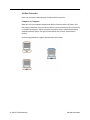
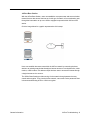
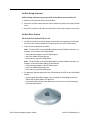
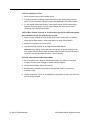
Note: Reset button is on underside of AirPort Base Station for original AirPort. Reset
button is beside Ethernet (LAN) port for AirPort (Dual Ethernet).
Reset Button
on original AirPort
Base Station
Reset Button
on AirPort Base
Station (Dual Ethernet)
Ethernet (WAN) Port
AirPort Base Station Symptom Charts
Ethernet (LAN) Port
AirPort Troubleshooting - 9