1
PRODUCT DESCRIPTION
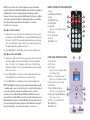
LCD Icons and data display
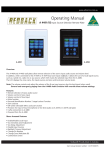
A compact wallplate designed to fit a standard electrical wall box, which
features a 2 x 15W RMS (into 4 ohms) internal amplifier with Bluetooth
wireless receiver. The wallpate uses a class D design amplifier whose
efficiency is greater than 90%. It is ideal for connecting speakers in your
lounge room, kitchen or study. It can stream music directly from your
smartphone or tablet. It also features an FM tuner, auxiliary 3.5mm jack, USB
and SD card inputs for MP3 playback. It could be used in reception areas for
general background music and broadcasting audio advertising in commercial
installations, shops, hotels, offices, restaurants etc. Includes IR remote control.
Requires 12V d.c. power supply.
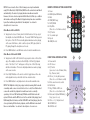
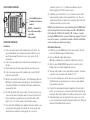
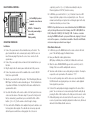
Different information is displayed on the LCD for each mode of operation.
The most important detail is shown on the top lines of the LCD. This will
indicate the current mode and the playback information that is relevant to that
mode.
ADVISORY
The information displayed during track playback is very similar in USB/SD
Card modes. ‘RPT ALL’ is indicating that the playback will cycle through all the
songs it can play and return to the first song it found on the list, and keep
playing. ‘NOR’ is the default or ‘Normal’ EQ setting. The number is the
volume level, which goes from zero to 30.
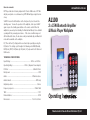
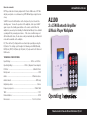
This instruction manual is written for the A1100 2x15W Bluetooth Amplifier
and Music Player Wallplate. Please read this manual carefully and retain it for
future reference.
INSIDE THE BOX
1 x Wall plate
1 x Wall box
1 x Extension wire
1 x Manual
1 x Remote Control
For example, in FM mode, the screen will display the sound volume bars,
as well as the channel number as stored in sequence in the wallplate’s
memory, and the frequency for that stored channel. This FM receiver does not
have RDS so no track information is displayed. You can press PLAY/Pause to
interrupt and restart playback of the channel audio. There is no EQ available
for FM mode.
S = SD Card; U = USB. ‘S > 002/017 160kbps’ shows that the wallplate
is in SD CARD mode, is playing track 2 of 17 available, and this is recorded at
a bandwidth of 160kbps. And below these two lines of information, the LCD
will display the Track name and Artist name for the current track. It also
shows the time progressing and the total track duration.