1
NOTE: If a user inserts either of the following source input media while
using FM or Bluetooth, USB/SD Card/AUX then the current mode will divert
automatically to the mode for playing whichever media was inserted.
However, if a device has been paired with the Bluetooth, that sync condition
will remain even though the Bluetooth playback may have been overridden
by another media being inserted into the wallplate. See below for
descriptions of screen icons.
Other Modes: AUX or LINE IN
1. Simply insert a stereo 3.5mm jack into the AUX socket on the top edge of
the wallplate to activate LINE IN mode. The words ‘LINE IN’ will appear on
the top line of the LCD. This mode will playback whatever audio is playing
on the source AUX device, which could be a phone, MP3 player, tablet or
PC playing through the headphones or line out.
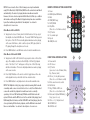
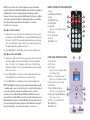
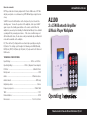
REMOTE CONTROL BUTTONS DESCRIPTION
1.
2.
3.
4.
5.
6.
Power
MODE (default FM Radio)
Mute
PREV/NEXT song
PLAY/PAUSE
VOL-/VOL+
(Press 3+ sec for Volume control)
7. EQ Control
8. 0-9, number pad
9. Repeat
10. USB/SD select
2
1
3
4
5
6
7
9
USB/SD
10
8
2. Press MODE button to exit AUX mode and enter another available mode.
Other Modes: USB and SD CARD
1. Simply insert a USB or SD Card into the appropriate socket on the bottom
edge of the wallplate to activate either USB (U) or SD Card (S) playback
mode. The letter ‘U’ or ‘S’ will appear on the top line of the LCD, along
with other information. This mode will playback whatever audio is playing
on the source media
2. Press USB/SD button on the remote control to toggle between these two
media playback modes, when both slots have media inserted.
3. Press MODE button to exit playback and enter another available mode.
NOTE: This Wallplate is fully ‘plug n play’ enabled, meaning that if a media
or auxiliary audio source is inserted into a slot or socket, then that inserted
source will override the playback from whichever mode is currently
operating. I.E. Insert SD Card during FM Radio and SD Card mode will
replace FM mode and the MP3s stored on the card will start playing; Insert
USB during Bluetooth mode, and the USB’s MP3s will start playing; Insert a
stereo jack during SD Card mode playback, and the AUX-Line In mode will
take over and activate. See below for descriptions of screen icons.
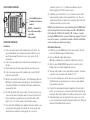
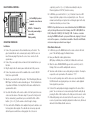
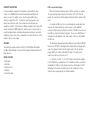
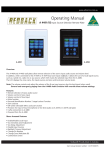
FRONT PANEL CONTROL BUTTONS
1. Power switch
2. LCD Screen
3. EQ Control
(press once to select Normal, Rock,
Pop, Classical, Jazz)
4. VOL- or |<< skip track previous
(Press 3+ secs for Volume control)
5. IR Receiver for remote control
6. AUX Socket
3
7. Play / PAUSE or FM Scan
(Press 3+ secs to activate scan)
8. Mode switch (default FM Radio) / 4
Sleep (press 3+ secs)
9. VOL+ or >>| Skip track next
10. SD CARD Slot
11.USB Stick slot
1
6
2
8
9
5
11
7
10