1
Function and basic technical
specification
The Pro Logger II has been designed to comply with
Australian Standards AS3100, AS3760 & AS4024.1
to maximise user safety.
Mains Power Outlet Check (may be disabled for some
situations)
The mains power outlet supplying the STC is checked for the
existence of an Earth, Active-Neutral transposition and Mains
voltage tolerance.
Earthed appliances are tested for:
• Electrical continuity <=100K Ohm
• Earth continuity <=1 Ohm @ 200mA*
• Insulation resistance >=1M Ohm (250/500V DC Selectable)
Note: If the appliance requires mains power to energise its
Off switch (and the switch must be “on” to complete the
mains electrical circuit), the Pro Logger II can conduct a
Current Leakage Test (Run Test) to ensure Leakage Current
is <= 5mA.
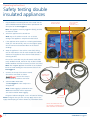
Double insulated appliances are tested for:
(unique to the Pro Logger II)
• ensures the stainless steel cloak is correctly in place:
• to provide a return path for any leakage current
during the insulation resistance test; and
• provides user protection from electric shock
• Electrical continuity <= 100K Ohm
• Insulation resistance >= 1M Ohm (250/500V DC Selectable)
Test duration
• Approx. 3.0 seconds
Electrical stress test parameters
• Insulation 500V DC / 250V DC
• E arth circuit 200mA nominal (High Current Earth
Test Option available)*
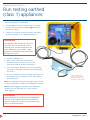
Run test (leakage current test)
• S eparate 20A Run Socket for user safety
(no switched earth – compliant with AS3100)
• Leakage current clamped at 6mA for user safety.
Run Test will terminate at > 6mA leakage current
• Earthed Appliance Leakage current <=5mA
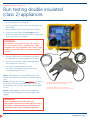
• Double Insulated Appliance Leakage current <=1mA
• Supplies 15A @ 240V AC for the duration of test
• The duration of Run Tests is user variable
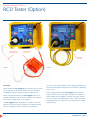
RCD Tester (when fitted) conducts a Lead Test and
then an RCD Test
• Insulation resistance >= 1M Ohm
• Earth circuit continuity <= 1.0 Ohm @ 200mA
• E lectrical continuity for resistance Active / Neutral 10K Ohm
nominal (< 10K Ohm is considered a short)
• Connection polarity (transposition of active and neutral)
• Mains Isolation Transformer included
• T rip Time < 300mS @ 30mA & < 40mS at 10mA (measured
at 0° and 180° crossing)
Note: If the appliance requires mains power to energise its
On/Off switch (and the switch must be “on” to complete
the mains electrical circuit), the Pro Logger II can conduct a
Current Leakage Test (Run Test) to ensure Leakage Current
is <= 1mA.
• S eparate 20 & 32A Run Sockets supplied
(other currents available)
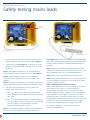
Extension/Mains leads are tested for:
• Checks for appliance running (Switched on)
• Insulation resistance >= 1M Ohm
• Leakage current <= 5mA
• Earth circuit continuity <= 1.0 Ohm @ 200mA*
• L eakage current clamped at 6mA for user safety.
Run Test will terminate at > 6mA leakage current.
3 Phase Appliance Testing (when fitted)
• E lectrical continuity for resistance Active / Neutral 10K Ohm
nominal
• The duration of 3 Phase Run Test is user variable
• 'Figure 8' leads (no earth) Insulation resistance A-N to Cloak
>= 1M Ohm
Note: *0.2, 10 & 25A test currents are available with
the High Current Earth Bond Option
6
SafeTcheck Pro Logger II