1
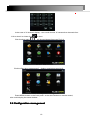
Configuration Management contains nine sub-menu: basic configuration,
on-site configuration, video configuration, recording plan, alarm configuration, network
configuration, user management, PTZ configuration and advanced configuration.
2.4.1 Basic configuration
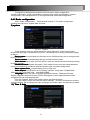
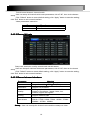
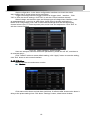
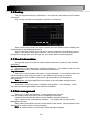
Click“Basic configuration”,show window as pic2-6, The basic configuration
contains two sub-menu: system date and time
1) system
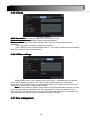
Pic 2-6 System
In this interface user can setup the device name, device ID, video format, Video
Output and language, Screensaver and so on. The definitions for every parameters display
as below:
Device name: It may display on the client end or CMS that help user to recognize the
device remotely.
Device number
number: Corresponding with the remote control number
Video format: two modes: PAL and NTSC. User can select the video format according
to that of camera.
Password check: Enable this option. user needs to input user name and password
can do corresponding operations with the relevant right in system configuration.
Show system time
time:choose display time in liveor not
Video output: the resolution of live display interface, range from: VGA800*600,
VGA1024*768, VGA1280*1024 and HDMI 1080P.
Language: setup the menu language:Simplified Chinese ,Traditional Chinese,
English,Japanese,German,Russian,French,Portuguese,Turkish,spanish,Italian,Polish,
Hungarian,Slovak,Vietnamese,greek
Click the "Default" button, the system restore the default things ;
Click the "Apply" button will save the above settings; click the "Exit"button to exit the
current interface ,Tip to change the menu language and video output, the device will restart.
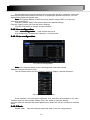
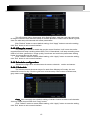
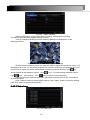
2 ) Time & date
Pic 2-7 Time & date
11