1
How to set audio off during recording………………………….……….…………………… 15-16
How to keep display screen off during recording……………………..………………………… 16
How to change volume…………………………..……………………………………………… 16
How to set auto power off…………………………………………………………………… 16-17
How to set date and time stamp…………………………….…………………………………… 17
How to set date and time…………………………………………..…………………………….. 17
How to use GPS GeoTag…………………………………………………...…………………… 17
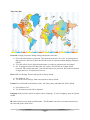
How to use time zone…………………….………………………………………………….. 17-18
How to set password……………………………….…………………………………………… 18
How to reset……………………………………….…………….………………………………. 18
How to format memory…………………………………………………………………………. 18
How to change language………………………………………………………………………… 18
How to find unique ID……………………………………………………………………...…… 18
How to find version number…………………………………………………………………….. 19
How to find batch number…………………….………………………………………………… 19
Photo menu options………………………………………………………………………………………. 19
Playback mode options…………….…………………………………………………………………….. 19
How to reboot the unit…………………...………………………………………………………………. 20
How to change from Motorola to Kenwood……………..………………………………………………. 20
3