1
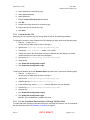
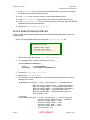
BAM User Guide June 2004 BAM Software Release 2.0 9. In the maxRetries field, enter how many times BAM should retry to send a message to
the RADIUS server when attempts are failing.
10. In the timeOut field, enter how much time should elapse between retries.
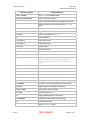
11. In the networkInterface field, enter the type of network interface. (See Table 9.)
12. In the canopyUserPassword field, enter the one password that every SM in the RADIUS
database should send for authentication.
13. Save the file /etc/canopy/canopyapi.xml.
SET UP BAM ON RADIUS SERVER To set up RADIUS to interact with BAM software and store SM configuration data, perform the
following steps.
NOTE: The Canopy BAM distribution includes the directory.mot.com file.
Distinctive fonts indicate
literal user input.
variable user input.
literal system responses.
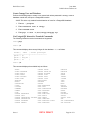
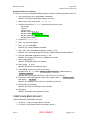
1. With an editor utility, open the file /etc/raddb/client.conf.
2. For each BAM server, insert the following block of lines:
client BAMServerIPAddress {
secret
shortname
= FromStep8Above
= DesiredAliasForBAMServer
}
3. Save the file /etc/raddb/client.conf.
4. Open the file /etc/raddb/users.
5. For each SM for which the BAM server will forward authentication requests, insert the
following block of lines:
SM_MACAddress Auth-Type := Local, User-Password == "FromStep12Above"
Motorola-Canopy-Shared-Secret = "AuthenticationKey",
Motorola-Canopy-SULDR = "SustainedUplinkDataRate",
Motorola-Canopy-SDLDR = "SustainedDownlinkDataRate",
Motorola-Canopy-ULBA = "UplinkBurstAllocation",
Motorola-Canopy-DLBA = "DownlinkBurstAllocation",
Fall-Through = Yes
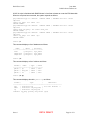
For example:
0a003e000b4d Auth-Type := Local, User-Password == "please_change_me"
Motorola-Canopy-Shared-Secret = "deadbeef",
Motorola-Canopy-SULDR = "2200",
Motorola-Canopy-SDLDR = "7800",
Motorola-Canopy-ULBA = "4400",
Motorola-Canopy-DLBA = "15600",
Fall-Through = Yes
Issue 5 BETA DRAFT Page 69 of 71