1
11
Chapter 5.How to Install Application
I.Application installation
The Android applications can be installed in this device.
Enter the file browser and choose the application file which you want to install, system will guide you how to install step by step till
finished.
Note
Not all application can be used due to different software developed in different way.
Some applications are not developed for TV, remote control may not work properly, you may use mouse for further
control.
Regarding the third party application, in case of any issues when you use these applications, please check with these
software R&D, Egreat will not provide technical support for these applications which provided by third party.
Some applications may make the system can not work smoothly or device can not be turned on, please uninstall these
applications or use enforced recovery function to reset the device.
II.Add and delete shortcuts
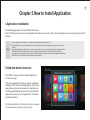
Press“ADD” to show up all the installed applications
on the home page.
Choose the applications which you want to add/delete.
Adding shortcut will show this application on the home
page, deleting shortcut will remote this application on
the home page.Deleting shortcuts will not uninstall the
applications, please go to “All applications” for further
uninstall operations.
Click menu button on the shortcuts icon to manage
the replacement,remote,on top settings.