1
13
Chapt7. System Upgrade
System Upgrade
We may upgrade the firmware to improve user experience.
Local Upgrade:
1.Download firmware which named “update_signed.zip”.
Please do not change file name after download, and save the file to the root directory of your USB storage device .
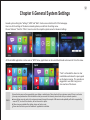
2.Connect USB storage device with the player.Get power on. Follow this path: “Settings” - ”System setting” - “System upgrade” “Local upgrade”, system will automatically check the upgraded file and finish upgrading automatically.
3.Please keep power on to make sure the upgrade progress runs smoothly until it resets and goes to the homepage automatically.
Enforced Restore System
Factory Reset
Method 1: Enter the home page and follow this path: “Settings” - ”About” - “Factory reset” - “OK”,Please keep power on to
make sure the upgrade progress runs smoothly until it reset and go to the homepage automatically.
Method 2: Enter the home page and follow this path: “Settings” - ”Advanced settings” - “Backup and reset” -“Factory reset”“
reset the device”“clear all datas”,Please keep power on to make sure the upgrade progress runs smoothly until it reset and go to
the homepage automatically.