1
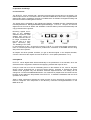
Playback works but recording doesn´t:
• Check that a valid input signal is at hand. In this case the Error LED on the hardware extinguishes, and the actual sample frequency is shown under 'Settings'.
• If you are sure that a valid signal is being sent but the LED is still red, then check the chosen
input.
• Check that the DIGI32 is set as recording device under the software being used.
• Check that the setting of the sample frequency in the software (recording properties or similar) relates to the adjacent signal.
The recording or the playback is disturbed by crackling:
•
•
Increase the quantity and size of the buffers in the software being used.
Use a different cable (coaxial or optical) to cross-check them for defects.
The computer hangs after the first access on the DIGI32:
•
If you are using a graphics board with S-3 chip 968 then a memory allocation error might be
the reason. Please change the used memory area with 'Resources', so that it is adressed
underneath the memory area of the graphics board (for example D0000000 - D0FFFFFF).
More informations on this subject can be found in the document 'install.htm', located in the
directory \rmeaudio.com\english\techinfo on the RME Driver CD.
13. Installation Problems with older PC
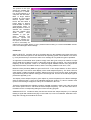
Older models without Plug & Play compatible mainboards often present some problems. In such cases the configuration of
the IRQ in the BIOS and the configuration of
the memory area in Windows must be done
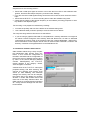
by hand. In the Device Manager (Settings
/Control Panel/System) the DIGI32
usually appears in the category 'Sound,
video and game controllers’.
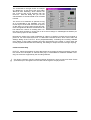
A double click on the DIGI32 calls up the
properties dialog, and after selecting 'Resources' the interrupt and memory area
shows up. After disabling 'Use automatic
settings' the memory area can be changed,
the bottom part of the dialog box showing
whether a conflict with another device will
result out of the newly selected value. The
IRQs cannot be changed because Windows
™
95 strictly uses the settings from the mainboard´s BIOS.
User's Guide DIGI32 © RME
13