1
9. Configurating the DIGI32
9.1 General
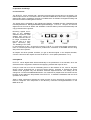
The hardware of the DIGI32 includes a number of helpful options under all supported operating systems, that allow to configure the behaviour of the card according to the actual needs.
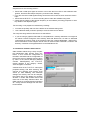
Through the registercard ‘Settings’ you will gain access to:
•
•
•
•
•
Selecting the input
State of the output
Channel Status of the outgoing signal
Synchronisation behaviour
Display of the input signal
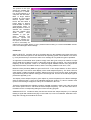
The display of the actual input frequency is updated every 0,5 seconds. When choosing an input
with a signal including errors or without input signal the statement ‘No Lock’ appears, in case of
sample frequencies widely out of tune ‘Out of Range’ is shown. When an optical signal is
present while the coaxial input is active then you immediately see that there’s no valid signal
available. The changing / switching of the inputs happens right away and needs no further click
on OK. All parameters for the active input needed to start recording are found very quickly. With
this the tedious ‘trial and error’ to get a digital recording working becomes a thing of the past.
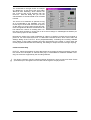
The three states of the output selected through the choicebox ‘Output’ are unavoidable functions
for daily use.
‘Automatic’ sets the normal mode where
the input signal reaches the output only
whilst recording. In this mode when starting a recording feedback occurs very
often in studios with digital mixing desks.
‘Play only’ solves this problem by making
sure that the input signal is never passed
through to the output.
After selecting ‘Input’ the input signal
appears always at the output when playback is not active. DIGI32 saves a
continual recording standby mode and
can switch itself to monitoring without
active software. As the output options
operate immediately stepping through
the inputs gives a fast check of the incoming signals.
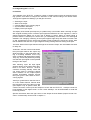
'AutoSync’ guarantees a fault-free function of the modes Record, Record while
Play and while using more than one card
(see chapter 10.2). In specific cases, like
a direct connection of the inputs and outputs of a DAT with the DIGI32, AutoSync leads to a
local feedback of the digital carrier. In such cases AutoSync can be deactivated to avoid this
local loop problem.
Specific information about the right choice of the Output Channel Status (Output Format Consumer / Professional) can be found in chapter 11.
User's Guide DIGI32 © RME
9