1
Resetting the repeater
If you need to reboot your repeater, it is possible to unplug it from the wall socket and plug it back
in after some seconds. Or you can press the reset button in the side. In case you wish to perform a
factory reset, please press and hold the reset button for 30 seconds. Afterwards the repeater will
be sending out its original network name “WNP-RP-002” and you will be able to follow the
installation procedure again.
Frequently asked question (FAQ)
1. I plugged in the repeater and conencted to its network, but Windows tells me the
connection has limited access or no internet acces.
Your repeater needs to be setup before First use. This allows the repeater to connect to your
router. Only after the initial setup it is possible to use internet via the repeater. Please use this
manual to setup your repeater.
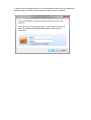
2. Windows asks for a PIN code when I try to connect to the repeater network. Entering the
password (12348765) is not working here.
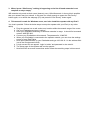
Indee Windows can ask for a PIN code sometimes. However, for setting up this repeater using a
PIN is not possible. Please click on the blue link “connect to this network without setting it up” to
enable normal password authentication. (Windows message may differ in different Windows
versions)
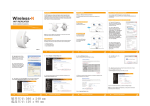
Click here
Do NOT click OK, but click
on the blue link above.
X