1
Navigating Your Device
After the device is powered on and Wi-Fi connection is established, it goes into the Live View mode
automatically. From there, you can simply navigate
through different functions using the Back button.
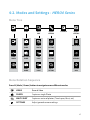
The order of appearance of the functions are illustrated below.
1080/60/W
0015
45:30
1. Live View Mode
2. Hide OSD
3. Screen Saver
4. Clock
5. Playback Mode
6. Settings Mode
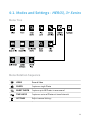
To Adjust Settings
The settings can be adjusted in the Setting Mode.
Please navigate to the settings mode using the
M (Mode / Power) button, and enter the menu by
pressing the REC (Shutter / Select) button
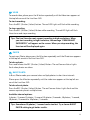
The list of the settings are:
LCD Brightness
STANDARD mode / ECO mode
System information
It displays the general information of the device
Camera Network
It lists the available Wi-Fi network you can connect to
7