1
University Program Design Laboratory Package User Guide
8.
Click Save JCF to save the current settings to a JCF for future use.
Type the name of the file in the File Name box and then select the
desired directory in the Directories box. Click OK.
9.
Click OK to save the changes.
10. Click Configure in the MAX+PLUS II Programmer to configure all
EPF10K20 devices in the JTAG chain. Then, click Program to
program all EPM7128S devices in the JTAG chain.
Connect Multiple UP 1 Education Boards Together in a Chain
This section describes the procedures for connecting multiple UP 1
Education Boards together, (i.e., how to set the on-board jumpers, connect
the ByteBlaster download cable, and set options in the MAX+PLUS II
software).
Setting the On-Board Jumpers for Connecting Multiple UP 1 Education
Boards Together
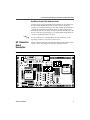
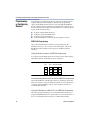
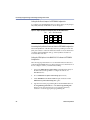
To configure/program EPM7128S and EPF10K20 devices on multiple
UP 1 Education Boards connected in a multi-device JTAG chain, set the
jumpers TDI, TDO, DEVICE, and BOARD for all boards except the last
board in the chain as shown in Figure 10.
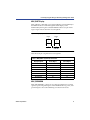
Figure 10. Jumper Settings for All Boards Except the Last Board in the Chain
TDI
TDO
DEVICE BOARD
C1
C1
C1
C1
C2
C2
C2
C2
C3
C3
C3
C3
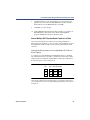
The last UP 1 Education Board in the chain can configure and program
one or both devices. However, the BOARD jumper must be set as shown
in Figure 11.
Altera Corporation
23