1
Microsoft Windows Preinstallation Environment User's Guide
Page 19 of 27
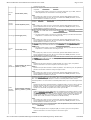
contained on the disk.
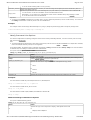
Converts an empty dynamic disk into a basic disk.
convert
basic
convert basic [noerr]
Important
l The disk must be empty to convert it to a dynamic disk. Back up your data, and then
delete all partitions or volumes before converting the disk.
noerr
For scripting only. When an error is encountered, specifies that DiskPart continues to
process commands as if the error did not occur. Without the noerr parameter, an error
causes DiskPart to exit with an error code.
Converts a basic disk into a dynamic disk. Any existing partitions on the disk become simple
volumes.
convert
dynamic
convert dynamic [noerr]
convert gpt convert gpt [noerr]
noerr
For scripting only. When an error is encountered, specifies that DiskPart continues to
process commands as if the error did not occur. Without the noerr parameter, an error
causes DiskPart to exit with an error code.
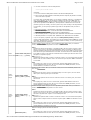
On Itanium-based computers, converts an empty basic disk with the master boot record (MBR)
partition style into a basic disk with the GUID partition table (GPT) partition style.
Important
l The disk must be empty to convert it to a GPT disk. Back up your data and then delete
all partitions or volumes before converting the disk.
noerr
For scripting only. When an error is encountered, specifies that DiskPart continues to
process commands as if the error did not occur. Without the noerr parameter, an error
causes DiskPart to exit with an error code.
On Itanium-based computers, converts an empty basic disk with the GUID Partition Table
(GPT) partition style to a basic disk with the master boot record (MBR) partition style.
convert
mbr
convert mbr [noerr]
Important
l The disk must be empty to convert it to an MBR disk. Back up your data and then delete
all partitions or volumes before converting the disk.
noerr
For scripting only. When an error is encountered, specifies that DiskPart continues to
process commands as if the error did not occur. Without the noerr parameter, an error
causes DiskPart to exit with an error code.
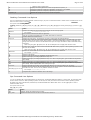
On Itanium-based computers, creates an Extensible Firmware Interface (EFI) system partition
on a GUID Partition Table (GPT) disk. After the partition has been created, the focus is given to
the new partition.
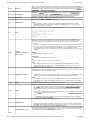
size=n
Specifies the size of the partition in megabytes (MB). If no size is given, the partition
continues until there is no more free space in the current region.
create
create partition efi [size=n]
partition efi [offset=n] [noerr]
offset=n
Specifies the byte offset at which to create the partition. If no offset is given, the partition is
placed in the first disk extent that is large enough to hold it.
noerr
For scripting only. When an error is encountered, specifies that DiskPart continues to
process commands as if the error did not occur. Without the noerr parameter, an error
causes DiskPart to exit with an error code.
Creates an extended partition on the current drive. After the partition has been created, the
focus automatically shifts to the new partition. Only one extended partition can be created per
disk. This command fails if you attempt to create an extended partition within another
extended partition. You must create an extended partition before you can create logical drives.
create
partition
extended
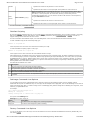
size=n
Specifies the size of the extended partition in megabytes (MB). If no size is given, then the
partition continues until there is no more free space in the region. The size is cylinder
snapped; that is, the size is rounded to the closest cylinder boundary. For example, if you
specify a size of 500 MB, the partition size rounds up to 504 MB.
create partition extended
[size=n] [offset=n] [noerr] offset=n
Applies to master boot record (MBR) disks only. Specifies the byte offset at which to create
the extended partition. If no offset is given, the partition starts at the beginning of the first
free space on the disk. The offset is cylinder snapped; that is, the offset is rounded to the
closest cylinder boundary. For example, if you specify an offset that is 27 MB and the
cylinder size is 8 MB, the offset is rounded to the 24-MB boundary.
noerr
For scripting only. When an error is encountered, specifies that DiskPart continues to
process commands as if the error did not occur. Without the noerr parameter, an error
causes DiskPart to exit with an error code.
Creates a logical drive in the extended partition. After the partition has been created, the focus
automatically shifts to the new logical drive.
size=n
The size of the logical drive in megabytes (MB). If no size is given, then the partition
continues until there is no more free space in the current region.
offset=n
file://C:\Documents%20and%20Settings\alessandrot\Local%20Settings\Temp\~hh9F54.htm
15/07/2004