1
Osborne-Hoffman Network Receiver Software
User Manual
Video
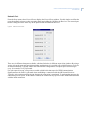
From the Setup menu, select Video to display the Video Setup window. Use this window to configure the OH
Network Receiver Video function. The video functionality is compatible with the CS9104 or NX-9104
modules with VVMIQ functionality.
Figure 11. Video Setup window
The Video Enabled field specifies whether the OH Network Receiver will receive video from alarm panels.
The video clips are stored in the format described below. The video files are in .asf format which can be
opened by a standard video viewer such as Windows Media Player.
Note:
As the OH Network Receiver does not have any backup capability, and the database is completely dynamic, it is good
practice to store the video clips on a Network Drive.
The following line defines the parts of a video file in .asf format. Use Table 5 to decipher it.
S_RRRR_LLLL_CCCCCC_PP_ZZZ_NNN_MMDDYYHHMMSS.ASF
Table 5.
.asf format descriptions
Format
Description
S
Header Format (Byte [13] of Section )
RRRR
The Receiver Number, 4 -digits
LLLL
The Line Number, 4 -digits
CCCCCC
The Account Number
PP
Partition Number
ZZZ
Zone Number
NNN
Clip Number
MM
Month
DD
Day
YY
Year
HH
Hours
MM
Minutes
SS
Seconds
For example:
Video Alarm: 01010034"SIA-DCS"0007R0001L0001[#000001|Nri01/BA003]
Video File Name: 2_0001_0001_000001_01_003_0_020706025425.asf
The Video Port field specifies the port that alarm panels connect to when sending video. This should always be
set to 9995, or should be set to the same value on both the VVMIQ module and receiver. You can also enter the
path you store video clips in using the bottom field on the Video Setup window.
13