1
1. Step-by-step guide to e-grant
1.1 Accessing e-grant
Applications to Innovation Fund Denmark must be submitted via the electronic application system
https://e-grant.dk/.
All the general pages in e-grant are available in both
Danish and English (switch language at the top right).
Note however that the actual application form for
large-scale projects is available in English only.
1.2 User setup
The first time you access https://e-grant.dk/, you will
need to set yourself up on the system.
You have two options:
•
Either use NemID every time you log in (requires a key every time),
•
Or create a user profile consisting of a user name (i.e. email address) and your own choice of
password.
The chosen login type will be the one you use for all future access to e-grant.
Create user profile: requires both an email address and a mobile phone number: The link is sent to
you by email first. When you then activate your access, you will receive a code by SMS, which you
then have to enter. For all future logins, you will not need a mobile phone, and simply have to
remember your user name and password.
1.3 Welcome page (Home) – Find the right call
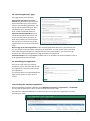
After login, you land on the Welcome page.
At the top is the green main menu (a number of the items shown in the screenshot are visible only if
there is content to display).
“Application possibilities” (in Danish:
“Søgemuligheder”) takes you to a page
listing all the open calls.
Find the relevant call and click “Apply
now”.
1.4 Starting an application
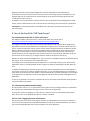
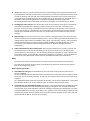
After you have clicked “Apply now”, you will be taken to a page where you start the generation of an
application form by entering a title and clicking “Create application”.
The title cannot be amended subsequently on the application's cover page, but you will be able to
amend it inside the form. The amendment will not be
reflected on the cover page until the application has been
submitted.
2