1
1.5 Introductory page for a given application
The application form itself now opens in a new window.
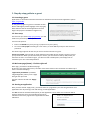
You start out on an introductory page containing general
instructions. When you have read the introductory page,
click “Start” at the bottom. You can now complete the
individual pages of the application form.
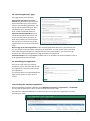
On the left-hand side is a menu showing you the various
pages you have to work through. These pages can be
completed in any order.
As soon as you have entered the mandatory content on a
page (fields marked *), and have saved the page (save and
continue), the page is ticked as completed in the menu on
the left.
The information you input can be amended at any time while you work on the application.
1.6 Completing the individual pages of the application form
The application form contains a number of fields to be completed either by entering text or by making
selections from lists or in checkboxes. Follow the instructions in the form.
Certain fields require you to enter longer texts. By all means use copy/paste from another document,
but bear in mind the space restrictions. Your text will be truncated by the system if it is too long –
perhaps in a way that is detrimental to your application.
1.7 Attaching appendices
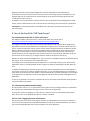
On the application form's “Attach appendices” page, you have to attach the required appendices to
your application.
Before attaching them, the appendices
must be saved on your local drive as PDF
documents.
Note that the file names must not
exceed 45 characters and must not
contain special characters. Note also that
the total size of the appendices must not
exceed 25 MB.
The appendices can be attached in any order – their order in the final application (i.e. when all
documents have been compiled as a single PDF by the system on submission) will be determined by
the “Document type”.
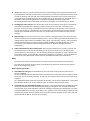
At the bottom, you can see any files you attached previously – these can be deleted and replaced by
new ones.
Attaching files over the system may take some time, so don't wait until the deadline when the system
may be more busy.
3