1
DELINKING PROCEDURES MAY 2006
5.2
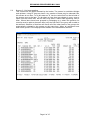
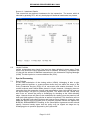
Screen 2 – List items pending
This screen lists the items selected by the broker. The screen is scrollable left/right
and up/down, using PF keys as shown. Any number of items may be selected from
this screen at one time. To do this enter an ‘S’ into the ‘select field’ on the left side of
the screen next to the item. To de-select an item that was chosen in error, enter a
space into the select field. Not all items may have a select field appearing next to
them. Where items have been grouped by Xchanging (e.g. where the premium for
one slip must be paid at the same time) only the first item in the group will be able to
be selected. Selection of that item will cause all of the other items in the group to be
automatically selected by the system at the same time. When all selections have
been made, press PF5 to display further details of the transactions selected.
Page 6 of 15