1
DELINKING PROCEDURES MAY 2006
5.3
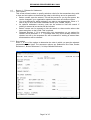
Screen 3 – Transaction Details
This screen displays the detail of a selected transaction. If a number of transactions
have been selected – either by the user or by the system for grouped items – each
transaction will be presented in turn. For users who only have enquiry authority all
data will be protected. For users with update authority the following fields can be
amended:
• Broker contact name and telephone number
• Broker reference 1 and 2
• Rate of exchange (for convertible currency items only)
• Net premium for settlement (for convertible currency items only)
• The release indicator
• The effective date for the release
To release an item for settlement, enter ‘Y’ in the release field. Optionally an effective
date can also be entered. Items marked for release will remain on the suspense
database until the end of the current day, or the end of the effective date if entered.
Up to that time it is possible to de-activate any items marked for release by entering
‘N’ in the release field. In some circumstances the system may prevent the release of
an item – e.g. if a premium warranty is in effect and the warranty date has expired. An
error message will be displayed to explain the reason for not allowing the release. In
these cases it will be necessary to contact Xchanging to execute the release (see
Section 7.6).
Page 7 of 15