1
448
Maximizer CRM 10.5
User’s Guide
Publishing Your Catalog on the Internet
?
To learn more about
publishing your catalog, open
the eStore Help and look up
“upload” in the index.
The final stage of building your catalog is to publish the catalog.
Publishing the catalog is actually a very simple process—eStore
generates the files that make up your eStore website, then copies
them to a publicly-accessible folder on your company’s web server
(the computer running Microsoft Internet Information Server).
For security reasons, your production site—the site where you
publish the catalog—may be on a different computer than your
preview site.
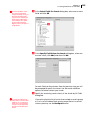
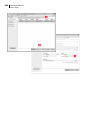
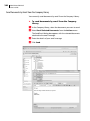
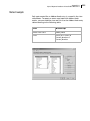
Specify the Physical Location of the Catalog Files
Make sure you have two virtual directories set up on your IIS server:
an internal virtual directory for previewing your catalog and a
publicly-accessible virtual directory for the completed catalog. When
you specify the location to store the files for preview, you specify the
physical location of the preview folder on the IIS server (e.g.,
“\\servername\catalog”). A virtual directory “points” to the folder in
which your catalog’s website files are stored.
Enter the URL of Your Preview Site
Enter the IIS server’s URL (or the IP address) and the virtual directory
of your preview site. If you are working at the IIS server that hosts
your site, you can enter “127.0.0.1” as the IP address. eStore uses this
URL to display the preview site for you in your web browser.
An example of a URL using an IP address would be in this format:
“http://xxx.xxx.xxx.xxx/catalogpreview”, where “xxx” is the IP