Creating a Booking
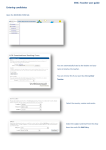
• Select the resource(s) that you would like to book.
• To appear on the calendar, the resource must be
added using the ‘choose resources’ button on the left
of the screen.