1
Creating a Project
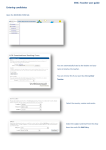
• Follow down the other tabs on the
left of your screen and complete all
the necessary details.
• Under User tab please enter all
members of your project team who
have registered an account on
calpendo and will be making
bookings for the project
• Ensure you upload your study
pathway approval documents (e.g.
ethics approval letter/email pdf,
Sponsor letter) and your signed
CRICBristol project specification
form in fields at the bottom of the
General tab.
• Once you have completed all
necessary data, press the ‘Submit
project request’ button.