1
Readingg Lists Online Staff Usser Guide Introd
duction
This Stafff User Guidee has been d
designed to pprovide mem
mbers of the library staff w
with informa
ation on the use of the admin
nistrator secttion of the R
Reading Lists Online syste
em. Accesssingtheadministtratorho
omepage
e
1.
2.
3.
4.
5.
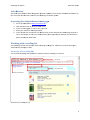
Go to the weeb address h
https://rlo.nccl.ac.uk/ . Click the Admin link on tthe RLO mainn menu. If you are no
ot logged in, click on the Login link. Enter your ccampus n‐id a
and passworrd. If your detaiils are correcct then you w
will be taken to the administrator hom
me page for RLO. If you’re still u
unable to acccess the adm
ministrator ho
ome page an
nd you believve you should then please contaact the Web team. Work
kingwithareadin
nglist
The follo
owing section will show yyou how to m
manage read
ding lists. It a
assumes you have been ggiven administtrator privileeges to RLO. Structtureofarreadinglisst
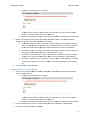
The two
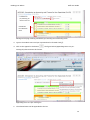
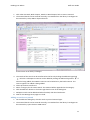
o following diiagrams provvide an overvview of RLO’’s reading list structure. List name
List public note
Modulee contributors Structurre of a readin
ng list (1) 4