1
Project Deliverer User Guide: Volume 2
Set risk rating
Each live project should be assigned a risk rating on MCIS. New projects set up
on MCIS should be risk-rated prior to making them live.
The project should be risk assessed on an ongoing basis using the local
(Intermediate Body) risk assessment form, and the findings registered and
maintained on MCIS.
The risk rating for each project is displayed alongside the cost and output variance
ratings in the Search results ‘performance dashboard’.
To display this screen
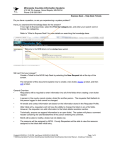
Search for and open the project you wish to assign a risk-rating to. The Project
Profile Overview page will display. Click the Risk link displayed.
Add a meaningful
comment supporting
the risk rating.
About this screen
This screen records the risk rating for the project.
The current risk rating of the project is displayed at the top of the screen. If a risk
rating has not yet been assigned, the message ‘Not set’ will display.
Completing this screen
1. Select the level of the risk by clicking on the Low, Medium or High radio
button.
2. Add comments that give the reason for the level of risk chosen.