1
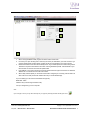
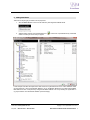
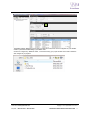
3. 2 4. 5. 1. 1. 2. 3. 4. 5. When running the MBUS-CONF program the above window will be seen. Un-tick any com port not being used. Leave only the comm port allocated to your level convertor e.g. if unknown please check windows device manager to see the port allocated to your level convertor Deselect baud rates if unit baud rate is already known. E.g. if Default Speed of converter being used is 19200 then only leave 19200 ticked to save time scanning at different speeds. If the baud rate of your level converter is unknown then leave all speeds ticked. If the address of your level converter is known then please select the upper and minimum to reflect the address set. If not known then leave as shown above. When ready and the options you are aware of have been configured you can simply click this button to start a auto scan of the port and the software will find your connected device(s). If you are setting up a new unit then the defaults are typically: Baud Rate: 19200 Address: 255 (in above image set start to 255) Com port: Assigned by your own computer Note: If your unit type is known you may add it manually into your project by selecting the folder with the green cross. Online Store: www.syxthsense.com Enquiries: T: 0844 840 3100 F: 0844 840 3200 Copyright 2013 SyxthSense Ltd. Ver 0.1 MoD-M-BUS CONFIGURATION S/W USER GUIDE 6