1
3–16
Chapter 3: Parameter Settings
IP Core Parameters
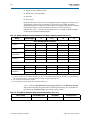
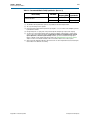
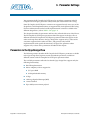
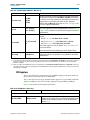
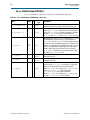
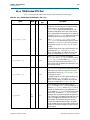
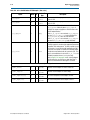
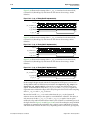
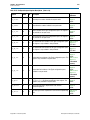
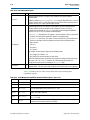
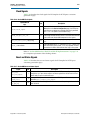
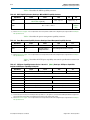
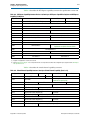
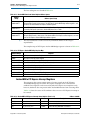
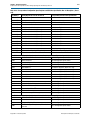
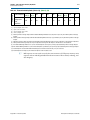
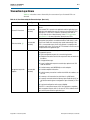
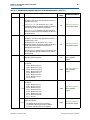
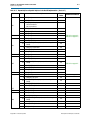
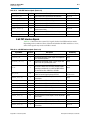
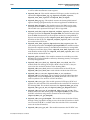
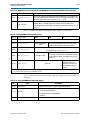
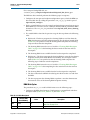
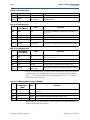
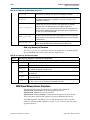
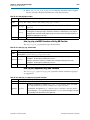
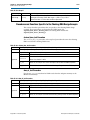
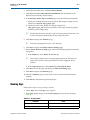
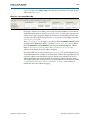
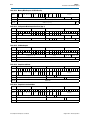
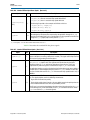
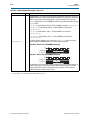
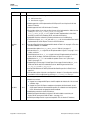
Table 3–11. Capabilities Parameters (Part 4 of 4)
Parameter
Value
Description
0x068[26:16]
10:0
System software reads this field to determine the MSI-X Table size <N>, which is
encoded as <N–1>. For example, a returned value of 10’b00000000011 indicates a
table size of 4. This field is read-only.
MSI-X Table
Offset
31:3
Points to the base of the MSI-X Table. The lower 3 bits of the table BAR indicator
(BIR) are set to zero by software to form a 32-bit qword-aligned offset. This field is
read-only.
MSI-X Table BAR
Indicator
<5–1>:0
Indicates which one of a function’s Base Address registers, located beginning at
0x10 in configuration space, is used to map the MSI-X table into memory space.
This field is read-only.
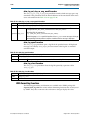
MSI-X Table size
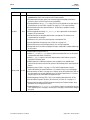
Pending Bit Array (PBA)
Offset
BAR Indicator
(BIR)
31:3
Used as an offset from the address contained in one of the function’s Base Address
registers to point to the base of the MSI-X PBA. The lower 3 bits of the PBA BIR are
set to zero by software to form a 32-bit qword-aligned offset. This field is read-only.
<5–1>:0
Indicates which of a function’s Base Address registers, located beginning at 0x10 in
configuration space, is used to map the function’s MSI-X PBA into memory space.
This field is read-only.
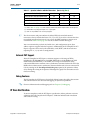
Note to Table 3–11:
(1) Throughout The PCI Express User Guide, the terms word, dword and qword have the same meaning that they have in the PCI Express Base
Specification Revision 1.0a, 1.1, or 2.0. A word is 16 bits, a dword is 32 bits, and a qword is 64 bits.
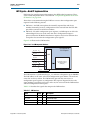
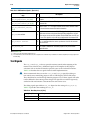
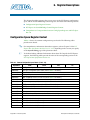
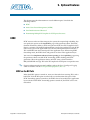
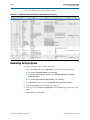
Buffer Setup
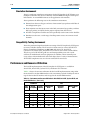
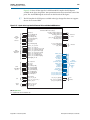
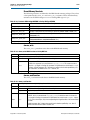
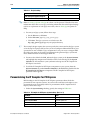
The Buffer Setup page contains the parameters for the receive and retry buffers.
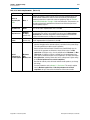
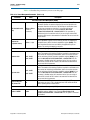
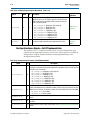
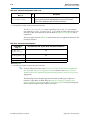
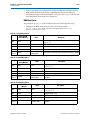
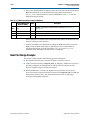
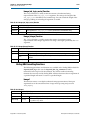
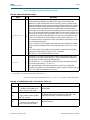
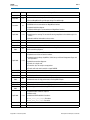
Table 3–12 describes the parameters you can set on this page.
The IP Compiler for PCI Express parameter editor that appears in the Qsys flow
provides only the Maximum payload size and RX buffer credit allocation –
performance for received requests buffer setup parameters. This parameter editor
also displays the read-only RX buffer space allocation information without the space
usage or totals information. For more information, refer to “Parameters in the Qsys
Design Flow” on page 3–1.
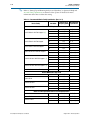
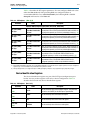
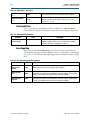
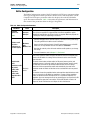
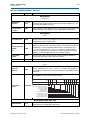
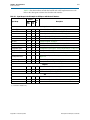
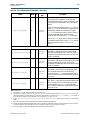
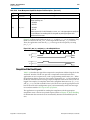
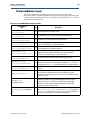
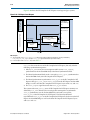
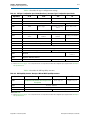
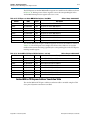
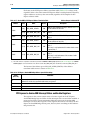
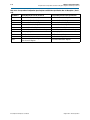
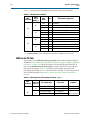
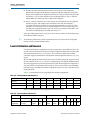
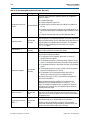
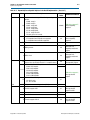
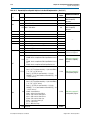
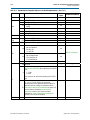
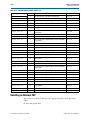
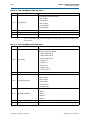
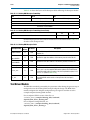
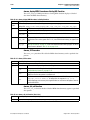
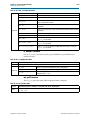
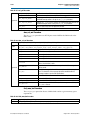
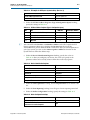
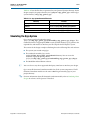
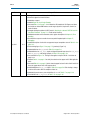
Table 3–12. Buffer Setup Parameters (Part 1 of 3)
Parameter
Maximum
payload size
0x084
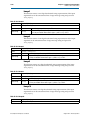
Number of
virtual channels
0x104
Value
128 bytes,
256 bytes,
512 bytes,
1 KByte,
2 KBytes
1–2
Description
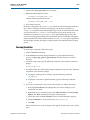
Specifies the maximum payload size supported. This parameter sets the read-only
value of the max payload size supported field of the device capabilities register
(0x084[2:0]) and optimizes the IP core for this size payload.
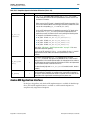
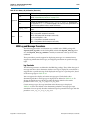
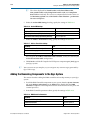
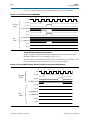
Specifies the number of virtual channels supported. This parameter sets the
read-only extended virtual channel count field of port virtual channel capability
register 1 and controls how many virtual channel transaction layer interfaces are
implemented. The number of virtual channels supported depends upon the
configuration, as follows:
Hard IP: 1–2 channels for Stratix IV GX devices, 1 channel for Arria II GX,
Arria II GZ, Cyclone IV GX, and HardCopy IV GX devices
Soft IP: 2 channels
Qsys: 1 channel
IP Compiler for PCI Express User Guide
August 2014 Altera Corporation