1
FireBrick User Guide
ADSL/Stealth with external machines
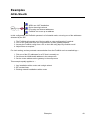
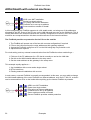
ADSL non−NAT installation
Router has single subnet
PCs using real internet addresses
FireBrick not to use up an address
Some machines outside of firewall
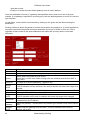
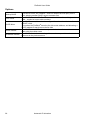
In this configuration the FireBrick operates in a full stealth mode, not using one of the addresses
allocated by the ISP. Some of the PCs are on the LAN side and some are on the WAN side. This is
usually done where the external machines are carefully configured to be secure, but if the external
machines are compromised then this does not allow access to the internal machines.
The FireBrick provides no protection for the PCs on the outside.
1. The FireBrick will operate out of the box with no extra configuration if required
2. PCs on the LAN must have the router address as their gateway address
3. Access the FireBrick config from a PC on the LAN using http://my.firebrick.co.uk/
4. Adjust filters as required
For clock setting, and any external communication from the FireBrick such as emailed logs :−
1. Pick one of the PC addresses for a PC that is normally on and on the LAN side
2. Set this as the WAN stealth address in the setup menu
3. Set the router address as the gateway in the setup menu
This example equally applies to :−
1. Any installation with a router and a single subnet
2. BT net start lines
3. Existing network installations with a router
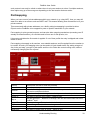
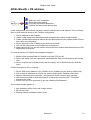
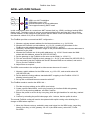
In such cases, a second FireBrick is normally recommended. In this case, you may wish to change
the LAN stealth address of the outer FireBrick to a different address, such as 217.169.0.2, so that it
can be accessed from PCs on the inside without picking up the internal FireBrick by mistake.
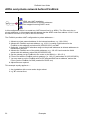
ADSL non−NAT installation
Router has single subnet
PCs using real internet addresses
FireBrick not to use up an address
Some machines outside of firewall
Second FireBrick provides outside protection
50
Examples