1
9449
Engineer Program Command List
1.
Key in a two digit programming command followed by #. (See "Engineer
Program Command List".)
One or more LEDs glow to show you the current option used in the
command. While in programming mode use the blue numbers
printed to the right of the LEDs. If all LEDs are OFF the option is "0".
2.
Key in the correct digit for the option you want, and then press #.
The system beeps twice to show that it has accepted the command. All
the LEDs flash, and the system is ready for the next command.
The system gives a single error tone if you enter an incorrect command.
Re-enter the correct command.
3.
Key in "99 #" to leave programming mode when you have finished. You
will then be in user mode.
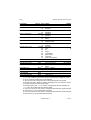
Engineer Program Command List
To change:
Key-in: Then:
Zone n
0n #x...x #
(see "Zone Programming"
on page 10)
Entry/Exit Chime
Zones omitted in Part Set
Engineer Code
7890
User Code 1
1234
User Code 2
0000
Duress Code
****
Part Set Exit Mode
Notes
Default
n = zone number (1 to 7)
x = Zone type, one or more of:
0 = Not Used (see Note 8)
1 = Normal Alarm
Y
2 = Entry Route
(zone 1 default)
3 = Panic Alarm
4 = Fire
5 = Technical Alarm
6 = Omit Allowed
Y
7 = Chime
8 = 24 Hr Monitored
9 = Double Knock
08 # 7 #
To toggle on/off
Off
10 # zone n..n # LEDs ON for zones
5&6
omitted (see note 1)
20 # new code #
4 digits
21 # new code #
4 digits (see note 2)
22 # new code #
4 digits (see notes 2 & 3)
23 # new code #
4 digits (see notes 2 & 4)
35 # 0 #
1#
Low tone
Silent
496329 Issue 1
Y
7 of 16