1
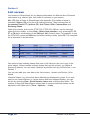
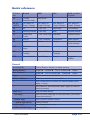
Quick reference Function key Normal Shift Ctrl Shift and Ctrl together F1 Context Sensitive Help Help Arrow F2, F3 and F4 List Tables or Graph Settings List Tables or Graph Settings List Tables or Graph Settings List Tables or Graph Settings F5 All FTSE 100 Non-index Convertibles F6 Ordinary shares FTSE 250 AIM Income shares F7 Investment Trusts FTSE Small Cap Warrants Capital shares F8 Indices FTSE Fledgling Preference Other shares F9 Update Details Graph Select Current Cash Account F10 Select the menu Context menu F11 Current Portfolio Imported Data Directors’ Dealings Cash Accounts F12 Select Portfolio Data Mining Email Triggered Alarms Context menu General a-z (and 0-9) Find a Share or Search (in News screen) Enter (Return) Graph Details Esc (Escape) Graph List or Portfolio Space Select next item in current list Shift and Space Select previous item in current list / View numerical price history for selected share (and / again to close) \ View News for selected share (and \ again to return to previous screen) Shift and \ View all News stories . (full stop) View Directors' dealings for selected share (and return to previous screen) - (minus sign) View Current Portfolio screen - - (minus sign twice) Select Portfolio + (plus sign) View Transactions screen > (Shift and full stop) View Key Dates Quick reference List or Portfolio Details Graph Graph Page 123