1
Troubleshooting Guide
ESPrit™ 3G Sound Processor
Troubleshooting Kit Contents
What the kit contains:
675 PowerOne HP, zinc air batteries, 6 pack
Signal check
Accessories adapter for the ESPrit 3G
59” lapel microphone & clip ESPrit 3G
Monitor earphones for the ESPrit 3G
Soft earhook cover
Earmold compatible earhook
•
•
•
•
•
•
•
Before troubleshooting step by step, conduct a maintenance check
of the equipment.
Maintenance Check
Confirm:
Transmitting cable is properly connected.
Cable is not broken or cracked.
Transmitting coil is on the child’s head and is correct N24
(yellow connector), N22 (green connector).
•
•
•
Program
Also do the following:
Confirm that the ESPrit 3G is ‘ON’.
- If no sound, switch the ESPrit 3G ‘Off ’
for about 3 seconds, and then ‘On’.
Confirm that the student is using the
recommended mode setting.
'T' for telecoil
Confirm that the child is using the
recommended program setting.
Confirm that the rotary wheel is
set at the recommended setting.
•
•
•
•
If the child reports no sound from the processor
and the above inspection is good, take the following steps:
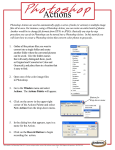
18
selectionselection
/on/
Program
off control
control
Volume
or
orVolume
sensitivity
(rotary
wheel)
sensitivity
control
control
Top controls
'W' for Whisper Setting
'M' for microphone
Mode setting switch
Socket for attaching
the accessories
adaptor
Troubleshooting Kit