1
Troubleshooting Guide
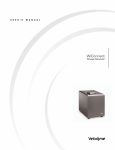
Freedom™ BTE Sound Processor
Troubleshooting Kit Contents
What the kit contains:
675 PowerOne HP, zinc air batteries, 6 pack
Freedom coil (8cm)
Freedom magnet - #2 beige
Freedom lapel microphone
Freedom monitor earphones
Freedom earhook set (small and large)
Freedom microphone protector
Freedom battery holder
•
•
•
•
•
•
•
•
Before troubleshooting step-by-step, conduct a maintenance check
of the equipment.
Maintenance Check
Confirm:
Transmitting cable is properly connected.
Cable is not broken or cracked.
Transmitting coil is on the child’s head.
•
•
•
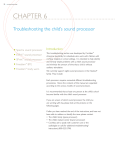
Select
button
on/off
Display
Also do the following:
Decrease
Confirm that the Freedom
button
BTE is ‘ON’.
Cover for
If no sound, turn the Freedom
accessories
Increase
BTE ‘Off ’ for about 3 seconds,
connection
button
and then ‘On’.
Confirm that the child is using the recommended program setting.
•
•
•
Program 3 in use
Microphone only
Program 2 in use
Telecoil only
• Identify whether help messages are displayed on the LCD.
22
Troubleshooting Kit