1
Balm Facility 081111- 510 Meta Inv Guide. Pg 2
1. Find your sample
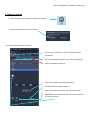
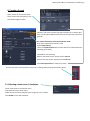
1. Open the software by clicking the ZEN shortcut button
2. Choose Start System to start the confocal
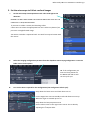
3. Find your specimen by eye. To do this:
•
Set the system to Ocular so you can see light down the
microscope.
•
Set the microscope to Online (or you won’t see anything)
•
Switch fluorescence shutter on
•
Select which objective you want and clean it
•
Pick which filter you want and open it.
•
Open the fluorescence shutter to see fluorescent light
•
Brightfield can be viewed here click in the box to switch on
and control intensity