1
USECA
USECA Demonstrator V1.1: User
Page 5 of 5
6. A few files can not be removed automatically (Install.log, Setuptwk.exe, WProtect.exe, as
well as the configuration files and variable data files that are write protected). In order to remove these files the user has to remove the directory 'Programs\Demonstrator'.
Start of the Demonstrator Software
Overview
The USECA demonstrator application starts when the demonstrator icon in the 'Start Programs'
menu is selected, when double-clicking the icon or when the file Demonstrator.exe is executed.
A demonstration session is described within two kinds of files: a configuration file and up to 4
variable data files. When started the software first of all searches for the default configuration
and the variable data files of a UMTS system in the directory ‚Config‘. The default configuration
and variables are loaded. With these data sets the user is able to start a simulation session immediately after the start of the demonstrator application. A configuration file includes all the information that describes a simulation session like the authentication protocol or the type of the simulated attack. Configuration files and variable data files are named 'name.ext'. The extension of a
configuration file is ‚dsc‘. Variable data files are stored with the extensions ‚uvf‘, 'ivf‘, 'tvf‘, 'nvf'
which characterise the variable data files of the instances USIM, Intruder, Terminal and Network. A variable data file includes all information concerning the variables of the instance: the
name of the variable, an explanation of the variable and the current value.
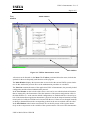
After the start of the USECA demonstrator application the following screen is displayed. The
demonstrator screen includes 3 windows, a menu, a toolbar and a status line.
USECA/DOC/GD/011/WP27/B