1
Unpacking Information
This product package should contain:
for ACPI
One 10/100Mbps Fast Ethernet Adapter.
One 3.5” Setup & Drivers Diskette Disk.
This User’s Guide.
Product Description
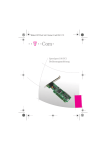
The 100Base-TX has one RJ-45 connector and two LED
indicators as shown in Figure 1and Figure 2.
Figure 1 PCI Fast Ethernet Adapter
Complete compatibility with the 10Base-T and
100base-TX standards.
Automatically senses media type.
Full-Duplex Ethernet for 20Mbps and 200Mbps
throughput.
LED Indicators
The adapter provides two LED indicators for monitoring
network conditions. This section describes the function of
each LED.
Refer to Figure 2 or Figure 3.
Automatic configuration through the PCI BIOS.
Programmable PCI burst size.
Provides 32-bit Bus Mastering data transfers.
Diagnostic LINK,
troubleshooting.
Active
LEDs
for
quick
Support flow control.
Figure 2 LED indicators
Link: light up when the network connect correctly
Act: flashing when the packet transmit/receive through
the RJ-45.
(Option) 32K, 64K EPROMs for Remote BootROM.
Act
10/100
(Option) Support Wake On LAN function.
(Option) Support ACPI, PCI power management.
Figure 3 LED indicators
flashing when the packet transmit/receive through
the RJ-45.
10/100:LED light on when the network connect to 100Mbps
Act:
Specifications
Standards……………:IEEE802.3, 802.3u.
Bus Type………….…:PCI-Bus Revision 2.1.
Network Interface…...:10Base-T and 100Base-TX .
Full-Duplex…..……...:20Mbps and 200Mbps.
I/O Address…….……:Automatically determined
by PCI BIOS.
Interrupt(IRQ)…….....:INTA on PCI slot pin assignment
Boot ROM Size………:32K, 64K byte EPROM.(Option)
Bus Access Method….:Bus Master.
Temperature…….…....:0°C to 55°C (Std Operating)
32°F to 104°F
Humidity……………..:10% to 90% non condensing
Dimensions……..……:4.72”× 2.36” Non-Bracket or
4.72”× 1.5” Non-Bracket
Certification
of hardware configuration. See the section on “Diagnostic/
Setup program” for more information.
6. Installation the software driver. Refer to the Software Drivers
section.
Supported Network Drivers
Novell Netware v3.12, 4.0, 5.0 (included Client/Server drivers)
Microsoft Windows NT V3.5X, V4.0
Microsoft Windows 95/95 OSR2/98/98SE/ME
Microsoft Windows 2000/XP
IBM PCLAN Program.(NetBIOS Driver)
TCP/IP for SCO UNIX.
Packet Drivers for FTP TCP/IP, NCSA TCP/IP.
All products or brand names mentioned are trademarks or
registered trademarks of their respective companies.
Meets FCC Part 15 Class B , CE Mark
Hardware Installation
The section describes the procedure for installing the adapter.
Follow the steps listed below to install the PCI LAN adapter
1. Power off your PC and remove its cover.
2. Select an empty PCI slot and insert the adapter.
Note: If your card support Wake On LAN, Please Connect the
cable to the mother-board. And read the manual of the mother
board to know about how to set up the Wake On LAN function.
3. Connect your adapter to the network using RJ-45.
4. Power on the PC
5. Run diagnostics RSET8139.EXE program to check the adapter
RP2003,NIC,01