1
Evaluation Board User Guide
UG-248
EVALUATION BOARD HARDWARE
INPUT SIGNALS
The SSM2380 evaluation board provides all of the support
circuitry required to operate the SSM2380 amplifier, including
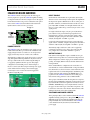
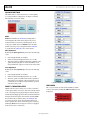
a computer interface for the I2C bus. Figure 2 shows the typical
bench characterization setup used to evaluate the audio performance of the SSM2380. See the Evaluation Board Software
Quick Start Procedures section to get started.
On the left side of the PCB are two 4-pin headers, JP5 and JP6.
These are used to connect the input audio signal to the amplifier. If
the input audio signal is differential, use the two center pins of
JP5 (INL+ and INL−) for left channel audio and the two center
pins of JP6 (INR+ and INR−) for the right channel audio. In
this case, connect either the top or the bottom pin to the source/
signal ground.
EXTERNAL I2C
1/8” STEREO
INPUT
OR
DIFERENTIAL
AUDIO INPUT
TO LOAD
For single-ended audio inputs, only two pins of JP5 and two
pins of JP6 are used: ground and the input signal. If a noninverting input is desired, connect the input signals to INL+
and INR+, and place jumpers between Pin 3 and Pin 4 of JP5
and JP6, shorting INL− and INR− to ground.
2.5V TO 5.5V
TO PC
09686-002
TO ANALYZER
Figure 2. Diagram View of Evaluation Board Connections
POWER SUPPLIES
Alternatively, single-ended stereo audio can be supplied by
connecting a standard ⅛" stereo plug to the J2 input. In this
case, jumpers must connect INL− and INR− to ground.
The SSM2380 requires an external dc power supply. A 2-pin
0.100" male header, H3, is provided on the evaluation board.
Supply voltages between 2.5 V and 5.5 V are accepted, and
supply currents may exceed 1 A under some conditions.
OUTPUT SIGNALS
Alternatively, 5 V USB power supply can be used to power the
chip, although the USB 2.0 specification only allows current
draw up to 500 mA. Be cautious when using the USB port
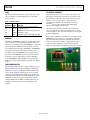
to supply any significant amount of power. The jumper
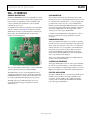
configuration used for USB power is shown in Figure 3.
09686-003
Be sure to remove JP7 when using an external power supply,
as this will short the I2C voltage to the external supply.
Conversely, be sure to remove the external supply from
H3 when using USB power.
Figure 3. Connecting USB Power Supply to SSM2380
Conversely, if an inverting input is desired, connect the input
signals to INL− and INR−, and place the jumpers between Pin 1
and Pin 2 of JP5 and JP6, shorting INL+ and INR+ to ground.
Each channel of the amplifier output is available at two 2-pin
0.100" headers. The speakers are connected in bridge-tied load
(BTL) configuration, and the output pins are labeled with their
polarity; for example, OUTL+ indicates the left channel noninverting terminal.
In the standard filterless configuration, the two headers on
each channel are connected with 0 Ω links on the pads marked
B1 to B4. In this case, the two headers on each channel are tied
together and can be used interchangeably as attachment points
for the load and an audio analyzer. The EMI filtering is not
populated on the SSM2380 evaluation board to allow proper
measurement of key parameters such as SNR and THD.
The top layer of the PCB contains the footprints necessary for a
ferrite bead-based EMI filter configuration, whereas the bottom
layer of the PCB contains the footprints for an inductor-based
EMI filter. If EMI filtering is used, only H6 and H7 connect at
the proper location with respect to the filter components—the
load must be connected to these headers. Measurements of the
unfiltered waveform can be taken at H4 and H5.
SHUTDOWN AND MODE JUMPERS
The 2-pin jumper, JP8, is used to enable and disable the SSM2380
amplifier. Inserting a jumper across JP8 pulls the SD pin to the
SPKVDD supply rail, activating the amplifier. Removing the
jumper from JP8 shuts down both channels of the SSM2380
so that minimal current (about 20 nA) is drawn from the
power supply.
Rev. 0 | Page 3 of 20